

8471 comments found.

Hi,
Is there a place we manually download 2.8.1 ?
Automatic update does not work for me
It’s pending as I’m working on more last minute fixes.
I have two licenses for JIG I switched domain names. Can you reset the license “cptops”
Done!
Dear Developer,
I have one presale question for you.
Is it possible to make a gallery which has one image per row ? Something like here on my website: http://alexeiart.fi/
Best Regards.
Hi, yes you can set it up so, especially with a latest addition that allow a thumbnail to only go as tall as the screen. While there is no dedicated setting that says “x images per row” the mechanics of how the plugin works allow to easily set up one per row at the largest possible thumbnail size that fits your content area. Let me know after purchase if you need settings specifics.
wow that was fast ! Thanks a lot. I will contact again if I get stack with the setup.
All right 
ok. I played wit hthe settings and found thumbnail settings but I dont know how to get what you told me. Could you explain a bit more please?
From an upcoming FAQ entry, hope it’s helpful:
Yes it’s possible, although there is no dedicated setting for this yet as it’s just like a recipe. The components of this layout are variable and are specific to your theme and photos.
Most likely you need this for mobile devices. The guidelines are these:- Target row height in the range of 360 to 640.
- Row height max deviation is irrelevant only when you use the Disable cropping setting (which is recommended).
- For a more compact look, use a moderate row height with the same amount of height deviation, e.g. 360 for both settings. Do not disable cropping in this case.
- Please note that the device in landscape orientation has less available height than a portrait thumbnail this way, but JIG will limit the thumbnail height to the screen height!
- Consider disabling the lightbox.
- Set a very large row height, in the range of 800-1200 with 0 height deviation (irrelevant due to disabled cropping). The exact value depends on how thin your portrait images are, and how wide your content area can be. It’s open to experimentation, there is no one size fits all magic value.
- Always disable cropping.
- Disable the lightbox, it will not be very useful in this setup.
- Disable TimThumb unless your source images are large (above 1200px on average).
Thanks for replay! I did as you said with the desktop version and I managed to get the thumbnails in right form. However, they are scaled a lot more than their actual size is.
here is comparison between my old website and test page with the settings you gave me :
https://www.dropbox.com/s/mv9r119gdsw9el5/issues.jpg?dl=0is it possible to control the scale of the images if the row height is very big?
Which is which? Both are in proportion and their max scale. Unless you wish them to be cropped, they will not appear any larger. If you don’t use the “disable cropping” setting but manage the row height by adjusting the deviation setting you can get them to show up larger, albeit cropped. Or do you mean JIG upscales them? Don’t set the row height larger than your tallest image. The thumbnail itself is not generated upscaled but the display can appear so.
The left one is using your plugin and the right one is from my old website. Their proportions are the same but the thing is that the images are scaled up a lot on the left. its like 1000×200 on the left and 500×100 on the right and the original scale is 500×100 and I need to keep it this way. I hope this make sense.
But the left side has more available width, it’s like double of the right. In this case you can’t use a large row height you need to limit it to 100 then. What would you like to see? Given that width, JIG would put 2 images in a row at that row height.
If you need the gallery to not fill the entire width of the screen you can give JIG a custom fixed width but then it would not be responsive.
I tried to make the height as tall as one of the images “150” but then it places more than one image in a row. The idea was to make one image per row and without upscaling . How I can set the exact width of the row?
Ok . I managed to adjust the width but the images are appearing on the left now. is it possible to move them to center ?
Enter this to JIG Genearl tab > Settings that affect the entire grid > Margin around gallery>
0 auto
ok thx a lot. Its working=)
Great!
Just wanted to say that I am using Visual Composer plugin and I managed to make two rows, one is visible for the desktop and another for the mobile. The mobile version has responsiveness and it keeps the images in one column style=) So basically I got the responsiveness and a one column style gallery !
That sounds good! Stay tuned for dedicated Visual Composer feature as well.
Hi Firsh,
I got the following code in my category.php which fetches featured thumbnails of the posts.
<?php $ids_for_jig = array();
     if (have_posts()) : while (have_posts()) : the_post(); ?>
            <?php if ( has_post_thumbnail() ) : ?><?php $ids_for_jig[] = get_the_ID(); ?><?php endif; ?>
    <?php endwhile; endif; ?>

    <?php   if(!empty($ids_for_jig)){
            get_jig(array(  'recent_posts' => 'yes',
                        'aspect_ratio' => '3/4',
                        'custom_width' => '1024',
                        'max_rows' => '0',
                        'thumbs_spacing' => '6',
                        'row_height' => '320',
                        'height_deviation' => '20',
                        'mobile_row_height' => '260',
                        'mobile_height_dev' => '10',
                        'min_height' => '640',
                        'loading_background' => '#eaeaea',
                        'limit' => '0',
                        'last_row' => 'center',
                        'mouse_disable' => 'yes',
                        'link_target' => '_blank',
                        'post_ids' => implode(',',$ids_for_jig)
                        ));
                        }
                        ?>
Notice the second last argument 'link_target' => '_blank',. This does not seem to be opening in a new tab. Please help.
It’s only for custom links. If you have just a gallery of recent posts or images, the links on those are not custom links, therefore this setting doesn’t apply to them. Why would you like the category pages to open on new tabs?
If it is not too much of a trouble can you please suggest me a solution ?
Nope Add this one to JIG settings, General tab: Custom JS:
jQuery('.jig-imageContainer a[href$="/"]').attr('target','_blank');
without the code tags obviously. It’ll add what you need to every link in JIG that ends with a / (so not the the images but recent posts, most likely).
It did not work, the target is still self, any ideas why ?
Please send me a link where you are trying this.
Here is one of my category page
An how about it when you change the code to this:
jQuery(document).ready(function(){jQuery('.jig-imageContainer a[href$="/"]').attr('target','_blank')});
(without the code blocks)
Hello Sir,
Love this plugin! However, I am having an issue with grabbing the rss feed from my groups feed on Deviantart. The groups favorite feed works fine. But our gallery feeds do not work even though I added the link directly from the RSS link on the page. Also individual artists feeds work great too, but the favorites feed do not work at all either.
Pls Advise.
Hi, try this shortcode:
[justified_image_grid caption=slide caption_opacity=1 caption_bg_color=rgba(0,0,0,0.2) caption_match_width=yes-rounded overlay=off specialfx=captions specialfx_type=blur specialfx_options=amount:1 last_row=flexible load_more=click load_more_limit=20 rss_url=http://backend.deviantart.com/rss.xml?q=favby%3Aundergr0und--x8%2F54403453&type=deviation rss_links_to=image rss_link=yes rss_link_text="Go see this on DeviantArt"]
Also, send me your favorites link and the corresponding Feed URL and I’ll check it. Send me any feed URLs or links that you thing may be relevant too.
Okay thank you I will email you the gallery I would like to get from my deviant group.
Okay!
Hi! I have been using this plug in for a while with no problems, to display a number of flickr albums. A few days ago I added a new album display but when the photos were clicked they did not display in a lightbox like all the other albums. Instead, clicking a photo opened the photo in a new tab with this in the url : https://farm9.staticflickr.com/(...deleted the rest). At first, the existing albums continued to display in the lightbox as they always had, but now today all the photos in ALL the albums are suddenly opening in individual tabs like that. Some of them start in the lightbox then switch to the tab. I haven’t made any changes to the settings for the plug in or the flickr photostream. Can you help? Thanks.
It’s likely because a JS error on the page, preventing the lightbox. Sens me a link where this happens and I’ll let you know. It’s not related to Flickr at all.
What is the proper way to embed a youtube feed? this code was working:
[justified_image_grid preset=16 row_height=160 height_deviation=60 caption_opacity=0.9 caption_bg_color=#262435 caption_text_color=#fc8a3a lightbox=magnific mobile_lightbox=magnific last_row=flexible-match link_target=video rss_url=https://www.youtube.com/user/mainstreampower]
But I now get the error: The requested RSS feed is empty.
Any ideas?
It works for me fine, your shortcode. Make sure the RSS url is not blue in the editor, not converted to an actual link. Also, try clearing the RSS cache of WP. JIG settings > RSS tab > RSS caching time and in the help bubble.
The url is not blue and i tried clearing the cache. I have put the code on to this page so you can check it out, the problem is still there: http://mainstreamrp.com/resources/videos/
Contact me from my profile, I’ll need to log in an check this out.
Hi! I’ve installed this plugin with Avada theme. I am not sure that the changes I am making to the lightbox in the plugins settings are being reflected on the page. I’ve also selected the “disable lightbox” in theme options. Please see this page http://brootarameshwar.com/portfolio-items/early-works-2/ to check if I am missing any steps. Thanks!
Hi, I can confirm that the lightbox is JIG’s version, though I’m not sure what changes you tried and what else should I be seeing. E.g. have you switched a prettyPhoto skin?
Hey…appreciate your promptness! You are right, the changes I had made are showing up now. It’s funny though, for some reason there is a delay in changes being reflected – no matter how much I refresh! I don’t have any caching plugin. I think it’s probably nothing to do with JIG, asking anyway – have you noticed such an issue before? Thanks!
Also, I am trying to use a lightbox (preferably a bundled one) that allows me to zoom an image to its full size. I am trying to setup PhotoSwipe as on the demo site http://justifiedgrid.com/photoswipe/ But the fullscr/een and zoom icons are not appearing on my images. What am I missing to do?
Hi, you need to have a big enough image to show in the lightbox first. Lightboxes tab > Max image size for the lightbox. Large or Full. I do get a zoom albeit very small extent as the image is not much larger than my window.
Slow changes, maybe server side caching controlled by the hosting? Try ctrl+f5 to avoid browser cache.
Hello,
I am using NextGen Gallery Pro and have installed JIG to augment/improve some of the layout. I am very impressed so far, but am running into some trouble with the integration of the NGG Pro lightbox. I have been able to follow other support posts to the point where my images are now opening in the NGG Pro lightbox, but the lightbox is not displaying/working properly (or, as it does in NGG). Specifically, when viewed via JIG, the Pro lightbox does not show the options for the e-commerce, proofing or e-commerce sidebar. Is there something I am overlooking that will trigger this?
Many thanks, Alex
Hi, following this: http://codecanyon.net/item/justified-image-grid-premium-wordpress-gallery/2594251/faqs/19660
it’s not yet possible. NG pro lightbox somehow knows that it’s not NG that opens it but another gallery. While the images are actually from NG, I’m not sure how it could be tricked to treat it as its own gallery thus enable ecommerce and commenting. I could try a few things on your environment, since I don’t have NG Pro, it’s a little bit hard to experiment with this on my own. Since you already use a setup that is just missing this, if you could let me work with you maybe I could fill this gap. It’s been quite some time people have been requesting this.
I would be more than happy to let you have a look at it. Is there a way for me to PM you with login details?
Yes, contact me from my profile please.
Hello i have installed the update but the pretty box, doesn’t work now. The lightbox doesn’t open. Do you have any idea why ? WP 4.2.4
Could you send me a link please where this happens?
PHP Warning: file_exists(): open_basedir restriction in effect. File(/var/www/user/data/www/domain.com/wp-content/plugins/justified-image-grid/timthumb.php/http://domain.com/wp-content/gallery/gallery/picture.jpg) is not within the allowed path(s): (/var/www/user/data:.) in /var/www/user/datawww/domain.com/wp-content/plugins/justified-image-grid/timthumb.php on line 981, referer: http://domain.com/pageIm try check option Do not use TimThumb, but no luck
Hi, it’s a known problem for which I’ll provide a fix soon. Would you be able to provide me temporary FTP access to help me work on it?
Hello,
I hope you are doing well.
I am getting a fatal error when i try to display the gallery.
Fatal error: Call to undefined method Mobile_Detect::isMobile() in /home/theocea0/public_html/davidsflooring/wp-content/plugins/justified-image-grid/justified-image-grid.php on line 8671
Can you please help me out.
Thanks,
Can you verify that you have v2.8 of JIG and that mobiledetect.php is in the folder of JIG?
Hi there!
Love this plug-in, but I’m also experiencing the famous “timthumb permissions” error. Up until now I could always solve this by manually making the JIG cache folder writeable (777) after each JIG update.
BUT with version 2.8 this does not seem to work anymore (keep on seeing: “all images failed to load” – I’ve disabled timthumb until solved). My website setup is as follows:
- sample page http://www.20watt.nl/portfolio/bruiloft-bruidsreportage/ (timthumb currently disabled as I absolutely need a working gallery) - Latest Wordpress 4.2.4 - I’m using “wordfence” as a security plug-in with caching enabled - Not using hostgator
Thanks for your support & keep up this great plug-in.
Hi, could you provide proof of purchase please? The issue is being worked on, will release a fix v2.8.1
Thanks for the reply.
Forgive me, but I’m having trouble to link my proof of purchase to my Envato account (envato DID ask me to update my username & password when I wanted to make use of support earlier today, so may there’s something wrong there?)
I do have an e-mail confirmation of my purchase (it’s from 21/08/2014) and also a license number in my JIG wordpress settings.
Ok then please send me the license number from my profile, and also a temporary FTP account if you wish that I worked the issue on your server before making it to a public fxi.
Getting a TimThumb issue with Version 2.8. I’m using W3 Cache and it’s on a HostGator dev server currently. Justified Image Grid v2.6 was working fine on it before and just updated that plugin folder.
All gallery images return Bad Request 400 ERROR.
Possible CHMOD issue with the cache, but tried them via FTP. CHMOD 755 tends to work best, CHMOD 775 or 777 can cause Internal Server 500 Errors. Not sure about if I need to CHOWN?
1) First issue is it’s treating the image as an absolute URL. Therefore not finding it as internal, rather defaulting as an external source.
2) Second it’s create the thumbnail cache files as 0kb.
Log details as follows (for example): Is a request for an internal file: /wp-content/uploads/image-file.jpg Trying file as: /home1/dev/domain.com/http://www.domain.com/wp-content/uploads/image-file.jpg Trying file as: /home1/dev/domain.com/wp-content/http://www.domain.com/wp-content/uploads/image-file.jpg Trying file as: /home1/dev/domain.com/wp-content/plugins/http://www.domain.com/wp-content/uploads/image-file.jpg Trying file as: /home1/dev/domain.com/wp-content/plugins/justified-image-grid/http://www.domain.com/wp-content/uploads/image-file.jpg Trying file as: /home1/dev/domain.com/wp-content/plugins/justified-image-grid/timthumb.php/http://www.domain.com/wp-content/uploads/image-file.jpg Could not find the local image so treating it as an external resource. Cache file is: ./cache/timthumb_int_65f48fc63c18ffe514132d5efb1770c3.timthumb.txt Trying server cache Got request for external image. Starting serveExternalImage. webshot is NOT set so we’re going to try to fetch a regular image. Fetching external image into temporary file /home1/dev/domain.com/wp-content/plugins/justified-image-grid/cache/timthumb6cneuK Scheduling file /home1/dev/domain.com/wp-content/plugins/justified-image-grid/cache/timthumb6cneuK to delete on destruct. Curl is installed so using it to fetch URL. Fetching url with curl: http://www.domain.com/wp-content/uploads/image-file.jpg Remote file has invalid mime type: Adding error message: The remote file is not a valid image. Mimetype = ’’/home1/dev/domain.com/wp-content/plugins/justified-image-grid/cache/timthumb6cneuK Deleting temp file /home1/dev/domain.com/wp-content/plugins/justified-image-grid/cache/timthumb6cneuK
Update: Under “timthumb.php”
// Tilde fix if (preg_match(‘%(?:/~.+?)(/.*)%i’, $this->param(‘src’), $regs)) { $this->src = $regs1; } else { $this->src = $this->param(‘src’); } // End of tilde fix
Narrowed it down. If removing this “Tilde fix”, it works fine as before. There’s a possible issue with that?
Also should it be using relative URLs on those images in the gallery?
Yes it’ll be that, nice find and thank you for the bug report. It fixes the path when the ~ appears in the URL: Please contact me from my profile I’ll need to log in via FTP and find a solution for you, after which I can release v2.8.1 as a fix. It’s necessary as it works fine for me, though I’d prefer if the tilde thing did its job while at the same not distrupting your normal use. Rather than to revert the addition.
I’ll attempt to help out as much as I can. However, need to get permission if to give FTP access, as it’s shared hosting with a large business / customer database. It’s not just up to me.
Hopefully it’s not a major however…
Your “Tilde fix” seems to be providing the correct URL, but rather changes it to absolute (with domain) instead of relative path URL. This leads it down different attempts to resolve it (trying as /home1/dev/domain.com/http://www.domain.com/wp-content/uploads/image-file.jpg rather than /home1/dev/domain.com/wp-content/uploads/image-file.jpg). I suggest working out if it’s local domain and providing relative path in that case?
Rerunning the log again to compare: Is a request for an internal file: /wp-content/uploads/image-file.jpg Found file as /home1/dev/domain.com/wp-content/uploads/image-file.jpg Local image path is /home1/dev/domain.com/wp-content/uploads/image-file.jpg Cache file is: ./cache/timthumb_int_f793de50029364a49805568bc2f3bcab.timthumb.txt Trying server cache Got request for internal image. Starting serveInternalImage() Local image path is /home1/dev/domain.com/wp-content/uploads/image-file.jpg Calling processImageAndWriteToCache() for local image.
Does your URL contain the tilde by the way? Mine doesn’t and it works fine on both local and hosted environments. I added the fix after testing it a customer’s system that did have the tilde and wasn’t working without it. It’s common on new hostings that are not yet attached to a domain. From what I’ve seen, the errors are output at the beginning of the thumbnail, but later the thumbnail actually gets generated. So if I suppress the error maybe that would help. I need an FTP where this doesn’t work because I need to work on it that way, since for me it all works fine. I could get access from someone else as you are not the only one with the problem. I’ll ask around and get back to you soon.
1) URLs don’t use tilde. 2) Being treated as an external URL (rather than internal), the only issues I can think of is either 301 redirection or hotlink blocking it? 3) I also have password protection on the dev server, so it could just be getting blocked access by that? However, if other’s are having the same issue in different environments, that might not be the cause.
Not everybody. It seems that server PHP versions older than 5.4 which have safe mode enabled have this problem. It eventually reaches a state where the image is found and the thumbnail gets created, but first it tries it at a wrong path, triggering an error. http://php.net/features.safe-mode What I’m not that sure about is if there is no tilde in the URL then why does that fix change anything in this regard, but I’ll continue to investigate. I’m getting FTP from another user so the solution will be found soon I hope.
Change my tilde fix to have no else branch.
// Tilde fix
if (preg_match('%(?:/~.+?)(/.*)%i', $this->param('src'), $regs)) {
    $this->src = $regs[1];
}
// End of tilde fix
Let me know. This worked for another customer.
Hi Firsh, tested that code and can confirm it’s fixed! Debug logs show it’s working as internal image and getting the thumbnail cache successfully. Many thanks.
Great! It’s included in v2.8.1 but I pulled it from now as I also want to include fix for another thing.
Quote: “Hi, I have a problem with TimThumb. See photo.
http://up.picr.de/22728152vo.jpg What can I do? ”Same problem here and I think there will be more and more of it. Today on my side Wordpress automatically updated to 4.2.4 and now this problem appeared. Also yesterday updated JIG. So problem is in between two. Couple days ago everything worked normal.
Chmod and etc doesn’t help.
Now I’m switched to the Jetpack/Photon, but I do not like it, so I hope there will be solution for this problem.
EDIT: downgraded JIG from 2.8 to 2.6 – everything works as it should be with 4.2.4 wordpress (no TimThumb error).
So there is problem with newest JIG 2.8. Look in to that.
delete – double post…
Can you send me a link to the actual site where the problem occurs?
Yes there was a change but it only affects sites that have a ~ in the URL and the only new thing is around line 300 of timthumb.php – if you revert just this file to the one from an older version, but JIG itself at v2.8, does it help?
No, same problem with v2.8 with replaced timthumb.php from v2.6. Only when deactivating 2.8 and activating 2.6 it works.
I’m working on this with another buyer but if you’d like this solved asap, please contact me from my profile with temporary FTP access (it can be limited to the plugins folder of WP).
If you are working already on the same problem with another buyer, then I will just wait for v2.8.1 or fix. Currently I’m running on v2.6 with no problem.
All right, stay tuned.
Replace the part with “tilde fix” with this (delete the else branch) in timthumb.php:
// Tilde fix
if (preg_match('%(?:/~.+?)(/.*)%i', $this->param('src'), $regs)) {
    $this->src = $regs[1];
}
// End of tilde fix
Let me know. This worked for another customer.
hello! Can your plugin make a gallery view like this: http://art-matilda.ru/new/959-2/ (screenshot: https://yadi.sk/i/JCiSy-D5iDwpE )
Yes and you already have JIG there but you haven’t purchased it yet? Larger row height with smaller spacing and it’ll look very similar to what you need.
Yes, you are right. I will buy it if it will work as i need. Or i will delete it. update: it work`s! in 1-2 days i will purchase, thank you!
Hm, not so good as i think. If i choose a large height — the page is looks ugly in small screens. Check it: http://art-matilda.ru/new/959-2/ just resize width of browser window. And after that check this: http://www.visionnaire-home.com/bedroom/windsor-master Can your plugin do a same resizing?
Yes but how come you use JIG without purchasing, where did you get it? v2.8 automatically limits thumbnail height to the screen height too. Furthermore if you disable cropping then it’ll shrink similarly. You set row height a little bit over the top though
To be honest, I found out that the plugin already paid once downloaded it and installed it. went here for tech support and then saw. and I downloaded it on one of the first references listed in the Google “download justified image gallery wordpress”. My version of your plugin 2.7. I do website design firm, bought the theme on themeforest and also buy your plugin, once I get the money from the customer. I turn to you for help in setting up autoresizing height after purchasing the plugin. Thank you.
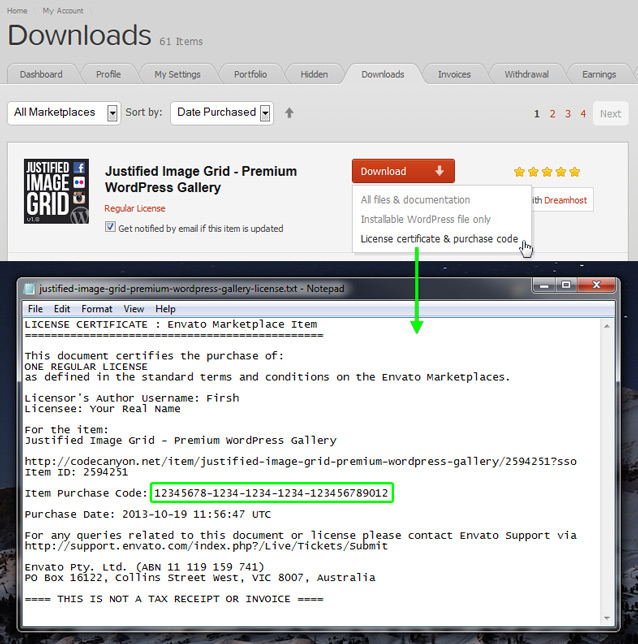
Hello! As you see i purchased your product. So, i don`t understand where is purchas code? i dont see any links with text «License certificate & purchase code» i looked for it here: https://yadi.sk/i/dRSllHPyiJnwx and here: https://yadi.sk/i/h6_JrlbviJo8p
Thank you! I have two questions.
1) I am using this code: [justified_image_grid ids=981,976,980,979,978,977,955,954,953,952 photoswipe_social=yes title_field=title caption_field=description margin=20px limit=6 hidden_limit=10 overlay_icon=on]
[justified_image_grid ids=981,976,980,979,978,977,955,954,953,952 row_height=890 photoswipe_social=yes title_field=title caption_field=description overlay_icon=on margin=20px limit=6 hidden_limit=10]
in one page
and i see in result this: https://yadi.sk/i/PgvE1hzciK8Vp
1st code return error 2nd code works perfectly
Anyway another question. 2) How i can to create a gallery like this: https://yadi.sk/i/KRl4mmHfiK8dP a) two columns b) resizing to all monitor sizes c) justified fullscreen example: http://www.visionnaire-home.com/bedroom/windsor-master
Hi,
1. Are you sure the first one has no typos, missing spaces in it and you copied it exactly? Have you changed any global settings?
2. JIG is row-based and has no columns or “x images per row” setting. Your best bet at shrinking what you see on desktop is using the “disable cropping” setting.
Hey, I recently changed domain names. my old domain name used to be www.edge-works.ca and now it’s mtlgraphicdesign.com
Can you please reset it? Thanks
Done.
Thanks!
No problem.
Hi, I have a problem with TimThumb. See photo.
http://up.picr.de/22728152vo.jpgWhat can I do?
Thanks for help.
Please send me a link to a page where you’ve a JIG gallery on. I assume you found out about the problem by trying to create a gallery.
for example here: http://neymar.bplaced.net/wordpress/2013/12/22/neymarbrasilien/
Hi, the thumbnail wishes to get generated but some errors mess up the output. This should be a thumbnail: http://neymar.bplaced.net/wordpress/wp-content/plugins/justified-image-grid/timthumb.php?src=http%3A%2F%2Fneymar.bplaced.net%2Fwordpress%2Fwp-content%2Fuploads%2F2013%2F12%2F2.jpg&h=230&w=230&q=90&f=.jpg the random letters below the errors are the thumbnail just shown as text. The error that says:
Warning: file_exists() [function.file-exists]: open_basedir restriction in effect. File(/users/neymar/www/wordpress/wp-content/plugins/justified-image-grid/timthumb.php/http://neymar.bplaced.net/wordpress/wp-content/uploads/2013/12/2.jpg) is not within the allowed path(s): (/users/neymar/www:/users/_temp/neymar) in /users/neymar/www/wordpress/wp-content/plugins/justified-image-grid/timthumb.php on line 981
doesn’t make any sense because JIG passes the image path as a query string GET variable and not like the error says it so. Anyway, if you contact your hosting about open_basedir restriction, they should be able to help.
hi there just want to ad an album but get this message “Justified Image Grid: The Facebook content cannot be displayed, the error from Facebook: Generic Facebook error.”
got my page up anything can do to trouble shoot?
Yes please contact me from my profile with temporary wp-admin.






)