152 comments found.

Hi, I just purchased the plugin but I am not able to install it. I just copied the content to the WP plugins directory, but when I go to plugins dashboard in WP, it does not appear there.
I tried to install it uploading the plugin in zip format from the WP dashboard but I got this error: “The package could not be installed. No valid plugins were found. Plugin install failed.”
I am working in local (MAMP) with WP 4.8.1.
Thanks.
Sorry, I copied the wrong directory. Now it is working.
Hello, does anyone know if this plugin works on WP 4.8.1?
yes. it works.
Hi Antoine, I cannot figure out how to get rid of the massive space above the text. Tried to change the Height parameter in font_anim.php from ‘height’ => 600 to less, but that doesn´t change anything. The bigger the font size, the bigger the height of the snippet. If I reduce the height in the backend the text disappears to the bottom and does not show up in the frontend either. Can you please help? Thank you!
Hi, Yes you have a “vertical” parameter for that in options.
How to trigger start of animation when in view??? ( i got viewpoint and jquery ) can i set a class at object, for it to start or something like that???
Hi, you can select in dropdown the mode of apparition when you create the animation :
Animation Play :
Document load, On mouse hover or Parallax Scrolling (that mean on view).
Select “Parallax Scrolling”.
The difficulty is to create a working function that load animation when it is visible. (http://stackoverflow.com/questions/487073/check-if-element-is-visible-after-scrolling/488073#488073)
You can change the file “font_hnim.php” (that is “hover loading” file) for load animation when the element is visible or when the scroll is greater than a value of pixels.. And you can define manually the value.
Hi, just purchased this plugin in to use on a development site and nothing appears when I apply the shortcode.
Furthermore when I go to create the text, I can’t preview and the plugin loads a ton of errors in the sidebar.
Any help? If not I would appreciate a refund as this matter is time sensitive.
Jason
Hi, try to disable warning like in production mode and view if it work.
I’ve tried disabling warnings and still seeing errors, can’t use this plugin.
what is the error ?
If this plugin support any other language… i try Russian don’t work
That depend the font you use. The font I use don’t support russian but if you convert russian font in svg I think it’s good.
how after russian font convertion i add it to plugin,,,ore other simply question if i give you languages to add how much it cost me?
Documentation explain how to add a font to the plugin : Find a Cyrillic compatible font in your case and convert it to svg. And copy svg file in ”/font/” folder in plugin folder.
I can do this for you send me your font by email or email me with private contact form : https://codecanyon.net/user/antoine_rousseauYes When you insert the shortcode widget you use a text widget ?
Problem come from text widget add “
” tags in javascript code.
See here :
https://stackoverflow.com/questions/14653101/remove-automatic-paragraph-from-wordpress-widgetand don’t forget to rate the plugin if you are satisfaid. 
Hi i was email you yesterday by your plugin doesn’t work from widgets. can you help me please i need to add text to header
I have respond you. Can you give me url of the page ?
Hi when i try to use plugin tru widget it doesn’t work (svg+xml)
Hi, is your website online ? Can you give me the url ?
Plugin is not working. I’ve installed on my site, with shortcode. It shows in the plugin preview but does nothing on the page i’ve put it on.
Can you give me the url of the page or the error message in console ?
no error message, just not showing up. it’s on my gated staging site. I will have to give you login credentials
yes you can give me url and login credentials. You can also try to test with other theme.
PM’d you
Hello. I cannot seem to get your plugin to work. Nothing shows up in the preview or on the page I’ve put the shortcode. Please advise
problem resolved by private message by removing this line :
<script src=”http://code.jquery.com/jquery-1.10.1.min.js”></script>
of “font-anim.php” file (plugin jquery library).
Thanks for your purchase.
Thank you!!!
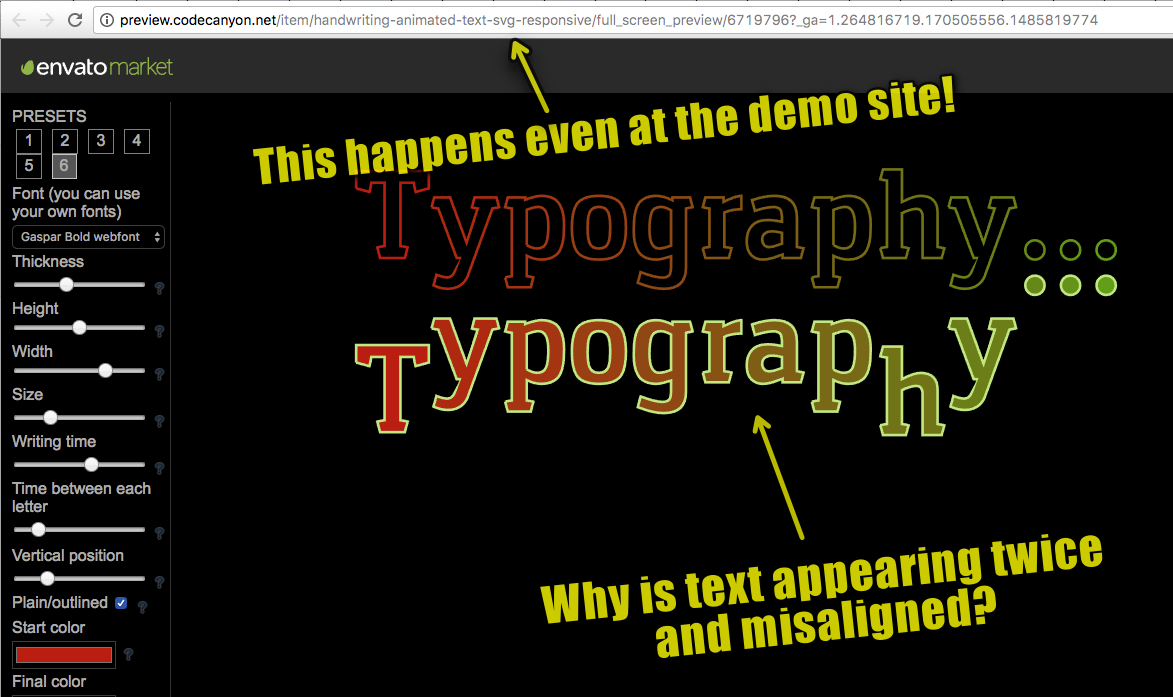
Something odd seems to be happening, with the animated SVG displaying twice. The second one the text is vertically mis-aligned. Can you take a look at this screenshot? http://s24.postimg.org/osxz3rykl/anitext_odd_display.png
Hi, do you have a url ?
This issue seems to happen only if I enable ‘Plain or outlined letters’. I’d rather not post the URL here.
It probably comes from the configuration of the server or the version of php used.
I upgraded the server to PHP 7.1.2 and the phenomenon is still happening. Do you have any suggestion what other changes to consider?
you have no error in console ?
I hope this screen capture will help diagnose the matter: https://goo.gl/yI9BW9 I have moved the software from one domain to another. Does this affect the functioning in some way due to licensing issues?
no. license is for unlimited domain. Try also with another server for test.
Merci. I tried that with a different hosting company – same results. I didn’t notice before, but this odd behaviour actually happens at the CodeCanyon software demo site as well. See screencap here: http://jlrmaps.com/testing/anitext-demo-odd.png
But again, it only seems to happen if the ‘Plain or outlined letters’ feature is enabled and only with Google Chrome 57 and Firefox 52. Safari 10 functions correctly. I am using Mac Sierra OS.
Is this maybe related to the WordPress version vs. the standalone versions of the software?
It seems problem come from your browser. This script is not for wordpress. You have bought the PHP version. The wordpress version is pratically the same but is better updated because there is more sales.
Post your comment on the PHP version comments system.
https://codecanyon.net/item/handwriting-animated-text-svg-responsive/6719796/commentsI was able to check with another browser, and yes, you are correct. There’s something wrong with my chrome install even though it’s the latest version. Sorry for that.
Hey! Love the plugin but I can’t seem to get it to work with the revolution slider. I copy the shortcode and it to the text layer. However, revolution slider throws the following error: “Revolution Slider Error: You have some jquery.js library include that comes after the revolution files js include…”. What’s the proper way of adding this to the slider?
Thanks
yes remove the line calling jquery in font-anim.php file.
Hello again! So I went into the font_anim.php file and removed the line ”<script src=”http://code.jquery.com/jquery-1.10.1.min.js”></script>” but that caused nothing to work. Can you be more specific please?
Thanks
Do you have the same error ? If yes try to remove this line from “font-hnim.php” and “font-snim.php”
So I went to the files you said and removed the line on both and kept it for ”..anim”. Got the error. I removed it from all three files and the error went away but no animation.
Ok what is your url and if possible your credential login (in private message) ?
I just sent it.
Thanks
Hi Antoine, on a default theme with WordPress, cannot make it work. Can you help?
Have tried to deactivate all plugins ?
yes, there is only few pages/posts on a new install…one plugin active..Font Writting Animation. BTW it looks like a great plugin!!
give me url please. And if possible admin credentials.
The plugin works in admin ?
I can send you no wordpress version (php javascript) for free. You can create your animation in a separated page and insert it with an iframe from the same size of the div if you have some knowledge in html.
But describe me the problem first.
thanks, I am emailing you at your hotmail address
you can see an empty box and the background color but no letters animated..they work in the preview inside wordpress
Hi Antoine, seems to work…by enabling PHP error logging. merci 
Nothing. Thanks for your purchase
Fixed the problem. There was a transform CSS set for all objects on the page of Flora Theme. Removed this for the SVG Div and it shows up fine now. Thank you for the quick and courteous response!
Fine.
This plugin isn’t working for me at all. Size and width of Canvas do nothing. Letters are huge and being animated on top of each other. There is no letter spacing. The preview works, but when you paste the shortcode into the page, it looks nothing like the preview.
Hi, Can you try with basic theme (twentyten or other) ?
Yeah, unfortunately that will do me no good. I need to use this with the Flora theme, not the default Wordpress theme.
It’s just to test. To identify problem and resolve it.
J’utilise le thème Jupiter qui lui même utilise VLC. J’ai édité le code avec le text bloc.
Merci de votre aide
Peut-être un clonflit jquery. Essayez de retirer la ligne chargeant jquery dans le fichier “font_anim.php” et retestez.
Pouvez vous me préciser quelle ligne de code je cherche?
La ligne 253 dans “font_anim.php” :
<script src="http://code.jquery.com/jquery-1.10.1.min.js"></script>
Hi,
Can this plugin work with Divi Theme and can I use it to animate a small written article section and not just the Title? Thanks
It work for divi theme. It doesn’t work for paragraph with line return.
I apologize, I already sent a message about how to handle alignment, but I’m finding that the animation is loading before the section of the page is visible. If I reload the page on the section with the animation it loads, but if I reload the page from the top and scroll down the animation is already loaded prior to getting there. Is there a way to load the animation when it’s visible?
Do you have a url ?
You can choose in options between : on load, on scroll or on hover. You can choose on scroll. Or you can choose on hover and modify the element in file to an other element to be hover (the section background) (devlopment knowledge required) Or you can modify the function in file to start the animation when the scroll is an precise point (devlopment knowledge required)
I tried the different options. On scroll is a parallax effect, which isn’t what we’re going for and on hover doesn’t solve it. It sounds like starting that animation at a precise point is best, but can I justify this per animation? I have two of them, so I’d need to set a point for each animation. Is that possible?
Yes. The difficulty is to create a working function that load animation when it is visible. (http://stackoverflow.com/questions/487073/check-if-element-is-visible-after-scrolling/488073#488073)
But I can send you a file (that replace “hover loading” file) that load animation when the scroll is greater than a value of pixels.
And you can define manually the value.
Contact me at private message if you are interested.
The problem is that in the responsive version the value is not the same…
Need to be able to make a text animation like this http://www.marieforleo.com/about/ (The text “Hey!”). can this plugin generate such animation with different fonts ?
Hi, this “Hey” is generated by SVG. My plugin do exactly the same thig except only with SVG font and not directly SVG code. If you take some time you can create your svg font with an online tool for free (https://icomoon.io/app/) and create a letter exactly like the “Hey” or with another SVG code. After you use this svg font that you have created and just type the appropriate letter in the text field. The svg code that you have inserted in the font (“hey” or other svg) is played as animation.