Pitchbar for WordPress & WooCommerce — Streaming AI Chat Widget, Knowledge Sync & Deep Store Integration
Pitchbar for WordPress is the official companion plugin that connects your WordPress (or WooCommerce) site to a Pitchbar workspace and drops a streaming Sales-AI chat widget on every public page. The agent answers from your own posts, pages, and products — captures leads, applies real coupon codes to the cart, looks up the visitor’s orders, and hands off to a human operator in real time.
One click installs the widget on every public page. Posts, pages, and the entire WooCommerce catalog sync to your Pitchbar agent in the background. Five major page builders (Elementor, Divi, Beaver, Oxygen, Bricks) are rendered properly so their visible HTML actually reaches the agent. Every product / post in the WP admin gets an “Indexed” badge so you can see at a glance which entries are searchable.
Self-hosted, GPL-licensed, multi-page-builder, WooCommerce-aware. Built by the team behind Pitchbar.
Live Demo
WordPress + WooCommerce demo site (full admin access, the widget is loaded on the front end):
- URL: https://wordpress.thecodestudio.xyz
- WP admin: https://wordpress.thecodestudio.xyz/wp-admin
- Username:
admin - Password:
admin
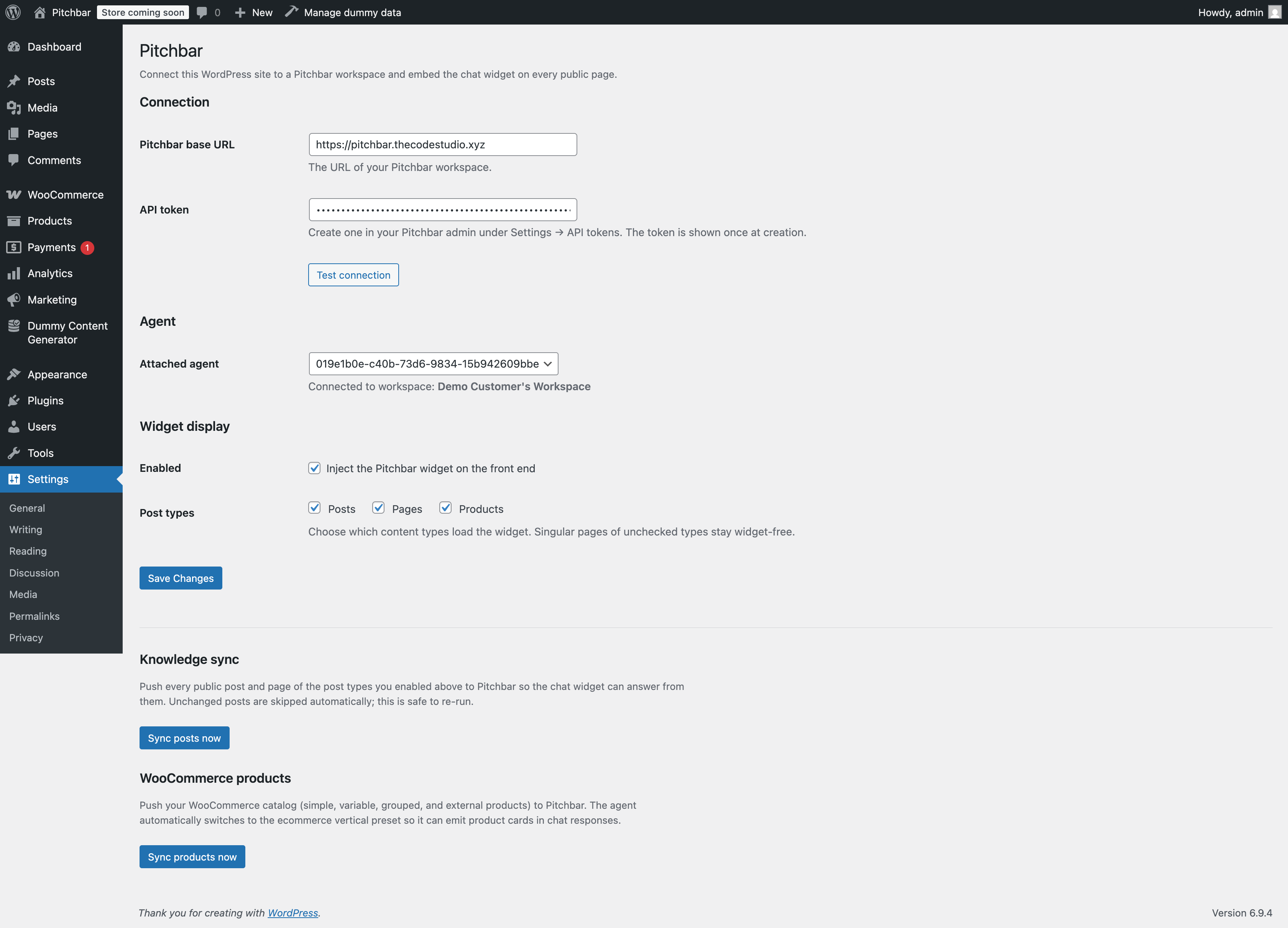
Visit the front end and chat with the widget in the bottom-right corner. Open Settings → Pitchbar in the WP admin to see the connection panel, the agent picker, and the “Sync posts now / Sync products now” buttons. Open Posts or Products to see the “Pitchbar” admin column with Indexed / Out of date / Not indexed pills.
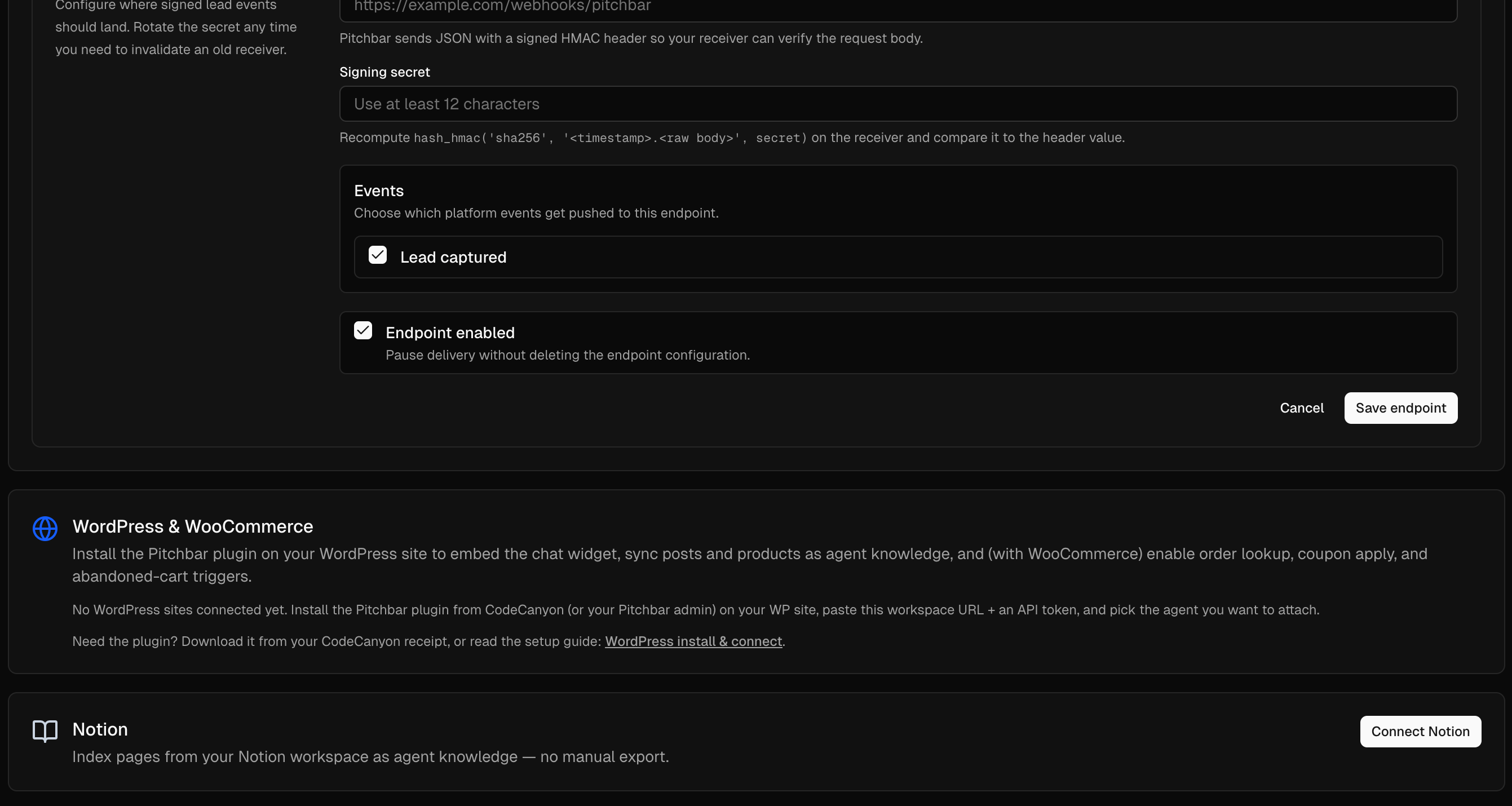
What you need to run it: a Pitchbar workspace (the SaaS this plugin connects to). If you’ve purchased the main Pitchbar — Self-hosted Sales AI Widget you already have one. Otherwise create a free trial workspace at your Pitchbar deployment and paste the URL + API token into the plugin’s settings page.
Why this plugin
- Designed for WooCommerce. Logged-in shopper context, order lookup, real coupon emission and one-click apply, abandoned-cart re-engagement, product-card rendering inline in chat replies — none of which a generic chat plugin can do.
-
Page-builder native. Pages owned by Elementor, Divi, Beaver Builder, Oxygen, and Bricks have empty
post_content— every builder stashes its layout in postmeta. The plugin invokes each builder’s native renderer so the visible HTML reaches your AI agent intact. - Knowledge sync that doesn’t time out. Bulk + delta indexing of posts, pages, every custom post type you opt into, and the full WC catalog. Resumable across multiple WP-Cron ticks so big catalogs survive shared hosting’s 30s execution cap.
-
Zero theme conflict. Widget renders inside a Shadow DOM — your theme CSS can’t accidentally style it; the widget can’t accidentally style your site. Loaded with
<script async>onwp_footerso it never blocks paint. - Visible status in the WP admin. Posts, Pages, and Products list tables get a “Pitchbar” column with green “Indexed”, yellow “Out of date”, or gray “Not indexed” pills based on the actual sync timestamp + content hash per row.
- Secure two-way auth. Plugin → Pitchbar with a Bearer API token (SHA-256 hashed at rest on the server). Pitchbar → Plugin (order lookup, coupon apply, lead push) with HMAC-SHA256 signatures using a per-token shared secret. 5-minute timestamp window stops replay attacks.
- RTL aware. The widget mirrors as a unit on Arabic, Hebrew, Persian, Urdu, and any RTL locale WordPress recognises.
- GPL-licensed. No obfuscation, no encoder, no phone-home. Open the source, fork it, ship your own variant.
What the plugin actually does
1. One-click widget embed
- Injects the Pitchbar widget loader into
wp_footeron every front-end request, scoped to the post types you opt into (Posts and Pages by default; tick more from the settings page). - Skipped automatically on admin pages,
wp-login.php, AJAX, REST, XML-RPC, and cron requests — the widget never shows where it shouldn’t. - Passes a JSON page-context blob (post id, post type, permalink, categories, tags, and — when WooCommerce is active — the visible product fields) to the widget so its retrieval prefers content from the page the visitor is on.
- Locale-aware: the widget receives
data-page-dir="rtl"and the resolveddata-page-localeso it mirrors correctly on Arabic, Hebrew, Persian, and Urdu sites.
2. Posts + pages knowledge sync
- “Sync posts now” button under Settings → Pitchbar pushes every published post of the opted-in post types to your Pitchbar agent in batches of 50.
-
Delta hooks on
save_post/wp_trash_post/before_delete_postkeep the agent up to date as you publish and unpublish. - Content-hash dedupe — Pitchbar skips unchanged posts on every batch; running “Sync now” twice in a row only sends what’s actually changed.
- Resumable — when a sync runs past 20 seconds of wall clock it persists a resume marker, schedules a WP-Cron continuation 30s out, and finishes off in the background.
- Empty-body fallback — featured-image-only posts (and builder-owned stubs) get a synthesised body from title + excerpt + taxonomy terms so they still produce indexable text.
3. Page-builder support
- Detects and renders pages owned by:
-
Elementor (Free + Pro) via
\Elementor\Plugin::frontend()->get_builder_content_for_display() -
Divi via
setup_postdata()+the_contentfilter (so Divi’s shortcodes resolve correctly) -
Beaver Builder via
FLBuilder::render_content_by_id() -
Oxygen via
ct_template_outputfilter -
Bricks via
Bricks\Frontend::render_content()
-
Elementor (Free + Pro) via
- First-match-wins detection based on the builder’s own postmeta keys — a site that switched builders mid-project never double-renders.
-
pitchbar_post_content_htmlfilter so themes or sites can post-process the rendered HTML (strip nav, force a specific template, etc.) without forking the plugin.
4. WooCommerce: product sync
- Every product type is synced — simple, variable, grouped, external, AND subscriptions, bundles, memberships, bookings, and any custom type extensions add. No type filter means custom store types never silently drop on the floor.
- Each product carries SKU, name, permalink, image URL, short + long description, price + sale price + currency, stock status, on-sale flag, categories, and attributes — everything the agent needs to render a product card in chat.
- Delta hooks on
woocommerce_new_product,woocommerce_update_product,woocommerce_delete_product,woocommerce_trash_productkeep the agent current as you edit. - Fallback
WP_Querypath for hosts whosewc_get_productshook chain hides custom types — a real fix for the “0 products, 0 queued” symptom on subscription / multilingual stores.
5. WooCommerce: deep store integration
-
Logged-in shopper context — when a WooCommerce customer is signed in, the plugin issues a short-lived HMAC-signed token attached to the widget loader. The Pitchbar server lifts
wp_user_id+email_hash(SHA-256 of the email — never plaintext) into the visitor’s JWT so the agent knows who’s talking. -
lookup_ordertool — the agent can ask “where’s my order?” and resolve to a real WooCommerce order. The plugin exposes/wp-json/pitchbar/v1/orders/lookupover HMAC-signed POST and returns the last N orders for the signed-inwp_user_idwith status, items, total, tracking URL (AfterShip / Shipment Tracking / generic_tracking_url), and a deep-link to the customer’s view-order page. -
Coupon emission & apply — the plugin syncs the store’s currently-valid WooCommerce coupons to Pitchbar after every product sync (drops expired and exhausted codes). The agent renders
<coupon/>cards in chat with Copy and Apply buttons. Apply hits/wp-json/pitchbar/v1/cart/coupon, validates the code withWC_Coupon, and stages it in a 15-minute transient that fires$cart->apply_coupon()on the next cart load. -
Lead mirroring — every lead captured in chat is pushed back into WordPress as a WooCommerce customer (via
wc_create_new_customer) when WC is active, or as a WP subscriber otherwise. Idempotent on email so refilling the form doesn’t create duplicates; the lead id and conversation id are stashed in user meta. -
Abandoned-cart trigger — a tiny front-end script mirrors WooCommerce’s jQuery cart events (
added_to_cart/removed_from_cart) intolocalStorageso the widget’sabandoned_cartbehaviour rule can engage when the cart sits idle past the configured threshold.
6. Admin badges + status
- “Pitchbar” column on the Posts, Pages, and Products admin list tables shows one of three pills per row:
- Indexed — green, with the relative timestamp of the last sync (“Indexed 2h ago”).
-
Out of date — yellow, fires when
post_modified_gmtadvances past_pitchbar_synced_at(the row was edited after its last sync). - Not indexed — gray, for posts/products that have never been synced.
- Forced 110px column width via
admin_headCSS so the header text never wraps vertically (a real bug on crowded WooCommerce screens). - Soft info notice on the Plugins screen while a chunked sync is mid-run, so the operator knows a WP-Cron tick is still finishing the job.
7. Connection & diagnostics
- Test connection button validates the workspace URL + API token, lists the agents in the workspace, and lets you pick one from a dropdown.
- Detailed error reporting — HTTP status, the URL the plugin tried, the cURL / DNS transport code on a network failure, and the first 800 chars of the upstream response body. A “Show details” toggle reveals the full diagnostic block.
- HTTP-status-aware hints: 401 prompts to reissue the API token, 403 hints at the missing
wp:integrationability, 404 hints that the Pitchbar app isn’t fully deployed, 5xx points to the server log.
8. Security & privacy
-
Two-direction auth — plugin signs every outgoing request with a Bearer API token; Pitchbar signs every callback (orders, leads, coupons) with HMAC-SHA256 using a per-token
shopper_signing_secret. The secret is delivered in the handshake response and stored inwp_options. - Replay window — both directions enforce a 5-minute timestamp window on the HMAC payload.
-
No PII to the agent — only public taxonomies, post type, permalink, and Woo public product fields ride in the page-context blob. The shopper token carries
wp_user_id+ SHA-256 of the email — never plaintext. -
Capability-gated admin — Settings page, connection test, and sync buttons are all behind
manage_options. AJAX endpoints verify a WordPress nonce on every POST. -
Clean uninstall —
uninstall.phpdeletes every option the plugin wrote so a reinstall starts clean.
Where the plugin is genuinely different
Generic chat plugins drop a third-party script and call it done. Pitchbar for WordPress is built to actually work on real WordPress sites:
-
Plugin load-order race fixed. Alphabetical plugin order puts
pitchbarbeforewoocommerceon most sites —class_exists('WooCommerce')returns false atplugins_loadedpriority 10 and WC features silently disable. The plugin listens forwoocommerce_loadedinstead and re-checks if WC already fired, so WC features always wire up correctly. -
Coupon enumeration via the
shop_couponCPT + directnew WC_Coupon($id)hydration. Replaceswc_get_coupons()which is not public WC API on every release. -
Sync resumable across WP-Cron ticks. Hard 20-second time budget per pass, transient resume marker, scheduled continuation 30s out. Big catalogs survive shared hosting’s 30s
max_execution_time. -
WP_Query fallback when
wc_get_productsreturns 0. Real fix for a real symptom: subscription / multilingual / membership stores where WC’s query hook chain hides the catalog. - Diagnostic transport surface. When “Test connection” fails the plugin shows the HTTP status, the URL tried, the cURL error code, and the first 800 chars of the upstream body. The admin can copy/paste the diagnostic block straight into an issue without re-running anything.
Requirements
- WordPress 6.4+ (tested through 6.6).
- PHP 7.4+ (tested through 8.4).
-
WooCommerce 8.0+ optional — the plugin core (widget embed + post sync) runs perfectly on a non-Woo site. Every WC-specific feature is wrapped behind a
class_exists('WooCommerce')guard so it never breaks anything. - A Pitchbar workspace. The widget script and the chat agent live on your Pitchbar server. The plugin is the bridge — it does not contain the AI itself. If you’ve purchased the main Pitchbar SaaS item you already have a workspace; otherwise sign up for one on the deployment you’d like to use.
- Multisite supported (per-site activation; each subsite connects to its own Pitchbar workspace).
Installation in 60 seconds
- Download the
pitchbar.zipfrom your CodeCanyon downloads. - WP admin → Plugins → Add New → Upload Plugin. Choose the zip, click Install Now, then Activate.
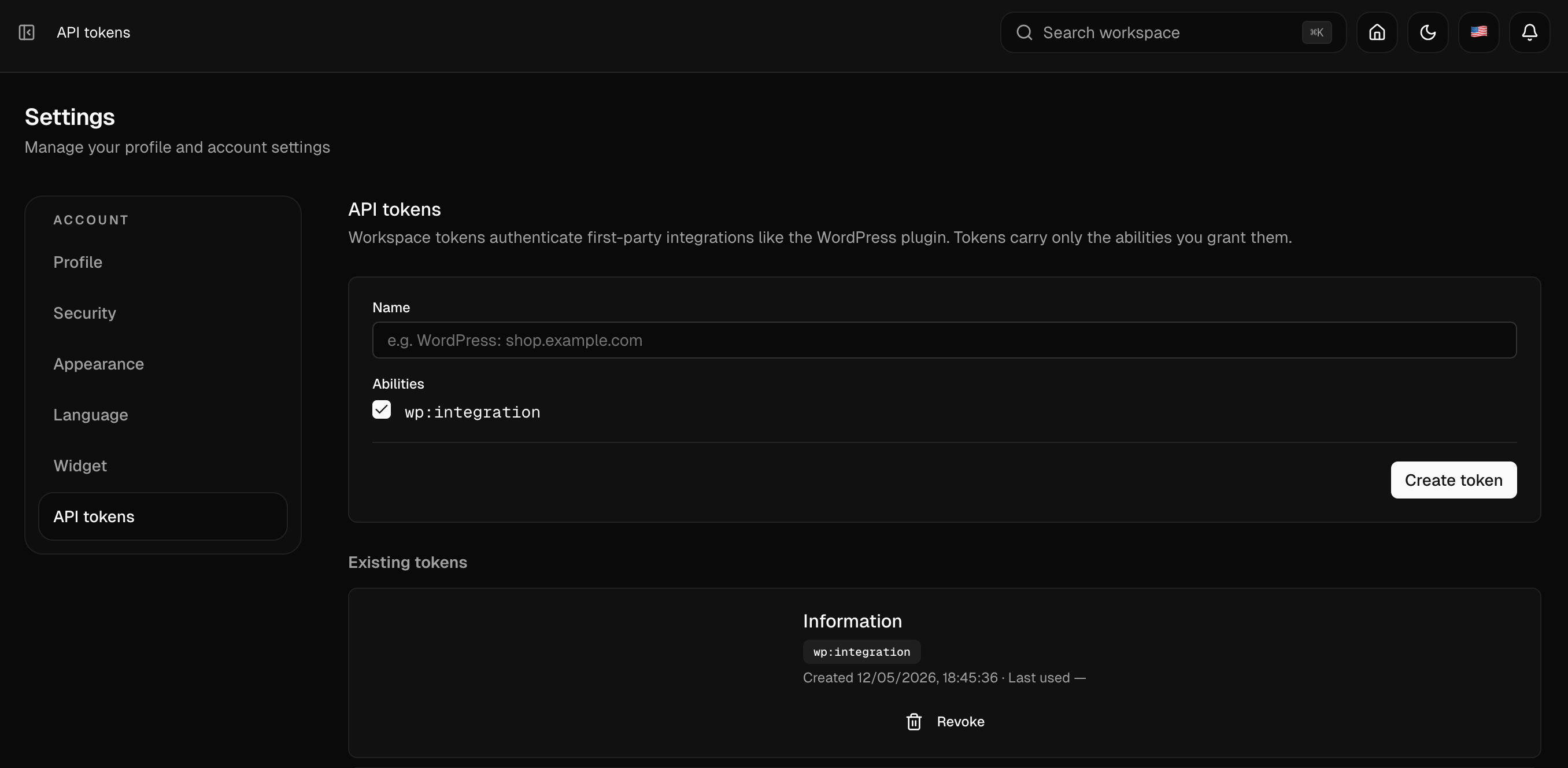
- Settings → Pitchbar. Paste your Pitchbar workspace base URL and the API token you created in your Pitchbar admin under Settings → API tokens.
- Click Test connection. The plugin reports the workspace name and lists the agents you can attach.
- Pick an agent from the dropdown. Click Save changes. Done — visit any public page on the site and the widget loads in the bottom-right corner.
- Hit “Sync posts now” (and, on Woo sites, “Sync products now”) so the agent has knowledge to answer from. New posts and products are pushed automatically on every save / publish thereafter.
Frequently Asked
Does this plugin need anything other than WordPress?
A Pitchbar workspace — that’s where the AI lives. The plugin handles the WordPress side: widget embed, knowledge sync, store integration, admin badges. If you bought the main Pitchbar self-hosted item you already have a workspace. Otherwise you sign up for one in the Pitchbar deployment you want to use.
Will it slow my site down?
No. The widget loader is a single asynchronous
<script> tag injected into
wp_footer. The widget itself is under 25 KB gzipped
and renders inside a Shadow DOM, so it never blocks paint and never
interacts with theme CSS. Page-builder content is rendered server-
side only when the “Sync now” button runs — never on
every visitor request.
Does it work with WooCommerce subscriptions / bookings / bundles?
Yes — the product syncer doesn’t filter by type, so subscriptions,
bundles, memberships, bookings, and any custom product type
extensions register all sync. If your store has a multilingual
plugin or subscription gate that hides products from
wc_get_products, a fallback WP_Query
against post_type=product picks them up automatically.
What happens if a sync hits PHP’s 30-second timeout on shared hosting?
The syncer is resumable. After 20 seconds of wall-clock work it persists a resume marker in a transient, schedules a WP-Cron continuation 30 seconds out, and finishes the rest in the background. You’ll see a soft “is finishing in the background” notice on the Plugins screen while it works. Re-running “Sync now” just resumes from where the last pass left off.
Can I see which posts have actually been indexed?
Yes — every post and product gets a green “Indexed”, yellow “Out of date”, or gray “Not indexed” pill in the WP admin list tables. The status is computed from a sync timestamp + content hash the plugin stamps on every successful push.
Are my customer’s emails sent to the AI provider?
No. The shopper context carried in the widget loader contains
wp_user_id and a SHA-256 hash of the email — never
the plaintext email. The Pitchbar server uses the hash to dedupe
leads and correlate sessions, nothing more.
Does the widget work with Elementor / Divi / Beaver / Oxygen / Bricks?
Yes. Each builder ships a public renderer; the plugin calls it
server-side when syncing so the visible HTML reaches the agent
intact. Without this, builder-owned pages have empty
post_content and the agent silently has no knowledge
of them. Divi posts route through the_content
correctly with setup_postdata priming.
Can a logged-in customer ask “where’s my order?”
Yes — that’s the lookup_order tool. Enable it on the
agent in your Pitchbar admin and the AI will call back to the
plugin’s /wp-json/pitchbar/v1/orders/lookup endpoint
over an HMAC-signed POST. The plugin returns the visitor’s recent
orders with status, items, total, tracking URL (AfterShip /
Shipment Tracking / generic _tracking_url meta), and
a deep-link to their view-order page.
Can the bot apply a coupon to the cart?
Yes. The agent emits a <coupon/> card with the
code, label, and discount; the visitor clicks Apply;
the plugin’s /wp-json/pitchbar/v1/cart/coupon
endpoint validates the code with WC_Coupon and stages
it in a 15-minute transient. On the visitor’s next cart load
$cart->apply_coupon() fires automatically.
Can I disable the widget on specific post types?
Yes — the settings page lets you tick which post types load the widget. Posts and Pages are enabled by default; uncheck them or tick custom post types (CPTs) as needed. Singular pages of unchecked types stay widget-free.
Is the plugin open-source?
Yes — GPLv2 or later. No obfuscation, no encoder, no phone-home. Fork it, audit it, ship a variant — whatever you need.
What’s included
-
pitchbar.zip— install-ready WordPress plugin (~45 KB). - This item description as
item_description.html. -
documentation.html— Mintlify-style standalone HTML reference covering install, configuration, sync, page builders, WooCommerce features, REST API, security, and troubleshooting. Open in any browser; no internet required. -
readme.txt— WordPress-compatible readme with changelog. - Full English POT translation template (
languages/pitchbar.pot).
Roadmap (no extra purchase)
Already on the radar for upcoming releases — every buyer in the major version receives every minor / patch release at no extra cost:
- Native Gutenberg block for inline widget embed in the editor.
- Multisite-wide settings panel for network admins.
- Per-product widget overrides (different agent per product category).
- Optional outbound rate-limit configuration for shared-host edge cases.
- Translation packs for Spanish, French, German, Arabic, Portuguese, Japanese, and Chinese (the runtime already supports them — these add the .po/.mo files).
Ready to ship
Pitchbar for WordPress is production-ready, GPL-licensed, and powered by the same team that builds the Pitchbar SaaS. Every feature on this page is shipped, tested, and visible in the demo site.
Drop it on your WordPress site. Connect to your Pitchbar workspace. Done.