2106 comments found.
Hello,
I have the checkout form implemented on the front page, and the initial overlay is loaded on page load. Where can I customize the javascript code of this initial overlay effect?
Please email your website URL…also tell me in detail what you are looking for…Thanks
I’ve sent you an email.
Did you receive it?
you need to send PM from my profile page…Thanks
I did, I send you a private message 9 days ago, it should be there 
Ok…Sent you email.Please check
Hello
Is this plugin ready for Woocommerce 2.1? Thanks
It is preferable to use latest version 2.3.x
It is no possible for me. I want know if is work in 2.1.
Hi,
We just updated to Woocommerce 2.3, but were told this plugin is not compatible with the new version. Is this correct?
Wendy
It is compatible with 2.3.x ofcourse
Hi, thanks for that. We have upgraded and it works fine, EXCEPT for step #3, the order overview. It comes up blank. What do we need to do to show to show this?
Hello,
I have just purchased the plugin and the Order Information tab is blank.
Can you please help?
Thank you
Please email me your wordperss login info…I will see this…THanks
Hi, for some reason the ‘payment info’ tab is blank, i can’t choose any payment option, only the “place order” button appears and takes me to the credit card payment.
Also, the default buttons still show up as well as the side bar on the left with the 3 steps.
I have removed the shipping option. Now there are 3 buttons that should take 100% of the width. Should I change it in the css file?
Thanks for your quick response
Can you please email me your website URL…i will see this…Thanks
Hello. I have two issues.
1. My theme will create transition effects when visiting anchors, and this causes an unpleasant experience with the multi-step checkout. I would like to ask the author if we can disable transitions forced by theme.
2. Could you please let me know how to set the anchor for each step to be BEFORE the step row. As it is now, the user cannot see in which step he is at the moment. This does not happen in the plugin demo.
Some help will be really appreciated.
What is your website URL?
I have sent you a personal message since the site is currently under development.
Hello, thanks for the fast response. I understand that this is rather a theme issue. I just wanted you to tell me how to set the anchor (of the steps wizard) to go before the steps bar. In this way my problem will be solved somehow.
And please let me repeat. In your demo, the anchor looks to be set before the steps bar.
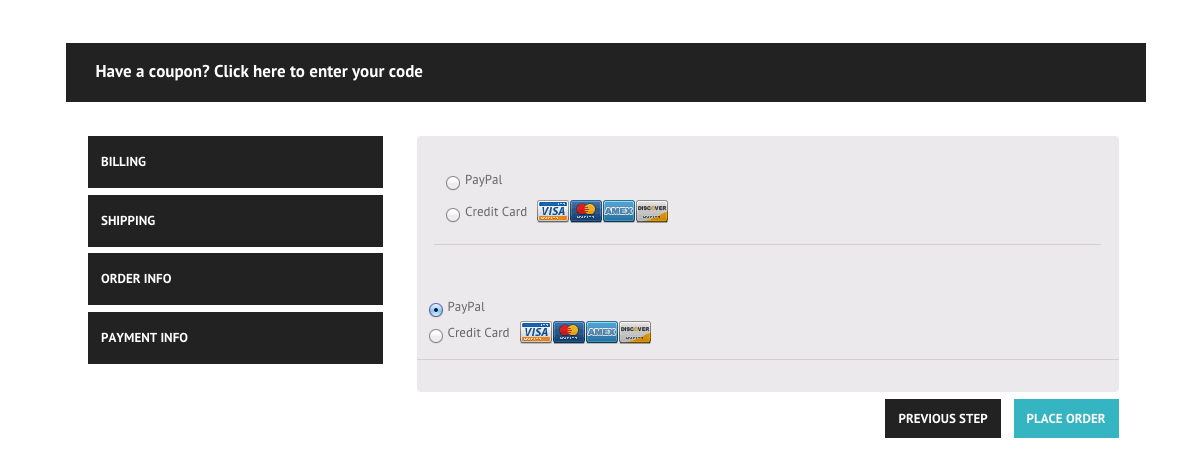
Hello! I purchased the plugin however, payment information shows twice when on payment information tab. Here is link to screenshot – http://chrisburgeministries.org/wp-content/uploads/2015/03/Screen-Shot-2015-03-23-at-10.13.49-AM.png Can you please assist? Thank you!
Please email me your wordpress login info…I will see this…Thanks
Just emailed requested info. Thank you.
Hi thanks for the plugin – but 3 important questions and URGENT
1. I don’t have shipping but i DO have order notes – and checkout add ons – If i disable shipping completely – it removes the shipping tab – but then in romoves completely the section of order notes, and order add ons. NOT GOOD -> please help
2. I only use on payment option so I do not need a whole tab for payment options – i want to include it in the order summary tab – please help !!
3. I do not see anywhere that you explain how to change the order of tabs – please help
1) For your 1st requirement you can use WooCommerce Checkout Manager https://wordpress.org/plugins/woocommerce-checkout-manager/. 2) Plugin does not support to change the order of the tabs. I can help you in placing the order payment under the order summary but such customization won’t be upgradable i.e. if you later update the plugin they will be gone…Let me know about this…Thanks
HI. Pre- sell question – I have seen many question about the option to change the order of the tabs. In particular – I am using the checkout add-on plugin from woocommerce that allows to add add-ons to product on checkout.
I want this to be the first section, and that only than the client will be redirected to billing. Is it possible?
Also – you keep mentioning that changing order of tabs is possible with minor code editing – can you please show an example?
thanks for this nice plugin ! It makes a good job now !
Please do you have a jQuery Snippet for me to adjust the wizards y-offset ? In my case your wizard-step-tabs are below my header after clicking on the next (previous) button.
Need anything like this:
jQuery(document).ready(function($) {
    $("body").on( "wizard-appear???", function () {
            var target = 'wizard???';

            var offset = $(target).offset();

            $('html, body').animate({scrollTop: offset.top - 120}, 500);
    });
});
Thanks for your help
...
Please email me your website URL…Thanks
Hello,
Im hoping for some direction here…Anyway we can change the order of the steps? My client would like it similar to http://www.finishline.com/
Where Shipping is FIRST…And a check box exists that says:
This is also my Billing Address...If checked the next step…Billing…would be pre-populated…
Please let me know if this explanation makes sense and also if this is possible?
Thanks,
I can help you change order of steps, but your other requirements needs bit more coding..If you want to hire me for all of your custom work, then you can email me…Thanks
hi, I installed the plugin but at what I do I still did not work. Everything I see myself rushes beneath the image. http://work.mitchi.cz/checkout.jpg In what could be the problem? thanks in advance Mitchi
Email me your WordPress login info…I will see this…Thanks
Hi the plugin works great but the one issue I have is the tabs drop on to a second line. Could you take a look please and give me a bit of css to get them on one line?
http://www.clickflowers.com.mt/checkout/Yes…your theme CSS is conflicting with plugin CSS….Please email me your wordpress login info…I will fix this for you…Thanks
Hey, I just bought this plugin to use it on a site where I want to sell gift cards (from igniteWoo) for my shop. At the normal checkout procedure, the user was able to fill in some extra credentials for the gift cards (name, message) but now those fields have disappeared. Do you know how can I retrieve them and integrate them in the flow? Thx!
Please email me wordpress login info…I will see this…Thanks
Hey,
Just installed the plugin and only first two steps (Billing and Shipping tabs) are working fine but no order information in being displayed in the 3rd step (order information tab). I’ve emailed you the login details for the site.
The link to page is http://www.swsdevsite.com/cspaomega/checkout/
I see its working fine..Make sure you are filling every field including the “State”...Thanks
Hi, noticed the State Field validation does not work still allows to move to the next step, even in your demo if I leave the State without any option I am able to next step. Plugin Purchased. Any fixes?
Thanks.
The reason it is not initially validated is because Woocommerce use “Select2” plugin to create a mask for state dropdown, so this plugins leaves its validation up to woocommerce, who validate state field as soon as user click on the “place order” button in the final step. I will see if we can add something for it in the future version….Thanks
ok.. but if deactivate your plugin and just use the Woocommerce standard checkout the State Validation works..
Yes you are right and this is what i said above…Right now state validation is done by the WooCommerce itself..
so there is no way that we add and display the validation error on the State field?
Hi, any solution that it can be applied to this? any thoughts? delivering a ecommerce site with two different validation not very user-friendly.
I am working on this and hopefully it will be solved soon…I will update you as soon as it is done…Thanks
i have added validation for “state” please donwload the latest plugin and check….Thanks
Hi, still doesn’t work. you can check here http://staging.thelemonlab.com/bombisha/
I see you are using old version of the plugin.
Ok, how can I get the updated version?
Have you updated the downloadable files?
You need to download the plugin by clicking on download link….the same way you have downloaded it for the first time… Take a backup of old plugin in case you have done customizations…Thanks
Can you have a look here? http://staging.thelemonlab.com/bombisha/checkout/ updated the plugin and now got the not passing the loading icon.
Hi, I’m looking to integrate a form(questionnaire) for the customer to fill out as one of the steps. I’m curious to know can your plugin assist me with that? Also, if your plugin can help, will the form have to be Pre-payment or can it also be post payment?
add_action('woocommerce_multistep-checkout-before', 'first_checkout_tab');

function first_checkout_tab(){
    $html = '<h1>Tab Title</h1>';
    $html .='<div>Tabs contents. You can also put HTML or PHP code here.</div>';
    echo $html;
}
Hi, I’m using the pro version of the plugin. I would like to change text under “Order Info” from “Shipping” to “Delivery” How can I do that?
http://take.ms/9tIBOI hope you can help me. Thanks.
Actually this label is not generated by this plugin, instead woocommerce is generating this. So i can’t help you in changing this..You need to google this on this topic…Thanks
Hello, I would like to buy this plugin. But I have question. Is it possible to add last step with complet order reviews? (include shipping and payment cost). Nothing to edit – only review and confirm button.
Many thanks for your answer.
Plugin does not provide this feature, but it can be done using custom coding….If you are comfortable with PHP and woocommece then you can do this or you can hire me to do customization….Thanks
Hello, I’m having a problem with the second step. The layer where appeared the information, now is blank.
This problem is new. Could you please help me?
Beat regards.
What is your Website URL?
You can try with this product: http://www.soinuan.com/producto/bolsa-de-ejercicios-lecturas/
(Because index webpage isn’t published)
Thanks!
What version of the plugin you are using? i recommend you to use updated of the plugin…Let me know if the problems still exists after updating the plugin…Thanks
It was the problem but, an other question: How could I auto update the plugin?
Thanks.
Hello, How can I enable autoupdate the plugin? Thanks.
There is no auto-update option. You will need to manually download and install the plugin again..Thanks