578 comments found.
Hello There, How can you deregister the plugin ? In case if you want to move to another domain? I can see only register, there is no option to deregister in plugin section and in villatheme my account section…
To register with another domain, please open a topic on our support forum at https://villatheme.com/supports/forum/plugins/woocommerce-email-template-customizer/. Our support team will help you unlink your key from the existing domain so you can reactivate it with the new one.

I’m trying to recover my password from your support website and don’t get an email, also I have a question. How can I hide the shipping charge from template
Could you please try to log in via your Envato account (see screenshot:https://prnt.sc/nw8Df3FZtck- )?
To hide the shipping information, you can use the ‘Remove shipping when shipping is free’ option, apply custom CSS, or use shortcodes like {order_total} instead of the ‘Order subtotal’ component
Hello there,
The email notifications are not showing the product images. It was working fine until the past week. I have the latest version: 1.2.18
Can you help me please? Please, let me know.
Regards,
To help you find the exact reason for the image issue, we’ve prepared a detailed guide. Please check the troubleshooting steps here: https://docs.villatheme.com/woocommerce-email-template-customizer/#configuration_child_menu_10449 or https://villatheme.com/knowledge-base/images-are-hidden-in-emails/
Thanks. I checked everything in this list but the issue persist. I think it is an issue caused for the last version of your plugin. Can you tell me how to download an older version of your plugin?
Url for the image is ok: https://drive.google.com/file/d/1OyfW6I1zdIrnLHrWPkhZQpO2GNTnCi6E/view?usp=sharing And the image file has the right permissions: https://rosannadelariva.com/wp-content/uploads/2025/06/14870PM-1-500x500.jpg
Fixed. Thanks.
Glad to hear you got it sorted. If you have any further questions, feel free to reach out to us.
With your plugin can I show in the email the coupon code used by the customer?
Unfortunately, the feature that allows displaying the coupon used in the order email is not supported at the moment.
Custom Order Status Not Appearing in Email Type List.
I created some custom order statuses using a plugin by Bright Plugins, and i tried all means to make Email Template plugin fetch the custom statuses, but to no avail. Please I have sent email to your support to advice on how they can show so I can create Email template for them.
Hi,
Thank you for reaching out.
I understand what you’re looking for. It’s worth noting that our plugin doesn’t include built-in support for many 3rd plugin’s template. However, we do have an article that shows how to add template for 3rd plugin’s emails from the other side. Please take a look at this article: https://villatheme.com/knowledge-base/compatibility-scenarios-with-3rd-party-email-plugins/#3
This should help you adapt the templates to work as expected. If you run into any issues while following the guide, feel free to let us know and we’ll be happy to take a look.
Best regards.
Hello,
I have purchased the premium version of WooCommerce Email Template Customizer, however I am currently unable to access or use the Custom CSS tab within the Email Editor.
The tab appears in the interface, but it does not allow editing or saving any CSS, even though the licence is active. I have already contacted VillaTheme support via the support system a few weeks ago but have not yet received a response, so I wanted to check here in case I am missing a setting or required configuration.
Could you please confirm:
- Whether the Custom CSS tab requires any additional activation or configuration
- If this is a known issue in the current version
- Any recommended troubleshooting steps to enable the CSS editor
Thank you very much for your assistance.
Hi,
Thank you for reaching out to us.
It’s a compatibility issue. Could you please update your topic so we can investigate it for you?
Best regards.
Hi,
It seems after updating the your plugins to the latest versions, some shortcodes no longer works in the email templates – It happens to both the abandoned cart recovery button and the coupon on subscription shortcode.
I have to revert back to the older versions of the email plugin.
Any ideas why and any fixes planned?
Thanks
Hi,
Thanks for letting us know.
Could you please create a support ticket on this Support Forum and specify exactly which shortcodes/placeholders are no longer working, and maybe more details? That will help us reproduce the issue and see what changed in the latest version.
Once we have those details, we can investigate properly and advise on a fix or workaround.
Thanks for your patience.
Best regards.
We had issues where the emails sent were showing wrong styling on mobile devices that you guys fixed a while back. With the new update we went from 1.2.16 to 1.2.18 and now the mobile email styles are showing wrong again. i do not have support and don’t need support but wanted to report the bug to you. If wanted I can send you original html examples with emails sent with correct styling from version 1.2.16 and html examples with emails send with wrong styling from version 1.2.18.
Hello,
Thank you for reaching out to us.
It’s alright, we absolutely can check the problem for you. Please create a support ticket on this Support Forum. We’ll dig into and see what we can do
Best regards.
angela_grey, thank you. I did that.
Hello, I downloaded the free version of your plugin to test it, and I noticed that the email is not responsive on mobiles. Is there something I can do to correct this problem to use your plugin?
Hi,
Thank you for reaching out to us. Could you share some screenshots showing how the email is on mobiles?
Best regards.
How do I attach files?
You can attach a file directly within each email template in the plugin settings: https://docs.villatheme.com/woocommerce-email-template-customizer/#Attach-file
This attachment is static, meaning:
- Only one fixed file can be attached per template
- The same file will be sent to all recipients using that template
Please note that dynamic attachments are not supported. For example, if your orders generate a different PDF file for each order and you want to attach those automatically, this feature will not work for that use case.
Why I got notifications like this?
Hello! Your 9MAIL – WordPress Email Templates Designer Premium has expired so you no longer receive automatic updates as well as support. Please go to renew now
Hello! Your WooCommerce Email Template Customizer Premium has expired so you no longer receive automatic updates as well as support. Please go to renew now.
Hi,
Thank you for reaching out to us.
You’re seeing those notifications because the support and auto-update period for those plugins has expired.
This only affects automatic updates via our auto-update key and support, not the plugin functionality itself. The plugins will continue to work normally.
You can still update the plugins in other ways:
- Download the latest version manually from your Envato account and update it in WordPress
- Or use the Envato Market plugin to receive updates automatically via Envato
You can find more details about updating plugins here in this guide: https://villatheme.com/knowledge-base/how-to-update-villatheme-plugins-from-envato/#outside-support-periodRenewing support is optional and only required if you want direct support from us.
Best regards.
Hello! Please tell me how I can get a list of selected products that a customer has added to their wishlist? I want to send emails when there are discounts on a product in the wishlist.
I also want to set up an email requesting a product review. How can I insert the product for which I want to request a review?
Hello,
Thank you for your questions.
At the moment, this isn’t something we can support. WooCommerce itself does not have a built-in wishlist feature, so any wishlist data is likely provided by third-party plugins. Our plugin does not have access to, or integration with, wishlist data generated by external wishlist plugins.
One quick question, when our plugin is inactive, do you see wishlist product information included in the default WooCommerce order confirmation emails on your site?
Regarding review request emails: our plugin does not allow manually inserting a specific product into a review request email. But you may try this plugin instead: https://wordpress.org/plugins/woo-photo-reviews/
Best regards.
Hi! I’m using the WoodMart theme, it has custom templates for feedback emails, abandoned cart, waiting list, discounts on selected products. Please add these templates to the list so they can be configured through your plugin. Or maybe you have instructions on how to do this?
Hi,
Thank you for reaching out.
At the moment, our plugin doesn’t include built-in support for WoodMart’s custom email templates. However, we do have an article that shows how to add template for 3rd plugin’s emails from the other side. Please take a look at this article: https://villatheme.com/knowledge-base/compatibility-scenarios-with-3rd-party-email-plugins/#3
This should help you adapt the templates to work as expected. If you run into any issues while following the guide, feel free to let us know and we’ll be happy to take a look.
Best regards.
Can you import a custom html email ?
Hi,
Thank you for reaching out to us.
It’s unfortunate that our plugin export/import JSON string that can only be used in our plugin itself. It’s not HTML file so you can’t upload file like that. For more details, you can see this document: https://docs.villatheme.com/woocommerce-email-template-customizer/#Import-&-Export-Templates
Plugin has its built-in templates, they’re the only ready template that can be used.
Best regards.
When using the product component, it would be better to have more control over what products do and don’t appear, such as by product category. Having to select individually becomes arduous.
Additionally there’s a bug when typing text in a field to select a product to exclude in the editor – it starts off screen.
Hi,
Thank you for reaching out. For the inquiry of the feature request for category-level control, I may not fully grasp what you’ve written, could you please clarify your idea?
When you set the Product type “Category” for the product component, it shows the products which are in the same category as the order items, you don’t need to select individually?
As for the UI bug, please create a support ticket on this Support Forum. I’ll check it.
Best regards.
Hi! How do i reorder the icons on Socials. For example i would like tiktok to appear first and then facebook. Thank you!
Hello,
Thank you for reaching out to us.
You can reorder them by adding each social icon as a separate Social component and placing them in the order you want.
Just add a row with multiple columns (up to 4 per row), then drop each Social component into its own column, TikTok first, then Facebook, and so on: https://snipboard.io/4NIU67.jpg
Best regards.
My core setup is Woocommerce with Wpbakery. After update to latest version 1.2.16. I encountered the same issue calebweeks mentioned. The downloadable link will no longer displayed in the email. I tried to downgrade to 1.2.12 but it’s not working too. I finally downgrade back to 1.2.9 and the download link reappeared in the email again.
Hello,
Thank you for reaching out to us. Can you please create a support ticket on this Support Forum?
Best regards.
Hi! How can I get the buyer’s phone number to make it a separate button?
Hi,
I’m afraid that, feature isn’t available in the plugin. If you want a separate button for the buyer’s phone number, you’ll need to add it manually using your own custom code or link, or simply make a separate button with phone number as the label, to be prominent.
Best regards.
Hi! What code can I use to get a customer’s phone number?
In order confirmation emails, you can use {customer_phone_number}: https://snipboard.io/Qoi1rX.jpg
Hey there, I’m having bother updating the plugin:
“Updating Plugin WooCommerce Email Template Customizer Premium
An error occurred while updating WooCommerce Email Template Customizer Premium: Update package not available.” – It has done this each time we’ve tried to update.
I also tried manually updating by uploading the plugin files via FTP. However, doing this caused our customised templates to stop sending through. Reverting back to version 1.2.14 seemed to fix it.
Hi,
Thank you for reaching out.
To update the plugin, please make sure you’ve activated your license on the domain first: https://villatheme.com/knowledge-base/how-to-use-auto-update-feature/
Once that’s done, you can use the Envato Market plugin to handle the update process: https://villatheme.com/knowledge-base/how-to-update-villatheme-plugins-from-envato/#envato-market-plugin
This should allow you to update without the error message and without needing to upload files manually.
Best regards.
thanks, though this was already done. We can’t even see now that the update to 1.2.15 is available.
This behavior is related to WordPress’s update system. Please try clicking the “Check Again” button under Dashboard → Updates to refresh the list: https://nimb.ws/ExhQ0Ka
Then, you can use the Envato Market plugin to update the plugin directly.
Let us know if you run into any trouble, we’ll be happy to assist further.
Is it the case you only receive plugin updates if paying for support?
Hello, I would like a response please. We keep getting notifications that the plugin has an update.
However, at times it will also say the license has expired. However we are continually notified there’s an update. Then, the available update message disappears. It definitely seems like there’s some kind of bug.
Additionally, I want to know if I need to continually pay for the plugin here on envato to receive updates to the plugin – please clarify.
I await a reply please.
Hi there,
Sorry for the delay – our team just got back to work after a recent typhoon, so we’re catching up on support.
Regarding your concern: Please use the Envato Market plugin to manage and update your purchased plugins. It handles both the license validation and automatic updates directly from Envato.
You can read this guide for more details and answers to all your questions about updates: https://villatheme.com/knowledge-base/how-to-update-villatheme-plugins-from-envato/#outside-support-period
Thanks for your patience and understanding!
Best regards.
I don’t understand. We as users need to continually buy 6-months support to update the plugin even though in a year that costs more than the plugin does itself? Am I understanding this?
A license with Item Support extended – 12 months – costs higher than one without. I’m a bit confused – are you saying you purchased a one-year license but only received 6 months of updates? Could you please clarify what you mean so I can better understand your situation?
No it’s me that’s confused a bit by your processes and pricing structure.
Regular license plus extended support = $42.13.
However, buying support only for 6 months = $23.63×2 (for 12 months) = $47.26 higher than the cost to buy the plugin again with the 12 month support incentive.
What is meant to be the correct process to continue receiving updates for a customer that has already purchased a license and 12 month support but has now expired? A whole new license that’s a better price, or continually buy extra support?
“Regular license plus extended support = $42.13.”
>> One license with extended support means you can use that single license on one domain for 12 months.
“buying support only for 6 months = $23.63×2 (for 12 months) = $47.26 higher than the cost to buy the plugin again with the 12 month support incentive.”
>> If you purchase two regular licenses without extended support, that means you can use them on two different projects/domains, but each license will only include 6 months of support.
Unless your existing license has expired and you decide to purchase a new one, in which case, Envato will automatically update your previous license’s support period to match the new one.
This setup is part of Envato’s policy and pricing structure, not something we control on our end.
Hello VillaTheme Support,
I have purchased both WooCommerce Email Template Customizer and WooCommerce Abandoned Cart Recovery. I noticed that each of these plugins allows me to customize the abandoned cart email notification template.
Could you please clarify in which plugin I should edit the abandoned cart email template to avoid conflicts or duplicate emails? Should I remove the abandoned cart template from WooCommerce Email Template Customizer and manage it only within WooCommerce Abandoned Cart Recovery, or is there another recommended approach?
Thank you in advance for your guidance.
Best regards!
Hi,
Thank you for purchasing our products!
Actually, it doesn’t matter how many templates you create or customize in which plugin, you just need to assign specific templates under Email settings – Send email rules: https://docs.villatheme.com/woocommerce-abandoned-cart-recovery/#set_up_child_menu_3551
And it’ll send the right template. So, no worries about duplications.
Best regards.
Hello VillaTheme Support,
Thank you for your reply. I think I didn’t explain my question clearly.
What I meant is: since both WooCommerce Email Template Customizer and WooCommerce Abandoned Cart Recovery include abandoned cart email templates, which plugin should I actually use to edit and manage the abandoned cart email design?
For example, should I only customize the template directly in WooCommerce Abandoned Cart Recovery, or should I instead manage it through WooCommerce Email Template Customizer? I just want to make sure I am editing in the correct place and not maintaining two different templates.
Thank you for clarifying this point.
Best regards!
Both plugins include abandoned cart email templates, but there’s no strict “should” here – it depends on your needs:
WooCommerce Email Template Customizer gives you more tools and flexibility to design and customize the email layout.
WooCommerce Abandoned Cart Recovery also has its own template, but it’s more limited in terms of customization options.
If you want greater control over the design, we recommend using WooCommerce Email Template Customizer. That way, you only need to manage the template in one place and can take advantage of the extra customization features.
I hope this clears things up! Please let me know if you’d like me to share quick steps on how to set the abandoned cart template in the Email Template Customizer.
Hello VillaTheme Support,
Thank you very much for the detailed clarification! Now everything is absolutely clear: it’s best to manage the templates in one place – WooCommerce Email Template Customizer, and handle the abandoned cart notification rules in WooCommerce Abandoned Cart Recovery.
That makes perfect sense. Thanks a lot for your support!
You’re most welcome! I’m glad the explanation helped and everything is clear now.
If you have any other questions down the road, feel free to reach out anytime – we’re always happy to help.
Hello, is there a way to exclude a specific email from using the plugin templates? I am trying to use the YITH Gift Card plugin but the gift card email that is being sent is not working when going through your plugin.
Hi,
Thank you for reaching out.
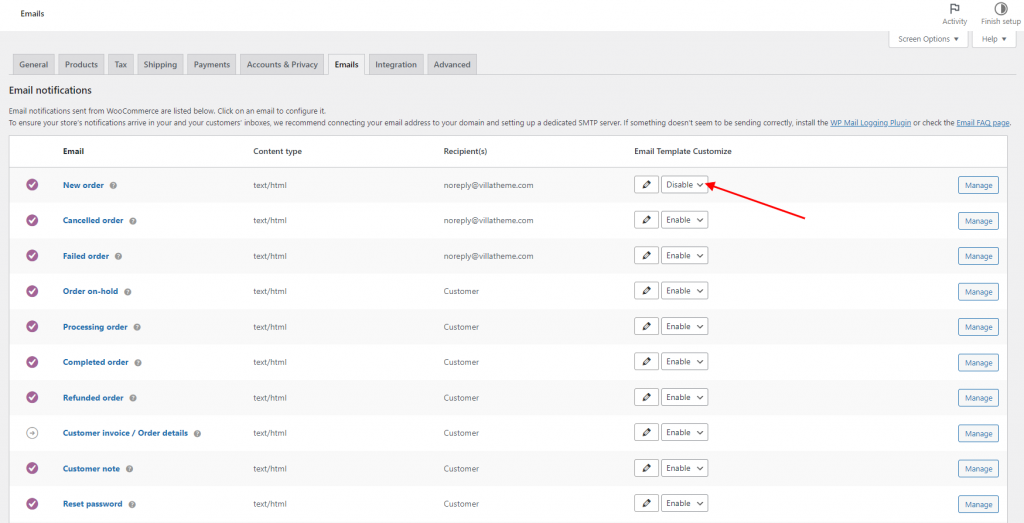
I’m not sure the specific issue you’re facing. But you can disable a template using this option: https://docs.villatheme.com/wp-content/uploads/2022/07/screenshot-localhost-2022.07.21-16_30_49-1024x523.png
It’ll send the default email design of that email type instead of our template.
Best regards.

This item was featured on CodeCanyon

Power Elite Author
Contact the Envato Market Help Team