29721 comments found.

Something went wrong contact the author https://codecanyon.net/user/bastikikang
Hi,
Please email me all your access details, including:
Site link
FTP access
Also, provide a screenshot of the error and include a detailed description of the issue in the email.
You can reach support here: https://codecanyon.net/user/support-kmrsCheers
send
wait for my email
Why is the XML sitemap not working?
any screenshot of the issue?
Please email me all your access details, including:
Site link
Admin login
FTP access
Also, provide a screenshot of the error and include a detailed description of the issue in the email.
You can reach support here: https://codecanyon.net/user/support-kmrsCheers
My friend, please consider the new payment method: phone number payment. As long as the customer leaves their payment phone number, the administrator simply sends a payment instruction. This is remote payment, or the administrator can post the payment phone number online, and the customer will automatically transfer the money to that number. This is because the payment account is now the user’s phone number. This works in China, Russia, and other countries; as long as you know the recipient’s phone number, you can transfer funds directly. This payment method is very convenient, offline, and universally secure. Please slightly modify the current bank transfer function so that the customer can see the transfer account when placing an order.
sure mate will do take note
Thank you for your reply.
My friend, There is another question,please consider this: automatically refresh the actual order address every time you launch the app. This setting will prevent disputes. In practice, if 10 people order food, 9 will use their current location as the delivery address, and only 1 will choose a previous address. Under the current settings, if the address from point A to point B is within a certain delivery range, it’s disastrous. The customer will wait a long time because points A and B are at different distances from the restaurant. Therefore, automatically grabbing the current address each time the app is launched and promoting nearby restaurants is beneficial.
hi mate
don’t worry this will be added next update 
I am trying to add ingredients on item but is not saving and alert “Please correct the forms”. I tried also on your demo and i get the same error. Check image please https://ibb.co/21xz3601
ok its because you need to enter the pre time greater than 0 also extra time
or just simple remove the zero and it will saved
sent
sent
sent
sen
sent
sent
Sen
sent
Nothing mail
Please
Sent
Hi Basti, I moved the installation of the purchased domain to a subdomain and now it’s asking me to activate the license. What do I do now?
update your domain here https://bastisapp.com/activation/index.php/index/updatedomain
if you having issue send me your purchase code here and new domain
You can reach support here: https://codecanyon.net/user/support-kmrshi basti, is it possible for each merchant set his own paypal token credential then receive his online payment directly in his own paypal account?
hi mate
yes this is available
set the merchant as membership type and all payment will be set by merchant and all payment goes to merchant
hi Basti send Email
wait for my email thanks
I am trying to uploa language file but i get error
CDbCommand failed to execute the SQL statement: SQLSTATE23000: Integrity constraint violation: 1452 Cannot add or update a child row: a foreign key constraint fails
this means that the language your uploading has the same keys it cannot insert records with same keys
try to check first if your csv file has same keys
i suggest upload first like 2 to 3 lines of words to check if will have error or not
Ok thanks
welcome
Hi mate, which field do we use for the merchant logo? Is it $merchant[‘logo’] or something else? Thanks
am sorry can you explain the details? like where you will use it ?
Hello mate, In merchant panel Merchant > Settings > Taxes there is a switch to activate: tax on service fee, Tax on small order fee, Tax on delivery fee, Tax on packaging fee. Where is the tax percentage defined and assigned for each tax on service fee, Tax on small order fee, Tax on delivery fee, Tax on packaging fee? Thank you
Ignore it, I found it. Resolved.
glad to hear
Hello mate, thank you for your support!I don’t need the geocode feature. The issue I’m facing is the following: I just want the customer to fill in these three checkout fields:
-Street Name -Street Number -Apartment, suite, or floor
…and then save the address without triggering the validation errors.
Thanks in advance
hi mate
you mean when customer adding their address? if yes it does not use geocode or api it only validate the required fields like street is require etc but it does not use google api when you enter your address
only the geocde is use when you use get my current location
and when you place order it use google distance matrix
Hi man, thanks for the reply.
No, I’m not using Mapbox or Google Maps. The customer just selects an item from the merchant and then fills in their name, surname, and phone number. After that, they’re redirected to the checkout page where they need to enter the delivery address: Street Name, Street Number, and Apartment, suite, or floor.
But when they click “Save address”, they get this error: [ “Places ID is required”, “Latitude is required”, “Longitude is required” ]
To get around this, I modified the code like this:
public function attributeLabels() { return array( ‘address_uuid’ => t(“address_uuid”), ‘location_name’ => t(“Apartment, suite or floor”), ‘formatted_address’=> t(“Street name”), ‘address1’ => t(“Street number”), }
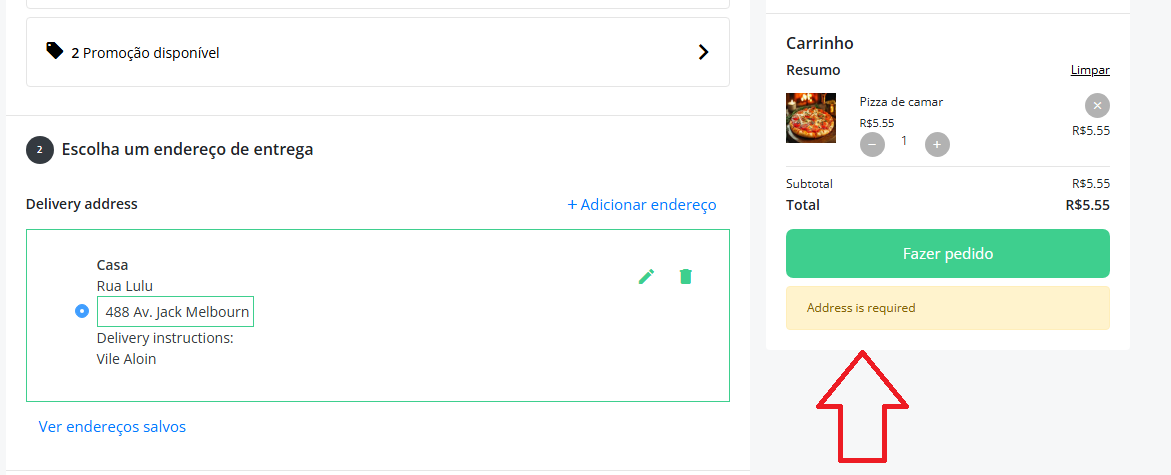
( I removed some other fields for latitude and longitude)After doing that, the address saves without errors, but now when the customer clicks the button to complete the order, a yellow alert appears saying: “Address required”
Why the system still thinks the address is missing or invalid even though it was saved successfully? Maybe the code still missing the reference for latitude and longitude.
How to disable completely the map required features and use only the fields to write the address?
ah ok mate got it
this is required for old version of customer app so its called backward compability in latest version am using now coordinates
edit this file protected\models\AR_client_address.php
and remove this
  array('place_id','ext.UniqueAttributesValidator','with'=>'client_id',
           'message'=>t("Address place id already exist")
          ),
Googd morning, man. Thanks for supporting ! I have checked the code and it was marked before, so it’s not that instance:
https://i.postimg.cc/hvD4pszQ/t5.pngI tried to change a few instances also in AR_client_address_location.php , but it’s still give me a “Address required” when I click to send the order in the checkout page:
https://i.postimg.cc/kGQ1XNfs/t5.pngare you using what version of kmrs?
this means that the there are no address selected and it should passed the address id using checkout
I’m using the version 2.0.7.
this issue means that the address id is not present in the submission of form when you place order
any changes you have done ?
this happen when you place the order right ?
i thinks its better
Please email me all your access details, including:
Site link
Admin login
FTP access
Also, provide a screenshot of the error and include a detailed description of the issue in the email.
You can reach support here: https://codecanyon.net/user/support-kmrsand provide the sample customer login and what merchant to order
Cheers
Thanks for answer me, man. Yes, it happen when the client place the order.
I have configurated the functions like this:1- The client choose the food.
2- He get the screen to add the Name, surname and phone (Sing up optonal).
3- He stay in the checkout page, beause I have not a token for mapbox or google maps, so he can’t save the address on the fields, so I deleted instances like “latitude and longitute” from AR_client_address.php. and then he could save it, but could not send the order.
4. The problem is: The client can’t send the order because the chechout page needs the address from the map.
Yes, I can send you all the acess to the website, I just haven’t the password from the Filezilla because it’s from the enterprise.
Thanks again, mate.
first of all you cannot delete the fields latitude and longitute this is needed when comparing the distance from customer address and merchant address without this we cannot check if merchant is allowed to deliver to customer location
it will be great if you can provide what am asking so i can check
Hey mate! How are you doing? Thanks for your support, I really appreciate it. Thank you, man!
Sorry, you’re right. I could not change all the code because it was based on the maps and geocodes.
I found a solution for my doubt. I just restored the default PHP files and turned off a few delivery services, so I could adapt the code for my purpose.
The only issue is: After a client orders food and the restaurant clicks to accept the order and then clicks on ‘ready to pickup’, the client sees the progress bar going back to the beginning of the order but no message on his board.
When the restaurant clicks to complete the order, the user sees his progress bar completed.
Anyway, I know you have so much work and I don’t want to disturb you.
If possible, just tell me where I can activate the ‘ready to pickup’ option to the progress bar.
Check list:
PHP mail working. Cron jobs working.
no worries mate
for the progress bar , check your settings in admin panel -> orders -> order settings -> order status
and order tracking the status should same as my demo cause this is being use to determined the progress bar
Basti, how to change the texts in the error page at example.com/backoffice/login/error
It says “Something went wrong contact the author https://codecanyon.net/user/bastikikang". I want to change this
Found. Please ignore.
glad to hear
cheers
Basti I need help; I need to renew domain but I really dont remember my last domain since it is been years… how to proceed?
sent me your purchase code
You can reach support here: https://codecanyon.net/user/support-kmrssent
sent
Hi, I’m looking for a developer who knows everything about Karenderia. I have a very important integration to do and I’d like to have a reliable tech person to work with me on everything. If you’re interested, please contact me at vtiktokviral7@gmail.com
Hi,
I want to transfer my Karenderia Multiple license to a new domain. I tried using the link for changing and activating it, but it doesn’t work. I need to transfer the license from the domain obeduj.online to the new domain gastrogo.eu.
Thank you.
for delivery pickup translate them in admin panel -> attributes -> order type -> edit -> item translation
now for the message you can change that as well in same menu and to translate just copy the exact words in Registration Message
and add in your language in admin -> attributes -> language -> front end
Hi Basti,
Friend, I’ve been encountering this error in the admin panel all day today. Why is your licensing system failing? It’s strange that I can’t even access the admin panel of a product I purchased. Why does a system that was working suddenly start giving errors? Please fix this licensing issue in the software. My work keeps getting delayed because of it.
https://www.demo.com/backoffice/login/error Something went wrong contact the author https://codecanyon.net/user/bastikikangCheers
sent
sent
sent
sent
sent
sent
Thanks a lot, my friend, for everything.
your welcome mate
Hello Bastikikang, Your theme is great, thank you
!I would like to know what I can do to offer a free plan for merchants.I tried setting the price to 0.00 on a plan, but it still requires a payment gateway.
I want to allow merchants to choose a free plan before they decide to purchase a paid membership.
Thank you in advance for your help!
hi mate
since am using subscription api you will have to create a plan with trial usually in stripe or paypal has this features
you will have to create a free trial for your plan and once free trial is done the card will be charge
cheers
Hello, In the next update, please add the option to disable the real-time map view for customers; instead, it only shows the state line that appeared previously without a map. Thank you
hi mate
you mean totally remove the map in track order? just the status of the order in left side?
if yes sure will do take note
Hello mate,
Yes, that’s right.
The admin has the option to disable the map and instead show a progressive bar for step orders. https://ibb.co/NgbygZJn
This is useful for delivery admins, and self-delivery merchants may also prefer not to show their location.
Thank you
your right noted mate
thank you

This item was featured on CodeCanyon

Elite Author
Contact the Envato Market Help Team