6659 comments found.

I cannot get the latest update View version 2.21.1 ?? The uploaded file is the old plugin
Hi
Due to a technical issue with Envato’s uploader, we used an alternative method to release the update. The new version is still in the queue for approval, I’ll let you know when it is now available for download.
Regards, TC
Hi
The new version is now available for download.
Regards, TC
Hello I downloaded and uploaded latest zip but keeps saying there’s an update available (Version 2.21.0). Could you tell me more about that?
Hello?
Hi
Due to a technical issue with Envato’s uploader, we used an alternative method to release the update. The new version is still in the queue for approval, I’ll let you know when it is now available for download.
Regards, TC
Hi
The new version is now available for download.
Regards, TC
plugin keeps saying to update, I downloaded + uploaded latest zip but keeps saying there’s an update available.
Hi
Sorry, there is an issue with the plugin upload to CodeCanyon, we’ve contacted Envato about it. I’ll let you know when the new version is available to download.
The auto-update within WordPress should work though.
Regards, TC
yep that worked thanks, forgot about that
Great work!
Una volta acquistato uso costruire il sito web in un dominio dedicato per poi trasferire il sito una volta completato. In questo caso come trasferisco la licenza dal dominio di costruzione a quello di produzione?
Hi
On the production domain, go to Forms – Settings – License & Updates, and Verify the license key on the production site to associate the license with that site. The license on the build domain will become deactivated after some time.
Regards, TC
hi how can I style the upload file option similar to this: https://ibb.co/ycq09Lqy in css global style or within the form
Hi
It wouldn’t be possible to style the native browser file input field like this so that it is consistent cross-browser.
The closest thing would be to go to the Settings for the File Upload field, on the Styles tab enable the option “Enable enhanced uploader”, then choose either Button or Dropzone for “Enhanced uploader style”.
You can then go to Edit Form – Settings – Style – Global, at the bottom click “Add global style” and choose “Upload button” or “Upload dropzone” to style it with CSS.
Regards, TC
In a dropdown multi select box, one with a lot of items, is it possible to have an autocomplete, so user can start typing the option they are looking for and it shows results as they type, then can then select it and search again for more options.
Hi
In the settings for the the Multiselect field, on the Styles tab, you can enable the option “Enable enhanced select” which will convert the field into an enhanced field with searching.
Regards, TC
Is there a way to use the form as a kind of booking form? What I mean is: for example, if I put 20 items in a checkbox list, and one form submission selects, say, radio button 4, that option should no longer be selectable or should disappear for future submissions. Is that possible?”
Hi
If you add a “Prevent Duplicates” validator in the field settings on the Advanced tab, it will prevent that option from being submitted again but will still display on the list.
To make it disappear from the list, you can use the code on this page.
You can either click Download ZIP at the top right to get an installable WP plugin, and then adjust the code in the plugin, or copy & paste the code from line 8 onwards into a plugin like WP Code or Code Snippets, then adjust the code as described in the readme.txt file. Although it mentions Select Menus, it will work for Radio Buttons too.
Regards, TC
Hi there, see screenshot: https://prnt.sc/XfLONPrtjxFe
On the File Upload element, is it possible to have customers upload multiple files, but instead of the files saving on the server, can I receive it as email attachments on my Admin notification email? That would be great, let me know. Thanks.
You had provided a response on this a year ago, but on the latest Quform / file upload element / in the Data tab, I’m not seeing g the option to turn on the to-a-notification attach the file to notification email. I only see the option to disable saving on the server:
1. In the File Upload element settings, on the Data tab, turn off “Save uploaded files to the server” and to-a-notificationemail”>attach the file to the notification email, it won’t be stored on the server.
Hi
The attachment options are in the notification settings in the current version, see this page for more info.
Regards, TC
Perfect, thank you so much! And if I choose the option to have the files upload and save to the server, is there an option to have those files automatically be removed from the server after certain number of days? That way it won’t overload the storage space over time.
Hi
There isn’t a built-in feature to do that. There is an additional plugin in this topic to auto-delete entries after a certain period of time (by default 4 weeks), which will also delete the uploaded files attached to the entry.
Regards, TC
Is quform compatible with wordpress 6.8.1? You show on themeforest only compatible wordpress 6.6. Regards Rainer
Hi
Yes, it’s compatible with WP 6.8.1 – I’ve updated the list, sorry about that!
Regards, TC
perfect
if I buy a license for “www.example.com”, do I have to buy another one for a third-level domain “thirdlevel.example.com”?
Hi
No, the license is tied to the main domain (example.com in this case), all subdomains can share the same license.
Regards, TC
thank you
Hello, I’ve built a form that has the back and next buttons enabled. I’m trying to add the form to the bottom of a blog post, but the form is broken and not formatted the way I designed it to be. Here are some images for better referencing:
Broken: https://imgur.com/a/4jlN6I6 Here is what it’s supposed to look like: https://imgur.com/a/rZPYEzA
Please help
Hi
It looks like the Quform stylesheets aren’t loaded on that page, can you check at Forms – Settings – Performance, that “When to load scripts/styles” is set to “Always”?
Regards, TC
That did the trick. Thank you so much! 
Hi, this is a general inquiry for an issue I encountered years ago. Have you guys figured out how to use validator to not accept emojis?
Thanks!
Hi
You can prevent emojis being submitted by going to the Settings for a Text/Textarea field, then on the Advanced tab add a “Regex” validator, then enter this pattern in the validator settings:
/[\p{Emoji}]/u
Then enable the “Invert” option.
Regards, TC
TC, thank you for the quick response. You guys are amazing. But I tried this just now and it doesn’t allow any special characters or even numbers, not just emojis.
I couldn’t make it allow “Act 1 ?!@$$*” as an example.
Any thoughts?
Another option can be to make Quform delete the emojis when sending to the recipient table. Like the Trim function with spaces. Is there a suggestion in this sense?
Hi
You could try this regex instead:
/[\x{1F000}-\x{1FFFF}\x{2600}-\x{27FF}\x{2900}-\x{2BFF}\x{1F900}-\x{1F9FF}]/u
To delete the emojis instead, you can add a Regex Filter instead of a Validator on the Advanced tab of the field settings, and use the same regex pattern.
Regards, TC
I tried the validator and it looks like it works. Thanks!
Hello,
1) Is it possible to export all entries from all forms at once, or only from individual forms?
2) Do you support the Cloudflare Turnstile captcha?
3) Is it possible to have the information entered by the user in the form automatically saved to Google Sheets?
Hi
1) You would need to export each form individually (at Forms – Tools – Export Entries).
2) Yes, add a reCAPTCHA field to the form, in the field settings set the Provider to Cloudflare Turnstile. Then add the keys in the plugin settings (Forms – Settings – reCAPTCHA).
3) It can be done through Zapier, see our guide here.
Regards, TC
Thank You.
The SEND button is no longer in Italian, but has become English. When I go into the form the text is written in the correct language. How can this bug be solved?
Hi
Can you check this option to see if the text is set correctly in that option?
You could also try setting the button text directly on the submit button field. If you go to the settings for the submit button, change “Submit button type” to “Default button”, then you’ll be able to set the text on the button.
Regards, TC
Hi, how can I have the description field showing up in the notification email?
Hi
If you go to the field settings then to the Labels tab, at the “Admin label” field you can enter custom text to override the label in the notification emails, this can help you identify the field or add additional information that is only shown to admins.
Regards, TC
Hi
I have two submit buttons on the same form. Using logic on the button elements, I display the appropriate one based on what has been completed in the form. I would like each button to have a different label/text and also set a different completion/redirect URL to be executed after successful validation. However, I only see a single field under Style > Buttons to set the button label/text, which applies the same label/text to both buttons. Could you please advise how I can achieve this?
Hi
In the Settings for the submit button, change the “Submit button type” to “Default button”, then you’ll be able to set different text per button.
To configure a different completion/redirect URL, go to Edit Form – Settings – Confirmation, click Add Confirmation, configure the confirmation to redirect to another page/URL and configure the logic rules for the redirect (the same rules that would change the button).
Regards, TC
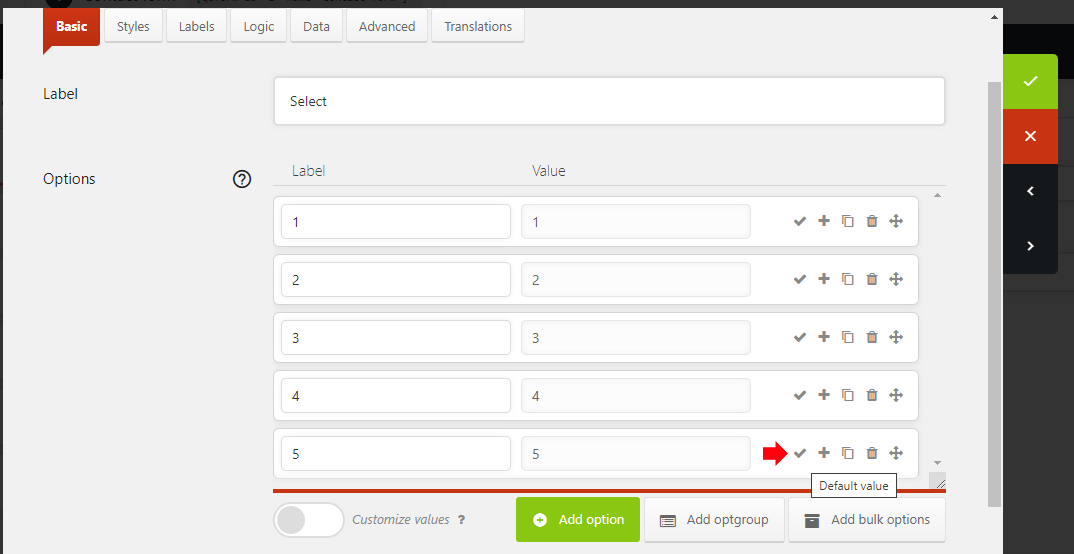
Hi, how to set default value, when using select menu or radio buttons field type? We use status field, which is not shown on form submission. We would set this status field’s valu via admin later. But be the default value “Arrived” when someone send a message.
There is any chance to generate QR Code from entry data to email, user scan and see their data
Hi
Unfortunately this isn’t possible, Quform doesn’t have the ability to generate QR codes or for users to see their data. It would require custom development.
Regards, TC
Hi,
I renamed the css selectors with the my unique ID, how come the CSS does not work for the signature? https://simpleconceptsmedia.com/test/
Also, how can I get an I agree checkmark like this https://simpleconceptsmedia.com/contact/
Hi
It looks like some of the signature HTML code is missing (the canvas tag), can you try adding the code in the Text tab of the editor in the HTML element settings (not the Visual tab)?
You can add a Checkbox field, make it have one option. There are instructions on how to configure this on this page if you expand the section “Configuring the consent Checkbox”.
Regards, TC