

1033 comments found.

I have bought phpformbuilder.
Tried the registration, but it failed. Which version of PHP does this work with? I have 5.5.36. (Would be difficult to change it). The error messaage I am seeing is: PHP Parse error: syntax error, unexpected ’:’, expecting ’;’ or ‘{’ in C:\Life_At_The_Villages\phpformbuilder\class\Autoload.php on line 7
Please advise. Thanks Peter
Hi,
Thanks for purchase.
You need PHP 7.4+ with cURL and openssl extensions enabled. PHP 5 is really too old, it’ll not be possible to work with this.
If you need anything else you’re welcome,
Gilles
I would like to buy it. I have a few questions. Is this a sotware to be install in my PC or is this an online access to customize the foirms as I needed? To buty the licence, what is included? Thank you
Hi,
When you buy you get a ZIP with all included inside : the form builder, the drag & drop form builder, the templates, the documentation.
All you need is a php server. There’s no installation process, you just need to have the files on your server and register your purchase. You can host the files both on your pc (localhost with mamp, laragon, ...) and on a remote server. The license allows 2 active installations, one for dev and one for prod. And I’m available for help of course.
This might help : https://www.phpformbuilder.pro/documentation/quick-start-guide.php#installation
If you need anything else you’re welcome,
Gilles
Hi Nice script pre sale question 1. is there any database also 2. Can I install this script at my xyz.com domain and generate code and install this code ( HTML FILE ) at abc.com (cross-browser)? I want to use this as email subscriber form . apart of that can i integrate with googlesheet .
Hi,
1. There’s no database. Unlike most other form scripts, I don’t want it to be overly complicated or impose a proprietary structure or functionality on the user. The PowerLite PDO library is integrated and allows you to do everything you might need. The drag & drop tool can generate queries automatically : https://www.awesomescreenshot.com/image/57611988?key=8b85eee4354fffaeab6b9ebe14d174f8
2. No you can’t. 1 license = 1 domain + subdomains. That’s how it’s supposed to be with all the items you can find on Codecanyon with the Regular license.
3. You can use the Googlesheets API : https://developers.google.com/workspace/sheets/api/guides/concepts
All of a sudden today I am getting an error message on all form submissions “Can’t connect to licensing server.” Nothing changed in my code. Did something change? Our system is currently down and need to get a resolution quickly.
Hi,
You didn’t change anything but your hosting provider probably did. This sounds like a firewall issue. You have to ask them to allow requests to https://www.miglisoft.com.
You also can test with curl-test.php. Open it in your browser, it should show the same result as https://www.phpformbuilder.pro/curl-test.php
Hi Migli,
I’m struggling with running plugins in dynamic-fields. I have same page as demo example “dynamic-fields-form-1” but I have there textarea with “word-character-count” plugin.
Plugin works fine for Job 1, but not loading for the dynamicly added fields.
Thank you for your help.
Hi,
You have to enable the plugins for the new fields in the Ajax loaded file (ajax-elements.php).
For instanxce: ``` <script> if (typeof(phpfbWordCharCount) == “undefined”) { window.phpfbWordCharCount = []; } phpfbWordCharCount[”#<?php echo ‘word-char-count-textarea-’ . $index ?>”] = new WordCharCount(”#<?php echo ‘word-char-count-textarea-’ . $index ?>”, { maxCharacters: 15 }); </script> ```
Please if you ask for help you’re welcome to renew your support on Codecanyon
Hello, I used the script a few years ago and was very satisfied with it.
Now I have another project where it could be helpful. I have a question about the configuration:
Is it possible to make certain times available for booking appointments with a date/time picker?
For example: I select tomorrow and am shown three options, such as 10-11 a.m., 11-12 p.m., etc.
Of course, it would be best if assigned times were no longer selectable at the end.
Any ideas or solutions for this? Thank you very much for your help!
Best regards
Hi Hatcha,
Yes you can. You can use the Material Date + time picker (https://www.phpformbuilder.pro/documentation/javascript-plugins.php#material-datepicker-example), or the Pickadate plugin (https://www.phpformbuilder.pro/documentation/javascript-plugins.php#pickadate-example)
You can customize the Javascript and set your own configuration in the plugin’s xml files : https://www.phpformbuilder.pro/documentation/javascript-plugins.php#customizing-plugins
Or use the plugins APIs for callbacks and events.
If you need anything else you’re welcome,
Gilles
Okay, thank you very much for your quick reply.
Thanks to you
hello, how to reset the license to use in another domain, i already sent you an email via your contact form
I answered your email
Hello, I have a couple of questions. Does the system have an admin panel? and can anyone create forms without restrictions?
Hi,
Unlike most others form builders it doesn’t have any integrated admin panel or database. You build your forms using the drag & drop form builder or the functions, then you have the freedom to do anything you want with the posted data : save into your database, send by email, ... etc.
Got it, thanks a lot.
Hi,
when using image-uploader with edit and crop-functionality, I get a warning when calling FileUploader::getPostedFiles($_POST[‘uploaded-images’]);
Warning: Array to string conversion in phpformbuilder/plugins/fileuploader/server/FileUploader.php on line 176
The config looks like:
$fileUpload_config = array(
    'xml'           => 'image-upload',
    'uploader'      => 'ajax_upload_file.php',
    'upload_dir'    => '../../../../../file-uploads/',
    'limit'         => 1,
    'file_max_size' => 4,
    'extensions'    => ['jpg', 'jpeg', 'png', 'gif'],
    'thumbnails'    => true,
    'editor'        => true,
    'width'         => 960,
    'height'        => 720,
    'crop'          => true,
    'debug'         => true
);Hi,
Thanks for purchase and for reporting this issue.
Please:
- Open phpformbuilder/plugins/fileuploader/server/FileUploader.php in your code editor
- Replace the
getPostedFilesmethod with this one:// old version public static function getPostedFiles($postedfiles) { $files = array(); $postedfiles = json_decode($postedfiles, true); foreach ($postedfiles as $file) { $f = str_replace('0:/', '', $file); $files[] = $f; } return $files; } // new working one public static function getPostedFiles($postedfiles) { $files = array(); $postedfiles = json_decode($postedfiles, true); foreach ($postedfiles as $file) { $file['file'] = str_replace('0:/', '', $file['file']); $files[] = $file; } return $files; }
If you need more help you can If you want you can email me your form URL and your FTP access, then I’ll make it work.
I’ll publish this patch in the next release.
Gilles
Hi, that worked perfectly! Thanks a lot!
May I ask another question?
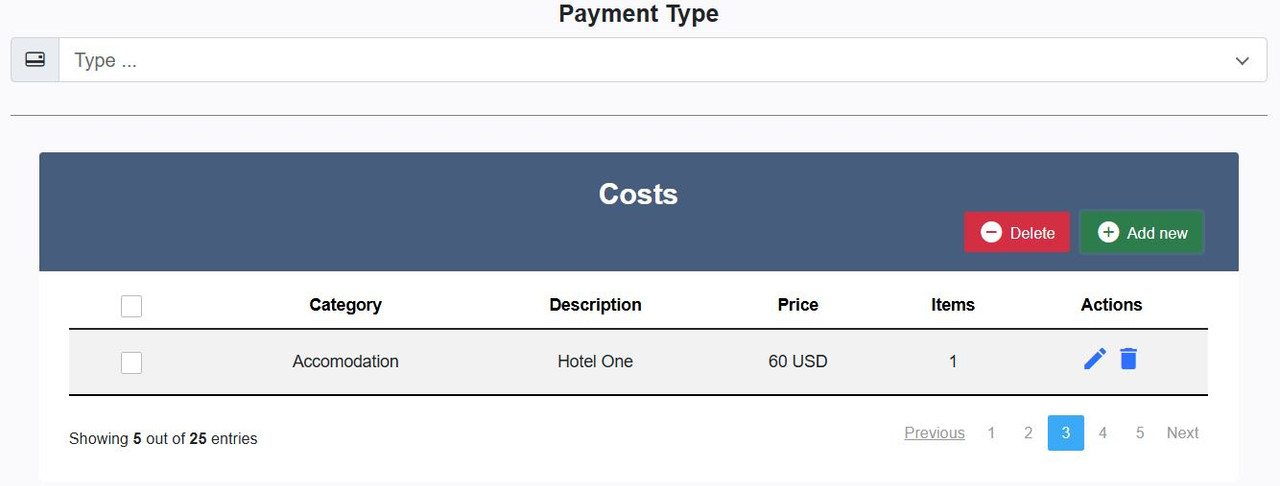
The costs table is a code sniplet which I want to integrate in the current form. It has it’s own javascript code and modal forms… I tried with .addhtml but it doesn’t work… Any idea how to get this to work? I also tried with plain phpformbuilder but I wasn’t able to get this to work…
I don’t know how your snippet works, so it’s not easy to really help you with this.
You can add your own Javascript to the page and load anything …
Your screenshot shows a CRUD (Create/Read/Update/Delete) ; did you have a look at PHP CRUD Generator? It might help.
Else you still can send me your access, you may hire me as freelancer to help with your snippet if you want.
Hi and thanks for your reply. What’s the best way to contact you?
You can email me from my contact form here.
I tried to contact you via the contact form but I get a “captcha error” – even though I can’t see a captcha anywhere
Oh hang on… In Google Chrome and Firefox I couldn’t see the captcha… But via MS Edge it worked
This form builder has no installation? and also does not have conditional logic?
Hi,
Thanks for purchase.
No, it has no installation. You put the files on your server and build your forms, then you can choose what to do after post & validation (DB recording, email sending, ...)
It has a solid condirional logic with the startDependentFields() and endDependentFields methods: https://www.phpformbuilder.pro/documentation/javascript-plugins.php#dependent-fields-example
https://www.phpformbuilder.pro/documentation/class-doc.php#startDependentFieldsThe dependent fields are also available with the Drag & drop Form Builder.
If you need anything else you’re welcome,
Gilles
Hi, I sent a message regarding having a form completed for me. Are you still open to that kind of thing?
Hi,
I didn’t receive your message. Could you please send it from here?
Hi i love this module.. how to add send email after record is saved o viceversa.. currently only allowme to choice send email or record database not both?
Hi,
Thanks for purchase.
The drag & drop doesn’t offer both simultaneously, but you can easily add the code to send email to the form php file. You’ll find some sample codes here: https://www.phpformbuilder.pro/documentation/class-doc.php#sendMail but if you want more help you can email me the details (instructions for email sending(s), form URL and FTP access) then I can make it for you.
If you need anything else you’re welcome,
Gilles
please helpme i had to move my form to another hosting.. but when i tried to register says….Unfortunately, installation failed because of this reason: The maximum number of allowed PHP Form Builder installations (2 installation(s) total) reached
please clear my other registration because your module required phpmail enable. and on hostinger dont allow this feature enable.
Done.
Hello, is it possible to add a payment method like Stripe to validate and send the form?
Hi,
Yes, everything is possible, you have to follow the Stripe documentation and add the required code to your form (you have to code, the drag & drop cannot do this).
how can i remove the header in the received mail. Now its showing php form builder and all the icons like bootstrap 4 , 5 bulma,....
Hi,
The documentation about emails and templates is available here: https://www.phpformbuilder.pro/documentation/class-doc.php#sendMail
In a nutshell: if you keep the default options the sendMail() method loads the default template from phpformbuilder/mailer/email-templates/default[.html/.css]
You can edit and customize the html/css as you wish.
In your PHP Form Builder do you provide any payment collection feature? For example ,l will create a student fee form for the course fee. Student admission fee collection…etc. I also needs common and major payment gateway integrations will be a good choice. Thank you.
Hi,
No, payments gateways are not integrated but you can integrate any if you wish.
Why dont you add razorpay payment gateway and other common pgs likes paypal,stripemskrill..etc So, that it will be very useful for us to manage.
There are two reasons for this:
- I’d rather not overload the package with proprietary features. I would prefer to publish an extension separately.
- I simply don’t have the time at the moment for this development.
I cant open the fromular
Hi,
Thanks for purchase.
When you have an error 500 (white page) the first thing to do is to turn display_errors On in your php configuration (php.ini) Then you’ll see the details of the error which will help to understand what happens.
https://www.phpformbuilder.pro/documentation/help-center.php#white-page
Alternatively you can also look for the error into your server logs.
You probably have this error because your folder structure is wrong.
Please have a look here at the quick start guide. I just edited it to make things the most clear as possible.
Your templates folder at the same level as the phpformbuilder folder. The “documentation” folder is also required at this time, at the same level as the phpformbuilder folder too.
If you want you can email me your FTP access, then I’ll make it work.
Gilles
I upgraded recently to the latest version of phpormbuilder. You used to be able to get the form id of an existing for with the code $form->form_ID. It is no longer working. How can you get the form ID from an existing form?
Hi,
All the properties have been renamed to small camelcase standard. Now you can get the form id with $form->formId
If you need anything else you’re welcome,
Gilles
Any integration with Mailwizz?
Hi,
You can use Mailwizz API with PHP to send any request: https://api-docs.mailwizz.com/
we use phpformbuilder
Hi,
Is it possible to see changelogs on GitHub that show details of the specific lines of code that were changed? Or at least to see which files were modified?
We’ve made some custom adjustments to the system, and with the update to a new version, we want to avoid overwriting those changes. That’s why we’d like to apply the updates manually.
Thanks!
Hi,
You can use a file comparison program like Meld or Beyond compare
Hello, how do I know which files have been adjusted or do I have to work through all the files by chance? sorry, but the answer is not very helpful. if I take the last update as an example, I don’t recognise which files are involved.
version 6.0.5 (12/2024
Bug Fix: – fix the PHP validator’s ‘required’ validation when the fields are not posted – fix the file uploader code generated by the drag & drop form builder – fix the image uploader’s editor to save files & thumbnails after editing – fix the checkbox columns width in the drag & drop form builder – fix php typings in the drag & drop form builder for php 7.4
The tools I suggested you to use allow to see the differences between folders and files at a glance. You don’t have to walk through each folder / file.
For instance with Beyound compare, load your current version’s folder on the left, the new version’s folder on the right then click the “Diffs” button. You’ll see only the files & folders that have been edited.
If you modify the Code of the program you have to manage the versions of these files by yourself, I have no better way to help.
My forms have a fair amount of fields which become visible depending on radio button selection choices. Is it possible to make the “required” property dependent on the visibility of an item? In short: if a form item is hidden, the “required” property is ignored.
Hi,
Thanks for purchase.
Yes, it’s a built-in feature. When you use the dependent fields plugin the validator ignores the hidden fields.




