6659 comments found.
Hello, I have presale question. Can I use your plugin to pass data from one form to another?
I’ve been using this plug-in for years and for the first time I’m finding a weird issue. The form only works for logged-in users. Have you seen this issue before? When users press submit button it loads as if it’s going to display the confirmation messages and then does nothing. I tried changing confirmation to another page after submission and it doesn’t work either.
Hi
I haven’t seen this issue before. If you open the browser dev tools with F12 and go to the Console tab, then submit the form, are there any errors in the console?
If possible, please try checking for a conflict with another plugin using this method.
If you could post a link to the page or send the link privately using the contact form on our profile page, I can test the form.
Regards, TC

How can I do in the example https://www.quform.com/examples? Booking, that when you choose your professional, the chosen time will no longer be available for that professional, and cannot be seen in the Hour selector?
How can I do in the example https://www.quform.com/examples? Reserve, when choosing your professional, if you already have all the hours occupied, you cannot choose the professional or the schedule selector does not appear
Hi
Unfortunately, there isn’t a feature in Quform to book time slots like that, which would make those time slots unavailable to others. You’d probably need to use a booking plugin for this.
Regards, TC
Well, if that is not possible, how could I make it so that if I put prevent duplicate as a value in time, that time will no longer appear in the time select, just that, until you select all the hours and the time select is hidden
Choose your professional*, there would only be one, there would be no more professionals
THX a lot
Hi
You can prevent duplicate times by adding a “Prevent Duplicates” validator on the Advanced tab of the field settings, but this would mean this time could only be chosen once, no matter what day was selected.
A booking system would be required to book time X on day Y.
Regards, TC
You have not understood me, I mean that this prevent duplicate, for example 10:00AM, no longer appears in the select
Hi
The Prevent Duplicates option will not remove it from the list. It would be possible to do this with custom development, though.
The problem is that for regular bookings, the booking Time is connected to the Date, so when a different Date is selected, the system would need to know what Times are available on that day. If you remove the 10:00AM on the list, it would be removed for ALL Dates. This is where a booking system would be a better option.
Regards, TC
I don’t care if the time is deleted, each professional will have their form, and I don’t want a reservation system. I don’t need it, if you can tell me how I could delete 10:00am for example when it is already selected by prevent duplicate
Hi
Okay, here is the code to delete 10:00am after that time has been selected: https://gist.github.com/ThemeCatcher/a990bccded6b9b90d098293830ad1679 You can add it using a plugin like Code Snippets, or add it to the WP theme functions.php file. See the comment below the code for how to set it up.
As I mentioned previously, if 10:00am is selected this code will prevent 10:00am from being selected again, no matter what date is selected.
Regards, TC
I have a form that uses Select Menu options from my database via add_action(‘quform_pre_display_12’, function (Quform_Form $form). (That works, and I’ve used it before for other forms.)
For reasons that are likely over complicated, I’m redirecting the results to a custom query to interact with my database.
I’ve tried… $player = $_POST[‘iphorm_12_3’]; $school = $_POST[‘iphorm_12_21’]; $posting = $_POST[‘iphorm_12_13’];
$player = $con->prepare(“INSERT INTO a_potw(pid,schoolID,posting) VALUES (?,?,?) “); $player->bind_param(‘sss’,$player,$schoolID,$posting);
...to no avail.
Do you already have an add_action/add_filter set up to handle something like this?
Thank you.
Hi
I’m not 100% sure I understand what you are trying to do, but I believe the hook you might want to use is quform_post_process_12 which is called when the form is successfully submitted.
Also, you’d want to use “quform” instead of “iphorm” when looking getting the $_POST variables, or use $form->getValue.
Regards, TC
Thank you…I’ll dig into that.
I’m trying to Insert data into my own data table (Table A), which is inherent through Quorum, but if the option (player name) isn’t on the list, I was going to have the User (coach) add the name, which would require inserting data into two tables (Table B and Table A).
Hi
Sorry, I don’t understand. Do you want to insert the data when the form is displayed (quform_pre_display), or when the form is submitted (quform_post_process), or something else?
Regards, TC
Hi
am using this datepicker :
https://support.themecatcher.net/quform-wordpress-v2/guides/customization/persian-calendar-solar-hijri/This datepicker can be configured to allow the selection of a date range within the one picker as mentioned on the developer page:
http://keith-wood.name/calendarsPicker.htmlHow can I activate this?
Thanks
Hi
You should have code similar to this already:
jQuery(function ($) {
    if ($.fn.calendarsPicker) {
        $('.quform-field-1_3').calendarsPicker({
            calendar: $.calendars.instance('persian', 'fa')
        });
    }
});
It looks like you can enable the range by adding the rangeSelect: true option (note the extra comma added at the end of the line above as well):
jQuery(function ($) {
    if ($.fn.calendarsPicker) {
        $('.quform-field-1_3').calendarsPicker({
            calendar: $.calendars.instance('persian', 'fa'),
            rangeSelect: true
        });
    }
});
Regards, TC
Works great, thank you
HI,
In your form there is no URL element…. I tried putting regular text element and validate as URL but I don’t see that options either. I also checked the documentation here https://support.themecatcher.net/quform-wordpress-v2/ but i could not find a way to do that, is that possible or not?
Thanks
Hi
You can use a Text field and on the Advanced tab of the field settings, add a Regex validator, then enter a pattern to validate a URL. For example:
/^(https?:\/\/)?([\da-z\.-]+)\.([a-z\.]{2,6})([\/\w \.-]*)*\/?$/
You can create a custom validator if you want to use something else.
Regards, TC
Excuse me
I purchased on 12/09/2024
Knowing that I am working on an old version
And I downloaded the new version on the site
And I find it working fine without me migrating
Did I miss something
When I open the migration page, I find it telling me a message stating that
Migration is not possible because no forms from Quform 1.x were found in the database.
Did I miss something
Hi
The migrator wasn’t able to find any forms from Quform v1 in the database, are you sure you were using this old version? It was in 2017 when Quform v2 replaced it.
Regards, TC
I am using version 2.14.0 I purchased and installed it directly and did not notice any change or modification in the plugin Is everything going well with me or is there something wrong?
Hi
The migrator is for migrating forms from a very old version of Quform. If you don’t use any old forms, you don’t need to use the migrator. So everything is fine 
Regards, TC
I noticed something strange that your component is installing itself as a link to my site and its name and path have been detected. Can you provide any help or solution to this problem? I do not want it to be presented as a link. Please escalate the matter.
Hi
I might be misunderstanding what’s happening here, but it sounds like the form has been added inside a link tag:
<a href="..."> ... form added here ... </a>
Can you check the HTML surrounding where the form is added?
If this is not the issue, could you please post a link to the page with the form, or send it privately using the contact form on our profile page?
Regards, TC
Hello ,
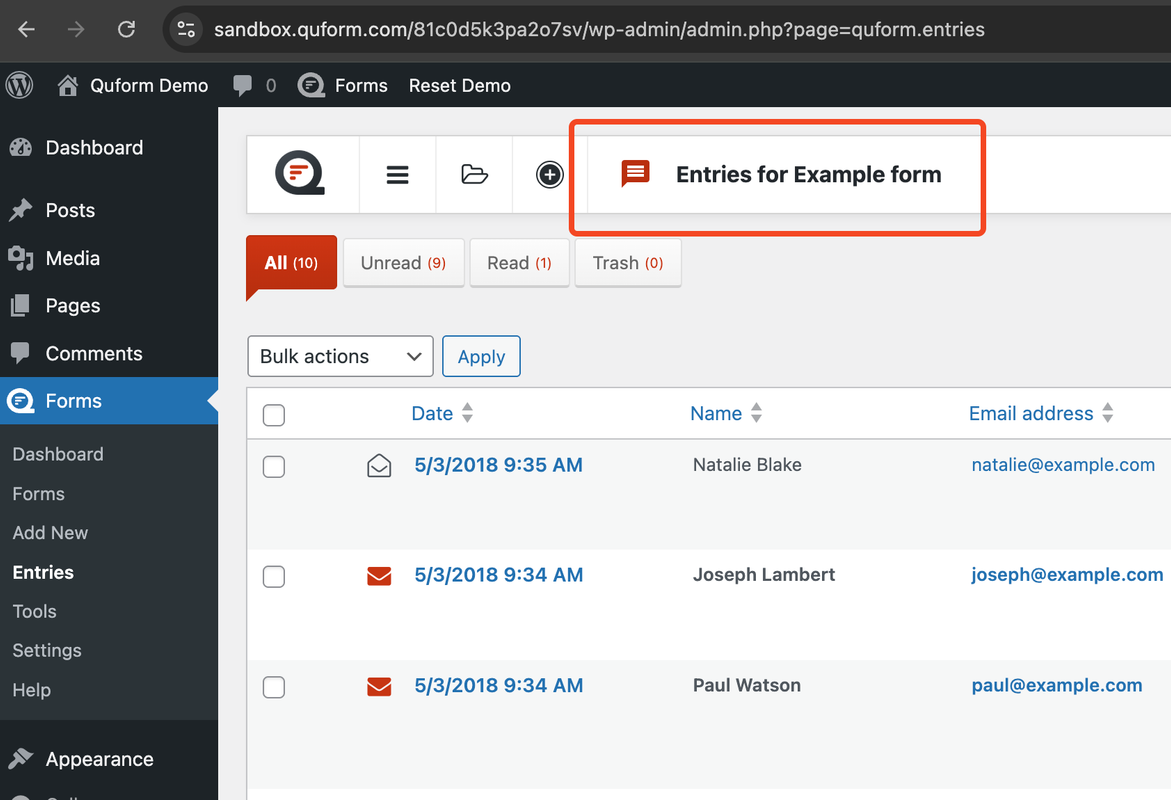
I’m using your demo server, and I’ve encountered an issue. When I try to view the entries, there’s no option to switch between forms. I have two forms in the form section, but when I check the entries, only the ‘One form entries’ is displayed. I’m unable to switch forms directly from the entry page, although I can see the option in the form section.
In my opinion, it would be more convenient for users to manage and view entries for each form directly, rather than having to switch forms every time by navigating back to the form section.
https://i.postimg.cc/gcqcyv3M/SCR-20241204-qqpi.pngHi
Thank you for the feedback!
You can click the folder icon to the left of the area highlighted in your screenshot, to switch between forms.
By default it will show only the entries for the first created form. Because each form can have different table layouts, it only shows the entries one form at a time.
We are planning to make some improvements to this page in a future update, to be able to choose the from these options:
1. Show entries from a specific form
2. Show a simplified view of recent entries from all forms
3. Show a list of forms with how many read/unread entries there are
Unfortunately I don’t have an ETA for this yet.
Regards, TC
Is this plugin right for me? Here are my requirements:
Users: QA Specialist (auditor) Agent (frontline agents) TL (team leader or agent’s supervisor) Manager Administrator
Flow: A QA logs in to the website. Loads the QA Form Evaluate/audit agent’s transaction and fill out the QA Form (this form will auto-calculate the QA score of the agent). Once the form is saved, the agent, the QA, and the TL will receive email notification about the new evaluation (with the score and content of the evaluation)
Then, the agent will need to log in to the website, should see a notification there is a new audit/evaluation. When the notification or audit link is clicked, the agent will see the QA Form that the QA specialist filled out. The agent cannot edit this and the only option he/she has is to acknowledge the evaluation or submit a Dispute.
If acknowledge, another email notification will be sent to TL, agent and QA.
If disputed, the QA needs to review again the agent’s transaction and will have the option to either maintain the score or accept the QA mistake of the audit/evaluation.
Then the agent can then acknowledge it.
The QA will then extract report like CSV file to do data analysis of the evaluations (let’s say weekly, monthly, or even daily).
If possible can it display on a certain page the average QA score performance per agent, per team, per support channel?
Hi
Quform isn’t a good fit for this, as many of these requirements would need custom development.
Regards, TC
hello can we store all form data in wp database tables?
sorry just see in features that is possible
if i use your product, what is the best solution to retreive the information data from those tables? for example, I want to display all entries about a specific user (i can select it by email), i want to display all data about this youser sended with a specific form, in a public page or better in his user profile page. Do you have some suggestions? thanks
Hi
It will require some custom code for this. We have an example plugin here that will display the entries for the currently logged-in user, for a specific form. If you click Download ZIP at the top right, you’ll get an installable WordPress plugin. See the description at the link for the shortcode to use.
You may need a developer if you need to customize this.
Regards, TC
i think this is perfect…. is what i need because simply i can create a page, and with 3-4 shortcodes i can display results for 3-4 different forms (only entries for the logged user…). right?
just if you can confirm me, because this is essential for my work, without this all form entries are unuseful…...
Hi
Yes, you can add 3-4 shortcodes to display results for 3-4 different forms.
Regards, TC
is there a way to add css to the Submit button icon, through the Custom CSS & JS in order to increase the size, color and so on?
Hi
You can go to Edit Form – Settings – Style – Global, at the bottom click “Add global style”. Choose the selector “Submit button icon” and enter the CSS to customize it, for example:
font-size: 16px;
color: #123456;
Regards, TC
I just bought this and trying to work with it. Right now it seems I can do much of what I needed it to do including dynamic field and math calculations.
However, I do notice 2 things that are not working in my form setup:
Form set up:
Page 1 – choose between Test 1 or Test 2
- – if Test 1, then all of Test 2 pages are hidden
- – if Test 2, then all of Test 1 pages are hidden
Test 1
    Page 2    - Test 1 start
    Page 3    - Test 1 page
Test 2
Page 4 - Test 2 start
Page 5 - Test 2 pageTwo things not working:
- 1. The forms paging indicator shown at the top of the form doesn’t reflect the fact I have certain pages hidden
- - choosing Test 1. The paging still shows all of Test 2 pages, and vice versa
- - current fix is to not show the paging indicator
- 2. The SUBMIT button does not understand the end of the actual chosen path
- - in the form setup, Test 1 pages are before Test 2 pages. So when the user finishes Test 1, the submit button should show up. However, the submit button does not. The submit only shows up at the end of Test 2 pages
- - current fix is to hide the NEXT button (via CSS) and to create a separate Submit button via the html element<l/i>
Could I have missed a setting somewhere?
Hi
In this simplified situation you could have two separate forms, and the progress bar and submit button would be as expected.
1. If you want to keep a progress bar, you could add an HTML element to the top of each page with the HTML or an image for a progress bar showing how far along they are on that path.
2. Instead of a separate button, you could edit the submit button for the Test 1 path, choose “Next button type”: “Default button” and set “Next button text” to “Submit”.
Regards, TC
Hello.
Is this math possible?
hi. i have 5 licenses. but i am not sure where or what site it is loaded.
Hi
We have a URL where you can check what site a purchase code is associated with:
https://api.quform.com/wp-json/quform/v1/lookup?purchase_code=xxxxxReplace xxxxx with the Quform purchase code. It’s a little basic, but if the code is in our system it will display the site URL.
Regards, TC
how to integrate it with klaviyo
Hi
It should be possible to integrate with Klaviyo through Zapier (or a similar service) using the Quform Zapier add-on.
Regards, TC
Hi, do u plan promotions of QUFORM2 for BlackFriday/CyberMonday? If yes, when will the promotion be open? Thanks.
Hi
Yes, we are planning a promotion during the sale. The sales starts at Wednesday 20 November 1am (UTC).
Regards, TC
Hi Is it possible to have a numbers field? Here is an example:
https://www.w3schools.com/tags/tryit.asp?filename=tryhtml5_input_type_numberHi
You can add a Text field to the form and convert it to a number field by adding this code to Forms – Settings – Custom CSS & JS – Custom JavaScript:
jQuery(function ($) {
    $('.quform-field-1_3').attr('type', 'number');
});
Replace 1_3 with the field unique ID.
Regards, TC
Thanks, much appreciated.
Hi,
I want to fill out a form with attached documents, which will then be sent to a Google Drive account, creating a separate folder for each order or client.
Is it possible to do this with your Form?
Thank you very much.
Hi
There isn’t a direct integration between Quform and Google Drive unfortunately, so it would require using a 3rd party service or custom coding.
It should be possible to do this through Zapier using the Quform Zapier add-on. The file would need to be saved to the server though, so that it can be downloaded from the URL of the file on the server by Zapier and saved to Google Drive.
Regards, TC
hi, how can I style the Form Outer Wrapper trough the Settings / Custom CSS & JS…
Also if I want do this for the input text area to be height: 140px; resize: none;
thanks..
Hi
The Form Outer Wrapper selector is .quform to target all forms, or .quform-1 to target a specific form ID. For example (to target form ID 1):
.quform-1 {
    padding: 40px;
}
To style the textarea fields (all forms):
.quform .quform-field-textarea {
    height: 140px;
    resize: none;
}
Regards, TC
Hello,
I want to disable the forms in the admin area. but I want these forms that I have disabled to be actively available in the website interface area and continue to process data. is there a method to do this?
Hi
I sent you an email about this.
Regards, TC