434 comments found.

Hi Webvars, I am the owner of Fixed TOC (Purchase Code: b18e7863-8a35-45f6-b49f-0683e703c1b0). I’ve lost my login password for your support site and haven’t received a reply to my previous emails. Please help me recover my account. My name is Vinh Nguyen Van
I haven’t purchased a domain yet, how am I meant to use it without knowing what my domain name will be?
You can use it for testing on localhost, without a domain and code verification.
I’m trying to reset and reinstall WordPress, but I keep getting the message “This purchase code is already registered to another domain.”
How can I fix this?
Hello, would you please update the plugin?
Hi, the header “Contents” is set as “H2” tag. This may affect SEO. How can I remove H2 tag for the header ?
Set in General/Common/Title Tag
How can you set it so that the table of contents is only displayed when an article reaches 600 words, for example?
Sorry, It can’t limit from the words. It can only limit from the headings number.
Hello, Where can I download the latest version? When I download from CodeCanyon, I still get the old version 4.1.0 (Nov 20, 2024) while the Changelog is the newer version 4.2.1 (Dec 23, 2024) Have you updated the Plugin file on CodeCanyon???
Hi,
Is there any way to set automatic activation by category with your plugin?
Our problem is that dynamic content and ACF/SCF fields need to be called. This would break the whole layout.
Thanks in advance.
Sorry, not support.
I’ve found he has a bit of a problem on mobile, the hover button won’t expand the TOC when clicked on mobile, it disappears!
Please, supports field bracket syntax ?
Can you search for specific content in a free search field?
Is it possible to always display the floating TOC icon whether scrolling up or down? Currently, it seems that the floating TOC icon only appears when scrolling up.
Yes. Uncheck Trigger Button > Trigger Toggle on Scroll
I have activated the license on a domain, now I change the domain, how to deactivate on the old domain and reactivate on the new domain
I am using the classic editor plugin and the new TOC version, but I cannot find the option to edit the `TOC` style. Previously, this option was located in the customizer.
Wheter output support rich snippet schema json or microdata ?
hi bro, can we automatically add numbers to h2 headings to make them prominent with this plugin?
Sorry, I’m not sure what you mean. The plugin provides many list-style-type. See https://tocer.webvars.net/documentation/list-style-type/
I don’t mean the list style of table of content, I mean the style of headings belows the table of content. I wonder if the plugin automatically add the increasing numbers before headings like the following example : 1. heading h2 # 1 2. heading h2 # 2 3. heading h2 # 3 .....
No. The plugin doesn’t modify headings like that.
When using the Tocer plugin with PHP 8.3 and WordPress 6.7.1, the following PHP errors occur. Can you improve the plugin so that these errors do not occur with PHP 8.3?
===
[27-Nov-2024 06:22:59 UTC] PHP Deprecated: Using ${var} in strings is deprecated, use {$var} instead in /home/public_html/public_html/wp-content/plugins/tocer/inc/class-composite.php on line 264 [27-Nov-2024 06:22:59 UTC] PHP Deprecated: trim(): Passing null to parameter #1 ($string) of type string is deprecated in /home/public_html/public_html/wp-content/plugins/tocer/inc/class-heading.php on line 230 [27-Nov-2024 06:22:59 UTC] PHP Deprecated: trim(): Passing null to parameter #1 ($string) of type string is deprecated in /home/public_html/public_html/wp-content/plugins/tocer/inc/class-heading.php on line 231 [27-Nov-2024 06:22:59 UTC] PHP Deprecated: trim(): Passing null to parameter #1 ($string) of type string is deprecated in /home/public_html/public_html/wp-content/plugins/tocer/inc/class-heading.php on line 230 [27-Nov-2024 06:22:59 UTC] PHP Deprecated: trim(): Passing null to parameter #1 ($string) of type string is deprecated in /home/public_html/public_html/wp-content/plugins/tocer/inc/class-heading.php on line 231 [27-Nov-2024 06:22:59 UTC] PHP Deprecated: trim(): Passing null to parameter #1 ($string) of type string is deprecated in /home/public_html/public_html/wp-content/plugins/tocer/inc/class-heading.php on line 230 [27-Nov-2024 06:22:59 UTC] PHP Deprecated: trim(): Passing null to parameter #1 ($string) of type string is deprecated in /home/public_html/public_html/wp-content/plugins/tocer/inc/class-heading.php on line 231 [27-Nov-2024 06:22:59 UTC] PHP Deprecated: trim(): Passing null to parameter #1 ($string) of type string is deprecated in /home/public_html/public_html/wp-content/plugins/tocer/inc/class-heading.php on line 230 [27-Nov-2024 06:22:59 UTC] PHP Deprecated: trim(): Passing null to parameter #1 ($string) of type string is deprecated in /home/public_html/public_html/wp-content/plugins/tocer/inc/class-heading.php on line 231 [27-Nov-2024 06:22:59 UTC] PHP Deprecated: trim(): Passing null to parameter #1 ($string) of type string is deprecated in /home/public_html/public_html/wp-content/plugins/tocer/inc/class-heading.php on line 230 [27-Nov-2024 06:22:59 UTC] PHP Deprecated: trim(): Passing null to parameter #1 ($string) of type string is deprecated in /home/public_html/public_html/wp-content/plugins/tocer/inc/class-heading.php on line 231 [27-Nov-2024 06:22:59 UTC] PHP Deprecated: trim(): Passing null to parameter #1 ($string) of type string is deprecated in /home/public_html/public_html/wp-content/plugins/tocer/inc/class-heading.php on line 230 [27-Nov-2024 06:22:59 UTC] PHP Deprecated: trim(): Passing null to parameter #1 ($string) of type string is deprecated in /home/public_html/public_html/wp-content/plugins/tocer/inc/class-heading.php on line 231 [27-Nov-2024 06:22:59 UTC] PHP Deprecated: trim(): Passing null to parameter #1 ($string) of type string is deprecated in /home/public_html/public_html/wp-content/plugins/tocer/inc/abs-toc.php on line 378
Okay, I will make it compatible with php 8.3 at the next version.
thank you very much!
1. Can you let me know when the next update will be released?
2. In the block editor, when using the Page Break block ( https://wordpress.com/support/wordpress-editor/blocks/page-break-block/ ) to divide a long post into multiple pages (parts), a Fatal Error occurs in Tocer when trying to navigate to heading items on the second page or later. I noticed this issue right after Fixed Toc was changed to Tocer and had informed you about it. You will find the problem when testing after dividing a post into pages using the Page Break block.
I have tested, it worked for me. Maybe your WordPress context is different. something conflict. Request support here https://codecanyon.net/item/fixed-toc-wordpress-plugin/7264676/support. And give me a page link for checking. So I can figure it out. It’s better to provide PHP error log. Thanks your feedback.
1. It is compatible with PHP 8.3 starting from version 4.1.1. Have you updated it? Minor versions are no longer released on Envato. If your plugin has been updated to version 4.1.0, you can simply update it via the WordPress Plugins backend. See https://prnt.sc/ggJPsAFtjbRO
2. My apologies! I found the issue. I tested it with shortcode turned off, so the error didn’t appear. Please temporarily add the following code to the loader.php file. I will fix this in the next version.
require_once 'feat/class-shortcode.php';Check the demo https://tocer.webvars.net/demo-page-breaks/2/#tocer-section-7-h2
Thanks. Currently version 4.1.0 is installed. I checked the option “Auto Update (beta)” in the plugin’s settings page, but it’s not automatically updated (and no update notice is displayed.) Of course, the license is registered for the plugin:
The current site is activated for using the Tocer plugin.
Your purchase code has been successfully registered for "" and all its subdomains.I just updated it to 4.1.4. Thanks.
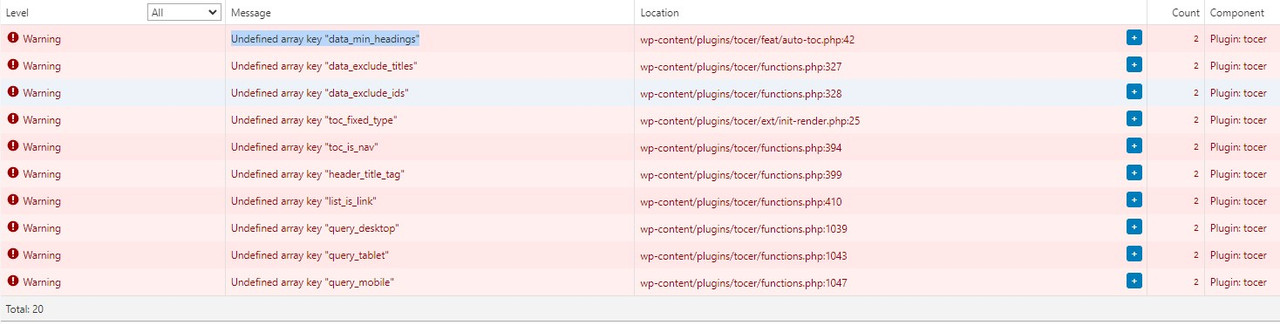
too many warning https://i.postimg.cc/wM9bt1fN/Screenshot-2.jpg
Which version you use? Submit your support here https://codecanyon.net/item/fixed-toc-wordpress-plugin/7264676/support
2 weeks ago I ask you this:
Sorry for my late answer. I hope the plugin will als wotk without Gutenberg! Not everbody wants Gutenberg. I disable it with the plugin “Disable Gutenberg” see here https://de.wordpress.org/plugins/disable-gutenberg/
now it works the new update also without Gutenberg and I must not use the shortcode?
will this plugin work out of the box with the theme twenty tweny four?
Yes. The demo https://tocer.webvars.net/demo-1/ is juset created by twenty twenty four. Tocer is optimized for block themes, and also support almost themes and plugins. You can request support if you have compatible issues.