1138 comments found.
The last update of your plugin was on 1 May 2024. We constantly get the following error from behind the wordpress courtain: “The WC_Cart::get_cart_url function is deprecated since version 2.5. Replace with wc_get_cart_url.”
Hello,
The Events Schedule plugin is using wc_get_cart_url function. You can check in the api.woo.php file, line 82. This deprecation warning might be related to another plugin on your platform. All the best.

there is a button to subscribe to the calendar (all events dates/times) ?
all the changes in the admin panel will reflect automatically all changes to all people who subscribed to the calendar (on their end in their calendar google/etc will show all events coming up, with updated times/dates if any changes) ?
thank you
Hello,
No, the add to iCal button downloads an ics file with the info of the event at that moment and it will be added to visitors calendars with that info. Future changes you make to your events will not make changes in visitors calendars. All the best.
Hi I think i found a bug. Even though I have a event that is repeated weekly, it only show until the start of january. I want it to show minimum 3 months ahead. How to do that?
Hello,
The repeating functionality has an endless loop protection in place, for schedules which are set to show all days. You have two options available, either using the Show More button to display more weeks instead of show all or adjusting the endless loop protection. You can edit the class.event.class PHP file, inside the Classes folder, and go to line 68 to check the code for that. If you need more info, please open a ticket on our support platform. All the best.
But all events stops February 4th and there is no option to display this “Show more button”. Where do I find that setting?
The button will not be displayed if your schedule is set to show all days and the events will be limited by the endless loop protection. You need to change show all days to 4 weeks and add a label for the show more button. This way, the button will increment 4 more weeks each click and you can have an unlimited number of events. All the best.
Thank you, I changed it to that and now it works. But there is still this problem that if I want to show all days, it does only show until february. Strange.
This is the normal behaviour if you select show all days, due to the endless loop protection. We had to limit the maximum number of repeating instances, to prevent the schedule from trying to load an infinite number of events. I mentioned in my first reply that you can edit the class.event.class PHP file, inside the Classes folder, and go to line 68 to change this limit. All the best.
1) Does your plugin allow each registered user to post their own events (from their own account)? 2) Can I create different calendars for my website, for example, cultural events calendar, sports calendar, social events calendar, etc.?
Hello,
The events are a custom type of posts, so they can be added by users who have the right to create posts. The schedule builder is an admin panel. You can create as many schedules as you want, in the same page or different pages, using any style you want. All the best.
Is it possible to display different types of events on separate pages within the same website?
For example: - A dedicated wp page that only shows Sport Events - Another wp page that exclusively lists Cinema Events
The goal is to avoid grouping all events together on a single page and instead provide clear, categorized event pages.
Hello,
Yes, you can do this by creating a separate schedule for each page and selecting in the schedule builder only that particular Type. We also sent a reply to your support ticket. All the best.
Hi, I have a pre-sales question. Do you have Fundraising function??? how does it look like if it have?
Hello,
We do not have such a dedicated option, but you can use the action button of each event to send to a custom URL of your fundraising page. All the best.
Hello, I am thinking in buying another license, but this time I am wondering if I can link a button to buy the tickets in a external website. This button must be visible in the single page event.
Thanks in advance.
Hello,
Yes, you can use the action button for this and assign it a custom URL. The button will be displayed in the single event page and in the modal and also directly in the schedule for Plain List and Weekly Tabs styles. All the best.
I’m considering buying this plugin. Is it compatible with Gutenberg and core blocks?
Hello,
Yes, it should work fine adding the schedules in page through shortcodes with Gutenberg. All the best.
Thank you
HI, How would I use this to allow for 500 bookings for the same time slot for a webinar please? Possible?
Hello,
If you use our integrated booking through WooCommerce, just set the event capacity at 500 and it should work fine. They will all have to go through the default WooCommerce cart and checkout process, even if the price of the ticket is 0. All the best.
I see. Thanks.
I have replied on a ticket (21124) – 7 days ago without any input from you. This is not cool at all. Why should we have to post here for you to respond in an attempt to save face. You can do better.
Hello,
We checked ticket 21124 and we did send a reply, a few hours after the ticket was received. Maybe there was an issue with the mail delivery or the address is not correct. Please check the junk folder as well. Our reply was the following: ”This could be caused either by a local conflict or an issue which appeared after the import. Please try to clear and save the schedule builder settings again. You can also try to temporary deactivate other plugins to test for a conflict. If you send us WP login info fro your dashboard, we can also investigate further the source of the issue.”
If you are able to find our reply, please use the same ticket to reply. If not, please open a new ticket and make sure the mail address is correct. For privacy reasons, we can not write here the mail address that we sent the reply to, but it was sent 7 days ago.
All the best.
I saw your emails and I have replied twice via email on different days before coming to write here on the comments. Your support website, as far as I can see doesn’t provide a place to add replies to the ticket when you manually connect via purchase code. Which is strange. I have opened another ticket as a follow-up. I hope to get immediate help.
We use Zendesk as a support platform, any reply to our mail will get to us as a reply inside your ticket. If I understand correctly, you did get our reply, but we did not get your next ones. In this case, maybe they ended up in the junk folder, though we do check this one as well. Hopefully, we will get your next replies this time. We received your new ticket and we are currently investigating the source of the conflict on your platform, you will get a reply shortly. All the best.
Hello, I still keep getting the “Critical Errors” on your plugin pages both front-end and back-end. I have opened a support ticket where I have shared an email auto-sent by WordPress specifically pointing out the lines of code on your plugin that are causing these critical errors. I hope for a speedy fix to this issue.
We sent a reply to your support ticket. All the best.
I have replied to the ticket, and I only reply here because previously you had said you could not see my replies via email. Also, your response as the author of this plugin, given that I have given you my WordPress Logins and shared the error lines is really disappointing. I need a quick fix to this please.
We appreciate that you have shared the login info and an error log, but this is not always enough for us to identify the source of the issue. Since your error is related to bookings and there are no current bookings, it is natural to ask you if you deleted any bookings. This is important info needed for troubleshooting. We will investigate further and let you know how it goes through the open ticket. All the best.
I have provided you with all this information you are asking via the ticket. Your support is terrible, just awful. It is as if you do not understand your own plugin. Why would you ask me the same question over and over, with the same answer, yet no solution. I want an immediate refund.
We usually do not jump to this, but in this situation, it is probably for the best, for both sides. You can find the refund request form here: https://codecanyon.net/refund_requests/new All the best.
Hello!
I’ve said it several times: We love your calendar! 
Another question for you: We have a recurring appointment. Everything works so far. In the description of the appointment we would like to specify a registration deadline and date, which should always be 1 day before. Is there a possibility to implement this through an “advanced shortcode”?
Currently I always write “the day before” instead, but explicitly mentioning a date would be better. And I don’t want to create a separate appointment for each event – that would contradict the purpose of the calendar.
Thank you for your help and kind regards
It is possible, but this shortcode or custom field would have to be custom coded. So, you will need to enlist the help of a professional developer for this. All the best.
Hi!
Thank you for the feedback. Our customer decided not to do this because of additional costs. Unfortunately, we now have another requirement that I didn’t know about before: Participants can register on the event page using the Elementor contact form. An email will of course be sent to the organizer. However, it is of course necessary that he also knows which date (for the recurring event) the participant has registered for.
Is it possible to integrate the event date there? Unfortunately, an attempt with the shortcode in the email body of the Elementor form did not work.
Thank you very much and kind regards
This is a pretty similar request, you will need a way to pull the timestamp, just like our default WooCommerce booking. When accessing a single event page from the schedule, the URL will have a timestamp, used to display the date. So, you will need a date field, which can either be empty, for the visitor to fill out, or pre-filled, in which case the field has to pull the timestamp from the URL parameter. All the best.
Hi, i am creating a page for a client. On this site, customers can booking some cooking events.
Is is possible to show the remaining capacity and the total capacity in the list overview or/and modal (eg. 20/25 seats)? I see some comments before about that…
Maybe this is possible to make with override the corresponding template file in the child-theme. But i can’t find the correct variables (i’m not very firm with vue )
And another quick understanding question: Does i need a “ticket” product for every Cooking-Event even all events have the same pricing? Capacity is assing to the event itself, as i see?
Greetings
Hello,
Displaying the capacity in the schedule would require custom coding, to pull the info and adding it in to the style template PHP file. By default, we do not have an option to display the capacity in the front-end, only when the maximum capacity is reached, a sold out label will be displayed instead of the booking button. You can use only one ticket for all your events, if you are happy with the same price and ticket name. All the best.
OK, but that would still be a useful display in the event output?  I saw today that it is possible to order more tickets than are available: As a test, I created an event with 1 capacity and was still able to select and order 2 tickets in the shopping cart.
But after ordering, the message correctly appears that the event is now fully booked – but now overbooked.
I saw today that it is possible to order more tickets than are available: As a test, I created an event with 1 capacity and was still able to select and order 2 tickets in the shopping cart.
But after ordering, the message correctly appears that the event is now fully booked – but now overbooked.
You can also assign a custom URL to the sold out label, so it becomes a button, if you think it will be useful to redirect clients this way. The events should not overbook, even in this scenario when you add more tickets in the cart, updating the cart to a higher number of tickets than available should reset tickets number to available number. All the best.
Sadly overbooking is possible in my site  On the Testevent another testing it showing now three bookings (same order number) with 3 Tickets on each -> 9 Tickets – strange… Should i send you a ticket via curlythemes support form? Greetings
Yes, you can open a ticket with WP login info for your platform and we will take a look. All the best.
Hi there,
I’m currently in the process of selecting a plugin for booking calls, and before making a purchase, I need to confirm whether it includes certain critical features:
I need the plugin to sync with Google Calendar. The synchronization must be two-way, meaning that if one of our staff members already has a meeting scheduled, that time slot should automatically be marked as unavailable. Additionally, I need the plugin to consider slots as available only if all members of a specific user group are free during that time. For our client calls, multiple team members are involved, each with their own schedule and ongoing meetings. Do these features exist in the plugin? Unfortunately, while the description is quite detailed, I couldn’t find these specifics, which are very important to me.
Thank you!
Hello,
No, the plugin does not have sync with Google Calendar. All the best.
Hi Alex!
We are nearly ready with out new website and today I made some function tests. There I’ve seen that in the exported ICS-file there is the wrong starting time of the events.
Of course, I controlled, if I have made a mistake when doing the input – but for me everything looks correct. There is a difference of 2 hours. Instead 19.00 there is 21.00 – on all events.
Thanks for help! And kind regards
Michael
Sorry for my too early question – after the last WP update the time zone was wrong. Now everything works perfect.
I’m desiging a website for an acrobatic week long festival.
Our event has: Mon-thurs 1 day each, 1 location Fri-Sun 1 day each, 3 locations and schedules going at the same time
in the event pop up, can you click on the teacher and then view their description, click social media links and then view all of their schedule for the event?
can we also have a field for difficulty level, cms, filtered by difficulty on schedule?
could I have 1 calendar swapping view from: week view to daily view?
does it support multi-event? 1 day 1 timeslot can have 3 events at different locations
Hello,
You can have the teacher name send to a custom URL or open a pop up, but the plugin does not create schedules automatically for all teachers or locations, you would have to create the schedules yourself, add them in pages and add the page URL in the teacher description.
You can have additional filters, we can send you some code from support to add a 4th or more taxonomies.
We do not have a schedule style which allows swapping view from weekly to daily.
I am not sure I understand exactly what you mean by multi-event. If the event happens in 3 locations at the same time, you will have to create 3 events for it. We do not have a style which splits the events by location, so they will be displayed just like the other events, if you add them in the same schedule.
All the best.
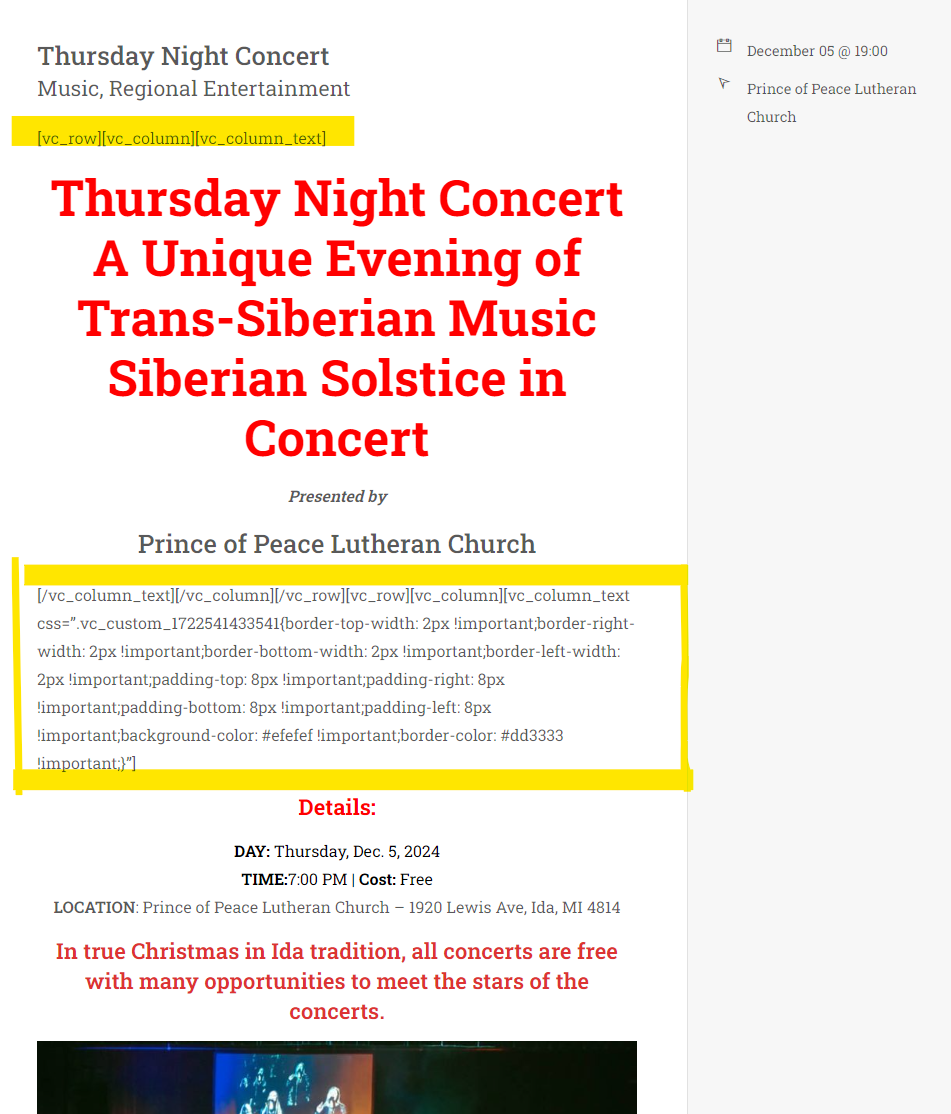
The WP Bakery/Visual Composer plugin code is showing on a section of this site. For example: https://christmasinida.com/event-schedule/. This is the second entry, and when you click on it, you see the shortcodes for the plugin in the modal as you see from this screenshot https://christmasinida.com/wp-content/uploads/2024/08/Screenshot-2024-08-01-1549111.png.
Strangely, when you go to that very same entry on it’s own page, the code does NOT display: https://christmasinida.com/class/thursday-night-concert/.
Please advise how to fix this. Thanks!
Hello,
We are not able to access your site due to geographical restrictions, but please note that Events Schedule modal window does not support advanced content like builder elements or scripts, for this type of content you need to use the single event page. If this does not help, please open a ticket on our support platform with a screenshot of the issue and we will take a look. All the best.
I deactivated Wordfence so you should be able to see everything now.
I do use the single event page and need to be able utilize the Events Schedule in order to have a cohesive list since we have over 30 events.
How do I overcome this?
If you want to use builder elements content for your events, you need to replace the modal window with the single event page. You can do this by selecting Disabled under Modal Options in the schedule builder. This should make all your events in the schedule open the page, which supports any WP content. All the best.
THANK YOU for this solution! That works out perfectly!
Hello … Is it possible to hide/disable the image from the ‘Plain List’ view as I only want it to appear on the modal popup. Thank you
Hello,
You can use a simple line of CSS to hide it, by addressing the .wcs-timetable__list .wcs-class .wcs-class__image class, just like it is hidden on small screens. Also, if you are fine with the other list styles design, you can use Large or Compact lists, as they do not display the image directly in the schedule. All the best.
Thank you
Hello, I Just purchased the plugin and I am implementing it on a new website for a customer.
I need to edit the single event page design. I wanted to create a post template via elementor and assign it to the event custom post type but it is not being listed in the “assign template” elementor selector.
I have ticked the event custom post type as editable via elementor in elementor settings but this allows me to use the editor in the single post but not automatically in all the posts.
I need the customer to use standard field and not to play around with the editor.
Thanks
Hello,
If Elementor is available as a builder for your single event pages, but you can not use templates, they might require for the show_in_nav_menus to be set as true. We did encounter this in the past, with Avada layouts. You can ask Elementor support if this is necessary or just test it directly by setting the show_in_nav_menus as true for our post type, through your child theme. All the best.
Hello … I’ve having an issue with the module using the Avada Theme, the modal popup doesnt appear. I see a number of other people have reported this and there’s a css fix for this. Please are you able provide this? I’m unable to send you a message as my support has expired?
Hello,
Please try adding the following line of CSS in your custom CSS field:
body.wcs_modal-opened > :not(#wcs-vue-modal):not(.wcs-vue-modal), body.wcs_modal-opened::before, body.wcs_modal—opened::after{filter: none;}
The comment field formatting rules might affect the code, so if this does not work, please open a pre sale ticket on our support platform. All the best.
Hello, I got a presale question.
I am building a sport club website. I need to show trainings time table (like school classes demo style) and the competition calendar. Also a event calendar. So I need 3 different design / categories to show in 3 different location using Elementor. Is this possible?
Hello,
Yes, you can add as many schedules as you want, in the same page or different pages, with any style you want. The plugin works fine with Elementor. All the best.