11939 comments found.

We are planning to purchase it, but we need answers to a few questions first. Does EventON integrate with WooCommerce? If it does, can we automatically send a Zoom link when someone purchases an event? Also, if it’s a free event, can an automatic email be sent upon registration? Additionally, can I set it up in multiple languages? Can you help me with this?
Hello,
Please take a look at Tickets add-on. It’s functionality is based on WooCommerce.
Yes. When you enable Virtual event: https://docs.myeventon.com/documentations/how-to-set-up-virtual-online-events/
WooCommerce allows you to set up free events by adding 0.00 to Ticket Price and users will receive emails. But you can also check RSVP add-on https://www.myeventon.com/addons/rsvp-events/
You can either use https://docs.myeventon.com/documentations/setup-language-corresponding-events/
Or use WPML: https://docs.myeventon.com/documentations/wpml-eventon-front-end/
Does it provide a solution for paid events as well? Like automatically directing to Zoom after the purchase? Is there a solution for this?
Not automatically, but customers receive an email with the Zoom link. Also after the purchase they can go back to the event page where Zoom info will be available.
Hello how i can add for booking events car selection dropdown , but if same car already selected for other event that car need to be disabled
Hello,
Could you create a new ticket on our support forum: https://helpdesk.ashanjay.com/
done
Perfect! Thank you.
hi! pre-order questions: 1) Can I have more than one calendar on my site? 2) Is it possible to use this plugin on multilingual sites? I use TranslatePress for this thansk!
Hello,
1. Yes of course. You can have as many calendar as you like: https://docs.myeventon.com/documentations/shortcode-generator/
2. EventON has WPML compatibility: https://docs.myeventon.com/documentations/wpml-eventon-front-end/
Also please take a look at this built-in system that EventON has:
https://docs.myeventon.com/documentations/setup-language-corresponding-events/Hello! For some reason, when adding a new event, I can’t select the date anymore, only the time. It doesn’t allow me to change de date of the event I’m adding. Could you help?
Hello,
Could you go to https://helpdesk.ashanjay.com/ and create a new ticket with included login info, so we can check the issue?
Hello! How to correctly transfer plugin settings from a test site to a main site so as not to manually reconfigure the appearance, fields in the event card, etc. Thank you? Thank you!
Hello,
Please go to EventON Settings > Import/Export General EventON Settings > Export/Import.
Hello! Will all settings be imported in a similar way (including from tabs, for example, EventCard) or only options from the General Settings tab? Thank you!
All settings should be imported.
I have a big request! It would be great if you added a new function. It’s about changing the color of the title. both in the overview and when open. I don’t want all the background colors to be dark so that you can read the white font. Thanks. Many greetings Tobias
Example: Event A has a dark red background and the font should be white. for event B the event color is yellow and the font should be white
Hello,
Thank you for your great suggestion. Please go to https://helpdesk.ashanjay.com/ and create a new ticket and select Feature Request as category so others can vote on your idea and get it moved into development faster.
Hello,
I have just purchased the Event ON plugin. I would like to purchase the “Event Tickets” addon as well, but I have a few questions: - What payment methods are compatible? Is it possible with Stripe? - If the payment method is Paypal, can I pay directly by credit card without a Paypal account? - Is it possible to display the price and a “Book” button on the “Tile” display?
Hello,
Tickets add-on uses WooCommerce as it’s base. So please check what Woo can offer as payments options.
If WooCommerce supports Stripe then EventON should work too.
Paypal is supported by Woo as well as credit card.
You can manually add a field to EventTop:
https://docs.myeventon.com/documentations/setup-use-custom-meta-fields-events/You can also hook into EventTop:
https://docs.myeventon.com/documentations/hook-eventtop/can we exclude specific day for an event which run for a range of days. like it runs for 5 days but it does not on sunday and saturday can we exclude those days. as they are in between the timeline
Hello,
Please take a look at Weekly Repeats:
https://docs.myeventon.com/documentations/setting-up-repeating-events/Hi, is iot possible to customize the layout and features for searching events by country and city? Is there an option for a monthly subscription model that allows users to use the system for a monhtly fee instead of a per event fee? Additionally, how will ticket verification be handled at the venue? If there is an app available, can it be customized to include my company’s logo? Thanks
Hello,
With Event Map add-on it’s much easier to search for events: https://www.myeventon.com/addons/events-map/
Also take a look at https://docs.myeventon.com/documentations/how-to-use-event-types-to-do-more/
EventON doesn’t have such functionality, but you need to try a third-party plugin since you can restrict access to the website itself only for your subscribers.
Please take a look at QR Code add-on to check-in customers: https://www.myeventon.com/addons/qr-code/
It seems that you can edit the checkin page.
1. if i am a user and i want to submit an even in the calendar imagine there is a local holiday in my city and i submit in eventon and it should be shown only to me. 2. can we shown events based on the location of users. and it is not shown to the other users.
Hello,
1. Please take a look at Action User: https://www.myeventon.com/addons/action-user/
Then you can use [add_eventon currentuser=”yes”] to show only events from current loggedin user.
2. Please check Event Map: https://www.myeventon.com/addons/events-map/
However, all events are visible to everybody.
Hi there,
I’m currently in the process of selecting a plugin for booking calls, and before making a purchase, I need to confirm whether it includes certain critical features:
I need the plugin to sync with Google Calendar. The synchronization must be two-way, meaning that if one of our staff members already has a meeting scheduled, that time slot should automatically be marked as unavailable. Additionally, I need the plugin to consider slots as available only if all members of a specific user group are free during that time. For our client calls, multiple team members are involved, each with their own schedule and ongoing meetings. Do these features exist in the plugin? Unfortunately, while the description is quite detailed, I couldn’t find these specifics, which are very important to me.
Thank you!
Hello,
You can only import events from your Google Calendar with https://www.myeventon.com/addons/ics-importer/
Not sure about the second feature.
What the main plugin can do you can find on this page:
https://demo.myeventon.com/Add-ons: https://addons.myeventon.com/
It seems that you need to custom solution for your specific task.
Try our add-ons on https://dev.myeventon.com/wp-admin/
Hello, I am using EventON Lite version and when displaying upcoming event using shortcode “[add_eventon_now]”, the event cannot be clicked and there is an error in console “Cannot read properties of undefined (reading ‘outerHTML’)” in eventon script. Could you please let me know where can be the problem? Thank you
Hello,
Could you create a new ticket on our support forum for EventOn Lite:
https://wordpress.org/support/plugin/eventon-lite/Please include a link to your website.
With EventOn + Booking addon, can you display the slot availability in the list view (or any other view) without having to click on the actual event or is that information only shown once the event is opened? If it’s possible, can I see an example somewhere?
Hello,
Not possible with the current functionality of the plugin and add-ons, I am afraid.
Can you hide events that are full capacity?
Sorry for the delay. Not possible as well.
Hello, someone has developed an app for checking? send me a message.
Hello,
Could you elaborate more?
Hello,
I am using EVO Lite and experiencing an error with category filtering. When users toggle between category filters, you will see that no results populate (and when you filter back to ‘all’, no results display anymore).
You can view a copy of the calendar I have set up at the link here: https://lfola.org/test-calendar-filter/
I have created specific calendars for each category on other pages on the website (filtered using shortcode) and those display properly, but on this aggregate calendar, the filtering isn’t working.
I have also updated to 2.2.19
Thanks! Patrick
Hello,
Could you send us your shortcode?
This was working for about 6 months then just stopped one day:
[add_eventon exp_so=”yes” tiles=”yes” hide_past=”yes” tile_bg=”1” tile_count=”3” tile_style=”1”]
We are working on the issue.
Could you create a new ticket on this support forum related to EventON Lite:
https://wordpress.org/support/plugin/eventon-lite/Ashan will reply there to you when the fix will be ready.
Done, thank you!
Hi, I am interested in this product but have a question:
Does the plugin have the ability to categorize events either by issue, topic, or region and allowing the user to filter/sort through the events visually?
Hello,
Please take a look at Event Type: https://docs.myeventon.com/documentations/confused-event-type-categories/
Also check https://docs.myeventon.com/documentations/how-to-use-event-types-to-do-more/
You can also filter by Event Location and Event Organizer.
How it looks like https://dev2.myeventon.com/test-648/
Hi there, I apologize, I somehow asked the wrong question. I meant to ask if the user would be able to change the views of the event listings. For example, if they want to view it as a grid, they can change the view. Or if they wanted to change from a grid view to a list view, then they can click the button. Does this kind of feature exist?
Hi, looks like the plugin can be updatet, i have this error: The package cannot be installed. The package does not contain any files. Is my problem or is from your update? Thanks.
Hello,
Are you trying to update manually or using the autoupdate?
Please follow “2.0 Method #2: Manual Download from codecanyon” https://docs.myeventon.com/documentations/update-eventon/
Hi ArtemSupport!
I bought your plugin a while ago and just now getting around to using it on my new site.
I added successfully and everything worked correctly and all of a sudden, when I click on the banner, it won’t open or expand to show the details. I’m not sure what the issue is. I’m leaving a screenshot here and will give you my login details on your profile page.
my site is: https://VintageGarageSale.com
https://prnt.sc/ab9swzaYDPF7Thank you, Winners!
Hello,
Please go to EventON > EventCard > open Designer and save > now save EventON Settings.
Hey Artem Support!
That worked, perfectly!
Thank you! Winners!
Glad to help! If you have a moment, we would greatly appreciate if you could kindly leave us a review at Codecanyon. By going to your account > Downloads. We are very grateful for your kind review!
Hi ArtemSupport!
Yes, most certainly will!
I wanted to ask if there’s a way to try or demo your “Ticket Variations” plugin? I would like to know if this plugin is compatible with my site, seeing as my current payment system does not use Woocommerce. So, I would like to run a test with your Ticket Variations plugin before I purchased it, is that possible? Or, is there a refund policy in this situation, that if I purchase it and it doesn’t work with my setup, I can request a refund?
I hope I wouldn’t need a refund, but if it doesn’t sync or work with my current setup, I would like to have that option if possible.
Thank you, Winners!
Also, if I just need the Ticket Variations plugin, would I HAVE TO purchase the Event Tickets plugin as well for the Ticket Variations plugin to function correctly? Or, will the Ticket Variations plugin function/work seamlessly without the Event Tickets plugin?
Thanks, Winners!
Please take a look at our Refund Policy > 8.1 Eligibility conditions for a refund request: https://docs.myeventon.com/documentations/terms-and-conditions-and-refund-policy/
Our add-ons are available here to try them all: https://dev.myeventon.com/wp-admin/
Variations requires Tickets add-on.
ArtemSupport!
Got it!
Thanks for the reply!
Winners!
Glad to help!
Great Work!
Hello,
Thank you for your kind words!
Would you believe I bought this a long time ago and only coming around to using it now.
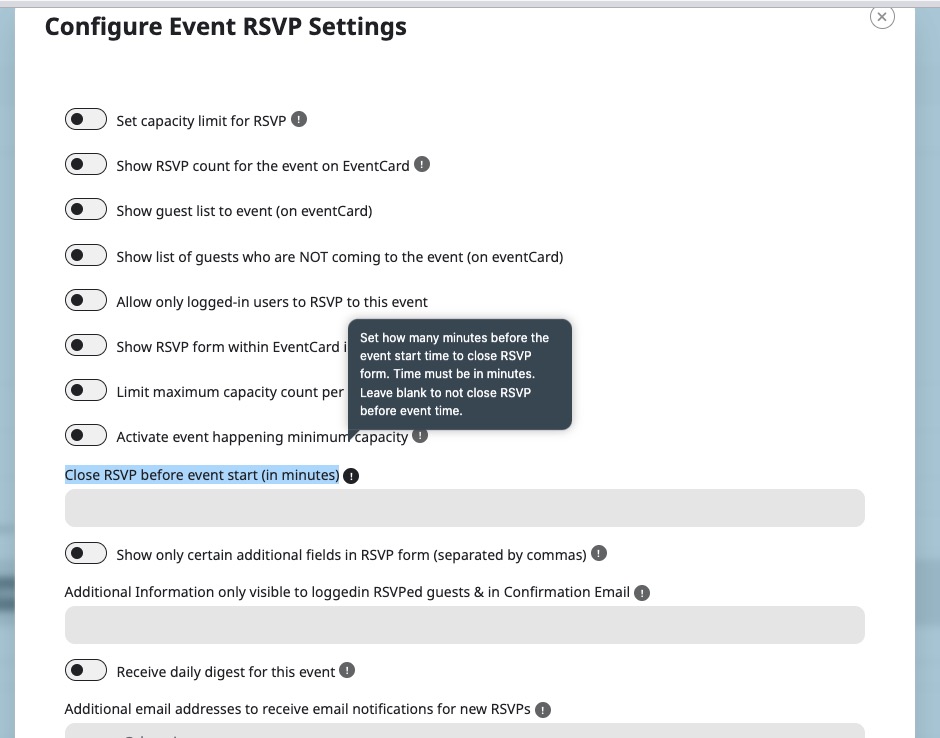
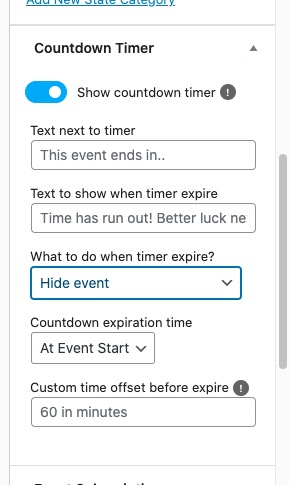
I want to have event dates available which can only be booked 4 weeks or more in advance.
Is there a way for me to Automatically remove these dates when the date to book them gets less than 4 weeks before each date ??
Hello,
With RSVP add-on https://www.myeventon.com/addons/rsvp-events/ you can use this option:
https://helpdeskx.s3.amazonaws.com/wp-content/uploads/2024/08/12143225/Screenshot-2024-08-12-at-23.31.58.jpgYou can also take a look at Countdown add-on https://www.myeventon.com/addons/event-countdown/ :
https://helpdeskx.s3.amazonaws.com/wp-content/uploads/2024/08/12143410/Screenshot-2024-08-12-at-23.33.47.jpg