11939 comments found.

I need an events calendar that allows me to create locations that have custom fields for facilities such as Electric Hook Up, Showers, Waste Disposal, Hard Standing along with What3Words and Directions. Each location can be used for many different events so I need to store this data with the location so that it can be reused. Can I do this within EventON?
Hello,
Could you elaborate more?
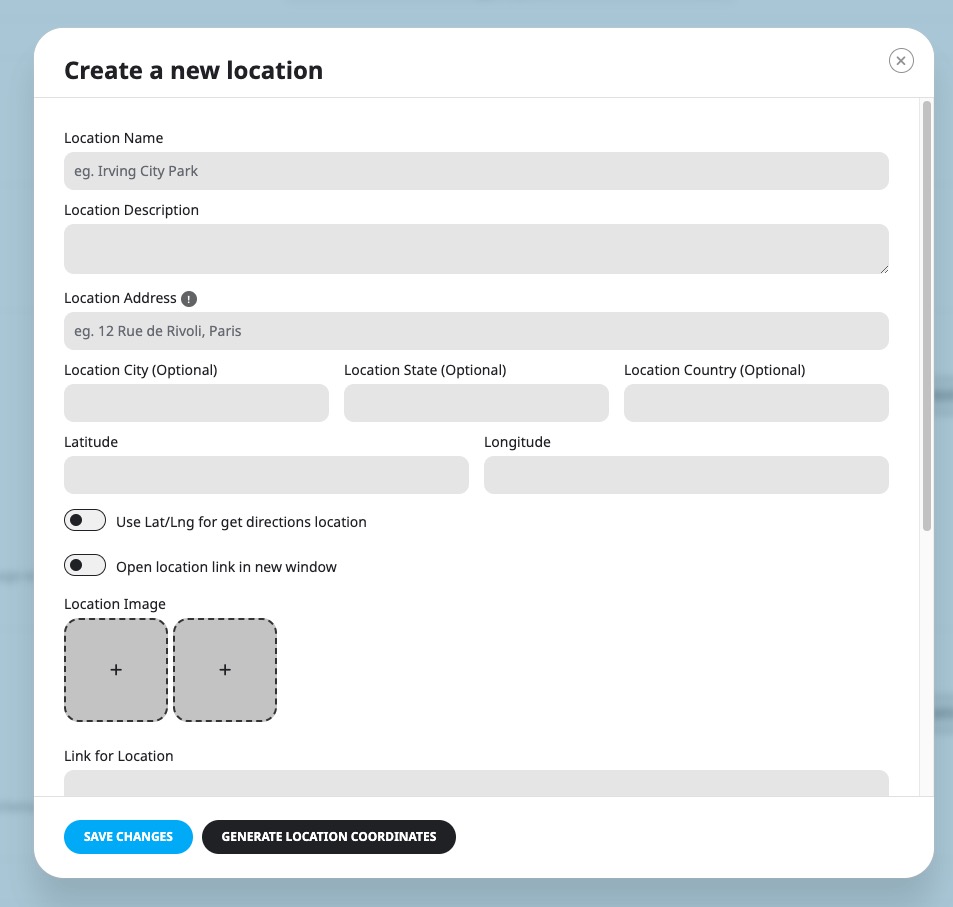
Here’s how locations look on EventON:
https://helpdeskx.s3.amazonaws.com/wp-content/uploads/2024/08/12143737/Screenshot-2024-08-12-at-23.37.27.jpgTake a look on https://dev.myeventon.com/wp-admin/
Thanks for the quick response. I organise weekend camping events for caravans and motorhomes. We use a variety of locations from empty fields to petting farms and full campsites. For each location that I store I need to also list what facilities are available. This can be done using boolean fields such as Showers, Toilets, Cafe, Petting Zoo, Electric Hookup, Pub Food etc. Therefore I would like to be able to add some custom fields to the Location template so that each location stores all of the relevant information. I prefer to list all facilities and use check boxes for those that are available as it also shows campers what is NOT available, rather than just list facilities in the description box.
I would like to create something similar to this https://www.leedsda.org/siteslist
For facilities you can use Event Type: https://docs.myeventon.com/documentations/confused-event-type-categories/
The same with Meet Type. Filtering by locations is available by default.
Here’s how it should look like:
https://dev2.myeventon.com/test-640/You can also try on with [add_eventon exp_so=”yes” tiles=”yes” tile_bg=”1” tile_count=”3”]:
https://dev.myeventon.com/wp-admin/Sorry but I just get Bad Gateway notice on all of those links
All good the links seem to work now thanks
Perfect! Please check and let us know.
for some reason the description is not visible in the events that i create. am i missing a setting?
is it not working with classic editor and only working with gutenberg? this is the only thing i would be able to come up with because i even compared to the settings in your demo and don’t understand why there is no text visible
Hello,
Could you create a ticket on https://helpdesk.ashanjay.com/ ? We need to check wp-admin.
hello, is it possible to setup evergreen events that repeat every year?
Hello,
Please take a look at Yearly Repeat:
https://docs.myeventon.com/documentations/setting-up-repeating-events/Are you referring to EventON or evergreen events?
Hello, may you give an update on the following feature? https://helpdesk.ashanjay.com/ticket/ics-importer-delete-events-deleted-in-source-ics/ I couldn’t find an updated article and this feature + support for repeating events is highly requested as my ics source has a lot of repeating events. sometimes the sync on the UID does not work as expected. I believe that the UID changes on the source after an event is renamed there. So the sync does not change the event title and creates a new one.
Best Regards
Hello,
No new updates on this one, I am afraid.
i make this fix on file wp-content/plugins/eventON/includes/admin/class-evo-admin.php on line 331 to prevent ssl error mixed content on the backend: FROM : $gfont= “http://fonts.googleapis.com/css?family=Open+Sans:300italic,400,300; TO (fixed): $gfont= is_ssl() ? ‘https’ : ‘http’ .
Hello,
Thank you for letting us know! We are going to take a look at this.
Dear team,
we use your plugin and love it! We have a question. Since a few days the photos are not loading… Do you know what the problem could be?
Thanks for helping!
Screenshot: https://kostbaarvaatwerk.nl/wp-content/uploads/2024/07/Schermafbeelding-2024-07-23-om-16.06.23.png
Hello,
Please go to EventON > EventCard > try a different Feature image display style.
Hi – my client’s site has been compromised, so I’m going to launch the site we’ve been developing.
Can I export then import, retaining all pics etc? (she’ll probably use EventBrite if not)
Hello,
Please take a look at CSV Importer add-on:
https://www.myeventon.com/addons/csv-event-importer/Try on https://dev.myeventon.com/wp-admin/
I think that https://wordpress.org/plugins/wp-all-import/ also might work.
Oh man I am so sorry to hear about your client’s site. Those attacks are no fun at all.
Please try the suggestions give by Artem. CSV importer can import all the event data exported from eventON settings.
Another alternative could be go to phpMyAdmin and export database and then import the sql file back to new database.
That would make sure all data is moved. Then copy over content from wp-content folder, AFTER scanning that for any malware or spyware.
I also recommend wpfence plugin and sucuri for scanning injected files and identifying them.
Also change passwords. Similar thing happened to my personal site and I wrote an article about my experience and how I recovered from it, if you are interested—https://ashanjay.com/htaccess/
I think it is important you do these security scans and fixes so similar things will not happen again or chances will be slim.
Good Luck mate!
Hello,
Can other users also add the events (from the frontend) or does the admin have to do it? If users can ad it, where can i see that and can you charge theme (packages) like in a listing theme?
Hello this is a presales question, im interested on the reminder addon but i need to know if its possible to add new dinamic tags to the email reminder, For example creating a custom field and display that on the email.
Hello,
You can use “Supported Dynamic Tags for Email Message”: {event-name} {event-link}{rsvp-yes-count}{rsvp-no-count}
And also HTML content. But cannot create new custom fields, unfortunately.
Ok but i need to display custom field on the email, is there anyway to do it? if i buy it you can help me with that? thanks
The thing with emails is that their HTML structure is different from a regular website. You cannot just put a PHP element to the email body, you need to program it with table tags and inline styles:
https://webdesign.tutsplus.com/build-an-html-email-template-from-scratch--webdesign-12770a#toc-3bio-create-the-content-areaNot not possible with the current functionality of RSVP Reminders add-on.
Hello,
I am currently looking for an event plugin that can assist me in creating and managing events. Specifically, I need a plugin that allows me to generate a form for each event. This form would be used to collect specific information and documents from visitors before they can be accepted into the event.
Does your plugin support the creation of such forms within each event?
Thank you for your assistance.
Thanks for your reply, but not sure I understood how to add custom information to ask visitor to add multiple documents, and informations when register…
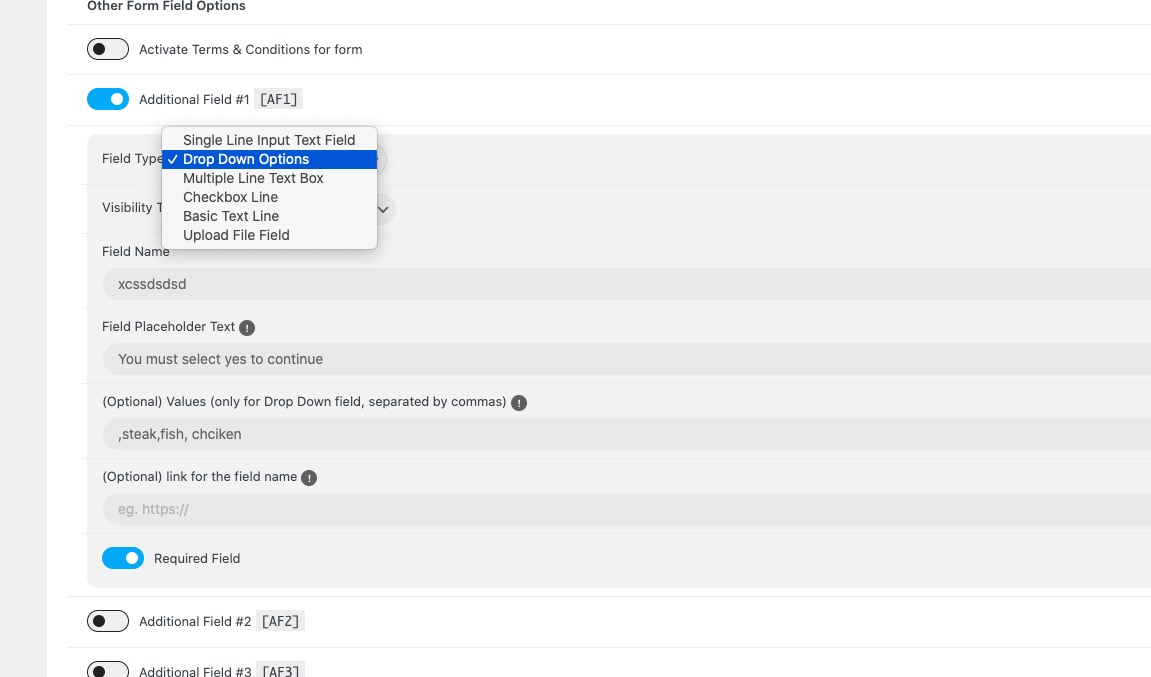
Please take a look at what RSVP allows you to add as fields to the form:
https://helpdeskx.s3.amazonaws.com/wp-content/uploads/2024/07/01142402/Screenshot-2024-07-01-at-23.23.46.jpgYou can find it here: https://dev.myeventon.com/wp-admin/admin.php?page=eventon&tab=evcal_rs#evoRS3
Thanks for you reply. Just want events and a forms to subscribe to the event as I need to manually validate customer. I do not need ticket and do not want woo commerce involve. Also I need to get documents from the form. Is it possible with your plugins and add ons to do that?
RSVP doesn’t use WooCommerce and also doesn’t charge your customers.
To lets users to upload documents, you can use RSVP’s “Field Type: Upload File Field”.
I manage to do this : https://dev.myeventon.com/event/test/
But cannot find a way to activate the form, even though I have been in the settings and I have activated new field… your plugins seems not so easy at all !
I enabled RSVP Event Box from https://dev.myeventon.com/wp-admin/admin.php?page=eventon#evcal_004a
So the field should be available now.
Do you future plan include SureCart integration? Thanks!
Hello,
What kind of integration are you referring to? Could you give us some examples?
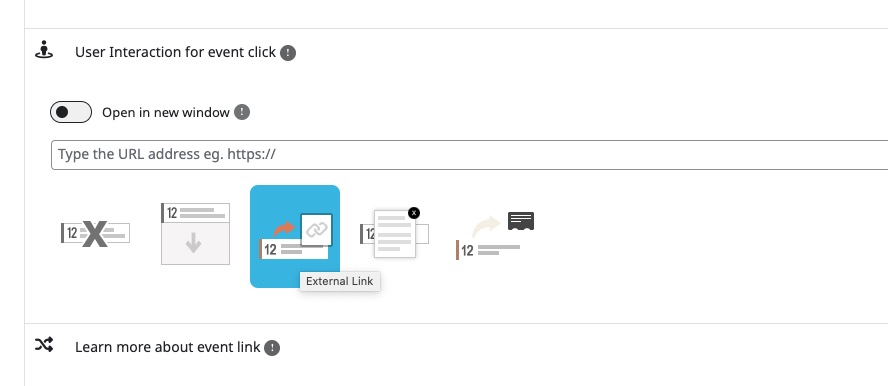
The interaction for event click is not working. I configure the slide down event card but it’ isnt show anything
Hello,
Please go to EventON > EventCard > open Designer and save > now save EventON Settings.
Thanks
Glad to help!
Hello there, your plugins looks great but I am not sure that I understand, the plugins help you just show events. The events does not allow visitors to subscribe to event ? email them on the coming events etc ? I am looking for this features. Thanks for your help,
Hello,
To subscribe to an event you need to have RSVP add-on: https://www.myeventon.com/addons/rsvp-events/
With RSVP you can also email subscribers.
There is also Subscriber add-on: https://www.myeventon.com/addons/subscriber/
Yes I saw all the add on, thanks for your reply. Your plugins seems great.
Glad to help!
Hello, at moment is possibile indefinitely repeating for single event? I have to add some events works Everly Sunday for almost 5 years!
Hello,
Not possible to make it indefinitely repeating, unfortunately.
But you can just add as much repeats as you want to “Number of repeats”: https://docs.myeventon.com/documentations/setting-up-repeating-events/
Hi, we are a small mountain bike club. We currently need a tool to implement the following:
- Internal event calendar for members only - external calendar for non-members - We offer courses that our members can book. A maximum of 7 people can take part in each course. -External participants can also book courses, but these will cost money.
Can this be implemented with the tool and corresponding extensions? We currently use Whoocomerce, but it’s not quite suitable for this.
Hello,
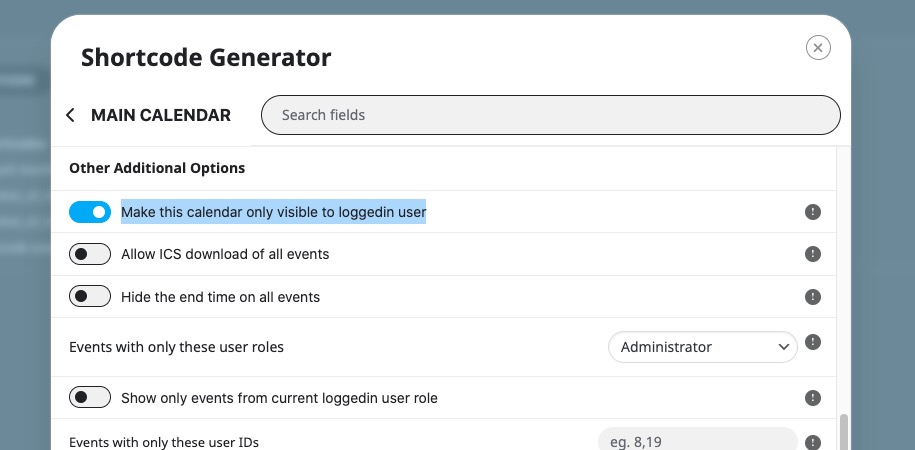
1. & 2. You can use “Make this calendar only visible to loggedin user”: https://helpdeskx.s3.amazonaws.com/wp-content/uploads/2024/06/18051359/Screenshot-2024-06-18-at-14.13.39.jpg
3. Please take a look at RSVP add-on (for free events): https://www.myeventon.com/addons/rsvp-events/
Also check Bookings add-on (requires Tickets add-on as well as WooCommerce): https://www.myeventon.com/addons/bookings/
Hi,
and thanks for the quick reply! Is it possible, when working with limited tickets, to have the remaining number mapped as well?
For example, I still have 10 tickets for the event on Monday. Then it would say: 10 from 15 tickets left.
to 1&2. So far we have not worked with specific logins via WP. We have an internal page that can be accessed via a password. We want to incorporate a separate internal calendar there. Is that possible?
Like this? https://dev2.myeventon.com/events/rsvp-45/
If your page password protected then it seems that you need to restrict access to /events and also Single Event Page. With Single Event, you can try EventON > Single Events > Restrict single event pages to logged-in users only OR EventON > Events Paging > Stop using eventON single event template for single event pages.
Hi! I have 2 questions.
1. regarding the FulCal addon. I would like to have the calendar grid with event names inside the date boxes, but I have way more events on the same date than 2 (which is the maximum allowed). Is it possible to increase/delete this limit?
1b. And if it’s not possible, what is the best setting to display 6 or 7 events on the same date? I don’t want the events to be displayed below the grid as in the demo https://addons.myeventon.com/fulcal/
2. regarding the Main calendar. I’ve set it up with the Crystal Clear style, but the event details (time, location etc) are not showing. What went wrong?
Hello,
1. Not possible, I am afraid.
1b. You can enable Tile Design and show events like this:
https://dev2.myeventon.com/test-588/2. Please go to EventON > EventCard > open Designer and save > now save EventON Settings.
Hi Artem, thank you for your reply! 1. so just to be clear, with Tile design I’d have the dots with events up to 4 events, and >4 I’d have the text “5 more”? 2. Is it possible to show events when you hover over a date box as in the picture here: “Quick glance events”: https://www.myeventon.com/addons/full-cal/
1. This is how it looks like: https://dev2.myeventon.com/test-589/
2. Please see the calendar in 1.
Hi Artem,
thanks it looks good  I wonder, would it be possible to increase the limit of 4 events per box (when hovering over a box) with custom development?
Unfortunately, we don’t provide any custom development at the moment.
Hi! Is it possible to to show events near the user’s location? For examle, if the user enters the site from Texas, the calendar is filtered so that the Texas is checked in the filter bar.
Hello,
Please take a look at Events Map add-on: https://www.myeventon.com/addons/events-map/
But it does not choose automatically nearest location for the user? What i want is to show nearest events to the user when he comes to the site without need to click anything.
Event Map doesn’t have such functionality, I am afraid.
If the addon does not have the feature, does EventOn have such feature? Any workaround for this? If it is not possible to show near events to the user, is it possible to make tabs for each city and embed event list into each tab having that city already checked?
The only available functionality that is closest to what you need is “Get Directions” section:
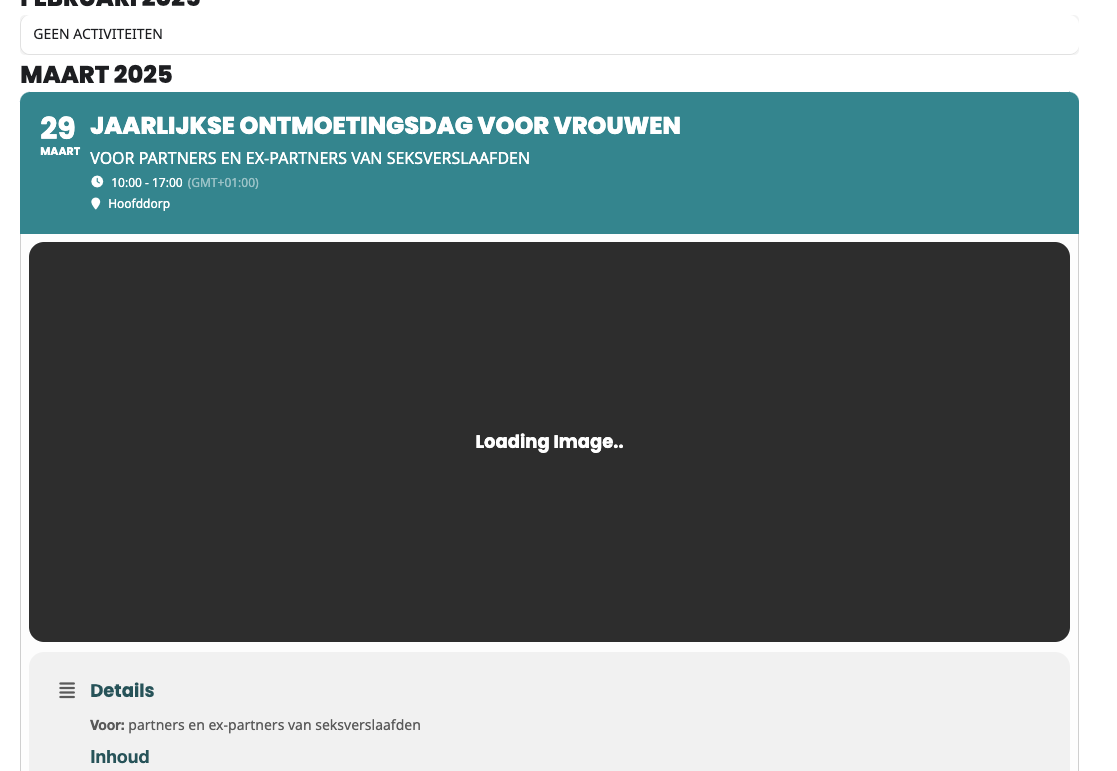
https://dev2.myeventon.com/events/test-172/Hi i updated to 4.6.5 but my lightbox image doesn’t work (before lightbox is clicked it just is a black image that says IMAGE LOADING. https://www.loom.com/i/14823ba9143d44aa9a224c90125b9d75 https://irvingtonhistoricalsociety.org/events/divided-loyalties-the-tenant-farmers-of-philipsburg-manor-in-the-revolutionary-war/ please help?
Hello,
Please go to EventON > EventCard > try a different Feature image display style.
Thanks! on pagination is there a way to show more years in the past? right now only shows 2 years in the past and future. https://www.loom.com/i/c6624149914d4d6ea140afaca7700fa0
Please try adding:
jumper=”yes” jumper_offset=”-5” jumper_count=”10”
Change -5 and 10 to get years you like.
Hello, I am interested in buying the plugin along with the Fulcal add-on. I have a couple of questions. Firstly, is it possible to add a hyperlink to the event button in the grid so that it redirects the user to a specific location? If that’s not an option, can I add a hyperlink to the popup event box instead? Secondly, could you please inform me about the web accessibility level of this plugin, such as WCAG Level AA? Thank you.
Hello,
You can use “User Interaction for event click” for each event: https://helpdeskx.s3.amazonaws.com/wp-content/uploads/2024/06/05143140/Screenshot-2024-06-05-at-23.31.04.jpg
Try on https://dev.myeventon.com/wp-admin/
Please take a look at this response from Ashan regarding WCAG and DailyView add-on:
...the accessibility has not been set up for dailyview As you have already noted several items are not native buttons, but trigger javascript responses.
This is a project we are hoping to implement in the future. But as of now we do not have an immediate solution for this.
Hello, thank for your reply. How about the web accessibility level for monthly view in Fulcal? I will mainly use this add-on
Thanks for providing the method, I’ve tested the development site using the method you suggested, and it works. However, the testing site doesn’t support Fulcal, I’m unable to test the hyperlink behavior on Fulcal.
when i’m going to activate fulcal add-on, it asks me for License Key and email, please help
Please take a look at this test page I created with FullCal: https://dev.myeventon.com/test/
Hi! I want to purchase the plugin, but have some questions. - the premium purchase ($29 USD) have full functions ? Searching box, order by category, google maps view, etc. ??? - my site is in spanish language, did you support it ? - how can i add a box for price (feature) ?
Thanks a lot!
Hello,
What you see on this page is included in the main plugin:
https://www.myeventon.com/More demos: https://demo.myeventon.com/
This also included: https://docs.myeventon.com/documentations/setup-basic-paypal-events/
But what on this page is not included:
https://addons.myeventon.com/