8957 comments found.

Hi,
Purchase code: 639f3fd7-24bb-4d89-81d7-bf0cf9b4cd63
I can’t see the widget in the elementor pro dashboard?
Thanks, Michaela
Hi Michaela,
Thank you for choosing Filter Everything PRO.
In Elementor you can find in in the “WORDPRESS” area (dropdown/section) You cannot find it with Serach as it is strictly the Elementor feature – https://prnt.sc/nXUmA2RT_0T6
Best Regards,
- Victor
Is there a way to show some indicator (like a spinning cycle when to search is performing? Maybe there is already but it does not show at all.
False alarm! I have to enable using Ajax in Settings to have this when performing search.
Hi Panosgrth,
Thank you for choosing Filter Everything PRO.
We are glad to hear that the issue was resolved.
Best Regards,
- Victor
Hey there again, I think I found a tiny bug in your plugin. I have a filter set that uses AJAX, with a text search field and two taxonomies. I set the option to hide empty (tax) terms on the initial filter layout. When I now type in some text into the text search field that yields no results, both taxonomy filters show ‘N/V’ instead of the (greyed-out) taxonomy terms. If I pick ‘never hide’ for empty terms on the filter set options, of course those empty terms show up. Is this a known bug? Since it’s not the ‘initial filters’ when I type text that doesn’t exist in any posts and get the zero result, I’m just ever so slightly confused.
Hi enoversum,
Could you provide us with the link to the page where you are experiencing the issue, along with a step-by-step guide on how to reproduce it? This will help us better understand the problem and provide information on it.
Best Regards,
- Victor
Hi Victor, a very ugly, but practical example is this one: https://dev.boks.li/testpress/veranstaltungen/. To recreate this issue, just create a filter set with at least a text search field and one taxonomy. Set the option for ‘Empty Terms’ to ‘Hide in the initial Filter only’. Make sure to enable AJAX filtering. Then use a search term on the front page that does not exist and let the form AJAX-filter to see the ‘N/V’. If you instead pick ‘Never hide’ for ‘Empty Terms’, the greyed-out taxonomy terms still show. In my case, this is an archive for a custom post type, but I assume it works the same way for posts or pages.
It’s completely normal to see the “N/A” text when searching for something that does not exist while using the plugin. This is because “you asked” the plugin to hide filter terms with counters equal to 0. Therefore, all of the filter terms receive counters of 0 when it didn’t find anything, resulting in the “N/A” text. If you enable the “Hide empty filters” option, all empty filters will be completely hidden.
It won’t make them gray.
Best Regards,
- Victor
Hi Victor,
what I tried to achieve was to hide empty tax terms initially, so tax terms that have been created, but not connected to any posts won’t show, but as a user filters through, tax terms that are no longer available are still visible, but greyed out. So the user knows what terms were available, but cannot be picked due to his filtering.
If I get you right, with this setting, although valid tax terms are showing and empty ones are only hidden initially, when then using the text search field with a zero-result search term, I can’t avoid having all tax terms removed and replaced with ‘N/V’ (whatever that should mean)?
From the logic of the ‘Empty Terms’ settings, I would have assumed tax terms are only hidden when I access the archive with nothing filtered, hence your naming ‘initial filter’. It turns out that also applies to search results from the text search field. That doesn’t really make sense to me. Would you consider changing this logic, or providing a setting that allows to really only hide empty tax terms initially, i.e. when loading the archive page with no filtering active? As it stands, I can’t even hide or replace the ‘N/V’, as there is no class added to those N/V list elements, just the text.
All the best
Eno
First and foremost, it is important to note that the correct abbreviation for “not available” is N/A, not N/V. It is imperative to use the appropriate terminology in a professional setting to avoid any confusion or misinterpretation of information. Therefore, it is recommended to use N/A as the standard abbreviation for indicating unavailability in business or academic contexts. Long story short, you see the N/A abbreviation when there are no available filter terms with the search line.
This option is working hiding all of the terms dynamically, so of course you won’t see anything, it would require another layer of logig to do so. Which we maybe can add with future updates.
The N/A can be changed from the code, or with the loco translate plugin if you are using it in a other language than English. Also, it can be redefined by the function.
Best Regards,
- Victor
Hey Victor,
I can clear up the confusion with ‘N/V’. For whatever reason, in your own translation files, ‘N/A’ has been translated to ‘N/V’ for German. That’s not a correct abbreviation, it would be ‘n.v.’ (nicht verfügbar) instead. Coming from an academic, and linguistic background, this is also important to me. So the ‘N/V’ came from your translation files.
I understand WHY the terms disappear, because it is programmed this way  . I wanted to point out that it would make more sense if ‘Hide in the INITIAL filter only’ (as in, when the filter set is loading and nothing is filtered) has been set as an option to still show (the unavailable) tax terms AFTER filtering by keyword. This is what I don’t find logical.
I have no trouble translating your plugin strings, it’s just that I can’t style, hide or replace the list element with the ‘N/A’ inside since it has no distinctive class. I thought about doing a workaround, but having a simple string of text saying ‘N/A’ in a list element makes it rather hard. And I’d rather not change code in your plugin (even though I know where it is).
I’d be happy as a frog in a pond if you could add this kind of functionality (showing unavailable tax terms after filtering by keyword, when choosing ‘Hide in the initial filter only’ as my option for ‘Hide Terms’) to your plugin. It would really make more sense.
All the best, and thanks for your insights and help
Eno
Oh, we understand now. We had initially assumed that you were using the English version, which caused confusion about the N/V rather than N/A. Thank you for pointing this out.
We may consider implementing a similar feature in future updates.
A bit later, we should provide instructions on modifying and adding a class to this element so that you can style it as required.
Best Regards,
- Victor
Hi Victor,
thanks again for getting back. It would be good if you could change the ‘N/V’ to ‘n.v.’ for the German translation. I know I can do it myself through translation files/plugins, just asking for the sake of correctness of your plugin.
As for the feature, you’d have an even more intense fan here if you implement it. In fact, the project and client I am using my license for is probably not the happiest to have the plugin behave as currently when filtering. I considered it a bug, since the logic behind it struck me as weird, hence my report. But I understand you can’t implement this right away. So thank you for considering it, you must have a lot of bugs and features to work on on a regular basis. 
All the best Eno
Hi enoversum,
We have added it to our list. And will notify you here when it is released. About the N/A or n.v. as in your case, currently, it is not possible to redeclare in roder to change the class, this possibility will be added soon with the next updates.
Best Regards,
- Victor
Hi Victor,
thanks again for your care, I’ll be happy to receive the info once it’s released. And I already found out there is no way to hook into that function at the moment. I’ll try to relay the info to my customers on whose project I am using your plugin.
Again, thanks for all your help, really appreciated!
All the best
Eno
i try your free version and go to buy pro , but what is chip ?
Hi lenka2014,
Thank you for your interest in the Filter Everything plugin.
If you go here https://demo.filtereverything.pro/product-category/clothing/women/color-red/brand-hm/c-kind-dress/?max_price=100 you will see those options – https://prnt.sc/uOg2CbcCTRdG those are the chips.
Best Regards,
- Victor
oh yeah i see it, it is amazing, how to display a special Filter Set Only special page ?
With the PRO version, there is an option “Where to filter” where you can specify where you want to place the filter set.
Best Regards,
- Victor
Hi,
I’m using your plugin to filter my products on a “Product category” page template on DIVI.
Is it possible to dynamically display only the child product categories of the current page, like the WordPress “product category list” widget does?
Also, I can't activate my License key for automatic updates. When I add the key, I get an "Unkown error" message...Thanks in advance for your help.
Olivier
Hi boutiquebusiness6,
Thank you for choosing Filter Everything PRO.
To ensure that only child categories are displayed in the filter widget on the current category page, make sure that the products belonging to those categories are placed only in the current category and all of its child categories. If any product has additional categories, it will also be displayed in the filter.
It seems that your server does not allow connection with our license server. We can activate it on our side, but we need the following things from you:
1. Credentials to your /wp-admin following this document
2. And your license key.
Please, send all these via PM.
Best Regards,
- Victor
Hi Team, I’m interested in categorization links, such as these here on Airbnb: https://guesthook.com/airbnb-categories/ if you see on airbnb website, you can click on the link and it appears to share a new sort of the archive. I can not tell if your filtereverything has the same capability to ‘sort by single link’ this way, but please let me know! Thank you so much for your patient support. Here is a link to airbnb – you’ll hopefully see the top row of categories quite clearly. https://www.airbnb.com/?search_mode=flex_destinations_search&category_tag=Tag%3A5348
Hi norainu87,
So in other words, this is just a simple radio button with an image instead of the checker. You can create something like the brands in here – https://demo.filtereverything.pro/product-category/electronics/laptops/ this is a color swatch feature. And change the styles a bit so you will have the same filter looks with images only.
Best Regards,
- Victor
Hi Victor – thanks so much. I’m taking steps toward doing this. For some reason only 1 of the radio buttons is appearing: www.equitybound.com/stocks (I have several in ACF fields but only one of them shows – not the first one, just a random one). 1) Any sense on how I can change this to get the rest to appear? 2) Also, is 5 columns the maximum or is there any way I can create more? 3) Is there a way to apply left and right scrolling style to the radio buttons similar to the airbnb link I shared? Thanks always for the guidance and support.
Hi norainu87,
Can you please send the credentials to the wp-admin dashboard following this document so we can check it?
Also, provide the link to the page where you want to place the filter set, so the posts there will have all of the data. Because we are not sure what should it filter on the provided page.
Best Regards,
- Victor
So, I’ve learned more about the problem: I can only select ‘1 single’ radio button in both ACF—> FilterEverything. For the airbnb categorization style to work – I’ll need to be able to select ‘multiple’ buttons. E.g.: One house might be a ‘Tiny house’. It might also be an ‘Amazing Views.’ Any way to do this? Thank you always for your great help.
Or if there is another way to accomplish these filterable categories/links, please let me know. Thank you.
If you want to select a couple of options you can simply choose checkboxes.
But we are still not very sure how you want to make it look at the end. Because the showcase you showed us was a simple long list with radio buttons with images, and you could choose one from them.
If you can somehow present the end result of this as you see it, we might be able to provide more effective assistance in this regard.
Best Regards,
- Victor
Hi Victor – these clickable icon links are exactly what I’m trying to accomplish: (Categories of types at top)... Can I do that with checkboxes? I did not think checkboxes become clickable links that allow categorization as radios do… https://www.airbnb.com/?search_mode=flex_destinations_search&category_tag=Tag%3A5348
You’ll see categories ‘National Parks, Amazing Views, Tiny Homes, Beachfront’ etc. at top row, enabling users to click the link by category. I’d love to send you a picture if that is not clear. Thank you always.
Actually – nevermind, I’ve figured out the solution. I established ACF as ‘checkboxes’ and left FilterEverything as ‘Radio Button’ and it provided me the option to list radio buttons in link form with multiple radio selections per post. Thanks for all your help.
Hi norainu87,
Great job! It’s wonderful to hear that the issue has been resolved.
Best Regards,
- Victor
Hi, I was looking through the comments but couldn’t find my issue: Is it possible to filter search results by post type? Let’s say my search query includes ‘pages’, ‘products’, would it possible to provide a filter option for the different post types? I can add filter options within the post type, but I just want to filter by pages and products.
Hi happycamperdude,
Thank you for choosing Filter Everything PRO.
A bit confusing what you want to achieve. You can filter by one post type, which you choose when you are creating a filter set. Search should correspond to this post type, not just ?s=someText as it will by default find posts pages and products. Should be like ?s=someText&post_type=product
You can place a couple of filter sets on the page for different post types, but if the filters are the same it might show incorrect counters and some other issues might appear.
Best Regards,
- Victor
We are experiencing an issue with Sorting ACF fields on a custom post-type archive page. Page link here: https://stgcoffintrout.wpengine.com/rolex-at-coffin-and-trout/rolex-collection/
The size and material filters work perfectly.
The style and dial filters see that there are posts that contain data attached to the ACF but, when selected, returns no results.
Would you take a look and let me know if there is something that we might be missing?
Hi JohnScottDixon,
Thank you for choosing Filter Everything PRO.
Please check this page about ACF what issue it can have and how it can be fixed – https://filtereverything.pro/resources/acf/
Also, this might be a URL prefix issue, if the URL prefix is the same as some slugs in Woo it might be instead of 404 showing no products. Go to filters -> settings -> URL prefixes and change them to the unique ones.
Best Regards,
- Victor
It was a duplicate ACF Field in the database. Thank you so much for your help!
Hi JohnScottDixon,
We are glad to hear the that issue was resolved.
Best Regards,
- Victor
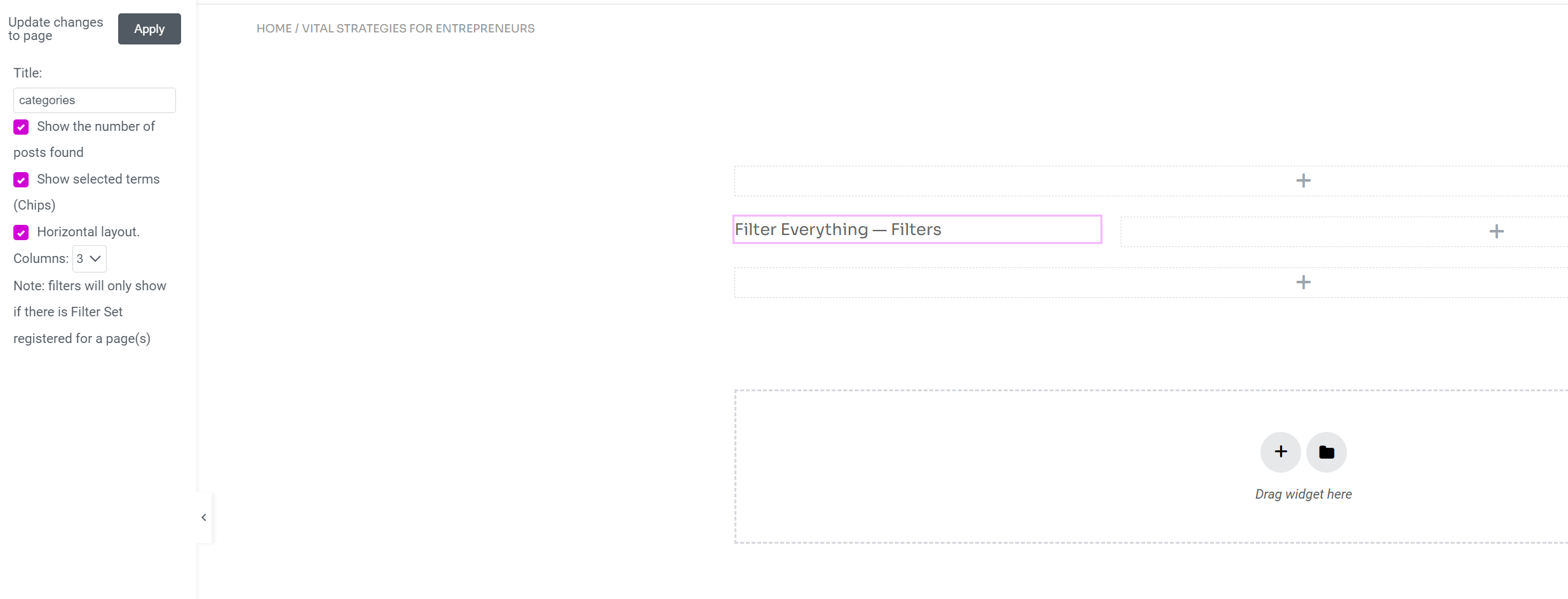
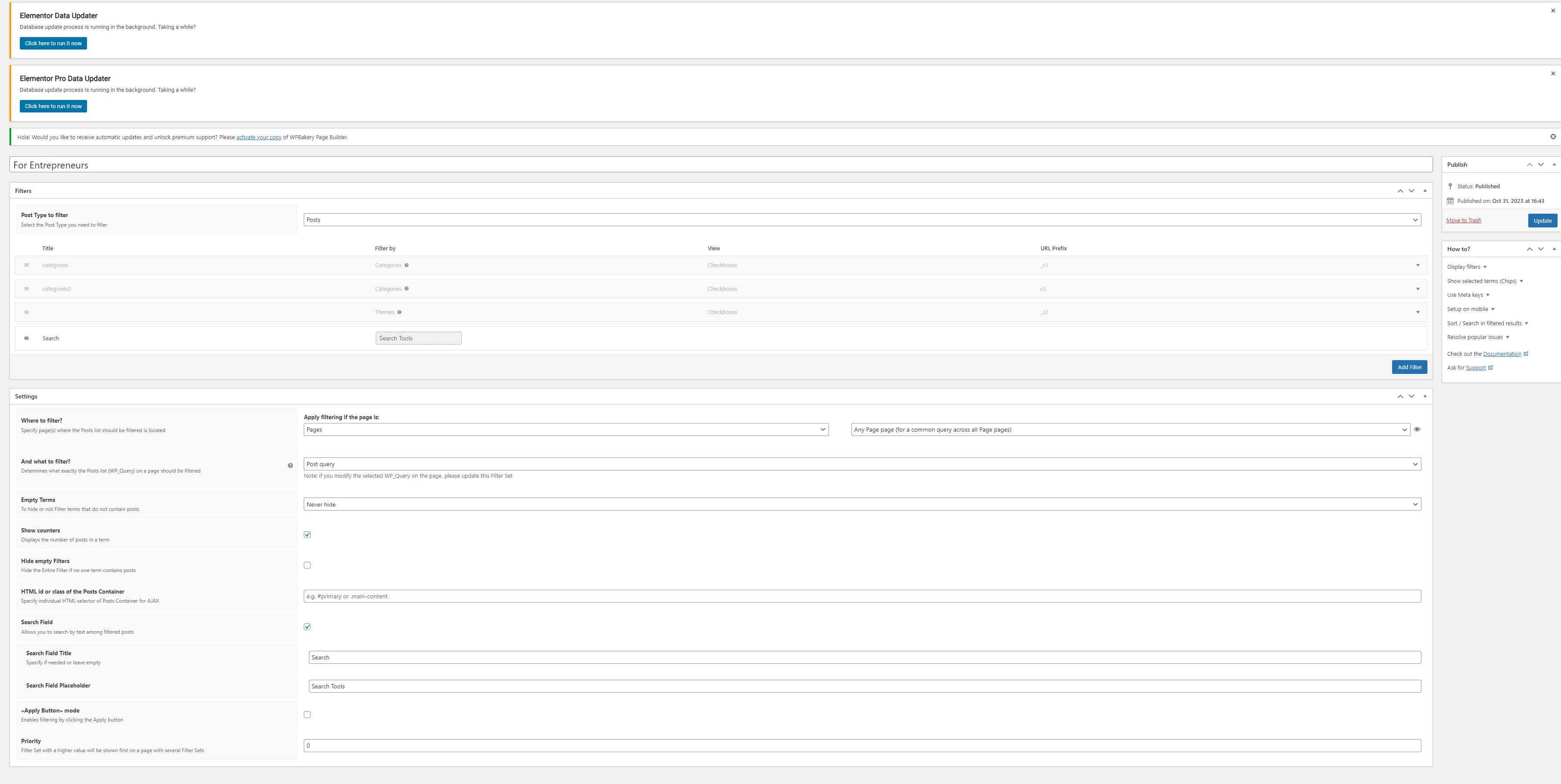
Hi love your product but cannot make it work, purchased pro and just want to filter normal post categories and tags on a wordpress page using elementor. Getting error message : There are no filters in the Filter Set yet. Please add them to the Filter Set related to this page. here are the screenshots with the settings https://mysam.ai/wp-content/uploads/2023/10/filter-everything-elementor.png 2 https://mysam.ai/wp-content/uploads/2023/10/filter-everything-error-message.png 3 https://mysam.ai/wp-content/uploads/2023/10/filter-everything-settings.png thanks
Hi peacecity,
Thank you for choosing Filter Everything PRO.
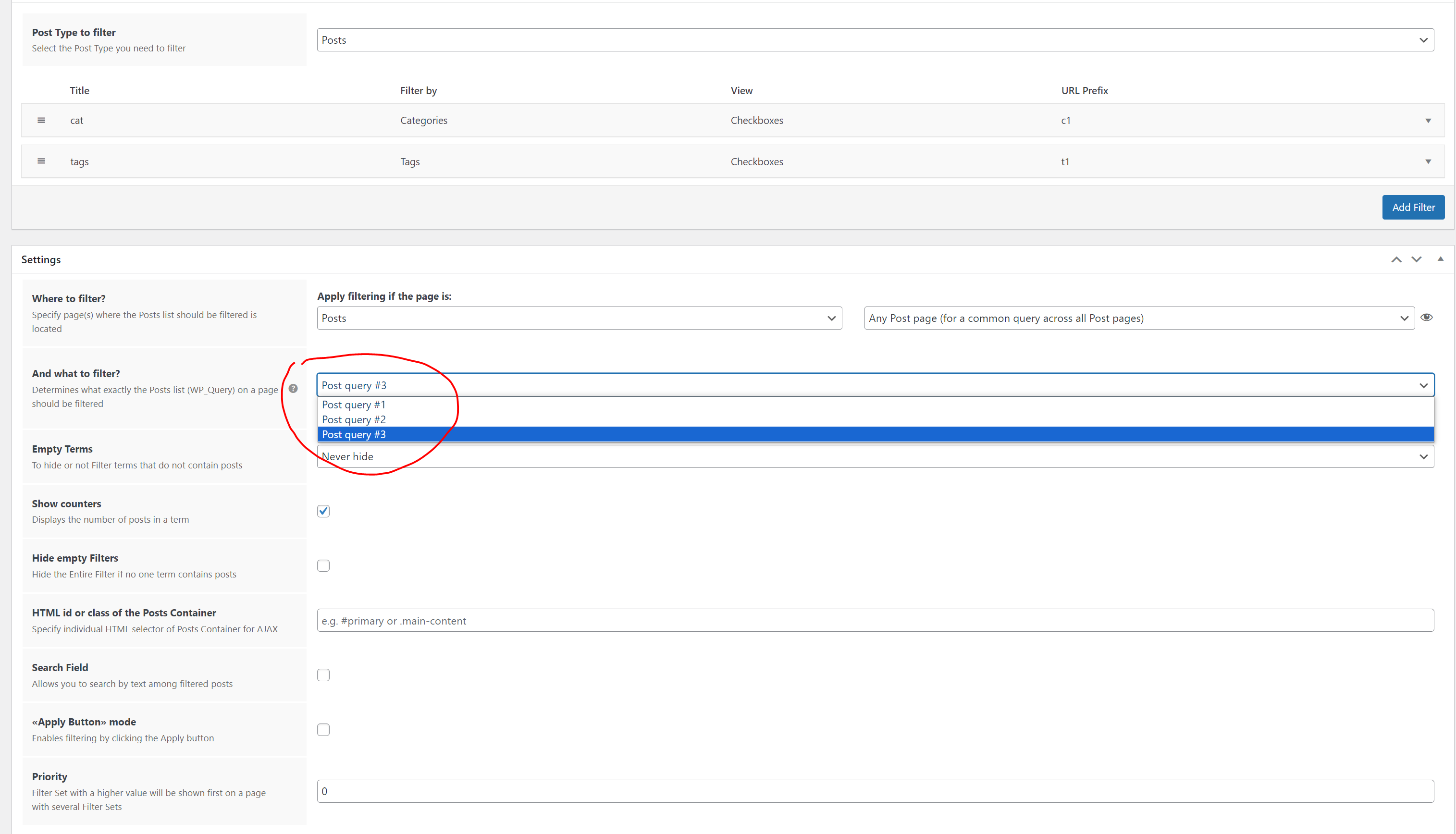
In the “Where to filter” Choose a specific page instead of Any page also choose the correct query in the “And what to filter?” hit update and check the workability.
Best Regards,
- Victor
Thanks Victor, how and where do I create a post query?
Hi peacecity,
Well we can provide you with an official page from the WP documentation – https://developer.wordpress.org/reference/classes/wp_query/
In general, when you create for example a page with let’s say Eelemntor you have elements like Posts/Products and then you choose in the query setting of that element which post type to display there. It will be your query.
Archive pages have the same WP_Query as in the official documentation, a bit modified.
Best Regards,
- Victor
our goal is simple: we want to filter post categories and tags using elementor here is what currently shows when clicking on what to filter https://mysam.ai/wp-content/uploads/2023/11/query-filter-everything.png how can we set it up so we can filter through categories and tags from standard wordpress posts? thank you Victor
Hi peacecity,
In “Where to filter” you should choose your custom page if you created it with Elementor like “page” + “My page name” or if you want to place it on the archive page choose “common WordPress pages” + “all archive pages”
Best Regards,
- Victor
Hi there!
Not sure if my first comment appeared. We just purchased FE to filter our blog posts on one page and all of our pages on another. It looks great so far, but the filter itself isn’t working with our page builder. The counters all show 0 and the filter doesn’t allow for users to click on anything. I’ve looked at a ton of tutorials on how to have the filter work with Elementor-type builders, but it just doesn’t seem to take. Would you be able to remedy this for us?
Thank you!
Hi immunizationeconomics,
Thank you for choosing Filter Everything PRO.
Can you please send the credentials to the wp-admin dashboard following this document so we can check it?
Also please provide additional information, what filter, on which page, and link to it, so we can check everything right away.
Best Regards,
- Victor
Thanks Victor! I just sent over the credentials.
Hi immunizationeconomics,
We set up the filter set on that certain news page, and set the correct query in the “And what to filter” Also we set up the AJAX container in that filter set settings in “HTML id or class…” input. So you can test it now.
Best Regards,
- Victor
To the nice folks at Filter Everything Pro.
We have created a filter set, installed it on a page, and it works as expected, as long as the URL of the page is only one directory deep. As soon as we drop the page underneath another one, the filtering function breaks.
Domain.com/parent/ - Everything works.
Domain.com/parent/child/ - Does not work. - To be clear, the query appears to work correctly. The filtered choices show up with the appropriate numbers next to them. When you click on a filtered term, the radio button or checkbox changes correctly. However, after clicking, the results never change. And the URL, which normally adds the filter term into the URL (domain.com/parent/filter-term) also does not change.
Is there a setting we can change, either within Filter Everything Pro or within WP or on the server, that would allow this to work as expected on a child page?
Thanks
Hi brettmwillis,
Can you please send the credentials to the wp-admin dashboard following this document so we can check it?
Also, please provide additional information on the pages where you want the filter widget to be displayed.
Best Regards,
- Victor
credentials sent. thanks.
Hi brettmwillis,
Well, there are two things that need to be solved:
1) Activate the plugin, as it is in the locked status and you cannot update or edit filter sets – “Error: you can not update settings because the Filter Everything Pro plugin is locked. Please, enter your license key to unlock it.”
2) Permalink Manager PRO not compatible with our plugin as our plugin have own permalink manager and all filtering working with URL.
Best Regards,
- Victor
Nevermind found the issue, GREAT PLUGIN!
Hi StainOnRug,
We are glad to hear that the issue was resolved.
Best Regards,
- Victor
Hello Team I purchased the pro version. I’ve a few queries:
1. when I enter the license ley, it shows an “unknown error”. Iam not able to activate it.
2. under filter sets I created a search bar, I wan rounded border. But unable to achieve it.
how do I send screenshot? thanks
Hi ramsypal,
Thank you for choosing Filter Everything PRO.
It seems that your server does not allow connection with our license server. We can activate it on our side, but we need the following things from you:
1. Credentials to your /wp-admin following this document
2. And your license key.
Please, send all these via PM.
Please add the license key in the email.
The second issue we can check on the place already.
Best Regards,
- Victor
Okay, I’ll follow the steps. However, I have a few queries about basic CSS. I want to send screenshots to you to help you understand. How can I do that here?
You can send the links to the screenshots as we did here – https://prnt.sc/mICZJ90PkNUq
Best Regards,
- Victor
I’ve sent you the login credentials and given you editor access. pls check your pm. Can pls also look into the CSS questions which I’ve asked above. Thanks
Please also check the filter settings, if im following the best practices
Hi ramsypal,
Thank you for the credentials, but first of all you didn’t send the license key, and second of all that’s all that we see in the admin dashboard – https://prnt.sc/TG-MNVJ_LTkJ we need full admin permission in order to do at least anything.
Also, we didn’t get any screens about styles or any showcases.
Best Regards,
- Victor
Oh okay pls check now
Here is the screenshot- https://share.zight.com/d5uJnkwz
I want the font a bit smaller and the the search bar – 5px rounded border.
Pls do let me know where do you add css, so that i can customize it later. thanks
We activated the plugin and added custom CSS in the filters -> settings -> experimental to make search borders rounded and smaller font size.
Best Regards,
- Victor
Hey Thank you so much. about font size I meant the chips font not the seach bar font – https://share.zight.com/d5uJnkmA
sorry for the confusion. pls check the screen shot
Done, you can check it now.
Best Regards,
- Victor
Thanks you so much Victor
Hey Victor I’ve 2 more querries:
1. how can i change the background colour and text colour of Filter Chips on CLICKING – https://share.zight.com/OAu7jYdv
lets say the bg color would be #19202D and text color would be – #1affb3
2. on mobile view the filter color invisible
Pls see – https://share.zight.com/o0uKXWNK
Hi ramsypal,
The required styles have been added. You can now make modifications to them to better understand their functionality and how they affect the overall look.
Best Regards,
- Victor
Hello Victor,
I checked the CSS and tried some modifications, but I’m still unable to achieve the desired outcome. I’m also getting confused about which element the code is for. If you can add comments, it would be very helpful for us to navigate the same.
1. I was after selecting the chip, the color should be like this https://share.zight.com/yAunAr4J2. Also pls check the filter in mobile view. the texts are not visible – https://share.zight.com/z8udlOx6
I’m really sorry for troubling you again. Thanks again for the great support.
We set all as much as we could, rest is absolutely on you. As custom styling is outside the scope of support in accordance with support policy here on CodeCanyon.
After making changes to the page, do not foget to update the container class within the filter set “HTML id or class of the Posts Container” option so that it can be updated via AJAX. Note that this container should only include your posts, not the filters or any extraneous elements.
Best Regards,
- Victor
I really appreciate your assistance Victor, I can’t thank you enough. I apologize for being a non-tech person, as it takes time for me to grasp these concepts. However, I’m trying to learn from the internet and YouTube as much as possible. I’ll promote your plugin; you have such a fantastic support team. I had a bad experience with WP Grid Builder they assume their customers were as tech-savvy as they are. I wasted 3 days before switching to your plugin, and you genuinely go the extra mile for customer satisfaction.
The second part you mentioned -
“After making changes to the page, do not foget to update the container class within the filter set “HTML id or class of the Posts Container” option so that it can be updated via AJAX. Note that this container should only include your posts, not the filters or any extraneous elements.”
do you mean this part – https://share.zight.com/nOuQ1Xw7
Hi ramsypal,
Thank you for your kind words.
What we mean is this part in the filter set setting – https://prnt.sc/ld94UCr0mvSj
And this is that container in your site as you see it only contains your posts – https://prnt.sc/X4jdKtNjcMAM
Best Regards,
- Victor
Oh I see so you already added and Thanks for the caution man
I’ve a querry regarding the filter in mobile view-
When we click on use case – https://share.zight.com/5zub2QLA
It goes to single post – https://share.zight.com/Z4upmOmW
the filter is showing, can we hide it, it looks weird.
We turned on this option to remove them across all of the pages – https://prnt.sc/UkSUj7HfoT_n And placed the shortcode of the mobile button on the page where it should appear – https://prnt.sc/fNmdIoZ-Moso
Best Regards,
- Victor
Ahhh man you fixed it i can see it on my mobile. thank thank you. Thanks a lot. God bless you bless you Victor.
Hey Victor In previous chat as asked me add “Query Monitor” plugin. What does it do? Do we still need it?
you there?
Hi ramsypal,
Yes, you can remove the debug plugin as it is no longer required. Additionally, please note that our support team is unavailable during weekends. Thank you for your cooperation.
Best Regards,
- Victor
Hello. I noticed a bug in your plugin or at least something must be improved. On my website I want to sort items by meta keys numeric. The problem is if few posts have the same meta key the order become weird. If I change the page in the pagination, some posts are visible on both pages and some are not visible at all. It seems that if the meta key is the same, you display those posts in random order. I think you should ask to set a fallback order if the sorting is the same. For exemple : sort by numeric meta key, but if identical sort by title or post ID, so the order is constant thru the pagination. Do you understand my problem ? do you have a solution ? Thanks.
Hi guillaumelorain,
We need a more detailed explanation of what you mean by the “if few posts have the same meta key the order becomes weird”. Because you have posts, you have a custom field numeric that applied on those posts, also you add some data in those fields when editing the post.
So you have like:
post1 – numeric field = 100
post2 – numeric field = 100
post3 – numeric field = 300
post4 – numeric field = 200
post5 – numeric field = 400
post6 – numeric field = 100
If you create a sorting option by your numeric field meta key, and choose ASC and DESC you will have posts sorted like this 100, 100, 100, 200, 300, 400, and in reverse. Products that do not have data inside of those fields will not be displayed.
If all numeric values are the same, then there is no point in creating a sorting option for them. Instead, you can create a custom field that you will use specifically for sorting orders that you like, and number them from 1 to N amount. This way, you can choose which posts you want to see first and which ones you want to see last and display them accordingly.
If you have posts with the same numeric values and sort them, those with the same values like 100, will go first in the order of how they were retrieved from the database, and then the last ones will go like 200, 300…
The pagination can be the issue with displaying posts, in any case, we need a link to the page with the issue, and instructions on how to see the issue so we can check it.
Best Regards,
- Victor
Thanks for your reply.
Hey,
I have a very large amount of attributes and I want to turn all of them into filters. How can I do that and save work from adding each attribute to a filter set by hand?
Thanks in advance
Hi ickomcdevill,
Thank you for choosing Filter Everything PRO.
There are a couple of options available to get this done. You can either do it manually, or you could consider hiring someone to do it for you. Those are all of the options available at the time.
Best Regards,
- Victor
No way of exporting or importing attributes?
Unfortunately, the feature you are looking for is not currently available. However, we would love to hear your thoughts and ideas on how we can implement it, the more detailed it would be the better it is. Your suggestions will be shared with our development team for further consideration.
Best Regards,
- Victor
Well for starter, option to automatically add all filters of each type to a filter set – similar to how “Automatically add all top pages” works in WordPress’ menu editor.
Another good feature for you would be to have some of the fields automatically filled in when creating new filters. When I add a new filter by an attribute I have to fill Slug*, Title, More/less. Since the attributes already are defined with a name and a slug – it would make sense to have those fields populated;
Third feature would be “Default settings” in the plugin’s settings. There you would find settings for what happens when you create a new filter. For example: “View in widget” – by default it’s ‘checkboxes’, but now you can set it to something else More/less … Show in Chips
Oh yeah, and the option to export and import filters.
Hi ickomcdevill,
“option to automatically add all filters of each type to a filter set” – impossible, filters are made out of custom fields, taxonomies, tags, attributes, and other entities, which are not connected with each other.
“some of the fields automatically filled in when creating new filters” – possible, but won’t be implemented, URL prefixes have to be unique and do not cross with any slugs on the site. If they cross you will face confusion, which plugin should open this page with such a slug? Is it Woo or WP or the Taxonomy page? As a results = a 404 error.
“Default settings” – technically, can be done, but it would require additional storing in the database and additional requests to it every time, which is not a good thing to do, to cover such a thing.
“export and import filters” – now this is something that can be done, and which will technically cover the filter set duplicationsб and will be added with future updates.
Best Regards,
- Victor
Please disregard my issue about the filters for WPML. I figured it out. Thanks.
Hi atrammell1,
We are glad to hear that the issue was resolved.
Best Regards,
- Victor
I have another question regarding Filter Everything PRO
Item Purchase Code: afc2898d-c8b1-47a6-bd90-066c6497e1e0
I’m trying to use this with WPML. I successfully was able to get a translated version of the filters for a custom post type, filtering by a custom taxonomy. However, it only shows one category having records, even though all 8 categories have posts associated with them.
I don’t know if this is an issue with WPML or the plugin. Any ideas?
You can email me back directly at bcleveland@stratabeat.com as the account email on this is the project manager, whereas I’m the developer on the project. Thank you – Brian Cleveland
Hi atrammell1,
We are glad to hear that the issue was resolved.
Best Regards,
- Victor
Hello,
We are using attributes to facilitate product categorization on the Product page. While the categorization of products is functioning correctly, we’re encountering an issue where, upon attempting to navigate to the next page from the categorized products, the product categorization resets, displaying all products once again.
For example, please check the website link below. There are 14 products under the category “Look-Concrete.” Since only 12 products are displayed per page, when navigating to page 2 to view the remaining 2 products, the product categorization disappears, and all products are shown. https://bellariatiles.com/all-products/look-concretePlease advise on how to resolve this problem.
Thank you.
Hi funpeas,
Well as we previously mentioned answering the same question, you can use this plugin for Woo pagination as it is compatible – https://wordpress.org/plugins/load-more-products-for-woocommerce/
Your AJAX pxl pagination is not compatible with our plugin, of course, if it will add to the URL page like this – https://bellariatiles.com/all-products/look-concrete/page/2/ it might work correctly. But it is not, it is using the original query from the page ignoring filtering results and providing the results on the second page as they would look without any filtering.
Best Regards,
- Victor
I just purchased filter everything pro, and I just can’t seem to get the license key generated. What can I do?
Hi soobongk,
Thank you for choosing Filter Everything PRO.
Follow the instructions from this page – https://filtereverything.pro/resources/license-key-issues/ also make sure that you are using incognito mode and the correct account for logging in.
Best Regards,
- Victor
We have been unable to generate a License Key for Filter Everything Pro.
I’ve logged into our Envato account and clicked the “Get License Key” button, after Approving connecting the site to our Envato account, it simply displays a blank page.
Our purchase code is: afc2898d-c8b1-47a6-bd90-066c6497e1e0
Is there any other way to generate the license key so we can have the plugin update?
- Brian Cleveland (Developer)
Hi atrammell1,
Thank you for choosing Filter Everything PRO.
Try to do it in incognito mode and make sure that you are logged in with the correct account.
If you have some kind of corporate account or something like that. We had a similar situation once when the user had the labels Purchased, and Supported, but he himself was not the buyer of the plugin but was connected to another account that bought the plugin. Maybe your situation is the same if the incognito mode won’t fix the issue.
Best Regards,
- Victor
This worked! The PRO version is now fully registered. Thank you.

This item was featured on CodeCanyon

Elite Author
Contact the Envato Market Help Team