8967 comments found.

Hi , i’ve created a custom page and i want display the shop filters but it always says No one Filter Set is related to this page. You can configure it in the Filter Set -> “Where to filter?” field. Here are my filter settings post types to filter : Products where to filter : Pages whites
Best regards kavaldeep
Hi Kavaldeep,
Thank you for choosing Filter Everything PRO.
Could you please make a screenshot of those setting like this – https://prnt.sc/VeMYMn17Z8R2 so we can check it? Also, please send the link to the page where you want to show the filter set.
If you have a plugin SEO Yoast turn it off and check if the filter widget will appear.
Best Regards,
- Victor
it’s working correctly on the real shop page 2122.mt/shop
Uhum, most likely the problem is that there are no products on the page “whites”? There is no WP_Query that displays all of the products like it does on the “Shop” page. The plugin itself is not displaying any product it is just filtering them. So placing the filter on an empty page won’t make products appear.
Best Regards,
- Victor
I did a copy with elementor of the shop page on a new page named whites. So we can’t use the filter everything on custom pages. The custom page is build with elementor with the widget product archive
Please edit the “whites” page and check if there is a “product” block inserted there, that should display all of your products.
Best Regards,
- Victor
Thanks i added products archive and it works
Hi,
The are a new update of the plugins but I can not upgrade it. “Automatic updating is not available for this plugin.” Could you help to update? Many thanks,
BR,
Antonio
Hi Antonio,
You can download here a new version and just update with it the old one.
Best Regards,
- Victor
Update to the previous answer, perhaps your plugin is not activated that’s why you didn’t get auto-updates. Please try to activate the plugin.
Best Regards,
- Victor
Hi Victor
Is it me or are the categories not included in the xml sitemap?
ive checked it out and i dont see them included in my site map
i used YOAST xml and tried XML-SiteMap as well. both sitemaps are not include the variables. have any idea?
For example. see;
https://accessiblevisit.com/sitemap.xml I cant find links like https://accessiblevisit.com/inventory/city-berlin/ What is see is https://accessiblevisit.com/sitemap-productcat-1.xml and links like https://accessiblevisit.com/inventory/berlin/but that isnt the correct link, it should be https://accessiblevisit.com/inventory/city-berlin/
Hi pmcooperation,
Unfortunately there is no possibility to do it right now, the only way out is wait for the plugin XML sitemap update.
Best Regards,
- Victor
hi Victor ah ok, any idea when it comes?
Yes, the main developer says that under ideal circumstances it will be released in two to three months. We’ll let you know here when an update will be available.
Best Regards,
- Victor
that would be great. thx!
is Search Field (to search among filtered posts) feature has or can has auto complete or suggestions ?
Hi CreatifyNetwork,
Thank you for your interest in the Filter Everything plugin.
Out-of-the-box there is no such feature for the searching field, but we constantly working on the plugin features, so perhaps in future updates we might add it.
Best Regards,
- Victor
Hello
I have plugin version 1.7.15 pro and woocommerce 7.9.0. I have some problem when setting filter on sale. I set it like this: Post type to filter: Product, Filter by: Custom field exists, Meta key: _sale_price and after saving in my filters it only shows in checkbox to select only Regular price and on sale not. In the settings include/exclude terms set to default. I turned off all plugins to exclude conflict but it didn’t do anything. What could be the problem ?
thank you kind regards
Hi Widly3,
More likely there are no products with _sale_price, please update any product by re-adding the _sale_price and updating the product and the filter set, then check if something has appeared.
In general, there is no support for accounts whose support period has expired following the support policy
But we can help you later after all requests from accounts with valid support periods will be processed. It may take some time – days or weeks.
If you want to get it faster, please extend your support period and this request will be processed in the first queue for supported accounts.
Best Regards,
- Victor
Hi, I am getting the usual “unknown error” that many other customers experience when attempting to activate the license.
Can you please provide a technical guide on how to fix this, I do not want to provide access to the website, thanks!
Hi inspirewebdesigns,
Thank you for choosing Filter Everything PRO.
In that case, we need a license key (not the CodeCanyon purchase code) and the domain name of the site where you want to activate the license.
Please send it all via PM
Best Regards,
- Victor
Thanks, I have sent licence key and domain name via PM.
Hi inspirewebdesigns,
We have sent you the email that is used for your account here with instructions of what to do next. Please do not share it with anyone as it contains your license key.
Best Regards,
- Victor
Thanks, it’s been activated now.
In future, let’s say I wanted to change the domain name for the website, do I need to contact support to deactivate and reactivate?
Yes, it would be better if you contact us we will do it in a couple of seconds, just to remove confusion and chaos. You can right away use PM writing just the license key and old domain name and the new domain name and that’s all.
Best Regards,
- Victor
Hi. I’m having trouble with the filter on the tag archive, it shows all tags as inapplicable.
https://campbellc1.sg-host.com/tag/magic/(Please note that when you click ‘reset’ it takes you back to a different archive page, you’ll have to click on one of the story tags to return you to the filter with the issue)
Nevermind! It… resolved itself? I updated my permalinks and it resolved itself!
Hi ERINCAIR,
Thank you for choosing Filter Everything PRO.
Glad to hear that the issue is resolved and working as it should.
Best Regards,
- Victor
Hi My Filter shows up, but does not filter. https://dihei.org/wgsmitfilter/ Why is that? On “And what to filter?” I have 5 options, even if there is only 1 Query on this page. What do i need to do so that it filters? Best Regards
Hi diheiv,
Thank you for choosing Filter Everything PRO.
Please turn off AJAX for testing purposes, and choose another query from the “And what to filter” dropdown update the filter set, and test the workability.
Best Regards,
- Victor
Do you mean In Settings Generall “AJAX for Filters”? This Checkbox was already turned off. And i tried with all of the 5 fitlers showing up in the dropdown and no one worked.
Please provide the credentials to the wp-admin dashboard following this document so we can check it.
Best Regards,
- Victor
Just Sent
We have checked the site, and the 5th query is the one that you need, we choose it and everything is working well now.
Best Regards,
- Victor
Thank you for solving it!!
Hi diheiv,
I’m glad that your problem was solved 
If it is possible I would be thankful for a positive review about the plugin here on CodeCanyon – https://codecanyon.net/item/filter-everything-wordpress-woocommerce-filter/reviews/31634508
Thank you in advance!
Best Regards,
- Victor
Can you tell me:
1. what im doing wrong at : https://shuffles.com.au/category/podcasts/, I dont think I have identified the post grid (in this case Im using a grid loop from ELementor
2. How I can make the container not have scroll bars (If vertical) 3. How I can make the bar horizontal ?
May thanks
Hi Shuffles1966,
Thank you for choosing Filter Everything PRO.
1. Unfortunately, we didn’t find any filter widgets on this page, could you place them so we can check it? Please make sure that you choose the correct query from the “And what to filter” dropdown.
2.”How I can make the container not have scroll bars (If vertical)” Could you provide more information on what you mean by that? or even a screenshot so we can understand better what are you referring to?
3. Horizontal layout from widget area – https://prnt.sc/VkKJ5z98WYl8 Read this page about shortcodes to understand how to make it with a shortcode – https://filtereverything.pro/resources/shortcodes/
Best Regards,
- Victor
Hi, i have purchase the pro license of the plugin. On my wordpress site i have set the filter in the homepage that filter a custom post type that use the default loop of wpbakery. If i show all the courses (cpt) it work perfectly, but if i set for my loop the load more ajax function, the filter stop working. I not receive error, but the filter doesn’t work, and i see all the course as well as the inizialstate without filter set.
Seem that there is a conflict between the ajax loop of wpbakery and your plugin.
Best regards, Digiko
Hi Digiko,
Apologies for the previous answer, it was a bit confusing and not full.
Currently the WPBakery “Load More” functionality is not supported by the plugin. But we will add this compatibility for WPBakery’s “Load More” functionality with future updates. Some plugins like for example – https://wordpress.org/plugins/load-more-products-for-woocommerce/ already have this compatibility. We are continuously working to expand our list of supported plugins that have “Load More” (Infinite Scroll) and other functionality to be 100% compatible.
We’ll keep you informed in this comment thread when the compatibility update will be released.
Best Regards,
- Victor
Hi, i have some other issue. If i set the standard filter (no Ajax) it work perfectly, but if i set the ajax filtering the result is empty, also when i click on the reset chip button. The inspect console return me an error 400 with the wp-admin/ajax-admin.php file. Do you know the reason?
The second issue regard the filter button on mobile. I can’t see this button in mobile state, but i set the normal mobile filter it work fine.
There are some incompatibility with wp bakery? In the documentation i see that the plugin work fine with it. At the moment the premium feature not give me the expected result, only the “where to filter” work as expected.
Best regards, Digiko
Hi Digiko,
Can you please send the credentials to the wp-admin dashboard following this document so we can check it? Also, send the link to the pages with the issue and a short pattern of how we can see those issues.
Best Regards,
- Victor
Already sent.
Best regards, Digiko
Hi Digiko,
Thank you for the credentials, but we need full admin rights because now we have an empty dashboard where we can change profile language and collapse the menu.
Best Regards,
- Victor
Sorry, now you are admin.
Little update. I solve the issue with the ajax filtering result that not appear. A class that show the single post was cancelled after filtering and the result not showing, but the filter work perfect. I set a style for the post wrapper in the post list and all work fine. The problem with the button on mobile still persist, it’s not showing yet.
Another little update. Solve the issue with button popup widget not showing. I add the shortcode [fe_open_button id=”XX”] and now work. But in the FE settings the “Hide opening widget buttons” is unchecked. I think it is an incompatibility with the theme or wp backery plugin.
Hi digiko_team,
Apology for the late response, as we checked the admin from time to time and it wasn’t changing.
There is some mistake or anything because the credentials you sent to us still show us only this – https://prnt.sc/tdq-FWe8Iq0Z
So we even didn’t have any possibility to check anything.
Best Regards,
- Victor
Hi,
I have just purchased Pro: Filter Everything. and I received
Fatal error: Cannot redeclare wpc_clean() (previously declared in /home/937913.cloudwaysapps.com/xstqeucqkw/public_html/wp-content/plugins/woocommerce-advanced-product-labels/libraries/wp-conditions/functions.php:282) in /home/937913.cloudwaysapps.com/xstqeucqkw/public_html/wp-content/plugins/filter-everything-pro/src/wpc-helpers.php on line 1199
I diactivated the labels, and it worked, but now I have no Product labels
Hope all is well, Please advise
Hi Shuffles1966,
Could you please provide the credentials to wp-admin following this document so we can check it?
Best Regards,
- Victor
Hi, I just bought the plugin and it is working great. I have just an issue. I’m using CURCY currency plugin. When I select a different currency, the Price range filter keeps the default JPY – japanese yen. Please help. Thank you.
https://japaninthebox.com/Hi ozzycdj,
Thank you for choosing Filter Everything PRO.
Weird, and there are no errors in the console, please send us the credentials to the wp-admin following this document so we can check it.
Best Regards,
- Victor
The credentials were sent. Thank you.
Thank you for the credentials but after we logged in we get this page – https://prnt.sc/7Dr5nytyjQ7V
Best Regards,
- Victor
Please try again. I think it is ok now. Please use the default login page.
It appears that we require more time to properly identify the root causes behind the malfunction. More likely we will provide an answer to the issue after a weekend. Thank you for understanding.
Best Regards,
- Victor
Please let me know when you have a fix for this. Thank you.
Hi ozzycdj,
We tried again to enter on admin dashboard today to find the issue, but it shows that we do not have permission. “Sorry, you are not allowed to access this page.”
Best Regards,
- Victor
Hi, would it be possible to give an option (at least with a filter) to disable fixed position of Filter/Category description and make it available as optional? I’d like to add the description under the breadcrumbs. Currently it’s under product loop and cannot be disabled. Thanks!
Hi morvy,
Please send us the link to the page with an issue so we can check it and also a screenshot of that description on the page so we would understand better what exactly you are referring to.
Best Regards,
- Victor
Hi, so this got lost in all the task I had but I’m returning to the issue if I may. I’ve read some similar requests here to change the way title, description and other stuff is handled with add_filter. I would like to remove the description from the “after_loop” hook, but this requires class, which can be accessed, but the ID of the specific hooked function doesn’t match. I tried to hook into init, plugins_loaded and other hooks with different priority, but I simply cannot remove the description. I’m trying to remove this hook: add_filter( ‘woocommerce_after_shop_loop’, array( $this, ‘showSeoDescription’ ), 5 ); where ”$this” is “global $flrt_plugin” I believe. These never match when comparing the ID in global array. For now I ended up with the seo_text filter returning blank string and get the category description with the API functions.
Hi morvy
There is this code example, that removes the description from the page and applies our SEO Description on that hook. You can rewrite it in order to just remove it or however, you need it.
add_action('wp_head', 'wpc_add_filters_seo_description');
function wpc_add_filters_seo_description(){
    if( class_exists( 'FilterEverything\Filter\Container' ) ){
        $seoFrontEnd = FilterEverything\Filter\Container::instance()->getSeoFrontendService();
        $your_new_hook = 'woocommerce_archive_description';

        remove_action('woocommerce_after_shop_loop', [ $seoFrontEnd, 'showSeoDescription' ], 5);
        add_action( $your_new_hook, [ $seoFrontEnd, 'showSeoDescription' ] );
    }
}
Best Regards,
- Victor
Thanks a lot Victor. I must’ve been looking at the wrong class the whole time. The code you provided works perfectly.
Hi morvy
We are glad to hear that everything is working.
Best Regards,
- Victor
Hello,
I’m currently facing a problem with my WordPress site.
I have WPML set up to handle translations on my site, and I’m using the Filter Everything plugin along with Advanced Custom Fields (ACF) in order to filter through different posts, which seems to work just fine.
However, when I switch languages using WPML, the ACF fields inside the filter doesn’t seem to translate at all. I have created filter sets for each language, and changed the strings inside WPML string translation, but does not seem to help. As far as i have been able to find the filter everything should be compatible with both acf and wpml.
The page is www.psc.dk and I granted you access for another issue previously, so you should still have access to it. Let me know if there’s anything else you need from me.
Best Regards, Okan.
Hi okang1,
Can you please specify where is the translation for this ACF group and its fields – https://prnt.sc/_DmLM-p5vG8i
Best Regards,
- Victor
The WPML->String translation won’t help you here. The plugin takes the term values directly from the custom field (ACF field). If your goal is to use different term names for different languages, you need to create separate custom fields for them. For example, base_material, base_material_de, base_material_dk, and in each of that fields write the values in the needed language.
Also, there is another way, each term goes through the hook “wpc_filter_post_meta_term_name” and you can write a custom code that will take the translation from WPML and replace it in the filter widget, but it requires advanced PHP and WordPress dev skills.
Best Regards,
- Victor
I’ve implemented some code on a test domain where I utilize the hook “wpc_filter_post_meta_term_name” to display the fields in various languages. Initially, I tested the hook first in the following manner:
Function wpc_custom_term_name($term_name, $entity_name){ $term_name = ‘test’; return $term_name; } Within this function, I assigned the value ‘test’ to $term_name. Consequently, all fields within the filter displayed ‘test’, even when I turned off the function again. The issue seemed to be resolved only when I removed the function and updated a product that utilizes these fields.
My main concern is whether this hook modifies or saves any database data related to these fields?
Hi okang1,
The hooks itself doesent save anything, the the cache is working, to clean it you need to use the GET parameter on your site ”?reset_filters_cache=true” just like this “mysite.com/some/?reset_filters_cache=true”
Best Regards,
- Victor
Hi! I am using Filter Everything to filter through posts and on the page you can move forward and backwards so I don’t have to show 100 posts on the same page. However, when going to the next page, the filter reset and I have to start over, very impractical. How can this be solved?
Hi chippen2188,
Thank you for choosing Filter Everything PRO.
Please send us the link to the page with an issue so we can check it.
Best Regards,
- Victor
We have checked the page and the problem is in the realization of:
« Föregående and Nästa »
The page numeration (1 2 3 4 5) itself works normally and adding the /2/ at the end of the URL so basically takes the current URL and adds /2/ or /3/ depending on which page you choose, but the “« Föregående and Nästa »” doesn’t take the current URL as the pages numeration do, so you need to rewrite the “« Föregående and Nästa »” realization in order to make it work correctly.
Best Regards,
- Victor
Great, thanks
Also from jimward2 on the range issue – could you tell us which php function gets the range values and returns products?
Hi jimward2,
Please do not duplicate the comment threads, as long as this is not a new issue, if this is a connected question then write it in the same comment thread where the original question was asked, to remove confusion and see the picture of the issue fully.
You can check the range.php and by those functions that are used there find all of the corresponding code.
Best Regards,
- Victor
Hi Victor. Thank you for your reply. Do you know of a way we can still use Filter Pro where we can programmatically intercept or substitute the return a single value, where we’re trying to see if a value is between a low and a high integer? Our products have a range of temperatures they operate in, and we don’t have a single number available that we can search on. Can we accomplish this using your API?
Hi jimward2, Thank you for choosing Filter Everything PRO. Range slider works only with numeric custom fields, the attributes with (1deg, 2deg, 3deg, etc.) won’t work. You need to create a numeric custom field and apply only numbers on products so you can create a range slider by this numeric custom field meta key. Best Regards, - VictorHi jimward2,
No, you cannot make it like that, you can create two numeric custom fields like “low temperature” and “high temperate” and apply them to your products, add low and high numeric values, and create two range sliders by their meta keys. So the first range slider will correspond to the low temperature and in the second high temperature.
Best Regards,
- Victor
hi, I had to modify a bit the range slider handles, so they are a bit smaller and square. The problem is they stick out of the container: https://prnt.sc/6mE7iOfIWBzr Could you please tell me which parameter to change in CSS to keep it the same width as the container? I tried couple of things but nothing seems to work:-S
Hi ziemo_as,
Unfortunately, we do not offer personalized CSS styling services. However, you can use the development tools in your browser to inspect the elements and determine which one is responsible for the appearance you wish to change. Additionally, we suggest visiting the following webpage https://developer.mozilla.org/en-US/docs/Web/CSS/Specificity to learn more about CSS Specificity, which will help ensure that your styles are not overlooked.
Best Regards,
- Victor
ok, I would really appreciate if you take basically 30s of your precious time and just take a look what could cause a problem and provide a solution. Honestly, this isn’t any heavy CSS modification, I just made the handles 10px smaller, so in theory your plugin shouldn’t have issues with that. If I manipulate the right handle (which has position left: 100%) to any other value, the handle stops being responsive (it stays in place while you try to drag it). So it would be nice if you can take a brief look what could be done here.
ok, forget it, I fixed it myself… anyway you should really reconsider the way you approach support topics and your clients. Tbo it’s the first time I had to deal with plugin dev that cares so little about the whole customer experience and tries to kill the topic as soon as possible… developing a plugin is one thing, providing support – another. I really didn’t ask you of rebuilding the plugin from the ground, just minor tweaks and problems, and the response like “this is out of support scope” really doesn’t help. Plugin is just ok, support – not so much.
We apologize that your experience with our support wasn’t satisfactory. We always strive to assist all plugin users within our support policy guidelines.
We discussed this further with other team members and the author itself concluded that it is difficult to draw a clear line between a plugin customization request and a technical question. Your question can be considered both the first and the second.
If you still need to change the position of the slider control elements, then you need to add: in Filters -> Settings -> Experimental -> Custom CSS:
.wpc-filters-range-inputs .ui-slider-horizontal .ui-slider-handle{
     margin: 0;
}
.wpc-filters-range-inputs .ui-slider-horizontal .ui-slider-handle + .ui-slider-handle{
     left: calc(100% - 13px);
}
It will work if there are no additional styles added that may rewrite it.
Best Regards,
- Victor
as I stated before, I already fixed that myself. It would took you less time just to provide this css rather than making discussion of what is the scope of your support and what’s not… Really, if that’s a topic for “team discussion” you should really think about how you handle your support… Next time I will simply go with other developer.
Hello! I am a PRO user of this plugin and currently facing some issues with it. I have a few questions that I would like to address:
1. How can I display a filter with a different custom taxonomy?
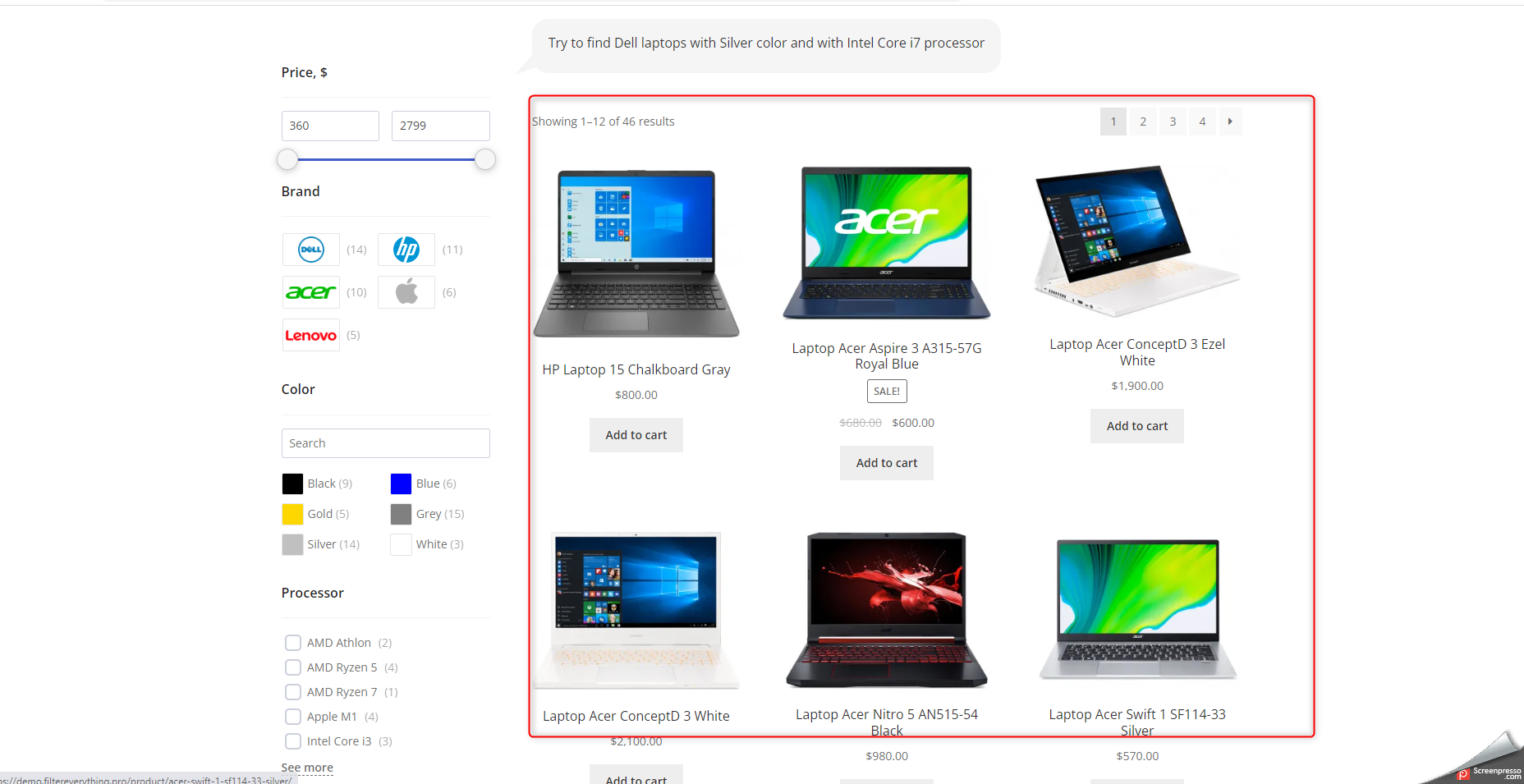
2. Is there a shortcode available to display the listing shown in this image: [https://share.supremeopti.com/2023-08-03_16h33_54.png ]?
3.If I want to display the listing of any other page, such as a Post or a Resource, how can I achieve that? For example, I would like to display the listing like it appears here: [https://share.supremeopti.com/2023-08-03_16h33_54.png] but its for laptops and I want to list my all Blog and resources.
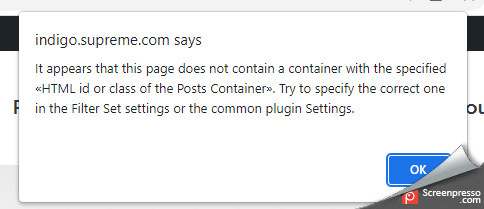
4. I have enabled the “ON Ajax” option from the backend, but on the fronted, it shows this popup: [https://share.supremeopti.com/2023-08-03_16h38_12.png ]. Can you please provide assistance on what needs to be done in this case?
Also, I was wondering if there is a video available that provides a brief explanation of this plugin, covering all the points mentioned above.
Thank you!
Hi Sheldondev,
Thank you for choosing Filter Everything PRO.
1. In the “Where to filter” specify the location of it.
2/3. The plugin doesn’t provide a product grid, the plugin is only filtering the products on the page where those products are already displayed with WP_Query, if we remove the filter widget from the page on your screenshots it will look the same just without the filters widget on the sidebar.
4. Well the popup message answers the question, but we will provide additional info. When you turn on AJAX there is an input field by the name “HTML id or class of the Posts Container”. Which is located in the Filters -> Settings -> General, that input field will use the specified class or id of the container to update the posts on any page with the filters widget. Also, in each filter set, there is the same input field, you need to write there the unique Id or Class of your posts container for a specific page where you want to locate the filter set.
The documentation for the plugin is accessible via https://filtereverything.pro/resources/ Please note that it is currently undergoing updates and may not be complete.
Best Regards,
- Victor
Hi, I created a horizontal filter, link is here: https://eyeconzmedia.com/ideali2/product-category/appliances-2/ovens-microwaves
How can the brands labels shown as images only?
Hi eyethalics,
Step-by-step example guide:
1. Create a brand in Products->Attributes – https://prnt.sc/C4BaKqzKBSXE
2. Go to the Filters -> Settings -> Experimental and turn this option on with adding the brand attribute – https://prnt.sc/usOr5Ifsalv5
3. Go to the Prodcuts -> Attribute -> brand that you have created and apply the image for the brand – https://prnt.sc/NkEdTbawXkIh
4. Apply on your products this brand attribute – https://prnt.sc/16UcH2Z1alPi
5. Turn off this option for filter brand – https://prnt.sc/L9DwL-cwUfDS
6. Done!
Best Regards,
- Victor

This item was featured on CodeCanyon

Elite Author
Contact the Envato Market Help Team



![https://share.supremeopti.com/2023-08-03_16h33_54.png]](https://share.supremeopti.com/2023-08-03_16h33_54.png])