2002 comments found.

Issue with: woocs_raw_woocommerce_price
SHOP has Denmark as default country with DKK as default currency.
This is the config of WooCommerce tax setup.
Plugin: WooCommerce Shipping & Tax (Author: WooCommerce) To handle different tax rates.
- Yes, I will enter prices inclusive of tax.
- Display prices in the shop (Including Tax)
- Display prices during cart and checkout (Including Tax)
- Display tax totals (As single Total)
The price rounding issue.
Normal price: 385,00 DKK (incl 25% vat)
- DK = Checkout > Billing Information > Country/Region > Denmark.
- DE = Checkout > Billing Information > Country/Region > Germany.
- DK: raw_woocommerce_price (Function Price: 385) incl 25% vat -> DISPLAYED PRICE: 385,00
- DK: woocs_raw_woocommerce_price (Function Price: 385.00) incl 25% vat -> DISPLAYED PRICE: 385,00
- 385.00 DKK – 25% VAT = 308.00 DKK
- 308.00 DKK + 19% VAT = 366.52 DKK
- DE: raw_woocommerce_price (Function Price: 366.52) incl 19% vat -> DISPLAYED PRICE: 366,52
- DE: woocs_raw_woocommerce_price (Function Price: 385.00) incl 19% vat -> DISPLAYED PRICE: 366,52
So the last line is the issue, as I can’t round the price.
is it safe to use “raw_woocommerce_price” with you plugin, as I can see “woocs_raw_woocommerce_price” do not handle the tax the same way?
Hello
Please write me here – https://pluginus.net/support/forum/woocs-woocommerce-currency-switcher-multi-currency-and-multi-pay-for-woocommerce/
tax calculation happens after this hook. So if you use this hook to rounding , the tax will be calculated after rounding.
Hi, im just testing the free version, before I buy. Im trying to add “woocs_clean_select”. do_shortcode(‘[woocs css_class=”woocs_clean_select”); but I still get styling, in seams the right html is loaded, but overwritten by js to make a fancy dropdown. I just want a normal dropdown without any styling or javascript.
Ohh… I found the reason, due to a translation plugin, the class woocs_clean_select was changed… 
Is it possible to force GeoIp? it seems the currency is not switching automatically to other currencies even when the website is visited from other countries.
Hello Please read this – https://currency-switcher.com/using-geolocation-causes-problems-doesnt-seem-to-work-for-me
Hi, I’m using a payment plan plugin which is not compatible with currency switcher, because the other plugin is using the original price as a base to calculate.
However, to solve the issue, I thought about to create for each currancy I’m aiming for a individual product with their currency as the base. If that would be possible the other plugin could probably work with your currency switcher.
Regards
Hello
prices for products must be stored in the base currency
Please read this – https://currency-switcher.com/woocs-labs
Hello, I tested the free version and noticed that even with the changes suggested in the documentation to make the Plugin work correctly with the “Woocommerce Product Addons” it still does not show the price in the currency within the “Product Page”.
Can you review? If I buy the pro plugin and it still doesn’t work, can you help me to implement it? I need the plugin to work correctly with Product Addons and if possible with Product Booking.
Thanks so much and congratulations to the excelent plugin!
Hello
Please write me here – https://pluginus.net/support/forum/woocs-woocommerce-currency-switcher-multi-currency-and-multi-pay-for-woocommerce/
Read this – https://currency-switcher.com/woocs-labs
i recently purchased FOX – Currency Switcher Professional for WooCommerce it works for few days the it stopped working and now its not visible on my website https://pashminavogue.com please take a look on my website and please do share your telegram or what’s app because your website is not working
Hello
Please wrete me here – https://pluginus.net/support/forum/woocs-woocommerce-currency-switcher-multi-currency-and-multi-pay-for-woocommerce/ – support forum site works fine
Please paste your license key here – https://share.pluginus.net/image/i20230222134241.png -> https://share.pluginus.net/image/i20230222134511.png and wp-admin access – https://share.pluginus.net/image/i20230222134615.png
Hi awesome plugin!
I have AUD and USD currency with free version.
It was working but now Side switcher Round select mode cannot switch currency. Only USD showing on page when click there is slight drop down animation but stops before AUD can be seen. The other modes Classic blocks and Roll blocks no longer appear on page.
Currency storage set to Transient.
I think this issue started when i tried the other options Fox, Php, Memcached.
Maybe relating to a cache problem with siteground or cloudflare but i have cleared siteground cache and purged all cloudflare. Php v.7.4.33
I tried cache and ajax options to no effect.
Could you have some suggestion to solve this.
Thanks.
Hello
Please write me here – https://pluginus.net/support/forum/woocs-woocommerce-currency-switcher-multi-currency-and-multi-pay-for-woocommerce/
and drop me exact link to the issue
Ty i created a ticket there
Hello
I answered you – https://pluginus.net/support/topic/side-switcher-issue/
Pre Sale questions.
I want to display the prices of the products on Albanian Lek , but on the checkout page everything should be automatically converted to Euro and the checkout to send the payment to paypal on Euro.
Thanks
I found it and this code works ok
add_filter(‘wp_head’,function(){ if(is_checkout()){ global $WOOCS; $WOOCS->set_currency(‘USD’); } });
But if the user goes to the home page or any other page the prices are still in USD. I would like that if a user is on every other page to see the prices in ALL and only on checkout to have the prices converted .
Thanks
Hello
The plugin remembers the last currency of the user, and since the currency was switched on the checkout page, then the user will see this currency until he switches to another
Is there any known issue with latest version of woocommerce as we can’t add new countries. ???
Is it possible to add multiple currency with same code and symbol but different description ? E.g.
Croatia / € (EUR) Cyprus / € (EUR)
I wanna show this in the drop down and there will be more if this is possible i’ll buy pro version.
Hello Is there any known issue with latest version of woocommerce – Unfortunately we haven’t heard of this issue.Can you describe it in more detail?
Is it possible to add multiple currency with same code and symbol but different description ? – Unfortunately the plugin does not have this feature.
Hello,
We are getting this message frequently lately. Does it have to do with your plugin being incompatible with pHp 8?
Our monitoring systems detected that your site //…// is not available and displays the following PHP error:
2023/03/27 00:32:35 [error] 21917#21917: *357466 FastCGI sent in stderr: “PHP message: PHP Fatal error: Uncaught TypeError: array_map(): Argument #2 ($array) must be of type array, string given in /www/…/public/wp-content/plugins/woocommerce-currency-switcher/classes/woocs.php:4002
Open site in MyKinsta
If you are actively working on the site you may ignore this message. In any case, we’ll keep monitoring this issue but only notify you again if the problem persists after 6 hours.
If you have any questions feel free to reach out to our support team by responding to this email or by opening a conversation within MyKinsta. We are available 24/7 to assist you!
Thank you, The Kinsta Team
Check our System Status page for updates. There may be a brief delay before the event appears on the System Status page.
You are receiving this email because you have Site monitoring enabled. Update preferences
Hello
Tell me please what exact PHP version on your site. On the demo site https://demo.currency-switcher.com/ we use now 8.0.28
And create please ticket here: https://pluginus.net/support/forum/woocs-woocommerce-currency-switcher-multi-currency-and-multi-pay-for-woocommerce/
We use php version 8.1. A ticket is also created in the link you provided. Please help us resolve the issue. Thank you.
Hello
I answered you here – https://pluginus.net/support/topic/php-error-3/
Hello, I am interested in your plugin but I wonder if it can accomplish what I need for my use-case. Can your plugin do the following (the store is in USD base currency)?
If payment gateway is COD: 1) Save a converted order total in EUR to the order metadata 2) Display the converted EUR total below the USD order total on the thank you page, account order page, and in order emails
If payment gateway is BACS: 1) Save a converted order total in HKD to the order metadata 2) Display the converted HKD total below the USD order total on the thank you page, account order page, and in order emails
In both cases, the store currency will remain USD. What I am trying to accomplish is that based on selected payment method, the customer will see which amount to pay in the currency for that payment method.
In my case, COD has bank transfer info for a EUR account, and BACS has bank transfer info for a HKD account. Therefore, I want the customers to know how much money to send in the correct currency when checking out.
Hello Unfortunately the plugin does not have this feature.
Hi, you have sent the adaption but it is NOT working correctly for the WooCommerce Deposits
It works incorrectly on the SHOPPING CART
https://imgur.com/a/PXVEdrP It does NOT work at all on the product page https://imgur.com/a/9BoELWSHello
I answered you on the forum – https://pluginus.net/support/topic/woocommerce-deposits-by-woocommerce/
How I can disable welcome currency feature?
Hello
The problem is that there should still be some kind of currency for users who visit the site for the first time
If you select the base currency as the welcome currency – then it could be considered that you have disabled this
I am using another plugin by WPML and its working fine. can you please remove this option to me because its glitch to google crawler with product variations.
Hello
Please write me here – https://pluginus.net/support/forum/woocs-woocommerce-currency-switcher-multi-currency-and-multi-pay-for-woocommerce/ paste your license key here – https://share.pluginus.net/image/i20230222134241.png -> https://share.pluginus.net/image/i20230222134511.png
And you describe this problem in more detail and we will solve it
I’m sure the welcome currency is not the reason for this behavior
I have purchased this plugin. more than 2 weeks I requested help on your forum with regard Woocommerce Deposit, Woocommerce Dynamic Prices, and Woocommerce Bookings as your published solutions are no working with new versions. But for 2 weeks you did not help?
Hello
I answered you here : https://pluginus.net/support/topic/woocommerce-simple-auctions/
https://pluginus.net/support/topic/woocommerce-deposits-by-woocommerce/ https://pluginus.net/support/topic/woocommerce-bookings-by-woocommerce/As you can see for one plugin we made an adaptation last week.
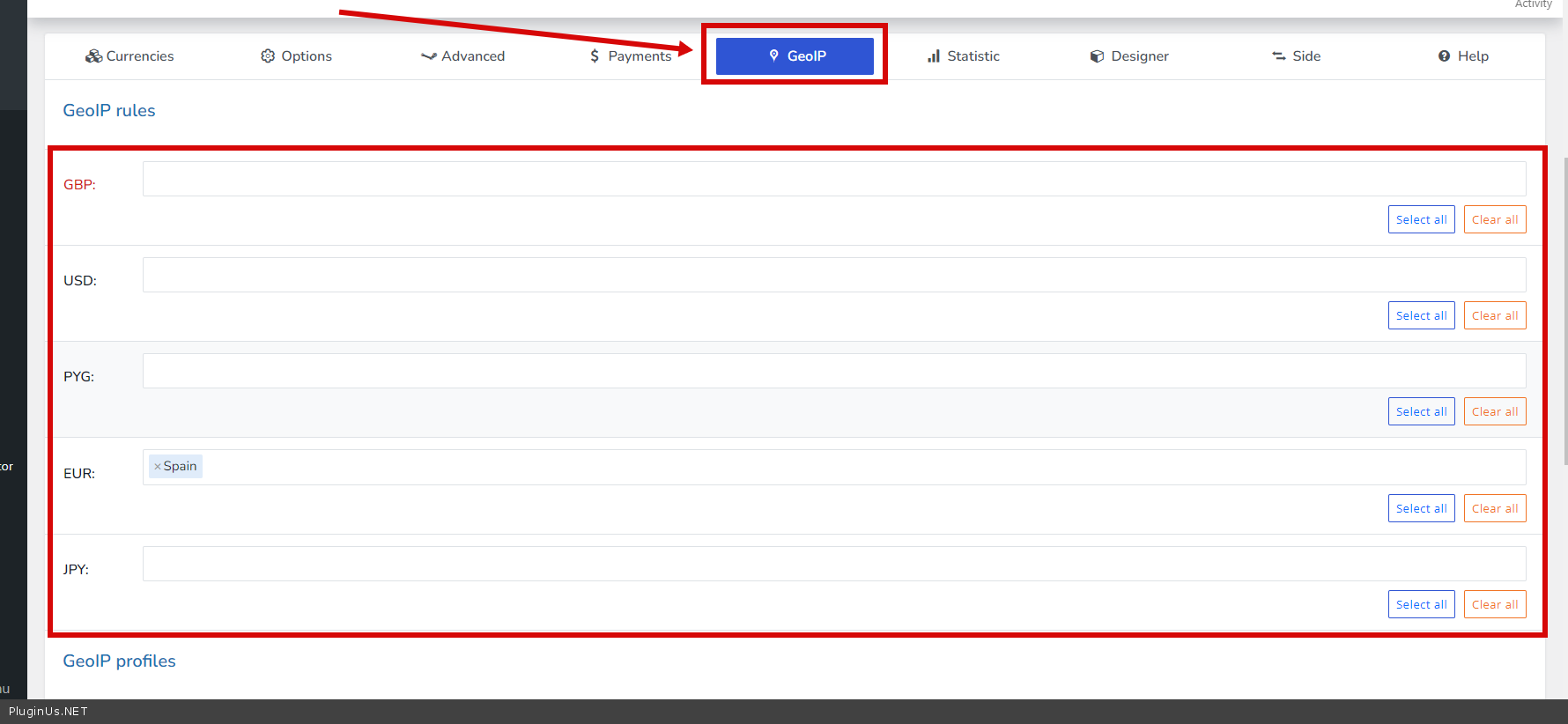
Hi. How do I make the welcome currency based on each country. As I don’t want the user when first visited the website don’t see other currency than the default currency or his country
Hello
please watch this video – https://currency-switcher.com/video#video_1
You need to configure GeoIP rules – https://c2n.me/4hXdPds.png
If it doesn’t work for you – https://currency-switcher.com/using-geolocation-causes-problems-doesnt-seem-to-work-for-me
Hello. I want to buy the paid version of your plugin. But after redirecting from free to permanent domain, there was a problem. On pages where the side currency switcher is enabled (this is only in the mobile version), there is a large free space under the footer. Saw this kind of issue mentioned in other posts, but the suggested solution didn’t help. I really want to solve the problem, because I like the plugin and I would like to use it in the future with more currencies. https://zapyataya.eu
Hello
Please write me here – https://pluginus.net/support/forum/woocs-woocommerce-currency-switcher-multi-currency-and-multi-pay-for-woocommerce/
Fix this error – https://share.pluginus.net/image/i20230228143250.png
also it looks like you are using JS optimization – Try to disable it for a test
This is happiness! Thank you very much for the quick response and the exact solution to the problem. I completely forgot that I also configured the Autoptimize plugin. The problem is fixed when unchecking the box “Also optimize the admin area of editors/administrators?” I am very grateful to you!
Great! Welcome;)
I have an unusual pre sale question. I have products that are priced in different currencies. For example: Product A priced in EUR, product B priced in USD. I would like to enter prices in different currencies in the backend depend on manufacturer price list. However, on the frontend, the prices should show in the selected single currency calculated with ratio. Is this possible with your plugin ?
Hello
Unfortunately, the plugin does not have such a feature. All prices must be stored in one currency
hello, this is another pre sale question
is your plugin work with woocommerce bundels and woocommerce funds ?
work with any sumo payment plans ?
Woocomerce smart coupons ?
https://woocommerce.com/products/smart-coupons/ https://woocommerce.com/products/product-bundles https://woocommerce.com/products/account-funds https://codecanyon.net/item/sumo-woocommerce-payment-plans-deposits-down-payments-installments-variable-payments-etci have check also check this plugins with your free version but i’m not success
i want to order your full package but first i want to be sure it’s working with the essential plugins with woocommerce
if not work give me any altrinatives plugins or if you have a plugins do the functionality of this plugins tell me
Thanks
Hello
Please read this – https://currency-switcher.com/woocs-labs
i’m already read it , i’m interested in all your plugins but first i want to be sure it’s fitted to my needs
if you have a time replay to my question
Hello
Unfortunately, we do not have information that all these third-party plugins are 100% compatible with the currency switcher
You can take a test with the free version – https://wordpress.org/plugins/woocommerce-currency-switcher/
and if you find incompatibilities – https://currency-switcher.com/woocs-labs
Hi, I have received an answer! Will you help me on the auction issue? Thank you in advance
I answered you on the forum
Hi, I purchased the woocommerce-currency-switcher. Now, I need a help to enable it for Auction Products. I am using woocommerce-Simple-Auctions
Hello
Please read this – https://currency-switcher.com/woocs-labs
I already read that. Can you please provide solution for the auction. As the auction price does not change when I change the currency.
I have supplied site credentials on your support forum
hello
I answered you on the forum

This item was featured on CodeCanyon

Power Elite Author
Contact the Envato Market Help Team