9132 comments found.

Hello Andrii
I’ve just purchased Pro!
Meanwhile I’ve searched in the docs and didn’t find an answer on the best way to replace the Free version installed with this one? Is it better to deactivate or delete? Will the Pro retain the tests I did in Free? Or is it better to make a new WP installation or other way to clean the DB and the queries?
And also if there is a way to export the Filters from local installation to live one?
Thank you!
Hello SugoDesign
Thank you for purchasing the plugin.
You can deactivate and after to delete the Free version, but be careful, make sure that PRO version is active at the moment of deleting Free. Because if both of them will be deactivated, all filters and their settings will be erased. I recommend you to create a DB backup before this procedure.
Yes, previously created filters will remain in PRO version. You don’t need to clean your DB as there will not be any “garbage” from the Free version. All your settings will remain in the PRO also.
Unfortunately Import/Export feature is not provided in the plugin yet, but I will definitely add it in the future plugin updates.
Thank you! By the way, if I have some suggestion is there a way to message more privately?
Hello SugoDesign
Sure. Please, click on my username and send me PM from the page that will open.
Hello Andrii. I don’t know if somebody already commented on that but I see that an url that has NOINDEX, at the same time has also canonical tag pointing to main category. IMO that is misleading for Google and in many cases Google may choose canonical as more important but as we know Google doesn’t have to stick to canonical directive (canonical is just a hint for Google) and the site might get indexed then. Do you have any plans to get rid of canonical tag in case when NOINDEX occurs? If not, are you able to suggest how could I get rid of it by myself?
Hello effa54
Thank you for your suggestion. I think I will not display canonical if it is Noindexed filters results page. I will add this feature in the next plugin update v 1.7.7
Great! Thanks a lot 
hi i purchased this plugin. 1] i need to show horizontal view 2) how to show the search results? default word press post type not working fine 3) acf field date are not displaying in date format shows continious numbers. my test page https://chennaibankauction.com/test1/
Hi fsbasheer
Thank you for purchasing the plugin.
1. To display filters horizontally just enable appropriate checkbox in the Filters widget. If you use shortcode, you can set it as shortcode attribute. Example [fe_widget horizontal="yes" columns="3"]
2. If you need to filter search results, please direct Filter Set to the saerch results page in the “Where to filter?” field. Here is example how it works for WordPress posts – https://demo.filtereverything.pro/?s=nam&post_type=post
3. Date fields are not supported by the plugin yet. They will be added in future updates. But from other side you always can use Templates Overriding feature – https://filtereverything.pro/resources/templates-overriding/ or Term HTML hooks https://filtereverything.pro/resources/hooks/#term-html-hooks to display data in desired format. Of course this expects that you are familiar with PHP or you have to ask a developer to help you.
Thank you. Regards.
Hello,
would be possible to make the SEO rules to work with the range slider? For example, we would like to set custom title and description when the price is in range 100-200 USD. Thanks for info.
Hello smartwebeu
I already answered you in this comments thread - https://codecanyon.net/comments/29316790If you will have further questions related with this problem, please ask them in that thread.
Thank you.
When I enter my licence key, I receive the message “Unknown error.”
I’m using the licence key and not the purchase code that’s displayed when clicking on the link on the Licence page.
I’ve tried disabling all other plugins and the issue persists.
Hello swintonmarketing
If the problem still persists, please, send me credentials to your /wp-admin in accordance with this document and also your License key I will try to activate it myself.
Thank you.
Thanks! Have sent you a PM
Hello swintonmarketing
Thank you for your credentials. I registered your License key and now it works fine. Please, check it.
Thank you. Regards.
Fantastic, thanks!
I’m glad that your problem is already solved
If it is possible I would be thankful for a positive review about the plugin here on CodeCanyon – https://codecanyon.net/item/filter-everything-wordpress-woocommerce-filter/reviews/31634508
Thank you in advance!
hello I test your free version before buy premium, but I have a problem, when a filter is selected cutomer can’t delete it, there no clear button or something like. the only way is the select again the option filter, but is not natural. it’s not usual for visitors to find out how to deselect the filter. Is there a way to add a button above the filters to clear the filters?
Hello ajna667
Thank you for your interest in Filter Everything PRO.
For this purpose there are special widget for selected filter terms called Chips. Here on this demo page https://demo.filtereverything.pro/product-category/clothing/women/color-red/brand-hm/c-kind-dress/?max_price=100 you can see it above the products grid – https://prnt.sc/TiFZgyJTgdth
If they did not appear in your theme automatically, it means you theme does not use popular WordPress hooks. But it’s not a problem, because you always can insert Chips as shortcode [fe_chips] or as widget above filtered posts or enable it to show directly in the top of the Filters widget.
good I find all fine, on mobile I have got an display error title for widget filter displayed 3 times (first the title I registered, others not translated. on desktop no problem. same issue with cleared cache/cookie. screenshothttps://www.transfernow.net/dl/20230329dWBvhGKL/rvt7I6Qk
some time the problee appear and others times no 
Hello ajna667
It looks like it is related reather with your translation tool, than with the FIlter Everything plugin. Anyway as you use Free version, you can ask about support on the WordPress support forum – https://wordpress.org/support/plugin/filter-everything/ Here is support for the PRO version only and I can provide it only for PRO users.
Thank you. Regards.
Kudos for your great product
Can you please confirm, can we use your nice plugin to make site like this one.
https://www.laptopscreen.com/English/Thanks.
Hello psbox
Thank you for your interest in Filter Everything PRO.
Although you have asked me about the plugin 7 times before, but anyway I can say – yes, you can achieve your goal with my plugin. Although you can also to build site with structure like in your example without my plugin using native WordPress opportunities and custom coding.
Hello again!
Here’s the scenario: we have a parent product category that has children.
We want the parent category to have a Filter Set and the children to have a different Filter Set.
However, when we set the option of the parent’s Filter Set “Where to filter?” to “Product Categories” > the parent category, it overrides the category children’s Filter Set to that one. Is there a way to fix this? (via hooks or so?).
Finally, the children’s Filter Set is set to “Common WordPress Pages” > “All archive pages for this Post Type” as we need it to work as the general filter fallback and on other pages (like the search).
Different topic, as a small proposal that could probably be implemented rather quickly: could you make the input selects hierarchical? Many of our categories are named the same, but belong to different parents. This is hard to see in the Filter’s HTML selects.
Best regards!
Hello busybytes
In general there is no support for accounts which support period is expired in accordance with the Rules. But I can help you later, after all requests from accounts with valid support period will be processed It may take some time – days or weeks.
If you want to get it faster, please extend your support period and this request will be processed in the first queue for supported accounts.
Thank you. Regards.
Hi,
I already made a request for activation of my licence.
Can you please activate the module on the website, we need it to work as soon as possible.
Thank you, Regards,
Hello yagoneto
Thank you for details you provided. I coped them. But also I reported your comment as it is publicily visible and contains sensitive information. I will check this and let you know.
yagoneto
I made all necessary things from my server side. Also I wanted to install PhpMyAdmin on your site to make final steps, but you restricted my user to do such things. It’s not a problem, you can insert in the functions.php code snippet I will send you on email and execute it one time (just open any site page after adding the code in the functions.php) and after to delete the code. As result you will have activated license.
Plaese, do this on your site and don’t forget to create files backup before any changes.
Thank you. Regards.
Hi, extension is stil not registred : Error: you can not update settings because Filter Everything Pro plugin is locked. Please, enter your license key to unlock it. I gave you all the info to login to the BO, I installed PHPmyAdmin. Canyou help me ?
Hi yagoneto
Thank you for installing PhpMyAdmin.
I made finish steps and now your License key is activated.
Enjoy
— We would be thankful for a positive review about the plugin here on CodeCanyon – https://codecanyon.net/item/filter-everything-wordpress-woocommerce-filter/reviews/31634508
Thank you in advance!
Hello, I have left several messages for you on the comment but not yet replied
Hello madhawaudawatta
I already replied to your comment also. Please, see it.
Thank you. Regards.
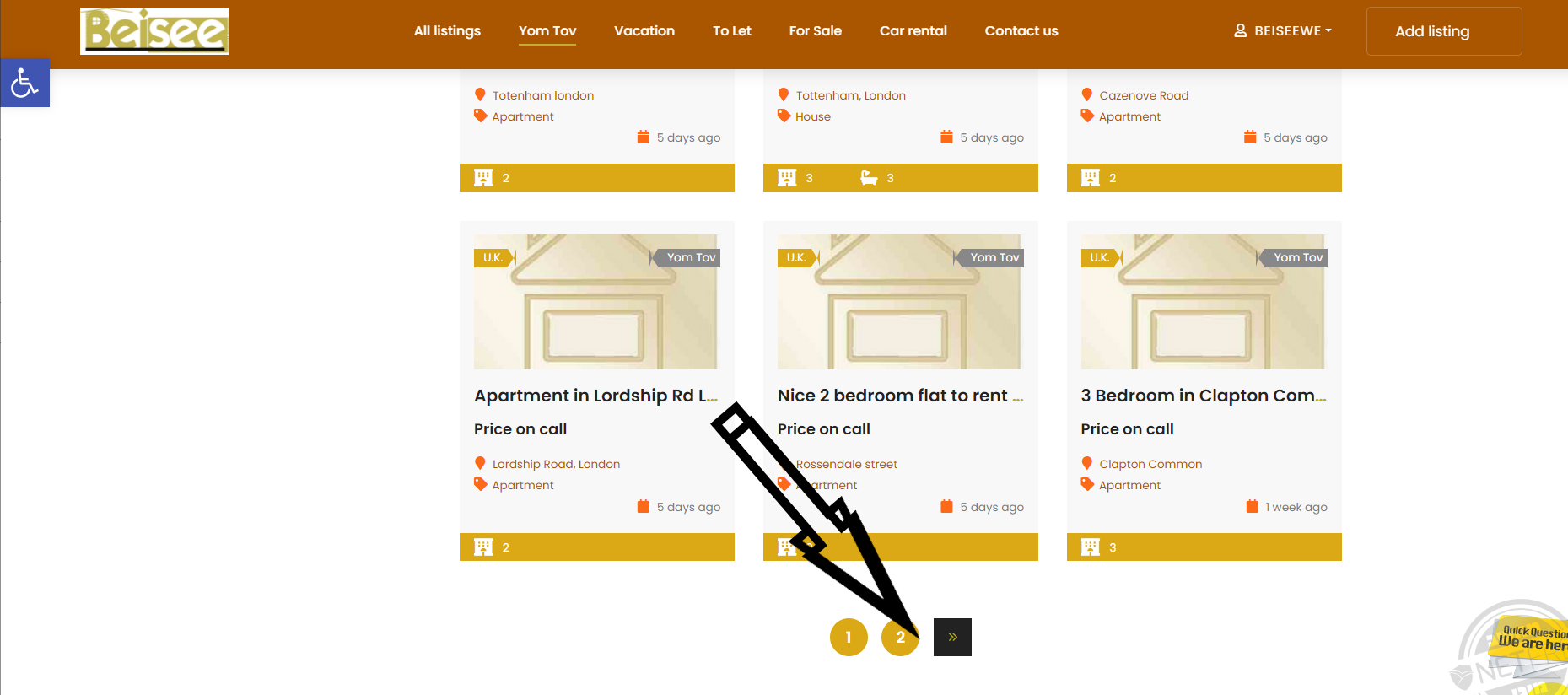
Hi I would be grateful if you have a solution to this. On this page https://beisee.co.uk/yom-tov-lettings/ I installed your wonderful filters. What happens is that when choosing a filter, & clicking to move on to more cards, the filter resets. https://www.beisee.co.il/wp-content/uploads/2023/03/image-50.png
Hi moshef3
It is known issue, but it is related with that fact, that this pagination works based on AJAX and it is not compatible with filtered by my plugin results.
There are sevaral ways to solve the problem:
1. To disable that AJAX pagination and to use ordinary pagination with page reloading.
2. To try to find another pagination plugin that supports AJAX and maybe it will be compatible with filtered results. I know such for WooCommerce products – https://wordpress.org/plugins/load-more-products-for-woocommerce/
3. To try to make them compatible via additional coding. Unfortunately such issue is not covered by the item support here on CodeCanyon as it is compatibility with 3rd party plugins.
Thank you. Regards.
I don’t think this is fair. Ajax is a very important feature. If this is known issue it should be stated clear. I would very much appreciate if this issue would be solved.
Hello moshef3
I’m sorry that your expectations were not satisfied. But this is AJAX and JavaScript technology limitation and it is already described in common details in this article – https://filtereverything.pro/resources/ajax-related-problems/
Any other plugin that uses AJAX if it load content parts on the page, all JavaScript features in these content parts stop to work. And usually in 99% cases only developers of these JavaScript features can adapt them to work after they were loaded by AJAX.
As option you can ask that pagination plugin support to help you.
Hello, we have a problem on a clients website where all filters are working except when we select a “Brand”.
Brands are created as an attribute not a plugin.
tinyurl.com/mt2mcjv9
Are you able to help point us in the right direction?
Hello, please could you help?
Why is my support post being ignored and you are responding to everyone else ?
Hello AP4571
I’m sorry for the late reply.
The special feature of the author dashboard here on CodeCanyon is that when you write a new comment under an existing one, it moves down in the list and I can reach to it the next day.
I think the problem may be in bad “URL prefix” for Brands – you use word “brands” that may be used also for attributes and WordPress recognize it as taxonomy name but not as filter. Please, try to open Filters -> Settings -> URL Prefixes and change this prefix to another one. This should help you.
Thank you for your reply! I had tested this already but still get the same problem. I have changed it to “p-brands” and this is refelcted in the URLs on the frontend so you can test. Any other tips ?
It’s strange, if you navigate to a product then view teh “Specification” tab…you can click a “brand” and view its products.
We are able to use an attribute for brands arent we ? And still use the filtering options
AP4571
Please, send me credentials to your /wp-admin in accordance with this document I will check it myself.
Thank you.
Hello, details have been sent.
Hello AP4571
Thank you for your credentials.
I totally removed filter by Brand and created it again and now it works fine. Please, check it.
Hello Stepasyuk,
I’m expecting for an answer about an issue appeared after an upload you did for me. The plugin had an incompatibility with the new version of Polylang and you solved it, but I have another issue appeared after the changes and my client is waiting for a solution. I would appreciate if you could take a look.
Thanks, Sergio
Hello Huzebio
I see your question related with this problem in another comments thread. Let’s continue to talk about the problem in that thread – https://codecanyon.net/comments/29133252
Hello decoracionvintage
This is a filter setup issue. I will be happy to help you if you extend your support period as your current one has expired.
Thanks for the plugin. I am trying to get the filters to display on the right side of the products page but an unsuccessful. I am adding to the widget section and all I am getting is the dropdown of the main categories and nothing to filter such as in the demo of the plugin.
You can see the example of what I am working on here: http://34.239.58.241/jpventures/product-category/custom-leather-goods/ Can you please advise as to what might be missing or needs to be added to get the desired outcome such as you have here: https://demo.filtereverything.pro/product-category/electronics/laptops/ Thank you very much!
Mark
@markstevens2 is my web developer
Hello Mark
Thank you for using Filter Everything PRO.
As i see it on frontend it looks like you didn’t select correct WP_Query in the “And what to filter?” field of the Filter Set. Please, try to experiment with other values in that dropdown and also I recommend you to add another filter in addition to the existing by category.
Kind regards.
Dear Stepasyuk,
The last update (1.7.6) rendered the checkbox filter items unavailable as in not showing them at all. It took me a lot of panic debugging the production until I somehow noticed that the working staging site was still running version 1.7.5
Overwriting the files luckily did the job, so I will leave this notice here if anybody else got stuck with this issue and if you need more information on this I will be happy to provide
Hello gunterqb
Thank you for yuor report.
Indeed in the current version 1.7.6 I was forced to update template files and noted this in the readme.txt file in the Changelog section. Luckily, you’re only the second person who have worried about this so far
how can I detect when a filter is set to specific, I want to put a banner when some filters are selected ?
Hello alinnovatr
You have to use the function flrt_selected_filter_terms(); that returns all selected filters.
Note: this function works correctly only if it fires after the Main WP_Query was fired. It means after hook ‘pre_get_posts’ was fired.
Thank you, I will try
Thanks for the plugin. I am trying to get the filters to display on the right side of the products page but an unsuccessful. I am adding to the widget section and all I am getting is the dropdown of the main categories and nothing to filter such as in the demo of the plugin.
You can see the example of what I am working on here: http://34.239.58.241/jpventures/product-category/custom-leather-goods/ Can you please advise as to what might be missing or needs to be added to get the desired outcome such as you have here: https://demo.filtereverything.pro/product-category/electronics/laptops/Thank you very much!
Mark
Hello Mark
Thank you for using Filter Everything PRO.
Please, write your support request from the account, where you purhcased the plugin.
Thank you. Best regards.
Hello,
we’re trying to reduce the font size of the checkbox filters.
We’re using CSS with no results.
Could you please help us?
You can see an exaple of the filter set: https://www.pelletterieborghese.it/abbigliamento-pelle-uomo/
Thank you.
Hello antonioborghese2019
Thank you for using Filter Everything PRO.
The plugin does not set own font size, but only inherits it from your theme styles. But as option you can add in Filters -> Settings -> Experimental – Custom CSS next:
.wpc-filters-widget-main-wrapper, .widget_wpc_filters_widget{
font-size: 16px;
}
and this will reduce it.
—
If it is possible I would be thankful for a positive review about the plugin here on CodeCanyon – https://codecanyon.net/item/filter-everything-wordpress-woocommerce-filter/reviews/31634508
Thank you in advance!
Hi,
I am using Collapse Filters Widget on Mobile devices, but by default they are open. How can I have it closed by default ?
TIA
This is very bad support! I have purchased the plugin and still no reply to this matter! I think its a bug on your version! Please I would really appreciate if you could check this out
https://flamingosl.com/tops-2/Here on the mobile version the collapse does not work
Hi madhawaudawatta
It is not plugin bug or something like that because it is consequence of some configuration errors on your site. The CSS file has HTTP protocol instead of HTTPS and that’s why it was not loaded on your site. Please see – https://prnt.sc/MDCtEAMtC4gh You have to fix this on your site to avoid using mixed HTTP/HTTPS resources.
I’m sorry that you had such impression about the support. But from other side you have to know what is included in the support to avoid inflated expectations. Please, see this short explanation of the CodeCanyon item support policy. Also FYI support delay can be up to 2 business days. I can hire additional guy for support to make things faster, but in this case plugin will cost 60-70$ instead of 40. I want you to understand this.
Thank you. Regards.

This item was featured on CodeCanyon

Elite Author
Contact the Envato Market Help Team