9142 comments found.

In the filter list we want the ability to type in something to search for? Like stock number. I see no option in the plugin for that a most have for us
I am trying my best to use your plugin but I am having all kinds of issues 1. My client wants a filter on the home page that submits to the custom post type page. This can be done by creating two filters where one only shows on home and one on custom post archive. But takes forever. Would be faster if you could just duplicate a filter. 2. There is no way to turn off labels when you use the show search field option. If you use css to hide it… hides the field search above. You should put a flag or something to show label in box and show or hide label or something. If you put no label it says search but you don’t know what you are searching for? only having title above for things like cars and trucks make the widget way way to long 3. We are testing in a dev. There should be a way to import export filters as well?
Hello one80group
Thank you for using Filter Everything PRO.
As a search field compatible with filters you can use regular WordPress Search widget and results finded by this field can be filtered with Filter Everything PRO (example). But also I planned to add own search field with improved functionality to my plugin. It is already in my development schedule and will be implemented in some time.
Also the feature that allows to duplicate Filter Sets is planned and will be implemented. But there are more prioritized features that should be devleoped first of all. You know that all these require some time for development and testings.
I’m not sure I understood you clear about labels for search field. Can you please provide me with link to the screenshot with example? It would be the best way to explain.
The Import/Export feature is also this that planned. In general I have to say that all features you mentioned for the moment on in the second place in my development queue. Because there are also features, that related with filtering functionality and should be implemented at first.
I understand your comments about the plugin and I appreciate such advices. Sooner or later they will all be implemented in a plugin but in this case it will also become more expensive and as I told above they require some time. Unfrotunately it’s impossible to implement all them in one two-weeks.
OK we have a widget on our home page, that sends data to our results page that has a filter widget as well. We are having a time getting this system to work How do we add a reset button only. We have apply on our home page widget that submits but we cant have results page set to apply otherwise it does not work. . I wish like filter pro you had an option for just a search field. The wordpress one deosnt work because we are using a custom post type.
I am just having a nightmare??
I am not wanting to send a rocket to the moon. I just want a search box only for a custom field, not all the junk it shows below in the different options like list mode, check box etc, we have like over a 1000 products and a way to reset all the filters with a button when apply is turned off.
Hello one80group
If you want to search only by custom post type with WordPress search field, you have to add field with the “post_type” parameter in the WordPress search form.
For example here is search results for WooCommerce products only https://demo.filtereverything.pro/?s=apple&post_type=product Because the results page contains parameter post_type=product. You can add the same in your search results page URL &post_type=your_custom_post_type_name via editing your searchform.php template or in another way that is available in WordPress also.
In general as I told you before, the search field with improved features related with filtering will be added in the future updates. I will notify you here in this comments thread about that.
Thank you. Regards.
There needs to be a way to add a reset button when submit/apply is turned off. So far in our user testing not one person outside of us developers know to unselect or move a filter to select to reset it!
one80group
Thank you for your suggestion. I thought about separate Reset button that can be inserted with shortcode anywhere. It looks like it is good idea, but I can’t promise that it will be implemented very fast. All the things (support, bugs, development, testing) require a time.
Hello one80group
I’m glad to inform you that built-in Search Field compatible with filters, AJAX and that allows you to search Woo products by SKU was added to the latest plugin version 1.7.8. You can update it automatically if you have activated your License key or download zip here on CodeCanyon.
Thank you. Regards.
Thats great. W ehave a new issue even in the latest version where the order by terms etc does not work. The widgets are always in the same order. None of them will lisyt choices in Alphabetical
Hello one80group
We have already answered you about this issue in this comments thread – https://codecanyon.net/comments/29521914 Let’s keep our conversation in that thread to avoid duplicates.
Thank you. Regards.
Hi, please help with following issue
I put Category Description on product category pages (Woocommerce) through following shortcode:
function custom_archive_description_shortcode() { $description = get_the_archive_description(); return ‘ ’ . $description . ‘ ’; } add_shortcode(‘custom_archive_description’, ‘custom_archive_description_shortcode’);
I used recommended hook “get_the_archive_description” but unfortunately “SEO Description” does not rewrite Category Description so then I have two descriptions (the original through shortcode + SEO Description from Plugin). I tried your adviced snippets which I found in comments but they did not solve my problem.
With H1 is my process working. I have shortcode with hook “get_the_archive_title” and your plugin nicely rewrites it with H1 Title from Plugin.
Can you help me please?
Hi richard_repetebox
Thank you for using Filter Everything PRO.
To edit SEO description you also can use hook ‘wpc_seo_text’. Please try to use it instead of ‘get_the_archive_description’. Here is exampl how SEO description is passed through the hook
$seoText = apply_filters( 'wpc_seo_text', $seoText );
thank you for reply, I tried to followed your advice and change my shortcode to: function custom_archive_description_shortcode() { $seoText = apply_filters( ‘wpc_seo_text’, $seoText ); return ‘ ’ . $seoText . ‘ ’; } add_shortcode(‘custom_archive_description’, ‘custom_archive_description_shortcode’);
but it is not working. I need:
- on page /category/ to show original category description (WORKING)
- on page /category/filter-abc/ to show SEO DESCRIPTION by plugin (wpc_seo_text) instead of original category description (NOT working, still showing the original one)
do you have other advice please?
Hello richard_repetebox
I would like to help you more with this, but unfortunately support here does not provide code debugging or customization. All that I can give you in terms of support is advice to use the hook ‘wpc_seo_text’.
If it does not work as expected I can only recommend you to check carefully all things related with the SEO Description, SEO Rule, hooks used on the page etc. This should help you to find the reason, why it works as it works.
Hi, I bought filter pro and everything works wonderfully! I just have one problem. In the filter I created for prices, it shows me the price range excluding VAT. How can I correct and have the range with prices including VAT as in the shop page etc?
Hi alessandro225
Thank you for using Filter Everything PRO.
To include taxes in the range filter, you have to use two hooks ‘wpc_set_num_shift’ and ‘wpc_unset_num_shift’ provided in the plugin.
Here is code example of how to use them if your taxes are 10% from the original price – https://gist.github.com/wpserve/430c34449708a7dcd5b630839a05cdbc
If your taxes are different and for example are fixed price you have to change this code in accordance with your situation.
This code example expect that you are familiar a little bit with PHP or you have ask a developer to help you with tis implementation. Unfortunately such custom coding are not provided under CodeCanyon item support license.
Thank you. Regards.
Hello! Thank you for your work and for the plugin so far. Is there any way to get a developer license type? I see a need for 10+ websites
Hello zumedia
Thank you for using Filter Everything PRO.
Yes, it is possible. Please, write me PM and I will provide you with details of how to get developer/agency license.
For ADA accessibility, I need to change div class=”widget-title wpc-filter-title” to something like h3 class=”widget-title wpc-filter-title”
Can you tell me where to find that? I found it in the free version but not the pro version and in my newest build, I only have pro installed.
I found it. Sorry!
Hi onnawebdesign
Thank you for using Filter Everything PRO.
I’m glad that your problem is already solved and thank you for your notification about that 
Hi, I’m getting “Invalid license key. Please enter correct license key.” for my license. Please advise.
Hi xavierunderwood
Please, note that License key and CodeCanyon purchase code are different things. To set License key, please go to Filters -> Settings -> License, click on the “Get your License Key” https://prnt.sc/-ehm9df3H_XT and you will be redirected to the new page. Log in there with your Envato credentials and you will see your License key for the Filter Everything PRO plugin.
Hello together,
Somehow it doesn’t order the numbers from small to large for me.
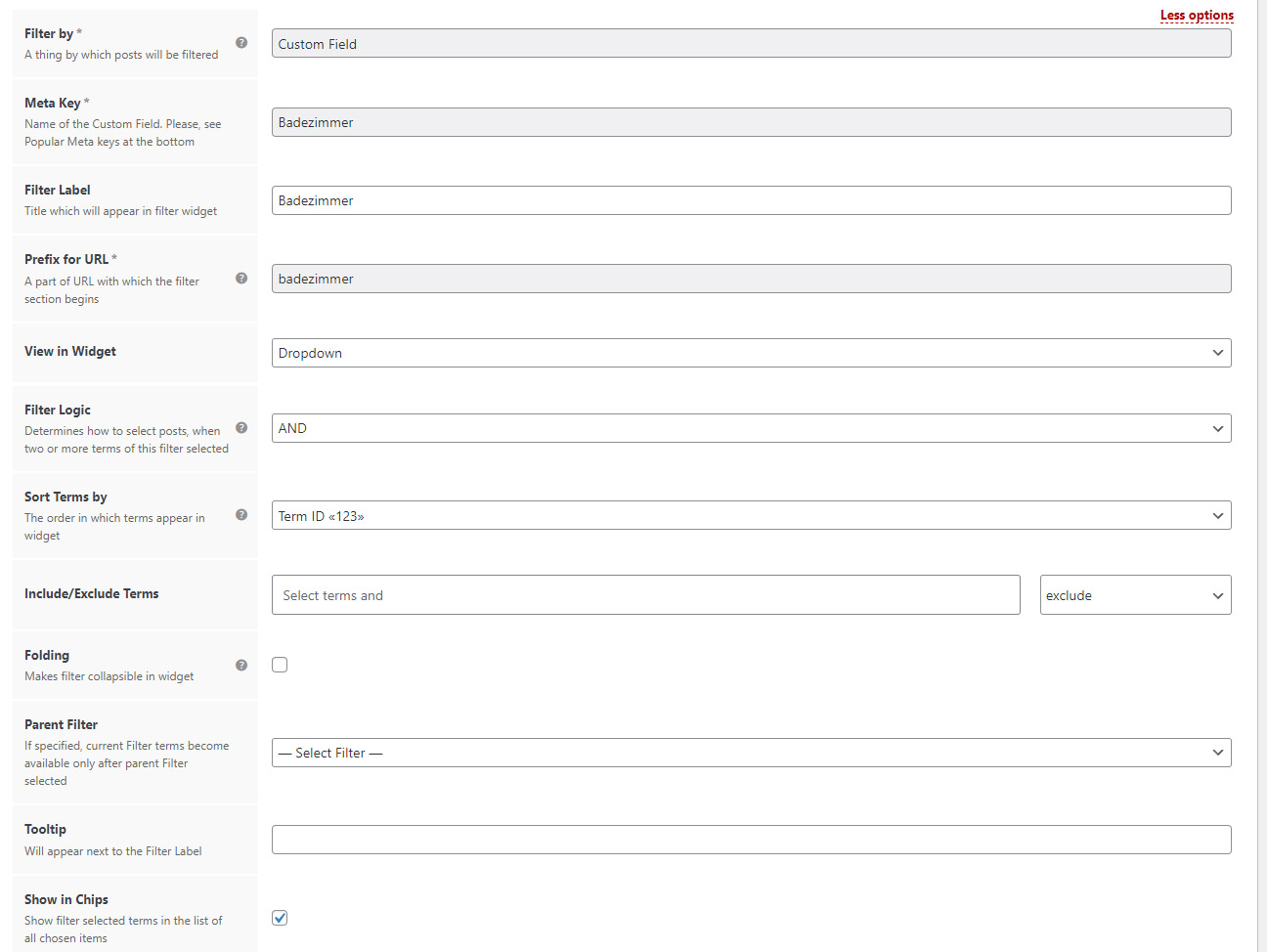
Backend Filter: https://webdesign-mallorca.eu/order-number.jpg (“Count ID 123” also does not work)
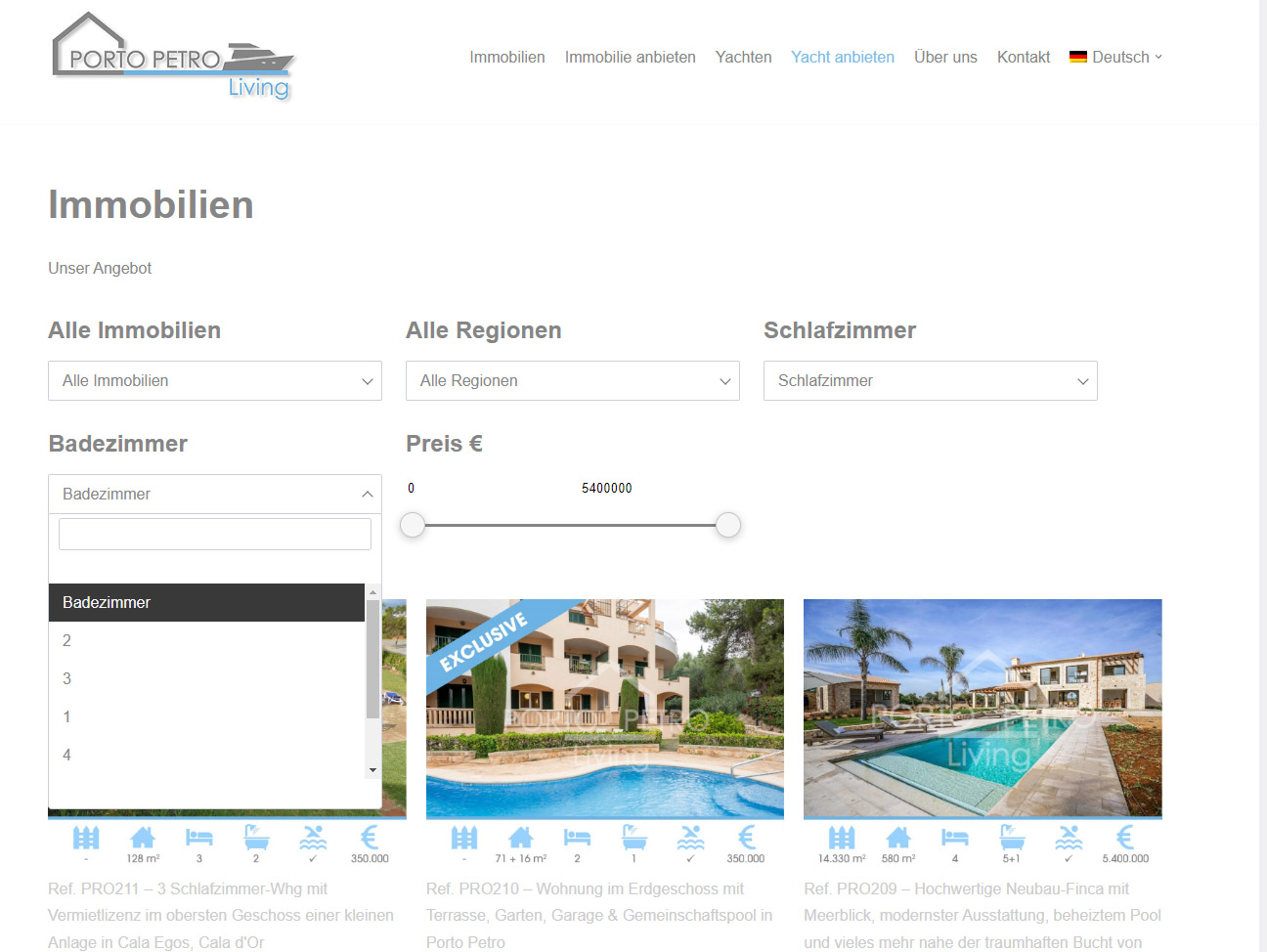
Frontend Filter: https://webdesign-mallorca.eu/website-filter.jpg
Have I overlooked some setting? Thank you & Regards
Hello SilentWorker
Sorting terms by Term ID is not so obvious because term_ID can be visible only for the site admin and only they can compare it with frontend and ensure it works or not. It seems you have to change the value to the “Term name abc” if you want to sort them in numeric order 1, 2, 3 … X
Please, try to select “Term name abc” for the filter.
Hi Stepasyuk,
Perfect, thank you!
I have two last questions.
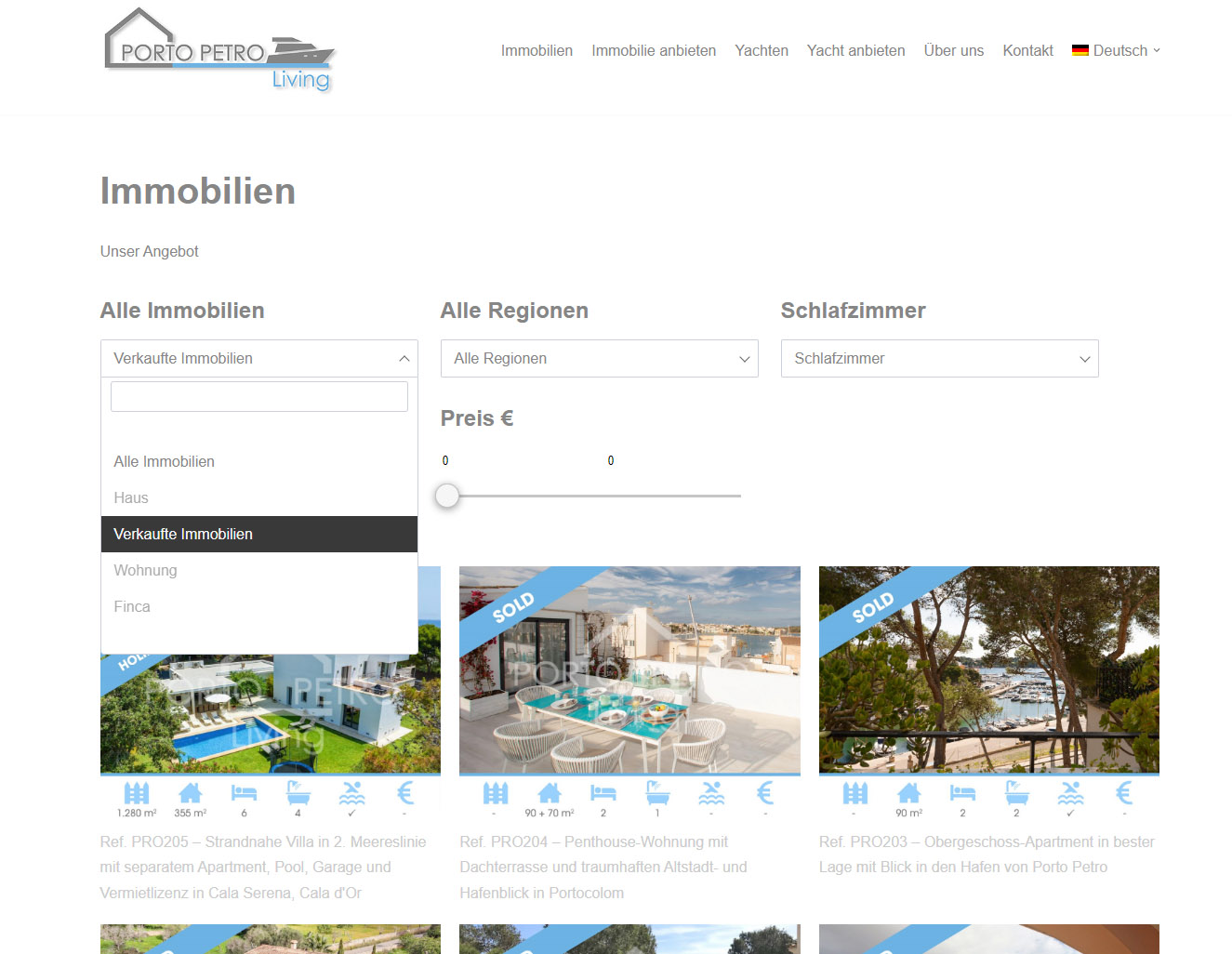
1. can I manually position a field? I want “Verkaufte Immobilien” to be at the bottom (Frontend). https://webdesign-mallorca.eu/Screen_Sold_Prop.jpg2. is there a possibility to chose a minimum number of bedrooms, e.g. 3 bedrooms or more(Frontend)? Like this (Backend): >=3 ?
Thank you very much for the nice support
Hi SilentWorker
I’m glad that your previous problem was solved
1. It is possible only for Product Categories and Product Attributes because they have ability to set manual order. If the “Immobilien” filter is not Product Category or Attribute you can use hook ‘wpc_terms_before_display’ https://filtereverything.pro/resources/hooks/#terms-before-display-hook to set desired terms order in PHP code. Of course it expects that you are familiar with PHP.
2. You can always modify your WP_Query that shows posts on the page via hook ‘pre_get_posts’ and to add there subquery that selects only posts with Bedrooms >= 3. Also you can use hook ‘wpc_filtered_query_end’ that allows you to modify WP_Query after Filter Everything parameters were applied.
—
If it is possible I would be thankful for a positive review about the plugin here on CodeCanyon – https://codecanyon.net/item/filter-everything-wordpress-woocommerce-filter/reviews/31634508
Thank you in advance!
I have a pageand I have added a products list on it with the filter on the side! but it does not filter.
Hello
would really like to have this sorted
Thank you. I have purchased this plugin
Hello madhawaudawatta
No worries, support answer delay here is up to 2 business days but depending from the problem may also be longer.
As I see now you were able to configure to work it by yourself and filtering works as expected http://box2531.temp.domains/~flaminx1/bodysuites/colour-green/
If you have any questions, please let me know.
Thank you. Regards.
Hi. Please, I need a refund. I totally regret buying it as it doesn’t fit my client’s needs. I really need a refund as this price is really expensive in my country. Thakns in advance.
Hello FMGD
I don’t see any refund requests from you in my dashboard. Please, create such request and it will be processed as soon as possible.
Thank you.
Sorry to bug you again but this is now delaying launch of our site. The filter has stopped working with new categories of blog posts. Any additional categories that get added show up as 0 count and gray-but filtering still works if I click on them. Please let me know what you need to assist us-the site with the categories on it is here: https://7868b54f5e.nxcli.io/video-learning/
Hello YetiSociety
It seems you have some kind of cache issue and it is related with that fact that you use two Filter Sets for the same page. In this case I recommend you to update both Filter Sets for this page – with Category filter and with Tag filter after you added new category or tag.
In general you can use the same Filter Set for both your filters, but to hide counts in the Tag filter you can use CSS and add in Filters -> Settings -> Experimental -> Custom CSS next code:
.wpc-filter-post_tag .wpc-term-count{
display: none;
}
Hello, thanks for your continued help! I see you’ve fixed our Video page. We were not able to duplicate the steps you took to fix the issue on another page – the articles page-”updating” each filter did not seem to work. Did you clear the cache (your previous recommendation) and which steps did you take to clear it? We would rather not rebuild the filter at this point if we can avoid it, if it is a matter of clearing the cache please give us the steps so we can exactly duplicate what you’ve done. Thank you so much!
Hello, checking in, it seems there was something very simple you were able to do to fix the “videos” page for us that we haven’t been able to do, could you go over those steps and provide them?
Hello, we would really appreciate your help with this. Thank you
Hello YetiSociety
To reset filter terms cache it is enough just to update Filter Set. But also you can manually reset the cache if you open your site with ?reset_filters_cache=true parameter in URL. For example https://7868b54f5e.nxcli.io/how-to-articles/?reset_filters_cache=true
But in general I checked your Category filter on the Articles page and I don’t see there any unexpected behaviour. You set it to include only two Categories “Silicone” and “Polyurethane” please see screenshot – https://prnt.sc/2lA4XkeulzYA and both them are visible in the filter.
If you want to see there another categories, please include them in the filter.
Thank you. Regards.
I have installed the plugin in our website in the header of a specific page. The filter is shown VERTICAL. I need to show it horizontal with columns.
How do I configurate it?
Can you please reply me with CC to info@efemossesistemas.com.ar?
Thanks, Francisco
Hello Francisco
Thank you for using Filter Everything PRO.
In general installing and configuring items purchased on CodeCanyon are not included in support here. But to make filters horizontal you have to activate appropriate checkbox in Filters widget. Please, see here – https://prnt.sc/tdEPx0b2oLI-
If you use shortcode, please look here https://filtereverything.pro/resources/shortcodes/ how to activate horizontal layout.
Thank you. Regards.
Hello, Stepasyuk
I designed a large e-commerce site using AVADA and your Filter Everything PRO plugin. After my last upgrade to WP 6.1.1, the filter for categories with many products (3,000+) stopped working correctly. I disabled all plugins I could to isolate any conflict issue, but the problem persists. I tried a few other plugins I had evaluated before choosing and purchasing yours, and they thought it could have been more elegant to work. I can only conclude there is an issue with compatibility with your plugin.
What might be the issue?
Also, I noticed that there are two plugins active on this site they are; “Filter Everything — WooCoomerce Product & WordPress Filter” and “Filter Everything PRO” is this correct? Should they both be active?
Hello emarioc
Please, let me know what exactly stopped working? What exactly is the problem with the category filter?
If you use default category (usually called Uncategorized) it may be the reason.
UPD: you can deactivate the Free version of the Filter Everything, when you use PRO.
I can not activate the license. It shows “Unknown Error”
Hi Stepasyuk, on our homepage (start page) we have a filter with drop-downs and the “Apply Button”, but the results are only visible on our search-results-page. After clicking the dropdown, we have a few seconds of loading, because the query is loading in the background.
Can we change this to: only load query on button click, not after selecting a dropdown?
Thank you very much.
Kind regards Christof
Hi Christof
I’m working on this behaviour, when selecting filter terms in the “Apply button” mode works immediately, but it requires some time to be implemented and tested.
For the moment it is impossible to disable such behaviour because every time when you select a new fitler, the plugin must recalculate all possible intersections witn other filters and dispaly correct counts in them. Otherwise, if the plugin will not recalculate counts visitors very often can receive empty filter intersections. For example they very fast select 2-3 or 5 filters, but after clicking on the “Submit” button they will receive “No posts found”. If such result will repeat 2-3 times, visitor will leave this filters form and maybe whole website.
HI Stepasyuk,
I have 2 filters, one for categories and one for tags. The filter for categories work but my tag filter wont work. I see 0. Could you help me to assign some products to this filter. I can give you again acces to my site by PM
Greetz, Thijmen
Hi Thijmen-Hookit
I have written you to your email. Did you receive my email?
Please, let me know. Thank you. Regards.
Hi, maybe I have overseen anything in the docs.
We can change the filter logic between “and” and “or”.
But can we also change the click behavior of buttons (label list) so that we can setup to allow only click on item or allow multiple choises?
Hey, me again. Can you help us with a 404 error? When you select a filter on Page 2 of the results, it turns to 404.
Hello mgcl1
This problem does not related with the Filter Everyting PRO, but rather with that fact that you use the word “sayfa” instead of regular “page”. I recommend you to use the word “page” for better compatiblity with all plugins.
Thank you. Regards.
Hey! Thanks for your quicky reply. But Sayfa = Page in Turkish and our website is in Turkish, what can we do in this situation? 
Isn’t there a way around it?
Hello mgcl1
You have to change either code in the plugin that uses “sayfa” instead of “page” or you have to change code in the Filter Everything PRO plugin. I do not recommend you to change Filter Everything PRO plugin code.
Hello! Thanks for the reply, changed ‘sayfa’ to ‘page’ and worked like a charm. Hope or SEO is not affacted by this 
Hello mgcl1
I’m sure, that Google knows both “sayfa” and “page” words and can correctly process them
Hi, is it a way to allow the custom product variations field “_groupe_couleurs” to be shown as colors insted of labels like other objects can be setted like that? This field is already used in a filter and it works fine as label. Unfortunatly, in the experimental tab I didn’t found this field in the “Taxonomies for Color swatches” selector (or a way to fill it). Cheers
Hi lesdessouschicsinfo
Unfortunately it is technically impossible to use Custom Fields to simulteneously store in them filter term value and color. Only taxonomies are supported for the Color Swatches bacause taxonomy terms have own Custom Fields.
When you create a filter by a Custom Field all its terms are Custom Field values with specified meta key. But colors require to store somewhere color values for these Custom Field values. And this is impossible.
We are unable to get the products to display:
https://prnt.sc/EfiwvD3P_fA-Using Elementor Pro. I have subscribed to support, with the additional 6 months.
Hello warchop1237
Sure, it is compatible with Elementor and with 99% of other page builders. As I adviced you under another comment it is better at first time to configure filters to work without the “Apply button” mode and without enabled AJAX. Also try to enable “Show counts” and select correct WP_Query in the “And what to filter?” field of the FIlter Set.
Thank you. In a further comment I requested a refund… please DO NOT refund. thank you.
Ok sure. No problems with that. I understood you.
Hi Stepasyuk,
I am trying to apply 1 filter set to both the archive page for a post type and taxonomy term pages for the same post type. The docs say: “Where to filter? (Location) | Defines a page or list of pages, where this Filter Set will be applied.”. From that I gather that I should be able to set a list of pages where the filter set will be applied. But in the filter set settings I don’t see options for applying multiple locations. So it only allows me to set 1 location, it seems.
Am I overlooking something and should I be able to set multiple locations for a filter set? If not, why? It seems impractical and prone to error to create a new filter set with the same filters and settings and set that to a different location.
Regards, Bas

This item was featured on CodeCanyon

Elite Author
Contact the Envato Market Help Team