9146 comments found.

Hi,
I have another problem.
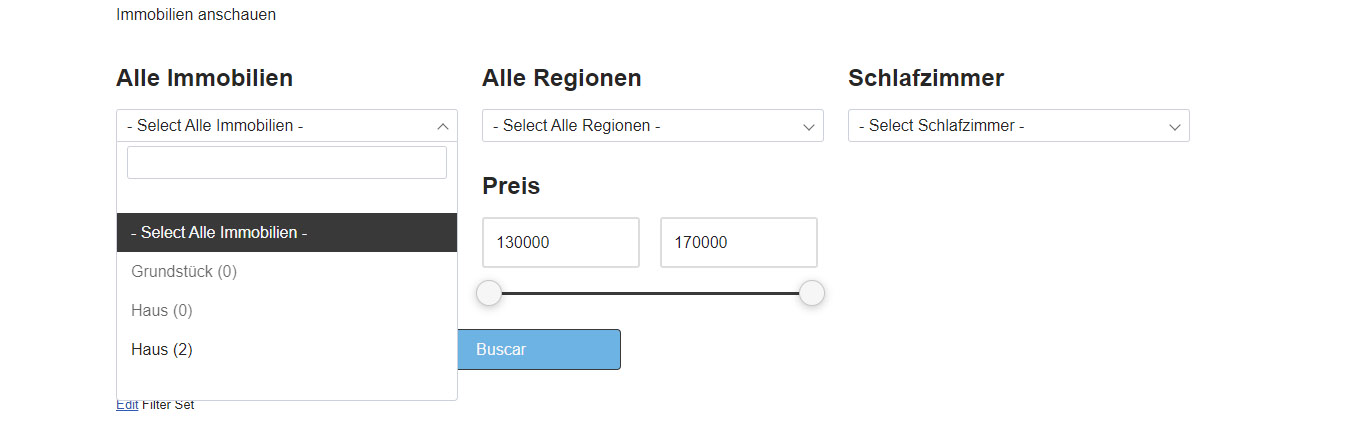
Here the Screenshot: https://webdesign-mallorca.eu/select_screen.jpg2 old tags “Grundstück (0) and Haus (0)”
Where can I delete them? There not in Post or in the Filter anymore but there are stil in frontend.
Thank you and best regards
Hi SilentWorker
You can exclude these terms in More options -> Include/Exlude terms option and they will never appear in the fitlers.
Or if you want to always hide empty terms, please set it in the Empty terms -> Always hide in your Filter Set settings.
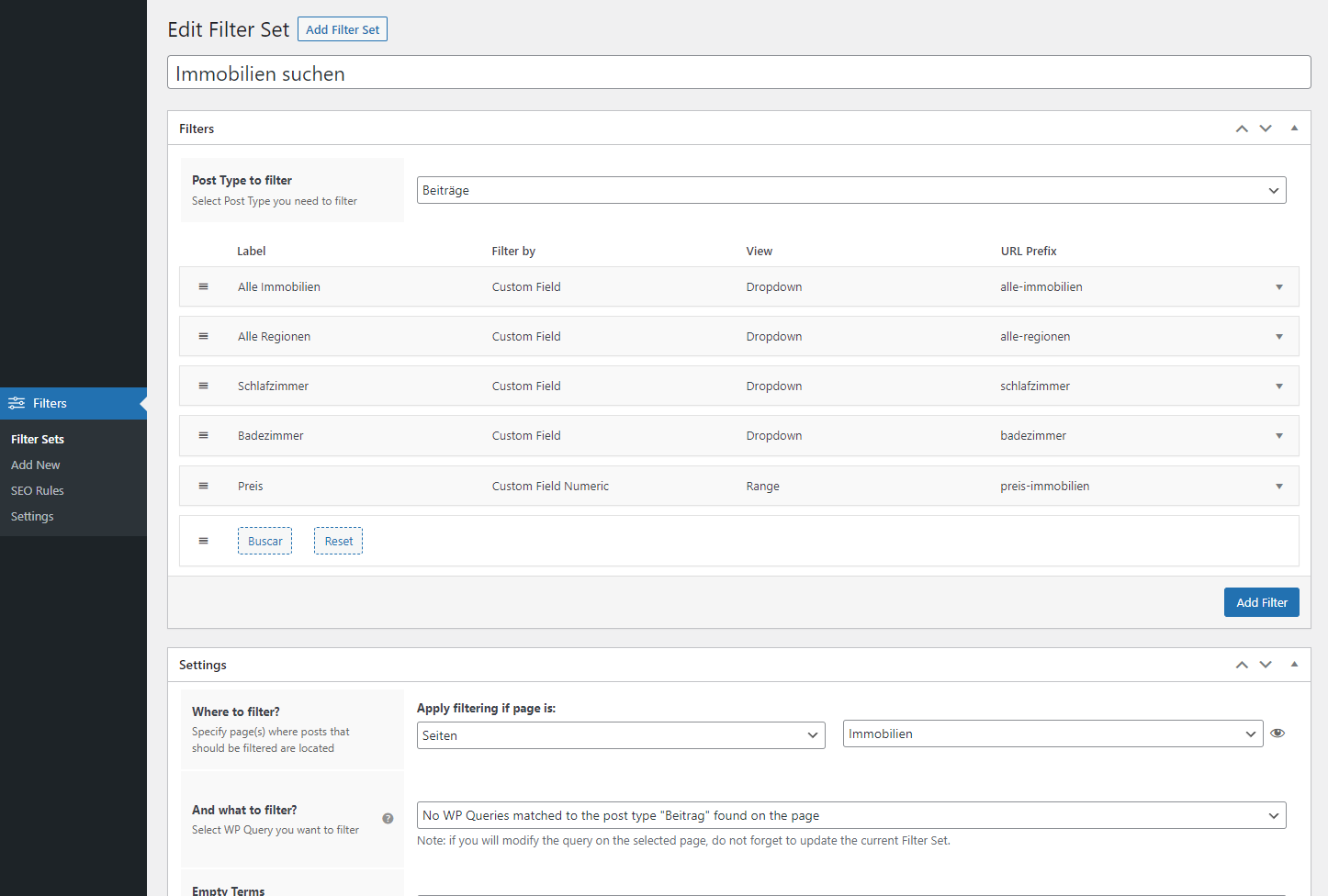
Hi, The only strange thing is that they are not listed here: https://webdesign-mallorca.eu/backend.png
I’ll look at it all again step by step … Best Regards & thank you
Hi SilentWorker
As I see from your screenshot you configured it wrong because you have no WP_Queries in the “And what to filter?” field. It means that on the page you specified in the “Where to filter?” field there are no posts specified in the Post type field.
Please, add these posts Beiträge on the page “Immobilien” first and after specify correct WP_Query.
Thank you, I had already read this and of course there are posts on the “Immobilien” page.
I think the error comes when I adjust the posts. Image size, grid etc.
I’ll take another look over the weekend and get back to you. Thank you & have a nice weekend
Hi,
Posts in “Immobilien” are available. Now I thing i have at least found the problem. But I still don’t have a solution.
When I insert the posts and adjust the layout, everything works. BUT as soon as I select only one category (Immobilien), the filter search fails and i dont have a WP_Queries in the Filter menu.
Best regards
Hi. I’ve been using the plugin for several months and I congratulate you because it’s done very well. But these days I have a problem with a checkbox of a custom field.
The filter recognizes the custom field which is correctly shown, but when I try to filter it does not return any results. The custom field is text (pods), like others that work correctly.
In private I’ll send you the license, the link to the site and the login credentials.
Sorry if I add a problem. The button that opens and closes filters on mobile devices disappears when I activate a filter. I also tried the pop up version, but it doesn’t work.
I solved the button problem by consulting the documentation. Sorry, I didn’t find it before!
https://filtereverything.pro/resources/typical-problems/ https://filtereverything.pro/resources/the-bottom-widget-button-does-not-appear/Only the problem of the checkbox field that returns no results remains to be solved.
Hello mattiascai
Thank you for using the plugin.
The problem is in your data stored in this field. Some of them have serialized data, some of them are simple strings – https://prnt.sc/kYiyayBkdhFZ
It seems you changed the type of this field and did not update all your posts after that. To be able to filter by this field you have to make all this data in the same format – either all fields should be strings or all these fields should be serialized values.
—
If it is possible I would be thankful for a positive review about the plugin here on CodeCanyon – https://codecanyon.net/item/filter-everything-wordpress-woocommerce-filter/reviews/31634508
Thank you in advance.
Hello, I solved most of my issues through the documentation but have two questions, please see the following page:
https://oddflower.co/collection/vintage/upcycled-denim/1) After filtering by a checkbox, “Showing all _ results” only updates the results number after page refresh. How can we get this to update with AJAX?
2) Is it possible to use query string instead of subdirectory in URL? For example, we want to use something like https://oddflower.co/collection/vintage/upcycled-denim?size=waist-34 rather than https://oddflower.co/collection/vintage/upcycled-denim/waist-34/
Thank you!
Hello refreshingdesign2
Thank you for purchasing the plugin.
1) It can be solved easily if you set for the “CSS id or class of the Posts Container” option such container, that also inlcudes your phrase “Showing all 25 results”. Optionally you can move WooCommerce hooks this phrase inside current container specified in the option.
2) Yes, sure. Just add in the functions.php of your active theme next code:define( 'FLRT_PERMALINKS_ENABLED', false );
Hi, in my site the SEO Description is not overwritten, can you tell me how to fix it? thank you
Hi ibeppo993
Thank you for using the plugin.
It seems your theme uses some another hook to display Archive Description than most of other themes.
If you use WooCommerce it should be hook ‘woocommerce_after_shop_loop’ if you don’t use WooCommerce it should be hook ‘get_the_archive_description’. If no one of these hooks is used on your site, you have to add it manually regarding to the Example 1 in this article – https://filtereverything.pro/resources/seo-rules-troubleshooting/
is there any simpler solution for Elementor? Thanks for the reply
Hello ibeppo993
I think in Elementor you can try to use one of the next hooks to display SEO description and specify it in the code from this manual – https://filtereverything.pro/resources/seo-rules-troubleshooting/elementor/page_templates/canvas/before_content elementor/page_templates/canvas/after_content elementor/page_templates/header-footer/before_content elementor/page_templates/header-footer/after_content
i tried all 4 hooks you suggested adding the function in the functions.php. Now I see both descriptions, one specific for the brand + category combination (managed by the filtereverything plugin) and one only for the category (woocommerce default description). do you have other solutions? thank you
Hi ibeppo993
Try please to put this code in the functions.php of your theme:
add_action('wp_head', 'wpc_add_filters_seo_description');
function wpc_add_filters_seo_description(){
    if( class_exists( 'FilterEverything\Filter\Container' ) ){
        $seoFrontEnd = FilterEverything\Filter\Container::instance()->getSeoFrontendService();
        $your_new_hook = 'woocommerce_archive_description';

        remove_action('woocommerce_after_shop_loop', [ $seoFrontEnd, 'showSeoDescription' ], 5);
        add_action( $your_new_hook, [ $seoFrontEnd, 'showSeoDescription' ] );
    }
}
If the ‘woocommerce_archive_description’ will not work for you, you can try to replace it with some of 4 Elementor hooks.
I am having trouble getting Filter Everything Pro to work with other plugins, specifically, I installed Iconic’s Show Single Variations plugin (https://iconicwp.com/products/woocommerce-show-single-variations/) and Fiber Everything Pro stopped working.
I have a support case open with Iconic, and I have a support case open with Barn2 for their Product Filters plugin (https://barn2.com/wordpress-plugins/woocommerce-product-filters/) which also failed to work with Iconic.
I have removed your plugin for now, sine it was rendering as a blank space on the site.
Have you seen this before? Can you help us troubleshoot?
Hi CharlestonWeb
Thank you for purchasing the plugin.
I’m sorry that you didn’t get them to work together and I have already registered compatibility issue with the Ionic plugin. I will check this and let you know about the result, but it may take some time.
Can you provide information around why it is not working? I have a support case open here with out, and IconicWP, and Barn2 and WooCommerce. I am hoping I can be a central point of resolution or somehow find out what the gap is and try to fix it myself faster.
Can you please share details or documentation on what the known cause is?
Hello, I have 3 questions for my site please: https://www.sport-in-place.com/listing/category/velo-appartement/
1 – I did not succeed in the filter installed according to the price of products: https://ibb.co/6vWfBYB / https://ibb.co/Gt9bJnF
2 – I did not succeed in the filter installed according to the customer reviews on products: https://ibb.co/2h8QJ0y
3 – I just wanted to know if you know when this possibility will be offered by the plugin: XML sitemap for indexed filtering result pages IN PROGRESS: https://ibb.co/hBTpgsG
I thank you in advance Sincerely Bruno
Hello Bruno.
I would like to help you with issues 1 and 2 but all that I can suggest you is to look on these examples for Price and for Rating filters and create them by advices on these pages. Unfortunately filter configuring is not provided under CodeCanyon item support policy.
About XML sitemap – I think it will be ready not faster than in February 2023.
I need some help with filter display ordering please. I’d like the options to display in numerical order but the “kg” text is preventing that from happening. It should show as:
1kg-50kg 51kg-100kg 101kg-150kg 151kg-200kg 201kg-300kg
...but using ‘Term name <<abc>>’ it shows is:
101kg-150kg 151kg-200kg 201kg-300kg 51kg-100kg 1kg-50kg
The Sort Terms By ‘menu order’ option is greyed out. Would that work (and if so, how do we access it)? I’ve tried the ‘wpc_terms_before_display’ hook code you suggest but haven’t had any luck – I’m not sure what I’m supposed to be doing with that and can’t see any documentation related to it. Any pointers please?
Thanks
Hi timdriver
The ‘menu_order’ option is available for WooCommerce attributes only as they store their order in term meta field with key ‘menu_order’. All other Taxonomies or Custom Fields are not supported as they have no such value.
Indeed, if no one from the sorting options is not good for you you can use hook ‘wpc_terms_before_display’ to sort them via code. But this expects that you are familiar with PHP or you have ask a developer to help you to solve this issue.
I would like to help you more with this, but unfortunately such custom coding are not provided under CodeCanyon item support policy.
Ok, that’s frustrating but never mind. As a workaround I’ve prefixed each item with A, B, C etc to get them to display in order and now just need to apply an on-the-fly search and replace to remove those. However, the usual str_replace php code isn’t working for this. Is there anything in the plugin code that’s likely to be the cause of this not working please? Any help you can offer here would be very much appreciated so that we can get past this annoying problem. Thanks in advance.
This is the code I’m using in functions.php, which isn’t having any effect:
// Fix Filter Everything sidebar ordering function replace_text($text) { $text = str_replace(‘A001-50kg’, ‘1-50kg’, $text); $text = str_replace(‘B051-100kg’, ‘51-100kg’, $text); $text = str_replace(‘C101-150kg’, ‘101-150kg’, $text); $text = str_replace(‘D151-200kg’, ‘151-200kg’, $text); $text = str_replace(‘E201-300kg’, ‘201-300kg’, $text); $text = str_replace(‘F301-500kg’, ‘301-500kg’, $text); $text = str_replace(‘G501-800kg’, ‘501-800kg’, $text); $text = str_replace(‘H801-1500kg’, ‘801-1500kg’, $text); return $text; } add_filter(‘the_content’, ‘replace_text’);
Hello timdriver
I’m sorry, I can’t help you with this as it is not included in the CodeCanyon item support policy.
Hello timdriver
Since our discussion has reached an impasse, I propose to resolve this situation in a way that is beneficial to both of us. Please send me a message via PM, I have a win-win offer for you.
Thank you.
Hi. I’ve just bought the Pro version of your add-on but the license key doesn’t work. When I enter it I get the error message “Invalid license key. Please enter correct license key.” I really need to be using this plugin today so would appreciate an urgent fix please. Thanks.
Hi timdriver
Thank you for using Filter Everything PRO.
Please, note that License key and CodeCanyon purchase code are different things. To set License key, please go to Filters -> Settings -> License, click on the “Get your License Key” https://prnt.sc/-ehm9df3H_XT and you will be redirected to the new page. Log in there with your Envato credentials and you will see your License key for the Filter Everything PRO plugin.
Thanks – sorted!
Is it possible to create subcategories?
Hi luukspecht
I’m not sure what you exactly mean, but if you want use hierarchy in a filter, you can enable it under More options section if the taxonomy selected for the filter is hierarchical. Here is example how it works and looks – https://demo.filtereverything.pro/posts/category-beauty/ please look on the Category filter.
I want to sort/filter Review badges (https://businessrating24.com/badge-test/). For the Badges i use a plugin called „WP reviews Pro“ I try to allow users to sort the Badges by ‘highest/lowest number of reviews’, ‘alphabetic order’ & filter the badges by ‘average rating. The plugin „WP reviews Pro“ doesn’t have the feature to filter/sort badges and i was wondering if it’s possible with this plugin.
Hello gabriel_togan
Here is support for the PRO versoin of the plugin only. I already answered you on WordPress forum about this problem.
Presale Questions:
I am a user of the Free version of your wonderful plugin, but I know need some features of your PRO version, but I have a few questions. Please let me know if this is doable with the PRO version.
1. it is possible to display only subcategories on a category page? for example. I have 6 categories and each category has 20 subcats and if user is on xyz.com/category, Is it possible to only display the subcats rather than all the other top-level categories?
2. Is it possible to add color swatches?
3. is the star rating available in PRO?
Thank you so much. I look forward to your answers.
Hello monanzallc
Thank you for your interest in Filter Everything PRO.
1. Yes, it is possible. You can achieve this by enabling option “Empty terms” – “Always hide” and if posts on your current category are not attached to other categories they will not appear in the filter.
Also you can specify manually what exactly category terms should be included in the Filters widget. But in this case it requires to create 6 Filter Sets for every parent category.
2. This feature for the moment is added in my development schedule, but not implemented yet. You can achieve this, but only via small coding and using term HTML hooks – https://filtereverything.pro/resources/hooks/#term-html-hooks
3. Yes, star rating for WooCommerce products is available in PRO.
Credentials for support sent! Thank you!
Hi 804seedbank
Thank you for your credentials.
I checked your site and didn’t find any Sorting widget. Please, provide me with details what exactly and on what page do not work. Please, remember, that Sorting widget works with products that are filtered (specified in a Filter Set in the “And what to filter?” field)
Please specify why your filter is loaded, even if the filter widget is not added to the sidebar? https://prnt.sc/VffkcHbcnrLd
I think it’s worth teaching the filter not to load if it’s not in a specific category.
It seems that this is the secret of stable work with the Woodmart theme. After excluding the plugin loading from some categories, problems began with Woodmart regarding ajax page loading.
Hi stasonua0
Nice question, thank you.
Some of the customers configure plugin to work with redirection from the page with Filters widget to the page with filtering results. That’s why Filter Everything requires to check on every site page if it is configured to work on such pages. But all these checkings optimized to be lightweight and do not load a site.
I’m not sure what exactly you mean about problems related with Woodmart theme. Please, provide me link to the page with example of the problem and explanation if it is not obvious.
Hello. Help set up the display of filters only where there are products. Here is an example https://dekanc.com/product-category/shkola / subcategories are displayed here and no filter is needed there. This greatly slows down the loading of the page, since all the filters for subcategories have been removed, and there are a lot of them there.
Found a solution https://prnt.sc/qt3R8cBv-NRD
Привіт stasonua0
Дякую за користування плагіном. Надалі продовжу англійською, щоб всім було зрозуміло.
I’m glad that you already found the solution 
Hi,
I wrote you 16 days ago and still no answer… now my licence is expired… I’m quite hesitating to renew support if i can get answers…
Here is my comment posted 16 days ago :
Hi, Your plugin is amazing !
I’ve got some questions :
1 – Template overriging with oxygen builder :
I’m wondering if there is a hook or a tips to override template when using oxygen builder who disable theme… Maybe a hook to relocate the template from a custom plugin or folder ?
2 – Default dropdown text :
Is there a way to change the default dropdown text ? Actually it shows ” – Select xxxx – ”. We are a french website and need everything to be in french and sometimes personnalyse it depending of the context.
3 – Custom item ordering We are looking for a way to order product category item displayed by the plugin other than abc etc.. We really need a custom order. Is there a way to achieve ordering with a hook and filter ?
Thank you for your time.
morkibut
Hi morkibut
Indeed, your support period was expired and accounts without actual support period have lowest priority in the answers queue. If you want to get support faster in common queue you have to extend your support period.
But okay, here are my answers below:
1. I’m not big specialist in Oxygen builder, but if it does not use themes at all it seems there is no possibility to use Templates Overriding feature. But thank you for the question, I will try to consider resolving of this problem in the future updates and I will notify you here about the result
2. Sure, you can edit the phrase ” – Select xxxx – ” by translating it in French language. You can do it for example with Loco translate plugin and after deactivate it or with another Gettext translation software.
3. Yes, you can make your own custom order for any filter terms using hook ‘wpc_terms_before_display’. Here is more info and example how to use the hook – https://filtereverything.pro/resources/hooks/#terms-before-display-hook Of course it expects that you are enough familiar with PHP to use this hook or you have ask a developer to help you with this.
I hope this will be useful for you.
Thanks for your answer.
Indeed, today my licence is expired, but when i wrote you 17 days ago it was valid for another week and i didn’t got answer.
But thank you for taking time to answer this time.
I will look into that.
Have a nice day and thank you.
Hi, I added your custom code from php. First code conflicted with default wpc-default-pro.php file. Then i deleted default hook and added custom but still it did’t work
as in the link on the filter top is displayed logo, but in the bottom filter by color and brand is defined in filter everything pro https://prosignage.eu/product-category/projectors/Hi marc_hello
It seems your logo were attached to the taxonomies in another way than in ”Yith Brands for WooCommerce” or “Perfect Brands for WooCommerce” plugins or in “Woodmart” theme. And you have to modify the code snippet in accordance with meta key of the field, where logo is stored.
Unfortunately such customizations are not provided under CodeCanyon item support policy. As option you have find a developer for example on Upwork to help you with this.
Hi, I am experiencing an issue with the range slider filters. For me, using chrome, the sliders work fine except if i set a range on one slider I cant then use the other slider at all.
Secondly, Users on Safari have noticed when they try to use the slider its very ‘sticky’. The range is in steps of 10 and when they try to move the slider it goes up by 10 then automatically refreshes/filters the products rather than letting them move the slider freely to their desired numeric value
This is very urgent so any help would be very much appreciated, Thanks!
www.funkmotorsport.com/filter-test
desperately need help with this!
Hi creativeshub1
Thank you for purchasing the plugin. FYI – support answer delay here is up to 2 business days and it depends from the number of current support requests.
Please, send me password for the protected page content via PM and notify about it here.
Sticky slider problem may be if you set too much step value for the range slider. Please, try to use less value for this option and it will work more freely.
thanks a lot. I have sent you a message
Hello creativeshub1
Thank you for the password. I checked sliders and I have to say that all works fine.
FYI – when you set value for the first slider, the second one automatilally re-calculate Min and Max values for already filtered products. This was made to avoid situatoins, when the second (and third fourth and all other sliders) have Min and Max values that are not related with products user see on the page.
So if you select Max value 150 – https://funkmotorsport.com/filter-test/?max_max-temperature-exposure=150 you will see that second slider will show only one value 100 and there is nothing to change because both products have value 100 for the second slider.
But if you select 500 for the first slider – https://funkmotorsport.com/filter-test/?max_max-temperature-exposure=500 you will see Max available value for the second slider is 260.
This works vice versa – if you set value for the second slider, the first slider also will re-calculate its Min and Max values.
So all works fine.
yes i noticed it worked ok in the end after i changed the step value. However, I have removed the range slider now and im coming across another issue I hope you can help me with. I might not of set the filters up right this time round… I have 2 filters that I am setting as radial buttons. They have 3 options each for the customer to select. for some reason when i check the page the filter is applied to it shows multiple options and only 1 of which are the options I set when creating the filter.
www.funkmotorsport.com/filter-test
the options should be 0 – 500 550 – 1000 1050 – 1650
where are all the other options coming from? what should I set the filter to now as well, This is on ‘custom field’ where as before I had it to numeric (for the range sliders) what am i doing wrong?
thanks
i’ve had to exclude all random options that I thought shouldnt be an option because i thought it would only show the options in the custom field (hence the use of the meta name)
so thats one issue sorted but its still not actually filtering anything. I click an option that only has 1 item in it but it still shows all products?
My deadline is today and would really appreciate some help. Thanks in advance
Hi creativeshub1
I checked your page but I didn’t find there Filter Everything PRO plugin. I would like to help you with this but I can do it only in terms of the CodeCanyon item support policy. Please, check this page https://codecanyon.net/page/item_support_policy to understand what exactly is included in support and what is not.
Thank you.
Hello, I have bought the Pro version and I want to display a filter in a custom page made by Elementor. If I choose the option “Where To Filter” and select page and the page I need the filter to be displayed nothing happens. Are there any instructions on how to do that? Is there a widget working directly with elementor?
Thank you
Hello sabiboy
Thank you for purchasing the plugin.
You did everything correctly, but you also have to insert Filters widget on that page. But if your page is for example “Shop page” or “Page for posts” you have to try select “Common WordPress pages” -> “Shop page” or “Blog page” etc.
In the Elementor sidebar with widgets you can find Filter widget in the section with WordPress widgets. They are not available by the Elementor search field, but if you scroll down to this section you can find it there.
Hello and thank you for your reply. I did that. I created a Test page and and the filter is set on that test Page.
I have chosen Apply Filtering -> Pages and then to Test page. Inside the page I also the Wordpress widget " Filter Everything - Filters".The result is that I see the filters I created but there are all null and don’t work. For instance the category filter has zero items.
If I choose the same filter on the shop page is working perfectly.Thank you
Hello sabiboy
Usually there are two possible reasons of such behaviour (No terms in filters):
1) You did not select correct WP_Query in the “And what to filter?” field of your Filter Set.
2) You have no filtered posts/proudcts on the page, where you pointed your Filter Set. If there are no posts, there are nothing to filter.
Please, check these things and let me know.
Hello, for the “Post type to filter” I’ve chosen “Products” and “where to filter” I’ve chosen “Pages” and then my “Test Page”. Now for the “and what to filter” option I only get one available option which is “product query”.
Finally there are 47 products inside and as I told you when I use the same filter to shop page is working fine. It doesn’t work to other pages.
Is there any way I can send you screen shote or my login credentials to see for yourself?
Thank you
Hello sabiboy
It looks like you selected wrong WP_Query for this page and if there are another WP_Queries available in the dropdown you have to try to use them.
Optionally you can send me credentials to your /wp-admin in accordance with this document and I will check it myself.
Thank you.
Hello, I’ve sent you the login credentials. Thank you
Hello sabiboy
Thank you for your credentials.
I’ve checked the page and realized that there were no any products. I added Rroducts widget on the page and fitlers started to work.
Please, check it now and let me know if it works as expected.
Thank you. It seems to be working perfectly.
Hello!
I have a field in products called “year of death” and I noticed that if in some product this field is empty (because the person has not died yet), then the filter shows the minimum value as 0. For example, I have four products, and in three products the year of death is indicated 1. 1987 2. 2015 3. 2000 4. empty field
then in this case, the filter will display the values as 0 – 2015 but logically, it should ignore the empty value and display the values as 1987 – 2015
is there any solution for this problem?
Thanks.
Hello gworksoy1
It seems you have to remove this field with appropriate meta key if it is empty. I thought to modify my plugin to not consider such posts with empty values, but it will produce another problem – such posts will be hidden during the filtering.
Hi, I am experiencing an issue with the range slider filters. For me, using chrome, the sliders work fine except if i set a range on one slider I cant then use the other slider at all.
Secondly, Users on Safari have noticed when they try to use the slider its very ‘sticky’. The range is in steps of 10 and when they try to move the slider it goes up by 10 then automatically refreshes/filters the products rather than letting them move the slider freely to their desired numeric value
This is very urgent so any help would be very much appreciated, Thanks!
Hi shanecatney
Thank you for using FIlter Everything.
I have to say that there is support only for accounts, who purchased the plugin and have appropriate labesl “PURCHASED” and “SUPPORTED” ( see example – https://prnt.sc/wvw52z_Fqmx8 ) Please, write your questin from such account.
Thank you.

This item was featured on CodeCanyon

Elite Author
Contact the Envato Market Help Team