308 comments found.

Before I decide on whether to buy or not, can we exclude certain posts/pages individually from AIL?
And can we decide where we want the links, for example to link “only in first paragraph” or something like that.
I also see the last update was 7 months ago. Are new features being developed and is it still compatible with the latest version of Wordpress?
Hello vstadene,
Before I decide on whether to buy or not, can we exclude certain posts/pages individually from AIL?
Yes, there is a selector in the post editor named Enable AIL and available in the Interlinks Options section.
And can we decide where we want the links, for example to link “only in first paragraph” or something like that.
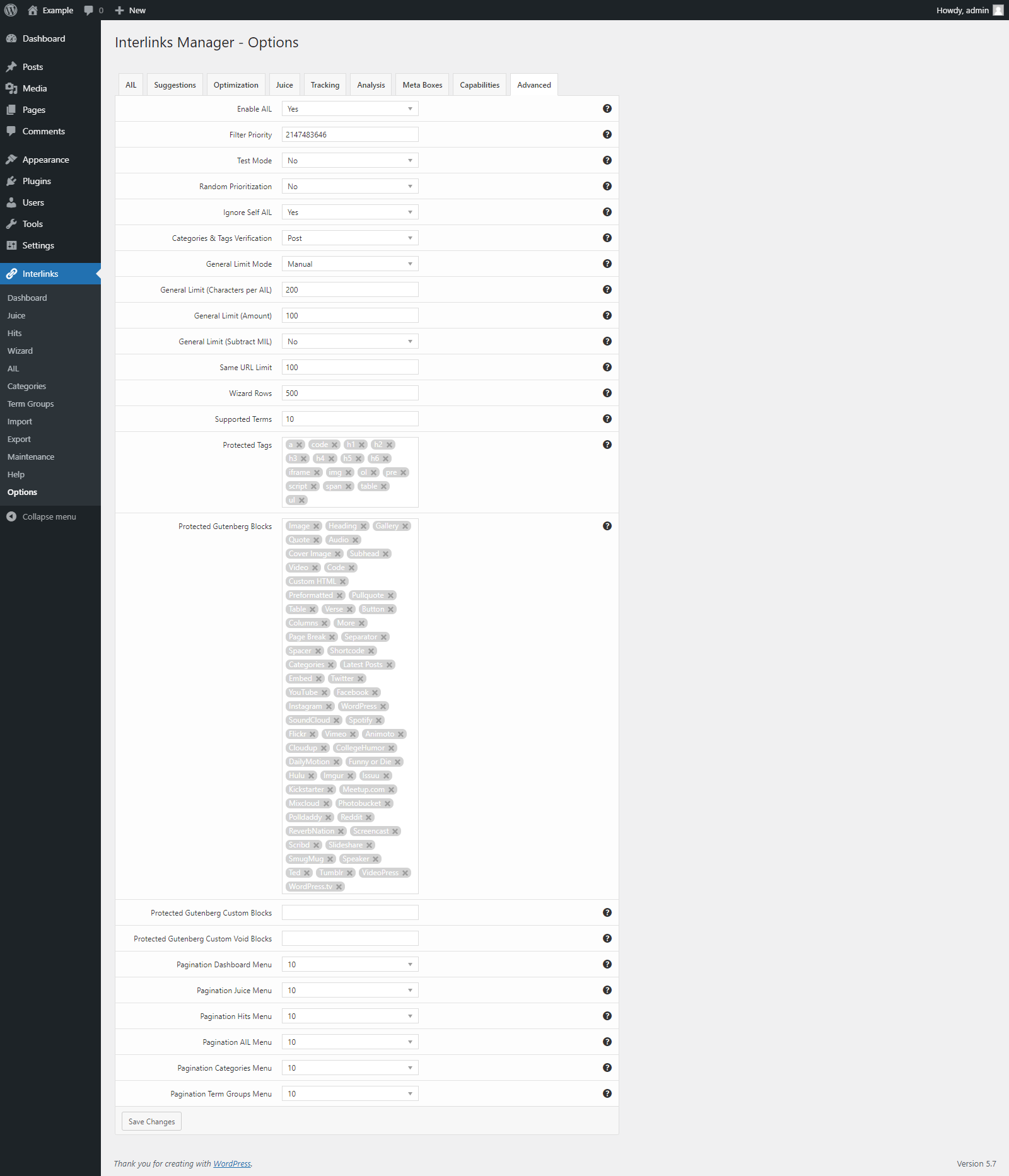
From the plugin options you can exclude specific tags, or gutenberg blocks (See: https://s3.envato.com/files/333611095/20_options_menu_advanced_tab.png) but there isn’t an option to limit the application of the automatic links only to the first paragraph of a post.
I also see the last update was 7 months ago. Are new features being developed and is it still compatible with the latest version of Wordpress?
The last update has been released on May 23, 2022. The plugin is actively developed and compatible with the latest version of WordPress.
Let me know if you have other questions.
Ok awesome thanks. So if I understand correctly regarding the gutenberg blocks, can I define which blocks to ignore by using a shortcode or something like that?
Nevermind got my answer from your link above, thanks
Hello, do I understand it correctly that to make the links autoamtic we need to create a database of AILs then run these via your plugin to auto update the keywords to URLs?
Is there a way to import this data to the system as the AIL page only lets me add one at a time.
Hello AP4571,
Hello, do I understand it correctly that to make the links autoamtic we need to create a database of AILs then run these via your plugin to auto update the keywords to URLs?
Yes, this is correct.
Is there a way to import this data to the system as the AIL page only lets me add one at a time.
Yes, you create in bulk the keywords and the related URLs with the Wizard menu. If needed you can paste data (data previously copied from a local or online spreadsheet) in the embedded spreadsheet edit.
Let me know if you have other questions.
Hello, thank you for confirming. Is there anyway of targetting product category descriptions?
Hello AP4571,
product category description are not posts and a filter provided by the plugin developers should be used for this type of content.
In case Interlinks Manager has a PHP method that can be used on this filter. However, custom applied automatic links are not considered in the plugin statistics.
Let me know if you have other questions.
Thank you. How can I contact the plugin developers to get this filter?
Hello AP4571,
if you are referring to the product category description field of WooCommerce this filter is known and we can provide you a script. In case please contact us via email with the “Support” tab above.
Let me know if you have other questions.
Sorry, on emore question…how can I mass delete all AIL’s ? I have discovered an error on pages due to the plugin affecting the grid elements.
I have been able to mass delete AILs via the Maintaince tab.
One more issue though…using the option “Protect Attributes” on the advanced tab breaks my pages where I have feeds. Is this a known issue?
Hello AP4571,
this type of issues depends on the specific context and plugin configuration.
Please contact us at support@daext.com with the following information:
- A link to the page where the issue is visible or the HTML of the page
- An export of your settings generated with the Interlinks -> Export menu (as XML file shared as email attachment)
Please do not share your site credentials via email. We do not log into customer websites to provide support. Thank you.
Hello, How easy to import existing links from another competitor? (I whisper) that I consider migrating from it. Talking here about manually created link using that plugin, I guess it will not remove the existing links. Will your plugin consider existing links? Thanks
Hello fliporama,
Hello, How easy to import existing links from another competitor? (I whisper) that I consider migrating from it. Talking here about manually created link using that plugin, I guess it will not remove the existing links.
If the links are hardcoded in the post these will remain. If the links are applied automatically with defined keywords (and the related URLs) you can import these data in the Wizard menu.
Will your plugin consider existing links?
In terms of statistics Interlinks Manager detects any internal link available in the post content. Both manually created and added with filters.
Let me know if you have other questions.
The plugin introduction mentioned that it supports the creation of internal links. Does it support Chinese internal links?
Hello x3830021,
I confirm that the plugin supports the Chinese language.
For the Chinese language please set “None” to the Left Boundary and Right Boundary options. This boundary is for the Chinese language and other languages that don’t always have transitions between words.
Let me know if you have other questions.
i made huge post of dictionary how do i make them interlink each other? no clue at all
Do i need to type one by one for the keyword ? it will be painful since the dictionary has 5000 post
Hello imnigroup,
you can either add the single keywords from the Interlinks -> AIL menu or upload multiple keywords from the Interlinks -> Wizard menu.
Let me know if you have any questions.
Can you tell me the different between both of method?
For exmaple: i create post CAT is blblablabla then i made post about story of life that include word “cat”... Can we make it automate to link post about cat ? How?
Hello imnigroup,
Can you tell me the different between both of method?
Both the methods are used to create keyword/URL combinations. The Interlinks -> Wizard menu is for bulk creation of keyword/URL combination.
For exmaple: i create post CAT is blblablabla then i made post about story of life that include word “cat”... Can we make it automate to link post about cat ? How?
Yes. In the Interlinks -> AIL o Interlinks -> Wizard menu you have to create add the keyword “cat” and set URL of the post.
Let me know if you have other questions.
Hi,
I am implementing Interlinks Manager on a page that uses GP elements and was wondering if I can make your plugin work with GP blocks/elements somehow. My scenario is:
- I am using custom fields to store some texts - These are displayed in posts, using GP elements, Block – Hook (so a Gutenberg block is basically getting the data from the custom fields and displaying it).
It appears that with this setup the AIL is not working. (tried adding gp_elements post type to the settings already)
Thank you!
Hello owt,
I can’t reproduce and test the same scenario because we don’t have the premium version of GeneratePress. However, this is a generic method to add the automatic internal links to a custom field:
//load the class that includes the add_autolinks() method
require_once( ABSPATH . 'wp-content/plugins/interlinks-manager/shared/class-daim-shared.php' );

//store an instance of the Daim_Shared class
$Interlinks_Manager_Daim_Shared = Daim_Shared::get_instance();

//get the custom field content
$custom_field = get_post_meta( int $post_id, string $key = '', bool $single = false );

//output the custom field with the autolinks applied
echo $Interlinks_Manager_Daim_Shared->add_autolinks( $custom_field, false, '', false);
Note that the autolinks applied with custom calls of the add_autolinks() method will not be reported in the statistics generated from the back-end menus.
Let me know if you have other questions.
Hi There, I’m using a WordPress Headless solution, depending on WP Rest API. Is this plugin compatible with WP Rest API? So, when I fetch any WP post through the Rest API, the links made by this plugin will appear on the post.
I’m using the following endpoint:
https://example.site/wp-json/wp/v2/posts/{post_id}?_embed=trueRegards.
Hello bbioonThemes,
the plugin currently uses a conditional tag to apply the automatic links only inside the single posts. To include the automatic links in the “content” field of the Rest API request above it’s enough to add an additional one-line condition for example that verifies the REST_REQUEST constant.
In case please contact us via the “Support” tab above after purchasing the plugin, so we can send you the details.
Note that I’ve also added a ticket so that a plugin option to enable the automatic links in the Rest API data will be added in the next plugin release.
Let me know if you have other questions.
I have another question: I have text content on my product categories. However your plugin does not work on these product categories (taxonomy: product_cat)?
I saw a 3 year old comment here with code, but that does not work. Do you support WooCommerce product categories?
Hello welaunch,
please make sure to add the “Products” post type in the Affected Posts -> Post Types option of the specific AIL. I confirm that this solution is still valid.
Let me know if you have other questions.
Hello,
can you please add the 2nd parameter to the two apply_filters(‘the_title’ functions in your code here: https://imgur.com/a/VWXN4qQ
WP requires 2 parameters since a few months, see: https://developer.wordpress.org/reference/hooks/the_title/
Just add the $post_id as 2nd parameter is enough.
This causes fatal errors in my plugins & right now in my customer site.
Hello welaunch,
thank you for reporting this. An update will be published in the next few hours/days.
May I ask you if you can share the instructions or the plugin to actually trigger the error? In case use support@daext.com
Pre-sale question:
I understand that you can pair keywords to links and then any content generated that include those keywords will automatically be changed to links; however, is it possible to install your plugin, set keyword to link pairs and then have the plugin retro-actively update any previous post/page to change those keywords to links.
Or is it only on new content published?
Thanks
Hello cosmatic,
the automatic links are applied to all the existing posts. (including old posts)
In addition, you can target specific selections of posts by defining the post types, categories, tags, and terms associated with the posts. Another option is to enable or disable the automatic links on specific posts, this can be done with a dedicated meta box provided by the plugin.
Let me know if you have other questions.
Hello DAEXT.
How to limit links to 1 per 1 page of posts? To avoid duplicate links from the same page like this in your video https://i.imgur.com/MvUaqX0.png ?
Hello iAlexX,
to limit the overall number of automatic links per post you can set the Interlinks -> Options -> Advanced -> General Limit (amount) option to “1”.
If instead you want to limit the maximum number of automatic links per post of a specific keyword the Limit option available in the Interlinks -> AIL menu should be used.
Let me know if you have other questions.
DAEXT, thanks, I bought your plugin from a company account. But there are new questions:
1. I see that the plugin generates information only for 1000 posts and puts AIL links in them. How can I raise this limit to 40,000 posts?
2. How to limit the number of AIL links per URL per Post regardless of different keywords. After all, the number of keywords for one URL can be different, and the link must be one to one URL from one post
Hello iAlexX,
1. With the Options -> Analysis -> Limit Posts Analysis option.
2. With the Options -> Advanced -> Same URL Limit option.
For other support questions please contact us via the “Support” tab above. Thank you.
H, is it possible to use the plugin in such a way that it automatically links products without having to laboriously create them manually? Best regards Carsten
Hello Carstenw1980,
with the Interlinks Manager plugin the fastest method to achieve this is upload a set of keywords and the related URLs of the products in the Interlinks -> Wizard menu.
https://s3.envato.com/files/333611095/05_wizard_menu.png
Hope this helps. Let me know if you have other questions.
Many thanks for the quick response.
Unfortunately, I don’t see a way to import a CSV or something similar on the screenshot. I don’t want to create the individual pages by hand. Or is there another way to automatically link between the products.
Best regards Carsten
Hello Carstenw1980,
the Data field visible in the screenshot is an embedded spreadsheet editor. You can paste the data available available in a CSV file or in any other spreadsheet document to this embedded spreadsheet editor with the copy and paste functionalities of your operative system (or by using CTRL+C and CTRL+V).
After copying the data you have to click the Generate AIL button to complete the process.
Let me know if you have other questions.
Thanks for the answer. Can you please tell me how to create such a list from woocommerce?
Hello Carstenw1980,
one method might be for example to retrieve (manually or with a bot) the product pages from the sitemap and generate the related CSV file with the keywords.
Alternatively you should search for a plugin which is able to export the WooCommerce data, product URLs included, in CSV format.
Let me know if you have other questions.
hello Juice -> Generate Data
There are no data at moment, click on the “Generate Data” button to generate data about the flow of “Link Juice” on the URLs of your website.
what to do?
Hello jakubai,
I just replied to your email. Please continue on that thread for technical support.
Thank you.
Thank you!
Hi,
Is it possible for the auto links to be visible in the Classic Editor while editing the post?
Use case: I have several thousands of posts that are heavily interlinked. New posts are constantly imported with status published and they get a decent number of auto links to already existing posts. However, not all posts are covered by AIL and some links need to be created manually. When I open the editor for a post I lose track of which text is already auto linked and which needs manual link creation. I am forced to keep a tab with post preview open on the side to check the auto links and then make the actual edits in the Classic Editor.
Hello bsmolyanov,
thank you for all the details. This feature is not available at the moment.
Please note that general statistics like the number of automatic internal links applied on specific posts are available in the Interlinks -> Dashboard menu.
Let me know if you have other questions.
Thank you very much! I guess this is not an easy feature to implement?
Hello bsmolyanov,
the plugin applies the automatic links on the content resulting from the HTML added in the editor modified by the the various filters and shortcodes. As a consequence the automatic links can’t be displayed in the post editor. (the automatic links displayed in the post editor would be different from the actual automatic links displayed in the front-end)
Let me know if you have other questions.
is this plugin can disable for specific page for specific keyword?
Hello mehrshadadiib,
the automatic links can be disabled for specific pages by setting to “No” the Enable AIL selector available in the Interlinks Options to “No”. Note that this field disables al the keywords and not a specific selection of keywords.
Let me know if you have other questions.
I presume this works well with your soccer engine plugin, so I could link player names in tables to profile pages?
Hello Amazemaker,
with Soccer Engine for blocks like for example the Match Timeline, that produce normal HTML in the pages, the automatic links can be applied with Interlinks Manager.
With blocks dynamically generated with JavaScript, like for example the Players, Staff, Transfers, etc. the automatic links can’t be applied with Interlinks Manager because it can’t filter and modify the HTML content of these blocks.
Since we had also other users requesting a feature to link players, staff members, stadiums, etc., new dedicated fields to create these links will be added in new Soccer Engine plugin updates. You can expect these new features released in March.
Let me know if you have other questions.
That sounds awesome. Your Interlinks Manager plugin looks great so I’ll get that and build the site out, and then start linking the dynamic content once the update is released. Cheers.
demo site?
Hello rich588,
we don’t have a demo site for Interlinks Manager. However, you can try the lite version of the plugin which is currently distributed on the WordPress.org plugin repository.
Let me know if you have other questions.
hi this plugin work with persian url link. my posts have persian link and all feature of plugins work with this?
Hello daneshjooyar,
the plugin can be used with Persian URLs. However, the plugin administrative menus on the back-end are not optimized for an RTL layout.
Please note that if you can’t use the plugin in your specific environment we are available to provide you a refund. In case simply contact us with the “Support” tab above or submit the refund form provided by CodeCanyon.
Let me know if you have other questions.
some user have this problem which in presian post url Ignore Self AIL option not work. you tested it?
Hello daneshjooyar,
the Ignore Self AIL function currently verifies the URL encoded version of the URL with the target defined in the Target field. As a consequence the URL encoded version of the URL should be added in the Target field.
Hope this helps.
Ok Thanks. can edit generated AIL Links on wordpress Page and post Editor?
Hello daneshjooyar,
the generated AIL can be modified with the AIL settings or with the plugin options and are not available in the post editor. From the post editor you can only disable the AIL when needed.
Let me know if you have other questions.
Hi, I am interested in the product but would need a multi-site license. Do you have or offer this?
Hello eliaslange,
at the moment Interlinks Manager is distributed only with Envato. As a consequence multiple “Regular License” should be purchased for each website. (E.g. With three websites three “Regular License” should be purchased)
Let me know if you have other questions.
Hi, “Ignore Self AIL” isnt working for me, any reason why? link: https://www.storecenter.co.il/%D7%9E%D7%94-%D7%96%D7%94-%D7%93%D7%A8%D7%95%D7%A4%D7%A9%D7%99%D7%A4%D7%99%D7%A0%D7%92/
Hello gigasb1,
please verify if in the value defined with the Target (URL Path and/or File) field there are characters that differentiate it from the actual URL. (E.g. A trailing slash, a missing trailing slash, etc.)
If this doesn’t solve, please contact us via the “Support” tab above and create a temporary account with access to the menus of Interlinks Manager. So we can provide you more details.
Hope this helps. Let me know if you have any questions.
all as intended.. sending support.