2004 comments found.
I added 4 currencies, the main currency is norwegian krone, but the euro rate looks wrong.
https://inannastore.com/product/luxurious-oriental-carpet-queen-versace-a-gray-green-cr02/Can you help me please?
Hello
I did a test – https://share.stackovergo.com/image/i20220616105319.png AND https://share.stackovergo.com/image/i20220616105355.png – Looks like it’s the correct conversion.
The problem is here: https://ibb.co/CJqTmWV
When the currency is set to euro, there is no problem. When other currencies are selected, the euro is problematic.
Hello
OK! I got it. Please write me here – https://pluginus.net/support/forum/woocs-woocommerce-currency-switcher-multi-currency-and-multi-pay-for-woocommerce/
Paste your license key here – https://share.stackovergo.com/image/i20210618130558.png -> https://share.stackovergo.com/image/i20210618130614.png and FTP+ wp-admin access – https://share.stackovergo.com/image/i20210618130637.png – I will fix it
Hello
Great! Thank you
Support worker will definitely answer you.

Hello, i am using your plugin, I used 2 currency for US & UK, default is UK Currency but for Spanish Ip, It,s showing US currency. I would like to use US currency for only US & UK for all other country but seems not ok, please advise if i need to purchase, i have no problem but i need to fix it urgent
Hello
Please check US for USD in the geoIP settings
AND
Check GBP in “Welcome currency”
and do a test
Read this – https://currency-switcher.com/using-geolocation-causes-problems-doesnt-seem-to-work-for-me
Hello im using the free verion with Gtranslate free version also, but i need to fix the CAD translation in Arabic side , how can i do this as manual way ? which file plz ? Thank
Hello
Describe in more detail what you want to translate? Do you mean the currency symbol?
Hello it is all translated but except the CAD, when i click to translate tge dite into Arabic all currencies done perfect but the canadian CAD show bad wrong words it is kind of swear words and it should say CAD instead
Hello
I’m not sure I understood you correctly
please drop me exact link to the issue and screenshots of this word
Hi, I have set Euro in woocommerce currency options but when I turn on the plugin, in product price I can add only USD currency.
Hello
On the product page, all prices can only be inserted in the base currency
ou can set the base currency here – https://share.stackovergo.com/image/i20220606112001.png
Please watch this video – https://currency-switcher.com/video#video_1
Hi, awesome, I was able to fix it. Thank you
Hello
Great! Welcome;)
Hello there, we have purchased your nice plugin, however we’ve found a critical bug with a double currency conversion when using add-on products to our main products using the popular plugin “WooCommerce Product Add-Ons Ultimate”. Where can I send you the screenshots showing the problem?
Basically your plugin does a first conversion on the product page, but then it does a conversion of the conversion in the cart page! so cost are multiplied by the rate exchange twice.
Ive sent you all details with screenshot from your contact page here: https://pluginus.net/contact-us/
Please let me know.  Thank you!
Hello
Ive sent you all details with screenshot from your contact page here: – As described on this page: To get support please write me here – https://pluginus.net/support/forum/woocs-woocommerce-currency-switcher-multi-currency-and-multi-pay-for-woocommerce/
This is an incompatibility with a third party plugin.
Please read this – https://currency-switcher.com/woocs-labs
Hello,
We tried several times to “Click here to reset your password” for Password Reset Request on an email.
A message always appear: Lost password This key is invalid or has already been used. Please reset your password again if needed.
Thank you.
Hello
Send please the same text and email of your account here https://pluginus.net/contact-us/ to reset access
Welcome
Pre-purchase question: Is it one time purchase or do we have to pay with subscriptions?
Hello
Is it one time purchase - Yes. The license has no time limitThank you buddy
Welcome;)
Can payment in X currency be activated on certain products? without necessarily being available in all.
Hello
Not sure if I understood you correctly. It is possible to have a specific currency included on the single product page. But on the store page (where there are several products) – all prices must be in the same currency. Same with shopping cart.
PRE-SALE QUESTION: is there a way to display the currency selector in the main menu or, with a shortcode, in a topbar? We have or site based in spain, so we are going to sell with EUR only, if the user selects, for example, USD, and all the prices will be displayed in USD, the payment will be processed with EUR only no? and all the gateway will work like now, so in EUR… So actually we want your plugin only to show the price in the selected currency converted with the last real time rate …. because it is going to have the real time rate value no? is that a free service or what? thank you very much!
Hello
Please watch this video – https://currency-switcher.com/video#video_1
the currency selector in the main menu or, with a shortcode - Read this - https://currency-switcher.com/how-to-drop-woocommerce-currency-switcher-in-menuthe payment will be processed with EUR – yes
it is going to have the real time rate value – yes, but it depends on your rate update settings and how often aggregators change currency data
is that a free service or what? - There are paid and free aggregators.Try a free version – https://wordpress.org/plugins/woocommerce-currency-switcher/
Hi, how to upgrade from free version to premium?
Hello
Please delete the free version and install the paid version(all settings will be saved)
Clear all cache and Ctrl+F5
Hey! I have downloaded the demo version and installed in woocommerce, for demo version I’m not able to auto fetch currency conversion rate. Is it the issue with pro version as well ? or in pro version the issue is fixed, kindly let me know so that I can go ahead to buy the pro version
Hello
this should work for all versions.
Please write me here – https://pluginus.net/support/forum/woocs-woocommerce-currency-switcher-multi-currency-and-multi-pay-for-woocommerce/
Please describe this error in more detail.
Hello I own a store in the base currency in dollars, but certain products are in euros. My question is it possible to display for example on the shop page products in dollars and other specific products in euros at the same time? The 2 currencies must be displayed at the same time, even if at the checkout the whole purchase is converted to dollars.
Hello
Unfortunately the plugin does not have this feature.
I just accidentally bought 2 licences for this product. I tried making an account on your site to ask you to refund 1 licence but I can’t make an account.
Do you have an email address that I could send to?
Hello
To request refund use this link please: https://codecanyon.net/refund_requests/new
Is it possible to add the country code after the price for some currencies like US and Canada where they share the same symbol? I’d like to display prices like $15.50 USD or $18 CAD. Thanks!
Hello
Yes. Please use this option – https://c2n.me/4fsfgXf.png
Thanks!
Welcome;)
I’m getting server errors from this plugin
Expected parameter 2 to be an array, string given in
wp-content/plugins/woocommerce-currency-switcher/classes/woocs.php on line 4002
Anyone else getting this? Know how to fix it?
Hello
Please write me here – https://pluginus.net/support/forum/woocs-woocommerce-currency-switcher-multi-currency-and-multi-pay-for-woocommerce/
Paste your license key here – https://share.stackovergo.com/image/i20210618130558.png -> https://share.stackovergo.com/image/i20210618130614.png and FTP+ wp-admin access – https://share.stackovergo.com/image/i20210618130637.png – I will check it
Hello, Where can we create a new support ticket ?
Thanks.
Hello,
We have clicked on a product topic “WOOCS” in profile, where can we find “CREATE A NEW SUPPORT TICKET” ?
Thanks.
Hello,
We have found it.
Thanks.
Hello
Great! Welcome;)
Hello
I sent you password yesterday, and just now again, please check spam box. New credentials works … Access is unlocked. Use https://pluginus.net/site-entrance and your email otcloud.XXX@yahXX.com
Hello,
We’ve just received it.
Thank you.
Welcome …
Hi, amazing plugin! One question. How to remove ”,” symbol when price is for example 1500. it shows as 1,500. I want to remove that ”,”. Thank you
Hello
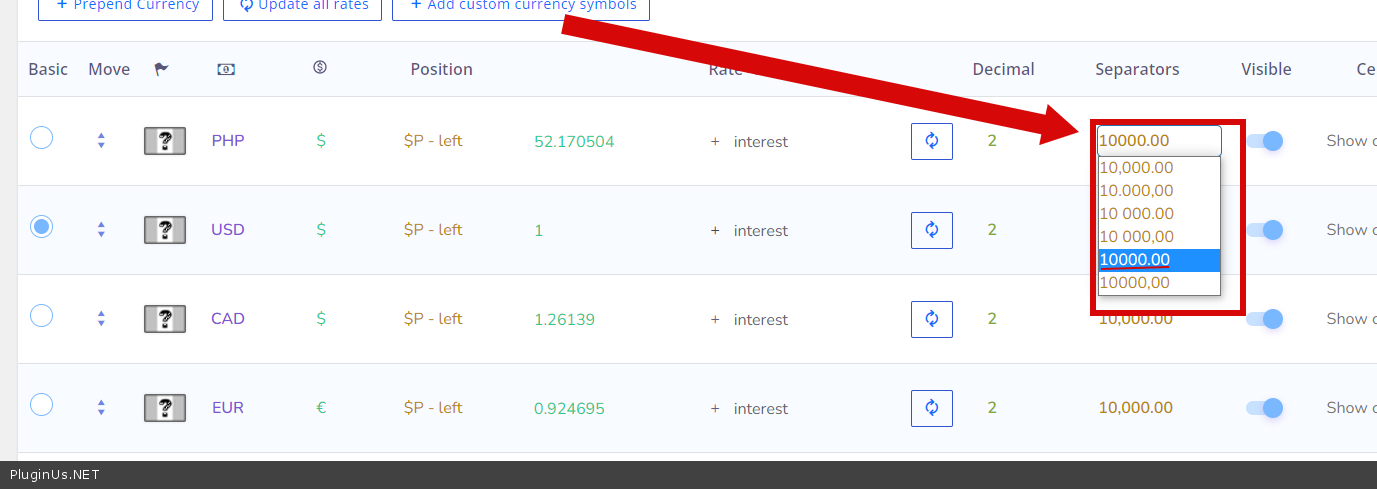
Please try to use this option – https://c2n.me/4fsf0wH.png
Hi, we have a multi vendor platform. Can each vendor choose their local currency to create products even tough the default currency at our platform is USD?.. I ask this because we tried to add a product in MXN and then it displayed as if it was in USD
Hello
Unfortunately not, all prices must be stored in the base currency
Pre sell: Hey, does your plugin work fine with FacetWP? I just tested some others and they were for some reason blocking load of FacetWP.
Hello
Unfortunately, we do not have such information, but you can do a test with the free version – https://wordpress.org/plugins/woocommerce-currency-switcher/
Looks like it’s working. Is it possible to set currencies like text links in menu. So just show USD EUR AUD in one line?
Hello
Please read this – https://currency-switcher.com/how-to-create-currency-links-without-shortcode
Hello, I tested and it works. The problem is that there is no active state to indicate it. Would be cool if you could add different display option or add a class to this solution.
Hello
To get current currency:
global $WOOCS; $cc = $WOOCS->current_currency;
and add
class=”woocs_currency_link <?php echo ($cc == ‘USD’)? “current_currency”: ””; ?> “
Pre-Sale-Question: I use the free plugin, right now only CHF and EUR. To sell subscriptions: woocommerce subscriptions together with automatewoo to create workflows for prepaid annual subscriptions. See: https://automatewoo.com/docs/examples/subscription-workflows/pre-paid-subscriptions/ As described in the doc above together with https://github.com/woocommerce/woocommerce-subscriptions-custom-price-string. Is it possible to have these strings (variable subscription: digital and print) also for the WOOCS – the product fixed prices? Or something similar?
Hello
Unfortunately the plugin does not have this feature.

This item was featured on CodeCanyon

Power Elite Author
Contact the Envato Market Help Team