651 comments found.

Feature Request: Please, could you add “Course” and “Book” type? So I could buy this plugin and write reviews of books and online courses on my blog. Thank you so much.
Hey Petern35,
Thanks for the interest in Let’s Review, but you can use the current schemas for reviewing any product already.
Codetipi
hello. I am waiting for your reply.
https://codecanyon.net/comments/28305140Hey there,
Many apologies for the delay! Are you still interested in the plugin?
Codetipi
Yes!!!
Answered now 
Can we show each visitor’s review for each parameter similar to that of the editor? I noticed though it asks each visitor for input for every parameter,the frontend does not show anything for each user.
Any update on this. I have created a ticket as well. PUBLIC TICKET #3055940
Hey there,
I had a look and see you’ve received a response now, hope it helps.
Codetipi
Does it supports AMP?
Hey Drayokunle,
The plugin has got some AMP code, but AMP has changed multiple times so I can’t confirm how it looks in the latest AMP.
However, AMP is really not recommended any more. Google got sued for it a while back and AMP no longer has any benefits. Your site will load faster without it and you will rank the same without it too.
Hope this helps.
Codetipi
Despite that, You should check the amp and make it compatible. AMP still works at least for me and across all my site
Happy to hear
I have a pre-sales question. sorry. I can not speak English very well.
Your review plugin is great.
I have a website that list some different CPT.
1. Can we add ‘comment visitor reviews’ to custom post types ( like Food, Movies or Books ) as different review templates or should we add reviews one-by-one to every each eg. Books?
2. For example, Food CPT automatically applies the Food review template, and we don’t want to use user reviews. And We want the ‘comment visitor reviews’ score entry (eg taste, aroma, price, service) to appear in the comments. is this possible?
3. Can the review slider(‘Is this a review?’ slider button) be disabled for visitor reviews so that the comment visitor reviews is the only way to submit a score? Without a review slider button, I want a block to input the comment visitor reviews score by default.
4. Is it possible to make ‘VISITOR REVIEWS BLOCK’ look like ‘Starts(https://demos.codetipi.com/letsreview/raspberry-v/)'?
5. In ‘comment visitor reviews’, set the default value to ‘0(zero)’ , and if the comment visitor submits without entering a score (unless a number higher than ‘0(zero)’), can a plugin make a ‘Please add a rating’ notification appear to the visitor? sample: https://prnt.sc/Mh6BeoVMSWeG
Simply put, is it possible that a comment visitor must set a number of ratings to be able to submit? I want to prevent some comment visitors from submitting with the default set score.
2-1. Do I need to use a ‘custom code’ to automatically display the ‘visitor reviews block’ without the post author manually inserting the ‘visitor reviews block’?
Hey there,
Many apologies for the delay! Are you still interested in the plugin?
Codetipi
Hi, I am still interested in your plugin. Waiting for an answer to my question.
Hey again,
Apologies for the delay again!
1. I’m afraid not, you can set one global default and all new reviews will load that for now.
3. Yes, the slider visitor rating option is optional. You can not use it and only allow visitors to review via the comments system.
4. Do you mean show stars in the comments review system for users to rate? I’m afraid not, to make it mobile friendly, it uses a 0-5 slider.
Hope this helps.
Codetipi
Hello,
Could you please answer ticket #3033220? It’s been 3 weeks that I have submitted it.
— GM
Hey GM,
I had a look and you received a response already, hope it helps.
Codetipi
Hey hi Codetipi. I hope you are well. 2 years ago I asked if it would be possible to use categories for criteria. I always wrote “Templates for Categories or Criterias” back then. The plugin would really be much more flexible if you could create different themes of reviews. Installing it several times is not possible or would not make any sense.  I just wanted to ask if the feature is coming soon?
Hey there,
I’ve been well thanks (except for getting COVID  ). Hope you are well.
I’m afraid the feature was a lot more challenging than anticipated and it will not be coming soon. It’s still on the dev log though. But sorry for the bad news!
Codetipi
Hi. Are those listings ( https://demos.codetipi.com/letsreview/iphone-xi/ ) still supposed to work? I can’t get mine to work at all. Why the feature is not even mentioned in documentation? Only way to even begin to find out how it works was to come find some comments here that are many years old??
Hey Bloggari,
Apologies for the delay but for support you need to open a ticket at http://codetipi.ticksy.com
Codetipi
Our website https://www.889fmkultur.de is built with the template Trion and the WP Bakery Builder, does the plugin work and harmonise with it?
Hey Carleto,
Thanks for choosing Let’s Review, hope you’re enjoying using it
Codetipi
Hello,
I submitted ticket #3007924 – Could you please get back with me? I am sure you might be busy, but I really need some tech support.
— GM
Hey GM,
I had a look and you have received a response a few moments ago, hope it helps!
Codetipi
We’re wanting to create a book review website that allows specific/approved members of the website post reviews of books. We will want a link to the “Author” of that review available to let the public see that author’s profile and also “Other reviews by this author’ concept. Is this possible with your plugin? Thank you,
Hey there,
Thanks for checking out Let’s Review
Hm, I believe something like that is possible but you’d have to do it via a theme too.
Have you considered our Zeen theme? That theme is the highest rated popular magazine theme of all time on Themeforest and includes a copy of Let’s Review for free!
https://themeforest.net/item/zeen-next-generation-magazine-wordpress-theme/22709856What I think you would need to do is create a WordPress author user account for any authors who you want to publish a review. They can then login to your site’s backend to publish a post. Once in there they’ll see the Let’s Review metabox with options that they can fill in. Once the post is published their review will appear there.
If they fill in their WordPress user profile, they can add their information (biography, job title, social media links, website, etc). For example check out this post from one of Zeen’s demo sites:
https://demos.codetipi.com/zeen/style/life/salty-air-cape/As you can see, it shows a review and has the author information on the left and in an author box below (you can enable/disable each one).
Then if you click through to their author page it’ll look like this:
https://demos.codetipi.com/zeen/author/coco/It will display all the author’s posts. If they only have posts with reviews, then the posts you see there will display the review score too.
In the demo, this author has multiple normal posts and 1 review post.
Hope this helps.
Codetipi
Hey I have a question is it possible to change the review format from slider to key entry sometimes on mobile its difficult to give 5 stars or the highest with the slider function. its like if you wanna give five you kinda forced to do 4.8 4.9 if you lucky
Hey there,
Which review option are you referring to exactly? Is it the user rating?If so, I’m not sure that’ll be possible, but users can change their rating to anything they want after the initial tap too.
Codetipi
Hello,
Pre-sale question:
At the bottom of a most posts on your demo, at the bottom of each post, I see a toggle button giving the option for users to submit a “Comment” or to submit a “Review”.
Question: On the same post, is it possible for my users to review the post using your plugin “Let’s Review” or submit a comment using “WPDiscuz” plugin?
Thanks in advance,
— GM
Hey Guymc,
Thanks for checking out Let’s Review.
The Let’s Review comments review uses the WordPress core comments system, as those comments allow for plugins to inject custom data/options. WPDiscuz is a third party system that removes the core WordPress comments and inserts its own comment system which doesn’t allow other plugins to inject custom data/options.
In other words, if you use WPDiscuz comments, you can’t extend the comments in any way outside of the WPDiscuz options.
Let’s Review does have another “User rating” option that can be included alongside editor review boxes, but it’s more basic than the comments review. It’s a single “User rating” where all visitors can leave a single rating and the final score is an average of all the visitor ratings.
Hope this helps.
Codetipi
Hi, I have a pre-sale question. Our theme has both dark and light mode. Will this plugin react to changes in these modes or can it be changed using css? If so, is there a tutorial on how to do it? I have some experience with custom css, but Im wondering if I will have to set some time aside for this. Thanks ever so much!
Hey there,
Thanks for the interest in Let’s Review
Let’s Review boxes can all be light or dark. So if you want them to react to your theme’s dark/light mode changes, you would need to write some custom JavaScript that makes the Let’s Review boxes also listen to those changes and tweak the review box class names as needed.
This is quite specific customisation though so you will need a developer to help you out with it. If you don’t know anyone who can help – I am the Let’s Review dev and you can hire me to do it too – please email via the Codetipi profile page here on Themeforest if you’d like to explore that.
Hope this helps.
Codetipi
Hi, sorry for a later reply. Would you be able to send us a price estimate for this? It doesnt have to be precice, just so we know what were working with You can send it to lukas@techbyte.sk
Thanks ever so much!
It’s no problem And sure thing, will email now.
Some shortcodes have not been working for months. The bugs were reported by me on 12.01.2022. Still not have been fixed.
Ordering by top scores does not show the list at all.
[letsreviewlist design=”simple” order=”2” source=”1” type=”1” postid=”5114,29002,6005,5643,4726,13367” proscons=”on”]
List is not ordered correctly by the publish or modified date
[letsreviewlist design=”simple” order=”1” source=”1” type=”1” postid=”5114,29002,6005,5643,4726,13367” proscons=”on”]
Hey there,
As far as I can tell, they are working fine though. You can see them running here: https://demos.codetipi.com/letsreview/iphone-xi/
Those are set by top scores.
Please open a ticket at http://codetipi.ticksy.com and include the exact URL where the issue can be seen and admin login details so that it can be investigated further.
Codetipi
I checked out your demo of Let’s Review and it has a feature where user’s ratings and scores are showing in their comments. This is not working for us on our installation – the scores are updating, but user’s scores are not showing: https://renewableheatinghub.co.uk/e-on-next
Please advise how I can fix this?
Hey again,
Check out the ticket you opened about this, it’s been answered now
Codetipi
Hi guys. I posted a support query 4-5 days ago and haven’t received any feedback. Is the support currently being manned by anyone?
Hey Marsm,
Apologies for the delay, it’s been a mental week! But I just checked and you got a response earlier today. Hope it helps!
Codetipi
On the bottom you have the affilaite text and button, is there an easy way to get that on top instead of bottom?
Hey Pie123,
It might be possible with some clever CSS depending on which review design you use. If you open a ticket at http://codetipi.ticksy.com and include a url showing the review you mean, someone from support will happily help out.
Codetipi
Hello,
Pre-sales questions:
Is it possible to create a different review template for each taxonomy I create (for each blog post category)?
Thanks in advance,
— GM
Hey GM,
Currently not, there is a single global template you can set up which will be the default settings new reviews use.
You can also create one-off reviews using Let’s Review Gutenberg blocks so you could copy/paste them between posts if that helps too.
Hope this helps.
Codetipi
Hello,
Pre-sales questions:
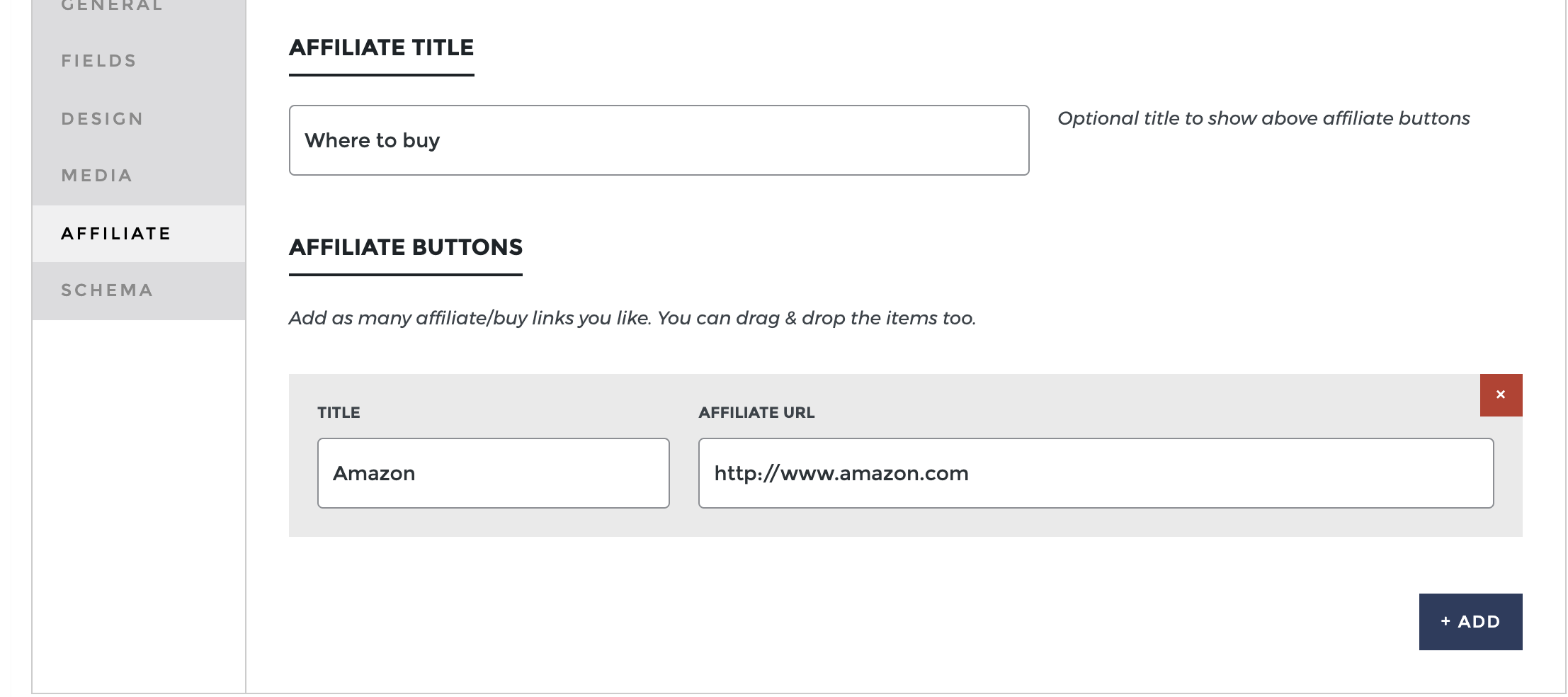
1. How does your “Affiliate” feature work?
2. Is there a way to enter Affiliate API for Amazon for instance?
3. Do you have any documentation, so I can learn how it works?
Thanks in advance,
— GM
Hey GM,
Apologies for the slow response!
1. The Affiliate buttons are added like this: https://demos.codetipi.com/letsreview/wp-content/uploads/sites/5/2022/01/lets-review-affiliate.png
2. No, but if you use a plugin that creates a shortcode for you to use, you can use that in the Affiliate url field and it will output the url provided by the shortcode.
Hope this helps
Codetipi