2002 comments found.

Hi,
I could not see ₽ as Russia Ruble symbol. How can I add this? You did not put that ı guess..
Thanks
Hello
It is on its place but in Russian language as ‘руб.’ https://c2n.me/4dgS7E1.png . To add special symbol use tab Options -> ‘Custom currency symbols’ https://share.stackovergo.com/image/i20210908193158.png
Pre-sale question – Hi, your currency plugin works with Woocommerce Subscription (variable subscriptions) ? Thanks
Hello
Only with code adaptation: https://currency-switcher.com/woocommerce-subscriptions-by-woocommerce/
Try please free version: https://currency-switcher.com/downloads/
Also read: https://currency-switcher.com/woocs-labs/
Hi, I posted a support query on your support site. However I am unable to reply to it anymore as there is no option to login to reply. This is the support post: https://pluginus.net/support/topic/changing-background-color-to-background-gradient/#postid-57196. The last suggestion did not work.
Hello
Try this CSS:
.woocs_auto_switcher ul li:hover body .woocs_auto_switcher.cd-stretchy-nav .stretchy-nav-bg{
background: linear-gradient(90deg, rgba(0,212,255,1) 0%, rgba(9,9,121,1) 35%, rgba(2,0,36,1) 100%);
}
I want to buy the plugin from you but I haven’t seen any signs of working with YITH Booking and Appointments (Calendar). I try the free version and doesn’t work.
_yith_booking_block_cost
Hello
Read this please – https://currency-switcher.com/woocs-labs/
i read but not have the yith booking 
Hello
oK! as described in this article, make an adaptation request
Hello, is this compatible with WCFM (multi-seller marketplace)? thanks.
Hello
Yes, but you need to change the plugin code
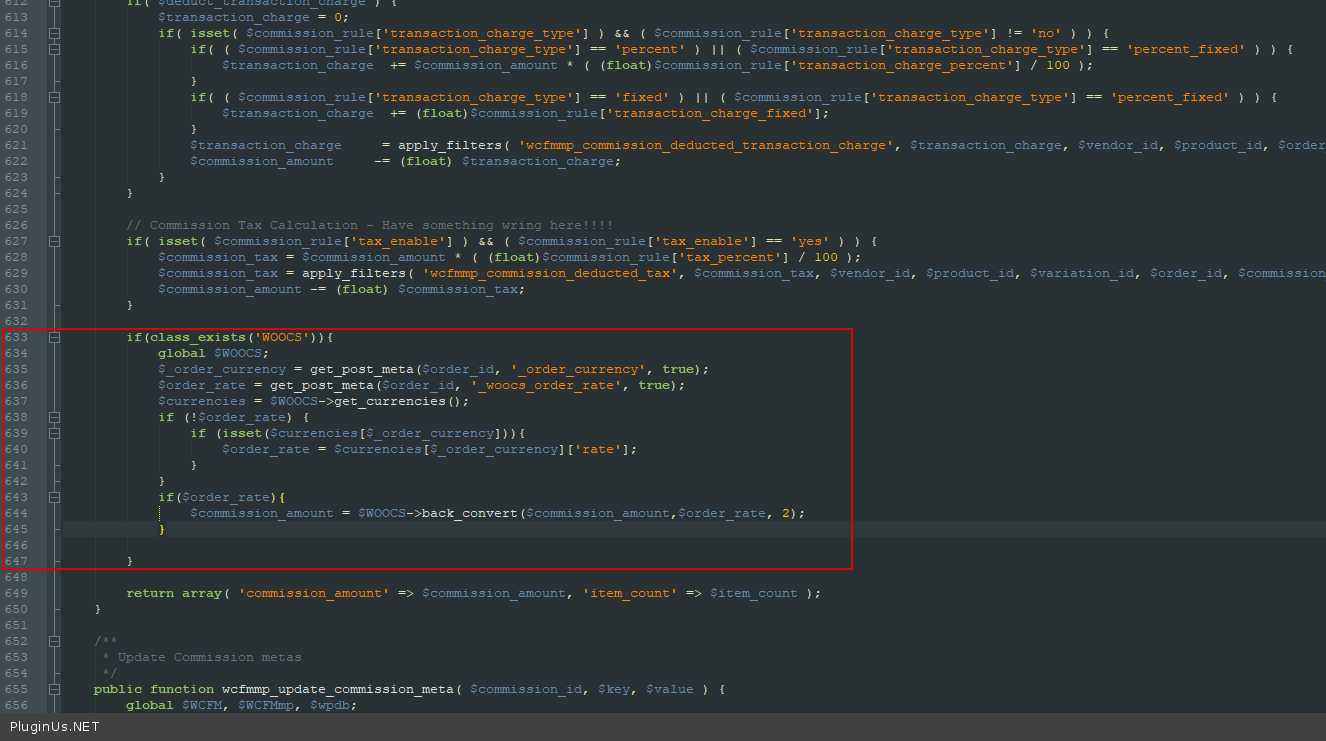
Try in file /wp-content/plugins/wc-multivendor-marketplace\core\class-wcfmmp-commission.php -add code - https://c2n.me/4b1zGzk.png
if(class_exists(‘WOOCS’)){ global $WOOCS; $_order_currency = get_post_meta($order_id, ‘_order_currency’, true); $order_rate = get_post_meta($order_id, ‘_woocs_order_rate’, true); $currencies = $WOOCS->get_currencies(); if (!$order_rate) { if (isset($currencies[$_order_currency])){ $order_rate = $currencies$_order_currency; } } if($order_rate){ $commission_amount = $WOOCS->back_convert($commission_amount,$order_rate, 2); }
}
Read this please – https://currency-switcher.com/woocs-labs/
Thanks for the link and code  We will probably buy thanks to this gesture even if after the sales if necessary. We are checking with wcfm their opinion since in their forum they said they could not find one currency plugin compatible with wc reports and hence did not take the time to integrate. However, if I can pass on to them your plugin + code, they might integrate it and you will have great sales Thanks a ton
Hello
Ok! Great!
You can test it with a free version – https://wordpress.org/plugins/woocommerce-currency-switcher/
Hello,
This plugin converts the currency in real time conversion using an API? do we need to pay and subscribe to the API? Thanks
Hello
It depends on which aggregator you are using (the plugin provides the ability to use paid and free aggregators)
Please watch a video – https://currency-switcher.com/video-tutorials/#video_1
Try a free version – https://wordpress.org/plugins/woocommerce-currency-switcher/
Thank you.
Is there a list of aggregators plugin provides? does it support Currency Layer?
In the video, you shown that it fetches the rates while setting up currency options from admin, will it fetch real time conversion rate while converting the price on frontend?
Hello
Please try a free version – https://wordpress.org/plugins/woocommerce-currency-switcher/ – you will see the entire list of aggregators
the plugin take srates from the aggregator of your choice. how often the plugin will make a request to the aggregator – https://share.stackovergo.com/image/i20210827144557.png
Hi Team,
I am facing an issue with this plugin. The currency is not working properly when someone come to my website from UAE. My website’s URL is http://hellofafashion.com/. The plugin is showing prices higher than the actual prices when someone come to the website from the mobile devices. I have checked it on the multiple mobile devices and the issue is same. On the desktop, the prices are working fine. Can you please check this issue as this is very urgent?
I am looking forward to your positive response. Thanks
Hello
Read this please – https://currency-switcher.com/currency-recounts-wrong-double-zero-and-others/
It looks like a conflict with a third party plugin. Do you use third-party pricing plugins?
Please write me here – https://pluginus.net/support/forum/woocs-woocommerce-currency-switcher-multi-currency-and-multi-pay-for-woocommerce/
Paste your license key here – https://share.stackovergo.com/image/i20210618130558.png -> https://share.stackovergo.com/image/i20210618130614.png and wp-admin access – https://share.stackovergo.com/image/i20210618130637.png
Hi there,
I have submitted the requirements as per guidelines. I hope, you’ll fix the issue very soon.
Hello
I answered you on the forum
Hello!
Can i have in the site the prices shown in one currency with no option to change the currency, but the base price be in another currency?
for example if i have all the products with the price in USD but i want to show only JPY corrency in my site front end with no currency change so clients see the price and buy only in JPY but if i change the currency exchange from USD to JPY in backend all prices in the site change to the updated currency exchange,
looking forward to your comments regards!Hello
yes! Please try a free version – https://wordpress.org/plugins/woocommerce-currency-switcher/
To not be able to switch currency add this code in functions.php:
add_filter(‘wp_head’,function(){ if(class_exists(‘WOOCS’)){ global $WOOCS; $WOOCS->set_currency(‘JPY’); } });
Hello! I had installed the free version for test but i cant figure out how to accomplish the scenary i explained before, looking forward to your comments regards!
Also i had added the code to functions.php and the currency switcher still shows up and i can change currency without problems, regards!
Hello
Please write me here – https://pluginus.net/support/forum/woocs-woocommerce-currency-switcher-multi-currency-and-multi-pay-for-woocommerce/
Paste exact link to your site
Question
Regarding Woocommerce Subscriptions,
Site default currency is USD.
a monthly subscribable product price $10
A customer from India purchases the above product at INR709.
In following month, a customer will be charged INR709? or USD10?
I need to ensure the customer gets charged INR709 (not USD10 or USD709).
1. Does this plugin take care of this scenario?
not sure if it’s related to the article that you shared https://currency-switcher.com/woocommerce-subscriptions-by-woocommerce/2. under what circumstance, we need to add those codes?
Thank you
Hello
Yes, this is an incompatibility with a third party plugin
read this please – https://currency-switcher.com/woocs-labs/
sorry, you mean your plugin is having incompatibility issue with ‘WooCommerce Subscriptions’?
Hello
Yes. How to fix this is described in the article.
Oh OK. I found the solution from there. Thank you!
Hello
Welcome;)
Hi
do you have the option of floor / ceiling for the decimal point? like the one here?
https://profilersports.screenstepslive.com/s/builder/m/590/l/565849-using-floor-and-ceiling-in-a-number-calculation-to-round-up-and-round-down/show_image?image_id=9903443Please advise. if not, can this be added as config options (instead of changing the code) in future?
Thank you
Hello
Sorry, I did not understand your question
This is a plugin for converting product prices and has nothing to do with these values.
OK. The question is as below.
Lets say I set 2 different currencies default is USD USD 10$ > coverted to Pound > GBP7.32 USD 10$ > coverted to Austrailia > AUD14.60
I would like to display the GBP 7.32 to GBP 8.00 (math function called “ceiling”)
but
I would like to display the AUD 14.60 to AUD 14.00 (math function called “floor”)
I would like to see if this can be controlled based on the currency.
similiarly https://docs.villatheme.com/woocommerce-multi-currency/#page_section_child_menu_3930I hope this makes sense to you now.
Thank you
Hello
Please read this – https://currency-switcher.com/hook/woocs_raw_woocommerce_price/ and https://currency-switcher.com/hook/woocs_woocommerce_variation_prices/
And use code(an example):
global $WOOCS;
if($WOOCS->current_currency 'GBP'){ return ceil($price); }elseif($WOOCS->current_currency ‘AUD’){ return floor($price); }
Hi
I saw the last change was on July but the changelog (https://currency-switcher.com/changelog/) is still showing June.
May I know what was the update on July? Thx
Hello
Thank you for feedback, just updated: https://currency-switcher.com/changelog/
multi-currency plugin. It is not well integrated with the wholesaler account integration plugin, and thus the purchase prices are wrong. We reported the problem to the plugin support, prepared a server for them for inspection, and after a long waiting time we got the answer that they will take care of it someday. When – we don’t know. As we can not really modify these solutions, for the moment we either wait or ignore this functionality, or look for another plug for which you will also have to pay and hope that it will work. UPDATE: After a month, we got information that they will not do it after all.
Hello
I found maybe your request: https://pluginus.net/support/topic/woocs-labs-integration-with-wholesale-for-woocommerce/ – it is added to queue
If to read carefully conditions https://currency-switcher.com/woocs-labs/ – Disclaimer: No warranty for success, also we not guarantee work of adapted code in future, all this we do of our free will and for free!
HI… i want to this plugin to get the current country currency where the site opens please guide …
i am using the latest version (Version 2.3.7 ) not old one that showing in video…
so how to enable GeoIp Location enable like video …
Hello
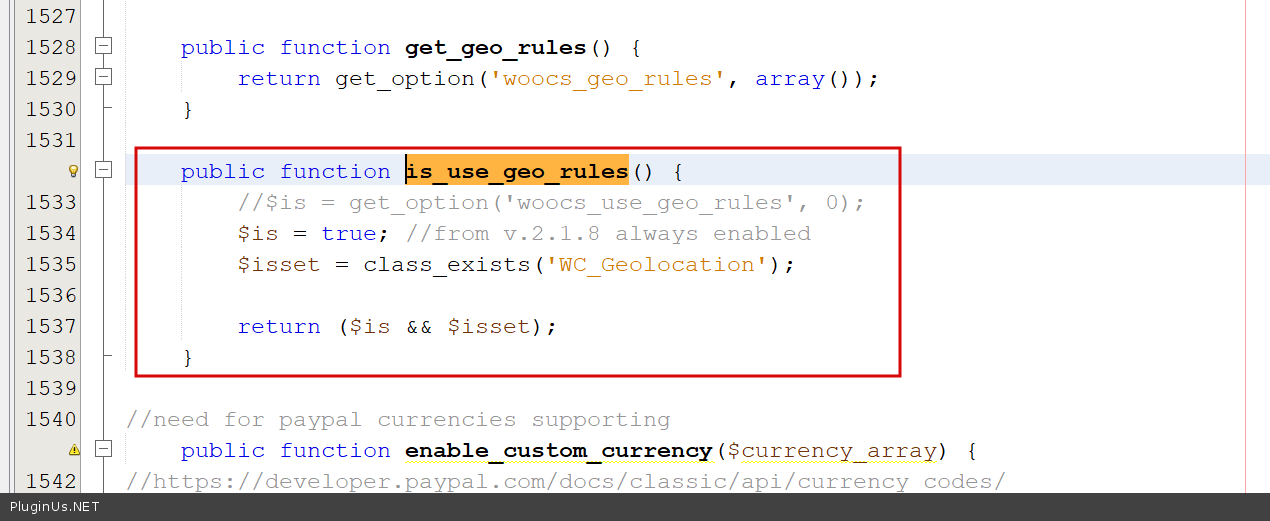
From v.2.1.8 it is always enabled: https://c2n.me/4cW2CIL.png + https://clip2net.com/s/4cW2GdM
Hi…
Please get the screenshot and website link https://snipboard.io/bPOIxS.jpg website link https://vitiligoorganics.com.au/temp/Hello
Please read this – https://currency-switcher.com/using-geolocation-causes-problems-doesnt-seem-to-work-for-me/
If no luck – write me here – https://pluginus.net/support/forum/woocs-woocommerce-currency-switcher-multi-currency-and-multi-pay-for-woocommerce/
Paste your license key here – https://share.stackovergo.com/image/i20210618130558.png -> https://share.stackovergo.com/image/i20210618130614.png and wp-admin access – https://share.stackovergo.com/image/i20210618130637.png
Hello
Paste your license key here -> also you should renew the support
I bought the pro version. But I can’t open the settings page. The page always loading, but the page cannot be opened. Three blue lines are circling. Please help with this. Thank you.
I think it’s a statistics problem like this link. How can I fix it?
https://pluginus.net/support/topic/woocs-admin-panel-is-stuck-on-loadingHello
I answered you on the forum – https://pluginus.net/support/topic/i-need-help-with-the-statistics-problem/
Yes. I paste the website link. Please help me to fix it. Thank you.
Hello
I answered you on the forum
It’s working. Thank you and best regards!
Welcome;)
Hi, do you have a shortcode to display the current currency code selected in text? Thanks.
Hello
Read this please – https://currency-switcher.com/shortcode/woocs_show_current_currency/
Hi. Great Plugin! I haven’t upgraded to the non free version yet as I wanted to check a couple of things with you.
1. Can the live currency rates be adjusted by a certain percentage or amount by admin? For example: the currency live rate is £1 = 1.2 euro actual but then we want to add + 0.2 euro. This is because we like to account for sometimes wild currency fluctuations
2. I have inserted your shortcode into our Woodmart theme top header but it is a little higher than the other elements on this header. I’m sure this can be adjusted easily but I’m not good at CSS. Can you assist with this to get the switcher lined up correctly?
3. Can the design of the switcher have a transparent background?
Kind regards
Hello
1) Yes – https://share.stackovergo.com/image/i20210721141219.png
2/3) Drop me exact link to the issue
Okay sent to you by PM
Hello
if you want to share your private data use the support forum – https://pluginus.net/support/forum/woocs-woocommerce-currency-switcher-multi-currency-and-multi-pay-for-woocommerce/ – https://share.stackovergo.com/image/i20210618130558.png -> https://share.stackovergo.com/image/i20210618130637.png – Unfortunately, we do not provide support via PM
Is it works with Razorpay?
Hello
Unfortunately, we have not done tests with this payment system.
Try a free version – https://wordpress.org/plugins/woocommerce-currency-switcher/
Hello
Regardless the currency rate is possible to manually add to each product different prices? Example: I need a T-shirt on usd10 but on eur20?
Thanks.
Hello
Yes, it’s possible
Use fixed prives please – https://currency-switcher.com/video-tutorials/#video_YHDQZG8GS6w
Try a free version – https://wordpress.org/plugins/woocommerce-currency-switcher/
Great plugin, I am having a small issue. The welcome currency is AUD, and I am browsing from AUD. Sometimes (not regular) it shows CAD and GBP as welcome currency which is wrong when I am browsing from Australia. When I browse from computer, looks like it is fine, but using same Wi-fi, when browsing from mobile, it shows different currency.
Is there any way to solve this issue?
Thank you
Hello
Please read this – https://currency-switcher.com/using-geolocation-causes-problems-doesnt-seem-to-work-for-me/
Pay attention, this only works for the first visit, then the plugin stores the last currency of the user
Hello even though, the wooCommerce is showing Au, on the first load, its showing GBP, why is that, is there any way to fix it?
I have read the documentation, if I use VPN then it located perfectly but without VPN it shows GBP instead of AU.
Any help will be greatly appreciated. Thank you
Hello
on the first load – in your case it will be VPN, I can assume that you have visited your site before
please write me here – https://pluginus.net/support/forum/woocs-woocommerce-currency-switcher-multi-currency-and-multi-pay-for-woocommerce/
Paste your license key here – https://share.stackovergo.com/image/i20210618130558.png -> https://share.stackovergo.com/image/i20210618130614.png and wp-admin access – https://share.stackovergo.com/image/i20210618130637.png I will check it
Hello
We were using NitroPack caching, which is really good for caching and page speed. So once NitroPack starts caching, the currency will start showing GBP instead of AU. If we disable the plugin and clear the cache, it will show AU. We have talked with the NitroPack and we want to keep it as well.
We want to keep this plugin as well, So is there any way to set this plugin to be compatible with Page Cache solution?
Thank you
Hello
If woocommerce does not correctly detect user location when caching plugin is enabled – my plugin cannot influence this
Write to me on the forum I am checking
hi, does this plugin support LKR as a currency?
Hello
Yes. Please try a free version – https://wordpress.org/plugins/woocommerce-currency-switcher/

This item was featured on CodeCanyon

Power Elite Author
Contact the Envato Market Help Team