2002 comments found.

Hi, Can i check if i m using reward point plugin in the website at the same time, is this plugin compatible and can be convert the reward point as well? This is the plugin i used https://wordpress.org/plugins/mycred/ thank you
Hello
Unfortunately we have no information about this third party plugin.
Read this please – https://currency-switcher.com/woocs-labs/
Compatible with LearnPress ?
Hello
This plugin is made for woocommerce. I don’t think it will work with this third party plugin
Please read this – https://currency-switcher.com/woocs-labs/
free version – https://wordpress.org/plugins/woocommerce-currency-switcher/
Hi, pre-sale question. I have a store with 3 valuta’s but when they paid the order I want to convert the order. to my own base currency(EUR) at my back-end. So it’s important for my administration that the currency is in EUR.
Is this possible with this plugin? I have tried other plugin also but didn’t find a match. Hope this will work.
Let me know.
Thanks.
Hello
Yes, this plugin can convert the order to other currencies
Try a free version – https://wordpress.org/plugins/woocommerce-currency-switcher/
Thank you, is it also possible to convert the orders that are already made in GBP and USD to EURO?
Hello
Yes. But the plugin must have currencies with which you will work. To convert order from GBP to USD – you need to have these currencies in the plugin settings. And then the rate will be current( not the rate that was at the time of order creation )
is it possible currency per product?
We want to add EUR and USD price for different products.
Two different currecy but our main currency will be JPY. When a user will visit website he weill see converted price from euro and usd.
Hello
Unfortunately not, all prices must be stored in base currency
Hi,
URGENT! We have a great big problem! We have around 25 currencies in our store. At first, we set GBP as base currency, but recently we switched base currency from GBP to USD. After we did this, we see that pricing have gone bad. For example, if a product is $5 USD, it will be £5 GPB, 5 Chinese YEN, 5 of any currency at all. How can we fix this? This is really urgent and we don’t have support. We never expected this type of problem with your plugin. Please help us, let us know what to do and how to fix this. We have up to date plugin version, so it must be another reason why it’s gone bad. Pls help it’s urgent! Thanks!
Hello
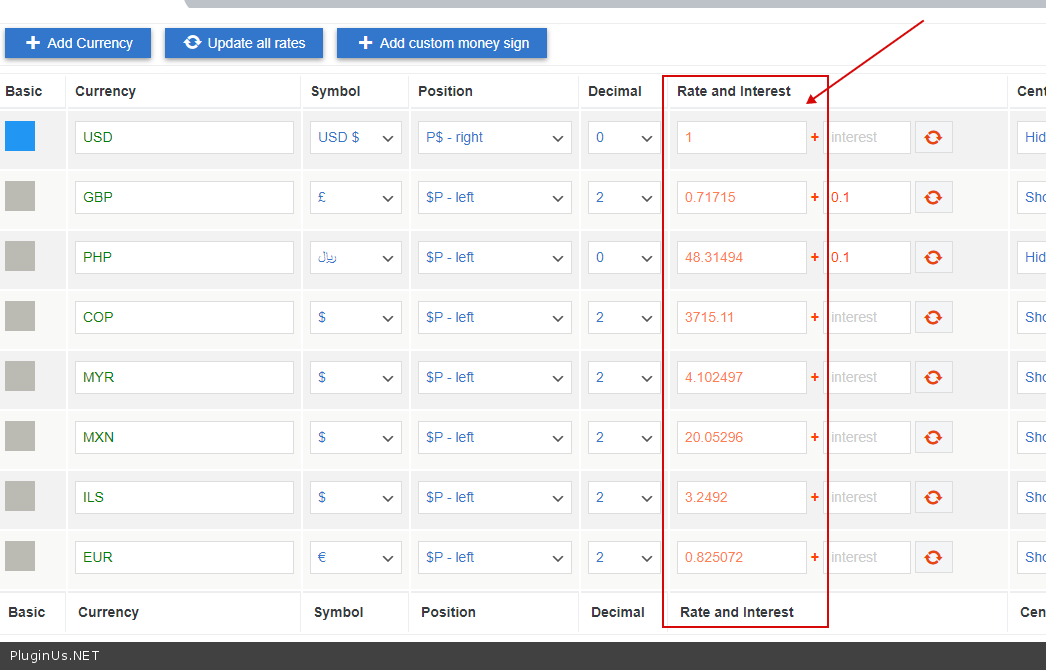
Please check rates – https://c2n.me/4bTfpxY.png
And read this – https://currency-switcher.com/currency-recounts-wrong-double-zero-and-others/
Hello
Be sure that only basic currency has value == 1
URGENT!!
Hi, Yes it is. I just noticed that the currency is correct on all normal products on the site. But for the ‘auction’ products it is showing the incorrect behaviour which I described in my previous above. The new auction products on our site is implemented with this Codecanyon plugin: https://codecanyon.net/item/woocommerce-simple-auctions-wordpress-auctions/6811382?_ga=2.159945917.1213433935.1619795328-1891506513.1607561066/ Can you help us with a code that will enable this plugin display currencies properly? Please provide me with an email address to send you a copy of the plugin to test and get the code we need to make it work well with your currency plugin.
Please kindly treat as urgent. Thanks!
Hello
You can create request here https://pluginus.net/support/forum/woocs-woocommerce-currency-switcher-multi-currency-and-multi-pay-for-woocommerce/ and share links in with zip in private area but support will answer on Monday already
Also read: https://currency-switcher.com/woocs-labs/
Hi, I cannot see how to send you a private message on your support forum with links to download the plugin and theme. Is there other way to send you these file links privately? Pls, it’s really urgent and we’ve waited all weekend. Thanks
Saw a pop up screen to ‘save support private data’, I have send all files in that pop up screen. We’ll appreciate a fast response as this is very urgent now. Thanks a million!
Hello
I answered you on the forum
Hi, I have sent you all login details in ‘save support private data’ on your support forum. Please treat this as VERY URGENT! We’ve waited more than 1 week and our site is offline because of this issue, we need it sorted today with your help. I look forward to your reply. Thanks!
Hello
https://share.stackovergo.com/image/i20210521162739.png – I will write to you as soon as your turn comes and the developer will find a solution.Any idea roughly when this will be? So that we will consider wither waiting or disabling your plugin for now and renable when you’re ready. We unfortunately made a promise to customers. if you can let us know roughly when, we would be most grateful. I can’t thank you enough for helping us with this, you’re the best person for it, as you know your own plugin better than anyone. Waiting for your reply. Thanks!
Hello
We should have done it last Friday
But unfortunately you have provided access that does not work – https://share.stackovergo.com/image/i20210525205812.png
Hello question before purchase.
is it possible to use the “Is multiple allowed” option only for certain currencies? example if I have euros, US dollars (the site’s default currency) and Canadian dollars. I would like to display the price in the 3 currencies. but when the customer pays he can only pay in dollars or euros. if his basket is created from Canadian dollars, in this case, he pays in American dollars, the default currency.
Hello
yes it is possible but you need code customization – https://currency-switcher.com/force-currency-on-checkout-page/
In your case:
add_filter(‘wp_head’,function(){ if (class_exists(‘WOOCS’)){ global $WOOCS; if(is_checkout() && $WOOCS->current_currency == ‘CAD’){ $WOOCS->set_currency(‘USD’); } } });
Hello
I am having issues when currency is switched to GDP
Sorry, it seems that there are no available payment methods for your state. Please contact us if you require assistance or wish to make alternate arrangements.
How can I fix this issue.
Hello
It looks like there is no such currency – https://en.wikipedia.org/wiki/ISO_4217#Active_codes
If your payment system does not support such a currency, unfortunately it does not depend on this plugin.
I think there is a bug with your shortcode. I installed your plugin in my website and if you have a look at e.g. this product: https://www.pronombres.es/producto/pronaming3/ Your shortcode is clickable even if you click 5 paragraphs below it. So my clients can’t click on other links below the drop-down selector. It’s as if the clickable surface was the whole surface of the selector even if it’s NOT dropped-down.
Sorry about my english.
Hello
I answered you on forum – https://pluginus.net/support/topic/shortcode-bug/
Does WOOCS work perfectly with AffiliateWP? Thank you.
Hello
Unfortunately, we do not have such information.
Read this please – https://currency-switcher.com/woocs-labs/
Hello, try free version please: https://wordpress.org/plugins/woocommerce-currency-switcher/
Thanks in advance!
Hello
Please drop me exact link to the issue
it’s in Sandbox. Do you want me to provide credentials?
Hello
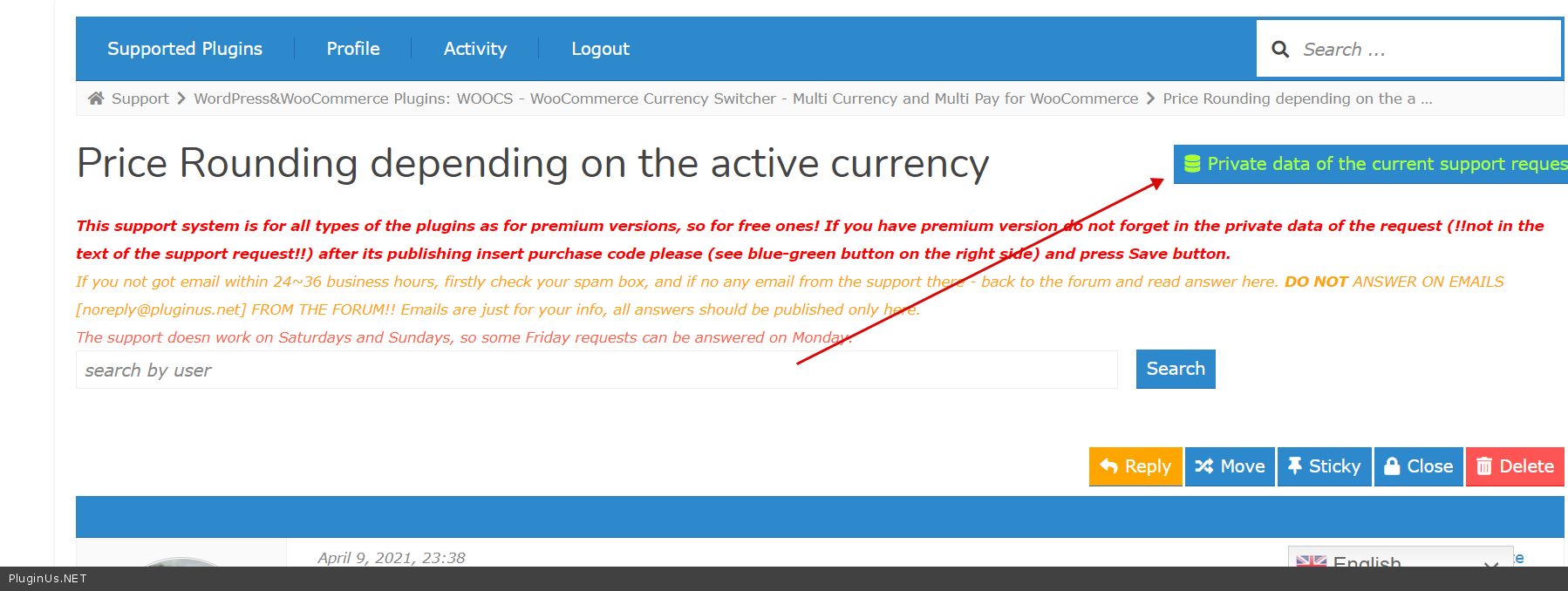
Create ticket with credentials in private area here please: https://pluginus.net/support/forum/woocs-woocommerce-currency-switcher-multi-currency-and-multi-pay-for-woocommerce/ -> https://c2n.me/4bFeWLs.png
Hi, I’m running the latest version of your plugin and it’s causing crazy long admin-ajax.php requests that are 5-10x anything else, why is this?
Hello
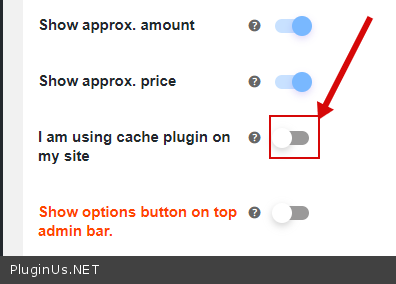
Ok! Please disable this option – https://c2n.me/4bEZBl2.png – and do a test
Hi. I have just bought your currency switcher.
How can i remove the flags from the widget? – the “show flags” are turned off, but still shows.
How can i turn of the No GET data in link, so it doesn’t give me URL with currency:euro and such? – this is also turned off in my setting, but keep showing.
Hello
Looks like cached options on the page, reset the site cache please and also browser (for any case) https://pluginus.net/how-to-reset-page-cache-in-the-browser/
It does not help at all 
Hello
In such case create please support request here https://pluginus.net/support/forum/woocs-woocommerce-currency-switcher-multi-currency-and-multi-pay-for-woocommerce/ with site link and exact description of the issue
hello, i have this problem too https://currency-switcher.com/possible-delivery-country-change-currency/
but the code here breaks my website saying critical error
Hello
Drop me text of the error
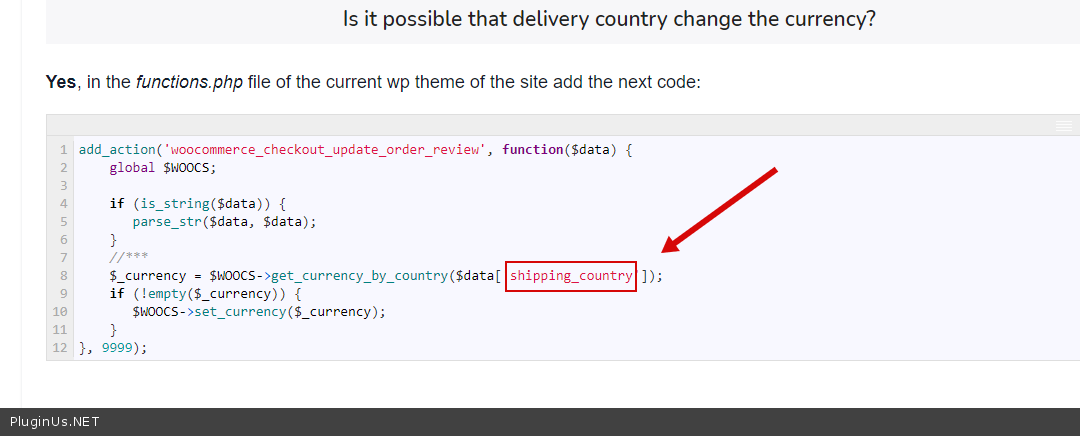
Try to change this string – https://c2n.me/4bAgl5E.png – to – billing_country
billing worked like a charm, now another problem i am facing is when i change the currency to another one, nothing changes on the shop, but when i choose a product the new currency will show which is irritating, any work around?
something is broken somewhere, i can’t change currencies any more
Hello
Please write here – https://pluginus.net/support/forum/woocs-woocommerce-currency-switcher-multi-currency-and-multi-pay-for-woocommerce/
Paste your license key here – https://c2n.me/43SC6rb.png -> https://c2n.me/42HBIt7.png and wp-admin access – https://c2n.me/42BAoj4.png
Hi, My Client wants a % added as INTEREST per Currency… Not a Value… How can I get it done?
Hello
Read this please – https://currency-switcher.com/codex/
Wow, This is great! This page has many very useful codes… Great Thanks…
Hello Welcome;)
Unfortunately, this plugin does not work.
Hello
Works fine: https://demo.currency-switcher.com/
If you have troubles ask support here please: https://pluginus.net/support/forum/woocs-woocommerce-currency-switcher-multi-currency-and-multi-pay-for-woocommerce/
Malware scanner picked up this… is it something to be worried about?
The threat known as PHP_Generic_BadPattern_4 has been found in /home/xxxx/public_html/wp-content/plugins/woocommerce-currency-switcher/classes/auto_switcher.php
Hello
You don’t need to worry. I’m sure you downloaded the plugin from the official source(envato). All plugins on envato are tested.
Dear Team,
I am willing to Buy this Plugin as it is very helpful but i have tested its functionality using free version and unable to fix the below and do not find any exact information in your documentation
Can you help with the below so i can test and then if working as expected , will place an order right away
1. Automatic Currency update for Product Price does not work in Free version ? if it woks can you suggest the exact setting as in my testing it does not work
Currency aggregator: Open exchange rates using their API
2. Regarding the Short code of Currency Convertor
I am willing to display it exactly as you have shown under on below Page
https://currency-switcher.com/shortcode/woocs/txt_type – 2 possible values: desc and code.
desc - on the front will be shown currency description in the drop-down optionsCan you share the exact short code to achieve this with width defined
if above two works then I am good to But the Plugin
Waiting for your reply
Hello
1) Free APIs have limitations. For example only works if the base currency is USD
2) [woocs txt_type=’desc’ ]
Hi Team,
Using the above code it looks different, i need to display it same as you have shown on your Page, can you share the exact code
Attaching a snapshot on how it looks and how i want it to be as per your website
https://support-tools.com/?f9a3286b1e0aafd7#xBQ/wG22utjKEY4rImfJYX3Q2dAi/5csn2Hpyy8BY+U=Hello
Please watch a video – https://wordpress.org/support/topic/issue-with-wp-content-folder/#post-14239653
And check option – https://c2n.me/4bswQsz.png
Thank you Team, just one more question
Is it Possible to pull out the detect Geolocation code and use on Page
example: Your Plugin is able to detect the location and shows the location in cart page as ” Shipping to Maharashtra. ” can we somehow use some shotcode or some php code to make use of this functionality and use this text somewhere else on pages so it dynamically shows the location of the user
Let me know if you can help
Thank you for your help in advance
Your code : [woocs_geo_hello] , shows it but it writes it as ” Your country is: India. (defined by woocommerce GeoIP functionality) ” and i just need the location and no other text
Hello
Yes, it is possible, read please: https://currency-switcher.com/special-shortcode-to-show-current-country-only/
dynamically shows the location of the user – if the site uses cache on the pages, I mean not checkout which is not cached page, it is better to use ajax request to get data for current visitor
Hi Team,
Great it works but shows only country, can you help with below as my site uses cache plugins
1. How to use ajax request to get data for current visitor ?
2. Above code shows only Country, I need to show the location and country by somehow modify the code that you mentioned
Can you help and share updated code
Regards, Pritam
Hello Pritam
1) You should hire a developer to implement this.
2) Read this please- https://stackoverflow.com/questions/51820223/get-the-geo-located-country-and-state-in-woocommerce-3
Dear Team,
Thank you for this but i noticed that many times country is detected incorrectly
So does your code which you shared as per below link requires the MaxMind Integration to be done in woo-commerce or it works on how you plugin is working to identify country and show currency based on the rules
https://currency-switcher.com/special-shortcode-to-show-current-country-only/Regards, Pritam
Hello Pritam
This plugin uses woocommerce functionality
Hello! Is there a shortcode to display Currency Name?
Would like to specify the currency name since many countries share similar symbols
Thank you
Hi, after installing the plugin and click save options , it redirected to 404 page, I already submitted a ticket and wait your quick reply please.
Hello
please read this – https://currency-switcher.com/when-i-save-the-plugins-settings-i-get-error-403/
Hello,
I have an issue with each style, but I choose Style one and I added CSS code to make it better, but I found another issue:D The selected currency flag not showing !! Can you please help to display it??
Hello
Please write me here – https://pluginus.net/support/forum/woocs-woocommerce-currency-switcher-multi-currency-and-multi-pay-for-woocommerce/
Paste your license key here – https://c2n.me/43SC6rb.png -> https://c2n.me/42HBIt7.png and drop me exact link to the issue

This item was featured on CodeCanyon

Power Elite Author
Contact the Envato Market Help Team