1125 comments found.

I moved the site this plugin is on from a dev environment to a production environment and it says I can’t add my purchase code because it’s activated on the dev domain. I’ve deactivated the plugin on the dev domain and it still says this. What can I do to resolve this?
replied via email support!
i have purchase the plugin . how to upgrade the plugin from wordpress cms
Hi There,
Thanks for purchasing our plugin. Please see the attached link for update plugin:- https://docs.coolplugins.net/doc/cool-timeline-pro/update-plugin/ Please contact us at contact@coolplugin.net If you are still facing any issue.Thanks & Regards
Hello,
I use the plugin CoolTime Pro on a staging website and now I moved the whole site to live. I need to deactivate the plugin from https://staging.easyhometc.gr site and activate it to https://easyhometc.gr
What are the steps I need to do?
Thanks in advance!
I also sent you an email at contact@coolplugins.net according to previous comment on similar situation.
Hi there,
I have deactivated your license from our license manager, now you can use it on another domain.
Thanks
Thank you for the fast reply. Everything is fine now.
Glad to hear it .
I would greatly appreciate if you kindly share your valuable feedback.
Thanks in Advance!
We just purchased your timeline plugin. However, once installed it looks like it only does one timeline. Is that correct? Otherwise, how do we create multiple timelines for different things?
Hi there,
Thanks for purchasing Cool Timeline Pro.
Please check in this documentation how to create multiple timelines:- https://docs.coolplugins.net/doc/cool-timeline-pro/create-multiple-timelines/
Thanks
Hello. Is there a possibility for clients to fill out timeline on frontend and save on their page? Or only admin can fill timeline in backend? Thanks
Hi there,
In the current version of Cool Timeline Pro user can’t fill out timeline on frontend.
Thanks
HI. I have a licencese for this plugin since 2018-09-21 and all of the sudden it stopped working on the website. The plugin keeps asking for the key and after i insert it, nothing happens. It’s the first time i have such an issue with it. Any ideas why?
Thanks.
Hello, We recently purchased a license to Cool timeline Pro. I activated it on one of our blogs to test. I want to switch the license to another blog on the same WordPress site and I keep getting an error it is already being used, however, I’ve deactivated it on the test blog. Please let me know what I can do to move forward. This is for a class project.
Hi there,
Thanks for using our plugin.
Actually, It is a Elementor Timeline Widget demo page. But you can easily do that with the help of small custom CSS. Please just provide your website link with us. We will share custom CSS with you.
Best regards, Narinder Singh
hi, the url is https://www.besios.gr/istoriko/
Hi there,
Add given below custom css inside Custom Styles option.
.cool-timeline-wrapper {
    width: 100%;
    max-width: 1024px;
    margin: 4em auto;
    font-weight: 400;
    position: relative;   // set position as relative
}
/* CSS for dots style */
.cool-timeline-wrapper:before, .cool-timeline-wrapper:after {
    content: "";
    width: 20px;
    height: 20px;
    background: #D7D7D7;
    display: inline-block;
    border-radius: 50%;
    position: absolute;
    left: 50%;
    z-index: 9;
    transform: translateX(-50%);
}

/* Media for responsive view */
@media(max-width:860px){
   .cool-timeline-wrapper:before, .cool-timeline-wrapper:after {
      left: 15px;
   }
}
Thanks
Hello. Does this plugin support RTL languages? Thank you in advance.
Hi there,
Thanks for purchasing Cool Timeline Pro. Yes, Cool Timeline Pro supports RTL language.
Thanks
Thank you. The plugin in great. A question, the plugin width is 1025pxis there a way to change it? Thank you in advance.
Hi there,
Timeline width depends upon container (inside which timeline shortcode is added). If you could share your tmeline page URL, then I can provide you some custom css solutions to change timeline width.
Thanks
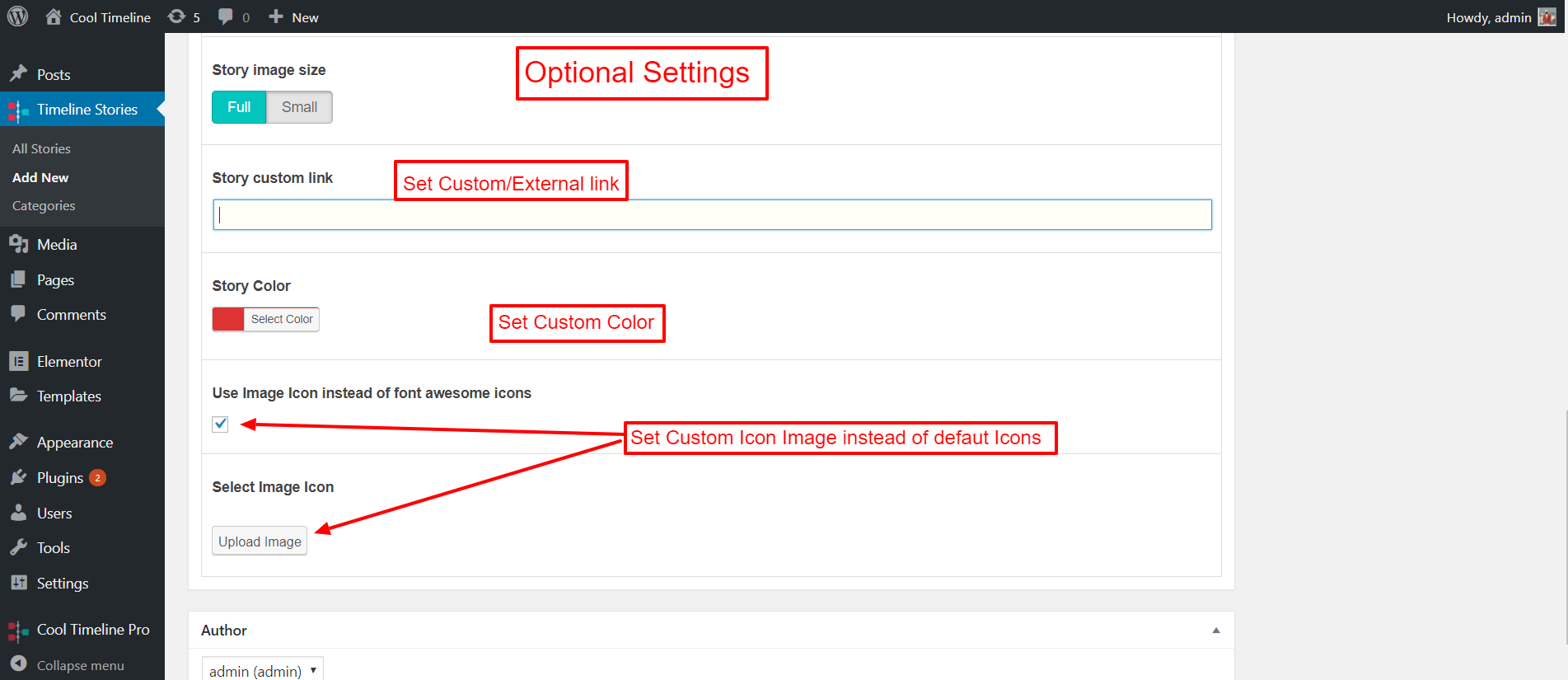
Hi i want the timeline Story custom link to point to a page in my blog. When i put the url it still points to the story created in the cool timeline. How can i make it work. Thanks
Have you added custom link there – http://docs.coolplugins.net/wp-content/uploads/2019/02/optional-settings.png ? please share url with support at contact@coolplugins.net we will sure check it.
Hi there
I have installed my pro version and I have two issues I need help with. Firstly I have selected my own icon but it doesn’t show? And I want to have different icons for different posts. And secondly, I have two spurious icons showing on my category & tags,Can send images if you need.
My test page is here https://fragmented.me.uk/timeline/test/ and you will see there are no icons showing just a ? and an ! ... there are also two spurious icons showing in my first two tags ??? Any ideas anyone?
I checked that your theme is over-riding icons used by our plugin – If you select any icon then theme change it with its own custom icon code so it is not displaying correctly – We can check it better way if you can share temporary wp-admin details with our technical support at contact@coolplugins.net
Hi there thank you for your help. I’ve managed to fixed this thanks but I’m wondering if there is a specific css I can use to justify the summary output. When I use p {text-align: justify;} it also moves some other text from centre to justify (this is text from another plugin that doesn’t allow css customisation so I’ve added it to my theme css but the css used for timeline is now overriding it.. So I need to just affect the summary nothing else.
Actually I think I’ve done it. I’ve used .cool-timeline instead of .p can you confirm this would be correct and ok to use .cool-timeline {text-align: justify;}
Hello anybody although this has worked it hasn’t worked for a post timeline set horizontally can anyone tell me what css to use to change this please?
Please share a link where you want to change with screenshot – we will sure provide custom css for that – contact@coolplugins.net
I want to change the colour of “second custom label” to white?
Please advise the steps?
Hi there,
Thanks for purchasing Cool Timeline Pro.
Please share your website specific page url where you have added timeline, I will provide you custom css to change label color according to your timeline design.
Thanks
is it possible to use custom post types as timeline posts/elements? And is it possible to filter by other taxonomies instead of just categories?
Hi there,
Thanks for showing interest in our plugin.
Yes, it is possible to use custom post types as timeline posts and filter them by other taxonomies instead of just categories.
Thanks
Thank you very much. And bought… 
License Verification Status: ❌ License is not verified yet! Your key has been installed on another domain(13.212.247.21)
i changed my ip but the website is same how do i solved this
Hi there
Please share your license key at contact@coolplugins.net I will update your license from our license manager, then you can use it without any issue.
my purchase code is not getting authorized for some reason need help urgent
I built my site in a Different Folder than it is now displayed on. When I moved it, it is not NOT showing my images and it will not accept my Purchase code.
Originally Built site on – https://safeantifreeze.com/NEW/our-story/ and then moved to LIVE site https://safeantifreeze.com/our-story/.
How do we fix this?? ASAP! I am to present to a company tonight….
Thanks!!
SHawn Budd
Hi there
We already have an option on registration page to deactivate the license to use on another domain https://prnt.sc/x52slf
Or
Please share your license key at contact@coolplugins.net and I will refresh your license information.
I think there is migration issue that’s why images are not shown.
Thanks
I have added an image icon and have tried to use falticon default sizes (16, 24, 32, 48, etc and they dont come out right) I used an SVG, which seems to preserve its quality and sze, but the icon is down the page. https://www.architecturalteam.com/timeline-development/ The very last item screenshot – https://www.screencast.com/t/rybZ2eHy223
Hi there,
Thanks for purchasing Cool Timeline Pro.
Please add below mentioned Custom CSS inside Custom Styles option to fix icon position issue.
.cool_timeline .design-5-icon img.ctl-icon-img { height: auto; width: auto; }
Let me know if you are still facing any issue in Cool Timeline Pro plugin.
Thanks
Thanks, I replied via email, we can probably just keep it there.
Hi,
presales question here 
on your Add Filter example here: https://cooltimeline.com/demo/timeline-category-filters/ you have 3 categories used as filters. Is it possible to combine them all into one timeline too? and add a filter button saying ‘All History’?
Thanks so much, Vauneen
Hi Vauneen,
Thanks for showing interest in our plugin. Yes, it is possible to add filter button to display combined stories of different categories. In order to do so you just need to create new category named as “All History” and link this category in all stories that you want to display under “All History”.
Please let me know if you have further questions.
Thanks
Thanks so much
Hi,
So my client changed domain names, but it’s the same website. How do I update the domain so the license will work ??
Hi there
Please try deactivating key and try activate on the domain https://prnt.sc/x52slf
Or
Please share your license key at contact@coolplugins.net I will deactivate your license from our license manager, then you can use on another domain.
Thanks
hi there, how can i make custom filters for timeline? or hide some of filters? i have category and 3 child categories, i want to show only child categories with ALL option OR child categories with PARENT category.
shortcode below
[cool-content-timeline post-type=”post” post-category=”cats” tags=”” story-content=”short” taxonomy=”category” layout=”default” designs=”design-2” skin=”default” show-posts=”20” order=”DESC” icons=”NO” animations=”slide-up” date-format=”default” pagination=”default” filters=”yes” filter-categories=”cat1,cat2,cat3”]
Hi there
Check out this below short code for showing only your child category
[cool-content-timeline post-type=”post” post-category=”cat1” tags=”” story-content=”short” taxonomy=”category” layout=”default” designs=”design-2” skin=”default” show-posts=”20” order=”DESC” icons=”NO” animations=”slide-up” date-format=”default” pagination=”default” filters=”yes” filter-categories=”cat1,cat2,cat3”]
if you want to show only specific category mention it in categories=”cat1”
for any other queries please contact us at contact@coolplugins.net
Thank you