2769 comments found.

Hello! some pre sale question:
1) Can I use Rewards Points with the plugin? How? 2) Can I have different prices in events to user types (Subscriber, Public) or the Admin apply discounts only to Subscribers? (example: Event $100 to public, $20 to susbscribers) 3) Can I show the events by categories and subcategories? 4) Can I import data to plugin from another platform (opencart)?
Thanks!
Hi,
1) If your WooCommerce has such functionality (perhaps via custom plugin) then it should be possible since all calendar products are processed via WooCommerce.
2) You can display different tickets with different price depending on the customer role (subscriber, admin, public etc…)
3) Yes by categories. There are no sub-categories at this point.
4) I don’t think so. Perhaps you could migrate your other products to woocommerce but tickets must be created via the calendar -> tickets menu because they are custom product type.
Hi, is it possible to add a custom field “Phone” to the RSVP-Form?
Hi,
Please open ticket at https://stachethemes.ticksy.com/tickets/ I’ll send you an example.
I’m attempting to import plugin settings from my staging site. I’ve exported a backup file from “Backup Settings” from staging, which downloads to my system with the file extension .stec.txt.
When I attempt to import on my production site, I get the error “File extension is not .stec” I’ve tried deleting the .txt from the file name (leaving the .stec extension) but I get the same error. What am I doing wrong?
Hi,
The file should end with just .stec not .txt
Yes, but as I mentioned, when I remove the .txt and leave the .stec file extension, I’m getting the same error.
Could you open ticket at https://stachethemes.ticksy.com/tickets/ and send me your file to take a look?
Thanks for the offer, but I tried this again on a different computer and it worked fine. It’s weird, but I guess there’s no problem here after all.
Hi, hope you’re fine. I have a problem when I read the QR code generated after a user makes a ticket purchase and it sends me to a link that says “Calendar notification – No Tickets Were Found in This Order” I don’t know why is this happening. Can you help me? Thanks
Hi,
Could you open ticket at https://stachethemes.ticksy.com/tickets/
and send me a screenshot of the qr code?
I’ll need wp-admin credentials as well to take a look at the order.
Hello plugin seems answer to our need but do you accept custom request ? If yes, how do you work (price by hour or project cost) ? Thank you.
Hi,
Unfortunately, we don’t do customizations due to shortage of time.
For customizations you can check https://studio.envato.com/
Hi, I set to open an events in a ”Single Page” but the link open with target _blank, i would it’s _self. I tryed to modify the file stachethemes_event_calendar\assets\js\front\stec.js like you replyed but nothing.
“window.open($event.data(‘permalink’), ‘_self’);” line 317
“window.open(external, ‘_self’);” line 325, i tryed to modify also this but nothing.
best regards and thanks for support
Hi,
No need to modify the core files.
In your theme or child-theme functions.php file place following filter:
add_action('wp_footer', function() {
    global $post;

    if (!is_a($post, 'WP_Post') || !has_shortcode($post->post_content, 'stachethemes_ec')) {
        return;
    }
    ?>
    <script type="text/javascript">
        (function ($) {
            $(function () {
                if (typeof $.stecExtend === 'undefined') {
                    return;
                }
                $.stecExtend(function (m) {
                    if (m.glob.options.general_settings.open_event_in === 'single') {
                        m.eventsHandler.eventToggle = function ($event) {
                            window.open($event.data('permalink'), '_self');
                        };
                    }
                });
            });
        })(window.jQuery);
    </script>
    <?php
});
Can you reset my activation code please?
Activation has been reset.
I’d like to hide the Woocommerce variation info from the cart and checkout pages (start date, end date, link). Is there a way to do that?
Hi,
No, sorry these are required at least for now.
Is there any option for wordpress users to submit events via the frontend?
Yes, via the front-end submit form.
Hi, I’m looking for a plugin with this feature:
“Free-up available slots in a specific order”: EG, the client will only see one slot available for the day “13:00-14:00”. When someone books that slot, another one is freed, eg, 19:00-20:00”.
Is this possible with this plugin?
Hi,
No, sorry. We don’t have this feature.
Thank you
Pre-sale questions:
1. Is your plugin compatible with Buddypress? 2. If yes, can each Buddypress group create their own individual events? 3. Also if yes to #1, does a user’s event registration information display under a separate Buddypress user’s profile tab?
Hi,
1. We’ve started buddypress integration and will be included with the next update.
2. Groups will be able to create their own calendars and submit events
3. The plugin will record the users actions when they create/edit/delete calendar or event and will be displayed under the Activity tab in their profile.
Hi, Pre Sales questions. I am looking for a system to bring the possibility to user schedule events, some of them are free others are paid. Is this possible? Can I use any payment system like Mercadopago in Woocommerce? does user can register and see the status of the event? On the other side, can we schedule event from backend, right? Thanks in advance for your response.
Hi,
It’s possible to let users create events. Users can be non-logged or to require certain user role depending on your calendar settings. Events can be created either from the back-end or the front-end.
However, there is no option “Pay to submit” an event.
The plugin uses WooCommerce to sell products or tickets.
You can test the calendar here: https://stachethemes.com/wp-demos/tbb/wp-admin/
User/Pass: demo/demo
Hello,
Can I create several different calendars?
I need a calendar for each company and we have 250 customers
Hi,
Yes, you can.
You can try the admin demo here: https://stachethemes.com/wp-demos/tbb/wp-admin
user/pass: demo / demo
Hi,
I tried to update the plugin from version 2.4.4 to version 3.1.4. I tried it with the check for updates button but nothing happens after a long time. When i update manually, deactivate the plugin and then manually upload the new files and then activate, all my events are gone and somehow the events calendar uses my themes default post layout instead of the stache layout.
So when i update i have to add all my content again?! Is there no other way?
Thanks in advance!
Hi,
In Dashboard -> St. Event Calendar do you see “Migrate” menu?
Hi,
Thanks for the quick reply.
No i don’t see the “Migrate” option in the menu. Only “Updates”
I have version 2.4.4
Is it possible to provide me with wp-admin and I’ll check what’s going on?
You can PM to stachethemes@gmail.com
Hi, a quick question:
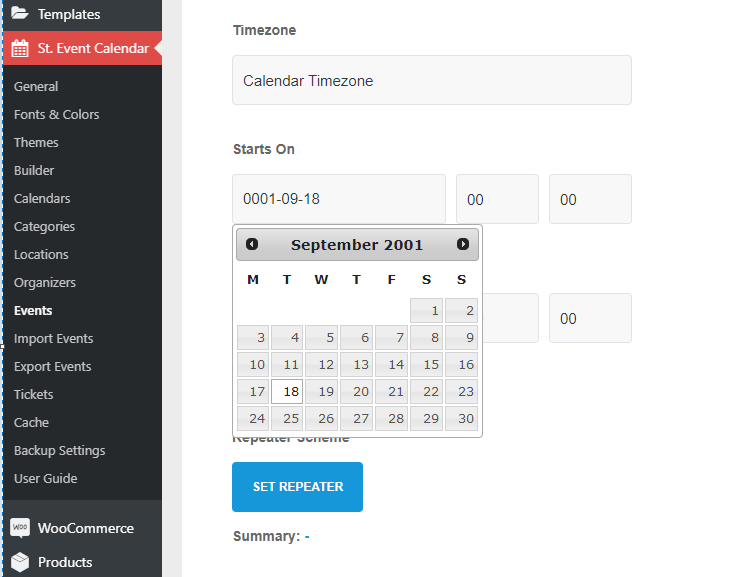
I was testing the admin demo and I notice that isn’t posible to add a calendar event in the year 0001 because the system thinks its the 2001. And the same between the year 0-100. Will be posible to add an event in the year 0033 for commemorating the jesus death or any other historic dates?
See screenshot: https://i.gyazo.com/85c14086612d2e59d9ca98b40274fa66.png
Thanks!
1- Oh sorry and I forget it: is there any way that if you click in “Submit an event” the form opens in a model or popup window instead a dropdown? Like this example: https://i.gyazo.com/9b559f9a27e77b2dc5b64bdeb631bd97.mp4
2- Is there any way to disable the “loading animation” of the calendar?
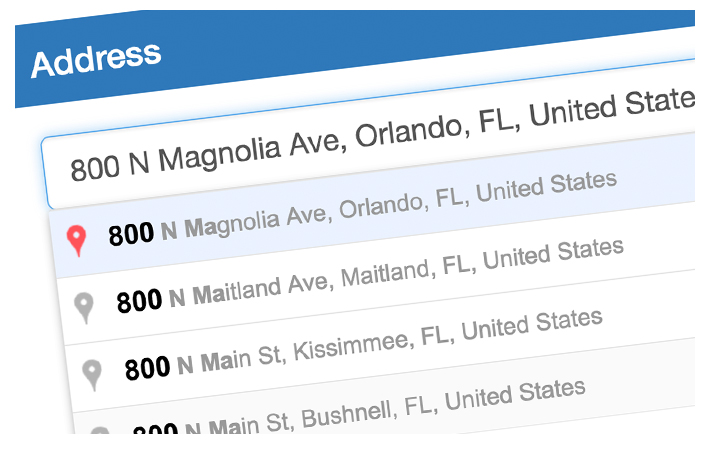
3- Can you add the option to directly have one field to type the event location and also get suggestions? Like this: https://www.solodev.com/core/fileparse.php/131/urlt/address-autofill.jpg in the demo example it only gets your coordinates and no suggestions for adress fields.
thanks a lot
Hi,
Sorry, I don’t think this calendar will fit your history project. At least not yet. The datepicker limitations have to be sorted beforehand and some other issues for years below 1000.
And you you plan to add that option to set events before year 1.000?
Also what about the other 3 points that I mentioned?
1- “Submit an event” as a modal 2- Posible to disable or modify loading animation? 3- One field to take the adress instead 3-4 of them with suggestions
Thanks!
Yes, we’ll try to do that with the next update.
The submit form can be a dropdown from the calendar view or can be displayed as a standalone on a separate page but there’s no modal window yet. Most likely will be added in the future.
Field with address suggestions would require external api so at the moment it’s not planned.
Hi, thanks a lot. So if I understand correctly:
0. Posible to select years before 1.000 will be avaliable in next update 1. Submit form as modal in the future (do you think its posible in 2020?) 2. ? 3. Not planned
And finally: I really need the option to just submit an event when you pay for it, so the current booking system isn’t what I’m looking for and I checked the comments and there’s a lot of people asking for the same (pay system to let users submit the event). Is there any posibility to release that feature in 2020?
Best regards, David
0. It will be possible, however we haven’t fixed the problem with the datepicker yet so you will have to enter the date manually.
1. Modal submit form will come at some point this year yes.
2. Animation can be stopped if the animation duration is set to 0. You will have to edit one of the js files for this.
3. Not plans at this point.
4. This feature will be introduced however I can’t say when. We’ll be updating the booking and shop sections starting next month and perhaps after this update we’ll take a look at the paid events.
I really appreciate your reply. I’ll wait for the next updates when you’ll add at least 2 of that points and then I’ll buy it, that’s for sure.
Congrats for a fantastic plugin 
Hi! I sent an email to reset my activation code. If you could help, that would be great! Thanks
Hi,
Activation has been reset.
Hi. Unfortunately my purchase code still cannot be activated. I get a message that the code is used on old website. Could you please help?
Could you try again now?
Hi! It does work now. Thank you!
Hi, Can I ordering the agenda alphabetically or custom? I also sent you a mail. I’m waiting for your answer.
Hi,
Agenda can be ordered by event date only (with option to reverse the order)
Hello there, this is a pre-sale question. Is it possible to attach downloadable files (PDF, doc or what else) to an event? Thanks
Hi,
Yes, events add/edit page has Attachments tab.
You can check the admin demo here:
https://stachethemes.com/wp-demos/tbb/wp-admin/User/Pass: demo / demo
Can you tell me if it’s possible to set up an event from 10:30 to 15:00 with 30 minute slots for RSVP? I want to show a single event with 10 slots and maximum of 5 RSVPs per slot. Can this be achieved?
Hi,
I’m not sure I understand what’s 30 minute slot so I assume it’s not possible.
Limiting up to 5 slots per rsvp request can be done via filter in your theme functions.php file.
Example:
add_filter('stec_rsvp_to_event_before_add', function($attendee){

    $max_slots = 5;

    if ($attendee->get_people() > $max_slots) {
        throw new \Stachethemes\Stec\Stec_Exception(sprintf("You can't reserve more than %d slots", $max_slots));
    }

    return $attendee;

});
Thanks for your reply. Slots = appointments. So I want one event with 10 appointments (every 30 minutes). RSVP disabled for the main event but enabled for the appointments. This is to avoid creating 10 individual events for the appointments.
No, sorry.
RSVP covers the event as a whole. If the event is repeated the attendee can choose to accept certain event occurence and decline the other ones.
Okay, can I get a refund for this license please? It doesn’t fit my requirements. Thanks
I spent some time on the demo and i have prepurchase questions mostly on map view
In Map View, when there’s is many upcoming events at the same location, only one appear : is there a way or an upcoming feature to show ALL the events (in my case, different events, not repeated events)
Map view again : when i select an event, i cannot see the external website button. Is there an option to make it appear ? I succeded in other view but not this one
Map view : is there a way to show ALL the upcoming event and not only today or this month ? Map View would be my homepage and showing by default all the events is needed
Organizers page : it show upcoming events. Is there an option to show also past events ? It could hlp visitors to know better what has been done before by this organizer
Booking : can we have an option to just put an URL ? I have hundred of events and all use external booking system (mostly a webpage with their own shop). When people click the tickets buton it would open a news page with this url ? I tried to use the shop feature but people have to click too many times 
External Website : can we had more field ? Many of my events have their own website but also facebook events. My visitors want to access to these 2 informations
I see many interessting thing in your plugin and i’m looking to use it at the end of the year with news fatures i hope 
Hi,
It’s possible to alter the map data and display all or certain events via filter.
Example filter displaying all events:
// STEC MOD: Display all events when in map view
// requires shortcode attribute map_all_events
// e.g. [stachethemes_ec map_all_events=1]
add_action('wp_footer', function() {
    global $post;
    if (!is_a($post, 'WP_Post') || !has_shortcode($post->post_content, 'stachethemes_ec')) {
        return;
    }
    ?>
    <script type="text/javascript">
        (function ($) {
            $(function () {
                if (typeof $.stecExtend === 'undefined') {
                    return;
                }
                $.stecExtend(function (m) {
                    if (m.glob.options.map_all_events && 'map' === m.glob.options.view) {
                        m.calData.filterGetEvents = m.calData.eventsPool;
                    }
                }, 'beforeReturnGetEvents');
            });

        })(window.jQuery);
    </script>
    <?php
});
With this filter inserted in your theme or child-theme functions.php file when you add map_all_events=1 to your calendar shortcode the map will display all events.
Organizer’s page events uses filter to alter the data as well. Example:
add_filter('stec_organizer_page_shortcode', function($old_shortcode, $organizer) {
                $new_shortcode = sprintf('[stachethemes_ec views="agenda" view="agenda" agenda_cal_display=0 show_create_event_form="0" organizer_id="%s"]', $organizer->get_id());
                return $new_shortcode;
}, 10, 2);
Showing the external link on the map popup display is not possible at the moment.
Regarding the booking and external link buttons – I’d suggest you to just insert them in the event description area with .stec-style-button classname. Example:
<a class="stec-style-button" href="https://www.example.com">Get Tickets</a>
Thanks you for you quick answer…. i will wait for the feature “guest stored separately” and the buy your plugin