22691 comments found.

Hello sir, I have made page by using your plugin see.
https://dailyjobalert.in/but see the column below margin is very large…and I want to look more beautiful and reducing spacing below each columns.
thanks
Hello, Please use support.wpbakery.com and share your temporary website credentials so our support team can investigate your issue and help you out.
Knowledge Base ·
Official Support ·
Facebook ·
Twitter
Don’t forget to join our newsletter. Be first to get news and inside secrets from WPBakery team.
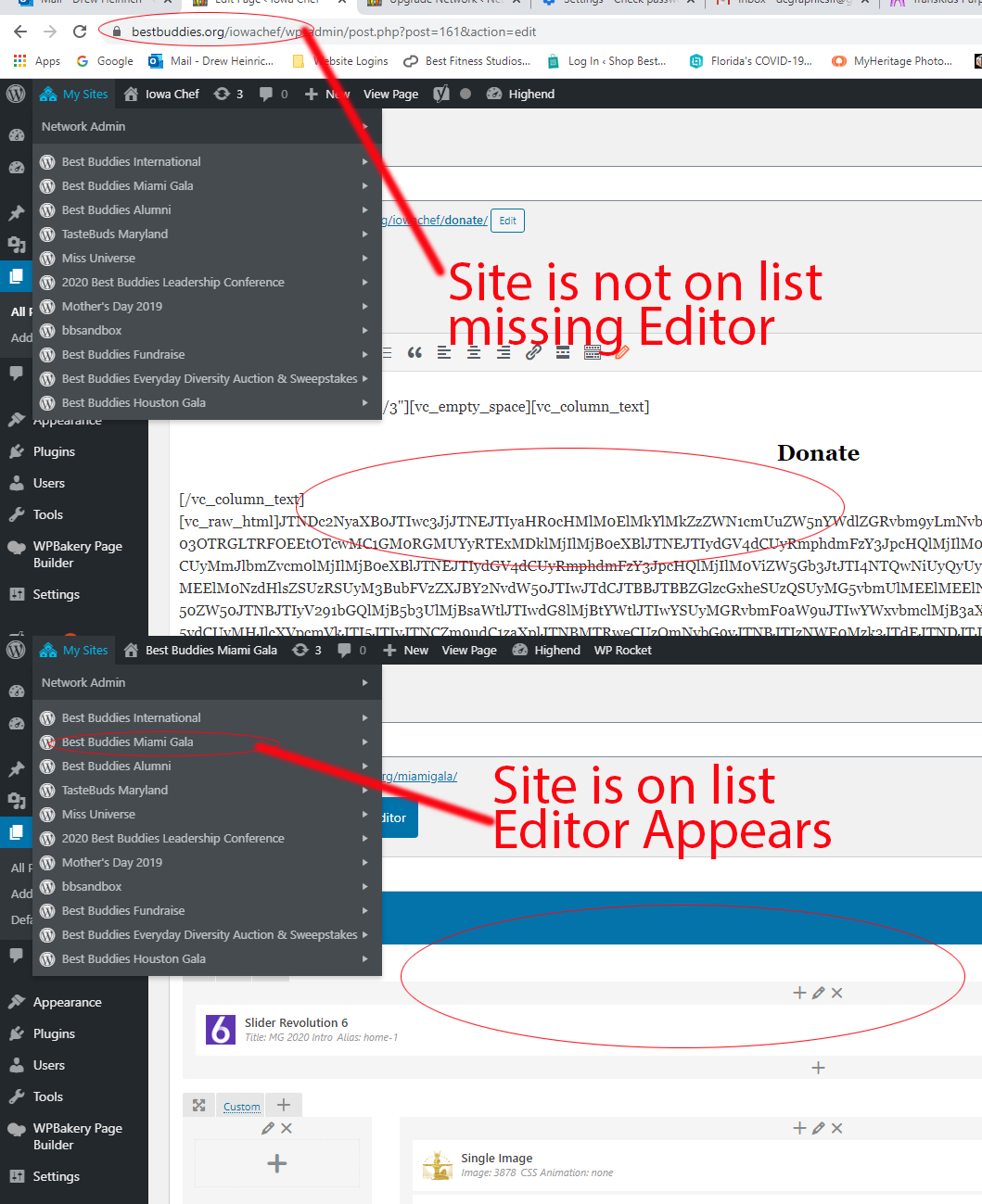
Hello Support. I just wanted to let you know that your update on 11.09.2020 – ver 6.4.0 – Fix: Multisite setup works properly for super admin user role: DID Not entirely fix the problem. (see attachment: https://www.bestbuddies.org/wp-content/uploads/2020/10/vc-issue.jpg If I add my Super Admin user name to the sites and it appears under the Super Admin list on the left in the dashboard, your editor appears. For the other sites as a Super Admin I am not a user of, but have access to, there are no editors appearing on the pages. If I log in as an Admin or another role on those pages, the Editor appears. Kindly advise on a fix or an update. Thanks again for your great plugin!
Hello, Please update the plugin to the latest version 6.4.1 which was released on 24/9/2020.
Knowledge Base ·
Official Support ·
Facebook ·
Twitter
Don’t forget to join our newsletter. Be first to get news and inside secrets from WPBakery team.
Thanks for the reply. I did the 6.4.1 update which did not help before contacting you. The screenshot is what the page looks like to a Super Admin who has access to a site on the network, but not added to the site on the network as a user: https://www.bestbuddies.org/iowachef/wp-content/uploads/sites/45/2020/10/issue.jpg
Hi, I have a Media Grid with 4 Images. If I click on the first image, the second image should open in the lightbox. Is there a way to implement this?
Hello, I am afraid the standard grid lightbox can only link to the image which is clicked. However, we do have many third party grid add-ons which you can check under add-ons section of codecanyon which might have such a feature.
Knowledge Base ·
Official Support ·
Facebook ·
Twitter
Don’t forget to join our newsletter. Be first to get news and inside secrets from WPBakery team.
Hello Team,
We are receiving below error in WPBakery 6.4.1 with WP 5.5.1 default theme, can you please fix it.
[Oct 01 12:32:49:1601555569.528223:1:error]
Notice: Undefined property: Vc_Updater::$title in /public_html/wp-content/plugins/js_composer/include/classes/updaters/class-vc-updating-manager.php on line 128
0
Thanks,
ThemeZaa
Hello, Can you please provide us with the steps that can be followed to replicate the issue to check it further?
Knowledge Base ·
Official Support ·
Facebook ·
Twitter
Don’t forget to join our newsletter. Be first to get news and inside secrets from WPBakery team.
Hi Rohan,
Below are the steps to replicate the error:
WPBakery Page Builder – 6.4.1 WordPress – 5.5.1 Theme – Twenty Twenty Wordfence Security – 7.4.11
Please go to Admin Panel > Wordfence > Scan > Click on “Start New Scan”. Check error in screenshot – https://tinyurl.com/yxacry8e
Thanks,
ThemeZaa
Hello, The error is because WordFence parser checks for updated version of plugin in WordPress directory. As it is a premium plugin, it is not located in WordPress directory.
Knowledge Base ·
Official Support ·
Facebook ·
Twitter
Don’t forget to join our newsletter. Be first to get news and inside secrets from WPBakery team.
Thank you Rohan.
ThemeZaa
Thanks, I love your plugin and have bought tons of add-ons and now nothing makes sense to me. Do I have to switch… man so many questions. Michael can you clarify this?
Thanks again.
Hello, The Visual Composer Website Builder and WPBakery Page Builder are two independent products.
You can find more info here: https://visualcomposer.com/docs/faq/visual-composer-website-builder-vs-wpbakery-page-builder/
Knowledge Base ·
Official Support ·
Facebook ·
Twitter
Don’t forget to join our newsletter. Be first to get news and inside secrets from WPBakery team.
Hi, we don’t have an independent license for this as it always comes bundled with the themes we buy. Is it possible to make a row have a transparent background?
Hello, By default rows have transparent background when you do not select any background under row design options.
Knowledge Base ·
Official Support ·
Facebook ·
Twitter
Don’t forget to join our newsletter. Be first to get news and inside secrets from WPBakery team.
Thanks for your help Rohan
Hi, we are experiencing a problem with the TAB structure; they don’t work. Clicking on a tab does not display the content from the site. We realized that the div containing the content did not set the correct id, but only report “tab-”. Another anomaly that from the backend, among the selectable elements, we do not have the TABs but the OLD TABs. Wordpress 5.5.1 – PHP 7
Hello, It looks like the new tab elements are disabled at your end by the theme and hence old tabs are available which were deprecated long back. The old tab element code is no longer maintained.
Knowledge Base ·
Official Support ·
Facebook ·
Twitter
Don’t forget to join our newsletter. Be first to get news and inside secrets from WPBakery team.
Is it possible to download the latest version compatible with the RIver theme which is version 5.7 of the plugin, where can I download it? Thank you
Hello, Please open a ticket via support portal: http://support.wpbakery.com/ so that the support team can share it with you.
Knowledge Base ·
Official Support ·
Facebook ·
Twitter
Don’t forget to join our newsletter. Be first to get news and inside secrets from WPBakery team.
Hi, I want a single image element to show a random picture every time the page is loaded to add more variety to my homepage. Do you know how I can accomplish this? It would also be cool for the images to change every set number of seconds. Example: https://stripe.com/payments/elements Thanks!
Hello, The single image element can only display a fixed image. If you use image gallery element, then you can display the images in slider format with an autoplay enabled.
Knowledge Base ·
Official Support ·
Facebook ·
Twitter
Don’t forget to join our newsletter. Be first to get news and inside secrets from WPBakery team.
Hello:) “Post Masonry Grid” is not working on my homepage.
Why could it be?  (The plugin came to me with the “Royalistic – Creative Multi-Purpose WordPress Theme” theme I purchased.) My page: https://www.oyamumcuoglu.com
Hello, The website is using a very old version of WPBakery Page Builder which is 5.2.1. Please update it to the latest version 6.4.1.
Knowledge Base ·
Official Support ·
Facebook ·
Twitter
Don’t forget to join our newsletter. Be first to get news and inside secrets from WPBakery team.
Hello, “To receive automatic updates license activation is required. Please visit settings to activate your Visual Composer.” but The plugin came to me with the “Royalistic – Creative Multi-Purpose WordPress Theme” theme I purchased. That’s why I can’t activate it.
Hello, The plugin which is received with the theme does not have a license of it’s own. In this case, you should either contact the theme developer for an update or purchase direct plugin license from us. The direct license purchased from us has these added benefits: https://kb.wpbakery.com/docs/faq/what-are-the-benefits-of-direct-license-for-wpbakery-page-builder/
Knowledge Base ·
Official Support ·
Facebook ·
Twitter
Don’t forget to join our newsletter. Be first to get news and inside secrets from WPBakery team.
Hello, i’v been trying to buy the plugin thru the main website but i keep getting declined or getting notification about it was blocked due unusual activity..
or like this on
Funding Instrument In The PayPal Account Was Declined By The Processor Or Bank, Or It Can’t Be Used For This Payment
already tried with different paypal accounts and credit cards.
Hello, Can you please share the email id that you enter on checkout page?
Knowledge Base ·
Official Support ·
Facebook ·
Twitter
Don’t forget to join our newsletter. Be first to get news and inside secrets from WPBakery team.
Problem: /wp-content/plugins/us-core/plugins-support/js_composer/js/us_input_examples.js: jQuery.fn.live() is deprecated My WP Bakery is up to date.
Hello, Please use support.wpbakery.com and share your temporary website credentials so our support team can investigate your issue and help you out.
Knowledge Base ·
Official Support ·
Facebook ·
Twitter
Don’t forget to join our newsletter. Be first to get news and inside secrets from WPBakery team.
This doesn’t work on wordpress backend anymore?
Hello, It looks like one of your plugins is dependent upon jquery migrate which is not enabled by WordPress in recent versions, which in-turn is affecting the backend editor. You can install the plugin: https://wordpress.org/plugins/enable-jquery-migrate-helper/ to make sure that it is enabled again.
Knowledge Base ·
Official Support ·
Facebook ·
Twitter
Don’t forget to join our newsletter. Be first to get news and inside secrets from WPBakery team.
Hi,
Your plugin shows error below in backend when you release a new version
Notice: Undefined property: Vc_Updater::$title in \wp-content\plugins\js_composer\include\classes\updaters\class-vc-updating-manager.php on line 99
Please check and fix it.
Thank you!
Hello, Please use support.wpbakery.com and share your temporary website credentials so our support team can investigate your issue and help you out.
Knowledge Base ·
Official Support ·
Facebook ·
Twitter
Don’t forget to join our newsletter. Be first to get news and inside secrets from WPBakery team.
bought bridge theme 2yrs ago …invited to update wpbakery for my site www.haveyourmagic.com I bought regular licence , developer installed files I log into support I see licence key unactivated we have a deadline to create something ready for a summit where I talk about healing trauma and we’re stuck  my email is haveyourmagic@gmail.com I emailed no response ….appreciate help (am in Uk)
Hello, As you have purchased a direct plugin license from us, can you please open a ticket via support portal: http://support.wpbakery.com/ so that the support team can guide you with any issue faced at your end.
Knowledge Base ·
Official Support ·
Facebook ·
Twitter
Don’t forget to join our newsletter. Be first to get news and inside secrets from WPBakery team.
Installation de l’extension à partir du fichier téléversé : codecanyon-9uvZi7lQ-visual-composer-page-builder-for-wordpress.zip
Décompression de l’archive de l’extension…
Installation de l’extension…
L’archive n’a pas pu être installée. Aucune extension valide trouvée.
L’installation de l’extension a échoué.
Hello, Please make sure that you unzip “odecanyon-9uvZi7lQ-visual-composer-page-builder-for-wordpress.zip” and then only upload js_composer.zip file via plugins -> add new -> upload to install it at your end.
Knowledge Base ·
Official Support ·
Facebook ·
Twitter
Don’t forget to join our newsletter. Be first to get news and inside secrets from WPBakery team.
The plugin does not work with Wordpress version 5.5.1. I have version 6.0.5 of your plugin! How can I solve the problem? Thank you
Hello, Please update the plugin to latest version which is 6.4.0 which is compatible with recent WordPress releases.
Knowledge Base ·
Official Support ·
Facebook ·
Twitter
Don’t forget to join our newsletter. Be first to get news and inside secrets from WPBakery team.
It does not seem correct to me as all the “themes” purchased even very recent have a previous version!
Hello, If the plugin was received as a part of the theme, then you can contact the theme developer for it’s update or can purchase a direct plugin license from us to update it yourself. The direct plugin license will also provide you with these added benefits: https://kb.wpbakery.com/docs/faq/what-are-the-benefits-of-direct-license-for-wpbakery-page-builder/
Knowledge Base ·
Official Support ·
Facebook ·
Twitter
Don’t forget to join our newsletter. Be first to get news and inside secrets from WPBakery team.
Hello I have a license why my license has expired?
Hello, The purchased license is valid for lifetime. The support tenure expires in six months and if you need any support beyond that, then the support tenure should be renewed.
Knowledge Base ·
Official Support ·
Facebook ·
Twitter
Don’t forget to join our newsletter. Be first to get news and inside secrets from WPBakery team.
I don’t need support I know how to use the product, just I’m asking why my license has expired?
Hello, The plugin license does not expire as it is valid for lifetime. The license comes with six months of support access and only support access expires after six months.
Knowledge Base ·
Official Support ·
Facebook ·
Twitter
Don’t forget to join our newsletter. Be first to get news and inside secrets from WPBakery team.
Hello. We’ve been using Rosie theme with WP Bakery for many years on our site: https://meadowsmuseumdallas.org/ I just upgraded to the latest version of Wordpress today and then WP Bakery to latest version, 6.4.0, Slider Revolution 6.2.23 and then Rosie to v 4.1 Site looks fine but when I got into the Dashboard and try to edit a page, I just see back end text and code rather than the nice page builder. I cannot click on the Visual tab, it is stuck on Text. What happened to the page builder and can I switch it back on? Here is a snippet of what I see rather than the page builder:
css=”.vc_custom_1481986868342{padding-top: 30px !important;padding-bottom: 30px !important;}”][vc_toggle title=”What do I need to know about COVID-19?” style=”round” color=”turquoise” el_id=”1481985479166-cda5e190-ccf9”]Effective March 17, the University has shifted to “reduced operations” status until April 6 to responsibly care for its campus population in response to the spread of COVID-19.
I have cleared my cache and switched from Chrome to Firefox all to no avail. I cannot see the builder any more. Can you please help? Thanks.
Hello, There can be an issue if any of your plugins or theme is dependent on jquery migrate which is not enabled y default in latest WordPress. You can enable it using a plugin such as: https://wordpress.org/plugins/enable-jquery-migrate-helper/
Knowledge Base ·
Official Support ·
Facebook ·
Twitter
Don’t forget to join our newsletter. Be first to get news and inside secrets from WPBakery team.
Here is an info: After the update the page did not show up anymore. Only the preloader was visible. After I deactivated the preloader, the page appeared normal again.
Sorry, wrong channel.

This item was featured on CodeCanyon

Power Elite Author
Contact the Envato Market Help Team