2769 comments found.
If I need to include the plugin in my theme to my customer directly, should I buy it as extended version ?
An Extended License is required if the end user must pay to use the end product.
Is that mean, the If I purchased an extended license it’s okay to include this plugin into my theme? I need a clear answer with Yes or no, please!
Yes, extended license allows you to use the plugin on an end product (theme in your case) that will be sold.
https://codecanyon.net/licenses/standard
Is it ppossible to change the author details of an event? As I have created the events for my client, but they need to get the emails.
Hi,
Sorry for the delay.
It’s not possible via the admin. I’ll add this option to my todo list for the next update.
At the moment it has to be done via a filter or programatically.
Example:
1) Place the following code in your theme functions.php file.
Make sure to change the $NEW_AUTHOR_ID value.
/**
 * Update events author ID
 * The code must be executed from the admin panel
 * REMOVE THIS CODE ONCE EXECUTED
 */
add_action('init', function() {

    if (is_super_admin() && is_admin()) {
        $NEW_AUTHOR_ID = 1;

        $eids = get_posts(array(
            'post_type' => 'stec_event',
            'fields'    => 'ids'
        ));

        foreach ($eids as $id) {
            wp_update_post(array(
                'ID'          => $id,
                'post_author' => $NEW_AUTHOR_ID
            ));
        }

        add_action('admin_notices', function() {
            printf('<div class="notice notice-success"><p>%s</p></div>', 'Events author have been changed. You can remove this code now');
        });
    }
});
2) Then go to your Wordpress Dashboard.
You should see notice at the top: Events author have been changed. You can remove this code now
3) Remove the code from functions.php file
Great, that worked! Just another question… After updating I don’t see the months above the calender anymore?
Go to Dashboard -> plugins and deactivate and reactivate the calendar.
You Guys rock with your fast reactions! Thank you!!1
Can other Forms be used for this plugin? I am not very crazy about the form options of this plugin. I need to create a much simpler form. I do not want to build an organizer list, or a locations list. I just want them to be text fields for address, organizer, etc.
I am working on something that will have many events with a lot of organizers and a lot of locations and having them all show up will confuse the users trying to submit an event.
Do you have a complete list of shortcodes? I created a frontend form and the styling is messed up unless I add a plugin shortcode to the page.
Even looking at your demo site, The same problem is there. https://stachethemes.com/wp-demos/tbb/stec_esf/submission-form-1/
Don’t directly display stec_esf custom post types.
Use the shortcode instead:
[stec_submit_form]
[stec_submit_form id=128375]
Where id=... is the builder template id number.
This shortcode is available via Elementor as a widget in the Stachethemes Event Calendar sub menu.
Live preview: https://stachethemes.com/wp-demos/tbb/form-test/
Where do I get the id of the new form?
It’s visible in the browser address bar (...&post=128375&action=edit…) when you edit the form.
If you place the form via Elementor “Event Submission Form” widget you don’t need to know the id. All forms are listed in the widget’s settings.
Awesome.. Thank you. This is Awesome!!
I’m Interessed to buy the plugin but i have one question : is-it possible to reuse the guests (keep it in memory when you create one).My website has many guest who are présents at many events
The guest feature is really interesting for me… only if i don’t have to create them each time 
Thank you
Hi,
At the moment only organizers and locations are stored separately as they are often reused.
Most likely the guests section will follow if not this update then the next one.
Hello, i in interessting in buying this plugin but need first to hame some clarifications: 1 – is it possible to display like 15 events in a day? 2 – i would like to customize the link for each event and display simple article instead of event detail? 3 – Can i filter by categories and sub-categories ? 4 – Can i add one time the same event but for differents dates like 3 times per a year ? Thank you so much.
Hi,
1) It is possible.
2) It is possible. In the admin Add/Edit Event page -> Introduction tab there’s external link option. You can set the link and text there.
Then from General settings set “Open Events In” to “External link”.
3) Only by categories. There are no sub-categories at the moment.
4) There’s built-in repeater for the events.
There’s online admin demo where you can test the calendar.
Link to admin demo: https://stachethemes.com/wp-demos/tbb/wp-admin/
User/Pass: demo / demo
CAn you please respond to my tickets? I have a very urgent project and I am having some issues with a few things.
PUBLIC TICKET #2531240
PRIVATE TICKET #2530911
PUBLIC TICKET #2530863
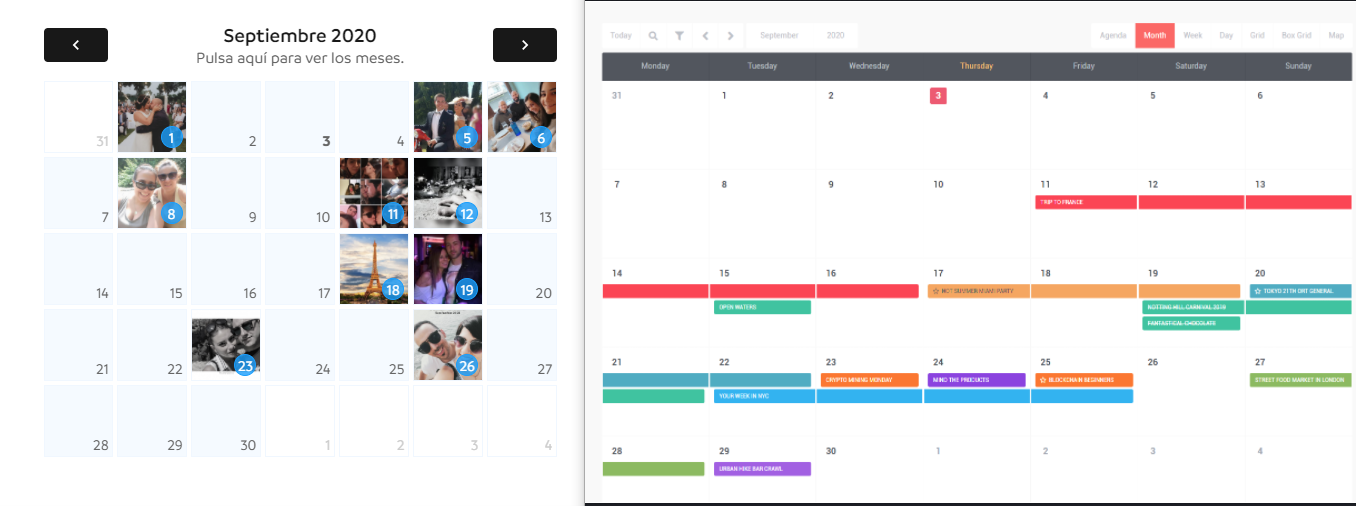
Hi, is there any way to show the main event image in the background of the calendar day? Like this example: https://i.gyazo.com/1109101ccdc7d56e333987172281ae7f.png (on the left what I want, on the right what I see in your demo)
Thanks!
Hi,
That’s very specific and requires certain conditions in order to look ok so it’s not built-in the calendar by default.
It’s possible to do it via custom filter though.
The filter:
add_action('wp_footer', function() {

    global $post;

    if (!is_a($post, 'WP_Post') || !has_shortcode($post->post_content, 'stachethemes_ec')) {
        return;
    }
    ?>
    <script type="text/javascript">
        (function ($) {
            $(function () {
                if (typeof $.stecExtend === 'undefined') {
                    return;
                }

                $.stecExtend(function (m) {
                    if (m.glob.options.view === 'month') {
                        m.$instance.$month.find('.stec-layout-month-daycell-image').remove();
                    }
                }, 'onLayoutSet');

                $.stecExtend(function (m) {

                    if (m.glob.options.view === 'month') {

                        $.each(m.$instance.$month.find('.stec-layout-month-daycell-events').filter(':not(:empty)'), function () {
                            let $container = $(this).parents('.stec-layout-month-daycell-wrap').first();
                            let event = m.calData.getEventById($(this).find('.stec-layout-month-daycell-event-start:first').data('id'));
                            let imageSrc = '';
                            let $image = '';

                            if (!event.images || event.images_meta.length <= 0) {
                                return true;
                            }

                            imageSrc = event.images_meta[0].thumb;

                            $image = $('<div class="stec-layout-month-daycell-image" />').prependTo($container);

                            $image.css({
                                backgroundImage: 'url(' + imageSrc + ')',
                                backgroundSize: 'cover',
                                position: 'absolute',
                                width: '100%',
                                height: '100%'
                            });

                        });
                    }

                }, 'afterFillEvents');
            });
        })(window.jQuery);
    </script>
    <?php
});
Hello,
When I go to Go to Dashboard -> St. Event Calendar -> General -> Single Page tab. There are no options.
I have deactivate and reactivate the calendar to refresh the settings but nothing happens, still doesn’t show nothing.
Hi,
If your version is 3.0+ it should display single page settings.
Check your browser console for javascript errors on that page.
Why pre-sale questions are left unanswered?
Hello,
With the newest update of the plugin I can’t find this file:
stachethemes_event_calendar\assets\js\front\caldata.js
By default the calendar looks 12 months ahead for upcoming events but in this file I could have change it for as many months ahead as I wanted to.
Where can I find this options now ?
Greetings
Hi,
Use shortcode attribute future_months_ahead={MONTHS}
[stachethemes_ec future_months_ahead=24]
So cool it’s in a shortcode now, thank you very much 
Hi, can I achieve the following with this plugin:
1. Create an event with countdown timer
2. Show count of registered people and spaces left
3. Once there are no spaces left, allow user to RSVP or add to waitlist before the end date
4. Display a simple registration form that takes name, phone, email, number of spaces, and message
5. Hide Time and Location ( Optional)
Our events are online we only need users to register and get an email with all the necessary details.
If any of the functions above doesn’t currently, exist but can be customised at an extra cost, please specify the price range. Thank you
Hi,
1) Yes as seen in the demo
2) Attendance tab dispalys places left on the front-end and who will be attending.
3) No, sorry.
4) The RSVP popup by default requires Name, Email and Places to reserve. The other options can be inserted via wordpress filter.
5) If you set the event to “All Day” the time will be hidden. Location by default is optional.
You can check the admin demo and see if it fit your needs.
https://stachethemes.com/wp-demos/tbb/wp-admin/User/Pass: demo / demo
Unfortunately we don’t offer customizations.
You can check https://studio.envato.com/ for custom work.
I like the plugin compatibility with Elementor and styling but I never can get it to make it do the same thing as in your demo here https://stachethemes.com/wp-demos/the-calendar/agenda/
I have tried following the documentation, created a calendar, event and tickets to show the tickets limit. But when I save and go to view, nothing shows up. Can you please send me how do to create an event and make visible just like the way you have on your demo or at least update your documentation to have a step by step guide. Thank you
Hi,
Please open ticket at https://stachethemes.ticksy.com/tickets/ and provide me with link to the front-end to take a look.
I’ve had problems with mobile after the update. Events are not clicking and giving a jquery error. For this, I downloaded both my csv and ics backups. I canceled the keep data mode, deleted and reinstalled the plugin. Mobile problem is still ongoing and I ran into another problem. I’m trying to upload the backup I got with CSV and it always looks like 0. When I upload the backup with ICS, this time my data in the timeline does not appear and my mobile problem still continues. Before the update, everything was working perfectly. How can I solve this?
Hello, bevore I will buy. 1. Is it possible to show two different calendars in one the widget or Sidebar? 2. Is it possible to set the number of events shown? 3. Is it possible to define a distance between the events in the Box Grid? 4. Is the single event page just like the other blog pages? With Sidebars, Counters, and so on?
Thank You.
Hi,
1. Yes, you can specify which calendar you want to display via shortcode attribute cal=... example:
[stachethemes_ec cal=1]
[stachethemes_ec cal=1,2,3]
Also standalone widget for sidebars will be coming next week.
2. In Agenda, Grid and Box Grid views you can limit the events by shortcode attributes.
[stachethemes_ec agenda_get_n=3]
[stachethemes_ec grid_per_click=3]
[stachethemes_ec boxgrid_per_click=3]
3. Only Grid view at the moment. I’ll see if I can add gutter option in the next update for the box grid view.
4. Events’ Single Page uses your theme single page template layout.
Hey, thats great,
And are events that are over invisible?
If you set in the shortcode upcoming_only=1 attribute they won’t be, otherwise they will remain visible.
Thank You
I bought these calendar for a project three years ago, but never managed to use. I am thinking of it using again, but my license no longer works. Is it possible to clear it?
Also, my project involves tracking over a number of years an exploration expedition. Is it possible and easy to set up calendar events in the 1800s and can you set the calendar to default open to a day 200 years ago?
Hi,
Send me your license key to stachethemes@gmail.com and I’ll reset it.
To start the calendar in specific date you can use the “start_date” attribute. Example:
[stachethemes_ec start_date=1800-01-01]
Ok, thanks! Sent from prayaga.org@gmail.com
i have small problem. sent mail sir.
Hi,
Please open ticket at https://stachethemes.ticksy.com/tickets/
i fixed sir thank you so much 5 stars pllugin.
Hey, sorry to bother again, just some questions:
1. So the new front end builder need elementor free plugin installed and active after this update? Can you also show via elementor woocommerce products in the frontend event builder?
2. Will you also support gutenberg as an alternative to elementor? Maybe next update? I know you think elementor is better, but gutenberg is faster and doesn’t add lots of DOM elements…
3. Will you also adress a more in-depth integration with woocommerce in next update? I mean a way to get woocommerce products or categories in the event page through event front-end builder (not only tickets) – this is somehow related to the question above, as this can easily be done through woo (gutenberg) blocks…
Also, another integration is related to the woocommerce “client” type of wordpress account, to be more integrated with the calendar (for example some fields’ values to be easily importable in the event builder – ex the email or phone or other values can be pre-filled via the client account values).
If you also consider these changes, when do you think they’ll be live in your plugin (an ~ ETA)?
Thanks.
1. After the 3.0.9 update the old builder is gone. To build pages you’ll need elementor installed. Single Page builder has “Shop” widget element that displays the products added to the event.
2. Once we’re done with elementor, yes. You will be able to switch between the two builders.
3. Shop page is planned for complete re-design.
In variables where predefined values can be set (like emails) we’ll do so.
ETA is too early to tell.
Hi,
1) Do you support WPML?
2) Can we turn-off tabs in single event page?
3) Can I install and use this theme without woocommerce. I do not want to sell anything right now.
4) How this affects speed? Any gtmetrix, pagespeed data?
5) Is this compatible with SEOPress and WP-Rocket?
Best
Hi,
1) Yes.
2) Yes via Elementor or via wordpress filters.
3) Yes, WooCommerce is optional.
4) Not measured.
5) Yes, although you may have to exclude the javascript compression of the plugin files in your wp rocket settings.
Hello,
I believe your plug-in is almost everything I need. But I have a small problem now. I have seen that it is possible to have 2 different kind of tickets (children and adult). But I have set the attendance on max 18 persons. But I can order 18 tickets for adult and 18 for children. How can I fix that? So it’s only possible to buy 18 tickets.
If someone buys 16 adult tickets and 2 children tickets the event is full. But now I can order 18 tickets of both.
Best regards. Michel Rikkert
Hi,
We’ll address this in future update after the elementor update next week.
I have the following Pop Up message : “Internal Server Error” after Submit Event Details, How to fix this, thanks
Open your wp-config.php and turn on the debugger:
define( 'WP_DEBUG', true );
define( 'WP_DEBUG_LOG', true);
Then check the debug.log file in wp-content folder for the error.