308 comments found.

Ciao, molto interessante il plugin. Ho un sito che parla di posta elettronica con parecchi articoli e volevo fare in modo che alcuni link venissero generati automaticamente. Ad esempio se il plugin trova la parola “browser” la link automaticamente all’articolo che parla di browser ma vorrei comunque avere il controllo nel senso che non vorrei che linkasse qualcosa che non deve. Posso avere il controllo anche manuale? Scrivo “browser” e lui mi propone automaticamente una lista di link pertinenti per lui oppure funziona in modo diverso?
Hello andreamarucci,
the auto internal links are applied based on the keywords, targets and additional options defined in the Interlinks -> AIL menu. The general plugin options are also considered to determine which keywords are applied.
Here you can find a video series on Interlinks Manager and here you can find the FAQ.
Hope this helps. Let me know if you have any questions.
Can the Interlinks Manager add link(s) in a Woocommerce product descriptions to link to another product?
Hello sandawg17,
please proceed as follows
- Create the auto internal links from the Interlinks -> AIL menu and set “product” in the Post Types option.
- To generate statistics about the auto internal links included in the “product” custom post types please check out this FAQ.
Hope this helps. Let me know if you have any questions.
And, if I want to limit the number of links created throughout all the products what do you suggest is the number and where can I add this, is this in the AIL?
Hello sandawh17,
the total number of auto internal links applied through the website or a selection of posts is not calculated (during the process used to apply the auto internal links) for performance reasons. This would require to apply the regular expression used to apply the each auto internal links to all the posts involved.
On this FAQ you can find the available options useful to limit the application of the auto internal links. I recommend you to limit the number of auto internal links with a fixed number or dynamically based on the content length as explained in the “Limit the total number of automatic internal links in a post” section.
Hope this helps. Let me know if you have any questions.
will this work with this plugin
https://codecanyon.net/item/wp-content-crawler-get-content-from-almost-any-site-automatically/15983018Hello pauljomy92,
If you need more information on this subject please contact us via the “Support” tab above and provide more information about the plugin.
Hope this helps. Let me know if you have any questions.
Hello. This is just a heads up. The plugin doesn’t seem to be working properly after the wordpress 5.4 update (released today). In the link juice panel, I cannot use both options at the right end of the table: view the table with the internal links / download a cvs table with those internal links. Thanks and regards.
Hello Birbo,
I just tested WordPress 5.4 with the latest version of Interlinks Manager (1.23) and I can’t see any issue with the two mentioned features. (internal links modal window and csv downloads in the Juice menu)
Can you please contact us via the “Support” tab above and indicate how to reproduce the issue, or alternatively create a temporary WordPress account so we can verify the issue directly in your website.
Thank you.
Hello
I’m thinking of buying your plugin.
I need the suggestion functionality of the internal links of the posts, when I write the article I would like to be suggested relevant links with the written words.
This is what your plugin does?
Is it okay with the Italian language?
Thank you
Hello WOODYP,
I’m thinking of buying your plugin I need the suggestion functionality of the internal links of the posts, when I write the article I would like to be suggested relevant links with the written words. This is what your plugin does?.
The suggestions algorithm make use of the post title, post type, categories and tags to find related articles. For more information on this please check out the “Get interlinks suggestions” section of the item description and this video tutorial.
Is it okay with the Italian language?
Yes. The plugin is also translated in Italian, the manual is only available in English.
Hope this helps. Let me know if you have any questions.
Does this support new PHP version?
Hello samrazzy,
yes, I confirm you that the plugin has been tested with the latest PHP versions.
Hope this helps. Let me know if you have any questions.
Tested but do not work . Not generate any link
Hello RankingCanada,
please contact us via the “Support” tab above and add more details about your WordPress environment and the plugin configuration, so we can provide you a precise answer.
Thank you.
Does the Interlinks Manager work with “Betheme” and “Muffin Builder” now?
Hello danielleaile,
with the Advanced -> Filter Priority option you have to set an high value (I recommend you to set “1000000000”) so that the filter used by Interlinks Manager will be applied after the filter used by the page builder of your theme.
In case you will not be able to actually use Interlinks Manager in your WordPress environment we are available to provide you a refund.
Hope this helps. Let me know if you have any questions.
Thank you. But unfortunatelly it doesn`t work. The suggestions is ok but the automated internal links doesn`t. What can I do. Do you need anything from us like a data export from wordpress? Please notify me again and thanks in advance. You are a great help for us.
Hello daniellaile,
please contact us via the “Support” tab above with the account that you used to purchase the license and create a temporary WordPress account. So I can inspect the plugin configuration, the WordPress environment and provide you a precise asnwer.
Thank you.
Hello, does your plugin work 100% with Elementor and with custom post types including ACF fields?
Or are there any restrictions or barriers here?
Hello EscortSeoAgentur,
does your plugin work 100% with Elementor
If your website is using Elementor I recommend to postpone the application of the auto internal links by setting the highest possible value in the Advanced -> Filter Priority option, which is “2147483646”.
with custom post types including ACF fields
To apply the auto internal links on the ACF fields customizations are required. Please check out this answer for more details.
Hope this helps. Let me know if you have any questions.
Hello, this plugin worked fine for a few months. Now the links aren’t showing up. When I check the “Interlinks Manager – Dashboard” it’s saying that “AIL” links are there, but when I open the url in any browser they’re not showing. Older article are still registering the links however. Any ideas as to what I can do to solve this issues? I really love your plugin, it’s a life saver.
Hello epdesigns,
for support please contact us with the account that you used to purchase the item via the “Support” tab above. Please include the credential of a temporary WordPress account so we can inspect your configuration and provide you a precise answer.
Let me know if you have any questions.
Dear DAEXT,
It’s a Pre-sale question.
I am looking for post interlink suggestions.
( https://www.youtube.com/watch?v=KI2xHCzApYc )
My requirement is to add “tags, categories” in >> suggestions >> Source post types.
is it possible to show this plugin to suggest “tags and categories” instead of “Post, page” ?
I wanted to interlink tags and categories most of the time.
Kindly guide.
Thanks Regards Kapil
Hello Kapil,
currently the Interlinks Suggestions feature suggests post, pages and custom post types.
I’ve added a ticket so that the ability to suggest tags and categories will be considered in the next plugin update. Please note that I can’t guarantee in advanced about an actual implementation of this feature at the moment or provide you a release date.
Let me know if you have any questions.
Dear DAEXT,
One more question.
Does it track MIL for tags and categories also?
I mean if I manually link tags or categories in a post, does this plugin track clicks for those?
Also does it calculate juice for tags and categories too?
Thank you for your kind answers.
Best Regards Kapil
Hello kapson,
Does it track MIL for tags and categories also?
The MIL are tracked for posts, pages and custom post types of any category or tag. The MIL are not tracked for the archive pages (the archive pages of tags and categories are not analyzed).
I mean if I manually link tags or categories in a post, does this plugin track clicks for those?
Yes, all the manual internal links are tracked.
Also does it calculate juice for tags and categories too?
The link juice is calculated for any URL linked in the posts, pages and custom post types of the blog. The archive pages are not analyzed to retrieve information about the link juice of the URLs.
Hope this helps. Let me know if you have any questions.
Interlinks Manager 1.23 has been released
Interlinks Manager has been updated to version 1.23, more information on the changes applied with this version are available in the “Updates” section of the item description.
To update please proceed as follows:
- In the Plugins menu click “Deactivate”
- Update all the plugin files via FTP
- In the Plugins menu click “Activate”
If you have any questions feel free to ask.
Is it somehow possible to check/prevent in AIL if a keyword has already been added? What happens if I add the same keyword twice with different URLs?
Hello owt,
Is it somehow possible to check/prevent in AIL if a keyword has already been added?
Yes, you can use the search form available in the AIL menu to verify if a keyword already exist.
What happens if I add the same keyword twice with different URLs?
This depends on the options associated with the two AIL and on the general plugin options.
Hope this helps. Let me know if you have any questions.
it no support for old post? I general, but it no update juice
Hello bstyPhamVinh,
it no support for old post?
You can determine the number of posts included in the back-end analysis (Dashboard, Juice and Suggestions) with the Limit Post Analysis option of the Options -> Analysis menu.
I general, but it no update juice
Please contact us via the “Support” tab above for this and includes additional information or alternatively create a temporary account with access to the Juice and Options menus, so we can provide you a precise answer.
Hope this helps. Let me know if you have any questions.
hi, so woocommerce is a custom post type and i can use your plugin for interlinking in product description, right ?
Hello jooee,
the WooCommerce products are custom post types “product” and you have to simply configure the plugin options like explained in this FAQ (you have to add “product” in the list of considered custom post types. E.g. “post, page, product”). To resume, yes you can use all the features of Interlinks Manager for the product description.
Note that other aspects of the content generated by WooCommerce are custom layout parts, in this case, if you need to absolutely apply the auto internal links in these parts, you have to use the method provided by this plugin. Check out this question from another user.
Hope this helps. Let me know if you have any questions.
Hello! Can I also track logged in Users with this plugin? I have a membership site and I need to track the members who clicks on my affiliate links. Thanks
Hello doglike,
currently the plugin doesn’t store information about the WordPress users that perform the clicks on the internal links but only information such as the date of the click, the post of the click, the target of the clicked link and the type of the clicked link (manual or automatic).
Let me know if you have any other questions.
- Can I define more than one keyword per URL / page to be considered for internal linking?
- Can I link to one and the same URL with different keywords (=anchor text) but only once in case more keywords were found on a specific page? Meaning that the target URL should only get maximum 1 link from 1 page.
- Can I excluded specific URLs / page like imprint, contact, free trial, etc. that I don´t want to be considered to generate internal links?
Thanks in advance!
Hello tmirwald,
Can I define more than one keyword per URL / page to be considered for internal linking?
Yes, in the Interlinks -> AIL menu define multiple auto internal links and set the keywords with and the same URL.
Can I link to one and the same URL with different keywords (=anchor text) but only once in case more keywords were found on a specific page? Meaning that the target URL should only get maximum 1 link from 1 page.
Yes, you have to set to “1” the Options -> Advanced -> Same URL Limit option.
Can I excluded specific URLs / page like imprint, contact, free trial, etc. that I don´t want to be considered to generate internal links?
Yes, you have to set to “No” the Enable AIL option available in the Interlinks Options meta box of the post that you want to exclude.
Hope this helps. Let me know if you have any questions.
Hi,
How I can exclude a custom field to ignore the internal link. Because for now the internal link show 2 in a page: 1 from content editor and 1 from the content in custom field. I already set the limit 1, but not help. It still show 2
Hello deody,
I just replied to this question in the existing email thread. Please continue on that thread for technical support.
Thank you.
hello is the plugin track just the internal link if i have affiliate link is the plugin track it and how many click it got ?
Hello Kenanmls,
hello is the plugin track just the internal link
Yes, it tracks only the internal links.
if i have affiliate link is the plugin track it and how many click it got
Only if the affiliate links are internal links. Please note that currently the number of clicks generated with the internal links is provided as a cumulative value for the post and not for the single link clicks.
Hope this helps. Let me know if you have any questions.
Hey DAEXT, please consider supporting category/tag/taxonomy descriptions and user biographies. I’m currently in a situation where this is needed but still considering my options, rather wouldn’t alter your plug-in too much  Filter hooks would also be a great thing to have. Thanks in advance!
Hello easilyonline,
please consider supporting category/tag/taxonomy
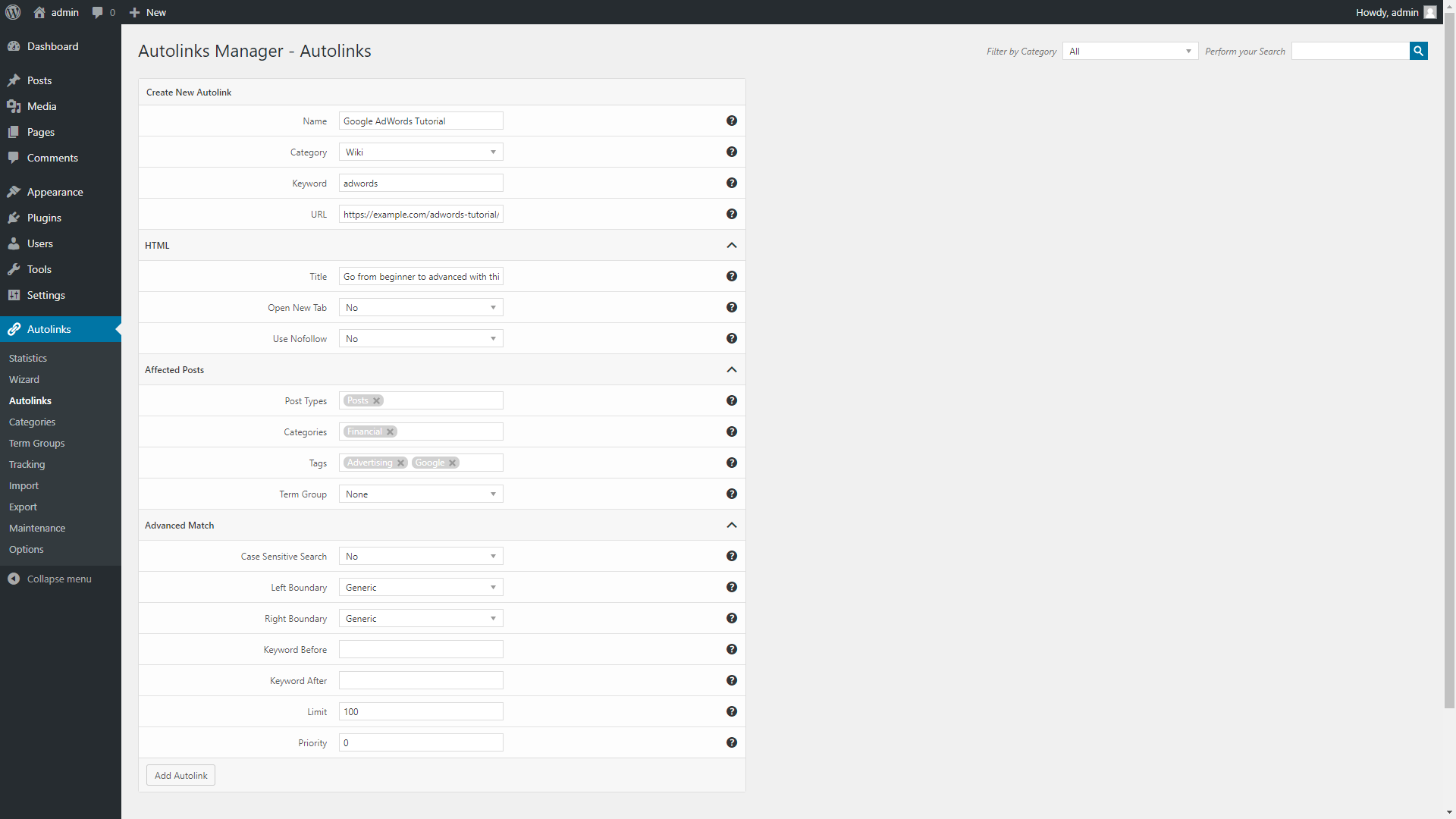
in the next plugin version additional criteria like tags and terms will be added in the AIL menu. The implementation will be similar to the one of Autolinks Manager:
https://s3.envato.com/files/248717288/3_autolinks-menu.png
descriptions and user biographies. I’m currently in a situation where this is needed but still considering my options, rather wouldn’t alter your plug-in too much
For this (descriptions, users, and filter hooks) if you want to add more details, so I can better understand your idea and save it as a feedback for future plugin releases.
Thank you.