22691 comments found.

Hello, I’m trying to modify default shortcode output, literally followed your documentation here: https://kb.wpbakery.com/docs/developers-how-tos/change-shortcodes-html-output/ and it does not work whatsoever. Is this documentation up to date? As I’ve been following this structure but its not the same. I just want to create a child theme for shortcodes so I can modify simple code. Please advise as the documentation is not working
Hello, Yes, the documentation is valid for our latest version. Please use support.wpbakery.com and share your temporary website credentials so our support team can investigate your issue and help you out.
Knowledge Base ·
Official Support ·
Facebook ·
Twitter
Don’t forget to join our newsletter. Be first to get news and inside secrets from WPBakery team.
Curious if anyone else in the community is running into this issue:
Inoticed when i use the tabs element with the theme (no matter what i have inside the tabs, when i click between the tabs the second tab will jump to bottom of the page then scroll back to the top. How do i fix this? I have deacivated all plugins with exception of WBbakery as I need this for the tabs element. Nothing seems to work.
Hello, It looks like something on your setup is conflicting with tab element to add it a scroll. We can recommend you to check the same using a default theme like twenty nineteen at your end.
Knowledge Base ·
Official Support ·
Facebook ·
Twitter
Don’t forget to join our newsletter. Be first to get news and inside secrets from WPBakery team.
I need activate license because i deleted the website and reinstall, how can i do?
Hello, You can deactivate the plugin license under your account: https://support.wpbakery.com/licenses to then activate it on the website as per: https://wpbakery.com/video-academy/activate-wpbakery-page-builder-wordpress-license/
Knowledge Base ·
Official Support ·
Facebook ·
Twitter
Don’t forget to join our newsletter. Be first to get news and inside secrets from WPBakery team.
Hello, Please use support.wpbakery.com and share your temporary website credentials so our support team can investigate your issue and help you out.
Knowledge Base ·
Official Support ·
Facebook ·
Twitter
Don’t forget to join our newsletter. Be first to get news and inside secrets from WPBakery team.
Why backend editor not working?
Hello, Please make sure that you are using the latest version of plugin which is 6.1.
Knowledge Base ·
Official Support ·
Facebook ·
Twitter
Don’t forget to join our newsletter. Be first to get news and inside secrets from WPBakery team.
Yes i have the latest version, but backend is not working
Please help, i cannot work on back end
Hello, I see that the design tab is having a new UI as compared to earlier after I updated to version 6.1. The rows that I see are not clickable and neither is the mobile icon towards the right. Is there any documentation to understand how this works? I would like to change the padding/margins etc but can’t find a way to do so now.
https://i.imgur.com/tEH88rj.pngHello, The design tab in the screenshot shared by you is not from our standard plugin. It is a custom feature added by a theme or a third party add-on at your end.
Knowledge Base ·
Official Support ·
Facebook ·
Twitter
Don’t forget to join our newsletter. Be first to get news and inside secrets from WPBakery team.
I’m working with wpbakery in my entreprise as developer and when I found that the masonary grid can’t be lazy loaded
Hello, Please use support.wpbakery.com and share your temporary website credentials so our support team can investigate your issue and help you out.
Knowledge Base ·
Official Support ·
Facebook ·
Twitter
Don’t forget to join our newsletter. Be first to get news and inside secrets from WPBakery team.
Hello, is it possible to call visual composer elements in a php file? I don’t want to use the Visual composer but i want some elements of a theme.
best regards
Hello, Yes, you can do so by rendering the element shortcodes using doc_shortcode WordPress function. However, some elements might fail to render in this scenario.
Knowledge Base ·
Official Support ·
Facebook ·
Twitter
Don’t forget to join our newsletter. Be first to get news and inside secrets from WPBakery team.
Hello, I am using the Grid Builder in order to customize a Post Grid template. I want to have the title on an overlay, on the image directly. This is done, but the overlay with the title is aligned to top and I cannot figure out how to align to bottom. Isthere a way? Thank you!
Hello, Please use support.wpbakery.com and share your temporary website credentials so our support team can investigate your issue and help you out.
Knowledge Base ·
Official Support ·
Facebook ·
Twitter
Don’t forget to join our newsletter. Be first to get news and inside secrets from WPBakery team.
Hello, The post slider 2 element displayed in screenshot is not a standard page builder element and is custom element added by the theme developer. As the standard plugin does not have such elements, the number of layouts added by it will remain same.
Knowledge Base ·
Official Support ·
Facebook ·
Twitter
Don’t forget to join our newsletter. Be first to get news and inside secrets from WPBakery team.
So can i design new layout display with WPBakery?
Hi, You can design a new page layout using WPBakery Page Builder. However, adding a new layout to post slider 2 element will not be possible using the standard plugin.
Knowledge Base ·
Official Support ·
Facebook ·
Twitter
Don’t forget to join our newsletter. Be first to get news and inside secrets from WPBakery team.
Hia When I enable the plugin the font icons on my website disappear from every page apart from the home page, like the drop down menu icons and shopping cart icon etc. When i disable the plugin they come back. I can see them all the time as admin but if logged out or logged in as a normal user the fonts only show on the front page and just come up as squares on every other page.
Can you assist me in the right direction? Really appreciate it
Hello, Please use support.wpbakery.com and share your temporary website credentials so our support team can investigate your issue and help you out.
Knowledge Base ·
Official Support ·
Facebook ·
Twitter
Don’t forget to join our newsletter. Be first to get news and inside secrets from WPBakery team.
Hi, I have WPBakery builder with version Version 4.12. If I buy this, will it be compatible with mine? just wanted to make sure before buying so that my 300+ plus page site will run fine. thanks
Hello, If the older version was purchased directly from us, then using the latest version will not cause any issue. However, if the older version was received as a part of the theme, then there is a possibility that it might have been customised. In this case, there can be an issue with the update.
Knowledge Base ·
Official Support ·
Facebook ·
Twitter
Don’t forget to join our newsletter. Be first to get news and inside secrets from WPBakery team.
Hi there,
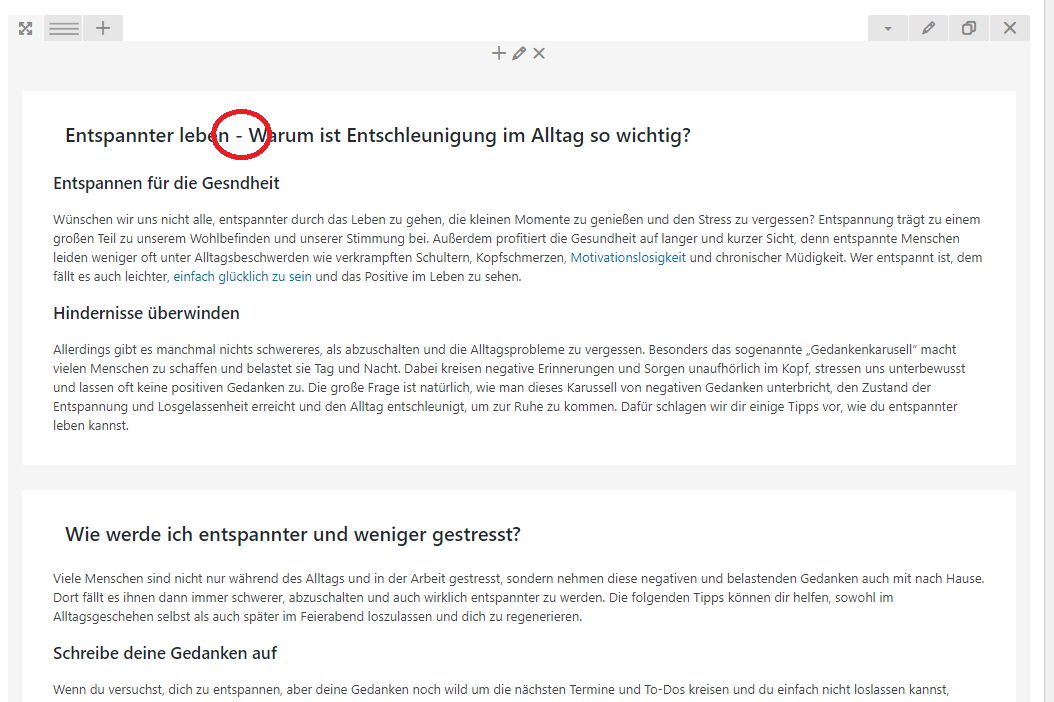
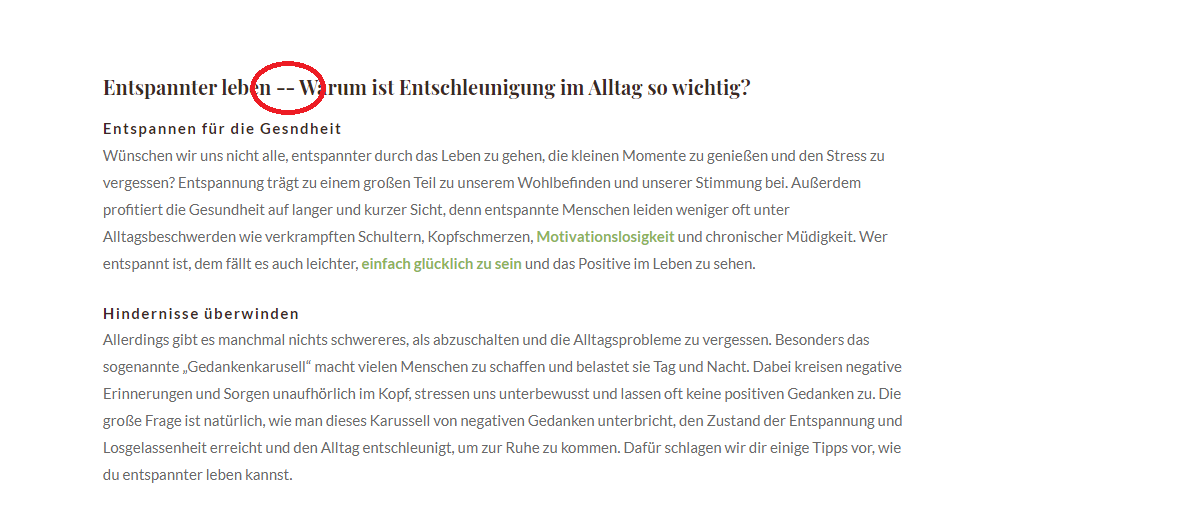
I have a small problem with your plugin. Everywhere I place a hyphen in your WPBakery-shortcode with space left and right next to it, for some reason my site shows two hyphens in the frontend. In the backend everything is okay, there is just 1 hyphen, but in the frontend there are shown 2.
Here are two screenshots showing the problem: https://i.ibb.co/RghCMR3/one-hyphen.png vs. https://i.ibb.co/R6SbBFn/two-hyphens.pngDo you know what might be causing this?
Best Regards
Hello, Please use support.wpbakery.com and share your temporary website credentials so our support team can investigate your issue and help you out.
Knowledge Base ·
Official Support ·
Facebook ·
Twitter
Don’t forget to join our newsletter. Be first to get news and inside secrets from WPBakery team.
Hi there!
I got your plugin by purchasing a theme on themeforest. Does that mean I get no support and the problem stays like this unless I buy a licence from you for 64$??? Please tell me I’m wrong here…
I migrated from old.website.com to newwebsite.net
The problem is i cant find the way to replace links that were stored in VC. I tried to search and replace through plugins, also directly from phpmyadmin and also via wpcli command. Nothing helps.
When i search for old.website.com there is no results.
Doing it manually would be extremely painful. What would be the second easiest way to replace hundreds of those links store by VC?
Hello, The WPBakery Page Builer links are stored in html entity format. You can check any of the links added onto the page by switching onto a classic editor mode. Once done, copy the link to search and replace it in the format in which it is stored.
Knowledge Base ·
Official Support ·
Facebook ·
Twitter
Don’t forget to join our newsletter. Be first to get news and inside secrets from WPBakery team.
how should i fix this? Important notice: You have an outdated version of WPBakery Page Builder Design Options. It is required to review and save it.
Open Design Options
Hello, You can follow these steps: 1) switch onto a default theme like twenty twenty. 2) go to WPBakery Page Builder -> design options -> disable or re-build & save. 3) switch back to the main theme.
Knowledge Base ·
Official Support ·
Facebook ·
Twitter
Don’t forget to join our newsletter. Be first to get news and inside secrets from WPBakery team.
Hi. I am having issues with the default accordion add-on. I have about 15 sections with different titles and text content in each of them but none of them are opening. To test, I installed another third party compatible accordion add on and it works perfectly fine. Any idea what may be causing my issue?
Hello, The issue can be due to a conflict from a third party plugin or the theme. We can recommend checking the same by deactivating rest of the plugins and switching onto a default theme like twenty twenty at your end.
Knowledge Base ·
Official Support ·
Facebook ·
Twitter
Don’t forget to join our newsletter. Be first to get news and inside secrets from WPBakery team.
Hello. Is it impossible to buy the Extended License for authors now? Why?
Hello, The extended license is now only sold via our own website.
Knowledge Base ·
Official Support ·
Facebook ·
Twitter
Don’t forget to join our newsletter. Be first to get news and inside secrets from WPBakery team.
WPBakery Page Builder was part of a theme I just purchased and when placing a form shortcode (ultimate member) via a text block element into a tabs element, I face the situation where the tab 1 align is centered by default but the tab 2 is left side by default, without any option to center it (I wont use padding as it will break the table form shape on mobile). I did try this with different forms and the situation remains. Is this normal and is there a non “padding/border/margin” to center a content in tab 2 ?
Hello, As you got WPBakery Page Builder within a theme, you will need to contact your theme author for support or use our support at support.wpbakery.com (You will require a direct license of WPBakery Page Builder for support access).
Knowledge Base ·
Official Support ·
Facebook ·
Twitter
Don’t forget to join our newsletter. Be first to get news and inside secrets from WPBakery team.
Can you please tell me before buying the plugin that if my WordPress website have no editor and I am editing the website from backend manually so, now if I want to buy the WPBakery plugin for editing frontend and backend can it will automatic convert my all pages(header footer included) and post to editable or I have to create from scratch with the help WPBakery plugin?.
Hello, The existing content will be automatically converted into a text block element if it is built using default WordPress editor. You can then edit it using WPBakery Page Builder at your end.
Knowledge Base ·
Official Support ·
Facebook ·
Twitter
Don’t forget to join our newsletter. Be first to get news and inside secrets from WPBakery team.
Hey, been a while since I’ve used your page builder, when are you planning to add being able to create for different devices? Rather than just viewing on different devices? Elementor does this really well.
Hello, We currently have a functionality to control column display based on different screen sizes. You can do so under column responsiveness settings.
Knowledge Base ·
Official Support ·
Facebook ·
Twitter
Don’t forget to join our newsletter. Be first to get news and inside secrets from WPBakery team.
How should i activate the wpbackery if it was already installed on my wp?
Hello, You can login into your account: http://support.wpbakery.com/ to deactivate the license if it was already activated. Once done, you can then activate it on required domain as per: https://wpbakery.com/video-academy/activate-wpbakery-page-builder-wordpress-license/
Knowledge Base ·
Official Support ·
Facebook ·
Twitter
Don’t forget to join our newsletter. Be first to get news and inside secrets from WPBakery team.

This item was featured on CodeCanyon

Power Elite Author
Contact the Envato Market Help Team