651 comments found.
Hi I just wanted to ask if there are still some photos from the admin area?
I would like to know how it works in the admin area. Do you first create the review box with criteria or do you have to re-enter the criteria every time? I’m currently using another plugin that seems to be no longer being supported or further developed. And then I wanted to ask as a precaution.
And can you integrate your review plugin into the theme or into a page?
And is there also the possibility to enter negative values or a field for devaluations? Or is not that intended? I would find it nice to be able to somehow indicate that a criterion had actually got 5 points, for example, but it was then devalued by -1. This creates special attention and interest, because then you want extra knowledge, which has led to the devaluation.
And a very small question yet. I use wpdiscuz. Is this compatible with the “User Rating” or can you make it compatible? Many use the free Wordpress plugin wpdiscuz.
Hey there,
Thanks for checking out Let’s Review.
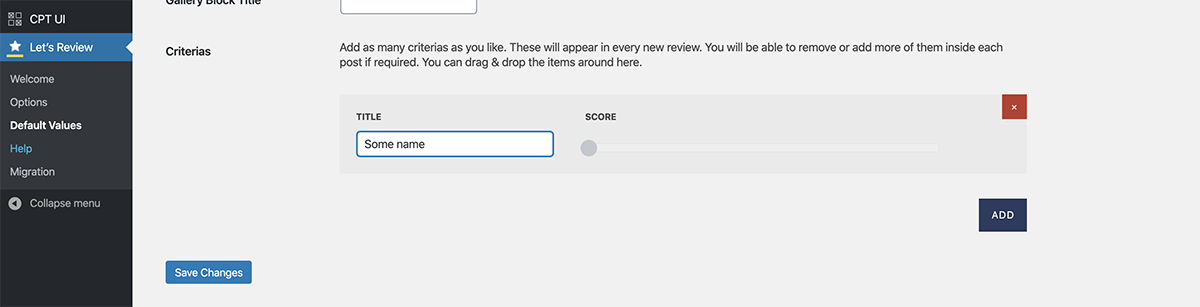
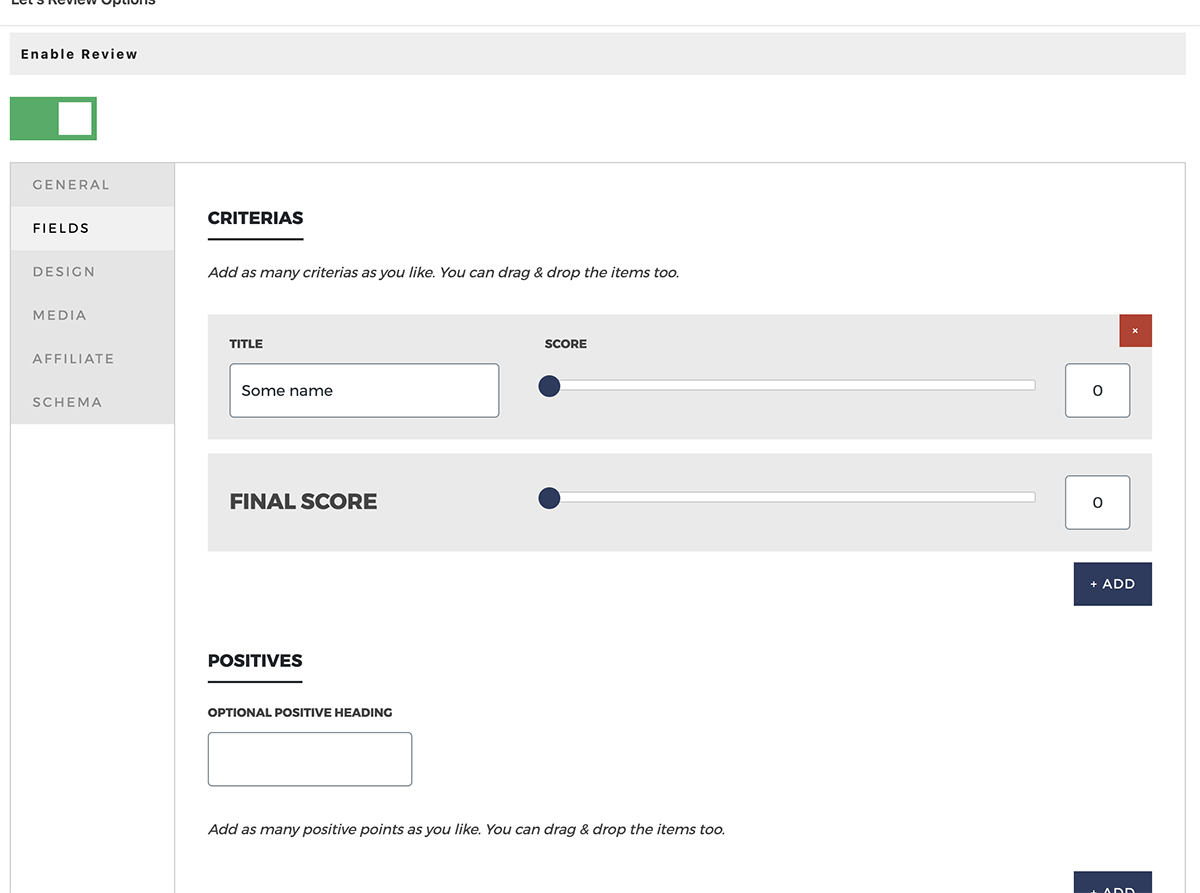
1- There is a default settings area where you can set the default criterias, and they will appear in all new reviews. You can of course add/remove/change them in each individual post review though. You can also create unique reviews with any data by using the Let’s Review Gutenberg block or the shortcode. Here are two screenshots showing what I mean:
1- Global default values criteria area
2- The plugin should work well in any theme, you can put them in any post/page easily using shortcodes/gutenberg blocks/post review metabox. The only thing that definitely isn’t automatic is showing the scores on archive pages (homepage/category/tag/etc), as those are generated by theme code. The Let’s Review demo site is using our popular Zeen theme ( https://themeforest.net/item/zeen-next-generation-magazine-wordpress-theme/22709856 ) which comes with the plugin’s API integrated already so the scores will automatically appear everywhere. If you are shopping for a theme, I really would recommend checking out Zeen too, as it is super powerful, easy to use and gives beautiful results every time. It might save you time with the review integration too.
However, if you want to show the review scores in a random theme, then you would need to ask the theme author where the theme generates the archive pages content, and then you could add the plugin’s API into that theme file (it’s explained in the plugin documentation).
3- It isn’t possible to enter negative values as scores I’m afraid. You could use the “positives/negatives” area to mention your devaluations though. For example, you could set the negative title to anything, such as “Devaluations” and then add some negative point below.
4- I’m afraid it is impossible to add review data to external comments systems. The review’s user comment review system is all possible because WordPress’ comment system is all in the same database. If you use a third party comment system, such as disqus/facebook, then the comments are actually created via an iframe which is 100% controlled by them, you can’t inject/edit them in any way.
Hope his info is useful.
Codetipi
Yes, many thanks for the information.
In the future, can you imagine that they could offer multiple global default values criteria area categories? I know if I can explain it correctly. You often do reviews with different categories. Maybe a review for books and then a review for tech. For books and for tech but always different criteria are important. Can you imagine that you could create the “values criteria” for several categories? Well, it would be good if you can create a kind of template & settings for certain categories. Maybe also that you can set up for a category already design and format. That would be very helpful, because then you only need to select what kind of review (tech, books, food) you are doing right now and all predefined criteria and settings are then inserted and set correctly. That would save a lot of work.
No worries! And yes, a template system like that is definitely something Codetipi is interested in doing for the plugin. I can’t promise it 100% right now, but I can promise it will be investigated and looked at for a future update.
Hi, it’s me again. I’m still torn and can’t really decide which plugin to buy. Reviewer WordPress plugin is apparently dead. At least it seems that there is no longer an update or support. At Taqyeem is the Predefined Criteria Addon (You can see how this was solved here. I would maybe not only limit it to the criteria, but maybe also offer a few more settings (appearance, orientation, design, title) pre-defined. ) already included, but I lack a bit of functions and I actually like your plugin much better, because you do a lot right. Clear code, good support and modern functions and design. That’s why I have to ask you again. Do you think that there will soon be predefined criteria? By predefined criteria, I mean that you could set a set for a category and that “everything” important can be predefined. (Critique, appearance, alignment, design, etc.) That would be very helpful and time-saving.
If so, I would choose your plugin because I have everything compactly in one plugin, so I don’t have to work with addons. I would find that better. I want to start with a new format next year. In the beginning, of course, I can always re-adjust everything, but in the long term I don’t want to have to set up all the criteria and settings again and again.
So, it would be great if I could bet on your plugin.
Hey again,
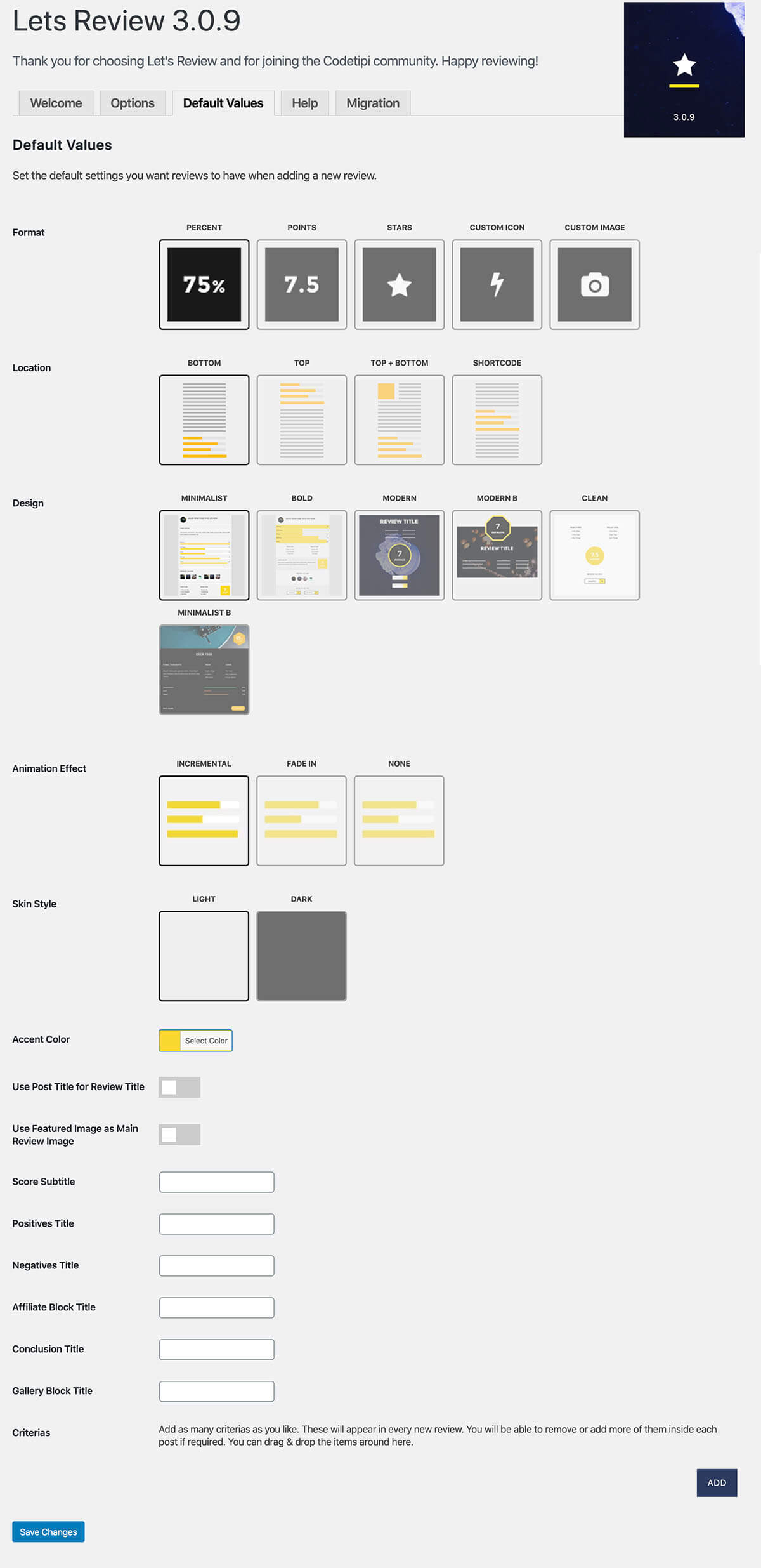
I’ve taken a screenshot of the plugin’s default values so you see what I mean:
https://demos.codetipi.com/letsreview/wp-content/uploads/sites/5/2019/12/default-values.jpgYou can set a predefined option for most main review options, but currently this is a single default template option, so all new reviews will use these default values. In the future the idea is you’ll be able to create different templates and then in a new post you can select a pre-made template of options to use. I can’t guarantee 100% this will happen, but it’s part of the plugin’s development plan so should happen unless there is a big stumbling block related to it all.
Hope this helps and Happy New Year 
Codetipi

Hi,
I checked the docs but I’m not sure:
- can I add a review template to specific custom post types or is it working one by one, post by post separately?
- can I define multiple templates? I mean one rating / review template for Books and another for Cars custom post types. Different rating criterias obviously for Books and different for Cars.
- what average rating values can we get? I’d like to have user ratings’ overall, top level average AND every each rating criteria level averages. Can we have them?
Thank you!
Hey there,
1 and 2- Currently it is indeed one overall template, however, a template system is on the to-do list so it will 100% be investigated and hopefully done in an update.
3- If you have Customer comment reviews enabled, then in v3 update you’ll see a new gutenberg block called comment average scores, which you can see in action here:
https://demos.codetipi.com/letsreview/bose-beats/It’s the “Visitor review block”. As you can see it shows how many user reviews there are, and also all the average scores and average finale score
Hope this helps.
Codetipi
Hi,
you mean it is one overall template, so I can use it either for ALL Books or Cars? I mean can template fetch some post meta or term meta, like a Car Brand or Making or a Book Genre or Author automatically?
Or considering a Woocommerce store, I might want to add your review template to all Woo products, can I do it with this version with product data autocompletion?
Thank you!
Yeah currently it’s one overall default template that all news reviews use. Like I mentioned, there are definitely plans to add a proper template system so you can create multiple templates.
WooCommerce already has its own customer rating system (it’s uses a unique WooCommerce comments system), you can enable Let’s Review on product pages, but there is no code to make it use specific product data, as that is locked away with WooCommerce.
Hope this info helps somewhat!
Codetipi
Hi after the latest update my custom image for icon in the review not showing up, i’m trying to switch using default star icon, but there is some block on the star icon, i’m using the Modern B design.
do i have to extend the support to fix this bugs?
Hey Prooyo,
The v3 update also updated Font Awesome to the latest version, and they changed the html markup of the icons, so if you’re using that, you need to update it to Font Awesome 5 names. If this doesn’t help, do indeed open a ticket at http://codetipi.ticksy.com and include urls so the support team can investigate.
Codetipi
I am interested in purchasing this plugin but I took a look at your demo website and noticed that you have schema setup as webpage and not product and in your structured data the review scores don’t come up in structured data. Is this only on your demo or do you still run into problems with structured data issues for products because I found two websites using Version 3.0.6 which in the comments you state fixes this issue but it doesn’t seem to have done it for those websites.
Structured Data Errors:
warningaggregateRating
The aggregateRating field is recommended. Please provide a value if available. warningoffers
The offers field is recommended. Please provide a value if available. warning
This Product is missing a global identifier (e.g. isbn, mpn or gtin8). Please see documentation for valid identifiers.
Hey ArnieD,
Thanks for the interest in Let’s Review.
Google changed the review schema and clamped down hard on them, removing a huge amount from the serps.
Due to these changes, the plugin now has multiple review schemas to choose from, and they are all valid as of now. But review schemas do not appear as direct schema anymore, they are inside other bigger schemas. If for example you test this one:
https://search.google.com/structured-data/testing-tool#url=https%3A%2F%2Fdemos.codetipi.com%2Fletsreview%2Foculus-rift%2FThat post is using the “Game” schema and to see the review schema you have to click inside the Game bit to see it.
Also, if you type this into google:
site:https://demos.codetipi.com/letsreview/oculus-rift/
You’ll see the review data live and working on that post too.
The Product review schema now has lots of extra optional requirements, such as ISBN/etc, if you select the product review schema option, then you will see fields to enter all that data. The sites you tested clearly haven’t added that info and that is why you see missing recommended fields. The aggregateRating is because they don’t have the visitor rating option in their reviews enabled (This is only recommended in product review schema, others don’t need it at all).
There is one field in the Product review schema though that is impossible to fill and that is the Offers one. The Offers one requires you to enter fields such as “Stock status/offer price/date offer price ends/etc”, which is of course not something 99.9% sites can fill in, as even if you physically sell the product, you won’t have it on sale all the time, so you can’t fill it in even then.
Hope this info helps.
Codetipi
Potential bug report:
I keep seeing 404 errors for “wp-content/plugins/lets-review/frontend/js/lets-review-scripts.min.js” in my 404 monitor.
This has been happening for quite a while. Here’s an example URL this is placed on: http://bit.ly/37HCBeG
I’m also seeing 404s for “wp-content/plugins/lets-review/frontend/css/lets-review-style.min.css”
Thanks
Hi there,
I looked at your url and I can’t see any 404’s with Let’s Review, and I went through all the backend/frontend pages of the demo site and also can’t see any. Please refresh your cache and check any custom code you may have. If that doesn’t help, wait until the next Zeen update, which will include the latest Let’s Review.
Codetipi
Hi,
is there a way to pass rating and review ( both review / ratings “templates” and submissions ) data to pass to Google Sheets?
Thank you!
Hey Vanetreg,
I’m not 100% the best way to connect data from the WordPress database to Google Sheets, but the review data is all stored in the WordPress database, so if you have a plugin/custom code that connects to your Google Sheets, you might be able to pull the data via WordPress’ custom fields.
Codetipi
Presales question.
Hi, your demo looks amazing. I have little experience with WP. I like very much how your demo looks for making a reviews site, but being a plugin it would change the overall website design? I have to install with some specific theme? Do you provide instructions to allow the site looks like your demo?
Thanks in advance
Hey Josemv,
Thanks for the kind words, really happy you like it
Indeed, the plugin can’t change the overall design of your site, the plugin only outputs all the review data/blocks you see on the demo site.
The demo site design was done with another Codetipi product – a theme called Zeen Which is a theme that actually comes with Let’s Review bundled in for free! Sounds like it’s a perfect fit for you – You can check it out here: https://themeforest.net/item/zeen-next-generation-magazine-wordpress-theme/22709856
In Zeen you can import any of the theme demos you see there, and in the next update of Zeen the “Let’s Review demo site” will be added as an import option, so in other words, you’ll be able to install Zeen, import the Let’s Review demo and you will have the literal exact same site design, set up and everything. You can see what I mean by import demo in this video: https://www.youtube.com/watch?v=3-cHgQONgAo (Let’s Review will be added as an option in the last step of the demo).
Hope this helps.
Codetipi
Hi codetipi, yes it helps.
I already choosed another theme, including some kind of review. When will be available next update, maybe could wait. But yours theme price it’s more than double. Have to do some maths.
Thanks
Next Zeen update will be out very soon (definitely this month), and thanks again for checking out Codetipi products
Codetipi
Hi there, In the latest update when I save a post, the overall review score ends up saving as 0 (zero) which is obviously not meant to happen. I now have multiple review posts where they show a rating of zero in google rich snippets. Please can you put out a fix for this as soon as possible. Alastair
Hi Alastair,
I’m not sure exactly what steps you are taking to do this, as I can’t recreate it locally (and no one else has reported this). Can you please open a ticket at http://codetipi.ticksy.com and include all the steps + url where this is visible so the support team can investigate. Thanks!
Codetipi
Hey,
I’ll open a support ticket now but in case others begin to notice this issue the steps I take to get this error are the same steps I took before getting this error. They are: 1. write a post 2. fill out the fields section where each has a score 3. the plugin still calculates the overall score at the end (like it is supposed to), so i don’t set overall score manually. 4. publish my post and all seems fine. 5. i go back into my post and edit the content (not touching any lets review settings) and then save the post. 6. Now when I view my post, the overall score sets itself as zero. 5. the only way to fix this is to manually set the overall score any time I go back in and edit a review post which is using lets review.
Hope that makes more sense now?
Best, Alastair
Oh seems I cant add anything to support as my support is expired. I bought the plugin when you were not updating anything for months and so I didnt have to use my support.
Hey there,
Apologies for the slow response, I completely missed your latest responses! Are you using the latest update? That was a bug in a very old version that was definitely patched up
Codetipi
Hello, big problem after last update – it seems that the plugin reset all of my reviews to type “Organization” instead of “Product” and now my rich snippets aren’t showing up in search results like they were before. How can I bulk-change them back to Product, as well as set this is a default (it’s not a default option from what I can see).
Here’s an example: https://search.google.com/structured-data/testing-tool/u/0/#url=https%3A%2F%2Fwww.automoblog.net%2F2019%2F11%2F09%2F2019-honda-accord-review%2F
Also, Minimalist B is not a global option (I’m using Zeen).
Thank you
Hi there,
This isn’t a problem – it’s on purpose. Google has clamped down on the review schema hard recently and there are very few valid review schemas now. The product one requires lots of extra fields. The organization doesn’t and is valid. But valid review schema doesn’t guarantee anything any more, Google’s algorithm decides if/when to show schema.
Minimalist B global option has been added to the plugin already, the one with Zeen isn’t the latest one yet.
Codetipi
I see, thank you for the reply.
You’re welcome
Hi, the guttenberg average reviewer comment block only outputs a % average score when all my visitor comment reviews are 0-10. Please can this be changed?
Hey Mikee_j,
Can you please share the url to check out the html that is outputting?
Codetipi
Also, another question. Is it possible to restrict the visitor comment (comment box reply) review to be the final score only, whereas the editor can use separate and multiple fields?
Thanks, this has been recreated and a new option has been added to the actual Gutenberg block where you can set the desired score type.
Regarding the comments, I’m afraid you can’t restrict to just a final score if the editor score has set criterias. However, this type of functionality is being looked at and might be possible in a future update.
Hey there. I have a question. I have your plugin through Zeen WordPress theme. I found that my reviews are no longer listed in Google because Google made a change in regards this.
In a post I found that the a review plugin should have a “name” property. Here’s the full quotation from the article: “Publishers who rely on schema structured data plugins, including Reviews WordPress Plugins, should check if their plugin is currently including the “name” property.” LINK: https://www.searchenginejournal.com/google-reviews-rich-results-update/326075/#close
Is this available in your plugin and how can I use it? Thanks
Hey Durmonski,
Update to the latest Let’s Review and use the new schema options to set it up and they will be 100% valid. Then it is up to Google if they show the schema in the serps or not. Just make sure you are adding review schema to real review posts, as Google is clamping down on spammy schema (pages with review schema that in Google’s eyes shouldn’t actually have review schema, as it’s not a review article for example).
Codetipi
I see. Thank you for the reply!
Just to be sure. This is done from inside the review of the specific post > SCHEMA > SCHEMA TYPE > Product and I should add DESCRIPTION (probably SKU, MPN, ISBN, and BRAND are optional?)
Thanks again!
Yeah, those fields are used to fill in all the optional fields (minus the offers one), or you can change the schema to Organization/Game/Episode if relevant, as those don’t need extra data.
Hope this helps
change log is still October.
When is the change log update?
Hey there,
The changelog on CodeCanyon has been updated, however, as you already have the plugin you shouldn’t be looking there! The plugin comes with the latest changelog inside and you can see it in the Let’s Review welcome screen, you should see it there
Codetipi
Is there a bug in v3.0.4. ? I updated the plugin and all posts with reviews suddenly lost the ratings: only the little box with numeric rating remains! Please help, it’s urgent. Thank you!
Hey DocDigital,
No, that doesn’t sound normal at all! Have you refreshed your site cache in case it’s still loading old files? If you have, please open a ticket at http://codetipi.ticksy.com and include url to see what’s going on. Although don’t panic, no data can be lost during updates, so it’s definitely all still there.
Codetipi
(i purchased 10months ago, but i don’t want to spend another $21 for ticksy support license, because of the bug – i hope you can understand)
Hey again,
Try updating to v3.0.6 update and see if that helps. If it doesn’t, you will need to open a new ticket and include admin login details for it to be investigated, as there’s no other way to know what is going on!
Codetipi
Ok, will try that. But where can i get v3.0.6.? At codecanyon and in WP plugin section there’s no upgrade… only v3.0.4
Hey again,
It’s definitely out on CodeCanyon now, download the file again and it should be v3.0.6
Codetipi
Ok, thanks, now v3.0.6 is available! And it resolves most of the issues i had…thanks!
HOWEVER there’s still a bug in the newest version remaining:
Custom Icons aren’t shown! I use a 80×80 PNG instead of stars etc. but it stays hidden in the “fields” review box. Switching to stars works, but custom icon is still not working. Please help.
Happy to hear! Regarding the new issue – you will need to open up a ticket about that with more info (urls/login admins/etc) as all the options work well on the demo site:
Custom icon: https://demos.codetipi.com/letsreview/watch-comparison/
Custom Image: https://demos.codetipi.com/letsreview/xbox-one/
Codetipi
hi there is there a possibility with this plugin to create a top 10 / 20 / 30 based on score? like a music review site where users can rank the song out of a number and that can be displayed in a ‘chart’ so to speak? thanks in advance!
Hey Stereobootsy,
Thanks for checking out Let’s Review and apologies for the slow response.
Currently, the plugin does come with a list shortcode that can be set to show top X scores, but it’s based on the scores of your posts. You can see it in action here: https://demos.codetipi.com/letsreview/iphone-xi/
Hope this helps.
Codetipi
Hi, just updated to 3.0.4 on the Valenti theme. Seems to work apart from most of my historic reviews don’t have Positives and Negatives.
Before the update that section was blank if there weren’t any positives/negatives but after applying the update, I have the positive/negatives headings now showing on all reviews. The only way I can clear it is, on each review, deleting the postive/negative headings. This works but is a) arduous going page by page and b) it leaves a gap where the headings were and the Conclusion title…looks too spacey!
Anyway to sort this out in one go as I don’t fancy doing it page by page…
Thanks!
Hey Dan,
Can you try updating to the latest version (v3.0.5) and see if it still happens? If it does, can you please open a ticket at http://codetipi.ticksy.com and include the relevant urls to take a look at the html outputting.
Codetipi
Thanks, I’m probably being a bit dense here but the plugin isn’t asking to be updated, as it did yesterday and what brought me here. Thinking laterally I’ve just downloaded it from my license area (which I’m assuming will be the v3.0.5 version??) but it says:
Destination folder already exists. /home/public_html/wp-content/plugins/lets-review/
when I attempt to install the installation zip, which I know means it doesn’t like the existing plugin being there. If I remove the existing plugin and install this one, don’t I lose all the settings?
Thanks!
Dan
Ah that is because when you update a plugin manually, you need to delete the existing installed one first, as WordPress doesn’t allow you to do a simple upgrade. It’s quite an annoying thing in WP, but deleting the installed plugin and installing the new zip version file will work fine. All the review data is safely saved in the database so you won’t lose anything doing it like this
Thanks. Interesting. After deactivating and deleting and installing the only file I cculd download from my account I noticed no change. Went to plugins page and saw it was still v3.0.4. I’ve just re-downloaded and extracted the installer, repeated the exercise and still says 3.0.4…is there a reason I cannot get 3.0.5?
Eerm, Envato sent me an email today saying it had been updated. I was preparing to download the files then I saw that my plugins page said there was an update. It has updated to 3.0.6 which is great (I think) but the same problem is there, I have the positve and negative headers showing still. I guess I can get rid of them from PHPMyadmin in a one-er if I know where to look rather than revisiting each post and deleting them/saving….
..and I don’t have support so I can’t submit the ticket I just tried to create. If I can’t send a ticket could you at least let me know if I can solve this via MySQL? Thanks, Dan
...and lastly (sorry), if you choose to not have positive/negatives in the review, it now leaves a gap between the ratingsand the conclusion title that looks odd.
Hey Dan,
If you can please include all the relevant urls and info of these things in the support system (I see you have valid support now), it will be investigated for you
Codetipi
OK, posted in the ticket system yesterday. Thanks, Dan
No problem, I’m sure it’ll be sorted.
Is it possible to output the stars or icons as well as the score, when using the API score box on other areas of your site, such as archive pages?
Hey Bravo,
Currently I don’t think the API does that, but I think it will be possible in an upcoming plugin update
Codetipi
Hi,
Thanks for this information. Looking forward to this feature being added in a future update. 
No problem
Hey Chris,
For only users notation with stars, on the home page the score is noted out of 100 in the different blocks (e.g. post = 4 stars > homepage = 80). Is this normal? can we change that? Thanks
Hey RV73,
I’m not 100% I fully understand what you mean by that, can you open a ticket at http://codetipi.ticksy.com and include a relevant url to see what you mean?
Codetipi
My license is expired. If you can take a look, here is the link: https://4k-uhd.fr/
Thanks 
Are you using the very latest Let’s Review and Zeen versions?
Yes! Zeen 2.4.2 | Let’s Review 3.0.5
Hey Chris it’s can be solved on a next update? thanks
Hey RV73,
It will be investigated, but I think it was changed on purpose, as 5 on the homepage doesn’t immediately imply a perfect score as it doesn’t have visual icons to show the 5/5 scale! but in percent (100%) it’s very obvious what that means to everyone.
Ok No worries, Thanks
It’s no problem
When using a Gutenberg block, is it possible to select the rating type (e.g. percentage or stars etc)?
Hey BravoEchoN,
Yeah, in the Gutenberg sidebar you’ll see a few options, including the base design and score type
Codetipi
That’s awesome, thanks
It’s no problem
Hey there,
I appreciate the work you have done with the new 3.04 version of the plugin. There seem to be some significant changes to the layout of the review lists compared to version 2.1 that we used before:
1) The items of a review list are showing the full title of the wordpress article now. Could you change it that they show the “custom title” of each review as it was before?
2) There is an image displayed in an oval box beside each review in the list. Is there an option to show this image in its original proportions or to automatically use a round/square-shaped image?
3) If this is not possible: How can we disable the display of this image in a review list?
We will renew the support license asap but asking for your kind help in advance. These are changes that many users of Let’s review are affected by.
Hey Redzonk,
Sure thing:
1- That was fixed in v3.0.5 already which is out, update and it should work that way
2 and 3- It should be round, if it is oval it may be that the thumbnail doesn’t exist, but it is likely a non-plugin issue (permissions, thumbnail regeneration needed, etc).
Hope this helps
Codetipi
Hey Codetipi,
many thanks for your quick reply and the fix for the titles in the review lists.
2 – remains: The image is displayed in an oval box (instead of a round shape) beside the item in the review list. In the source code it loads the 320×240px (thumbnail) or 240×180px version of the featured image of this post. The original featured post image is 1920×1200px. Can you help us?
New 4 – When you click on the image in the review list it opens up full-scale in a lightbox. We guess that most of the users would prefer the review article opening when clicking on it. Because for most readers the intention is to learn more about the item reviewed and you see the large image anyway when opening the article.
Would it be possible to change this in code / add this option?
Thanks again for your help in advance! You are doing a great job in updating Let’s review which is in our opinion the best review plugin available (and we tried quite some before buying yours).
Redzonk
You’re welcome, happy it worked
2- Please open a ticket at http://codetipi.ticksy.com with url for the support team to take a deeper look.
4- Good point! I can confirm this has been changed and will work this way from the next update.
Really happy to hear you are enjoying the plugin
Codetipi
Hi, I love the new Minimalist B option for Let’s Review but I noticed it is not available in the Default Values area. Is there any way you can add this in a new update?
Hey Ryneb,
Happy to hear that It’s been added in v3.0.6 update, which will be out in the near future
Codetipi