308 comments found.

Can you tell me the way how can I interlink these 2 keywords – tableau or what is tableau. Both will be linked to the same page and want only 1 link per post.
Hello DiwakarC,
for support please contact me with the account that you used to purchase the item. There isn’t a license associated with the “DiwakarC” user.
Thank you.
How can I bulk import Keyword/Target-URL sets? I have ~600.
Hello TopOffice,
a new menu to import from any spreadsheet file like the one available in Autolinks Manager will be included in the next plugin version (1.22).
Currently phpMyAdmin should be used. If you can please send us your source of the autolinks via email at support@daext.com I will reply to you with a file importable in phpMyAdmin.
Hope this helps.
Thanks for the swift reply and offer. I’ll wait for the next update then. Meanwhile I’m using on old (outdated) plugin that still works and has the feature. 
Hello,
I need to know before purchase if your plugin support “Words Between”, I mean if I add Autolink with this keyword, ex. “lawyer New York” , your plugin will auto generate links also for keyword “lawyer in New York”.
this kind of option : https://prnt.sc/nds167
Regards
Hello submitmix,
would you mind to privately link me the plugin you are referring to so I can verify how that option exactly works and provide you a precise answer?
In general my recommendation (the safest option) is to create multiple keywords with the same target (Eg. “lawyer in New York”, “lawyer available in New York”) so you don’t match unexpected occurrences. With Interlinks Manager this can be done by creating multiple AILs from the Interlinks -> AIL menu.
Hope this helps.
Hello,
I have sent you private message with the link. This option help to auto add link to dynamic keywords, not exact match.
I guess this feature is not included on your plugin.
Regards
Hello submitmix,
thank you for the details and the link.
I’ve inspected and tried the plugin and I confirm you that Interlinks Manager doesn’t have this option on purpose and that the safest method to achieve this is to create multiple keywords with the same target.
Hope this helps. Let me know if you have any questions.
Hi, I’m trying to limit the amount of AIL per post.
For example, I AIL’d the keyword “fitness”.
And over 3 fitness links were interlinked.
How can I make it so that only 1 AIL per post?
But still make sure the AIL works on other posts.
Hello erickneigfile,
How can I make it so that only 1 AIL per post?
The total limit of autolinks in a single post should be applied with the Interlinks -> Options -> Advanced -> General Limit (Amount) option. In your case if you want a single auto internal link per post you have to set this option to “1”.
To assign a limit on a specific keyword the Interlinks -> AIL -> Limit option should be used.
Hope this helps, if you need more info feel free to ask. For technical support please use the “Support” tab above.
Hi, it looks nice, it is possible that the links will be exclude h1,h2,h3,...?
Hello Peperonikuchen,
sure, the specific HTML tags that you want to exclude should be added in the Interlinks -> Options -> Advanced -> Protected Tags option.
Hope this helps, let me know if you have other questions.
Hi I have a question does this plugin work with page builders? Thrive Architect, Elementor, etc.? Also, can I use the plugin on all of my sites or is it just limited to one site install? Thanks…
Hello BaldiPI,
does this plugin work with page builders? Thrive Architect, Elementor, etc.?
We recently received a question related to the use of the plugin with page builders. You can find the answer on this thread.
Also, can I use the plugin on all of my sites or is it just limited to one site install?
The standard and extended license are suitable to be used in a Single End Product”. If the multiple WordPress installations can be considered part of the same Single End Product” a single license is enough.
If you are not sure you might also consider sending a ticket to Envato, in this case you have to usually wait a couple of days or more but they are the authority on this matter.
Hope this helps, if you need more info feel free to ask.
how to except some post ID for auto interlinks ?
Hello vootou,
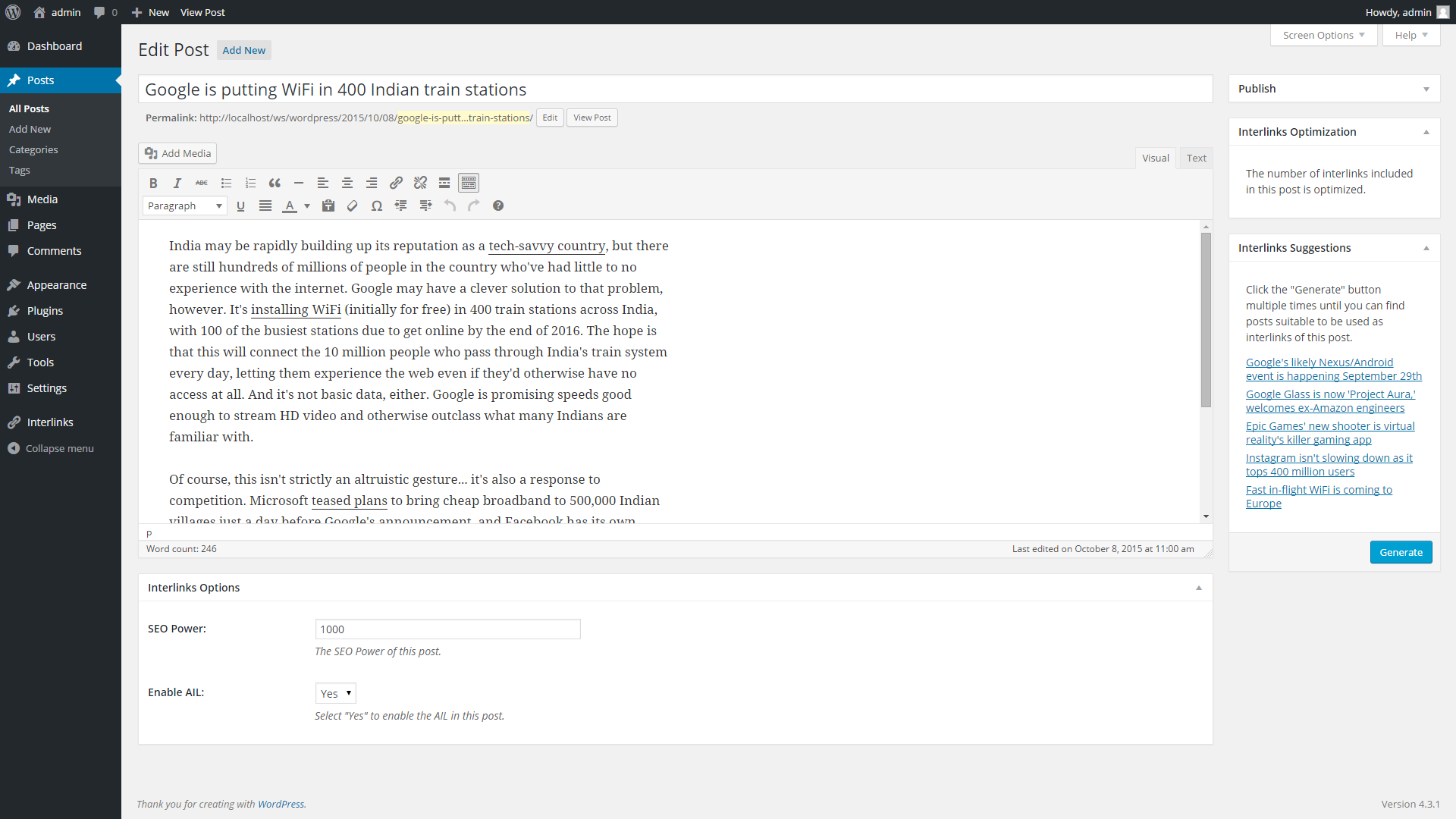
if you mean how to exclude specific posts from being autolinked this can be done by visiting the specific posts and by setting the Enable AIL option of the Interlinks Options meta-box to “No”.
The Interlinks Options meta-box is visible in this screenshot.
Hope this helps. Let me know if you have other questions.
Hi
I am using a food blog theme. The “Auto Interlinks” does not work in the Recipe area, such as the summary, direction, and recipe steps parts.
Example page: https://mychineserecipes.com/recipe/chinese-fried-bean-curd-sandwich-recipe/Is there a way to enable “Auto Interlinks” for these parts.
Thanks
Hello xyq146353,
to provide you a precise answer I have to inspect your website. (the content of the posts with the recipes and you Interlinks Manager configuration and AILs) Can you please contact me via the “Support” tab above and create a temporary WordPress account?
Thank you.
Presales question: In terms of suggestions, I am looking for a solution where the plugin will detect words that are present in the body of my text and will offer to link to other posts I have written.
Example:
I have a post about nutrition, in the text there’s a sentence that says:
It’s important to eat milk, fish and quinoa.
Then the plugin will suggest to link to my own posts:
mydomainname.com/milk mydomainname.com/quinoa.
Is it how it works?
Thanks
Hello williambesson,
the interlinks suggestions algorithm is based on the titles of the posts and doesn’t have an option to search in the post content. A feature that allows this algorithm to inspect the post content will be considered for future updates but I can’t guarantee in advance or provide you a release date at the moment.
Hope this helps, let me know if you have other questions.
I use Advanced Custom Fields on my website with multiple WYSIWYG-Editors in a post. Somehow the AIL only works and links the keyword in the default editor, not the ones coming from Advanced Custom Fields. Do you know why?
Hello owt,
the the_content filter (used to apply the AIL on the posts) is not applied on the ACF fields. If you want to apply the AIL on the ACF fields this customization is required.
Hope this helps, if you need more info feel free to ask.
Guys, does this plugin works well with:
- Avada theme?
- Divi theme?
- Flatsome woocommerce theme?
Any proven experience  ?
?
Hello BaldiPI,
the application of the auto internal links and the analysis of Interlinks Manager can be performed on specific elements of the visual editor only if the HTML of the elements of the visual editor is actually saved in the post.
If a visual editor saves in the post only an identifier of the element and stores the actual content on a custom database table Interlinks Manager can’t clearly have access to the HTML of this element.
To resume, I recommend you to verify how the selected visual editor treats the various elements and decide if using a plugin that perform this kind of analysis is appropriate for that specific case.
Hope this helps, if you need more info feel free to ask.
Hi Support, I have a problem iam trying to use (arabic URL ex. /المدونة+المهنية/ ) in Interlinks Manager – AIL it is not accept and gives me this error (Please enter a valid URL Path and/or File in the “Target” field. ( the URL scheme and domain are implied ))
Hello woodyship5,
since usually the users copy the URLs directly from the browser address bar the validation system of the plugin currently accepts the URL Encoded version of the URLs.
Please proceed as follows:
- Copy the entire URL from the browser address bar
- Paste the entire URL in the “Target” field
- Remove the URL scheme and domain
If instead you need to absolutely enter the original non URL Encoded version of the URL please contact me via the “Support” tab above so I can provide you a version of the plugin with an alternative validation system.
Hope this helps. If you need more info feel free to ask.
i tried your way but not working, the same error
Hello woodyship5, I just replied to your email. Please continue on that thread for technical support.
Hi, we are trying to figure out what documents on our intranet are linked to from all of the pages on our intranet. There is no access to the outside from the intranet. Will this still work for that purpose? Basically, we have thousands of documents we do not use, and we only want to move (to a new site) the documents that we are linking to. Will this help with that?
Also, will this plugin work on WordPress 3.7.16?
Hello jaysongbsn,
Hi, we are trying to figure out what documents on our intranet are linked to from all of the pages on our intranet. There is no access to the outside from the intranet. Will this still work for that purpose? Basically, we have thousands of documents we do not use, and we only want to move (to a new site) the documents that we are linking to. Will this help with that?
In the Interlinks -> Juice menu you can have a list of URLs with the related list of links that contribute to generate the link juice of the URLs. (for each URL you have a downloadable CSV file that includes a reference to the documents that are linking to the considered URL/page/document).
Also, will this plugin work on WordPress 3.7.16?
This version of WordPress is too old and is not officially supported and I can’t guarantee that the plugin works with it.
In case you want still try to use it and then you realize the plugin doesn’t work with that version or that it’s not useful for your particular purpose contact me via the “Support” tab so I can provide you a refund.
Hope this helps. Let me know you need more info.
Bought this Plugin…. think I will love it
One question: How do I get automated links in a custom post type in a specific ACF field?
regards from austria
Hello cws-ef,
I had other ACF users with the same question in the past. In this answer you can find the instructions to add the autolinks with ACF. The script makes use of get_field().
To resume:
- If you want the normal output of a field created with ACF you have to use get_field() like explained in the ACF documentation
- If you want the output of a field with included the AIL of Interlinks Manager you use the linked script (which already include the get_field() function)
- The autolinks applied with custom calls of the add_autolinks() method will not be reported in the statistics generated from the back-end menus.
Before implementing a change like this I recommend you to:
- Test the code in a development environment
- Make sure that you understand exactly what the PHP code does (the comments in the PHP part say exactly what the various instructions do)
Hope this helps, if you need more info feel free to ask. I recommend you to use the “Support” tab above for technical support.
Thanks s lot.. I found this solution and tried it.. but it didn’t work for me… maybe i misunderstood something… the code goes inte the single-xyz.php or in the functions.php?
Hello cws-ef,
this depends on your purpose. You can use functions.php, the theme template file, etc.
Please contact me via the “Support” tab with the the details of your implementation and the identifier of the ACF field so I can provide you a specific answer and if possible the implementation code.
How are the links generated? Does it update the keyword in content to be an ahref or will it require php power each time a page is loaded?
Hello LuckySkulls,
the original content of the post is never altered by this plugin and the automatic links settings can be changed any time. The automatic links are applied on the fly when the post is read by the user.
If a low number of keywords are set the PHP power needed is negligible. If an high number of keywords are set (let’s say 500, 1000, 5000) multiple regular expressions should run and I confirm you that the PHP power needed might not be negligible. (this actually depends by the server performance) In the latter case a caching plugin (WP Super Cache, etc.) is recommended.
Hope this helps. Let me know you need more info.
how you calculate link juice, means the value of link juice if with default setting, is it based on the word count of referred post or no of links that referred post carried ? how i know that if i add this no. of internal links to this post then the value goes to that no. what is the good value of link juice,
Hello hello_vickysen1,
the formula used to generate the link juice calculates the value of each link based on the SEO power of the page with the link and on other factors (included additional options defined by the administrator).
Hope this helps, if you need more info feel free to ask.
Hi there,
Is there also a function to auto link Tags and/or Categories?
Kind regards,
Webagent05
Hello Webagent05,
can you please add more details? So I can provide you a precise answer.
Thank you.
Does the plugin has an option to autolink to tags and categories archive pages?
Hello Webagent05,
thank you for the details. The auto internal links to the categories and archive pages should be manually created from the Interlinks -> AIL menu like any other auto internal link:
Interlinks Manager – Create an auto internal link
Hope this helps, if you need more info feel free to ask.
Does this plugin cgange links permanently in the database, or does it operate by scanning the page before rendering, and inserting links as the page is rendered?
Hello insurance,
I confirm you the the auto internal links are applied when the pages are rendered in the front-end and that the posts stored in the database are not altered.
Hope this helps, if you need more info feel free to ask.
Hi! I was wondering if it is possible to auto link without defining words but rather have it like this:
IF one article-link/title = a word in the text THEN there will automatically be a link to this one.
And if this doesn’t work: Can it be done with a little bit of coding with your plugin?
Hello braino,
I was wondering if it is possible to auto link without defining words but rather have it like this: IF one article-link/title = a word in the text THEN there will automatically be a link to this one
This custom logic is not available in the plugin.
And if this doesn’t work: Can it be done with a little bit of coding with your plugin?
As you can see from the screenshots this plugin has an high number of options and the coding part is quite coplex and require an advanced understanding of PHP regular expression an OOP PHP. So I can’t give you an yes or no answer for this. Please also note that we don’t provide customizations for our products.
Hope this helps.
did you add this custom logic in the mean time?
Hello braino,
can you please add more details on the custom login explained in your previous message? So I can create a ticket with more details that will be evaluated for future updates.
Thank you.
I am looking for a plugin which automatically turns page names, when used in posts and pages, it links to the corresponding page URLs. like this plugin here: https://wordpress.org/plugins/pages-autolink/ but it is 11 years old.
Hello braino,
thank you for the details. This is definitely possible and I saved your suggestion.
An update for Interlinks Manager will be released in March/April.
Let me know if you have any questions.