308 comments found.

pre-sale question: does this plugin support 2 words keywords, like for example: “contact us” or “good product”?
Also… My website uses BeTheme that has internal builder (muffin builder). I wonder if your plugin is compatible with this theme?
Hello 5126,
pre-sale question: does this plugin support 2 words keywords, like for example: “contact us” or “good product”?
Yes.
My website uses BeTheme that has internal builder (muffin builder). I wonder if your plugin is compatible with this theme?
Only if the HTML of the elements of the visual editor is saved in the post.
Hope this helps, if you need more info feel free to ask.
Thank you for a quick answer. I presume html conversion in BeTheme (called builder >> seo) will not be displaying the links created by your plugin, am I right? Apparently only SE bots can see the output, not regular visitors? How about if I use included WPBakery Page Builder instead? Will this work properly with your plugin without conversion to html?
Hello 5126,
any page builder element that has its actual HTML output saved outside the post HTML can’t be accessed by this plugin. We don’t keep a list a elements of the page builders that are saved or not inside the actual post HTML, there are too many page builders, too many elements, and this list would be subjected to changes when the page builders are updated.
Please note that if after purchasing you realize that you can’t use the plugin in your WordPress environment because of an incompatibility with your page builder I’m available to provide you a refund, in case contact me via the “Support” tab above after purchasing.
Hope this helps, if you need more info feel free to ask.
Hello. What´s about interlinks suggestions for Czech language? Is it functional, please? Thank you.
Hello MChvapil,
I confirm you that the plugin can be used with websites in any language.
If you need more info feel free to ask.
thinking of buying the plugin, but got a question – can I analyze internal links inside a specific category only? On my blog every category is a silo with 1 post that is the most important converting end of the funnel. I would like to see how these posts are interlinked compared to other posts in that silo. Hope you understand what I mean.
Hello crazyheart,
currently in the Options -> Analysis section you can set the post types where the analysis should be performed but not the specific categories. I saved your suggestion for future releases, it might be actually useful to restrict the analysis on specific categories sometimes.
Please let me know if you have other questions.
no more questions, i bought the plugin. thanks Only thing i need is run everything normally and just filter the end results by category. cheers
Hello Crazyheart,
I can guarantee in advance about the implementation of specific features but a plugin update is planned for January and this feature has been added in our list and will be considered.
You will receive an automatic update from the marketplace when the update will be published.
If you need more info feel free to ask.
Hello.
Just purchased – looks good. Just one quick question please, is there a recommended maximum number of matches per article? (What limit would you suggest for the same keyword). Thanks
Hello RoyalRumble,
this depends on how long is the content of your posts and on what you want to achieve.
If you want for example to create autolinks that are extremely natural to both users and search engines I suggest to set a low value in the AIL -> Limit option, let’s say between 1 and 3. If instead it’s important that most or all the occurrences of a keyword are converted to a link you can set an high value.
Please also note that there are many other options that control the application of the autolinks. This is a simplified answer just to give you an idea.
Hope this helps, if you need more info feel free to ask.
Hi, few question from a “brand new client”... My goal is to link the keyword “Hot Dog”, X times per post in each postevery 350 character. What i’ve to do?
From advanced I’ve setup
General limit: automatic Character per AIL: 350
Missed something?
Another issue… looks the AIL is not working for composed words like “Hot Dog”, it works just for “Hot” or “Dog”? (Hope not) Thanks!
Hello bob1983, I just replied to your email. Please continue on that thread for technical support.
Thanks, replied right now
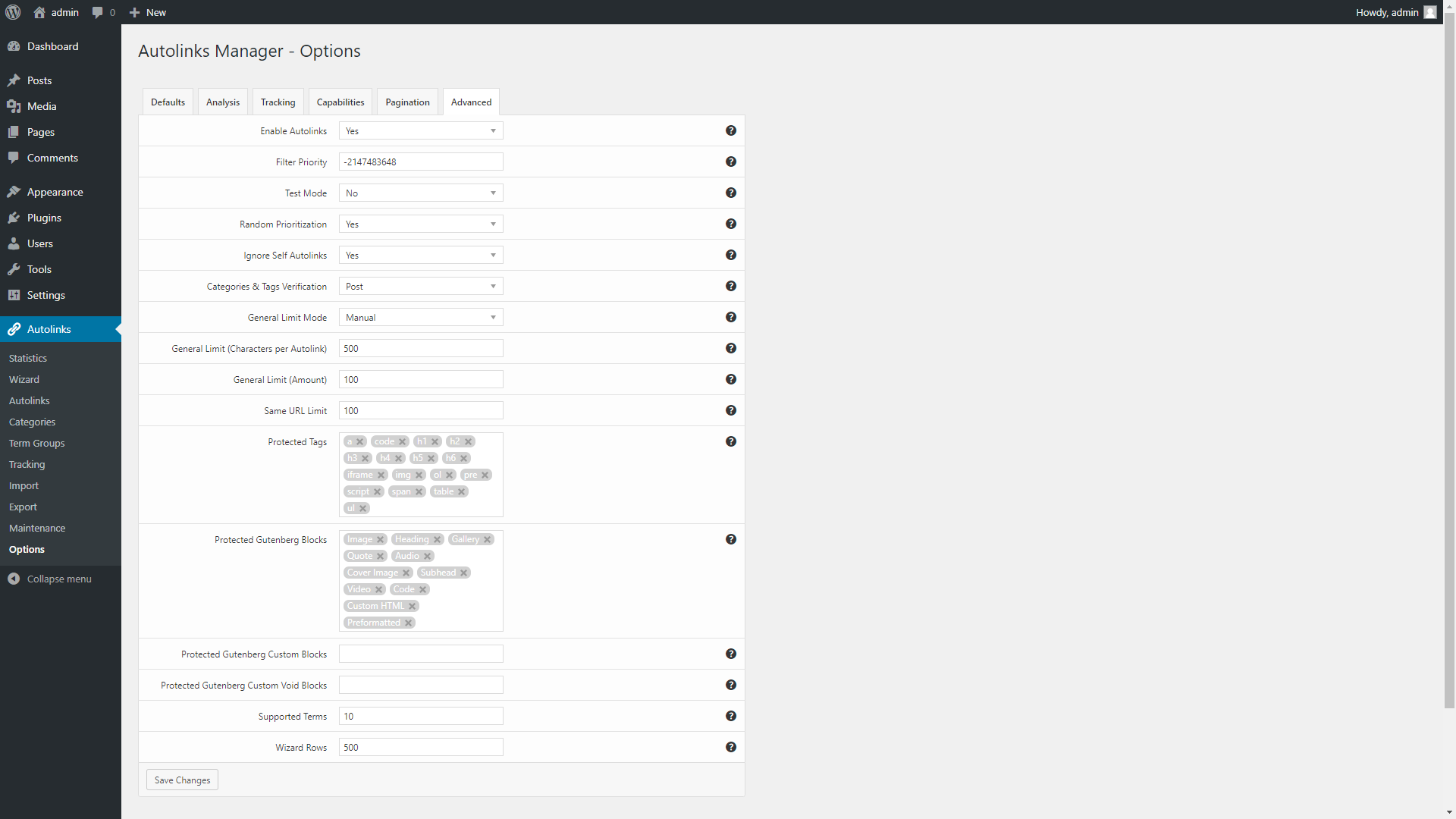
I can’t find “Max AIL per Post” anywhere, not in the AIL options or the options menu. I want to limit the number of links per keyterm per post to 1, and there is no way to change it. It’s as if the options your previous screenshots show do not exist for me?
Hello lwbaily,
with the latest update (v1.21) the Max AIL per Post option has been simply renamed to Limit.
It’s available in the AIL menu and in the Options -> AIL options section.
Hope this helps, if you need more info feel free to ask.
Sorry, still very much confused.
Here is my issue example: Let’s say I use “Term X” thousands of times across my 2,000 posts.
On my latest post, “Term X” comes up 10 times, on Post #563 from 6 years ago, “Term X” shows up 15 times. I need the first instance of “Term X” and ONLY the first instance of “Term X”, to be the internal link, on all 2,000 posts.
So the first “Term X” on my latest post, and the first “Term X” on Post #563 from 6 years ago, but none of the others on those posts.
If i set limit to 1,000 – It seems to be linking the latest 1,000 instances of “Term X”, but that means my latest post has 10 links to “Term X”, and by the time we get to post #563, “Term X” is no longer linked?
I specifically purchased this plugin because I could set “MAX AIL per Post”.
Am I confusing this with General Limit Amount in Advanced? OR something else? It seems like in 1.21 this feature was possibly removed? Thanks!
Hello lwbaily,
Here is my issue example: Let’s say I use “Term X” thousands of times across my 2,000 posts. On my latest post, “Term X” comes up 10 times, on Post #563 from 6 years ago, “Term X” shows up 15 times. I need the first instance of “Term X” and ONLY the first instance of “Term X”, to be the internal link, on all 2,000 posts. So the first “Term X” on my latest post, and the first “Term X” on Post #563 from 6 years ago, but none of the others on those posts.
Set “1” in the Limit value of the specific AIL to autolink only the first occurrence of the keyword. The limit value determines the maximum number of occurrence of the keyword associated with the AIL that can be linked in a single post, not the overall limit on the website.
If i set limit to 1,000 – It seems to be linking the latest 1,000 instances of “Term X”, but that means my latest post has 10 links to “Term X”, and by the time we get to post #563, “Term X” is no longer linked? I specifically purchased this plugin because I could set “MAX AIL per Post”. Am I confusing this with General Limit Amount in Advanced? OR something else? It seems like in 1.21 this feature was possibly removed? Thanks!
Sorry there was an error in my previous answer. The Max AIL per Post is now the General Limit (Amount) option and is used only if “Manual” is selected with General Limit Mode. This value determines the maximum number of autolinks that can be applied to a post. (the overall number, of any keyword)
Nothing has been removed from the previous version, we added new options and renamed some of the existing options to include them in the new “Advanced” section.
If you have other questions feel free to ask here or contact me directly via the support.
Thank you for clarifying. I suggest considering updating the video instruction videos on youtube. Works great now!
Hello lwbaily,
the video tutorials, screenshots and other changes in the item presentation will be updated after the next plugin release that will be published in a month or two with other new features.
Thank you for the appreciation, If you like this plugin please remember to rate it on your downloads page here CodeCanyon, this helps the plugin sales.
Interlinks Manager 1.21 has been released
Interlinks Manager has been updated to version 1.21, more information on the changes applied with this version are available in the “Updates” section of the item description.
To update please proceed as follows:
- In the Plugins menu click “Deactivate”
- Update all the plugin files via FTP
- In the Plugins menu click “Activate”
If you have any questions feel free to ask.
Hi, we are using shortcodes for buttons – the links in the buttons are broken due to your plugin – any advice?
Hello darrenflo,
the proper keyword boundaries and protected tags should be used if you have this kind of issues.
Please proceed as follows so I can tell you exactly how to configure your autolinks:
- Contact me via the support tab above and create a temporary account with access to the Interlinks Manager back-end
- Indicate on which pages you experienced the unwanted substitutions
Thank you.
Hello Can I use Japanese keywords for this plugin?
Hello takechi1234,
I confirm you that you can use it with Japanese language. Please note that if you are planning to autolink text strings not separates by spaces the Left Boundary and Right Boundary options available in the AIL menu should be set to “None”.
Hope this helps, if you need more info feel free to ask.
Thank you replay
Please tell me one more things.
Can I use PHP 7 environment and AMP? It was confirmed because it could not be used with other plugins.
I will buy if this becomes clear.
Hello takechi1234,
Can I use PHP 7 environment
Sure, PHP 7 is supported.
and AMP
Please specify which method you are using to implement AMP if you want a precise answer. A specific plugin, etc.
Thank you very much. I could purchase a plug-in, and it worked!
Sorry again. Only the keyword “AI” is not done why. Please let me know if you know the reason.
Hello takechi1234,
the string “AI” is a reserved word used internally by the plugin as a temporary identifier of the autolink during the process used to apply the autolinks on the posts. For this reason the validation system of the AIL menu doesn’t allow to create autolinks with this keyword.
If you need to absolutely use the “AI” keyword you can use it but with spaces at the beginning or at the end of the keyword, for example: ” AI”, ” AI”, ” AI ”.
Hope this helps, if you need more info feel free to ask..
OK!thanks!!
Hi there,
I am looking for a plugin that can automatically add internal links to my existing post. For example, I have two articles “aa” and “bb”, the url for each of them is domain/aa and domain/bb, if the keyword “bb” exist in the article “aa”, I hope the plugin can automatically generate a link on the “bb” anchor text and point to the domain/bb.
I think the “Create Auto Links” does this, but looks like I have to manually enter the anchor text and destination. Is there any way to automatically let the plugin do this?
If not, is it possible to upload a CSV file with the anchor and destination?
Thanks! Larry
Hello Lerry,
I am looking for a plugin that can automatically add internal links to my existing post. For example, I have two articles “aa” and “bb”, the url for each of them is domain/aa and domain/bb, if the keyword “bb” exist in the article “aa”, I hope the plugin can automatically generate a link on the “bb” anchor text and point to the domain/bb.
I confirm you that the keywords that should be converted to links should be manually created.
I think the “Create Auto Links” does this, but looks like I have to manually enter the anchor text and destination. Is there any way to automatically let the plugin do this? If not, is it possible to upload a CSV file with the anchor and destination?
If you need a plugin specialized in autolinks (and without the SEO tools present in Interlinks Manager) for internal and external links and bulk import check out Autolinks Manager. In this video you can see the procedure to import from a CSV file, in this case first opened through a desktop spreadsheet editor:
https://www.youtube.com/watch?v=TXs0pUmt6WQ
Hope this helps, if you need more info feel free to ask.
Is there any option to set Max AIL per target? Assuming I added 20 different keywords with the same target, it will link all of them in a post. I just want (the first) one to be linked, as it doesn’t make much sense to link a target multiple times.
Hello owt,
I confirm you that Interlinks Manager currently doesn’t include a “Max AIL per target” option but that we have currently this feature in the list of improvements that will be released in the next plugin update.
This feature will be named Same URL Limit and included in the plugin options like we already did (a screenshot of the options) in the autolinking plugin Autolinks Manager that we are currently selling here in CodeCanyon.
You will receive an automatic email from the marketplace when the update will be released.
Let me know if you need more info.
Hi – my AIL is not working. I followed your tutorial but the pages that have the keyword are not changed to links.
Hello Fiachra1, I replied directly to your email.
hello I have a problem with the plugin because I used lightbox picture and many picture of my site link to it’s media file, After I use the link plugin, too many pictures show in the Interlinks Manager, can I remove the jpg and png Formal
Hello twer,
if you want to limit the number of autolinks for specific keywords (with associated a link to a jpg or png file) you can use the Max Number AIL options available in the Interlinks -> AIL menu.
With the Options -> Max AIL per Post you can instead set the overall maximum number of auto interlinks per post.
If you need more info about a specific situation please contact me directly via the support tab, then link me the pages where you are applying the autolinks with more information on your current configuration of the autolinks.
Hope this helps, if you need more info feel free to ask.
Können die Links formatiert werden? Bei meinem jetzigen Template sind interne oder externe Links kaum sichtbar, Ich gebe ihnen dann in Elementor eine andere Farbe. Hier wäre es optimal, wenn das dieses Plugin übernimmt
Hello JochenBake,
please submit your question in English, so I can provide you a precise answer.
Thank you.
Can the links be formatted? With my current template, internal or external links are barely visible, so I’ll give them a different color in Elementor. Here it would be optimal if this takes over this plugin
Hello JochenBake,
if you want to style the AILs you have to use the [data-ail] selector. Example:
[data-ail]{color: #ff0000 !important;}
Hope this helps.
Thanks, but where do I have to insert that?
Too bad that there is no German language file
Hello JochenBake,
Thanks, but where do I have to insert that?
You can include that CSS rule in any CSS file loaded in your website, for example in the style.css file of your theme.
Too bad that there is no German language file
If something isn’t clear because of the language feel free to contact me via the support tab with your questions.
Let me know if you need more info.
hello,
we have purchased the plugin and have emailed you our query via personal message request you to revert to us asap.
Hello crusin,
I just replied to your email, if you have other questions feel free to ask.
Hello, can the plugin “The count of words in the created links anchors is randomized (between 1-3 words) “
Hello masterbig,
I don’t understand your question. Please add more details if you want a precise answer.
Thank you.
Is there a way to make automaticly internal links in random, means on page 1 make 2 internatl link, on page 2 make 3 links, page 4 make 2 links and page 5 make 1 link and so on… that every page has different many internal links?
Hello masterbig,
thank you for the details. There isn’t a way to explicitly set a random number of auto internal links per post but if you set for example a limit of five auto internal links per post and you create an appropriate number of keywords (not too many, otherwise the number of auto internal links will be always near the imposed limit) a random number auto internal links per post should occur naturally.
Note that you can always control the number of auto internal links with the various general options and options related with the specific keywords.
Hope this helps, if you need more info feel free to ask.
Hello
Can you tell me what the benefit of this product is
Please add the Arabic language in the product
Hello General_
Can you tell me what the benefit of this product is
For this I recommend you to verify the features available in the item description, if you have questions on specific aspects feel free to ask.
Please add the Arabic language in the product
The plugin is multilanguage ready and can be translated in Arabic by using Poedit or a translation plugin. Here you can find more methods to translate a WordPress plugin. Let me know if you need more info on the process.
Hope this helps.
Is it possible to link the same keyword only once in a post? When I use a keyword several times in a post, all of them get linked. So only the first appearing one should be linked.
Hello owt,
sure, in the Interlinks -> AIL menu simply set the Max Number AIL option of the AIL to 1.
Hope this helps, if you need more info feel free to ask.
Thanks, but this option makes only 1 keyword in the whole post get linked. I want all keywords to be linked, but each single one only once
Hello owt,
with the AIL -> Max Number AIL option you can set the maximum number of auto interlinks for a specific keyword.
With the Options -> Max AIL per Post you can set the overall maximum number of auto interlinks per post.
Hope this helps, if you need more info feel free to ask.
Oh, i’ve overlooked that. Thank you!
What is the difference between your plugin and yoast seo premium internal links option?
Hello ansateza,
I recommend you to compare the features of the two products for this.
If you have specific questions feel free to ask.
I dont intend to use yoast pro, can you please trow few words about it please?
Hello ansateza,
I’m sorry but I recommend you to compare the features of the two products in the related product descriptions for this. I can’t create a feature comparison between this product and another one not created or used by this studio in this comment section.
If you have specific questions about Interlinks Manager feel free to ask.
How can I prevent AIL from linking a keyword on the target page. So for example when I determine ‘bitcoin’ as keyword and /bitcoin/ as target, it will link to the same post from the same post as the keyword ‘bitcoin’ obviously appears on the /bitcoin/-page
Hello owt,
please proceed as follows:
- Set the Options -> AIL -> Ignore Self AIL to “Yes”
- Make sure that the value in the Target field of the AILs corresponds (URL path and/or file are implied) with the actual URL. (for example a trailing slash matters)
Hope this helps, if you need more info feel free to ask.