123 comments found.
And another question, is something like this possible <?php echo do_shortcode( '[wpcs_price meta_value=$usd_price]' ); ?>?
The $usd_price is a variable. Even better a ACF field.
Thanks a lot!
found this my self  I have to remove the $ so the code will be
 <?php echo do_shortcode( '[wpcs_price meta_value=usd_prijs]' ); ?>
Hello
Yes! It’s correct
Good morning, I have entered the shortcode wpcs_price value=100 with brackets. And I added to the settings of the currency switcher manually the currency ANG and conversion rate 1.78. But when I use the widget to change currency to ANG the amount stays 100. Am I doing something wrong? I can send screenshots. Thanks!
oh, I want to use a currency aggregator but ANG gives problems with the ones I choose. 1) Is it possible to choose another currency aggregator than on the list? 2) Is it possible to add a fixed rate instead of using a third party?
@pabloborysenko, I bought the full version and the conversion now is 1.78 so this problem is solved
Hello
Great!
For technical questions, better use the contact form – https://codecanyon.net/item/wordpress-currency-switcher/17450674/support
Hello, I have a presale question. Is it possible to use a shortcode (or with php code in a template) to convert? For example something like [convert=’100’ from=”eur” to=”ang”] Thanks!
Hello
Unfortunately the plugin does not have this feature.
It may be suitable for you converter – https://wordpress.currency-switcher.com/shortcode/wpcs_converter/
Standard functionality – https://wordpress.currency-switcher.com/shortcode/wpcs_price/
You can try free version – https://wordpress.org/plugins/currency-switcher/

Hello, Is multi price added to different user roles?
Ex:
Costumer > Dolar
User > Euro
Hello
unfortunately the plugin does not have this feature
Can it be done? I can buy.
Thank you
Hello
This is possible. But you need code customization.
Hello, I can’t, can you? I buy the plugin? Thank you.
Hello
If you have no programming experience you should hire a developer
Hello, I bought the plugin and I have a problem: the “price info icon” is not shown on my website even though I have put “yes” in the configuration. My site is a real estate website with prices in personalized fields.
Please indicate if I have to add something to my code to show the “price info icon”.
Hello
I answered you on email
Looks like The Free Currency Converter now requires API key so the currency updating is failing. Any ETA when update/fix will be available for this? Thanks
Hello
for the free version it is not necessary. But it looks like they have server problems, I’m sure they will fix it soon.
please i need help only 2 currency able to add
Hello
Uninstall free version and install premium one and you will see button “Add currency” there
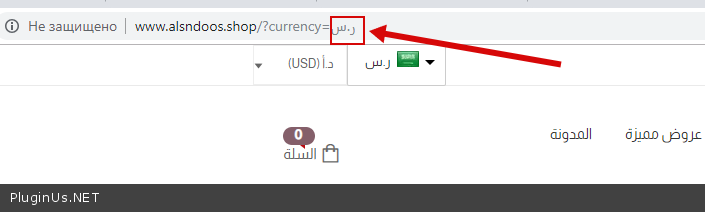
https://wordpress.currency-switcher.com/just-bought-plugin-cant-install-error/yes now we have problems as when we change currency and go to other page the currency back to default currency
Hello
Drop me link please, also if you using cache plugin enable in the plugin options in tab Options “I am using cache plugin on my site” and reset the site all caches
yes for cache can you see pls http://www.alsndoos.shop and i am used cloud fare
Hello
Please check currency codes. these should be standard codes – http://en.wikipedia.org/wiki/ISO_4217#Active_codes
Hello
https://clip2net.com/s/3ZErFIY – also look here please, resolve them please because they can prevent functionality of another scripts alsoi delete this plugin for cache but same problem when i go to another page the currency back to default ??
Hello
you did not correct the currency code – https://c2n.me/3ZFAAyf.png
Example: it’s correct – https://c2n.me/3ZFAP8Y.png – And everything works correctly
yes thanks done but when check out return to default currency
Pls already i set it as last link and i deactivate cache plugin but same problem can you see it http://www.sendfile.cc/GE4TMMRU
Hello
You write in the wrong support
Please write here(use contact form) – https://codecanyon.net/item/woocommerce-currency-switcher/8085217/support
no please i buy this plugin not this https://codecanyon.net/item/woocommerce-currency-switcher/8085217/support can you check pls
this message when update setting
Warning: mysqli_real_connect(): (HY000/2002): No such file or directory in /home/alsndoos/public_html/wp-includes/wp-db.php on line 1531
Fatal error: Uncaught Error: Call to undefined function get_bloginfo() in /home/alsndoos/public_html/wp-includes/class-wp-locale.php:231 Stack trace: #0 /home/alsndoos/public_html/wp-includes/class-wp-locale.php(112): WP_Locale->init() #1 /home/alsndoos/public_html/wp-includes/load.php(936): WP_Locale->__construct() #2 /home/alsndoos/public_html/wp-includes/wp-db.php(1569): wp_load_translations_early() #3 /home/alsndoos/public_html/wp-includes/wp-db.php(592): wpdb->db_connect() #4 /home/alsndoos/public_html/wp-includes/load.php(409): wpdb->__construct(‘alsndoos_wp1’, ‘A.7EvIg6TeM6VYh…’, ‘alsndoos_wp1’, ‘localhost’) #5 /home/alsndoos/public_html/wp-settings.php(106): require_wp_db() #6 /home/alsndoos/public_html/wp-config.php(102): require_once(’/home/alsndoos/...’) #7 /home/alsndoos/public_html/wp-load.php(37): require_once(’/home/alsndoos/...’) #8 /home/alsndoos/public_html/wp-blog-header.php(13): require_once(’/home/alsndoos/...’) #9 /home/alsndoos/public_html/index.php(17): require(’/home/alsndoos/...’) #10 {main} in /home/alsndoos/public_html/wp-includes/class-wp-locale.php on line 231
now the currency not changing
Hello
this plugin has nothing to do with this error
And this plugin does not work with woocommerce price!
What ?? i need it to woocomerec?? what are doing now
Hello
Looks like we have misunderstanding.
This current plugin https://codecanyon.net/item/wordpress-currency-switcher/17450674 is NOT for woocommerce BUT you asked question about chekout https://clip2net.com/s/3ZKM2SG – checkout is not functionality of this plugin, so it was not clear for support what exactly is going on. So, for things clearing I suggest you next:- write your support request here https://codecanyon.net/item/wordpress-currency-switcher/17450674/support
- describe in your message what exactly doesn work by links and screens
- very good if you will write in that message short video if you know how to do that
- support may ask you about wp-admin access to the site ti understand what is going on
ooh i need for woocommerce i will refund
Yes, done
PRE SALE – Its possible to disable the auto update rates? like Set currencies exchange rates manually dont by converter. Change manually?
Hello
Yes. Check option please – https://c2n.me/3ZofK3B.png
Rather than CurrencySign[none] I want to display text string value such NOT AVAILABLE IN YOUR COUNTRY
Hello
In this case you need code customization.
test
this plugin BDT currency support ?
Hello
The plugin supports all standard currencies – http://en.wikipedia.org/wiki/ISO_4217#Active_codes
Hello, Just brought this. somehow its not adding new currency. once i hit add currency button url seems like options-general.php?page=currency-switcher-settings# just added # nothing happed. also i can’t add flats. i have uploaded flags but after save its showing nothing. thanks
Hello
Please write me on support( use contact form ) – https://codecanyon.net/item/wordpress-currency-switcher/17450674/support
Paste your message + wp-admin access I will check it
Hi, does the Geo IP work without woocommerce?
I would like to display AED690 / per person, and have the AED690 change based on the country the person originates from. Is this possible?
thank you
Hello
Yes, this plugin not related to woocommerce. Try free version please …
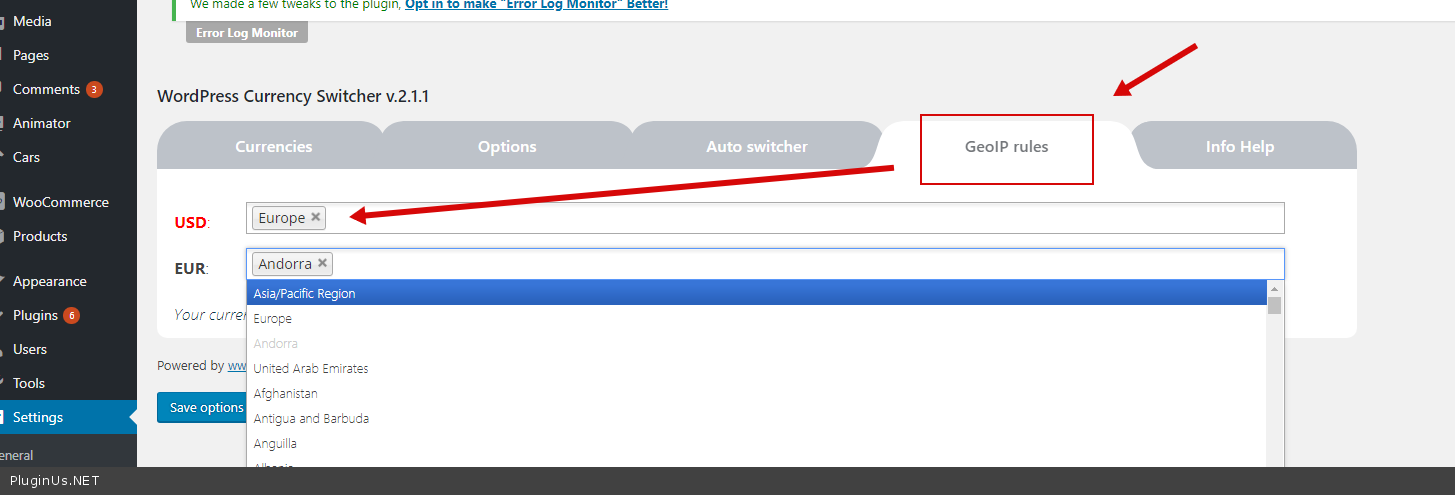
I have tried the freeversion but I want it to automatically detect the IP and change the price accordingly. Is this possible? ie. if you view the site from the states is shows price in dollars, if you view from UAE it shows it in AED.
If so – please explain how to do this and I will purchase.
Thank you
Hello
Yes it’s possible.
just select countries for each currency – https://c2n.me/3YtpioW.png
You can check it on free version
I did that but it keeps just showing the same currency. We’ve tried multiple setups and from different countries. Can you login and check? if so – please provide your email address. As I said before – we’re happy to purchase if it works.
thank you
The only way I can get it to change currency is with the side switcher. I need it to automatically detect the IP and change the currency accordingly. This job is urgent – do you have a direct contact details.
Hello
Please write on support (use contact form) – https://codecanyon.net/item/wordpress-currency-switcher/17450674/support
Paste your message + create test page with shortcode – [wpcs_check_country] and paste link to this page
I have downloaded your plugin as a free scheme for month of October. But I didn’t see the google/ yahooo finance options in Currency aggregator. Also, XE currency convert not working, it always shows no data error.
Thanks
Hello, download it again, it been updated
Hi,
Let me know how can i show the currency switcher with maps in my main menu instead of showing fixed switcher.
Thanks
Hello
Use shortcode [wpcs] and this plugin https://wordpress.org/plugins/shortcode-in-menus/
Hi,
Is there any shortcode or function/filter so that for converting the amount from one currency to another according to user choice. for example [wp_price price=45 from=’UDS’ to ‘NPR’]
Where user can pass the from and to currency code.
Thanks
Hello
unfortunately the plugin does not have this feature
Only this – https://wordpress.currency-switcher.com/shortcode/wpcs_converter/
I thought its for woocommerce
Hello
This plugin does not work with woocommerce. You need this plugin – https://wordpress.org/plugins/woocommerce-currency-switcher/
GOOD LUCK AND GOOD SALES! 
Thank you =)
Awesome! Thank you for sharing
Welcome
Hello Team,
I have downloaded and tested this plugin in one of my localhost environment as when we’re using different currency in the checkout it’s adding that currency amount in WooCommerce Report, Is there any way where it’ll separate report based on currency instead of keeping wrong data.
So after website launch owner can know based on currency order report they can keep default currency accordingly.
Hello
This plugin does not work with woocommerce.
If you mean this plugin – https://codecanyon.net/item/woocommerce-currency-switcher/8085217?ref=realmag777
Read this – https://currency-switcher.com/adapt-woocommerce-reports-date-currency-switcher/
Thanks for the update, oops wrong plugin sorry, yup I’ll try that solution and let you know if it’s working smoothly. Thanks for the link
Hello
Welcome;)