73 comments found.

This code is not at all updated, and it cannot build without numerous errors. Please instruct on how I can get my money back. Thank you.
Hey, let us check and update the app this week. 
Please answer: Dear Developer,
We identified one or more issues with a recent delivery for your app, “Photo editor – editor de fotos” 1.1 (2). Please correct the following issues, then upload again.
ITMS-90809: Deprecated API Usage – New apps that use UIWebView are no longer accepted. Instead, use WKWebView for improved security and reliability. Learn more (https://developer.apple.com/documentation/uikit/uiwebview).
Best regards,
The App Store Team
Hello, I have this error: Dear Developer,
We identified one or more issues with a recent delivery for your app, “Photo editor – editor de fotos” 1.1 (2). Please correct the following issues, then upload again.
ITMS-90809: Deprecated API Usage – New apps that use UIWebView are no longer accepted. Instead, use WKWebView for improved security and reliability. Learn more (https://developer.apple.com/documentation/uikit/uiwebview).
Best regards,
The App Store Team
Please amswer: Dear Developer,
We identified one or more issues with a recent delivery for your app, “Photo editor – editor de fotos” 1.1 (2). Please correct the following issues, then upload again.
ITMS-90809: Deprecated API Usage – New apps that use UIWebView are no longer accepted. Instead, use WKWebView for improved security and reliability. Learn more (https://developer.apple.com/documentation/uikit/uiwebview).
Best regards,
The App Store Team
Hi, I am looking for the following features : – - Add sticker - Add background (Image, Colour & Gradient) - Add text with Colour, Font, Background, Alignment, Border Strokes etc… - Add frames - Undo / Redo - Adjustment tools - Crop - Rotate - Flip - Draw on photo - Brightness, Contrast, Exposure, Saturation - Shadows - Created image should be editable again - In app purchase
do your app supports this?
Hi Patelgaurang1, Thanks for reaching us here, Unfortunately, these features are really complex and need a lot of time ti to implement them. The reason is we didn’t create such type of customized features in any of our apps. Some have a filters option, some have a build-in text option and some have other options like exporting filtered images or adding stickers only on images. So we will have to gather all these features and create a customized app. But if you want all these features you can get an img.ly license and we will integrate that in the app and we will only charge you for that license and source code pre res integration.
Thanks
Thanks for the detailed explanation, but we want source code & img.ly don’t sale code, thanks
Good luck with your sales
Hi, can you please send me screenshots of the internal design of the application?
What do you mean internal ?
Design of the application itself
You can check the screenshots in the app description. See here a video too: https://www.youtube.com/watch?v=RLR500SG90s
Hi, I’m confused by the whole background feature. The background adding seems mandatory even with the collage making, it looks terrible. I can’t seem to crop or resize in my simulator. To me, the background feature is really annoying and I can’t use the template this way. I really need to get rid of this feature please. I checked in the app store and the PicLab app doesn’t seem to have that mandatory background feature either. Thanks.
Sure, No issues. I will remove this feature and update you accordingly, please open up a ticket here: https://cubycode.ticksy.com/
Hello,
Is there a way to add more texts in such a way that customers will have three different paragraphs with different font?
Yes, We can do that but customized work would be required for that. The way out is that you need to introduce a new button and by that button you can achieve this. let me know in case of any issue.
Hello, Is there an option to add more than one image in the same project like picture attached? https://imgur.com/a/YQxJA4s and can users add there logos on pictures! Thanks
Yes it can be done
Hello, if I am modifying the png image, can I keep the transparent part of it?
BR, jack kwok
Hello, about the use after purchase.
1.Can I use my app on the app store after purchase? 2.Can I remove admob after purchase? 3.What is the difference between regular license and extended license? What license should I buy?
thank you for your help.
1) Yes, you can use this app template ( will need some customization ). 2) Yes, sure – you can remove AdMob 3) Extended license is only if you want to use “In App Purchases” . I think for now you can buy Regular License.
thank you 
Hi, can this do picture eraser? e.g. if i want to cut out a figure from a picture and stick to a background. If it’s not supported, how much extra to pay to get it supported ? Many thanks
Need to investigate this. Can you write me in private what exactly you want to change/add in the app template?
Could you please suggest me about 1 issue? I have selected picture for frame and I found that when picture was added in frame, I can zoom in but cannot zoom out. What should I do?
Send me the screenshot of that error, i could not reproduce that on my side.
Now, I can fix it. Thanks
I can’t get the file to either finish downloading or it says file is not a downlable file type….it looks to download it all within about 8 seconds then stops….file cannot be opened. thanks
hi, do you mean the PikLab zip file in your Downloads page?
Thanks for your reply….I’m not sure what the issue was. It finally downloaded and was able to open the package. I would like to add…an undo button would be fantastic for this app. Once a change is made you can’t undo without starting completely over. This app is very minimal. As often as I see you update this app it still hasn’t met some basic user options.
an undo feature is pretty complex and i would have to increase the price of the app then Thanks for you suggestion though
btw, this app doesn’t really need an undo button since you can remove stickers, frames, filters, etc. while editing a picture, before saving it, anytime you want, so undo is useless
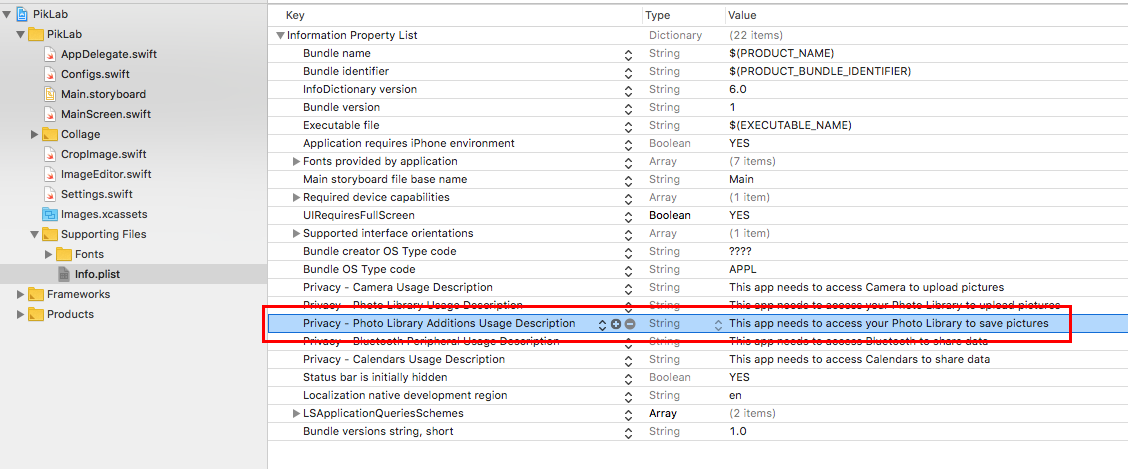
When press the “Save Image”, the app quitted. Please advise.
It’s a matter of a missing row in the Info.plist file, I’ll fix it right away and submit an update here.
here’s how to fix it, just click the (+) button in your Info.plist file and add this row: https://s6.postimg.cc/o7763pan5/info_plist.png
These sliders attached to a project in brightness, contrast, etc. have a live effect like iPhone photos app. I mean slider is continuous or not?
not continuous, you see the effect applied when you release the finger from the slider
Hi! I am having difficulty changing the fonts for some reason. I follow the instructions provided, and the font shows up in the list in the app, but not as the font it should actually be (all the added ones end up being the same basic font).. am wondering what i might be doing wrong here? Thanks!!
Also, is there a way to save the photos in the app to one’s photo library? This option isn’t showing up for me, only “save to files,” share, and open in other apps. Thanks so much!
1. please note that not all .ttf or .otf fonts are compatible with iOS, so you must just double check if you’ve done everything correctly while importing your new fonts, and then the only way to test if they are compatible is to see how they look after running the project. If they look like a standard Helvetica font, then it simply means that iOS can’t read such font file, you need to find a different one.
2. That’s weird, you should get Save Image button as well, as shown here: https://s6.postimg.org/4n4uxo3ch/sample.jpg
Have you downloaded the update of Feb 15th from your Downloads page?