4552 comments found.

Hi, I have a specific problem to solve and will happily purchase this plugin if it can do what I need.
I’m building a site for a leather goods company. It’s almost finished but one thing we need is the ability to offer free monogramming for people who sign up for the newsletter.
The monogramming is configured as a product add-on (using the woothemes plugin) and has different pricing depending on the currency being used.
Because of the different prices, I can’t just make a standard coupon for X amount.
So essentially I need a way to make a coupon code that will identify the product add-on and make it free.
Can your plugin accomplish this?
Hi there,
Thank you for your interest in our product but unfortunately it won’t solve this problem due to the complexity involved. I mean it’s not too complex from the technical perspective but it is rather unique (combines newsletter signups, product add-ons and multiple currencies). I believe your best shot would be to write a custom script/plugin that would do that.
Hi RightPress, I would like to set up quantity discount to all products and display quantity discount table on all product pages except products which are on sale. How do I automatically exclude/hide the table/discounts for all products on sale? Thanks
Hi there. By default pricing table is displayed on on all products that match conditions and there’s no condition to exclude products that are already on sale. We are aware that this is a limitation of our product and will do our best to improve this in the future. If you really need it to work like that right now, you would have to write some custom PHP and/or Javascript script that would do the job.
Pre-purchase question: I have a store with products 20.00€. Can i show product example 17.00€ when a user is logged in a specific ACL group? Can i also manage ACL group? Thank you
Hi there.
Thank you for your interest in our product.
You can target specific pricing rules / discounts to specific WP user roles, WP user capabilities and specific users. If you went with roles or capabilities, you would either have to assign rules/capabilities to users manually or use some other script/tool.
Also, this extension does not change prices throughout the store, prices will only be displayed when a product is added to cart with an exception of quantity discounts – you can display a quantity discount table on the product page.
Pre-purchase question: i use woocommerce checkout for a booking hotel plugin, so i need to know if i can apply the discount to a custom post type like room_type It is possible?
Hi there. Do you mean that you have custom product type in WooCommerce for hotel rooms? Or is it that you use regular WooCommerce products but somehow link them to room_type post type?
Hi, i do not have any product but the booking system use woocommerce for the checkout so i need to give discount to a user role that book a custom post type for example “superior room” in the checkout. It is possible?
Hi there. It really depends how the booking system that you are using works. Since we have not tested these two plugins together and are not aware of any technical details of the other plugin, we cannot tell you wether or not they will work fine together. One way to go would be for you to purchase our product and if it won’t work in your current setup, we will be happy to provide you with a full refund.
Can this Woocommerce plugin do this for each product?:
Choose Color option: black,red,white,etc…
Choose Qty:
Buy 10 Get 5 Free
Buy 25 Get 10 Free
Buy 40 Get 15 Free
Client needs this, so need to know.
Thanks,
Hi there,
You can solve the color option issue by either using WooCommerce variable product or some custom fields plugin.
Our dynamic pricing extension gives you an option to give 5 products free when 10 are purchased, 10 products free when 25 are purchased etc. However, if you need to do it so that customers can only by at these predefined quantities (10, 25, 40), then you would need some additional plugin to add this limitation. If not, then you are good by just using our dynamic pricing plugin.
everything is ok, I installed, Thank you
Hi Ivan,
I am happy to hear that the issue is fixed now.
This is due to the fact that Envato re-packs plugins that we upload. You need to extract the parent zip and upload the plugin itself from the Plugin folder.
Your plugins are excellent
Thank you Ivan! It’s nice to hear that you find them useful. We would be thankful if you could rate/review them on the downloads page.
Hi, I purchased your plugin but I can’t instal it. “Unpacking the package… Installing the plugin… The package could not be installed. No valid plugins were found. Plugin install failed. Return to Plugins page” This message appear in WP. What can I do
Hi RightPress,
I’ve installed the plugin, applied quantity discount based on fixed price and set price table to be displayed. For some reason nothing works. Is there anything else I should do?
Thanks
I’ve managed the plugin to work but my Quantity Discount setup shows the same price for all quantities. I’m trying to setup Quantity Discount for individual products only. Product base price is $70/box. For 2 boxes the price should be $120 and for 4 boxes $240. But all prices in product page price table say $70.
Could you please let me know where I’m making a mistake?
Thanks
Hi there.
We are happy to help but I would like to ask you to submit a support ticket on our support site so that we can take a look at your setup. Please either include screenshots of your setup or provide us with temporary login credentials to your website.
Hi RightPress, thank you very much for the info. Would you kindly please help me with the extra code? Without excluding all products on sale the plugin is useless to me at all as I can not apply further discounts to this products. I would really appreciate if you could help me to fix it. Thanks a lot in advance.
Hi there.
Unfortunately, this is out of scope for regular product support and we do not do freelancing. We are happy to answer any technical questions that your developer may have but we can’t do full job.
We will definitely introduce an option to exclude products that are already on sale but this would take some time to be released.
If you otherwise have no use of our product, we would be happy to provide you with a full refund.
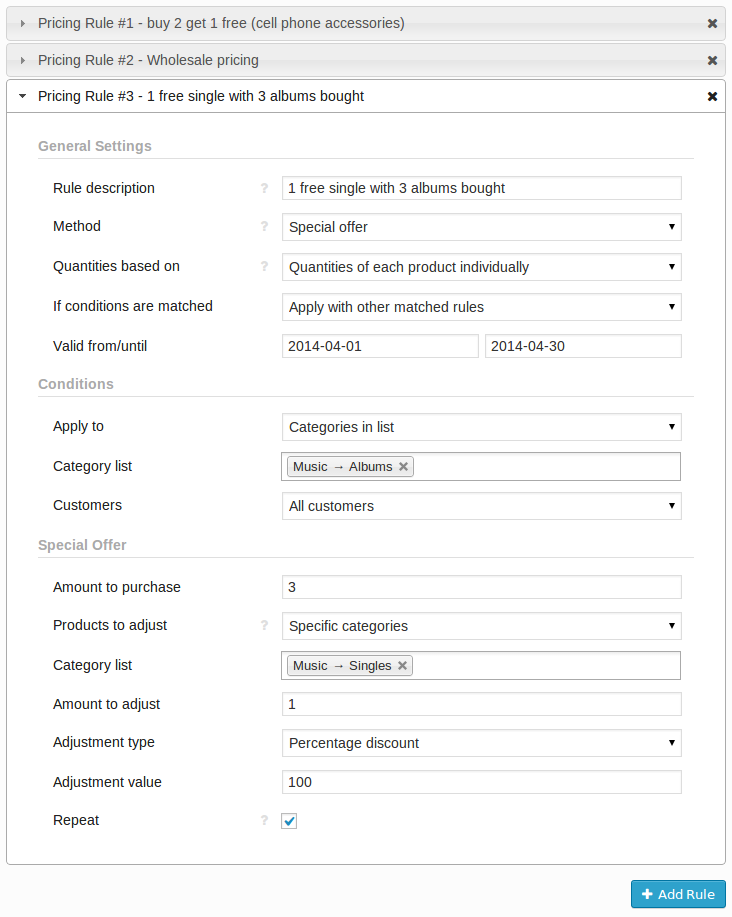
I’m sorry, I really tried, but I can’t seem to make it work. I want to set up a simple pricing method where if you buy any of 5 products (differents or the same, it doesn’t matter), the 6th will be free. I thought I was getting somewhere trying to reproduce this one : https://0.s3.envato.com/files/84332230/02_Pricing_Rules_Special_Offer.png but I doesn’t seem to work.
I checked the documentation but I haven’t see any full examples of rules set up. That would be very nice, in order to be able to tweak them according to your need.
Thanks for your answer
Hi there,
Would you mind submitting a support ticket on our support site? This way we could look into your configuration and see what prevents it from working in a normal fashion.
I’m sorry, I really tried, but I can’t seem to make it work. I want to set up a simple pricing method where if you buy any of 5 products (differents or the same, it doesn’t matter), the 6th will be free. I thought I was getting somewhere trying to reproduce this one : https://0.s3.envato.com/files/84332230/02_Pricing_Rules_Special_Offer.png but I doesn’t seem to work.
I checked the documentation but I haven’t see any full examples of rules set up. That would be very nice, in order to be able to tweak them according to your need.
Thanks for your answer
Hi,
Is it compatible with wordpress 4,5 ? Could i give special price for grouping qty ? ex : if buy multiple of 12 pcs—> 170 $ So, if i buy 35 pcs—> 24 pcs = 2 * 170 = 340 then 11 pcs = normal price
Thank you
Hello,
Yes, this extension is compatible with WordPress 4.5.
No, unfortunately, you can’t do such grouping at the moment.
PRe-sale question: Is this fully compatible with Wootheme Dynamic Discount?
Hi. Our product was developed to be a better replacement for WooTheme’s Dynamic Pricing. They are not supposed to be working side by side on the same site. You are free to do so of course but we have never tested these two extensions together.
Pre-purchase: Can i make a cumulative rules? like: role or group 1 have 30% on category X and 20% on category Z on checkout and role or group 2 have 40% on category x and 30% on category z on checkout?
thanks a lot!
Hi there.
Thank you for your interest in our products!
Yes, you can do that – multiple pricing rules can be applied at once to different categories and you can create separate sets of rules for different user roles.
Feel free to purchase this extension – we will be here if you will need any assistance when setting it up.
Pre-purchase: will this keep a tally cumulatively of how many products the customer has purchased – for reorder customers we want to be able to offer “for every 10th product, get one free”, they may make 3 separate orders of 4 products (12 total) and we would want them to get a free one at 10.
Hi. Unfortunately, this is not something that our extension could handle. You may wish to look for some customer loyalty plugin that may be able to handle this.
Hi Team, pre-purchase question: Is it possible with your plug-in to make the user to buy products in multiples of 6, that is the user can just buy 6 products, or 12, or 18, 24, 30, and so on?
Hi there. No, unfortunately, this extension does not handle this. You will either have to find some other plugin for that or simply create a separate product that would read “6 x Some Product”, if that’s feasible in your case.
I love the plugin but I have a problem with orders. When a discount is applied the amount if calculated perfectly on the cart and checkout. Once the order is processed though the price on the order is not indicated as a discount and the discounts line on the order shows as 0 – I need to be able to see what discount was applied and for how much. Is there a fix for this at all? The customer end is fine but our backend is not showing us what actually happened.
I read the comments and see that for others the discounts are showing as coupons but for me nothing shows – just the adjusted price. Actually showing as a coupon would be fine as long as I could see that the item was discounted with an explanation as to why (e.g. quantity discount, returning customer discount etc) but nothing appears.
Hi there.
This extension allows you to control two aspects of how much customers end up paying. The first one is dynamic pricing adjustments, the second one is cart discounts (tabs Pricing Rules and Cart Discounts correspondingly).
Pricing Rules adjust the price itself, i.e. if you offer loyal customers a $10 product half price, then the corresponding order item will have $5 next to it. They do not appear as cart discounts as they are not cart discounts (i.e. not the same as coupons).
Cart Discounts appear as cart discounts as they are cart discounts, i.e. they are applied to the cart subtotal instead of an individual product price.
I understand they are not cart discounts if applied to the order line. Is there any way to show on the order that the price for the item had been discounted, and why. I need my team to be able to see on the backend when items have been discounted. Can this be done in the coding at all?
Technically virtually anything can be done but this is not something that could be solved with a quick patch. I’m adding this as a feature request to our product backlog and we will consider improving this aspect of the plugin in the future.
hey Guys, just a quick question. can i give different user roles, different prices?
I want to edit prices on product level. So we will have product A.
User 1 after inlog will see it for 1 dollar User 2 after inlog will see it for 2 dollar
This will have to be on front end level. not only when they go purchasing.
Hi there,
Yes, you can set different prices for different user roles. You can also set different prices or discounts per product but that will be managed in a single UI and targeted to specific products by conditional logic.
Feel free to purchase our product – we will be here if you will need any assistance.
alright, thanks.
So product A en B are both in category Y.
I can give A and B both different prices?
Yes, you can do that easily. The problem might be if you had a large amount of products (say 100) each with different pricing adjustment, then the UI might become hard to navigate since all those pricing rules would be in one list.
I now have 50 products. in a month I will have more than 100…
isn’t the a easer method for it? Can’t I just go to the product it self and change it there. Just like how Opencart has it?
Are you sure that each of those 100 products will need a different discount?
Currently it’s not possible to manage pricing rules from within the product edit page but that’s something we are willing to look into in the future.
yes it should  thanks for the info. I will look into the plugins. It’s just, if I have 250 products in the future. I should be able to give a product a discount for different user roles.
Pre-purchase question: Does this plugin notify the customer, while they are checking out, that if they add more to their cart they can receive a discount? Are there ways to setup notifications inside the cart that let the customer know of the promotions set? Thanks
Hi there. Unfortunately, the current version of this extension can’t handle this. You would need to customize it or use some additional solution alongside. We will do our best to improve this in the future.
Hi,
Plugin doesn’t allow “Shop Manager” role to save any rules, it says “You do not have sufficient permissions to access this page.” when i checked the permissions user has the capability to ‘edit_posts’.
How can i fix this?
Thanks
Hi,
Would you mind submitting a support ticket here? We would take a closer look into this.
Thanks, i’ll submit a ticket, is there any workaround i can try temporarily..need to run a promotion soon as the newsletter is sent…
I will personally look into your ticket as soon as you submit it. We will find a quick solution there. If you wish to further speed up this, please include temporary login credentials for both admin and shop_manager roles so that I can test them.
Opened a ticket, can you please check urgently.
Thanks
Does this operate on a rules-based engine or just hard settings? Thanks!
Hi there. This plugin does have a conditional logic and allows you to set up multiple pricing/discount rules. Not sure if this fully answers your question – if it does not, would you mind clarifying it?