569 comments found.

I want to by your plugin colio but I don’t know how hard will be to add subcategories and box ‘see also’ for similar projects. Please tell me if that’s functionality is possible to add by developer.
Hello! Where subcategories should be displayed? And how they should work?
Hello. I am having problems with my galleries. I can view one and its fine, I click on another and click on an image and nothing will open. I have to refresh the whole page for them to do something – www.justine-louise.co.uk
I also can not seem to make my thumbnails larger? thank you.
I am still having issues with the above, but I have also discovered that that plugin is heavily reducing image quality compared to what the images look like in the media library. Is there a way to stop this from happening? Thank you.
Hello!
I see “page not found” when I open your site in browser. So, please check this.
Regarding image quality. My plugin generates 460×300px thumbs from Feature Image that you assign to Colio -> Items. This is made to optimize load time as usually you don’t need high resolution images for thumbs.
If you click the ‘cosplay’ tab – http://justine-louise.co.uk/cosplay/ I have had to hide everything for now.
Its not the thumbnails quality, it is the image that appears in the lightbox, it is heavily compressed to what they look like in the WP media library. Is there a way to stop this happening as my images are already web optimised, so I don’t really want the plugin doing it again when not needed.
In regards to thumbs though, I want to make mine bigger? how do I do this?
My plugin does not compress images for fancybox. Here is for example one of images – http://i2.wp.com/justine-louise.co.uk/wordpress/wp-content/uploads/2015/08/thor-02-e1451772198910.jpg?fit=533%2C800
This is the image in fancy box – http://i2.wp.com/justine-louise.co.uk/wordpress/wp-content/uploads/2015/08/ruby-true-21.jpg?zoom=2&fit=533%2C800
And this is the image directly from the WP media library – http://justine-louise.co.uk/wordpress/wp-content/uploads/2015/08/ruby-true-21.jpg
There is noticeable compression on the fancy box image.
In both cases I see the size is exactly the same 533×800. But first image URL begins with i2.wp.com/. I checked with Google and found out that this is some Photon acceleration plugin.
So maybe the reason is in that plugin? Try to deactivate it and check your problem again
Thank you, I have no idea where that has come from!
I am still having the issue though where I open one gallery fine, close it to open another but the images won’t load when you click on them? you see a spinning wheel quickly and thats it, nothing loads?
And I am also still struggling to get my thumbnails larger 
Hmm. That’s strange. Just checked http://justine-louise.co.uk/cosplay/ and when I click any thumbnail it opens with the rest of photos just fine.
What thumbs you want to make bigger? In portfolio grid or in viewport when you click an item?
If I click on a thumbnail to open a gallery and view it, is fine. But when I close that gallery and open another and click on an image, they wont load :/
I want to make both the portfolio grid and viewport bigger thumbnail wise
Ok, I see what you mean.
I use fancybox plugin with my Colio WP – http://fancyapps.com/fancybox/ to preview larger images for thumbnails.
And what actually happens is that for some reason facybox popup stays hidden (with opacity: 0) when I click thumbs. I’m not sure why it happens as there is no JS errors in browser. Also I checked in Google but found nothing related.
What you can try is to disable any other plugin except Colio and test if fancybox will work. This way you can find a conflict.
Hi, I’ m already waiting for a solution to my problem. In http://www.ferentino.org/media/oggi/reperti/ page prepared using Colio plugin everything disappear when the page load all images. This problem is on all pages with no filters inside. The problem does not exist in pages with filters.
Hi! You should go to Colio -> Settings, find your portfolio and click “Save Changes”. Looks like you have updated from earlier version of my plugin which didn’t have layout option.
Hello. This is not working with new versions of betheme. I click View Project and it shows loading but does not open the projects.
Hello! If you have latest version of my plugin – 2.3.1 please go to Plugins and Deactivate/Activate my plugin. If you have < 2.3.1 you should go to Settings -> Permalinks and just re-save changed.
When expanding a project (and with the “inside” expansion layout set), the thumbnail of the project in the row above the expanded project extends into the project detail div. Any idea what is causing this?
Hello!
could you explain this in more details or give me a link to your site. Not sure I understand what you mean.
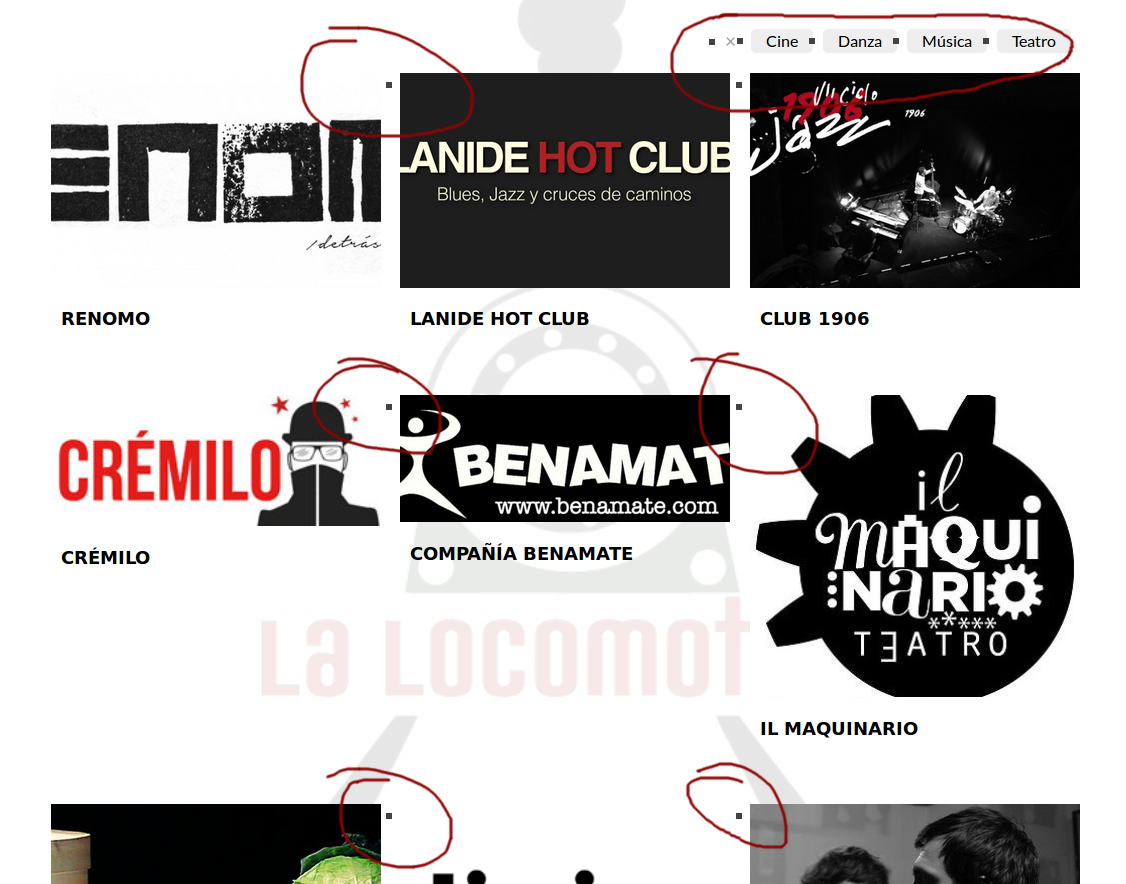
Hey there: A gray boxes appear near the filter labels and also near the minuaturas. I wish the background was completely white. Attached a picture. It can be a compatibility problem with the theme? Is it because I have not configured well?
http://lalocomotora.es/wp-content/uploads/2016/01/colio.png Thanks!Sorry, it’s OK. There was a trouble with theme. Thanks!
The error is still there. The color of the square is the same as the text color of theme ( background ) .
This problem is caused by UL/LI CSS style in your theme. To fix this you should add next styles to wp-content/plugins/colio/grid.css
.colio-wrap li, .colio-wrap ul {
 list-style: none!important;
}
Thanks!
Hi it’ s more or less three days I highlighted a problem about this plugin but till now I have no answer…..
Thi is a message appearing in the google-chrome console: Uncaught Error: No layout mode: jquery.isotope.min.js?ver=2.2:12
Hello!
it’s possible your site has another Isotope and there is a conflict between two versions. Please give me URL to your site and I will check. Thanks!
this is the URL http://www.ferentino.org/
Hi, after two days do you have a solution?
Sorry, I was in vacation so I haven’t checked comments. Now I’m back so I will reply regularly.
Could you give me exact URL to the page with Colio? I checked your site but can’t find portfolio.
All the items under “Media” in menu are created using Colio…..
I checked now and “monumenti” seems working while “Reperti” Always hide its content
Sorry, I cannot reproduce the problem. Also it does not seem you have another version of Isotope plugin. Could you check if you still have JS error.
after other checks it is clear that the plugin works correctly if there are set filters otherwise the content disappears….
You should go to Colio -> Settings, find your portfolio and click “Save Changes”. Looks like you have updated from earlier version of my plugin which didn’t have layout option.
Thank you, it works now!
Hi, after updating nothing works like as images filtering and image zooming. I tried to deactivate all plugins but the problem remains…..
What have I to do to fix this problem?
I tried, as for your hint of 5 months ago, to rename jquery.fancybox-1.3.4.min.js file but the only result is that all images disappear from the page, footer appears, as if the page has nothing inside…...
Hi! I think you are close. There is some JS error. You can check for it in your browser’s error console or give me a link to your site and I will check myself.
this is the link: http://www.ferentino.org/
Hello! Please give me exact URL to the page with Colio on it. Thanks!
Hi There. We are having a wee issue trying to change one of the icons to instagram. In notes from the past you explained this: Ohh. I forgot about that title. Ok. What you need is “colio_get_social_links” function in wp-content/plugins/colio/colio.php file. You can get rid of title attribute that is set for links. We cant seem to locate this code and wondered is the colio.php file is named correct or if it is a css style you change. We would be grateful if you could add a little more on how to remove the title tag that hooves the name of the social icon. A wee explanation would be much appreciated. Loving the plugin – it looks great!! Cheers
Hi!
Social links are inserted in wp-content/plugins/colio/colio-item.php PHP file and to remove title you need this code specifically
<li>
                <a class="<?php echo esc_attr($provider); ?>" href="<?php
                    echo esc_url($provider_url); ?>" title="<?php
                    echo esc_attr($provider_name); ?>" target="_blank"><?php echo esc_html($provider_name); ?></a>
            </li>
in code above there is attribute
title=<?php ... ?>please remove it all together.
Hi, I have portfolio filters enabled, using as a “select box”. is there a way to get rid of the “–” that shows by default? http://kbt.devrhycom.com/concierge/
In dropdown list ”-” means all items. You can rename it to something like “All Items” in wp-content/plugins/colio/colio.php in this line
$options = '<option value="">-</option>'; // "show all" option
in line 280
thank you
Hello, Text area can be below the slide? Or opposite..
Hello! Yes, you can position box with item details below or above portfolio thumb
Dear Ladys and Gentlemen, the plugin Color Portfolio I find great. Unfortunately, the black theme does not work on the iPhone. Once you click on an image, although the content is on it. When closing, however, the content disappears, but the rest of the pictures no longer come up. The background remains simple white. At first I thought the reason is that I have adapted the plugin something. But when I was with you on the developer side, stepped this problem also. Could it be a solution?
Hello! Could you explain how can I reproduce this problem and what viewport placement mode do you use – inside, after or before? Also could you give me link to your site, as the problem can be that Colio may conflict with another JS plugin? Thanks!
Hi, I’ve installed colio plugin on my site and configured all the settings followings this guide http://bestbags.terraquadra.net/wp-content/plugins/colio/docs/ but the plugin doesn’t work correctly. The page where I get the error is the following http://bestbags.terraquadra.net/catalogo/# and checking the javascript console it says: GET http://bestbags.terraquadra.net/colio/test/?portfolio_id=test 404 (Not Found). Can you help me please. Thanks
Hi! Do you have latest plugin version – 2.3.1? If you do, please Deactivate/Activate plugin.
Hi, I’m having trouble with my posts loading when the placement is set to “inside”. If the filters are set to “all” the post loads in the correct space but if a filter is selected, when a project is clicked it loads overlaying the items incorrectly.
Hi! There can be different reasons for that. Please give me link to your site and I will check. Thanks!
Hi, the site is still in ‘under construction’ mode. Is there a private place I can send you a username and password for access?
Hello? Could someone please answer me? Or email me at Jamie@clin-edge.com?
Hello! Sorry, I just sent you email.
Hi,
I purchased the plugin, installed it and when I create my new portfolio, the thumbnails, the title and View Proyect buttons are shown, but if I click on them, nothing happens. Loading but nothing else.
Could you help me. Thanks a lot.
Hi! Going to release fix for this tomorrow. Meanwhile please go to Settings -> Permalinks and just click “Save”.
flGravity, great work! It looks exactly fits my purpose, which I would like to confirm with you. I want to list all thumbnails of marketing contents (video, ebook, etc) on one page, tag each accordingly, and filter them using by tagged content type. However, as they are NOT portfolio, so each thumbnail will just be a link to a different page. Does it work with your plugin? Thank you!
Hi!
As I understand you just need portfolio grid with filters and ability to assign tags to the items. If you buy my plugin, I can modify the code for you so that you can set URL in Admin and when you click thumb (or title) you will be taken to this URL.
exactly. I need both the link on the image and the link in the desc text go to another page where people can fill a form. I don’t need the dropdown box where it shows the portfolio (though it’s great design :))
i also want to make sure that all my thumbnails can be listed on one page, and each thumbnail can be tagged to multiple categories.
Thank you!
> i also want to make sure that all my thumbnails can be listed on one page, and each thumbnail can be tagged to multiple categories.
not sure about this.
As I explained above, I can make so you will be redirected to another page when you click item title or thumb. URL of that page you will be able to specify yourself for portfolio items in Admin.
Happy holiday!
> i also want to make sure that all my thumbnails can be listed on one page, and each thumbnail can be tagged to multiple categories.
For example, a thumbnail is a screenshot of a product video demo. Therefore, it will be tagged as both “video” and “product demo”. When either tag link is clicked, this thumbnail remains unfiltered. But when a “whitepaper” tag link is clicked, this thumbnail is disappeared.
I want all the thumbnails to be on the same page, in other words, i can customize the max number of items per page.
Thank you!
Hi flGravity, did you have chance to reply my last inquiry? thanks!
Hi! Ok I understand. Every item in portfolio can have multiple tags assigned and it will work as you expect.
Hi flGravity, i purchased it with great please As we discussed, can you please modify the code so that I can set URL in Admin and when I click thumb (or title) ,and I will be taken to this URL. Also, can you make the Item excerpt to be HTML as I would need to include some links inside the description? Thank you!
Hi flGravity, do you have any update about modifying the code?
I have replied you in your last comment. Thanks!
when i display my portfolio on my homepage, the thumbnails and rollover effects work, but when i click view project nothing happens, hopefully you can help me with this. my website is http://wpdev.joshmcguinness.com
Hi! It seems you already found a fix for this your self.
Sometimes the “View Project” button is sitting above the tumnial so it is cut off half way. Is there a fix for this?
Hello! If you have a lot of items in portfolio, it can be that “view project ” button is not aligned properly until all thumbs are loaded.
All thumbs are loaded and its still happening… it seems random which is odd but I need to fix this as my client is complaining… I can send screen shot or give you access…
Yes, please send me a link and I will take a look. Thanks!
Please be aware this happens intermittently so you may not see it right away…
Hello! I saw the problem, but I have also noticed this JS error in console
[Error] TypeError: undefined is not a function (evaluating '$(window).smartresize')
    loadApi (main.js, line 1123)
    (anonymous function) (main.js, line 1333)
    dispatch (jquery.js, line 4)
    handle (jquery.js, line 4)
please fix it first as may cause JS code from other plugins to break.q
If this won’t help, please open wp-content/plugins/colio/init.js and find this code
// Fix problem with vertical centering of a button inside of ".colio-view" DIV
    $(window).bind('resize orientationchange', function(){
        $('.colio-list > li:visible').each(function(){
            var img = $('.colio-thumb img', this);
            $('.colio-view', this).css('height', img.height());
        });
    });
and add this line just underneath it
// center button
$(window).trigger('orientationchange');
I also want to remove the view button and just have users click on the thumbnail. You wrote:
Yes, it’s possible. You will have to edit some files however.
1. To hide ”View Project” button open wp-content/plugins/colio/grid.css and add this at the end
.colio-thumb .colio-view { display:none!important; }
It doesn’t work. I’ve added the above css code to the end of the file grid.css and I still see the view button. Any help is appreciated.
Hello! Please give me link to your site and I will check.
You should also add “colio-link” class next to the “colio-thumb” class. DIV with “colio-thumb” class you can find in wp-content/plugins/colio/colio.css and it looks like so
// thumb inner html
$item_thumb_inner = '<div class="colio-inner">' .
'<div class="colio-thumb">' .
Also in colio/grid.css you can add “cursor: pointer;” style to ”.colio-list .colio-thumb { … }” to make mouse pointer look appropriately.
Don’t you mean colio.php?
Can you pm me with exactly what to add for the “colio-link” and where to add it? Thank you.
yes, I meant colio.php. Add colio-link class after colio-thumb
'<div class="colio-thumb colio-link">' .
I want to change the background of the viewport. You wrote the following:
To change background color for black theme open wp-content/plugins/colio/themes/black.css and for while – white.css then find this style.
There is no folder called Themes. And I don’t see a file called black.css. Can you verify this please?
Please check my reply in another comment. Thanks!