22686 comments found.

Hi, I am trying to upgrade the plugin. When I deactivate it, the message at the top of the page says it has now been deactivated. However, it still shows as active. I can’t delete it, because wordpress says it is still active. Any ideas?
Hi, please follow these guidelines to update VC: https://wpbakery.atlassian.net/wiki/display/VC/Update
If there is still problem open support ticket at support.wpbakery.com and share your site credentials so we can look into this.
Knowledge Base ·
Official Support ·
Facebook ·
Twitter
Hi, “i have a problem” i’m using VC on one of my themes ( TheFox ), i’m trying to use the FAQ feature but it doesn’t work, not even with the code from your website (the test drive one) is like if the FAQ feature is disabled, here an screenshot http://i.imgur.com/y18bbmL.png i hope can you can help me.
Thanks you.
Hi, maybe your theme author has disabled those shortcodes – I would recommend contacting theme author so he can look into this and provide more information. Theme authors which include VC into their themes often make changes to VC so they should have more information on this one.
Knowledge Base ·
Official Support ·
Facebook ·
Twitter
Caught exception: load error: failed to find /home/vtsjoome/public_html/wp_organicfood/wp-content/themes/organicfood/css/less/style.less it is causing me to take my website down until it is fixed .
Hi, from what I see it looks like this is related to your theme so I would recommend you contacting theme author for more information on this one.
Knowledge Base ·
Official Support ·
Facebook ·
Twitter
Quick question – do you know where in the database I can find the design settings for visual composer? for instance, if I wanted to change which elements are displayed to certain roles, and do so from the database, where would I find this?
Hi, can not provide specific information for this one as I am not much of technician, but from what I now it is not recommended to change it directly in db, but of course you can hire developer who can look into this in more details, discover exact places and change it. Nevertheless I would suggest changing style and access in Visual Composer Settings and Design Options.
Knowledge Base ·
Official Support ·
Facebook ·
Twitter
Hello, I’m currently having an issue with my Ultimate add-ons for VC. Also my copy of stock VC has had its occasional bugs as well.
All of my settings have been normalized across my entire site. This means all of the text made with “headings” has shrank to a smaller size (but kept its custom font oddly), and interactive banner pictures have lost their adjusted widths and heights.
I checked the settings on them and they haven’t changed. I tried adding new blocks with new settings and have the same issue. Text sized to 42 shows up on the page at about a 12 or so. Changing it to 100 or even 1000 doesn’t make a difference.
I went to make a support ticket, then grabbed my purchase code off my downloads from codecanyon to enter it, but it says invalid purchase code for both VC (which came with WPLMS) and VC ultimate add ons.
Sort of dead in the water and now my site looks like it was designed by a highschool student lol.
Hi, so if you disable Ultimate addons everything is ok? In such case you should contact Ultimate addon author directly. As for access to support – this is for direct customers only – if you received VC within a theme you should ask your theme author for support or consider purchasing direct license for VC.
Knowledge Base ·
Official Support ·
Facebook ·
Twitter
Hello,
I have a quick question as well as a possible bug report.
Does the ‘Medium’ device size [for the responsive column section/setting] mean tablets? I assume it does but would like a definitive answer. I am using only the backend because I am using other VC addons (ultimate & vc extensions) and the front end isn’t too stable with all that, so I am unable to ‘test’ the various screen sizes. I have a phone so I can test the ‘Extra small’ responsive size which seems to be for the 6 or under phones. That is why I assume the ‘Medium’ is for tablets? Do you know the px size that relates to so I can design for that?
At random times I seem to be getting this error/bug when editing a row settings, but doesn’t seem to happen everytime I edit the row:
Warning: array_map(): Argument #2 should be an array in /home/..../...../wp-content/plugins/js_composer/include/classes/editors/popups/class-vc-shortcode-edit-form.php on line 44
I assume it is with this plugin (not the addons/extensions) because it says /js_composer/ ? Thank you
Hi, medium size mainly relates to tablets, but can also be handled by laptops with smaller screens sizes as well. In general we use Bootstrap principles there and rely on their logic. As for your error – our dev team are looking into this and we will release update soon for this one so please make sure to update.
Knowledge Base ·
Official Support ·
Facebook ·
Twitter
Hi guys, I had an initial response to my ticket saying “do a back up” which I already had and I replied straight away, but now it’s been 14 hours and nothing. This makes day three that my site has been down, and as I can’t switch back to my old theme or have anyone else in there trying to fix it in case you guys are in there, I really need a more speedy response on this… or any response really. I assumed when they responded initially as they had all the login details etc.. that they were actually going to do something? I have replied to the ticket asking for an update twice now (6 hours apart) and no response again. Can someone please respond to me!
Hi, please provide your ticket number so I can look at it. Also please take into account that our support team clears tickets on working days while weekends may not be handled (although we try to look into support on weekends as well).
Knowledge Base ·
Official Support ·
Facebook ·
Twitter
?Hello we have us own visual composer and we have these installed and i see the visual composer not worked my developer say me these: The issue is because it is disabled by the theme author using: https://wpbakery.atlassian.net/wiki/pages/viewpage.action?pageId=524293 You can get in touch with the theme author and get rid of the above code to get it back. Kindly check.?
Please Can you activate these point or say me we can i make these?
As point 2 We have in wordpress in setting no for license activate why is these here ?for visual composer and my developer say me these here: The issue is because there is an inbuilt version of Visual Composer (or the related code) present in your theme which is overriding the standalone plugin version and hence causing the issue. You will have to get rid of it. I would advise you to do so with the help of theme author, otherwise you might loose the extra elements added by him. Once this is done, you can install the standalone plugin and it will work fine. Kindly check.?
Can you pls say me we i can these point clear and fixed?
Thanks
Erdal Tunc
Hi, yes – theme authors can disable frontend editor so as your developer suggested it is recommended to contact your WordPress theme author to ask enable Frontend editor. As for second point again – your theme has modified version of Visual Composer included so mainly you can ask your theme author on how to disable their version so you can install default version of plugin.
Knowledge Base ·
Official Support ·
Facebook ·
Twitter
Could you please advise the best way to disable the thumbnail previews for Single Image element in the composer. They are draining server resources and causing ajax issues on pages with large amounts of content.
Happy to adjust core files of the plugin and keep a note to self to modify in future updates.
Cheers!
Hi, in general you should modify backend view of element, but I would suggest to open support ticket at support.wpbakery.com so our dev can provide more information on this one. Also you can check kb.wpbakery.com where there is tons of information for devs available.
Knowledge Base ·
Official Support ·
Facebook ·
Twitter
Cheers, I’ve already checked kb.wpbakery.com and couldn’t find the information I needed. I’ll follow up with support.wpbakery.com and let you know how I go. Thanks!
I want to land up directly to a particular tab section from another page but by linking “website-name.xyz/pagename/#tab-id” is not working, Using the bridge theme which comes free with your plugin.
Hi, we have worked on a new tab elements and they will be available in our next release within few days – there will be option to link to specific tab.
Knowledge Base ·
Official Support ·
Facebook ·
Twitter
Hello! I want to change the css class of an element.
add_filter('vc_shortcodes_css_class', 'change_css_class', 10, 2);
function change_css_class($class_string, $tag) {
    // modify $class_string variable to your needs. You can use $tag variable to determine what element is currently rendered.
        $class_string = str_replace( 'vc-zone-link', 'test', $class_string ); // This will replace "vc_row-fluid" with "my_row-fluid"
    return $class_string;
}
But it dosent work …
What i make wrong?
Thank you for your help!
Hi, could you please open support ticket at support.wpbakery.com so our support team or devs can look into this.
Knowledge Base ·
Official Support ·
Facebook ·
Twitter
Very cool plugin probably the best out there! But a quick feature request.
Copying settings from one element to a different page – lets say I have created a text block with lots of design settings. I want to duplicate it to a another page on its own.
Perhaps if you could strip the shortcode from that element and copy to the new page without having to view classic text editor.
Hi, thanks for your feature request and nice words. We have something like that in our to-do list so glad we are on the same track. This feature should be available soon enough in VC or Templatera addon for VC.
Knowledge Base ·
Official Support ·
Facebook ·
Twitter
Hello we have installed we can not see the frontpage editor why ??
Hi, it may be so that your theme author disabled VC Frontend for some reason – I would recommend firstly ask theme author about this as there should be a reason why Frontend is disabled. If this is not the case please open support ticket at support.wpbakery.com and share your site credentials so our support team can look into this.
Knowledge Base ·
Official Support ·
Facebook ·
Twitter
Hello,
I have this error:
Warning: array_map() [function.array-map]: Argument #2 should be an array in /home/shinerev/wp-content/plugins/js_composer/include/classes/editors/popups/class-vc-shortcode-edit-form.php on line 44
Extra class name
Could you check this for new version?
Thanks
Hi, please open support ticket at support.wpbakery.com and share your site credentials so our support team can look into this for you.
Knowledge Base ·
Official Support ·
Facebook ·
Twitter
Hi there
I am having the same issue reported from lara_c_2:
Fatal error: Call to undefined method WPBMap::getUserShortCode() in /home/pizzi/public_html/wp-content/plugins/js_composer/include/classes/editors/class-vc-edit-form-fields.php on line 47
Is there any quick fix for this?
Thanks
Arlind
Hi, you should open support ticket at support.wpbakery.com so our support team can provide you with more information.
Knowledge Base ·
Official Support ·
Facebook ·
Twitter
Hello, I bought a wordpress theme on themeforest which includes your plugin. How do i get it activated? Can I use the purchase code of the theme to activate my visual composer plugin?
Hi, if you got VC within a theme there is no need to activate it, nevertheless you can use VC only with this theme and can not get direct updates and support. Support and Updates are managed by theme author or you can consider purchasing direct license to unlock those features.
Knowledge Base ·
Official Support ·
Facebook ·
Twitter
Hi visual composer team, I have bought your plugin with theme Scent. I want to ask one question. When I use media grid gallery vc_media_grid there is no arrows for left/right . But i found in short code this : arrows_design=”none” . Can this have something with my problem with missing arrows or not ?
Hi, you should choose Paging in Media Grid and the new tab in param window Paging will appear – there you will be able to add arrows or pagination, choose style and color.
Knowledge Base ·
Official Support ·
Facebook ·
Twitter
Hi guys, I have your plugin as part of the jupiter theme (I have left this comment on Jupiter’s forum as well, but am desperate and hoping you might answer quicker!).
Basically I had Jupiter theme and visual composer all working nicely on my test install (which has a few weeks of test content on it, but the rest of the set up is identical), but when I moved it over to the live site yesterday it just crashes (constantly), CPU is maxed out and its a real nightmare.
I have uninstalled every other plugin, and it’s the same issue, also I have checked and the PHP version and memory allowances are as recommended or higher.
And the weirdest thing is the set up on the test site is identical to the live site, excpet the test site has a lot less content (about 7000 posts, 27K users, countless tags and comments less).
So I was wondering if there is something weird about Visual composer on sites with very large databases (and before you suggest it, yes the database is already optimised as much as I can) ?
Or if there was any way to “turn off” certain Visual composer functionality that might cause extra CPU strain on large sites??
The site has been completely unusable for two days now, so I am desperate, any help would be much appreciated (and I would have created a ticket for this, but as I did not purchaser VC on its own I dont have the purchase code)
Thanks in advance, Kate
OK have bought it separately now so can access support and adding a ticket now!
Hi, yes – opening ticket is the right way so our support team can investigate this in more details and help you out. Do not forget to share site credentials in ticket as well.
Knowledge Base ·
Official Support ·
Facebook ·
Twitter
Hi guys, I had an initial response to my ticket saying “do a back up” which I already had and I replied straight away, but now it’s been 14 hours and nothing. This makes day three that my site has been down, and as I can’t switch back to my old theme or have anyone else in there trying to fix it in case you guys are in there, I really need a more speedy response on this… or any response really. I assumed when they responded initially as they had all the login details etc.. that they were actually going to do something? I have replied to the ticket asking for an update twice now (6 hours apart) and no response again. Can someone please respond to me!
Hi,
I would like help with the identical question asked by someone on this page:
http://codecanyon.net/item/visual-composer-page-builder-for-wordpress/242431/comments?page=361I have latest version VC, latest version WP, and using RightWay Theme through a child. I have never been able to successfully edit images. I ALWAYS get the following error when I click the edit “pencil” over the image: Catchable fatal error: Argument 1 passed to Vc_Edit_Form_Fields::setSettings() must be an array, null given, called in /home/(redacted_site_name)/public_html/wp-content/plugins/js_composer/include/classes/editors/class-vc-edit-form-fields.php on line 47 and defined in /home/(redacted_site_name)/public_html/wp-content/plugins/js_composer/include/classes/editors/class-vc-edit-form-fields.php on line 68 Please advise.
The site is in a test environment. I don’t want to upgrade the live site because of this error (until it is fixed in test).
Do you know what the cause is so I can fix it, since it has come up before?
The same files, and the line lines. Identical.
Thanks
Guy
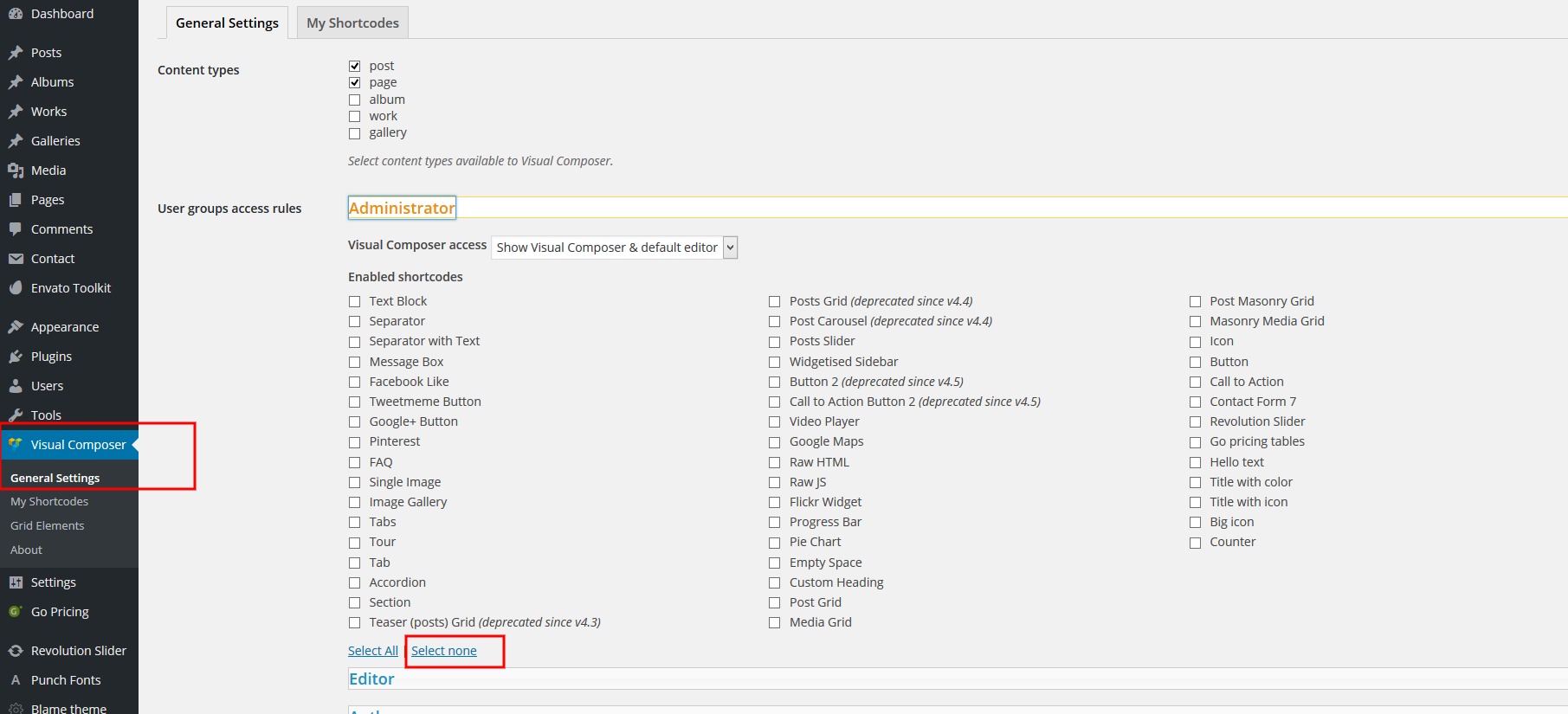
It seems this is common error. Just type the first view lines of the console error into Google and people are trying to get help.
I found the solution here, but clearly it should not be happening in the first place.
You just need to SELECT NONE under the User Groups Access Rules.
http://support.apollo13.eu/uploads/FileUpload/1f/bac1b0361e87b60df2ab325f01866d.pngHi, we will take a look at this issue. Thanks for pointing this out.
Knowledge Base ·
Official Support ·
Facebook ·
Twitter
Hi there, a couple questions:
1. Is it possible to add a custom post grid gap, for example 40px?
2. How to use a google font not in selection for Custom Heading?
Thanks.
Hi, by default max value is 35 pixels, but you can add extra class name to grid and then refer to it in Custom CSS.
Knowledge Base ·
Official Support ·
Facebook ·
Twitter

This item was featured on CodeCanyon

Power Elite Author
Contact the Envato Market Help Team