WooCommerce Pre Order Plugin
A pre-order is an order placed for an item that has not yet been released. The idea for pre-orders came when people found it hard to get popular items in stores due to their popularity.
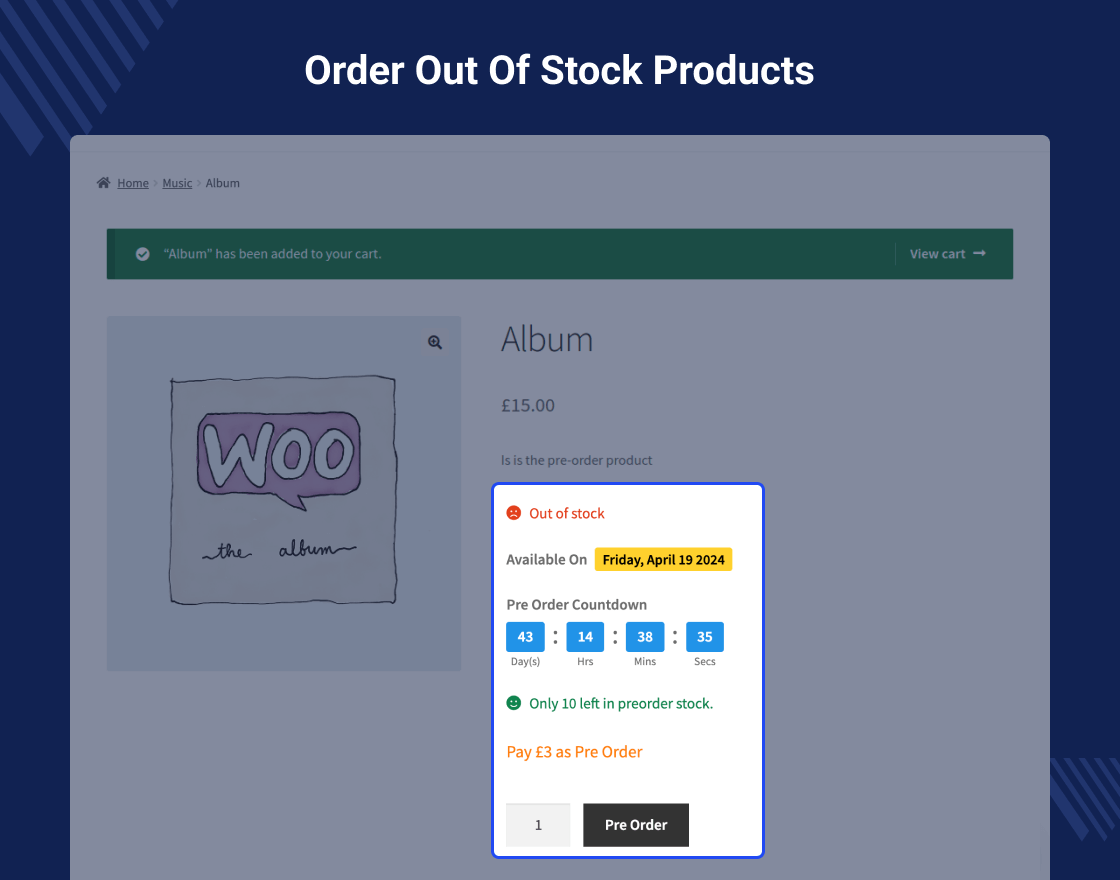
WooCommerce Pre Order Plugin allows the customer(s) to purchase a product from the store which is currently out of stock. And a customer can even purchase products which have not arrived at the store.
The plugin is very flexible in many ways as customers can order the items with multiple stock units with partial payment as well if allowed by the admin.
Note: If a client has applied ajax to the add-to-cart functionality via any third-party plugin on the product page then it will break the plugin functionality because by default WooCommerce does not support ajax to the add-to-cart functionality on the product page, it is applicable on all archive pages like shop, cart pages.
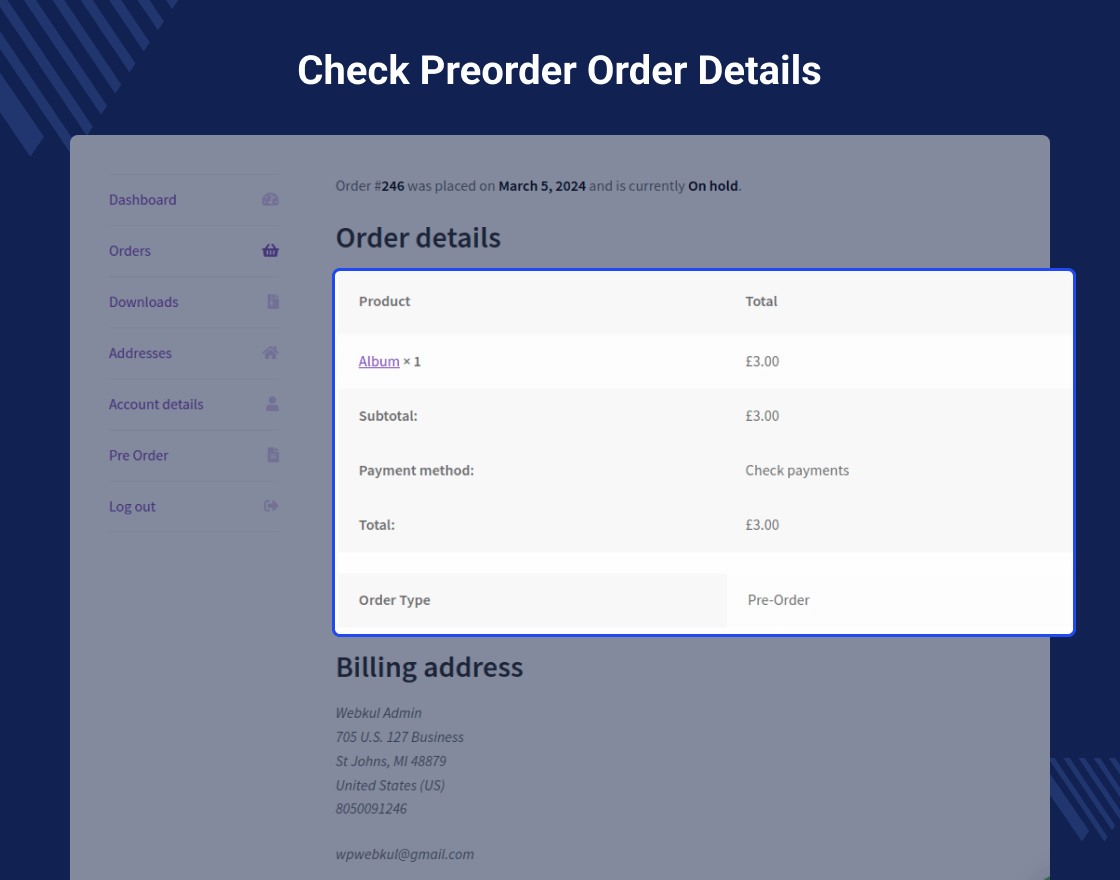
The shipping will not be generated at the time of pre-order, else it will be generated once the product will come back in stock and the buyer places the order again.
Note -
Video Preview
Why WooCommerce Pre Order Plugin?
Support
Dear Customers, if you have a question/query, please raise a ticket at webkul.uvdesk.com. We will do our best to answer as quick as it is possible. Don’t give us a low rate without contacting support on the issue you’ve faced with. We are always happy to help you.
Features Of WooCommerce Pre Order Plugin
- Works with types of products like Simple, Downloadable, Virtual, Grouped, and Variable.
- The customer can order out-of-stock products.
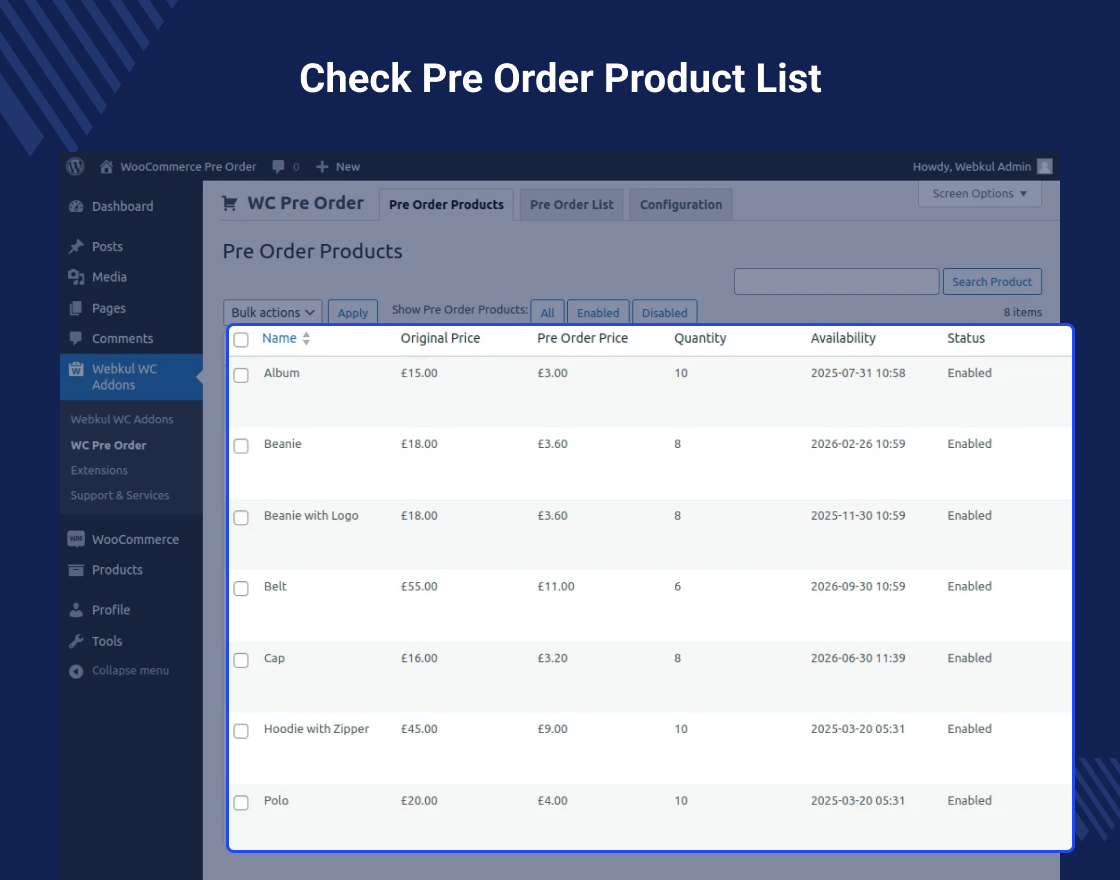
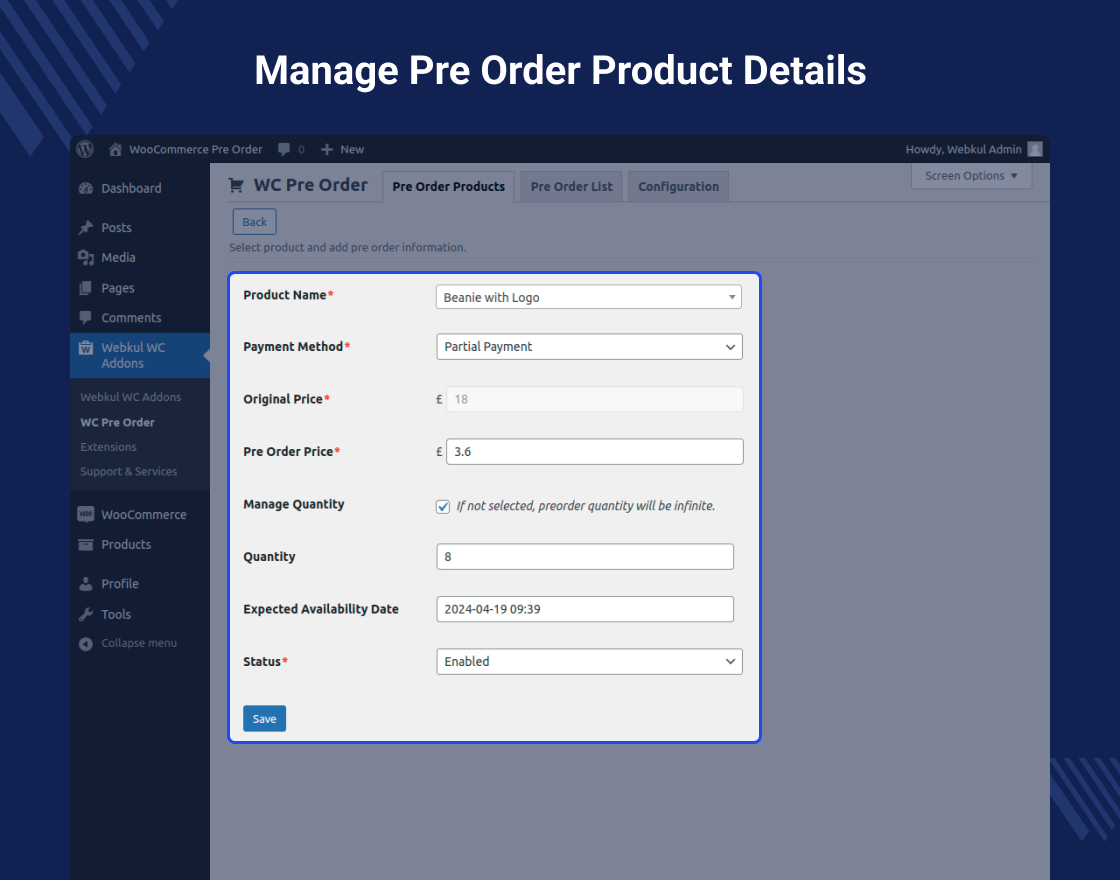
- The admin can set preorder status and availability date.
- The admin can set custom amount to be paid for pre ordered product.
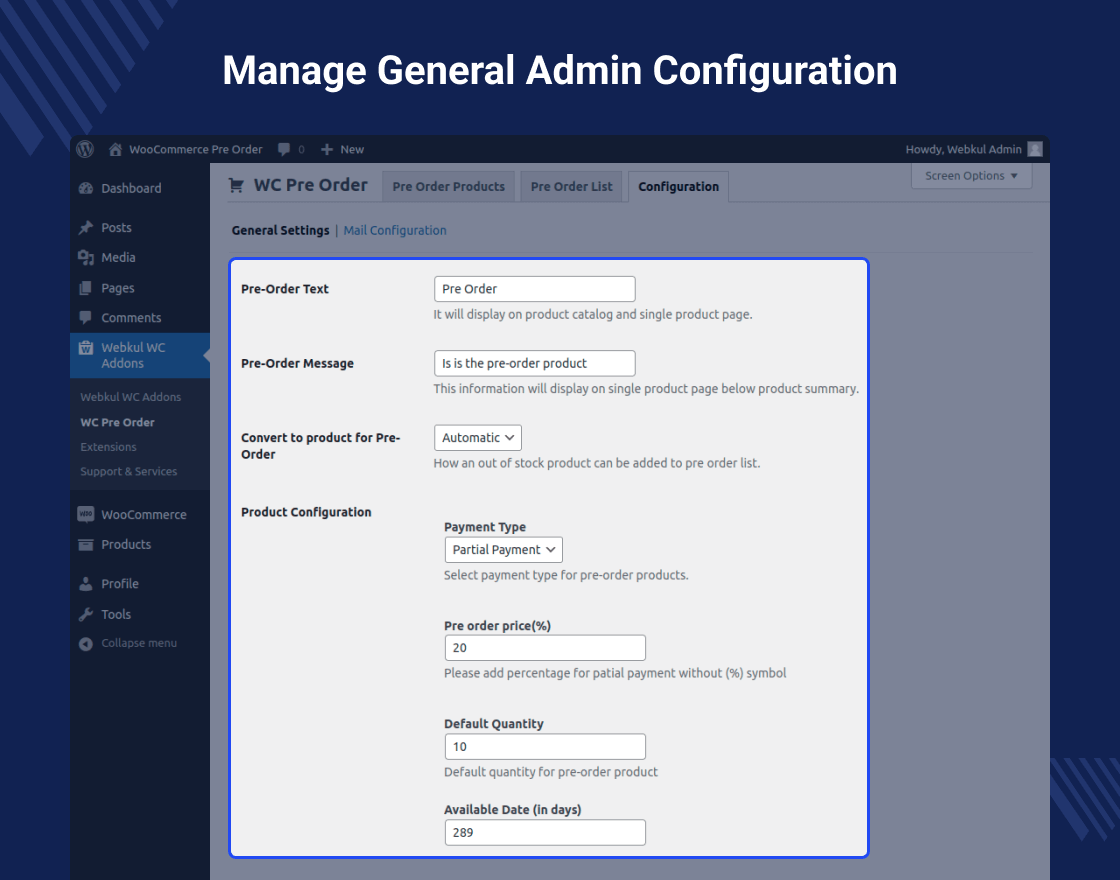
- The admin can set the add pre-order product permission as Automatic, manual, or both
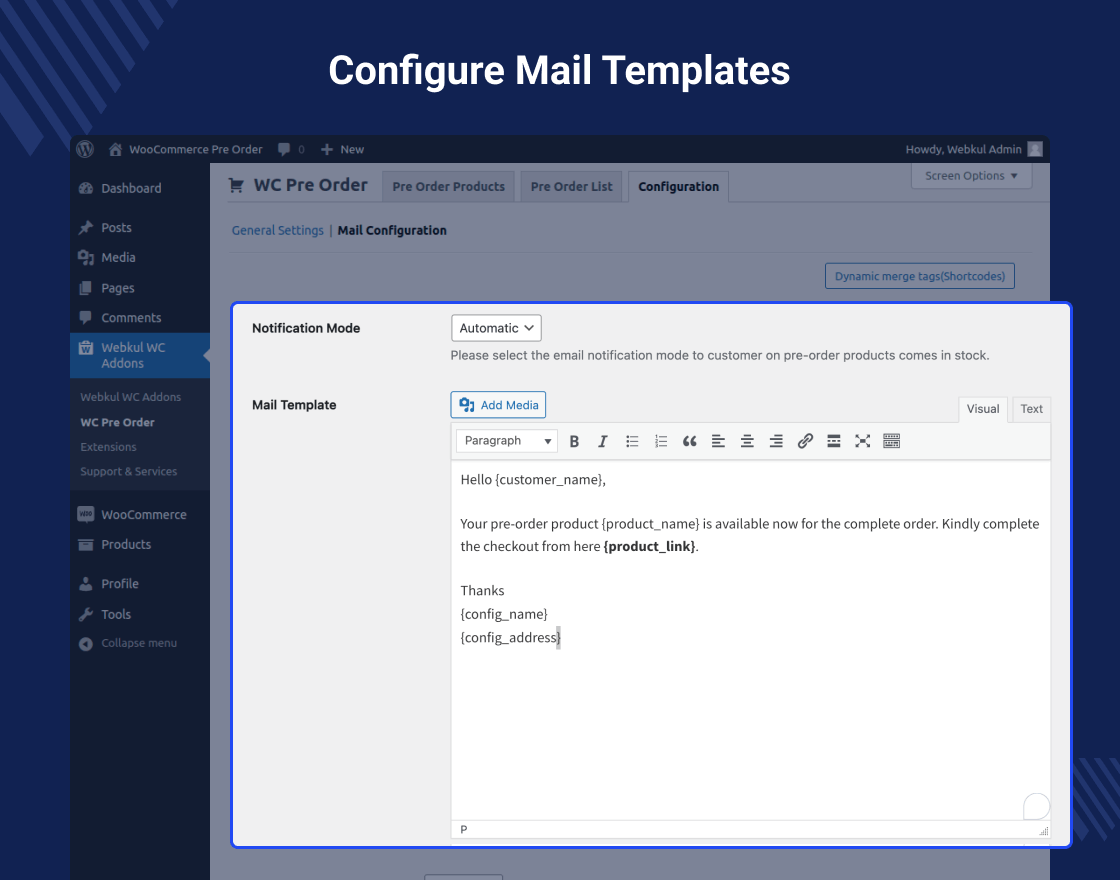
- The admin can set the email notification as automatic, manual, or both.
- Admin can add dynamic text on the pre-order button.
- Added a custom message on the pre-order product page.
- The admin can restrict any payment method for pre-order products like COD.
- By using this plugin customer can either pay the entire amount at once or can pay some of the amounts.
- Email notification to all registered customers for the new pre-order product.
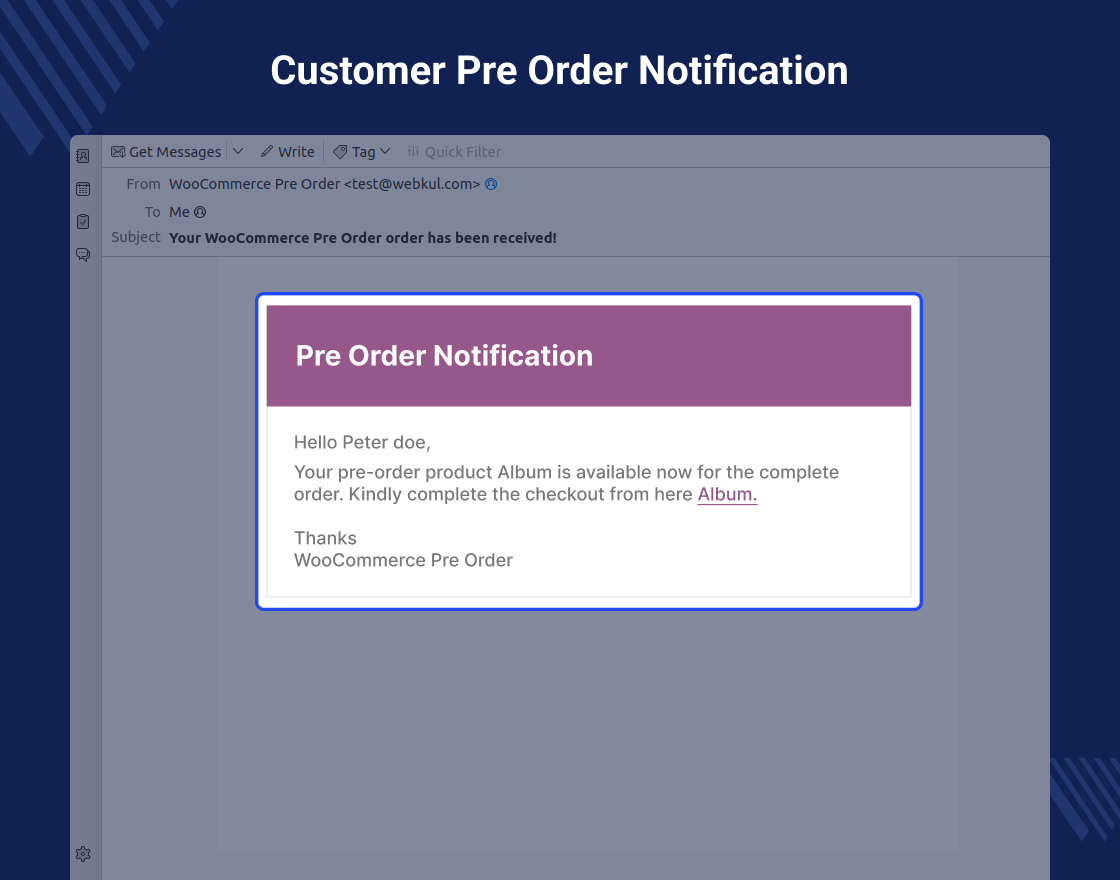
- Email notification to the customers once pre-order product available in stock.
- Admin can enable/disable the pre-order reminder email to all the customers.
- The admin can enable/disable the pre-order In-Stock reminder email to all the customers.
- Customers can combine pre-orders and regular products in a single purchase.
- Customers can include multiple pre-order items in one order.
Give Your Valuable Review
Highlighted Features
1 – Partial Payment
The module provides the option for advance payments, which can be either full or partial.2 – Notification Mode
Admin can choose to send emails automatically, manually, or both, ensuring customers receive notifications accordingly..3 – Arrival Date
The admin can set the product delivery date directly on the product page.4 – Product Addition Mode
The admin can specify the mode for adding pre-order products as automatic, manual, or both. .Business Use
WooCommerce Pre-Order Extension allows businesses to offer products for sale before they are officially available.
This helps store owners measure customer interest and predict demand before investing fully in production.
By letting customers place orders in advance, the extension ensures that popular items don’t sell out quickly after launch, improving customer satisfaction and loyalty.
This also serves as a marketing tool to create buzz and anticipation for upcoming products, maximizing sales opportunities in competitive eCommerce markets.
ChangeLog
"Initial release v 1.0.0" "Current release v 3.0.0"
v 3.0.0 (2026-04-22)

This is a major release that rebuilds the plugin's data storage from the ground up for better performance, adds full WooCommerce Block Checkout support, and introduces variable product pre-ordering.

= What's New =

* New: Full support for WooCommerce Block-based Cart and Checkout pages. The "Place Pre Order" and "Place Final Order" button labels, deposited/remaining price badges, and stock validation all work seamlessly with the block checkout.
* New: Pre-order support for variable products and individual variations. Customers can select a variation and place a pre-order just like a simple product.
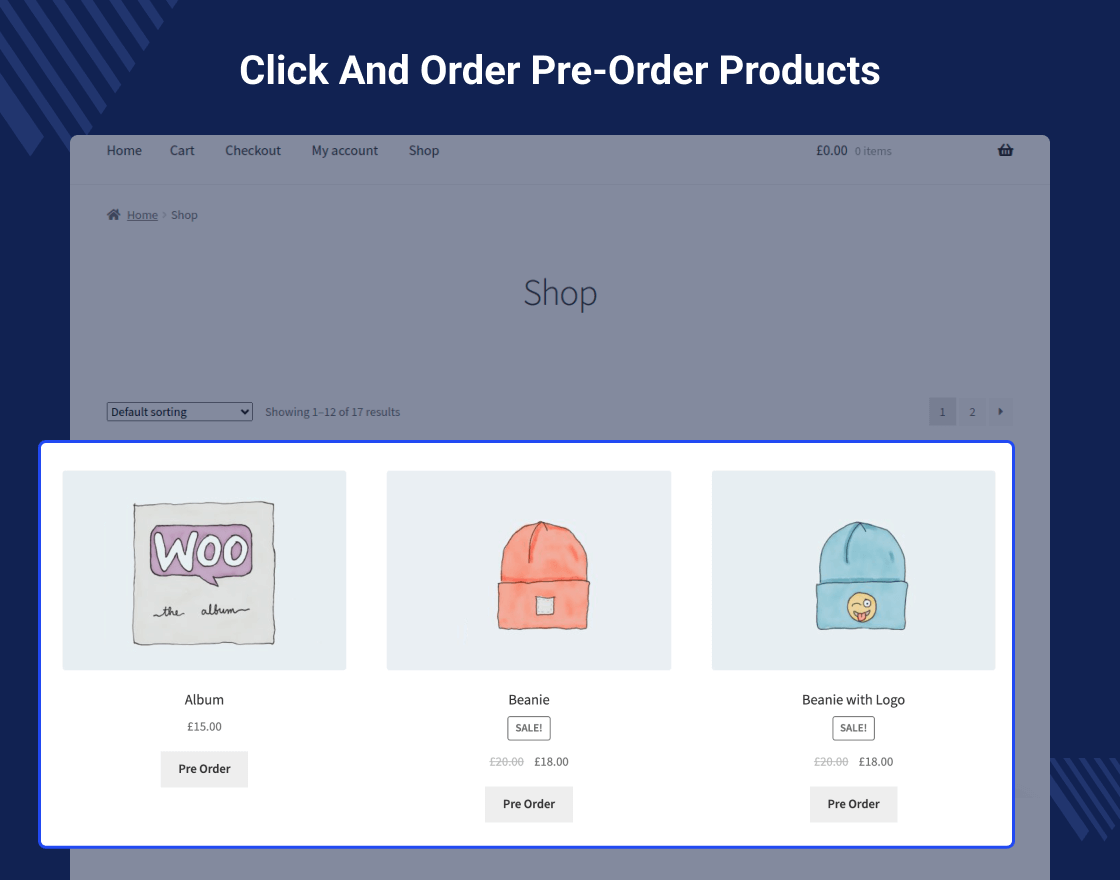
* New: Dedicated Pre-Order Products page on the frontend with pagination, displaying all available pre-order products in a shop-like layout.
* New: Pre-order countdown timer on single product pages with three display styles — Compact, Small Block, and Big Block. Configurable from admin settings.
* New: Richer pre-order status tracking with five states — Pre Ordered, Completed, Cancelled, Notified, and Notified Again — giving admins and customers clearer visibility into the pre-order lifecycle.
* New: "Complete Final Order" button on the customer's order view page. After receiving the in-stock notification, customers can click to add the product to their cart at the remaining balance price and complete the payment.
* New: Pre-order configuration auto-disables when a product comes back in stock, regardless of notification mode (automatic, manual, or both). New visitors immediately see the regular price.
* New: Option to enable or disable coupon usage for pre-order products from the admin panel.
* New: "Deposited amount" and "Remaining amount" labels in the cart and mini-cart for pre-order line items.

= Improved Performance =

* Improved: All pre-order data now stored in dedicated custom database tables instead of WordPress meta. This eliminates expensive database JOINs on stores with large order volumes.
* Improved: The "My Account > Pre Orders" page loads significantly faster — uses a lightweight indexed query instead of scanning the entire orders table.
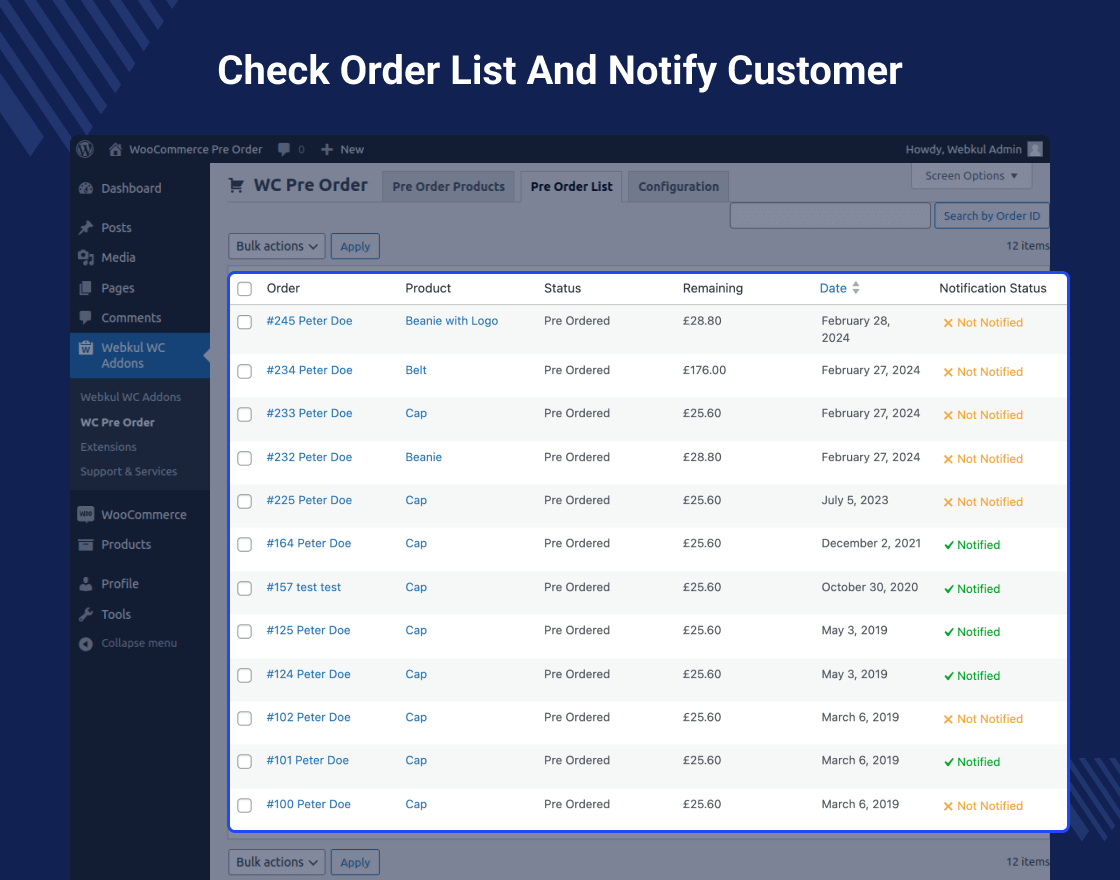
* Improved: Admin Pre Order List loads directly from the custom table with built-in pagination and search by order ID.
* Improved: Automatic data migration from the old meta-based storage runs in the background via Action Scheduler after upgrading. No manual steps required.

= Admin Improvements =

* Improved: Pre Order List now shows five clear status labels — Pre Ordered, Completed, Cancelled, Notified, and Notified Again — with a notification badge for each row.
* Improved: "Notify" and "Notify Again" row actions are automatically hidden for completed and cancelled pre-orders.
* Improved: Bulk notify action shows a clear error message when trying to notify completed or cancelled pre-orders.
* Improved: Expected availability date on the admin order page now reads from the pre-order configuration instead of legacy order-item data.
* Fixed: Pre-order quantity was not being saved correctly when products were auto-converted to pre-order on going out of stock.
* Fixed: Availability date was not migrated properly during the upgrade from older versions.
* Fixed: Quantity restoration on order cancellation was not working due to incorrect data source.

= Customer-Facing Fixes =

* Fixed: Variable product variations can now be added to the cart as pre-orders without the "not enough stock" error.
* Fixed: Block checkout no longer rejects pre-order products during payment with a "not enough units in stock" error.
* Fixed: Customers who completed a pre-order cycle now see the regular price when purchasing the same product again.
* Fixed: "Complete Final Order" button now appears correctly for both customers and admins viewing the order page.
* Fixed: Cart correctly shows the advance price for initial pre-orders and the remaining balance for final orders.
* Fixed: The "Pre Order" button text now displays correctly on the shop loop for pre-order products.
* Fixed: Out-of-stock pre-order products remain visible in the shop catalog when "Hide out of stock items" is enabled in WooCommerce settings.
* Fixed: Mini-cart price display for pre-order products.
* Fixed: PHP 8.1 deprecation warning on pre-order product listing page pagination.

= For Developers =

* New: Dedicated helper classes for querying custom tables — flexible filtering by order ID, user ID, product ID, status (including array-based IN queries), with pagination and sorting support.
* New: Playwright end-to-end test suite covering the complete pre-order lifecycle across four phases (product creation, customer pre-order, admin notification, balance payment).
* Changed: Pre-order status checks now return 'enabled' or empty string. All callers should use `'enabled' === $status` instead of `wc_string_to_bool()`.
* Changed: Store API cart-item extension namespace `wc-woocommerce-pre-order` exposes `is_preorder`, `preorder_id`, and `label` fields for custom block integrations.
* Changed: Webpack build produces `frontBlock.js` with Store API integration. Run `npm run build` to rebuild
2.4.1 (2025-02-03)

Added: Compatibility with the latest WooCommerce version.
Fixed: Security and validation issues.
2.4.0 (2025-01-29)

Added: Enable customers to place pre-orders and regular products together in a single order.
Added: Allow customers to add multiple pre-order products in a single order.
Fixed: Fixed an issue where Pre-Order products were not appearing on the Pre-Order Products page in the admin panel when "Convert to product for Pre-Order" was set to "Automatic," and all quantities of a product were purchased by a user.
Added: Implemented a tooltip on the "Create Pre-Order" page to provide additional information.
v2.3.7 (2024-11-29)
Added: Script to show plugin updates when a new version is available. It can be updating directly from the plugin page similar to native wordpress plugins.
Fixed: Issues with searching product in admin for adding to pre-order limited to 10.
Fixed: Pre order quantity is not decreasing when all or 1 quantity checked out.
Fixed: Pre order description was not showing on single product page for variable products.
Fixed: Negative values were accepting in availability date.
Fixed: Notices when search product does not exist on pre-order page.
Fixed: Notify option were showing for out of stock products.
Fixed: Pre order price showing zero in case of automatic conversion.
Fixed: Email notification was not sending automatically on products comes in stock.
Fixed: In stock email sending again and again on page refresh after notifying.
v2.3.5 (2024-06-14) ==
Fixed: Issue with remaining amount calculation on final order.
v2.3.4 (2024-06-03) ==
Added: WooCommerce Cart and Checkout blocks compatibility.
Added: Link to product in preorder mail reminder notification.
Updated: Coding structure and optimized for performance improvements.
v2.3.2

Added: WooCommerce High-Performance Order Storage (HPOS) feature compatibility.
Added: PreOrder Menu under our global Webkul WC Addons Menu.
Added: Compatibility up to PHP - 8.3 versions.
Added: Notify again feature for already notified pre-orders on products in-stock.
Added: Product name column in the pre-order listing.
Added: View order link merge tag in in-stock mail notification.
Changed: Place Order button to 'Place Pre Order' and 'Place Final Order' on checkout.
Fixed: Issues with variable products adding to pre-order.
Removed: Unused default pre-order status settings and related code.
Removed: Support for grouped and external products as it's creating feasibility issues.
Moved: Pre-orders from the customer list to final WooCommerce order after completing the order on availability.
v2.3.0
Added: Dynamic text for the pre-order button
Added: Custom message for pre-order product page
Added: Notification Mode
  * Automatic - Notify customer automatically when the product is in stock
  * Manual - The admin will notify to customer manually
  * Both - Both will work.
Added: Admin can decide how they can a product be added for pre-order
  * Manual -> Admin will add product for pre-order manually
  * Automatic -> Product will automatically add for pre-order
Added: Admin can decide how a can product be added for pre-order.
Added: Notification Status ( Admin can decide in which stock status the customer will notify automatically)
Added: Admin can decide in which product stock status product will add for pre-orders
Added: AddToCart button with the remaining amount on the customer order view page where the customer can add the same product into the cart instead of going to the product page and then add
Added: Dynamic mail template.
Added: Payment restriction feature for pre-orders.
v2.2.2
Added: Product search functionality on Add Pre-order form
Added: WPML Email compatibility
Added: Support&Service feature
Fixed: Phpcs issues.
v 2.2.1
Fixed: fatal error and notice error.
v 2.2.0
Added: Compatibility with Woocommerce v6.3.1
Added: Pre-order list section in admin end.
Added: Orders search and filter in customer Pre Order section.
Added: Admin enables/disables preorder product in bulk.
Fixed: Coding structure according to WordPress coding standards.
Fixed: Compatible with woo-commerce 5.9.0 and WordPress 5.9.x
Fixed: Time management in admin creates the preorder product.
v 2.1.5
Fixed - Admin end Navigation Menu issue.
Fixed - Mini Cart Pre Order Product Price Change.
Fixed - Variable Product Pre-order Timmer issue.
Fixed - Admin Shipping adding issue.
Fixed - Order cancellation issue.
Added WooCommerce Pre Order Email Template.
Added support with WooCommerce Option "Hide out of stock items from the catalogue" option enabled.
v 2.1.4
 Allow Preorder product to add to the cart, while another product is already in the cart.
 Fixed - checkout issue for WooCommerce 4.x.x version
v 2.1.3
Fixed: Pre Order price float value issue fixed.
Update :  post_author check removed for adding pre-order product.
v 2.1.2
 Added: Added client-side validations on add preorder product page.
 Added: Added Final Order button in order view page at customer end.
 Added: Added settings in the backend to enable/disable the emails on the performed action.
 Fixed: The fixed flow of the final order after the preorder.
 Fixed: Fixed issue of displaying add to cart button on the grouped products page in guest login.
 Fixed: Fixed issue of displaying a preorder button after the countdown expired on the product page.
v 2.1.1
Fixed: Fixed compatibility issues with the latest WooCommerce(3.6.0).
Update : Updated pre-order product page view.
v 2.1.0
Added: Added feature to add grouped products as a preorder.
Update: Updated overridden cart as new woocommerce update.
Update: Overridden woocommerce session.
Added : Added validations.
Fixed: Fixed mail issues.
Fixed : Fixed security issues.
v 2.0.2
Update : Added Translation Support.
v 2.0.1
Update : Compatible with Woocommerce 3.3.x
v 2.0.0
Update: The preorder product acts as a standalone product now.
Update : Compatible with WooCommerce 3.2.x
Update: Preorder products order listing on the customer end.
v 1.2.0
Fixed : Datepicker Issue resolved.
Fixed: Language Translation related issue fixed.
v 1.1.0
Update : Compatibility with WooCommerce 3.2.x
Update : Updated backend setting and cart file.
Fixed : js issue fixed for variable product
Fixed : Shipping calculation bug fixed
v 1.0.0
Initial release