

8731 comments found.

Hello,
I have a couple of pre purchase questions just to make sure this plugin will work for me :
1. does the plugin support google AI translator and Amazon API translator ?
2. can I use the plugin to scrape content from any website ? even if it uses javascript ?
Thank you
Hi,
1. No
2. Yes
Regards, Atef
I’m facing an issue while fetching products from Amazon as some products are coming with full details and some are not even fetching the images. Kindly assist me as I’m trying to contact you guys since last week. (Open a ticket as well on http://deandev.com/support)
Best Regards, Sarwar
Hi Sarwar,
I replied to your ticket but found that you are opening new tickets regarding the same question, I also sent you a direct email with the ticket link so you can follow up to this ticket
also check if the email notification sent to the spam folder or something
Regards, Atef
hi i am facing that problem when using openai to rewrite content is there any way to solve that problem
- Using model: gpt-3.5-turbo - Prompt text word count: 4208 - Prompt text word count is longer than 1400, trimming the text to 1400 words - AI prompt error: This model’s maximum context length is 4097 tokens. However, your messages resulted in 5647 tokens. Please reduce the length of the messages.
even if i Truncate content to a specific number of chars it didn’t rewrite content it work well in title but content not work at all
Hi,
You will need to either truncate the content to lower length that is tested to work or use the 16k model which supports longer content legnth
Regards, Atef
i actually try all of it no thing work - Using model: gpt-3.5-turbo-16k - AI prompt error: Server output is not json - Using model: gpt-3.5-turbo-16k - AI returned content length: 108 OpenAI Failed, setting as pending
i am rewrite arabic articles is that may be cause that problem ?
i will try test for english articles may be work but i need it for arabic not english
I think and it is a suggestion at the same time that you need a way to divide the paraphrasing process in openai for a certain number of words on several times and not the entire content at one time so that openai can do the paraphrasing without problems in stable version and all versions i think
after many testing yes its because arabic language , with english every thing is fine
We have a help desk setup for support. Please open a support ticket here and provide detailed information so we can check it further.
http://deandev.com/supportRegards, Atef
Hi,
When I try to import data from Aliexpress, I’m getting following error/ message from Aliexpress:
“Sorry, we have detected unusual traffic from your network.”
???
Hi,
This could be because AliExpress is blocking your server IP and you will need private proxies in the plugin settings page to be used as the connection IP instead of your blocked IP
For assistance, We have a help desk setup for support. Please open a support ticket here.
http://deandev.com/supportRegards, Atef
Hi we are interested in purchasing your this wordpress plugin and we are willing for make a bulk order of 36 license for our agency clients, but we need this feature:
ability to post multiple number of images from Pinterest in single post (we need option to control numbers of images)
And if possible option to control the images size as well it will post on wordpress from Pinterest
Thanks we are waiting for you to release this feature as soon as you release this feature let me know by comments so that we can make our order
Thanks
Hi,
Thanks for your feedback, right now, the plugin imports a single pin per post
Regards, Atef
I Got this error after update plugin & wordpress, Error:WP HTTP Error: cURL error 28: Connection timed out after 10000 milliseconds,
Seems that your server can not connect to the remote source server maybe due to the source server is blocking your server IP
If this is the case, then private proxies can be used on the plugin settings page
if you have any further issue/question, We have a help desk setup for support. Please open a support ticket here.
http://deandev.com/supportRegards, Atef
Amaozn capmaign sale price sometime ok sometime wrong add and categories not set (tik on Set the post categories from the original product categories ) I’m using Cloudways DigitalOcean server
Please provide a sample item link that its sale price or categories was not correctly imported
Regards, Atef
i have bought two items by mistake, i just want one, i have downloaded just one and the other still not downloaded yet, can i return this item
No problem, you can submit a request here https://codecanyon.net/refund_requests/new
Regards, Atef
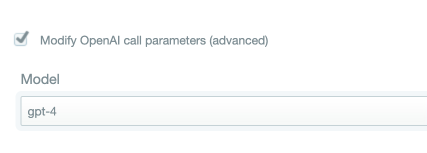
Can the browser only access GPT 3.5 content, or can you also switch to GPT 4?
Not sure what do you mean by “browser” here while the plugin can use the gpt-4 model if you already have access to it throw the API
Thanks a lot man !
No problem, You are welcome 
I have been using Google translate from long time without any issues, but from few days the Google translator is not working. Please help? I don’t understand what went wrong???
Update your plugin to the latest version 3.73.0 by visiting the plugins tab and click on the update now link
If you can not update automatically, here you can find detailed steps to update manually http://valvepress.com/how-to-update-plugins-from-valvepress/
Regards, Atef
I have a folder with 4000 pages of html – I want to import them into the same site wordpress – How do I do it?
We have a help desk setup for support. Please open a support ticket here and provide detailed information including a screenshot to this folder and where does it exist exactly and the content of every file.
http://deandev.com/supportRegards, Atef
Hello, is it possible to add tags to the post with artificial intelligence in this plugin? Exactly what I want: for each post created with wpaautomatic, artificial intelligence (as I used for the title and post) add tags to the post. [gpt] hey artificial intelligence, can you create 5 tags related to this post [/gpt]. I want this as wordpress tag, but wpaautomatic artificial intelligence only works for post and title. Thanks for the answer.
Hi,
you can check this tutorial
https://valvepress.com/how-to-automatically-generate-wordpress-tags-using-openai-gpt-api/If you have any further issue/question, We have a help desk setup for support. Please open a support ticket here.
http://deandev.com/supportRegards, Atef
Thank you very much.
You are welcome
Hello, you might already noticed this issue since I saw somebody else was already posted the same question here. I am trying to do Amazon Japan, but all descriptions imported in English, not Japanese. I need it imported the original which is in Japanese. Please let me know how you can fix this. Thanks.
Hi,
You have to make use of this option
make sure to set the language to the desired language on amazon site before adding the cookies
Regards, Atef
Thank you!! It works now.
Just FYI, I have ubid-acbjp and ubid-tacbjp, and I use “ubid-acbjp” id. kdp-lc-jp & lc-acbjp are “ja_JP”.
Also, I think I need to edit “core.amazon.php”, right? I found price_currency and price_numeric. Please let me know what other files I need to edit. Or please let me know any other easier way. Thank you
Not sure why do you want to edit the plugin files. Comments is not supposed to be a place for support. We have a help desk setup for support. Please open a support ticket here if you have any further issue/question or follow up.
http://deandev.com/supportRegards, Atef
can we limit the character limit that we scrape, for example we only scrape 700 words
Yes, the plugin can truncate the content to the desired length
Regards, Atef
Hi,
Regarding the translation option, is it the normal google translate free service or google translate AI paid service, I am asking because I will purchase google ai translate service, will I be able to use it integrated with this plugin for better quality translation?
also can I use Amazon Translate API ? integration with ths plugin
Hi Atef, I am trying to test on demo website , I tried to crawl articles from websites ( tested two different webs) and I used the multi page scrapper option, I don’t. know why it’s not working with me and I am receiving this error: Error:Provided XPath does not contain the a tag.
can u please clear what am doing wrong ?
We have a help desk setup for support. Please open a support ticket here after purchase if you have any issue/question.
http://deandev.com/supportRegards, Atef
Hello Atif,
Thank you for your response, actually those are pre purchase questions just to make sure this plugin will work for me , ok please help me answer those questions before I purchase :
1. does the plugin support google AI translator and Amazon API translator ?
2. can I use the plugin to scrape content from any website ? even if it uses javascript ?
a question before buying, if I want to copy the news from a website with categories, titles and photos, but I don’t know what the “feed” is, how could I create a campaign after automatically obtaining the news published by that site
The plugin can import from other sites using RSS feeds and Multi-Page scraper where it can import from the site directly without the need to an RSS feed
You can check both tutorials here
https://www.youtube.com/watch?v=YgN5Hv3eJms https://www.youtube.com/watch?v=Q73nJaMkAH8 and give the live demo a try here to make sure that it suits your needs http://preview.codecanyon.net/item/wordpress-automatic-plugin/full_screen_preview/1904470The feeds module can import the latest 10 posts from the site + all coming new posts
The Multi-Page scraper can paginate and import older posts as well
Regards, Atef
Hello Atef,
I have three pre purchase questions please,:
1. Do I have to pay for thebestspinner.com to use spinner services with this plugin ?
2. Does it support integration with services like word ai ?
3. I will translate the generated content using MS AI Translator , do you think I will need services like word ai , or I can just use services like gpt rewrite to generate unique content as possible?
Hi,
1- Yes if you want to use this service for rewriting, you will need to subscribe to their service
2- No, while our other plugin WP Auto Spinner can integrate with WordAI to rewrite the content of WP Automatic as well
3- both options are available so you can choose what suits your needs
Regards, Atef
hello this last update does not extract the date of the original publication in multi page scraper only in feed
Hi,
It depends on the format of dates on the original site, further config may be required if it does not work without extra config
We have a help desk setup for support. Please open a support ticket here.
http://deandev.com/supportRegards, Atef
Currently the plugin is still performing the translation
The plugin can translate normally using many translation services including Google translate, Deepl, MS translator and more
Regards, Atef
Hi Atef. I know you have the option to translate. But do you currently do the translation? I have always used Google Translator. I’m honest, by mistake, thinking it was the original, I bought this plugin from another and currently it doesn’t do the translation for me, it used to. Thank you very much.
Plugin must be purchased from CodeCanyon where is sold exclusively and Translation currently works normally
Hello. I want to specify a page for posts that are automatically posted and I want to know what ‘Parent page number’ is and where I can find it
Hi,
You can either set the campaign to assign the posts to a specific category or tag the imported posts with a specific tag
WordPress creates a dedicated URL for every category that displays all the posts from this category
it also creates a dedicated category for every tag that displays all posts tagged with this specific tag
-Parent page number sets the parent page if you are importing as pages and not as posts
parent page is a pages feature where a page can be the parent for another page and this helps in display on the main menu on the site if you display pages
this should not help if you are importing normal posts so you can use the advise above and then use the unique link for the category or tag to display in your menu or anywhere
Regards, Atef

This item was featured on CodeCanyon

Power Elite Author
Contact the Envato Market Help Team


