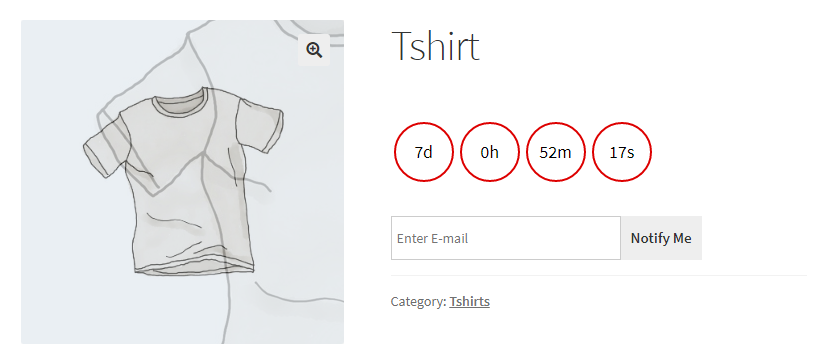
WooCommerce Product Availability Scheduler Plugin empowers merchants to schedule product availability. A scheduled product will not be purchasable until the time has expired or disabled the scheduler. The scheduler works for all types of products. The plugin allows scheduling specific products or scheduling products by categories or a global scheduler for all products based on settings. Allow customers to enroll for the availability of the product by email address; when the product will be available the notification email can be sent to all enrolled customers for the availability of the product. The notification email can also be sent before the availability of the product, based on settings. The plugin uses WordPress’ cron jobs to check the time expiration of the scheduled products, with multiple time ranges. Set auto or manual availability for the scheduled products.
Key Features:- Schedule products’ availability to increase sales.
- Allow customers to subscribe to the availability of the product.
- Set product availability automatically or manually.
- Count down timer & custom messages for scheduled products.
- Notify Customers when the product is available automatically.
- Schedule products on product level, category level, and global level.
- Supports variations of variable products.
- Allow customers to enroll email for scheduled products so that when the product is available notification email will be sent to the enrolled email.
- Allow/Restrict guest users for scheduled product enrollment.
- Notify enrolled emails by using WordPress’ cron jobs.
- Add description text before/after the timer.
- Set notification settings that the enrolled emails should be notified of the availability of the product, one day before the availability of the product or before one week.
- With special tags get the product name and product link in the notification email body to create the template.
- Download the .zip file from your CodeCanyon account.
- Go to WordPress Admin > Plugins > Add New and Upload Plugin with the file you downloaded with the Choose File button.
- Install Now and activate the plugin.
Frontend View of the WooCommerce Product Availability Scheduler Plugin
Timer on Variation of Variable Product
Timer on Simple Product
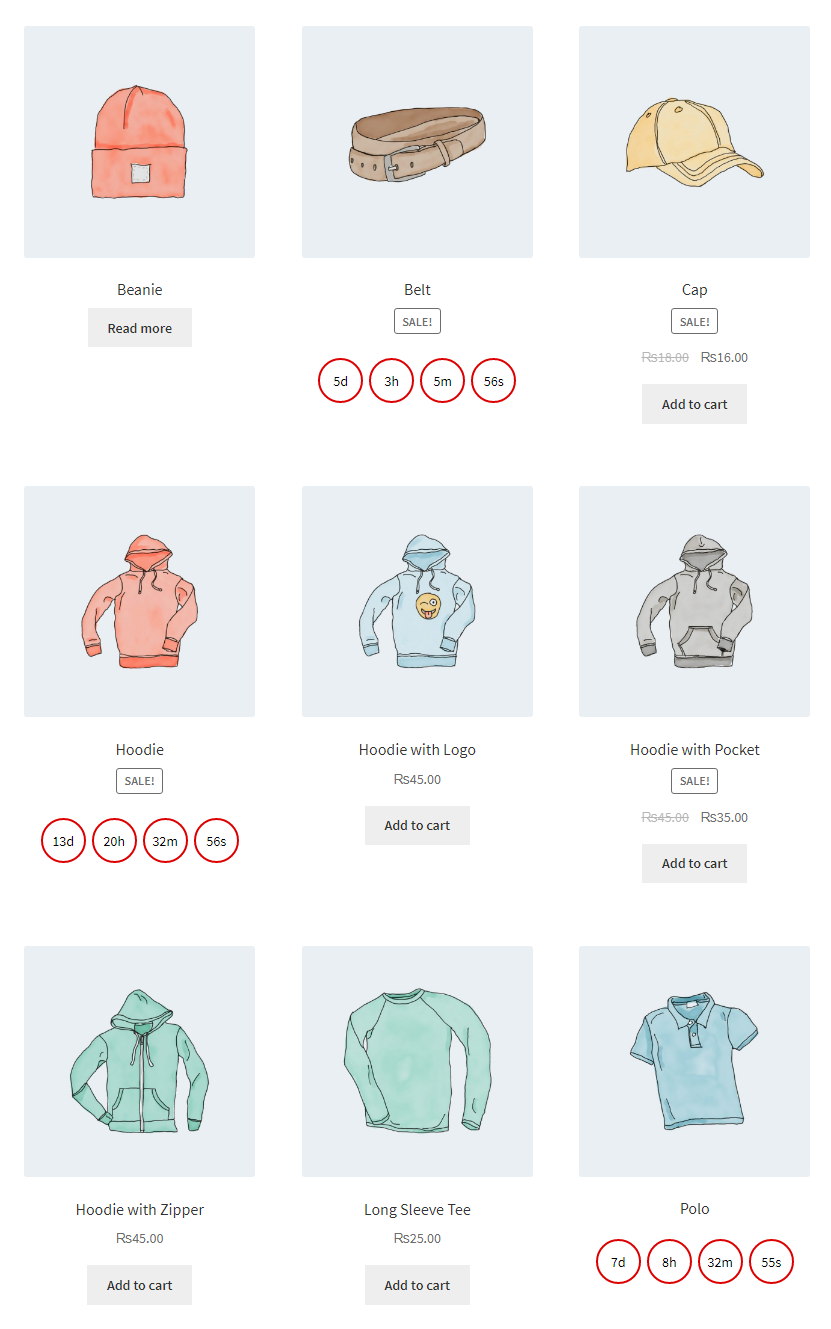
Timer on Product store page/Product loop
The timer will be removed from products when the schedule expires.
Customer Feedback and Success Stories
How To Setup WooCommerce Product Scheduler Plugin
After installation, you can configure the following options as per your requirements.
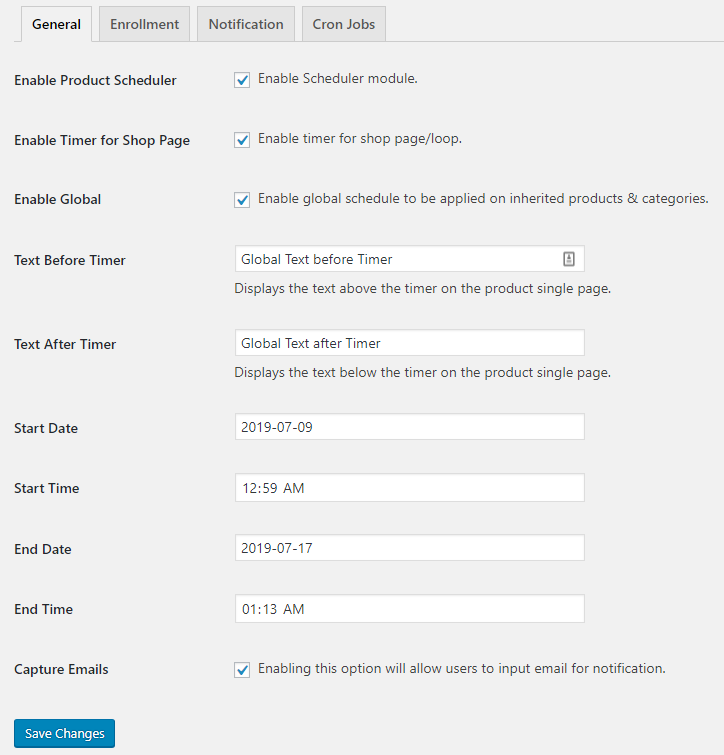
General Settings
- Enable Timer for Shop Page: This option disables/enables the timer for Shop Page.
- Enable Global: Enable global schedule to be applied to inherited products & categories.
- Text Before Timer: Displays the text above the timer on the product single page.
- Text After Timer: Displays the text below the timer on the product single page.
- Start Date: You can set the starting date of the scheduler from here.
- Start Time: You can set the starting time of the scheduler from here.
- End Date: You can set the ending date of the scheduler from here.
- End Time: You can set the ending time of the scheduler from here.
- Capture Emails: Enabling this option will allow users to input email for notification.
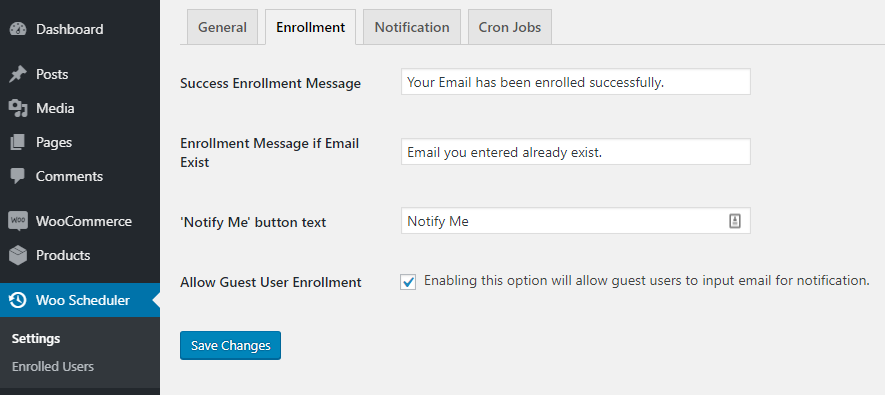
Enrollment Settings
- Success Enrollment Message: You can specify a message for users when they enroll for the scheduled product.
- Enrollment Message if Email Exist: You can specify a message for users when they enroll for the scheduled product with the same email again.
- ‘Notify Me’ button text: You can specify the button label (enroll user for the scheduled product) from here.
- Allow Guest User Enrollment: Enabling this option will allow guest users to input email for notification.
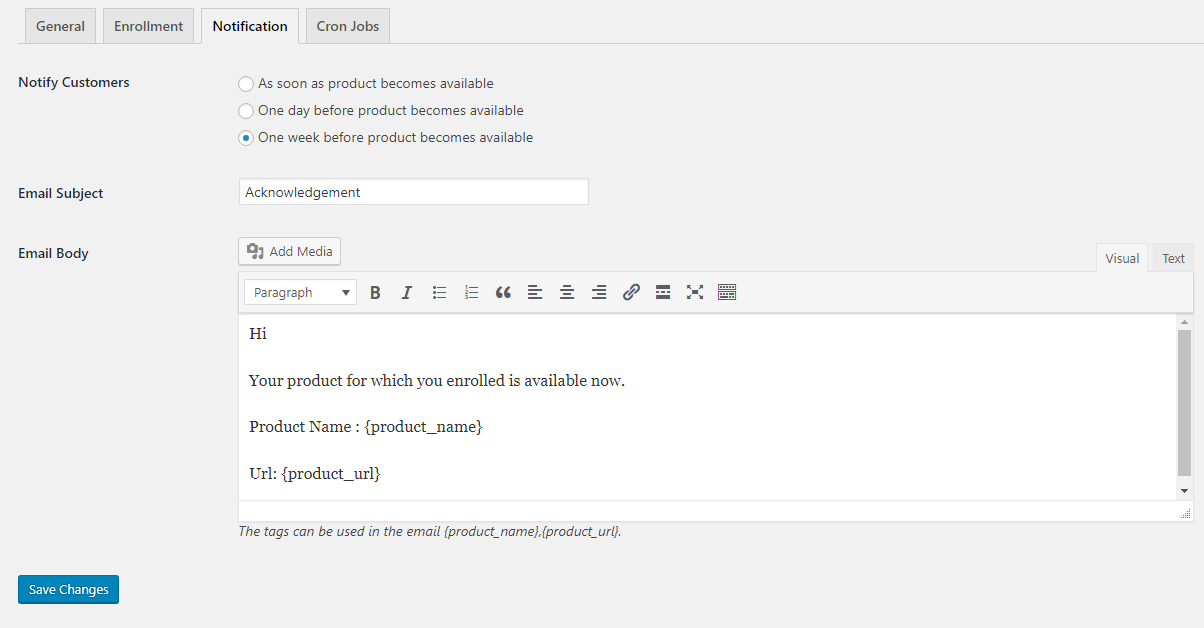
Notification Settings
There are three types of notifications, you will be:
- Notified you as soon as the product becomes available.
- Notified you one day before the product became available.
- Notified you one week before the product became available.
You can specify the Email notification subject from here.
Email Body:
You can specify the Email body from here. There are some special tags like {product_name} and {product_url} you have to leave them as it is, otherwise you won’t be able to get the product name and product link in your notification email body.
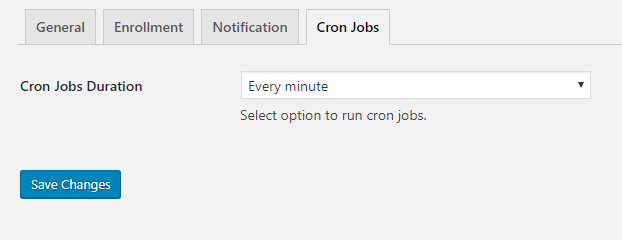
Cron Jobs Settings
Cron Jobs runs all schedules for specified time recurrently.
Cron Jobs Duration:
You can set cron job recurrence from here. So that it will run again and again until all schedules are completed.
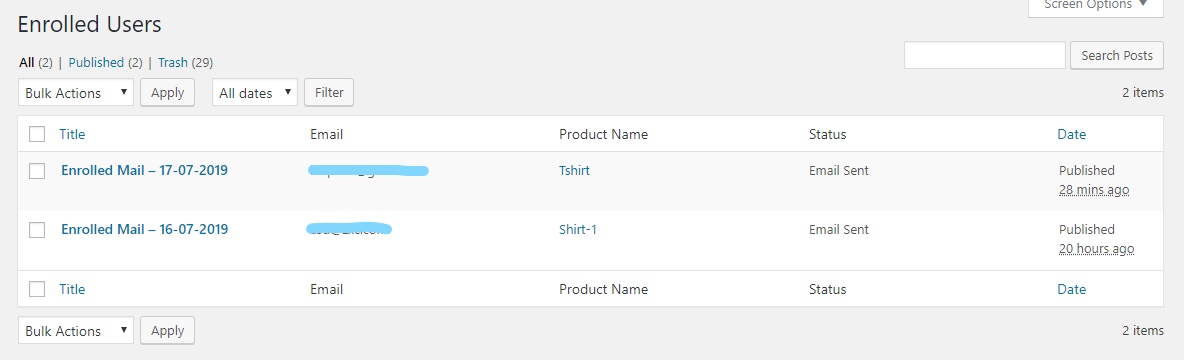
Enrolled Users
The above figure shows all enrolled users’ emails for scheduled products with the product name and status that email has been sent or is pending.
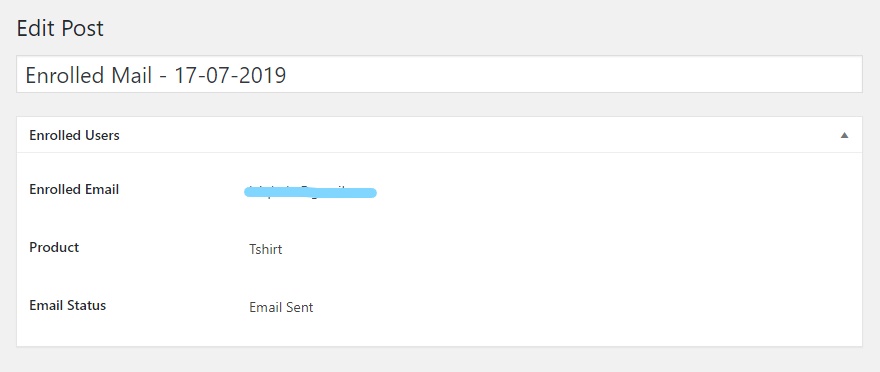
After clicking enrolled mail you will see all data individually.
Scheduled Products
This figure shows all products with extra information on scheduled products.
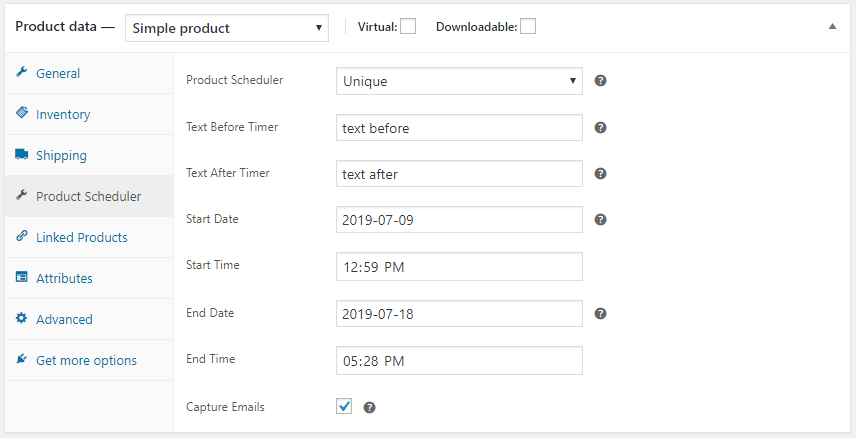
Schedule Simple Product
-
Product Scheduler: There are three options.
- Unique: Will select all scheduling options of that product.
- Disable: Disable the scheduler on that product.
- Inherit: Will select all scheduling options of that product’s category.
- Text Before Timer: Displays the text above the timer on the product single page.
- Text After Timer: Displays the text below the timer on the product single page.
- Start Date: You can set the starting date of the scheduler from here.
- Start Time: You can set the starting time of the scheduler from here.
- End Date: You can set the ending date of the scheduler from here.
- End Time: You can set the ending time of the scheduler from here.
- Capture Emails: Enabling this option will allow users to input email for notification.
Schedule Variable Product/Product Variation
We can also schedule all the variations of that variable product with the same settings as the simple product.
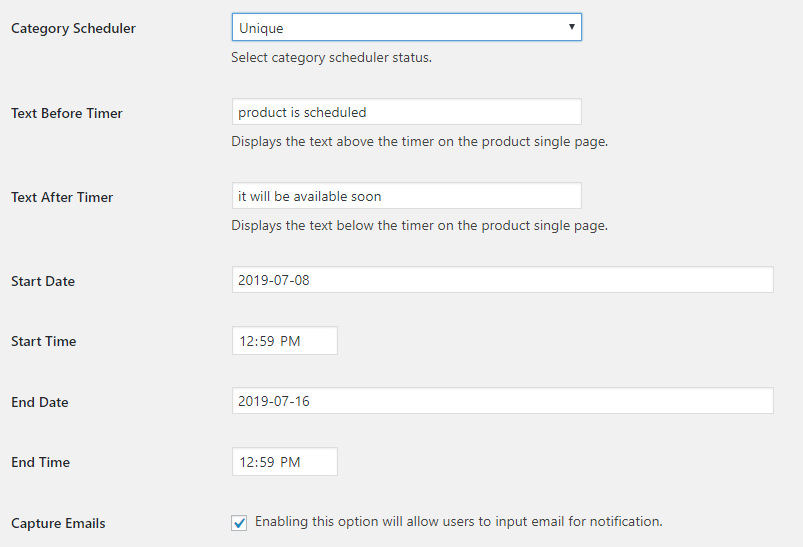
Schedule Product Category
We can also schedule product categories.
-
Product Scheduler: There are three options.
- Unique: Will select all scheduling options of that product.
- Disable: Disable the scheduler on that product.
- Inherit: Will select all scheduling options of the global setting.
- Text Before Timer: Displays the text above the timer on the product single page.
- Text After Timer: Displays the text below the timer on the product single page.
- Start Date: You can set the starting date of the scheduler from here.
- Start Time: You can set the starting time of the scheduler from here.
- End Date: You can set the ending date of the scheduler from here.
- End Time: You can set the ending time of the scheduler from here.
- Capture Emails: Enabling this option will allow users to input email for notification.
Changelog
Version 1.1.2
* Fixed - Cron duration not working properly.
* Fixed - Scheduled column not showing properly inside the Products admin page.
Version 1.1.1
* Added - Shortcode [woops_product_schdeule] to show schedule HTML on single product page to support page builders like Elementor, Fushion Builder etc.
Version 1.1.0
* Added - Support for single and per variation schedules for variable products.
* Added - Load the timer without delay on the front end.
Version 1.0.7
* Added - Fixed undefined PHP variable notices.
Version 1.0.6
* Added - Fixed issue on page edit for Divi builder.
Version 1.0.5
* Added - Support for Elementor Pro single product page to show scheduler status for the add to cart button widget.
Version 1.0.4
* Fixed - Product options not updating on latest WP version.
Version 1.0.3
* Fixed - Start date/time not working.
* Fixed - Variation price not displaying.
Version 1.0.2
* Added - Capability to show/hide availability date for currently not available products.
* Added - Capability to show/hide countdown timer.
Version 1.0.1
* Added - Schedule product in any timezone or for any country.
* Fixed - Timer End and product availability timezone difference issue.
* Fixed - Page load issues on timer end.
* Fixed - Product schedule inhering from global scheduled timer.
* Fixed - Product schedule inhering from scheduled timer for category.
* Fixed - Optimized code and security.
Version 1.0.0
* Initial Release.