

1446 comments found.

I’m having a bit of a problem with the export. I’m exporting custom taxonomies for WooCommerce, but some fields aren’t being included in the export.
Example https://joxi.ru/Q2K7NKZsw9OEy2 https://joxi.ru/l2Z6OJqhE8lQl2I wanted to try the demo version. It asks for the answer. I put in the correct answer and it says it is incorrect. And so on several times. Why? And then the question is how many simultaneous imports can it perform simultaneously?
Hi,
Sorry for the inconvenience.
The demo uses a security verification question to prevent automated access attempts. In some cases, the verification may fail because of browser cache, auto-fill, VPN/proxy, aggressive ad blockers, or a temporary session mismatch even when the answer is correct.
Please try the following:
- Refresh the page and try again
- Clear browser cache/cookies
- Try in Incognito/Private mode
- Temporarily disable VPN or ad blockers
- Try another browser
Regarding simultaneous imports:
The plugin supports unlimited simultaneous imports. The number of imports that can run smoothly at the same time mainly depends on your server resources, such as CPU, memory, PHP execution limits, hosting environment, and overall server performance. On a well-configured server, multiple imports can run concurrently without issues.
If you still cannot access the demo, please share a screenshot or the exact verification question shown on the screen so we can check it further.
Hello,
I have noticed that when I imported our orders onto the new site/server the time stamp is incorrect? Would it be possible to make sure it has carried over the same timestamp as the previous site/server? Thank you.
Hi. how it’s the actual situation with the issue about the update from v4 to v5? Still the issue that all templates are lost? it’s the same new interface? The newer woocommerce version are not compatible with the v4, and if I migrate to v5 and lose all the templates…
hi?
Hi,
Thanks for your question. Before updating, please go to Woo Import Export → Settings → Export Saved Settings and download your saved templates.
Please update to the current Version 5 — a new update will be released soon, and it will fully support your old settings, so your templates will not be lost.
Best regards,
VJInfotech
Thank you for your reply. So I need to wait to you publish the new version before update to get the option to import templates, right?
Hi,
Thank you for your message.
Yes, that’s correct — please wait for the next update. Once it’s released, you’ll be able to import your old templates safely, and everything will work smoothly.
We’ll notify you as soon as the update is available. If you have any questions in the meantime, feel free to let us know — we’re always happy to help.
Best regards,
VJInfotech
Hi, A few days ago I sent several emails from my profile—both through the platform and directly to your email address—but none of them have been opened. Are you on vacation?
Thanks
Hi,
Sorry for the delayed response.
Your license has now been deactivated and is free to use on another site. You can activate it again anytime on your preferred domain.
Thank you for your patience and understanding.
Best regards,
VJInfotech
Hi, No matter what I did, I couldn’t manage to import the reviews. Do you have a visual or written guide for this?
It seems you are more interested in those who don’t buy! 
Hello,
Thanks for reaching out!
You can contact me directly via my profile page at https://codecanyon.net/user/vjinfotech , and I’ll assist you with the review import process as soon as possible.
If you have any screenshots or sample files of what you’re trying, please share them as well so I can give you more precise guidance.
Feel free to reach out if you have any further questions.
Thank you, and have a great day! VJInfotech
Hello, I have tested the free version of Woo Import Export and noticed that mapping WooCommerce products requires the Premium version. Before purchasing, I would like to know if the Premium version will be compatible with the Tiered Pricing Table plugin (https://wordpress.org/plugins/tier-pricing-table/) so I can map its fields and perform scheduled imports.
If there is no certainty, is there any way to test the Premium version, and if it turns out not to be compatible, would a refund be possible?
Hi,
We haven’t tested it yet. It will work only as meta if the plugin saves extra data in meta and also in plain format. However, the chances are quite low.
Since the plugin is not very popular, we can’t add a dedicated addon for it at the moment.
100% refund is always possible if it doesn’t work as described or as we suggested for any feature.
Best regards, VJInfotech
Hi, thanks for your reply. I have checked how the Tiered Pricing Table plugin stores its data and here’s an example of what is inserted into wp_postmeta:
INSERT INTO wp_postmeta (post_id, meta_key, meta_value) VALUES (5055, ‘_fixed_price_rules’, ‘a:3:{i:50;s:7:”7612.50”;i:100;s:7:”6562.50”;i:200;s:6:”123456”;}’);
As you can see, the field _fixed_price_rules stores a serialized PHP array in meta_value. With this information, can you confirm if Woo Import Export Premium can:
- Map and import this meta_key directly from a CSV/Excel if I provide the serialized value exactly as needed, or - Allow mapping of separate columns for each quantity/price so it can serialize automatically?
Based on your answer, I’ll decide if it’s worth purchasing or if the plugin is not suitable for this use case.
Thanks in advance for your clarification.
Hi,
Our plugin supports both direct serialized strings and arrays for meta fields. If all fields are regular, then it will work fine. However, in some cases other plugins may store IDs or related data that are processed at runtime—those cases may not work properly.
There is no dedicated option to automatically split and re-serialize separate columns into that format. So if you provide the serialized value directly, it should work.
The only way to be 100% sure is to try it. You can go ahead with the purchase, and if it doesn’t work for your use case, simply request a refund—we guarantee 100% refund instantly if it doesn’t work as described.
Best regards, VJInfotech
Hi,
I recently purchased the plugin a few days ago (from my client’s account), and I’m running into an issue with importing the _fixed_price_rules meta field.
According to your earlier reply, the plugin should support importing serialized PHP arrays if I provide the value directly in the CSV. However, when I insert a serialized value like this:
a:3:{i:50;s:5:”25000”;i:100;s:5:”35000”;i:200;s:6:”105000”;}
the value stored in the database ends up wrapped as a string:
s:60:”a:3:{i:50;s:5:”25000”;i:100;s:5:”35000”;i:200;s:6:”105000”;}”;
As a result, WooCommerce does not recognize it as a proper array.
I also tested mapping the multiple values option for _fixed_price_rules but the same issue occurs — the final result in the database is always wrapped as a string instead of being saved directly as a serialized array.
Could you please clarify how to configure the import so that _fixed_price_rules is stored as a proper serialized array (a:...{}) rather than as a string (s:...:”a:...”;)?
Thank you for your help!
Hi,
Sorry for the late reply. Your ticket is already under processing, and we’re actively working on this issue. You will receive a resolution soon.
Thank you for your patience and understanding.
Best regards, VJInfotech
Hello. We plan to renew our subscription. But before we have an question: Lets say we working on subdomain 3.domain.com The product images are already in 3.domain.com Now we only wanna assign the images from 3.domain.com to the product via csv (not need to upload the image via your plugin):
csv content: sku;filename 123456;https://3.domain.com/wp-content/uploads/2024/01/filename.jpg
So now your import only need to assign image filename.jpg which is already in uploads folder to product sku 123456.
What your plugin will do in this case? It will add the image again to media library? Or it will only assign the existing image to product?
I checked 2 other import plugins and all have option „assign only“. And another plugin have option: search for image in media folder before upload it again…
BR Tommy
Hi Tommy,
Thanks for reaching out and for considering renewing your subscription.
To answer your question:
Our plugin first checks the Media Library. If the image (like `filename.jpg`) already exists in the Media Library, it will assign the existing imageto the product — itwill not upload it again.
If the image is not found in the Media Library, then the plugin will download it from the given URL and add it.
So in your case, if `https://3.domain.com/wp-content/uploads/2024/01/filename.jpg` already exists in the Media Library, the plugin will just assign it without re-uploading.
Let us know if you have any other questions — we’re happy to help.
Best regards, VJInfotech Support Team
We are formally requesting a refund once again, as previously discussed and promised in the event that the solution did not meet our needs, regardless of how much time has passed.
We kindly ask that you honor this commitment so we can bring this matter to a close and move forward. Despite this experience, we continue to wish you all the best.
Hi,
We truly appreciate your patience and understand your position.
As mentioned in our previous comment, we kindly request 3–4 more days to deliver version 4.1, which is being finalized with key fixes and improvements.
If it still doesn’t fulfill your requirements, we will absolutely honor our commitment and provide a full refund, no matter how much time has passed.
We’re very close to resolving this and hope you’ll give us this final chance.
Best regards, VJInfotech Support Team
Hi VJInfotech Team,
Thank you for your response and for the update regarding version 4.1. However, we believe you may have meant version 6.1, unless you are moving backwards, which, in terms of reliability, we feel we have already experienced.
While we appreciate your efforts to finalize the fixes and improvements, we want to reiterate clearly that our refund request remains valid and we expect it to be honored should the updated version still not meet our needs, as previously agreed, it’s been years, not days, weeks or months now.
Please understand that our intention is to resolve this matter amicably and promptly. We look forward to your delivery of the updated working version within the next few days and will evaluate it accordingly.
Thank you for your understanding and cooperation.
Best regards,
Hi,
Thank you for your message and for your patience throughout this process.
You’re absolutely right — we meant version 6.1, not 4.1. Apologies for the typo.
The new UI is fully developed and tested, and we’re currently working on the migration of old settings, which is now in the final testing phase. We’ll be delivering the updated version to you within the next 24 hours.
As mentioned earlier, if the update still doesn’t meet your needs, we will honor the refund as agreed — no issue at all. Our priority is to resolve this for you in the best way possible.
Thank you again for your cooperation.
Best regards, VJInfotech Support Team
Hello,
We have tested your application, and it appears that the original usability has not been restored. Could you please confirm whether the download link you provided is correct?
Thank you.
Hi,
Thank you for your feedback and for testing the application.
Yes, the download link we provided is correct. We’ve made significant changes to the mapping UI, aiming to modernize it while still maintaining similarities with the older version. We’ve also introduced some minor feature enhancementsbased on user suggestions.
However, if the current version still does not meet your expectations, we completely understand and are happy to provide a refund.
That said, if you’ve noticed any improvements or have suggestions for how we can make it better, we would really appreciate your feedback. Your input can help us continue to improve the plugin for all users.
Looking forward to hearing from you.
Best regards, VJInfotech Support Team
I’d like to share some concerns about the current user interface of your product, which, unfortunately, has declined significantly in recent updates.
The original version, while limited by speed and functional issues, particularly with handling large import loads, data corruption, and system hangs, was nonetheless strong in its user interface, that was why we purchased, assuming you would resolve the bugs and keep the same look and feel as the idea was solid.
These challenges were well-documented over years now, not days, weeks or months but years, the original user interface was intuitive and effective overall.
However, the recent user interface aka: UI/UX changes have moved away from that simplicity all together.
The new interface introduces nested complexity that makes the product feel overwhelming and cumbersome. As a team with over 30 years of experience in usability and creating users interfaces from the ground up, we’ve provided clear, constructive feedback, but it seems much of it has not been fully addressed.
The original version user interface was something and honestly now I think you have to start over and go back to what you had and fix it.
The continued reliance on an outdated Bootstrap frameworks, that do not fit with the WordPress / Woocommerce standards, coupled with nested workflows and an overabundance of options, creates a confusing user journey now.
This does not align with the needs or expectations of the average user. This is why your reviews show this, the average user will get 100% lost.
By comparison, while tools like WP All Import / Export may not be fast, they offer a more streamlined user-friendly experience.
Ironically, your original version was ahead in usability despite its technical limitations. For us, the core concern has always been functionality, not the design itself, but the latest updates have unfortunately impacted both now.
At this stage, the current interface is simply too difficult to work with, and we are unable to use it effectively. We sincerely hope that future updates will refocus on UI/UX fundamentals and return to a more intuitive, user-centered design. We have some of our own ideas, but like anything it takes time to make this all happen.
Thank you for your time and attention.
Hi,
Thank you so much for your detailed and honest feedback — we truly appreciate the time and care you’ve taken to share your experience.
We completely understand your concerns, and after reviewing your feedback, we want to assure you that this current UI is considered only a temporary update. Your input has been very clear, and we agree — the original design had stronger usability, and that simplicity is exactly what we plan to return to.
However, the reason we introduced the new layout was due to scalability limitations in the older design — especially when handling multiple add-on fields and more complex configurations. That said, we fully acknowledge that the UX shift has not worked out as intended.
We’re already working on restoring the older UI, while incorporating the new backend capabilities to address speed and stability. This will take time — at least 3 months — but we’re committed to making it happen. Our goal is to bring back the intuitive simplicity you valued, without sacrificing the new features and flexibility.
Again, thank you for your candor and guidance. We would be happy to involve you in testing or reviewing early drafts if you’re open to it — your experience is incredibly valuable to us.
Best regards, VJInfotech Support Team
We don’t have three months to wait. If you’re looking for an alpha or beta tester and are willing to offer an unlimited license in exchange, we’d consider signing up. Otherwise, we feel we’ve already invested too much time into this. Given the time we’ve spent in the industry, our value warrants more than what’s currently on the table. Best regards…
Hi,
Thank you again for your honest feedback — we truly value the time and experience you’ve shared.
You’re absolutely right — the main issue right now is with the UI, and we’ve already started working to revert back to the previous, simpler design. This change is now a top priority, and we’ll be moving as quickly as possible to restore the usability that made the original version effective.
Thanks again for your time and for clearly outlining your concerns. It’s been genuinely helpful.
Best regards, VJInfotech Support Team
Please refund our account, we moved onto something that does work, willing to test in the future, but not on a costs basis. Thank you kindly and all the best in your endeavors.
Hi,
Sure, no problem. Please go ahead and request the refund through your Envato account, and we’ll approve it as soon as possible.
Thank you again for your time.
Best regards,
VJInfotech Support Team
It seems that version 5.9.27 was the last version that showed real promise in terms of visual design and usability. While it didn’t function properly, it felt like it was headed in the right direction and then you ripped it all apart for version 6+.
I’d be open to testing your next beta version. If nothing else, I can provide an honest, unfiltered feedback on the product’s progress.
That said, you really need to step things up, at the current pace, the product risks total failure in the near future. You have a choice to either focus and improve this, or move on to something else. It’s entirely your decision.
Thanks again for following through. Wishing you all the best.
I am writing to formally request a refund. We have exercised considerable patience over an extended period, during which we were assured multiple times that the ongoing issues would be addressed.
Unfortunately, not only have these problems persisted, but the overall experience has deteriorated further with a full update that made things worse not better.
The continued lack of resolution, coupled with unfulfilled commitments, has left us with no viable alternative but to pursue a refund.
We trust that you will treat this matter with the urgency and seriousness it warrants.
Hi,
We’re really sorry for the delayed response and for the trouble you’ve experienced.
The recent design changes were part of a major structural improvement to make the plugin more stable and scalable — and that naturally took more time than expected.
Please allow us 3–4 more days, and we’ll deliver version 4.1 with fixes for the issues you’ve mentioned. If it still doesn’t meet your needs, we’ll be happy to provide a full refund — no questions asked.
We truly appreciate your patience and understanding.
Best regards, VJInfotech Support Team
I’d like to share some concerns about the current user interface of your product, which, unfortunately, has declined significantly in recent updates.
The original version, while limited by speed and functional issues, particularly with handling large import loads, data corruption, and system hangs, was nonetheless strong in its user interface, that was why we purchased, assuming you would resolve the bugs and keep the same look and feel as the idea was solid.
These challenges were well-documented over years now, not days, weeks or months but years, the original user interface was intuitive and effective overall.
However, the recent user interface aka: UI/UX changes have moved away from that simplicity all together.
The new interface introduces nested complexity that makes the product feel overwhelming and cumbersome. As a team with over 30 years of experience in usability and creating users interfaces from the ground up, we’ve provided clear, constructive feedback, but it seems much of it has not been fully addressed.
The continued reliance on an outdated Bootstrap frameworks, that do not fit with the WordPress / Woocommerce standards, coupled with nested workflows and an overabundance of options, creates a confusing user journey now.
This does not align with the needs or expectations of the average user. This is why your reviews show this, the average user will get 100% lost.
By comparison, while tools like WP All Import / Export may not be fast, they offer a more streamlined user-friendly experience now over your software.
Ironically, your original version was ahead in usability despite its technical limitations. For us, the core concern has always been functionality, not the design itself, but the latest updates have unfortunately impacted both now.
At this stage, the current interface is simply too difficult to work with, and we are unable to use it effectively. We sincerely hope that future updates will refocus on UI/UX fundamentals and return to a more intuitive, user-centered design.
I know you do not want to hear this, but this version will not help sales …
Thank you for your time and attention.
Hi, im more confortable with the v5. Can you send a link for the old version? I want switch back as this one is not working for me (blank ACF values, schudule configuration not working with my hosting, ...) .
Hi,
Thanks for getting in touch. We’ve received your email as well and just sent you the v5 copy.
Let us know if you have any questions or need further assistance.
Best regards, VJInfotech
I have file with sku, price and image, I don’t want to update title or content, but in log INFO: ERROR : Content, title, and excerpt are empty. Is it possible to update only image and price, but not title?
Hi,
Yes, you can update only specific fields like image and price as needed. Just make sure to:
1. Check the “Update Existing Items” option in Import Step 4 2. You are using the latest version of the plugin.
This will prevent the plugin from trying to update the title or content, and the log message should no longer appear.
Let us know if you need help setting it up!
Best regards, VJInfotech
Hi,
Yes, you can update only specific fields like image and price as needed. Just make sure to:
1. Check the “Update Existing Items” option in Import Step 4.
2. You are using the latest version of the plugin.
This will prevent the plugin from trying to update the title or content, and the log message should no longer appear.
Let us know if you need help setting it up!
Best regards,
VJInfotech
Hi, I bought two licenses a while ago, but they were activated on sites that no longer exist (the domains expired). How can I deactivate them so I can use them on other sites?
Hi,
Thank you for your email. We have successfully reset your licenses, so they are now available for use on any site.
If you have any further questions, feel free to reach out.
Best regards, VJInfotech
Hello, where are we with the updates, 6.1 ready to beta test? Please advise ASAP.
Hi,
Thank you for checking in about update 6.1. I apologize for the delay. Our team is currently working on two major changes in the upcoming release: a complete design overhaul and the restoration of old settings. While these improvements are taking a bit more time, please rest assured that we are dedicated to releasing the update as soon as possible.
Thank you for your patience and understanding.
Best regards, VJInfotech
Hello. We using WooCommerce and Germanized plugin. The plugin germanized is build to handle shippments in orders. So if you have a order you can create a shippment and shippment label. The informatin of the shipment is added into the order. We need to export orders from old store into new store (same plugins, other theme). Will your plugin export all shippment data if we run a export and import? Does it support germanized shippment post type and adding the information into order after import?
All the best. Tommy
Hello Tommy,
Thank you for your inquiry. Our plugin is designed to export and import WooCommerce orders along with their associated meta data. If Germanized stores shipment data as meta fields linked to orders, our plugin should be able to handle it with the proper mapping.
We haven’t specifically tested the Germanized for WooCommerce plugin yet, so please give us some time to test it. We will update you once we have more information.
Thank you for your patience, and let us know if you have any further questions.
Best regards, VJInfotech
WOW!! Thank you.
Can you send a link for the old version? I want switch back as this one is not working.
Hello,
We have sent you a link via email to download the previous stable version. Please rollback to that version, and let us know if you need further assistance.
Best regards, VJInfotech
Hello, Thank you! But unfortunately I did’t receive any email from you.
Hello,
Thank you for letting us know. Don’t worry—our team is resending the email now. Please check your inbox and spam/junk folder. If you still don’t receive it, please let us know and we’ll ensure you get the information.
Best regards, VJInfotech
Hello, where are we with the updates, not seeing any traction with this or even a response to my last email and/or posts here? Please advise ASAP.
Hello,
Thank you for your follow-up. Please don’t worry—we’re actively working on the updates. We only release a new update after receiving your feedback on our beta version. Once the beta version is ready, we will send it to you for testing and take your feedback into account.
Best regards, VJInfotech
“How is version 6.1 progressing? Are you now supporting the WP-CLI command line and Google Sheets, as we discussed over a year ago?
I’m also really curious, what prompted the UI changes? I’m honestly perplexed. I had praised your UI/UX as one of the best I’d ever seen and I tested everything on the market, and now it feels like you’ve taken a step back.
All that was needed was for it to function smoothly, so I’m wondering what led to these changes in the first place? The below UI is what you had before, it was super simple to use.
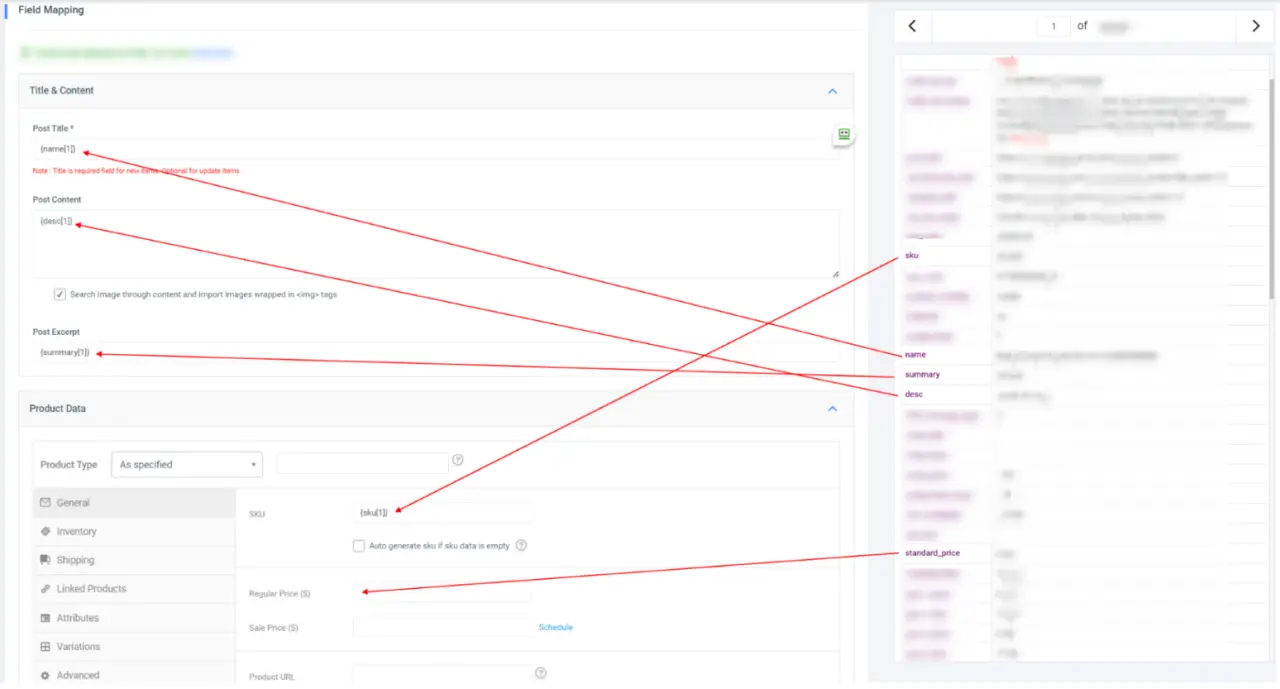
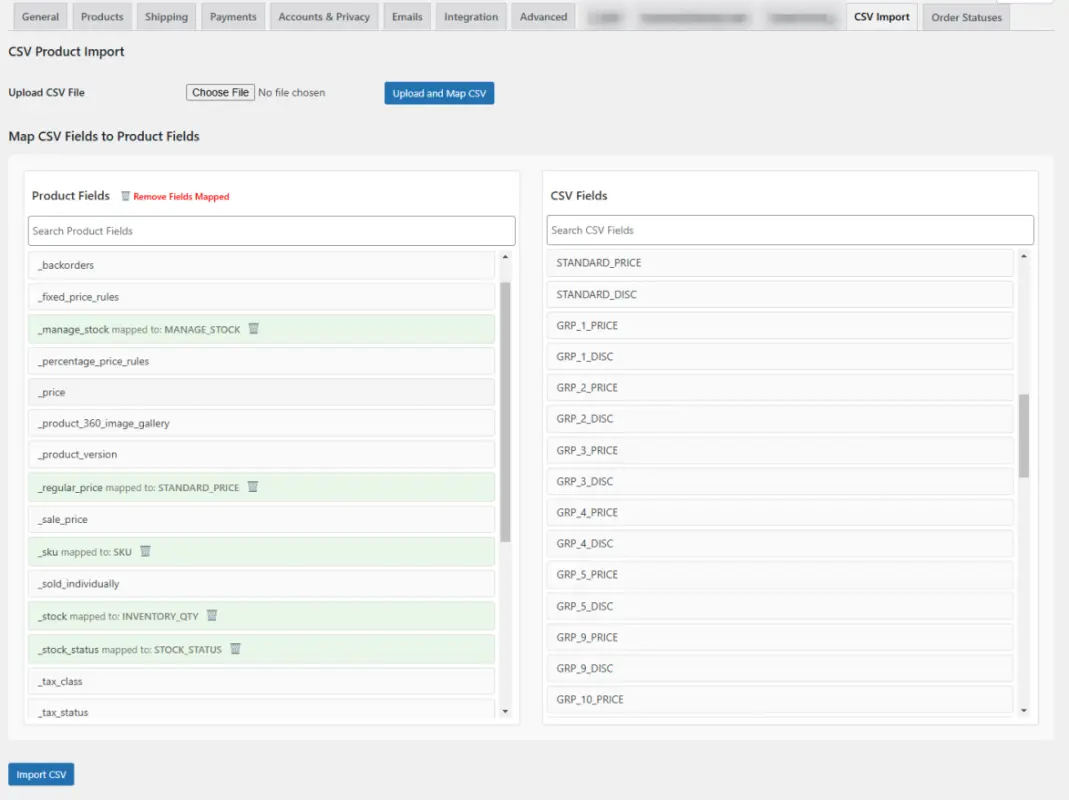
This current one is so confusing, I can’t hardly make sense of it for now, please resolve this.
I came up with this simple idea with a few hours of work using basic $wpdb / JavaScript. While it’s a work in progress, I really need a more powerful tool ASAP, something closer to your previous version. My tool auto detect the fields in the post type and auto detects the header fields in the csv file and then I can just drag and drop, plug I have a little trash icon to unmap the field or or unmapp them all at the top.
Hello,
Thank you for your feedback and inquiry regarding version 6.1.
I’m happy to let you know that Google Sheets integration is already available in our plugin. Regarding your question about WP-CLI, our current focus has shifted primarily to enhancing the UI/UX in our next update.
We truly value your input on the recent UI changes. Our team has discussed your concerns and is working to bring back the simplicity of our previous version’s UI—with some minor improvements—to deliver a more intuitive experience.
Thank you again for your valuable feedback. We’ll keep you updated as we roll out these improvements.
Best regards, VJInfotech
Hi, Since the new version, I have a problem with exporting the attributes. The value of the exported attribute is blank, for all products and for all attributes. I wrote to you in private but got no message back. Can you please check and get back? Thanks, Andrei
Hi Andrei,
Sorry for the delay. Our team will contact you soon and provide a resolution for the attribute export issue. We appreciate your patience and will update you as soon as possible.
Best regards, VJInfotech
Hi. Can you please help here? I also wrote to you in private. Thanks, Andrei
When can we expect to see version 6.1? Which you say below will fix our issue(s)? You removed our last post, which expressed concerns about promises being broken, so we’ll be more cautious this time around. We’re not happy with the current situation. What steps are you taking to address this?
Hi,
Thank you for reaching out and sharing your concerns. I’d like to provide an update regarding version 6.1.
There are two major changes in the upcoming update:
1. Reverting to the old design: We understand the feedback from users, and this change will restore the interface you’re familiar with.
2. Upgrading old saved settings: The new version will include an option to import and use your previous settings seamlessly.
These updates are complex, and we are working diligently to ensure they are implemented effectively. While it is taking some time, we aim to release version 6.1 as soon as possible. To address your concerns, we will personally share a beta version of the update with you for testing and feedback as soon as it’s ready.
We sincerely apologize for any inconvenience caused and appreciate your patience and understanding.
Thank you for your continued support, and we’ll keep you updated on the progress.
Best regards, VJInfotech






