131 comments found.

How do i get the pointy bottom on your marker styles just like listed on your page (the first map and third map)
http://plugins.sbthemes.com/responsive-google-maps-vc-addon/marker-popup-styles/Hi, You can set any image as marker in Marker Icon field in settings. So download that image and upload to media and select in settings. Thanks.
Hi i meant this pointed end not the marker it self. http://s11.postimg.org/p9arwqk1f/markerpopup.jpg How do i get the MARKER POPUP STYLE to look like that on your demo?
Thanks!!
Hi,
Its default style of google map.
You can’t add this arrow to custom style. Use default google style instead.
Thank You.
My map is not showing… what could be wrong? See here: http://take.ms/9yzWE and http://take.ms/94gUg
Hi,
Please send me website link so I can check.
Thank You.
What’s your IP address? I can give you access. The installation is on my dev environment.
Here is my ip address.
1.22.96.149
Thank You
Done! You should be able to view dev.snowwatch.org.uk now.
The page the map is on: dev.snowwatch.org.uk/about
Hi,
Its not working because you are using height in %. use height in pixels instead of %.
Percentage only works if your whole section has absolute position. Otherwsie any HTML element can’t take height in %.
Thank You.
Ok, got that working now. I want to have a map of the UK but when I enter ‘United Kingdom all I see is sea. See: http://take.ms/Cu1r7 and http://take.ms/EmYtb
Hi,
You haven’t added any marker. You have to add marker in map. See documentation or you can see screenshots here.
http://plugins.sbthemes.com/responsive-google-maps-vc-addon/wp-content/uploads/sites/2/2015/05/screenshot-8.pngAll sorted. Thanks for your help!
hi before buying this plugin i want to make sure i will be able to achieve the results im looking for.
please look at this link as a reference http://www.gkrlondon.com/contact/i like the way the colours have been modified and the icon is always visible across devices.
Hi,
Yes you can do both.
I have added 114 themes with different colors which you can use and you also can change color and map is also responsive.
Thank You.
what with your update ??
Hello,
Sorry I forgot to reply you.
I have checked and I can’t find any official announcement about deprecated function and I even can’t see any such error in my log file.
Also Visual Composer also has not mentioned in their log that this function is deprecated.
So can you please give me some source so I can check that this function is deprecated?
Thank You.
what with your update ??
Hello,
Sorry I forgot to reply you.
I have checked and I can’t find any official announcement about deprecated function and I even can’t see any such error in my log file.
Also Visual Composer also has not mentioned in their log that this function is deprecated.
So can you please give me some source so I can check that this function is deprecated?
Thank You.
Does this plugin allow for multiple pinpoints per map? I need to add 6 locations to one map. Thanks!
Hi,
Yes you can add any number of markers on a single map.
Let me know if you have any other query.
Thank You.
Hi there, Very nice Plugin you made here, tried various out before but this one works great. Only thing missing is something like a Filter for the Pins in the frontend.
Besides iam also stumbling upon this API limitations and cant see my pins anymore right now, can you tell me where to put the Google API Key in the code?
found out my self, but still this is limited by 2500 requests a day. Right now i got around 18 addresses makes a max of around 140 Page views a day. This is way to less. Isnt there an option like getting the long lat from the api ONCE in the back end and storing the ONCE required long lat in the short code or something. So the API would just be used in the backed when searching for an address. Would really appreciate that!!
Hi,
Another solution without API key is use latitude, longitude instead of address in address field.
It will make your map fast and it works because request to find lat, lng from address will decrease.
Thank You.
Hi, You need yo update plugin. I’ve got that message after update VC “add_shortcode_param is deprecated since version 4.4! Use vc_add_shortcode_param instead”
Hi,
Thanks for pointing this. We already know this and we will surely launch new version in next few days.
Thank You.
any update??
Hi,
Yes we are working on it and plugin will be ready by end of this week.
Thank You.
what with your update ??
???
Hi,
Sorry I thought I already gave you reply. May be it was another similar comment.
Problem is I checked logs of Visual Composer and I can’t find any where about this change.
And I also can’t see any deprecated error in my log. So can you please provide more details or official article from visual composer that this function is deprecated?
Thank You.
I’ve made update of VC and this problem disappeared, so now everything is ok.
tnx
Hi,
I can see all pin points right now.
It happens sometimes because google map has limitation per domain requests.
To avoid this you can use latitude, longitude in address field instead of address.
Like this : 21.131313, 90.787546
Format is latitude and comma longitude(lat, lon).
Let me know if you have more questions.
Thank You.
thanks for replaying are you sure about it why does is happen
Yes,
Google API has limit per requests per domain. So after that limit API stops working. So if we direct used latitude, longitude then no API call will fire to generate it.
So it will work.
Thanks.
Got a weird bug for you! Occasionally, the plugin breaks the website and doesn’t show the maps. Disabling the plugin brings the website back to life, then waiting for an hour or so and enabling plugin again seems to work! Is there a way of adding a Google API key?
Hi,
There is no option right now so if you still want to use API key then we need to add direct into code.
Let me know if you want to use. For that I need admin and ftp details and I will setup for you.
Thank You.
Hi,
Thank you, I’ve just emailed you the access details. Let us know how you get on.
Thanks
Hi, great plugin but recently the google map totally stopped showing. The markers are there but not the map background.
Hi,
Please send me your website link so I can check.
I will ask for more details later if require.
Thanks.
Hi, map is not shoeing because theme has overwrite map css.
Open this file via ftp. http://tropicanyon.com/wp-content/plugins/sb-google-maps-vc-addon/assets/css/style.css?ver=4.2.5Find selector .sbvcgmap-map-wrapper img in css file and add !important for max-width:none; So it will be max-width:none !important;
if you are not able to do this then please send me ftp details at sbthemes@gmail.com
And I will do it for you.
Thank You.
Thanks ! it worked!
Hi, so if I have a custom-post-type with custom-meta-data that contains long.lat, do the VC plugin offer ability to select custom-post-type and custom-meta-data to render googlemap?
Hi,
Sorry but no.
This plugin has own field in visual composer. So you must have to pass lat manually in panel.
Let me know if you have more questions.
Thank You.
On a one-page using the anchor and I call the ”#!” after the slash. These characters including the exclamation mark in the address bar, I’ll refresh the page and not displayed map. 
Hi, I think reason of this problem is Ajax. Your theme is fetching data via Ajax and map function only calls on page load.
So please send me your website link so I can check exact issue.
I may need more details like admin panel or ftp to call function on correct callback to make it working.
You can send details at sbthemes@gmail.com
Thank You.
Thank you for the information. After the change in the page in the template with the map loads. I have no idea. The problem with the show only in Chrome. If it happens again, I’ll write to you.
Okay no worry. 
Hi guys,
I’ve purchased this plugin but I’m having issues with the pop-up text running off the side so it’s not visible when you first open the popup.
It’s also not responding very well on mobile.
You can see the popup I’ve created here: http://mpspas.pndigital.com.au/ Can you help me?
Cheers, Skye
Hi,
I checked and I think you can add <br> tag or line break where you needed in popup content.
If you are not sure then please send me admin details at sbthemes@gmail.com and I’ll setup for you.
Thank You.
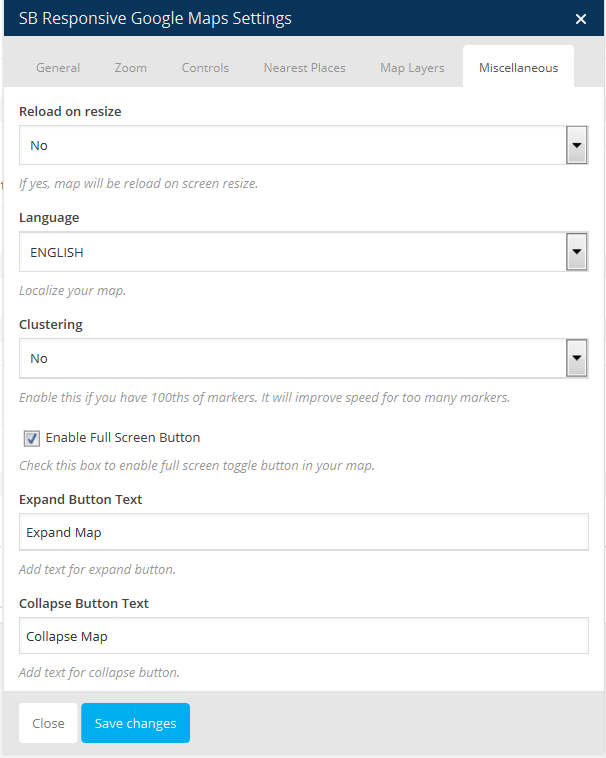
Great work, pre-purchase question,,,, on browser resize will the map center itself as per the lat and lang i have defined in the script?
Hi, Yes map will be centered automatically on browser resized. For that I have added option to enable this feature.
To enable this option you have to select yes for Reload to resize option. You can see this field here: http://plugins.sbthemes.com/responsive-google-maps-vc-addon/wp-content/uploads/sites/2/2015/05/screenshot-7.png
Here you can see all admin options: http://plugins.sbthemes.com/responsive-google-maps-vc-addon/admin-demo/
Let me know if you need more help. Thank You.
thanks for the quick response,, am not buying the wordpress version, so will this apply also to non-wordpress version? and is thereaway to make map center without reloading? forexample if am using google map v3 api, all i have to do is to add script
google.maps.event.addDomListener(window, ‘resize’, function() { var marinas = map.getCenter(); google.maps.event.trigger(map, “resize”); map.setCenter(marinas); });
which will center the map without reloading
where marinas is: lat and longitude
thnx,waiting for your reply
You don’t need to add any script.
If you have by default only one marker then it will be automatically center of map. You can also set custom center of map. You can pass latitude, longitude or address.
This version should work with wordpress. But you have to write shortcode manually.
You can use visual composer version and copy shortcode from editor and you can use that shortcode in wordpress version.
Thanks.
Oh sorry I misunderstood. I have coded so many code in php and wordpress so if you want to use this with non wordpress version then you have to generate html part manually. which you can get from view source. Let me know if you have still questions. Thanks.
Hello
I have installed the latest Visual Composer update
it seems to have broken your plugin
map won’t load anymore http://www.fk7photo.com/contact/Hi, Is my plugin was working initially? Looks like your theme us not wp standard. No wp_footer hook so all js is not included.
Can you send me admin login details and may be I also need ftp to check theme.
Thanks.
Yes it was all working fine this morning before I updated Next-Gen and Visual Composer and it all went to hell after that.
How can I send you admin details privately
You can send at sbthemes@gmail.com
Hello,
I have purchased your plug-in and have it up and running on my page here:
http://www.fk7photo.com/contact/Sadly I cannot seem to find a way to add a custom css class name to the map so I could crush the margins on the left and right.
I am trying to create a full width effect without any margins on either side.
Can you help with that?
Thanks
Right now I can see full width map. Do you want to add margin on both side of map?
You can add your custom style to this class
.sbvcgmap-map-wrapper
Thanks,
Trying to kill margins here: http://www.fk7photo.com/margins2.jpg
Oh this margin is not applied in map div. Actually your whole content is under a full page wrapper. So you have to remove main wrapper margin but it is not good idea as it will affect your whole content.
Did you get what I am trying to say?
Click here to see image: http://awesomescreenshot.com/0f8519ahc4
Here red area is your wrapper and you are trying to cross main wrapper.
There are many sections on the site where I killed the wrapper div’s margins… something like .content { padding: 0; border: 0; margin: 0; }. Check out the info section. http://www.fk7photo.com/a-propos/
I can’t seem to make it work with the map, specifically. Is it adding another wrapper inside the main content wrapper?
Hey what you are showing me is background image. Which you can apply on padding section.
Just forgot map and try to put another content with margin 0. You’ll not do this.
I don’t have problem to give you solution. This is not my map div. It is your themes .contact-content class.
You have added some padding on this class.
.contact-content
So you can set padding: 0 !important; on this class. But after doing this also check that your other content is perfect. May be you need some arrangement on other content.
Thanks.
Oh I see. The theme has a different template for the contact section specifically which I did not realize, and since I was only using your plugin in the contact section I assumed the problem was with visual composer conflicting with something else.
Thanks a lot for the speedy reply! I originally tried to use the google maps widget from ultimate add-ons for visual composer but it only worked in IE, not FF or Chrome, and not on mobile platforms either.
Your add-on works on every browser and every platform I have tested. Cool!
I killed the padding but got some margin added to the right now somehow. I’ll figure it out eventually now I know where to look.
Thanks for the speedy support.
Thank You.
The margin being added to the right… that is still the theme, right? Not the map? http://www.fk7photo.com/contact/
Yes both the side its theme padding. Not margin.
Hello, I just downloaded your map. Thus far, it is pretty amazing.
But I have a few questions. Can I have it so when you click the pin on a location, it will go to a URL?
Also, would you be able to do custom work where the pins automatically get created when a new vendor joins my marketplace? When vendors create an account, they include their address.
If so, what rates? I can pm you my info if you’d like. Thank you so much!
Hi,
Both of your work need custom work.
For your work we need to call shortcode manually in coding(php template) instead of visual composer shortcode.
I don’t have time for next 1 week but you can PM me at sbthemes@gmail.com
So I will check your structure and will decide.
Thanks.
Hi, I’m really happy to use your Google Maps Visual Composer addon.
But i got an issue when i use it in an Visual Composer accordion. Your map just don’t appears correctly. Like in this page : http://dev.etlacrise.com/badia3/?p=255
Do you know what happen ? Do you have a solution ?
Thanx
Hi, This is google map’s common issue. Google map not loading perfect in hidden area.
For that we need to reinitialize google map on your accordion function.
I need your ftp and admin login details.
Can you send me details at sbthemes@gmail.com
And yes I can’t see problem on my browser. Can you point me where exact you facing problem?
Thanks.