1337 comments found.

I’ve been waiting for 3 days for you to respond to my ticket.
Hi, your’ve probably hit a vacation period back then. Usually our Help Center operates the quickest and agents are prompt.
I wish the instructions page had instructions for it.
Hi, support is here https://help.xforwoocommerce.com/ and is very helpful. Click Submit ticket button to talk to our staff.
I can’t stand when i buy a plugin from Envato and there is NO DOCUMENTATION ON HOW TO USE IT????
Hi, support is here https://help.xforwoocommerce.com/ and is very helpful. Click Submit ticket button to talk to our staff.
Is this plugin support woocommerce 8.xx?
Hi, yes of course. Thanks for the interest!
Is it compatible with woocommerce 10?
Hi, yes of course.
Hi, this plugin adds information into Order. However, the Global form is not allowed for the product ordered. I see in the description in Order the different product.
Hi! Do we speak about attributes or the custom options? Attributes are not added by the plugin, they are just selected on page and Woo does the rest. If the custom options have problems please send more info that explains.
I have purchased a license but it is saying invalid license and won’t let me raise a support ticket and keeps telling me to renew it even though I have..
We have a site where we are using images for the attributes. There are 30 of them. When we use the standard alphabetical order, all 30 display. When we use the custom order, it only displays 29 and misses off the first or second one. Here is a product to test https://brassart.com/shop/escutcheons/closed-keyway/liberty-covered-escutcheon
The missing variation is Polished Brass (unlaquered) which should show next to the first one – Polished Brass
Thanks
Hi, it’s about browser cache, please use the incognito browser window and login again if it’s not cleared already. As for the bug, we’ll have to check this in the support area, so it’s important for you to login there.
Hi, I’m looking for instructions on how to use “Improved Product Options” for woocommerce plugin. The plugin guide link doesn’t seem to show this plugin. I’m hoping it’s still usable in my current woocommerce website. I’ve installed it from the zip file, but now do not see a way to customize the products with it.
Thanks for your help.
Hello,
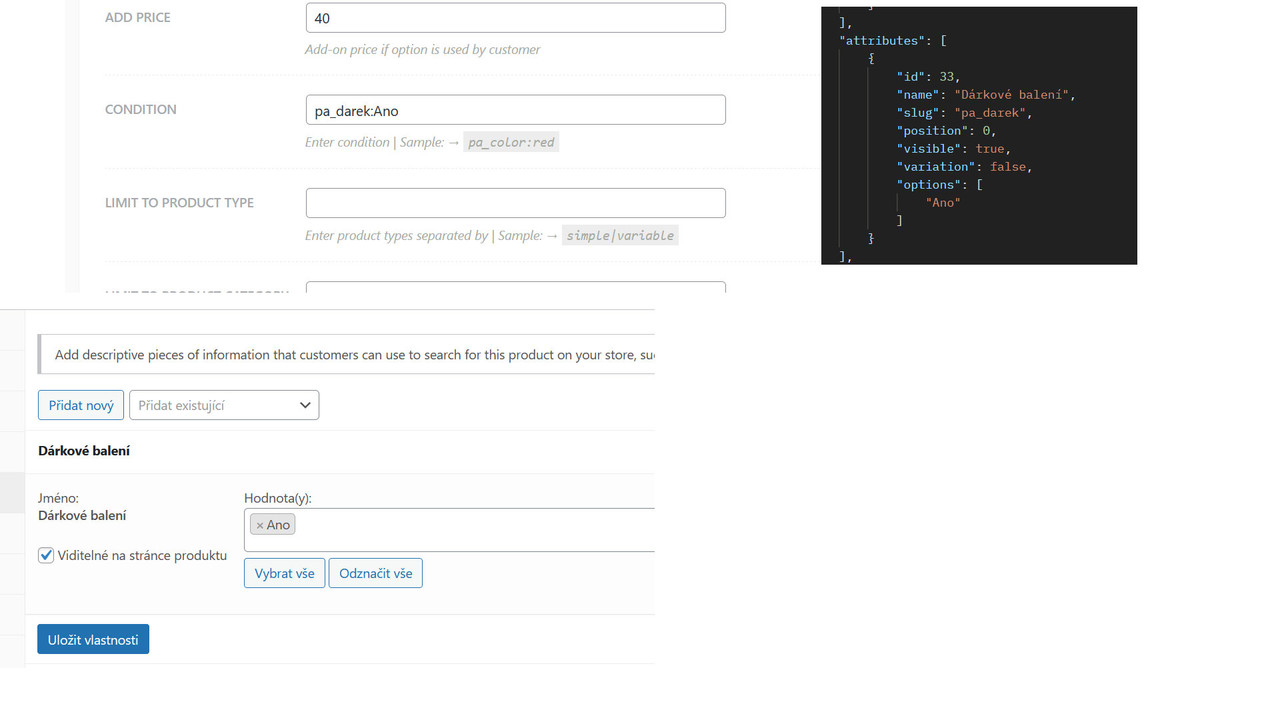
I recently purchased your plugin, and I am experiencing an issue with the conditional settings. Specifically, when I set the condition to “pa_color:red,” the element does not appear—even though the product clearly has this attribute. However, if I remove the condition, the element displays on all products.
Could you please advise on how to resolve this issue? Is there perhaps an update or fix available for this problem?
Thank you for your assistance. I look forward to your response.
Have you entered this right, please post a screenshot? Thanks.
OK, the problem is, that this only works with registered attributes. Those are the ones added to Products>Attributes. Then when you use an attribute term from there, you enter a slug not the name. Should be good. Please test.
Hi, slug for that term, if there’s one created as I don’t see from the screenshot, should be ano not Ano. But make sure the attribute is there, and that this particular attribute is added to the product.
I think I found where problem is. It is working with product with variants based on attributes. So in case that product has variants and you select that attribute it works. “attributes”: [ { “id”: 33, “name”: “Dárkové balení”, “slug”: “pa_darek”, “position”: 0, “visible”: true, “variation”: true, “options”: [ “Ano” ] } ], in case “variation”: true, it works. Without it is not working. If I turn product back simple product without variants, its stays with “variation”: true, and it works. So it is clearly bug i think. It should work without variantion.
It’s not a bug. There’s always a reason why it’s like os. Only registered ones from the Products>Attributes will work when using conditions as mentioned before.
But it is registered in Products>Attributes. Thats the thing. But if product has not variations it is not showing option. And I think there is no reason for behave like that, because you just want filtering and showing this options for product which has this Attribures, not to product which has Attributes as variant. Like filtering by tags.
Hm, will check that for sure on the next update. Thanks!
Thank you, it will be great if it works as it should.
Who defined that?
It is working, but the product prices are just visible after you select any value. How can we achieve, that the first value is preselected, so the price is visible from the beginning?
Thank you for your help Christoph Wastyn
Hi, glad to hear it operates well!
About the prices. If nothing is selected, it means that product doesn’t have default option set.
If you set a default option, then it’ll be preselected and the price will show.
Now if you have a lot of products and you’ve not set these default options it might be tricky if you don’t use PHP and scripts.
So, there are plugins that manage default options even they’re not set.
Not sure what is the right approach here.
Thanks.
where is my CODE ????
Hi, we’ve just updated the plugin with new version. Please update as well. Use the Help Center here https://docs.xforwoocommerce.com/docs/introduction if you don’t know how to update, automatically or manually. Activation is removed. Thanks.
Hello my name is Vladyslav (vlad_tincraft) zworks666@gmail.com I bought your item and your code is not correct Pleas send me avaliable code for your product thnks
Hi, we’ve just updated the plugin with new version. Please update as well. Use the Help Center here https://docs.xforwoocommerce.com/docs/introduction if you don’t know how to update, automatically or manually. Activation is removed. Thanks.
Hello i need verify CODE coz that code i recived it is avaliabel
Hi, we’ve just updated the plugin with new version. Please update as well. Use the Help Center here https://docs.xforwoocommerce.com/docs/introduction if you don’t know how to update, automatically or manually. Activation is removed. Thanks.
I need addon option for my product as a checkbox with additional number field. This is for Service product where customer can add additional option and specify how many he needs. Do your plugin offer this?
Hi, we’ve just updated the plugin with new version. Please update as well. Use the Help Center here https://docs.xforwoocommerce.com/docs/introduction if you don’t know how to update, automatically or manually. Activation is removed. Thanks.
Pre sale question. Can the product options be populated via a third party API?
Hi, we’ve just updated the plugin with new version. Please update as well. Use the Help Center here https://docs.xforwoocommerce.com/docs/introduction if you don’t know how to update, automatically or manually. Activation is removed. Thanks.
Hello, I have a license, first you require me to give you access to Envato, something that does not require validating a license code. Afterwards it doesn’t work either. One thing is a ticket to help and another is if something is not right, for example, the license does not work and you cannot contact because you do not have help support. If you can solve it. I understand that after validating the license code, access to the ENVATO account does not need to be maintained. Thank you
Hi, we’ve just updated the plugin with new version. Please update as well. Use the Help Center here https://docs.xforwoocommerce.com/docs/introduction if you don’t know how to update, automatically or manually. Activation is removed. Thanks.
Hi, I bought a license for Improved Product Options for WooCommerce, but when I put it in woocommerce / settings / Product Options / Enter Key it says “Invalid XforWooCommerce.com registration key”, what could I do?
Hi, we’ve just updated the plugin with new version. Please update as well. Use the Help Center here https://docs.xforwoocommerce.com/docs/introduction if you don’t know how to update, automatically or manually. Activation is removed. Thanks.
Hi, I’m interested in this plugin. But I need some testing before deciding whether I need a long term subscription or not, and I would like to ask if the 7-30 days refund service is supported?
No.
Hello,
I was looking at your plugin and it looks amazing. I was wondering if it is possible to add a picture to the information sign next to a title.
Regards
Probably. Thanks for the interest.
Hi,
can we set price for an extra option per Quanty ?
No, but there’s another plugin, named Package, Quantity Discounts, but usually, what you need is a custom solution, so you’ll probably never be happy, considering the amount of knowledge you can provide.
Good morning and as always congratulations on your products, even if this time I have a translation problem
I have a problem with the plugin related to the translation of the Custom attributes.
Let me start by saying that I have always used the plugin and have never encountered this error. as reported by a user here (stasktyle) I created some custom attributes that can be seen correctly in the main language, but even following the translation guide, when I go to create the custom attribute in the second language, it makes all those of the main language disappear and above all that custom attribute remains visible only in the main language even if it has been created in another language
Can you help me ? Do I need to renew support? Please help me because the project is finished and all that remains is the translation of the custom attributes to go online.
I’m using Elementor + Woocommerce + WPML
Hi, we’ve just updated the plugin with new version. Please update as well. Use the Help Center here https://docs.xforwoocommerce.com/docs/introduction if you don’t know how to update, automatically or manually. Activation is removed. Thanks.