54 comments found.

is this plugin still working in the latest version? Also is it still maintained? 2 years no updates
is it possible for this plugin to generate a code for every registered member for them to check there status on the website ?
In “Membership Settings” page, selecting “User Registration Form”, I cannot select “Generate password”. (Even though I can check, I will be unchecked after pressing “Save Setting” button below.) Also, I cannot select a form field for password. Bug?
Hi, the login form is not functioning as it should. If you submit incorrect details (username or password), the returned form has buggy HTML which in-turn messes with the rest of the page. It also shows the form title after the error message appears, even though this is set to “false” in the initial shortcode. This error occurs both when ajax submission is turned on and off. To replicate the issue, setup a login form and enter an incorrect username or password. Once the form reloads, enter an incorrect username or password again. This will trigger the bug.
I’m trying to select a password field, but the select input isn’t displaying.
It’s throwing the error at this line: ‘initializeFieldMap(‘_gform_setting_gfmem_register_password_enabled_container’, { .........’
Error: undefined is not a function (near ’...mapping.map…’)
I’ve also disabled all other plugins and tried loading and still not working.
Hello,
I Need to add recurring with quantity subscriptions plans
I want to create a recurring plan for a parent and they can add more than a kid in the same plan, and there is a calculator to show the price for each kid added, consider kid is added as a quantity in the check out, each kid will increase the price for that plan by one multiplied with the subscription fees, does it applicable with your plugin??
Hi, I can not see that this will cause any issues with this plugin, but this plugin does not offer any recurring payment and it will not create users for each kid. But I guess you have that function elsewhere?
Fredrik
https://www.time4learning.com/signup/step1.aspx
Hi,
Is it possible to use all types of fields in the profile update form? Even list fields?
Also, is it possible to the display user updated data on their profiles?
Thanks in advance!
Hi!
I don’t seem to be able to choose the password field as a the field i want to use for the password when creating a new user
Hi! Have you installed the latest version of the plugin?
Fredrik
Hi, yes i am on version 1.2
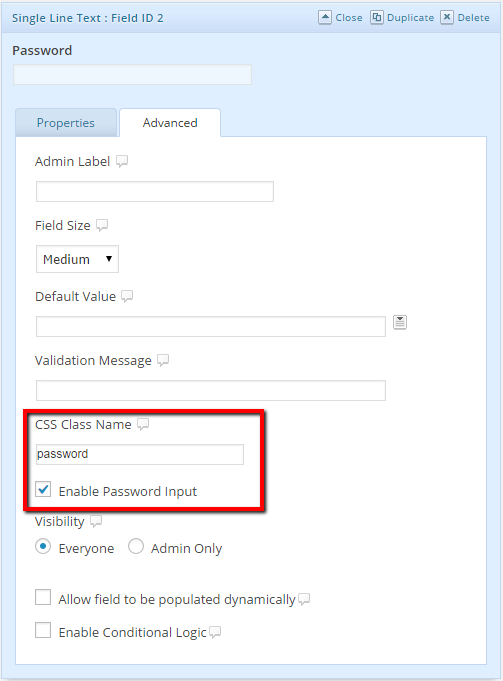
The password field is only available if you have the Gravity Forms User Registration add-on installed. If you want to use a password field with this plugin I recommend to use a text field and then check the box “Enable Password Input” under the advanced tab for that field.
I can activated it with a filter without Gravity Forms User Registration. There is a filter that can enable it: https://docs.gravityforms.com/gform_enable_password_field/
Allright! I did not know that this was possible and I will have a look at adding support for that field for a coming update!
Hello. I am always grateful for your help.
This time it’s not a big deal. If the administrator authenticates with the login form, he was unable to enter the dashboard. Is this a specification? Just confirmation. There is no problem as it is.
Thank you.
Hi, The administrator should be able to use the login form as well and the access the admin area. Do you get any errors? Does the user get logged in? What happens when you enter the area by writing /wp-admin in the url?
Fredrik
Hello. I have a question about the login form.
If login fails, can I customize it with the following two points?
1 Can alert messages be displayed somewhere above or below the form? Now the form disappears and only the error text is displayed. I thought it would be easier to re-enter if it was displayed along with the form.
2 How can I edit the alert message? I don’t know how to modify or add text.
Thank you.
This is a great idea! I have started to add this feature to the coming update! Hopefully released in a couple of days.
Fredrik
Hello. It will be helpful to contact you soon.
This is good news. Wait for a while and come here again.
thanks you.
New update submitted with your requested functions. Will be available shortly.
Hello.
Checked for updates. It’s amazing, it works as intended. Thanks for the quick and wonderful support.
Wonderful! Happy to help, please consider a rating, helps a lot!
Fredrik
Hello, Does your plugin work with the GP Better User Activation plugin from Gravity Perks? My client needs the functionality provided by your plugin to recover forgotten password but also needs to have user activation via email. I hope I have explained myself well. Regards, Manuel
Hi, What do you mean by “user activation via email”? That the admin must approve the registration or that the user must confirm the email by clicking a link in a email before registration?
The second option, that the user must confirm the email by clicking a link in a email before registration
Hi, I have purchased your plugin and the question I had has been answered as I have been able to send an email to the user before registration to activate his account.
Now I have another question, how is the process that has to be carried out for the restoration of mail?
As I have seen in your plugin, when I select the lost password form option I can create a custom email. In the message, I must attach a link where this “%s”, what should this link be?
Should this link be a page created by me with the forms that I consider appropriate?
Thanks in advance
Mauel Sánchez
Hi! Happy to see that everything works!
About the reset password mail, the %S will be replaced by a link that will takt the user to a form where they can get a new password. You don’t have to create this link. Create a test form and a test user and try it out 
Then if I understand correctly, all that remains is to create a new form that contains the password field and this form I will introduce it in a new page, it will be called “new password”, with a shortcode with the corresponding id. This new form I do not have to do anything special with it, I would not have to indicate that it is for the user to recover his password?
Returning to the message of the mail, the link that I must introduce will be the new page that has been called “new password”?
Not quite. You have to create a form with only one field, a email field (or a text field). The user that have lost his password will fill in his email here and click send. He will then receive a mail with a link where he can reset the password. I think you will understand if you try it out.
I have put the post this way:
https://drive.google.com/file/d/1C3XBveGvureJpYlAt59pdRkh1RGhbjdi/view?usp=sharingand the form that appears is this one:
https://drive.google.com/file/d/19S42W2PY8L-V_INWdaLt3kuEZWeuSyyM/view?usp=sharingCould this form be designed with gravity form, and not only the form but also the whole page?
The setup is correct. The form to reset the password is native Wordpress function, and its not a part of this plugin and can not be designed with Gravity Forms.
Ok. Do you happen to know of any documentation that explains how to modify this page and that it goes well with your plugin? I imagine that hopefully you have ever had to do it before. Thanks in advance.
I found this guide that I think is pretty simple and does not use a plugin. https://gist.github.com/eliasfaical/9415eb0acc58c3fcc6f0764595dd5d47 But it does require you to know some CSS.
There is also some plugins out there that will style the wp-login and reset password page. Search in the Wordpress plugin repository and you will find some.
Hope this help
Hello!,
I finally managed to design the password reset page. If it helps anyone, I created it using the plugin clean-login https://wordpress.org/plugins/clean-login/
And to give it a bit of design I followed the guide you provided Sundlof, using what I needed https://gist.github.com/eliasfaical/9415eb0acc58c3fcc6f0764595dd5d47
My new password reset page: https://drive.google.com/file/d/1K48fsSuMBob_3NDofI3Uos4UJeH-F5LX/view?usp=sharing
However, now I get the following error when I am in the Gravity Forms Membership settings. The error is as follows:
Warning: Illegal string offset ‘gfmem_type’ in /home/customer/www/kriisbarber.com/public_html/wp-content/plugins/gravity-forms-membership/class-gf-membership.php on line 702
In this line 702 of the php file mentioned is: { if ($settings[‘gfmem_type’] == ‘profile’) {
This error also appears in the pages where I have placed the different shorcodes.
It should be known, that I am using the plugin “Gravity Forms User Registration Add-On” and the plugin “Gravity Perks” with some of its extensions.
However, if I deactivate these plugins the error still appears. Therefore, I must imagine that the error was not coming from these plugins.
Considering the error I am telling you about, I don’t see the page failing in any way. My question is, can I leave this error but hide it?
Thanks in advance.
Hi, I am not able to replicate this issue but it should never be any error codes off course. If you provide me with your email adress I will send you an updated version with one line of code changed. If this solves the issue I will add it to the next update.
Fredrik
New update submitted and will be available shortly. It might sort out your issue. If not, please get back to me!
Sorry I didn’t notice the message notification. Thank you very much for your trouble. As soon as I test it, I will let you know.
Regards
[1] About Generate password How do I include the password generated by Generate password at the time of registration in the user email?
[2] Is email authentication possible? Can you build an email authentication solution? Specifically, the steps are as follows. Registration form → Send activation email → Authentication → Send registration content email
Hi, These functions are not included in the plugin, but I will have a look at them for the next update!
Hello,
Pre-sale question:
With your plugin is it possible to have the following:
- Unregistered Visitors: to “read only” all the posts and comments on my blog.
- Registered users: to be paid members only. Except for Admin, ALL users must pay a membership fee before registration (Paypal/Stripe). Members will have the ability to create posts, comments on post etc…
Is it possible with your plugin?
— GM
Hi, This plugin will not restrict any content, it will help you manage registration, login, profiles and members in that matter. But the restriction will have to be managed by another plugin in addition. With a little tweak and settings you will be able to have Gravity Forms payment to be complete before activating the member. But when you have your members they will not be able to create any content. But this will be fairly easy with other plugins and even Gravity Forms can help you here with front end forms to create posts. The Comment can be done with native Wordpress settings to only allow logged in users to comment.
So the answer is; if you want to use Gravity Forms for your site, this plugin will help you with parts of your setup, but not everything.
Fredrik
When I go to Form - Settings - Membership I see the options to click for the 4 types of forms. However, when I click on the button, the options do not appear below. Nothing happens.
Best, Fredrik
Hello i have just purchased this plugin but i dont find it in my wordpress, some baody can help me?
Hi, You will find the plugin in the form settings. Please see the documentation or the screenshoots. Please contact med at fredrik@sundlof.se if you have any more issues or questions!
Fredrik
Hi i still don’t find it, can you be more specific, im using wordpress…..
Do you have Gravity Forms installed?
Create a form in Gravity Forms, add some fields to that form, for example Username, Name, Email and password for a registration form.
The click Settings at the top and then on the tab “Membership”.
Here you will find the plugin settings and this is where you set up for the user to be registered on your site with your form.
There is a guide section in the gravity settings for this plugin as well.
Please get back to me if you have anymore questions.
ok, i anderstand that…. the problem is that i don’t find it any way, i can not see it. i went to the envato market in my wordpress and is tehre like a plugin but not intalled but whrn i go where there are all plugins i see it installed but don’t say settings r something similar, so is very cofused
In your Admin page, do you see “Forms” in the left dark menu? If not, you don’t have Gravity Forms installed.
If you do, do you see the “Membership” sub menu under the “Forms” menu? If not, you don’t have this plugin installed. It has do be downloaded from CodeCanyon and then uploaded to your site and installed.
If you see the “Membership” in the menu, please create a form and then enter the form settings. This plugin does not have any settings page of it own outside Gravity Forms.
i didi not resolve the problem i will have to use other plugi, beacuse i cannot find this one, is the first time that happens me something like that. Thanks so much anyway for your help.
Hi,
The Item Details page mentions that Gravity Forms User Registration and Auto Login is Compatible With Gravity Forms 1.9.x. I’m using Gravity Forms Version 2.4.20.5. Is it compatible with Gravity Forms Version 2.4.20.5?
Thank you.
Hi, It should not be a problem but I have not tested this yet. Give me a couple of days and I will try it out. If you buy it and It does not work, I will come with an update as soon as possible or give you a refund. I have not recieved any reports of any errors.
Fredrik
Is this still maintained? Last update seems a while ago
Fully supported!
Great to hear, just purchased
I just bought your plugin, but I cant find the password field in the configuration. All other field appear well, but impossible to find the password. Can you help ? (I disabled the official register plugin).
Thak you for your time, Axel
Hi! Acutally, there is no passwrod field, its just a Single Line Text Field with the setting for password enabled. Please see this image.
https://wp-doin.com/wp-content/uploads/2014/09/password.pngHope this help you out!
Fredrik
I have this field in my form : http://portfolio-online.ovh/Capture.png But ther is no password field to select in the configuration screen
Okey now I see. That password field is not supported. Please use the solution with the Single Line Text field.
Okay, so how can I acheive a password confirmation if I cant use the password field ?
Do you have any plans to make this work with Formidable Forms?
Hi, I have never worked with Formidable Forms. This plugins is based on Gravity Forms actions and it can not be transferred easily to another plattform. Consider using Gravity Forms, its a phenomenal plugin and very customizable.
Thank you. I use Gravity forms as well but most of my sites use Formidable Forms. It’s much better in many ways. It’s the second most popular form plugin, so if you ever decide to adapt yours to work with that, please let me know!
Hi, after installing the plugin i can’t find it anywhere, any idea for that ?
Hi! When the plugin is installed you should be able to find an new section inside the form settings. Go to any form -> Settings -> User Registration.