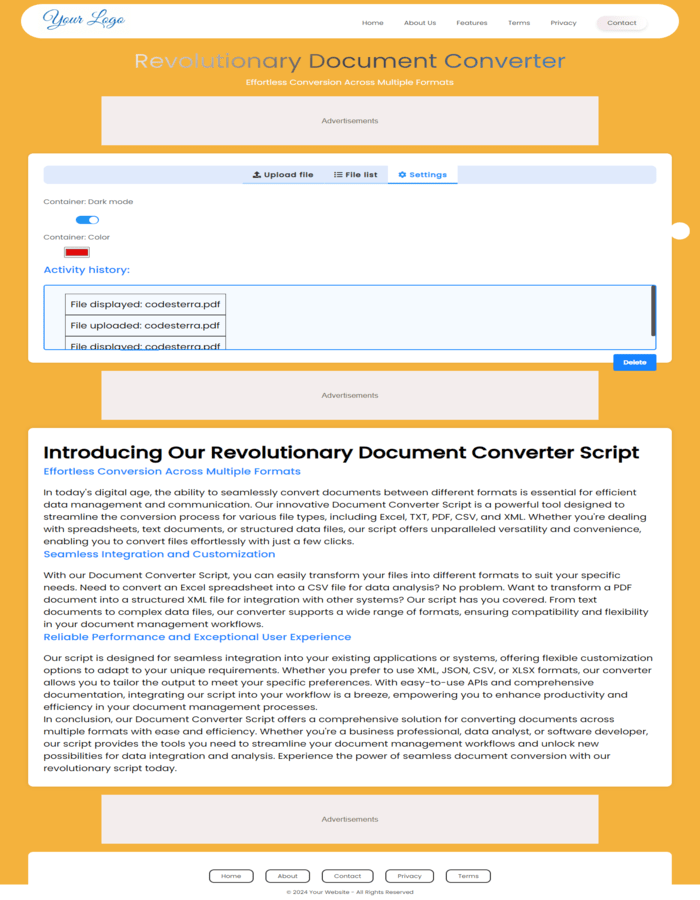
All-in-One PDF Tools & Document Converter Script
Welcome to the ultimate PDF Tools and Document Converter Script, a complete solution for anyone looking to launch a professional online PDF tools website, document conversion platform, SaaS business, or file management service. This powerful script combines a large collection of PDF utilities, document conversion tools, file management features, and productivity applications into a single modern platform.
In today’s digital world, users frequently need to convert, edit, organize, protect, compress, and manage PDF documents. Businesses, students, teachers, government organizations, freelancers, and professionals work with PDF files every day. Instead of using multiple software applications, users prefer an all-in-one online solution where they can perform every PDF-related task from a single dashboard. This script is specifically designed to meet that demand.
The All-in-One PDF Tools Script allows you to create your own online PDF tools website similar to popular PDF platforms. Users can upload files, convert documents, edit PDFs, organize pages, protect files, optimize document sizes, and perform numerous other operations directly through their web browser without installing additional software.
Powerful PDF Editing Tools
PDF editing is one of the most requested document management features online. This script includes advanced PDF editing capabilities that help users modify PDF documents quickly and efficiently.
- Edit PDF Files Online
- Add Text to PDF Documents
- Insert Images into PDF Files
- Add Watermarks
- Add Signatures
- Add Page Numbers
- Highlight PDF Content
- Annotate PDF Documents
- Modify Existing PDF Pages
- Customize Document Layouts
These PDF editing features help users update documents, add branding, insert signatures, and customize PDF files without requiring expensive desktop software.
PDF Conversion Tools
Document conversion is one of the most valuable features for any online document platform. This script includes a comprehensive collection of PDF conversion tools designed to support modern workflows.
- PDF to Word Converter
- Word to PDF Converter
- PDF to Excel Converter
- Excel to PDF Converter
- PDF to JPG Converter
- JPG to PDF Converter
- PDF to PNG Converter
- PNG to PDF Converter
- PDF to Text Converter
- Text to PDF Converter
- PDF to HTML Converter
- HTML to PDF Converter
- PDF to CSV Converter
- CSV to PDF Converter
- PDF to JSON Converter
- JSON to PDF Converter
- PDF to XML Converter
- XML to PDF Converter
- XLSX to PDF Converter
- PDF to XLSX Converter
These tools make it easy for users to convert documents between different formats while maintaining usability and productivity.
PDF Organization Tools
Managing large PDF files can be challenging. This script provides a complete set of PDF organization tools that help users structure and manage documents more effectively.
- Merge Multiple PDF Files
- Split PDF Documents
- Extract Specific Pages
- Delete PDF Pages
- Reorder Pages
- Rotate PDF Pages
- Duplicate Pages
- Arrange Documents
- Combine Documents
- Create Custom PDF Collections
These features are essential for students, businesses, legal professionals, and office users who frequently work with large document collections.
PDF Security and Protection Tools
Document security has become increasingly important. Users often need to protect sensitive files from unauthorized access. This script includes multiple PDF security features to help safeguard important documents.
- Password Protect PDF Files
- Unlock PDF Documents
- Remove PDF Restrictions
- Secure Sensitive Information
- Apply Security Settings
- Control Document Access
- Protect Business Documents
- Secure Legal Files
- Encrypt PDF Files
- Manage Document Permissions
These tools help users maintain privacy and security when sharing documents online.
PDF Optimization and Compression
Large PDF files can create storage and sharing challenges. This script includes powerful optimization features that help users reduce file sizes while maintaining document quality.
- Compress PDF Files
- Optimize PDF Documents
- Reduce File Size
- Improve Document Performance
- Optimize Images Inside PDFs
- Prepare Documents for Email Sharing
- Reduce Storage Requirements
- Enhance Loading Speed
Compressed files are easier to upload, download, share, and store, making these features highly valuable for businesses and everyday users.
Document Converter Platform
Beyond PDF tools, this script also functions as a comprehensive document conversion platform. Users can convert multiple file formats quickly and efficiently. This makes the platform useful for businesses, educational institutions, freelancers, agencies, and government organizations.
The built-in conversion system supports various document formats and allows users to process files through an easy-to-use interface. This flexibility increases user engagement and makes the platform attractive to a wider audience.
Modern User Interface
User experience is critical for any successful online platform. This script includes a clean, modern, and responsive interface designed for both desktop and mobile users.
- Modern Design
- Responsive Layout
- Mobile-Friendly Interface
- Fast Loading Pages
- User-Friendly Navigation
- Professional Appearance
- Optimized User Experience
- Simple Workflow
The intuitive interface ensures that users can quickly access tools and complete tasks without confusion.
Ideal for SaaS Businesses
The All-in-One PDF Tools Script is an excellent choice for entrepreneurs interested in launching a Software-as-a-Service (SaaS) platform. The growing demand for online PDF tools creates significant opportunities for recurring revenue through subscriptions, memberships, premium plans, and business services.
By offering document conversion, PDF editing, PDF organization, and file management services, website owners can build a profitable online business that serves a global audience.
SEO-Friendly PDF Tools Platform
PDF-related keywords generate millions of searches every month. Users search for terms such as PDF Tools, Online PDF Tools, PDF Editor, PDF Converter, PDF Merger, PDF Splitter, PDF Compressor, Document Converter, and many other document-related services.
This script is an excellent foundation for creating a search-engine-friendly website targeting high-demand keywords in the document management industry. By expanding your collection of tools and publishing useful content, you can attract organic traffic and grow your online business.
Who Can Use This Script?
- Developers
- Entrepreneurs
- Startups
- Digital Agencies
- Educational Platforms
- Business Organizations
- Government Institutions
- Freelancers
- Students
- Office Professionals
Main Benefits
- All-in-One PDF Solution
- Comprehensive Document Converter
- Modern Responsive Design
- Easy Installation
- User-Friendly Dashboard
- Business-Ready Platform
- Scalable Architecture
- Professional Interface
- SEO-Friendly Structure
- Suitable for SaaS Projects
- Supports Multiple Document Formats
- Powerful PDF Processing Features
Conclusion
The All-in-One PDF Tools & Document Converter Script is a complete platform for launching a professional PDF tools website, online document converter, file management service, or SaaS application. Combining PDF editing tools, PDF conversion tools, PDF organization utilities, PDF security features, document processing capabilities, and modern design, this solution provides everything needed to create a successful online document platform.
Whether your goal is to build an online PDF converter, PDF editor, PDF management system, document converter website, productivity platform, or subscription-based SaaS business, this script delivers the functionality, flexibility, and professional experience required to serve modern users and grow your business.