382 comments found.

hi how can I disable the automatic load of the images when I scroll down with the mouse?
I want people to press the button to load more images
my code now is
<script>$('#grid').autoGrid({
grid : {
fancybox : {
transitionEffect : 'slide'
});}
}</script>I tryed <script> but it doesnt work can you help me
$('#grid').autoGrid({
grid : {
fancybox : {
transitionEffect : 'slide'
lazyLoad : 'false'
}
}
});</script>Hi,
You are using the stand alone version right? (No the wp version) if so can you show me a living example online? So I can take a look and see what’s going on 
Hello ! I bought yesterday your plugin and I would like to change things in the css but I can’t find the file css on which I can make the modifications. For example, I would like to change the background color that appears under the photos for the popup or button color where there are arrows, and other changes. Also, I can’t find the sample files to import … could you tell me where they are? A huge thank you in advance, Caroline
Hi Caroline,
wow very very sorry, in the last update the example JSON files are missing by mistake, please contact me via email (through my profile at the bottom there’s a contact form) so I can send them to you right away.
I will push an update to fix this in the CodeCanyon as well
if you want to see the original CSS file go to this file: plugin/components/Media Boxes/css/mediaBoxes.css
Best, David
Hello, there is a demo version of the admin area?
Hi,
only screen shots, but if you want to see something in particular you can contact me via email (through my profile at the bottom there’s a contact form) and I can send you a quick video clip of the desire section you wish to see
Best, David
Just updated to the latest version but it seems you forgot to update the plugin’s version in new files. It might be useful to do so in order to avoid confusion. That’s a great improvement by the way! Thanks.
Hi,
you are totally right, I forgot :s
thank you for the heads up
Quesiton 1; Thumbnail does not crop properly. I indicated 1;1 ratio, but it shows black background. Please see – http://moderni.co/interior-design/interior-products/FLOOR-CARPET-BROADLOOM/ATLAS/
Question 2; I do not want grey rectangular shade at ‘lazy load’ at end. Please see – http://moderni.co/interior-design/interior-products/FLOOR-CARPET-BROADLOOM/ATLAS/
Question 3; I am wondering if I can have ‘Load More’ text without gray shading box, but with rectangular lines. Could you make it the same as in http://moderni.co/interior-design/interior-products/COUNTERTOP/LG-Surfaces/
Question 4; I am wondering if I can have rectangular box lines around thumbnail image like shown in http://moderni.co/interior-design/interior-products/COUNTERTOP/LG-Surfaces/
Thank you very much.
Hi,
1) The reason for the black background is because there’s no more height of the image to fit a 1:1 (as it takes the 100% of width) but you can invert that, so instead of taking the 100% of width it takes the 100% of height, just add this peace of CSS:
.media-box [data-width][data-height] img{
    top: 0 !important;
    left: -100% !important;
    right: -100% !important;
    bottom: 0 !important;
    width: auto !important;
    max-width: none !important;
    height: 100%;
}
2) Just add this peace of CSS:
.media-boxes-no-more-entries{
    display: none;
}
3) Add this CSS:
.media-boxes-load-more-button{
    border: 1px solid #e5e5e5;
    background: transparent !important;
    color: #999 !important;
    border-radius: 4px;
    font-weight: 600 !important;
    width: 90px !important;
}
.media-boxes-load-more-button:hover{
    background-color: #fff !important;
    border-color: #bbb !important;
    color: #333 !important;
    box-shadow: 0px 3px 5px 0px rgba(0,0,0,0.13) !important;
}
4) the only way of doing something similar would be by adding this peace CSS:
.media-box-container{
    overflow: visible !important;
}
.media-box-image{
    border: 2px solid #e2e2e2;
}
.media-box-image div[data-width][data-height]{
  border: 10px solid white;
}
Best, David
Are these for one particular gallery? I am wondering if these can be universal for all the galleries. Thank you very much.
I put those codes in the CSS in http://moderni.co/interior-design/interior-products/FLOOR-CARPET-BROADLOOM/ATLAS/ They are not quite working. I would really appreciate your effort. Thank you very much.
I see the issue, don’t include the “pre” tags and “br” tags, only the CSS I provided 
Thank you. It is working.
Question 1; I am going to have hundreds of galleries like these. Now these are for one particular gallery. I am wondering if there is a way for these codes to be universal for all the galleries.
Question 2; There are only two options; ‘Edit’ and ‘Delete’. It could be nice to have ‘Copy’ option so that I can duplicate the previous gallery for the new one.
Thank you very much.
awesome 
1) the only way would be to open this file: wp_auto_grid/plugin_extra/extra_style.css and at the top place that CSS, so it affects all galleries always
2) totally agree, I’ll keep it in mind for the next update
Best, David
Thank you very much. I just have two more questions.
1. When the image is hovered with mouse, it shows the translucent red color. I am wondering if I can change the translucency and the color globally.
2. If you look at http://moderni.co/interior-design/interior-products/CEILING/USG/, there are 3 empty white rectangles with grey lines in the last 2nd low to fill the columns. I am also wondering if any last row can fill the empty columns with white rectangles automatically whenever there are empty columns at the end.
Thank you very much again.
.thumbnail-overlay{
    background: rgba(0,0,0,.5) !important;
}
.thumbnail-overlay .media-box-title{
    color: #fff !important;
}
2) unfortunately this would not be possible, the plugin don’t have that feature
Best
It is working. Awesome program! Thank you.
There are still black background around images. Please see – http://moderni.co/interior-design/interior-products/FLOOR-CARPET-BROADLOOM/PATCRAFT/ Thank you.
Hi,
that’s because those images got different aspect ratio, they have more height than width, for those galleries you need to remove the CSS I provided above in the answer 1)
I am using your codes globally for all the galleries. If I remove that, some galleries will have the same problem. I am wondering if there is a solution for that. If not, Can I have the background white instead of black background? Thank you.
.media-box-image div[data-width][data-height]{
    background: #fff;
}
Thank you. I am still wondering if you can fix them globally without adding CSS in problematic galleries. I am going to have hundreds of galleries. I do not think that is practical solution for me. Other grid program I have does not have such problem. Can they be zoomed in to fill the square? Thank you.
Hi,
in the future I may add something for this
Thank you! I appreciate it. As I mentioned, I have to create hundreds of galleries and now have to change the settings individually for all the galleries.
1. I am wondering if I can set the following settings globally.
Number of images to load at the beginning;12 Number of images to load;12 Minimum of images per filter;12 Columns-6 columns per row Horizontal space; 18 Vertical Space; 18 Desktop Large; 6 columns Desktop Medium; 6 columns Desktop Small; 6 columns Tablet landscape; 6 columns Thumbnail ratio; 1:1 Search; no Filter; no
2. As per your codes, background is now white, but initially it shows black background and then changes it to the white. I am wondering if the black background does not show in the beginning.
3. When it is hovered, texts are all lower characters. Can they be all upper characters?
Thank you very much.
Hi,
1) currently no, but I will release an update in which you can create the a gallery and then just change the directory right in the shortcode, for example:
[auto_grid directory="gallery1"]
[auto_grid directory="gallery2"]
that may help you out
2) try adding this peace of CSS:
.image-with-dimensions{
    background-color: black;
    background-image: url('icons/loading-image.gif');
  }
3) add this css:
.thumbnail-overlay .media-box-title{
    text-transform: uppercase;
}
Thank you. I am not sure about your answer to Question 1. Could you explain it in more understandable way? When is going for update? Also it is easier to have copy function of a previous gallery for the next one? When is your timeline for that function? I have to create hundreds of galleries as soon as possible. Thank you.
Hi,
alright, imagine you want 5 galleries, and they all will have the exact same configuration, the only thing changing is the “directory”, so currently you need to create 5 galleries in the admin page.
But with the new update you can create only 1 gallery in the admin page and then in different pages/posts you can specify different directories using that one gallery, for example:
[auto_grid id="masonry_gallery" directory="galleries/gallery1"]
[auto_grid id="masonry_gallery" directory="galleries/gallery2"]
[auto_grid id="masonry_gallery" directory="galleries/gallery3"]
[auto_grid id="masonry_gallery" directory="galleries/gallery4"]
[auto_grid id="masonry_gallery" directory="galleries/gallery5"]
does it makes sense?
You just sent the update of your program. Does that have the function to do that? Thank you.
yes, that’s the new update
I downloaded the file. There are two folders; wp_auto_grid and __MACOSX. Which file am I supposed to copy into the old folder? I never updated a pluggin. Thanks for your help.
Hi,
in order to avoid losing your information that you already got, just unzip the wp_auto_grid file and find a file name “class_auto_grid_shortcode.php” then just replace that only file with the one in your WP installation
I am still having problem with black background showing up before images appear. Thank you.
.image-with-dimensions{
    background-color: #fff !important;
}
It still shows black background. Also I am wondering how I can change the text size on hovered images. Thanks!
.media-box .image-with-dimensions{
    background-color: #fff !important;
}
for the font size use this:
.thumbnail-overlay .media-box-title{
    font-size: 11px !important;
}
They are working beautifully. One more question; In http://moderni.co/interior-design/interior-products/Furniture-Seating-Task/Herman-Miller/, hovered texts show ‘file names’, but in http://moderni.co/interior-design/interior-products/Floor-Carpet-Modular/Bentley/, the hovered texts show ‘title name’, but not file names. I prefer to have just ‘title names’ rather than ‘file names’. I am wondering how I can fix that. Thank you very much.
QUESTION 1: In http://moderni.co/interior-design/interior-products/Furniture-Seating-Task/Herman-Miller/, hovered texts show ‘file names’, but in http://moderni.co/interior-design/interior-products/Floor-Carpet-Modular/Bentley/, the hovered texts show ‘title name’, but not file names. I prefer to have just ‘title names’ rather than ‘file names’. I am wondering how I can fix that.
QUESTION 2: In “[auto_grid directory=”gallery1”] the file names of gallery2 or gallery1 seem to be case-sensitive. I am wondering if the file names can be not case-sensitive.
Thank you very much.
Hi,
1) how did you defined title names here? http://moderni.co/interior-design/interior-products/Floor-Carpet-Modular/Bentley/
2) I’m afraid at this moment that the folder name can only be case sensitive
Best, David
Hi! I had a pre-sale question – is the directory attribute still working? I saw a few comments that said it wasn’t working in the new version anymore. I’d like to be able to do this:
[auto_grid id="gallery" directory="galleries/gallery1"]
[auto_grid id="gallery" directory="galleries/gallery2"]
[auto_grid id="gallery" directory="galleries/gallery3"]
[auto_grid id="gallery" directory="galleries/gallery4"]
With each shortcode on a different page. Is that still possible? Thanks!
Hi,
indeed in the new version the directory parameter right in the shortcode is not possible since you can configure the directory and all other configuration per shortcode in the admin section
but maybe I’ll include this in an update, just as a quick directory change
Best,
David
OK, thank you for letting me know. I cannot purchase this plugin now then, as I’d want to use it for multiple galleries (a few hundred), all with the same settings but pointed at a different directory. If you are able to add this parameter, please do come back here to let me know and I’ll purchase right away! Thank you!
Hi,
I just added the “directory” parameter to the shortcode, I pushed the update to CodeCanyon and its waiting to be approved
its approved, update is now alive once you purchase
Good day Sir, by mistake, we have purchased “non-word press” script. Can you please help me get the word press version which we can use with our word press.
thanks,
Hi,
please contact me privately via email here: https://codecanyon.net/user/castlecode#contact
Best, David
How do we display the example galleries on our site? The documentation ends after showing how to import the examples, and does’t explain how to actually add the example galleries to the site. I’ve read it over and over and what am I missing?
Hi,
in the admin section of the plugin you’ll see a unique shortcode for each example, you can copy that and past it in any page or post (it will create the gallery where you place the shortcode)
for example this one:
[auto_grid id="masonry_gallery"]I hope it makes sense
i payed auto grid and i enjoy it now. but every time i make a new gallery .. i must change grid layout menu into 5 column per row .. default 3 column. how can i change the setting 5 column into default setting?
my email – kosinus@naver.com
have a nice day ~
Hi,
yes you can do it by editing the PHP files, open the admin/admin.php file of the plugin and find this:
$form_columns = '3';then replace it for this:
$form_columns = '5';Best, David
Hi David, Happy New Year! I am back at my desk now and would like to get the AutoGrid plug in working. I’ve redownloaded and unzipped with a different expander but I’m still getting the same fatal error:
Parse error: syntax error, unexpected ‘[’ in /home8/rendercr/public_html/divimotioncircus/wp-content/plugins/wp_auto_grid/class_auto_grid_shortcode.php on line 202
I also tried replacing the plugin contents directly with FileZilla ftp. using the other WP Plugin only download, with no success. Please send me the plug in via email so I can get up and running. Sdack
Hi,
Please contact me via email (through my profile at the bottom there’s a contact form) so I can answer you directly to your email, I will attach the plugin, if still not working you can send me the ftp credentials so I can install it and find the problem
Best, David
Received this error when I tried to install the plugin. I would like a refund.
“Plugin could not be activated because it triggered a fatal error.”
Hi,
You must unzip the file you download from codecanyon and inside you’ll find a file named wp_auto_grid.zip that’s the file you must upload to wp.
Are those the steps you followed?
Hi there, yes those are the steps I followed. I also tried uploading it through the FTP and got the same error.
Hi,
Very strange, please contact me via email (through my profile at the bottom there’s a contact form) so I can send you the plugin, maybe there was an issue while uncompressing
Best, David
Hi and Merry Christmas!
Looking forward to using your Auto Grid gallery
Purchase code:
7abe6d4e-237c-4ad7-927c-5db0969b31ac – 23 Dec 2017
Error on activation on WP 4.9.1:
Plugin could not be activated because it triggered a fatal error.
Parse error: syntax error, unexpected ‘[’ in /home8/rendercr/public_html/divimotioncircus/wp-content/plugins/wp_auto_grid/class_auto_grid_shortcode.php on line 202
Please advise Nigel
Hi Nigel,
Sorry for the delay, I’m currently out for vacations but I’ll be back on Friday.
About your issue, can you try to download it again and unzip it with another program? Maybe there was an issue when unzipping
Best, David
The plugin could not be activated because it caused an unhandy error.
Parse error: syntax error, unexpected ‘[’ in /vhosts/turkmermermadenvakfi.org/http/wp-content/plugins/wp_auto_grid/class_auto_grid_shortcode.php on line 202
Hi,
Very strange, can you contact me via email? (through my profile at the bottom there’s a contact form) so I can send you the plugin, maybe there was some corruption when uncompressing
Best, David
Please I need help. Why I cannot easily customize the colour of the hover and rather than making visible the name of the file I would prefer an icon. If you show me how to do that the plugin could be perfect for my need
Hi,
I’m guessing you know some basic CSS, if so then you can open the admin panel and go to template tab and look for the CSS, then just find this:
thumbnail-overlayand in there you can adjust the background color
the pinterest style example has some icons on the overlay/hover you can copy the template from there
I’m assuming you imported the examples correct? if not, check it out in the docs here: http://www.castlecodeweb.com/wp-autogrid/documentation/#importexport
Best, David
hi there,
thanks for useful auto grid plugin, i wonder how to play with colors like Filter tabs/button background on hover, selected etc, and add some spacing underneath of filter buttons as well?
i can do it myself if you address me the file name and location i need to edit.
thanks
Hi,
you can do this with CSS, just add it in the CSS section under the template tab
for example use this CSS:
.media-boxes-filter>li a{
    background: blue;
}
it would depend on what you wish to do
Best, David
hi David, thanks for your response, actually i cannot find out how to change background color of selected (active) filter, i tried .selected but doesn’t worked
.media-boxes-filter>li a.selectedif so, you can change it there
thanks for your followups its already there, its not changing active filter background, i guess it that attribute is controlled by javascript or something, i got screenshot if you need, there is no option to send it here.
can you show me a living example online? so I can take a look and see what’s going on. Also you can contact me privately via email (through my profile at the bottom there’s a contact form)
Best, David
Hi. I recently purchased the plugin for wordpress. When I go to the page on which I entered its short code, it shows the images and filters perfectly but only on a black/deepgrey background. I have been struggling to change this color because my theme has white pages so the black isn’t bringing a good outlook. How can this be changed?
Hi,
can you show me a living example online so I can take a look and see what’s going on?
Best, David
sure. you can click the link. http://fcsphotography.co.za/wp/weddings/
Hi,
it seems that your theme is adding the shortcode inside “pre” tags (unless you manually did), those “pre” tags are not from the plugin, and your theme has all “pre” elements in black background
you can see them here: https://imgur.com/a/fn4Iv
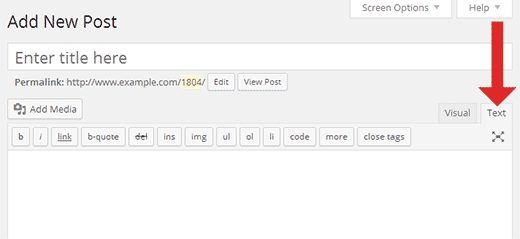
try using the “text” option, instead of the “visual” in your WP post/page, as shown here: http://cdn3.wpbeginner.com/wp-content/uploads/2014/07/wp-text-editor.png
Best, David
Ohhhh gosh. You have no idea how you just saved a life! it worked. Thanks a lot David. the short code was indeed inside pretags on the text side.
glad to hear that
Hi David. sorry to bother (again). So now the gallery seems to load only 2 items per row at the beginning and then after lazy load then it corrects I cant tell were it went wrong. additionally, my inline category setting is only showing 2/3 inline and category 3 under “all”. What might be the issue? (http://fcsphotography.co.za/wp/weddings/)
Im m not sure but i’m thinking its picking my pc as if its a mobile device at first (just a wild guess)
Hi,
try adding this CSS:
.media-boxes-filter{
  width: 100% !important;
}
body{
   overflow-y: scroll;
}
Best, David
Thank you very much, the rows have been fixed. Was the css also supposed to fix the filters inline?
.media-boxes-filter{
  width: 100% !important;
}
remove the “pre” tags, those are HTML not css
Best, David
Lol…sorry so new to wordpress, my second site lol. I appreciate you help so much. Thumbs up!
Happy to help
Hi! how can I hide the ALL option, so it loads only the categories? Thanks
Hi,
in the admin page under the “Filter-Search” tab there’s an option named “Filter all” just deactivate it, and set a different “Filter default”
Best, David
The gallery width in VC fullwidth row is being set wrong. I had to change ”$(window).ready” to ”$(window).load” in init.js to fix it. The window object doesn’t have the “ready” event. Please fix in future updates. Thanks!
Hi,
Ohh that was meant to be ”$(document).ready”, thank you for reporting this, and yes I’ll include it in the next update
Best, David
Hi, I have installed the plugin and have added two new folders inside gallery….but the image is not loading in lightbox when clicked. Can you please guide me on this.
Thanks & regards, Hari
Hi Hari,
Can you show me a living example online? so I can see what’s going on?
Best, David
Hi,
I see that you have fancybox already installed in your WP (as another plugin maybe), can you try deactivating it for a moment? and see if it works?
I’ve deactivated it…do you guys have any video tutorial on this…the documentation isn’t clear on this topic.
Hi,
Very strange, maybe some compatilibity issue with other plugin, Any chance you could give me ftp access to the plugin folder so I can run few tests? (You can contact me privately via email, through my profile at the bottom there’s a contact form)
Hi, I have emailed the details.
I answered you via email
Cool looking grid plugin. I have a quick question on this statement. “You can link to another page when you click in a thumbnail”. Does this mean I can set different destination urls for each photo? I’m looking to create a one page visual link directory, so I’d need to be able to redirect clicking on each image to an external site. Is this possible with your plugin, or possible with something like “page links to” plugin? Thanks!
Hi,
yes, you can. You can add a .txt file in which you can configure if you want an image to link to some page, a .txt. file with something like this:
image => Category 1/Autumn.jpg
link        => http://www.google.com

image => Category 3/Morning.jpg
link        => http://www.facebook.com

image => Category 2/Far Away.jpg
link        => http://www.gmail.com
I hope it makes sense
Thanks for your reply. So, would that be like a hosts file for your plugin to reference?
Hi,
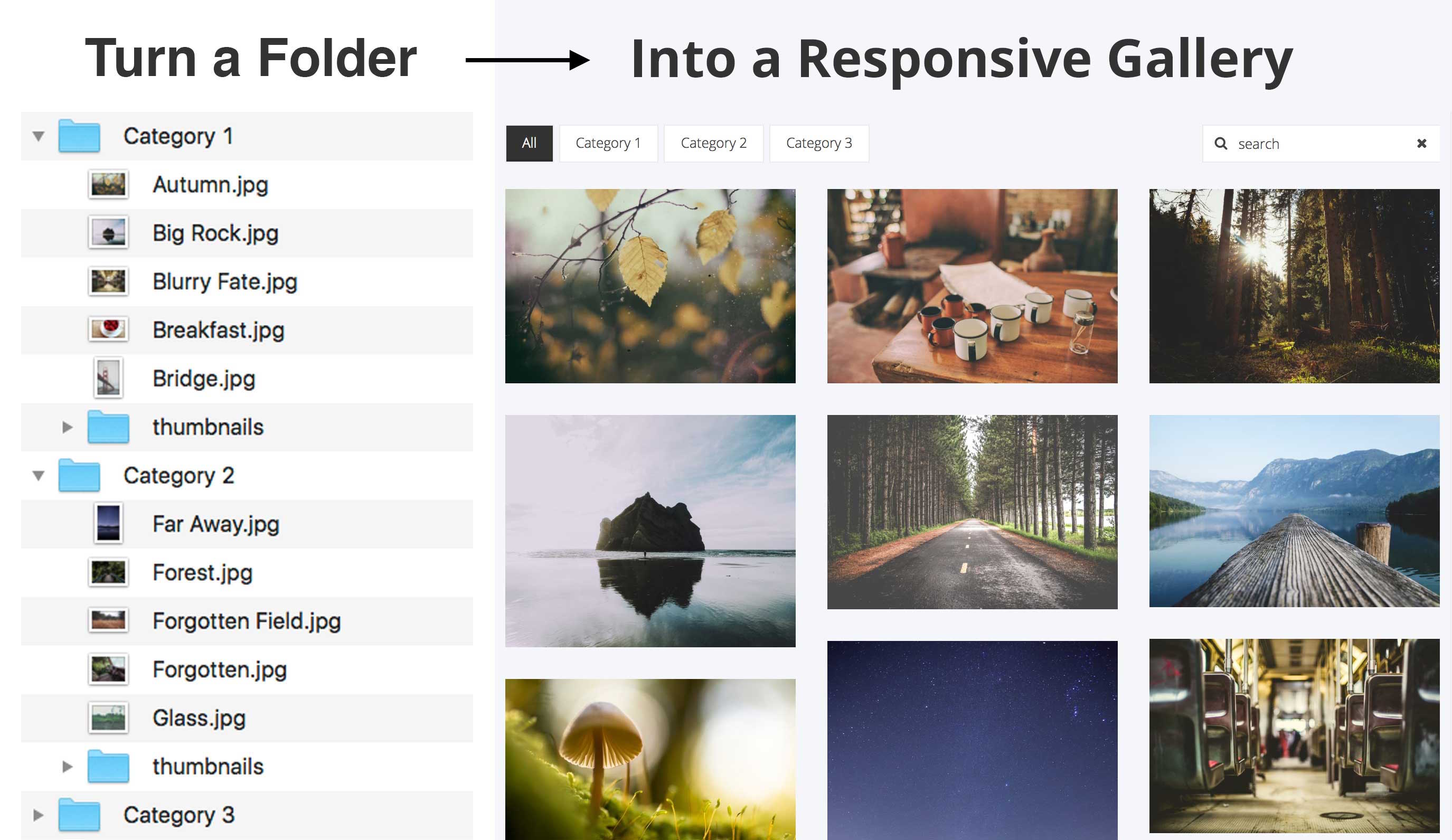
the plugin reads a folder full of images (in your wordpress installation) as shown here: http://www.castlecodeweb.com/wp-autogrid/wp-content/themes/auto_grid_theme/img/turn%20into%20gallery.jpg
in that same folder you can add a file named “config.txt” with the content I showed above, and the plugin will automatically use that file to add extra information for the grid, in this case add a link to the thumbnails
there’s a config.txt file included once you activate the plugin (for the demo)
Great, thank you very much!