23 comments found.

Hello, regarding the “Traffic” tab:
After selecting a post to generate a Performance Chart, the plugin gets hung/stalled. Then after a while, a message appears that reads “There has been a critical error on this website. Please check your site admin email inbox for instructions…”.
The error is caused in line 242 of the plugin file.
Error Message: Uncaught ValueError: max()
That is interesting.
Can you tell me if you are using MacOS or Windows? Can you tell me if you are seeing the other charts on the Dashboard, for example?
The JavaScript max() function is used by the ChartJS library, which, for some reason, is checking for a high resolution display.
I’m using Windows.
Yes, the other charts do appear on the Dashboard as line graphs & bar graphs (no pie charts).
More info on the error: type E_ERROR caused on line 242 of the file /active-analytics/includes/settings-internal.php “Uncaught ValueError:max()”
Argument #1 ($value) must contain at least one element in /active-analytics/includes/settings-internal.php:242 Stack trace:
#0 – /active-analytics/includes/settings-internal.php(242):max()
#1 – /active-analytics/includes/settings-internal.php(37):include
Otherwise, the plugin appears to be working fine.
Got it.
I have just released version 2.8.1. You should get an update notification.
Quick question, where did you buy the plugin from?
Can this plugin track woocommerce events?
No, it cannot. It tracks pageviews, not events.
Hello, I’m looking into buying this plugin but due to privacy concerns I’d like to disable the “Spy” function. Is that possible? Thank you.
Hi. The Spy function is not a function on YOUR website, but a so-called “spy” on your TRAFFIC. You can basically see where your users came from, which pages they visited before and after the current page.
It cannot be disabled, as the data is coming from the same table as the regular pageviews.
What exactly are your privacy concerns? I could probably add an option to enable/disable the Spy page.
Hello, thank you for replying. We are leaving G Analytics for privacy concerns of our users. Your plugin would be perfect if it would not store data that could be considered of concern to our users (like where they are coming from, etc). The spy function seems to do just that. If there would be a function to turn it off and even remove it from the menu, it would be perfect. Thank you!
I will add a function to disable the Spy feature next week, so expect an update soon.
This will be great! If I may make a suggestion, would it be possible to remove the Spy function altogether? Like you’d have to have it turned on on installation or it wouldn’t show? Something like that so that it wouldn’t be possible to just turn it off and on on the options. This would make it compliant to most companies. I’m sure people leaving G Analytics will then migrate to you. I’ll be watching for the update! Thanks!
Yes, that is what I have done. It’s disabled by default, and only enabled if you need it. See a screenshot of the new setting (which is disabled by default on all new installations).
It’s done! Version 2.6.0 adds the new option!
Hi,
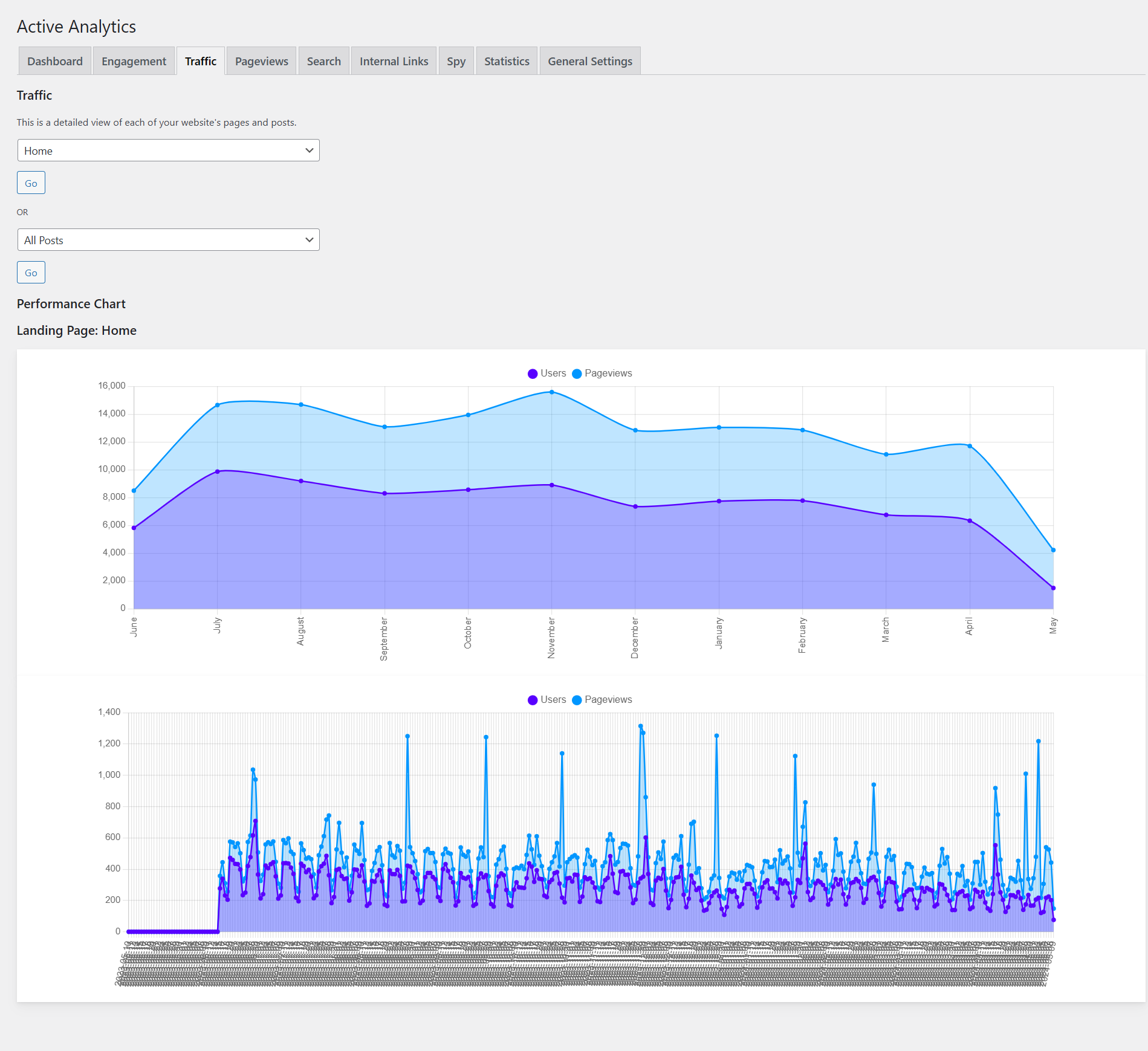
Is there a way to show the traffic count by days in the Traffic tab? Currently it’s only showing the traffic in the graph by months. I want to be able to see the traffic per day. Thanks!
Yes, I’ll put it on the list for the next release, thank you!
Thanks so much!
This is done! You should get a notification to update to version 2.5.6.
See a screenshot below:
https://getbutterfly.com/wp-content/uploads/2024/05/active-analytics-daily-traffic.pngCan I see list, or filter by IP on a specific page? I am ok to pay $35 to have that feature,
No, you cannot filter by IP.
You can see general statistics on specific posts or pages, but no filtering.
Where is the database for Active Analytics
It’s inside your WordPress database, in a table called wp_wpaa.
Note that the wp_ prefix might be different in your case.
Strange i am looking at my db right now via phpmyadmin
Is it in wp_options
It’s a separate table, called wp_wpaa.
Note that sometimes, phpMyAdmin will show a paginated table structure. Maybe you have a “page 2” somewhere, and the table name starts with a “w”, so it should be almost last.
I am checking my current new db doesn’t have it my old db there was no separate table like example wp_post
I understand. Is Active Analytics working for you? Is it tracking users, visits, and pageviews?
If not, then go to Plugins, deactivate Active Analytics and reactivate it.
If yes, why do you need the table? Can you post a screenshot of your database structure from phpMyAdmin?
What is the newest update about.
Check out the changelog below, and also this article:
https://getbutterfly.com/active-analytics-meet-the-new-content-report-your-pages-at-a-glance/ = 2.8.0 =- FIX: Fix wrong order of monthly overview
- FEATURE: Add new Content analysis section
- UPDATE: Update ChartJS to latest version (4.5.0)
- UPDATE: Improve typography
- FIX: Add proper installation and uninstallation routine (all data is properly set up on installation and removed on uninstallation)
- UPDATE: Add better contextual help for pageviews when not being enabled and collecte
- UPDATE: Refactor the internal links report
- UPDATE: Refactor the plugin settings and statistics
- SECURITY: Prepare all search analytics queries
- UPDATE: Improve speed of the dashboard chart, showcasing unique visitors, pageviews and sessions
- FEATURE: Add acquisition channel charts
- FIX: Fix IP detection
- UPDATE: Update all charts to use the latest (local) version of ChartJS
- UPDATE: Refactor the search analytics report
- UPDATE: Remove the auto-update feature
- FEATURE: Add option to enable the Spy feature (disabled by default)
- UPDATE: Improve script loading speed
- UPDATE: Sanitize and escape all output
- UPDATE: Update WordPress compatibility
I am missing 1 option, a summary of visits from a given year by month, year, such traditional statistics, number of visits, number of views for the whole site. Are you planning to add such a function? Then this plugin would be perfect!
Here’s what I have added today, maybe it helps:
https://getbutterfly.com/stuff/zoom.gifI have also optimized the Overview chart loading speed and brought it below 2 seconds. You can now display the last 24 months, and then you can zoom in any desired time ranges.
How can we get pdf report of the stats with the graph.
I don’t know, I don’t use PDF.
You can probably take a screenshot, put it in a Google Doc document, and then save it as PDF.
Hope that helps.
hello: can I show a number of visitor for specific post or page on the front end by short code or another way ? thank you
No, you cannot.
How would this work? Something like [aa postviews] on a post or a page, and it would automatically pick up the ID and show the views, right?
I can do it for the next version, 1-2 weeks max.
It will show number, so you can say:
“This post has [aa postviews] views”
Does this plugin track UTM campaigns? I need to track QR Code scans
No, it tracks pageviews and lays them out nicely in charts.
What can I export? Can I get all of the details? IP, location, Browser, OS for all data historically within a time range?
You can export the IP, the URL, the device type (desktop or mobile) and the referrer.
Hi. Your plugin looks great but one issue with the charts. I see this log while looking on my console: Uncaught (in promise) ReferenceError: Chart is not defined at wpaa-charts.js?ver=2.4.2:104:29 Is there any way to fix this?
Yes, you are correct, and I have an updated release for today to fix this issue. I was using the same ChartJS library for 2 plugins, and I missed the error, as it was loading for me.
Great! So is it fixed right now? Can I update it right now? upd. no worries. I just checked. Everything works fine now. Thank you again!
You are welcome!
wish this tracked outgoing links
Please elaborate, how would you see this functionality working?
we have text links on our site, would like to see how many clicks each link gets, i normally do this with event tracking on Ga
Correct, event tracking would do the job. I agree that it would be a useful feature so that users could stop using GA altogether.
I’ll put it on my development list.
Hi, can my visitors check their website’s traffic using this tool on my site? I meant, will my users be able to use this tool to test their website’s traffic too?
Thank you.
Israel
No, this is an admin tool. If you install it on your WordPress website, only you will be able to see the stats.
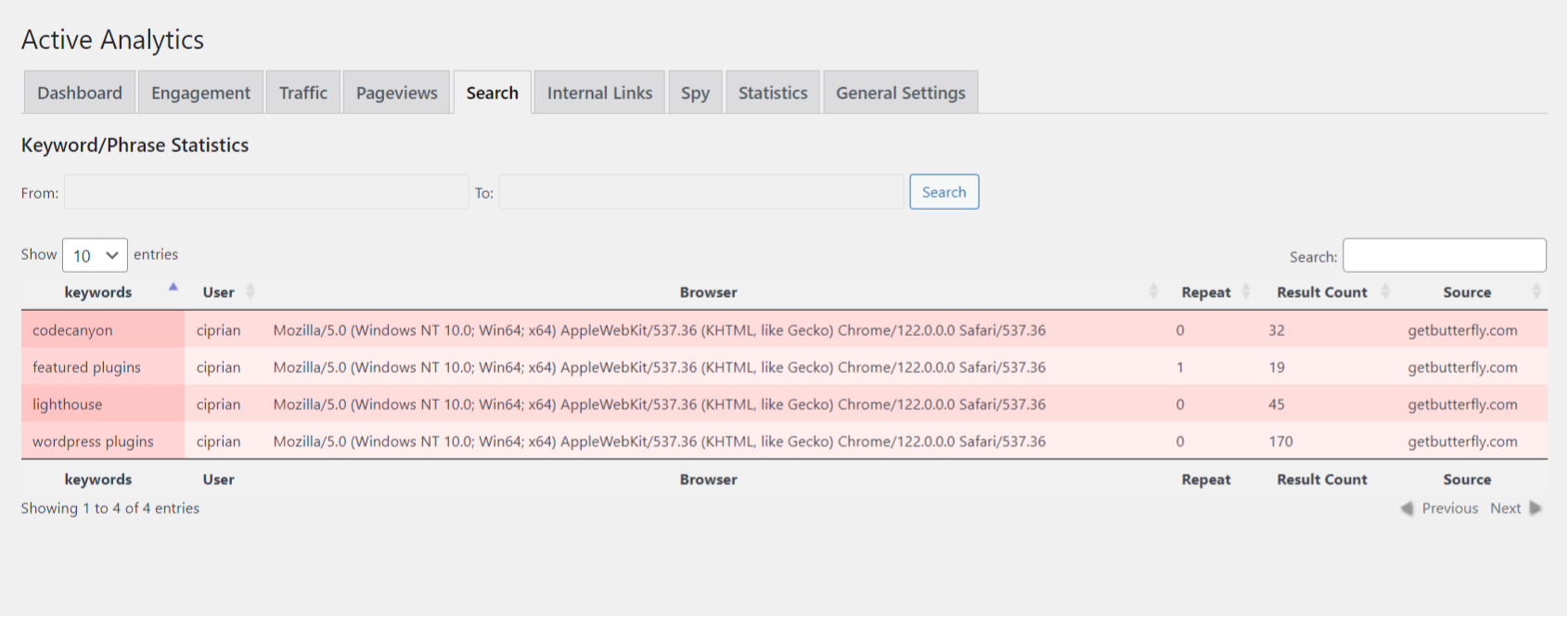
Hello. Are you perhaps considering implementing a feature where one could see what our visitors “search for”? Thank you in advance for your reply. Kind regards.
I actually thought about this, and track the “s” parameter, but I never implemented it. It could be a future development, yes.
Great news! I think I will be investing in this plugin then. Along with your Lighthous plugin as well.
Cheers! Thanks!
Hello again. I was wondering if perhaps the “s” parameter was implemented into the plugin? Thanks in advance for your reply.
Not yet, but I will put it on the list, definitely, for February 2024.
Hi one more time. I wanted to bump up my earlier question. Is the feature perhaps present? 
Hi. Not as of this morning, but I did it just now. It’s in beta, so some things might change (visuals, charts), but it is usable, and I will push an update later tonight.
See a screenshot below:
https://i.gyazo.com/ea6f86b600583db3e7311e082c30ccc0.pngHello! That’s superb! I see this works for logged in users. I guess it works for guestes also? Kind regards.
No, it works for everyone. It just shows logged-in users, if any.
Although, I’m not sure if it’s a good idea. I don’t care who searches what. It’s a beta feature. I might remove the user agent, as in most cases it’s not relevant.
Thank you for your reply. Actually I like it a lot. It would be a great feature to have – an option to choose – whether we want to see guests only or logged-in users OR both. Anyway. I will be purchasing your plugin. Thank you for the update.
I will keep the option then, and make the table filterable, so you can select logged-in users vs guests.
Thank you!
No, no. Thank YOU! Thank you for implementing this nice update AND considering my suggestions. I appreciate it very much (the filterable table – GREAT solution). Tomorrow I will place my purchase. Kind regards.
this plugin is not tracking visitors at all, just my own visits, the site has over 5000 uniques a day
The plugin appends the tracking code to the send_headers action:
add_action( 'send_headers', 'wpaa_append' );
Do you have anything blocking that? Or a caching plugin or something that might influence fetching the headers?
The plugin is tracking your visits, so it works, so maybe it’s a logged-out user issue.
yes i have caching and security features in headers
Can you remove them to see if this is the issue?
thanks yes it works now
Got it!
In a future version, I will add 2 types of loading: headers or page footer, so in your case, selecting the page footer would work, as the footer is not cached.
If you like the plugin, don’t forget to rate it!
I have updated the plugin and added a tracking method option. If you want to cache your headers, make sure you select the footer option.
Great work! Best of luck more sales.
Thanks!
Just bought it. I was only looking for the number of visitors but it gives so much more. It’s pretty easy to use. Basically plug-n-play!
Thank you very much!
Could you rate the plugin, please, if you found it helpful?
Hello, Is it possible to add this to the dashboard ? Thanks
Yes, it is, but I am not a fan of cluttering the Dashboard. I could make it optional, though, let me check what’s planned for the next release and maybe I’ll add it.
Yes I understand but the idea is to display just the Overview in the dashboard and keep the detail in the setting menu. Thanks
Of course, just the overview. I’ve seen Google Analytics plugins doing the same. I’m on it.
It is done. Version 2.0.7 brings a small Dashboard widget. Note that I couldn’t add the graph, because it was bigger than a default widget. I’ll research and see if I can improve the responsiveness of the bar chart/graph.
If you are happy with the plugin, please leave a review.
Cool ! Thanks, this is already a good start. After the idea for the graph it would be to show only that over a week, normally there is room for that. For the responsive, it would be enough to show the last 2 or 3 days.
One week is enough, indeed, but the graph is built using a table, so it needs a bit of work. I’m on it.
Ok I understand. Thank you for your attention
Hey, another suggestion : Is it possible to make the editor user role can access to the complete reports ? Thanks
Could you rate the plugin, please, if you found it helpful?
Hi
Can your plugin track logged in users visited pages ?
Yes, it tracks everything.