525 comments found.

Hi, I’ve installed and have the plugin working but have a question around the Year field. I have loaded this so the Years are bracketed (i.e. 2005-2015) but I want this to display as an individual year (i.e. 2005, 2006, 2007 etc). Is there a change we can make or do we need to load the CSV file for the individual years? Cheers!
Hi there,
Thank you for purchasing this plugin. I’ll be happy to help you.
Could you please let me know how you are adding the terms that include YEARS to the plugin? Are you adding them through the backend UI, or importing them using a CSV file?
If you are adding them through a CSV file, the plugin should automatically convert the year ranges into individual years before saving them to the database. If this is not working for you, please log in to the backend panel and go to: VPF (YMM) > Settings page. Under the “Settings: Admin” section, look for the option “CSV Range Supported Columns” and make sure that YEAR is selected.
If it was not selected, please select it, save the settings, and then try importing the CSV file again. Before doing so, make sure to remove the previously uploaded terms. Also, test first with a small CSV file containing only a few rows. Once it works correctly, you can proceed with importing the full CSV file.
If YEAR was already selected and you are still facing the issue, please re-save the settings page and try importing again. If the issue persists, please provide the following details so I can investigate further:
1. Website URL
2. Admin URL and login credentials
3. FTP credentials
4. The CSV file you are using
You can send these details to wpinstinct@gmail.com
Kind regards, WP Instinct Team
Hi, appreciate the quick response! I have got this sorted now 
One question I did have is can we resort the order of YMME to MMYE?
Cheers!
Hi there,
To switch the order of levels from YMME to MMYE, I would recommend using my other plugin, which is specifically designed with the Make → Model → Year → Engine (MMYE) structure: https://codecanyon.net/item/woocommerce-vehicle-parts-finder-makemodelyear/13458497
Please note that after switching, you will need to configure the new plugin from scratch, including re-uploading the terms for the VBF database.
To proceed, you can request a refund for your current purchase using the following link: https://codecanyon.net/refund_requests/new
At the same time, you may purchase the correct plugin. Once I receive the refund request notification, I will promptly approve it.
Please let me know if this solution works for you. I’ll be happy to assist further if needed.
Thanks, WP Instinct Team
I am interested in using your plugin for a project and have been reviewing your documentation. I have a few questions i’m hoping you can help me with.
Label Customization for Sub-models: I noticed the option to change labels in the documentation. Would it be feasible to repurpose these fields to function as a “Sub-model” tier? We are looking to create a deeper hierarchy beyond the standard levels.
SKU-based Imports: Does your SKU import feature support the same bulk-mapping logic typical of YMM filters? We intend to link specific attributes to existing SKUs in our WooCommerce database and want to ensure the import process is robust for large datasets.
Post-Filter Triggers/Events: Does the plugin currently support auto-updating categories immediately after a filter is applied? This is an example of the filter functionality we are trying to achieve: https://www.cspracing.com/pages/search?Year/2025/Make/Acura/Model/ADX/Submodel/A-Spec
If not, do you have a JavaScript trigger or an action/hook that fires after a user clicks the “Search” or “Filter” button? We would like to run some custom code to refresh the view, and knowing the specific event name would save us a lot of reverse-engineering.
Thanks for your help!
Hi there,
Thanks for reaching out regarding this plugin. I’d be happy to assist you.
1. Level labels and hierarchy:
You can change the labels of the existing levels: Year, Make, Model, and Engine. If you have a four-tier hierarchy that you’d like to use with this plugin, you can simply rename these labels to match your desired structure.
However, I would also recommend taking a look at our other plugin https://codecanyon.net/item/wpce-woocommerce-parts-compatibility-editor/24115209/, which is not limited to four levels and allows you to define fully custom level labels instead of being restricted to predefined names (Year, Make, Model, Engine).
2. Bulk import via CSV:
This plugin allows you to upload a CSV file for bulk import. In the CSV, each row (combination of Year > Make > Model > Engine) can be assigned to one or multiple SKUs.
If you can share your existing CSV file, I’ll review it and guide you in the right direction.
3. Left-side filters compatibility:
Compatibility depends on the filter plugin you are currently using. If it is not supported out of the box, some custom development may be required, which could involve additional cost.
If you need further assistance, feel free to contact me at: wpinstinct@gmail.com
Kind regards, WP Instinct Team
Could you please let us know if the plugin is able to provide search functionality similar to the reference site https://www.topflightautomotive.com/?
We would like to implement the search bar similar to the reference site, where we can search for products based on the make, year, and other details, instead of having to select each option in a dropdown form https://drive.google.com/file/d/1uhkbuJwIZRo6--YRgGgd8whbVxJFM7TU/view.
Our site: https://www.f2suspension.com/
Hi there,
Thank you for reaching out to us regarding this plugin. I truly appreciate your interest, and I’d be happy to assist you.
I understand your reference to the website where users can search for Make, Model, and Engine by typing directly into a text field rather than relying on dropdown selections. At the moment, this functionality is not available in the plugin by default. However, it can certainly be implemented through custom development.
Please note that this customization would involve additional development work and therefore incur extra charges. If you would like to discuss the requirements in detail and receive a quotation, feel free to contact me at wpinstinct@gmail.com
I look forward to hearing from you.
Kind regards, WP Instinct Team
Is it possible to display the My Garage section without showing the search section above it? In addition, can I combine the use of the VPF and WPCE plugins together?
Hi there,
Thank you for purchasing this plugin. I’d be happy to assist you.
Please try the code below and let me know if it works as expected for you:
if ( class_exists( 'WOO_VPF_YMM_My_Vehicles' ) ) {
    WOO_VPF_YMM_My_Vehicles::get_template();
}
Also, may I know why you need WPCE and this plugin to be used together? If you could explain the scope of your requirement, I’ll be able to guide you in a better way.
Thanks, WP Instinct Team
Actually, at first I should have purchased VPF, but I chose WPCE instead because it offers more features. After installing and configuring it, I realized that WPCE doesn’t have the “My Garage” feature, which is something I really need. Because of that, I had to purchase VPF as well. After using both, I discovered three issues: 1. The Garage feature cannot be separated. 2. There is no fitment re-check before adding a product to the cart on the product detail page. 3. The CSS/UI of the VPF search is not as nice as WPCE’s.
For point #3, I think I can fix it myself. However, points #1 and #2 are not solvable on my end, so I need to ask you about them
Thanks for your support.
WPCE also includes a Garage widget. Could you please contact me at wpinstinct@gmail.com so that I can share a few screenshots demonstrating how the WPCE Garage looks?
Thanks!
You can check this screenshot for the reference: https://s3.envato.com/files/647761614/screenshots/04_screenshot.png
I sent you an email. It seems that the save search feature isn’t working for me.
I have sent you a reply, please check. Thanks!
Hello, I’m interested in buying your plugin for my automotive parts store.
Before purchasing, I need to confirm something important.
Does your plugin support filtering by both Engine Size (for example: 1.2L, 1.6L, 2.0L) and Fuel Type (Diesel / Petrol)?
I want to make sure the filter works exactly like TRODO.com — where the user selects: Year → Make → Model → Engine → Fuel Type → Engine Size
and then only compatible parts appear for that exact vehicle.
Please confirm if this is possible with your plugin or if any customization is needed. Thank you!
Hi there,
Thank you for your interest in this plugin. I’d be happy to assist you.
This plugin is limited to four levels only: Year → Make → Model → Engine. However, if you need more levels, I would recommend checking out another plugin of mine that allows you to create any number of levels/dropdowns.
Here’s the link to that plugin: https://codecanyon.net/item/wpce-woocommerce-parts-compatibility-editor/24115209
Please take a look and let me know if this helps with your requirements.
Thanks, WP Instinct Team
Do we need an active licence to get the latest version? Made aware today of a vulnerability, and i can’t see where to download the latest version. Mny thanks, Matt
Hi there,
Thanks for purchasing this plugin. I would be happy to assist you.
You don’t need to purchase any new license for this latest release. Actually there is a hold on this new release by CodeCanyon, they are reviewing it and hopefully, it will be released soon. Just wait for 1-2 days more and you should have a notification in your inbox for this new release. After that you can download this new version through your CodeCanyon account.
Thanks, WP Instinct Team
Hi, I can’t get it to detect the shortcode when I add it to the page — it just doesn’t seem to recognize it.
Hi there,
Thanks for purchasing this plugin. I would be happy to help you.
Can you please tell me the shortcode you are trying to use? Here you can find more about how to use the shortcode: https://vpfymm.wpinstinct.com/documentation/#shortcode
Please let me know if it helps.
Thanks, WP Instinct Team
Thanks, I’ve already solved it. Another question: would it be possible to change the configuration so that instead of Year > Make > Model > Engine, it becomes Make > Model > Year > Engine? Thanks again!
Great!
In order to change the configuration, I would suggest you to switch the current plugin with my another plugin which comes with the exact order of levels you want: Make > Model > Year > Engine
Currently you have purchased this plugin: https://codecanyon.net/item/woocommerce-vehicle-parts-finder-yearmakemodelenginecategorykeyword/15122009/
But this is the one which comes with exact same functionality but with your desired order of dropdowns: https://codecanyon.net/item/woocommerce-vehicle-parts-finder-makemodelyear/13458497
I can help you to switch among these two plugins but if you have added the data to current plugin already, you have to re-import it into new plugin again.
You can reach out to me at wpinstinct@gmail.com and I will help you on this.
Thanks!
I’ve bought it too, but it doesn’t have My Garage.
Both the plugins have “My Garage” feature in the similar way. You should surely be missing something while it comes to how you setup it.
Can you please provide me following details so that I can troubleshoot the reason and can fix it for you:
1. Your website URL where you have added the finder.
2. Admin URL and login details
3. FTP credentials
You can email these details at wpinstinct@gmail.com
Thanks, WP Instinct Team
Hi, i am looking to extend just for the support. Is that possible? We have already bought the plugin and installed, it just has one bug that we need help to fix please.
Hi there,
Thanks for reaching out to me regarding this plugin. I would be happy to assist you.
You can renew the support only by following these steps:
1. Log in to your CodeCanyon/Envato Market account
2. Go to Downloads (top menu → click your profile → Downloads).
3. Find the plugin you want.
4. On the right side of that item, you’ll see: Download button, Support status (e.g., “Support expired” or “Support until [date]”).
5. If support has expired (or is close to expiring), you’ll see a Renew support now or Extend support link.
6. Click it → you’ll be redirected to checkout to purchase only the support extension (not the whole plugin again).
Thanks, WP Instinct Team
Hi there,
we bought this plugin: https://codecanyon.net/item/woocommerce-vehicle-parts-finder-yearmakemodelenginecategorykeyword/15122009
But I think this one suits more our needs: https://codecanyon.net/item/wpce-woocommerce-parts-compatibility-editor/24115209
It is nearly the same, but with MORe features right? Or are there any functionlaities missing? Can I request a refund for the first and buy the 2nd?
P.S. Are you open to customization work?
Hi there,
Thanks for reaching out to me regarding this plugin. I would be happy to help you.
1. Yes, WPCE has more advanced features as compared to this plugin. EG: Multiple finders with different levels of your choice, Product validator )
In order to request a refund and purchase the correct one, please reach out to me at this email id: wpinstinct@gmail.com
2. Yes, I am available for customization work as well.
Thanks, WP Instinct Team
I can’t get the custom tab to show up on the product. I’ve checked, and while there isn’t a tab manager running now, there doesn’t seem to have been one historically either. I have enabled it to show up in the settings. Is there a shortcode that can display the info (instead of trying to get the tab to show up)?
Never mind. I figured it out—for it to work, year, make, and model must be selected.
Hi there,
Thanks for purchasing this plugin.
As I can see you have managed to sort this issue out yourself. Please let me know if you still need my help anywhere.
Thanks, WP Instinct Team
Hello, how are you?
I bought the plugin some time ago and I’m finishing the project now.
I created a spreadsheet with over sixty thousand lines of variations between year, make, model and engine of vehicles and I was able to import it smoothly, without any errors.
Now, I’m starting to “map” the products I have in stock according to the data that was imported. My question is:
There are several types of parts from different brands with the same application. How do I map them in one product, and then export the mappings and import them in other products that have the same compatibility?
An export and import button on the product editing screen would boost the plugin, because so far I’m enjoying it, the only part of having to register product by product is giving me trouble.
Hi there,
Thanks for purchasing this plugin. I would be happy to help you.
1. In order to map the products with imported terms, I would suggest you to have a new column in same CSV file called “SKU”. Within this column, you can write comma separated multiple SKUs matching to the terms ( Year > Make > Model > Engine ) within the same row. Re-import the same CSV file and this time it wouldn’t duplicate the already imported terms, and will just map the products with the existing terms.
2. And regarding how to duplicate the terms from one product to another, if you create a product with a set of VPF terms and then while you duplicate that specific product, it automatically duplicates the VPF terms to that new product as well.
Please let me know if it helps!
Thanks, WP Instinct Team
Hi there,
I need exactly this plugin but I’m hesitate to purchase it because you have been updated the plugin 1 year ago which woocommerce has been released big updates for a while. Do you planning to update regularly?
Hi there,
Thanks for your interest in this plugin. I would be happy to assist you.
As you can see in comments section, I am regularly active on all of my plugins all the time. This plugin is working well with the latest version of PHP, WordPress and WooCommerce so I didn’t find a need of any update yet. As soon as there will be something for me to update on, I will release it asap.
Thanks, WP Instinct Team
[woo-vpf-ymm-product-terms-list-table] Isn’t working on the product page when using a Breakdance template. Can you check
Hi there,
Thanks for purchasing this plugin. I would be happy to help you.
You are using a wrong shortcode. Here’s the correct one: https://vpfymm.wpinstinct.com/documentation/#shortcode_product_terms_list
[vpf_ymm_product_terms_list]
Please let me know if you still face any issues.
Thanks, WP Instinct Team
I added the correct shortcode but it still isn’t working.
Hi, please provide me following details so that I can look for the reason and fix it:
1. Admin login details
2. FTP credentials
You can email these details at wpinstinct@gmail.com
Thanks, WP Instinct Team
As I can see, the section you are talking about doesn’t seem to support the shortcode. Does this section allows you to add any other shortcode? If not, then you have to talk to your theme support/developer as well so that they can provide you a way to support the shortcodes there.
Thanks!
Hello: We just purchased this plugin but realized we dont need it. We are n to asknig for money back, but wanted to make sure there is no annual subsciption associated with the item. Please let me know.
Hi there,
Thanks for reaching out to me regarding this plugin. I would be happy to help you.
You don’t need to worry about as there is no recurring subscription associated to this item. In case you use this plugin and need any assistance with it in future, you may require to only renew the support for this plugin but again, its a manual process and no automatic deduction from your account. I hope it helps.
Thanks, WP Instinct Team
I’m interested in your plugin but I just wonder is it possible to have search panel in Home page and after when I search something it shows me only products withing the category that belongs to that vehicle cause at the moment I have a website that specializes in Hilux and Land Cruiser parts and it’s very complicated cause for each model I had created same category, instead I want to make clean work for this to look professional and tidy in admin section. There is a website you can see what I mean autopartspecialist.com waiting for your reply thanks.
Hi there,
Thanks for your interest in this plugin. I would be happy to assist you.
I would suggest you to have a look at my another plugin called “WPCE”: https://codecanyon.net/item/wpce-woocommerce-parts-compatibility-editor/24115209
This plugin allows you to create multiple finders for different set of categories with different set of terms ( choices in dropdown ). Please go through its description and let me know if you have any questions for me.
Thanks, WP Instinct Team
Hi,
Does your plugin work with the Dokan marketplace plugin?
I mean if a logged in Vendor can see and use the features of your plugin (year/model/engine) on the product page?
Thanks
Hi there,
Thanks for your interest in this plugin. I would be happy to assist you.
This plugin doesn’t work with Dokan market place plugin and would require some customization in order to let it work together.
Thanks, WP Instinct Team
Hello! I have a quick pre-sale question. Is it possible to save a vehicle in the garage so that, while this vehicle is active, browsing through the shop categories only displays products compatible with it? In the demo, I noticed that after selecting the YMM and a category, the relevant parts are shown correctly. However, when I navigate to another category, the YMM selection resets and unrelated parts are displayed. Is there a way to keep the selected vehicle active across different categories?
Hi there,
Thanks for your interest in this plugin. I would be happy to assist you.
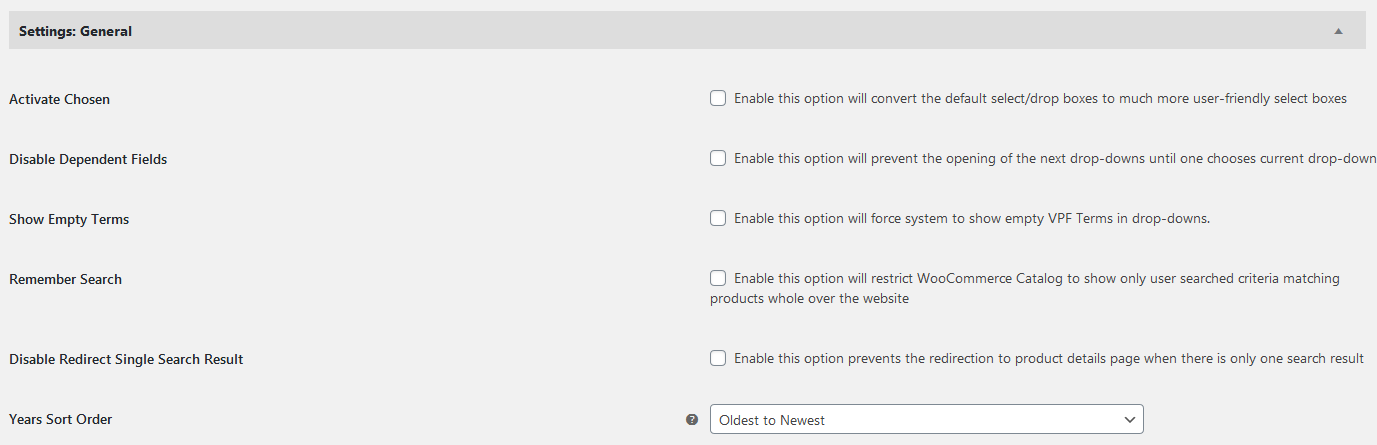
This plugin comes with an option where you can enable the “Remember Search”. You can check for the option in this screenshot: https://s3.envato.com/files/510103607/screenshots/08_screenshot.png
This option enables the user performed search throughout the website and shows only that specific vehicle related products only on all products archive pages until a user resets the search. I hope it answers your question.
Thanks, WP Instinct Team
Hi,
I recently started using your plugin and I have two questions:
Is it possible to export all the models I've added to my WordPress site, or is the CSV import the only available option?Is there a way to redirect users to a page displaying only the available product categories for the selected vehicle, rather than showing all products without category filtering?I’m currently using JetSmartFilters, so if this plugin can help achieve this, please let me know.
Thank you in advance for your help!
Best regards,
Hi there,
Thanks for purchasing this plugin. I would be happy to help you.
1. It’s not possible to directly export the terms you have added to VPF database. But as this plugin uses a custom taxonomy for all these terms, you can use a plugin which allows you to export the terms hierarchy for a custom taxonomy and the same plugin should work for it. I have heard a lot about “WP All Import” plugin from many of clients and I believe that one can help you.
2. In order to show product categories on search results page, it would require some custom work which will cost you a few additional charges. This is my email ID if you want to discuss it further: wpinstinct@gmail.com
Thanks, WP Instinct Team
We have issues with the plugin when on edge and firefox only. If you set a car, click on a category, set a new car the selection and browse around it usually reverts to the first car selected. We do not experience this issue using Chrome
https://get-primitive.com/shop/I can provide a video or any other useful information
Hi there,
Thanks for purchasing this plugin. I would be happy to help you.
Normally this happens with a cache plugin enabled. Are you using a cache plugin? If yes, Is there a way in the cache plugin options to exclude a cookie from being cached plugin? Mostly the cache plugins provide an option to exclude the specific cookies. If yes, please type vpfymm within this option and give it a try again.
If you still face the same issue after applying above solution, please provide me these details so that I can troubleshoot it further and can fix it for you:
1. Your website URL
2. Admin login details
3. FTP credentials
Thanks, WP Instinct Team
You can email these details at wpinstinct@gmail.com
I just realized that you have other plugin: https://codecanyon.net/item/woocommerce-vehicle-parts-finder-makemodelyear/13458497
I need this order: Make/Model/Year/Engine. How can I change the license for this plugin to theanother one?
Hi there,
Thanks for reaching out to me regarding my plugin. I would be happy to assist you.
In order to switch among these two plugins, I will share the required steps with you. Please contact me at this email ID for it: wpinstinct@gmail.com
Thanks, WP Instinct Team