987 comments found.
Hi, You need to know that this app is using YouTube IFrame Player API, so YouTube API Key fields has been removed (No longer used), It has been informed in the change log since version 5.1.0 was released, the last updated version of this item is currently 5.4.0. Thanks
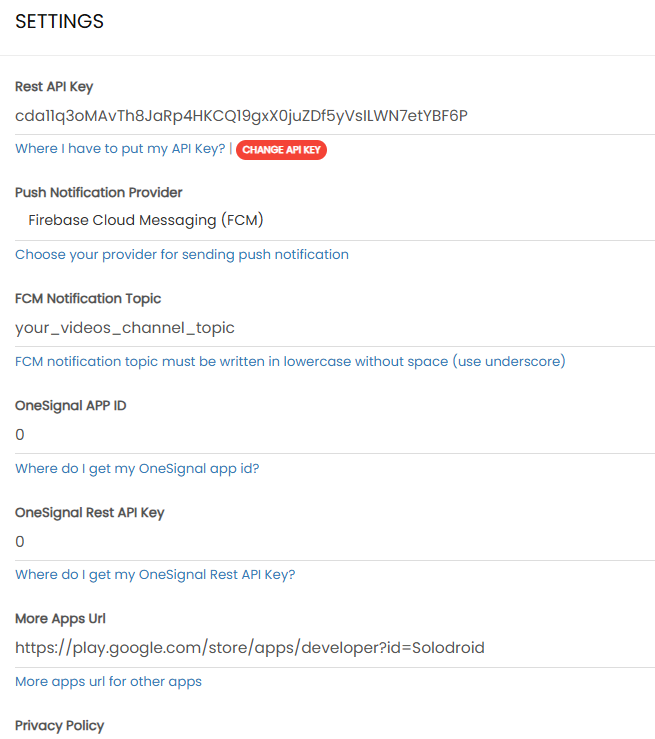
Thanks for the quick response. I have another issue regarding Push Notifications. I followed the documentation, even added the necessary code, and was able to send notifications from the OneSignal.com website. However, I still can’t send notifications from the admin panel. Please see the attached screenshot: https://i.postimg.cc/CL48CPcj/21-7.png
Hi, Your image cannot be previewed, please do not use postimg, it’s blocked in our contry, use other image hosting. Thanks
,
.
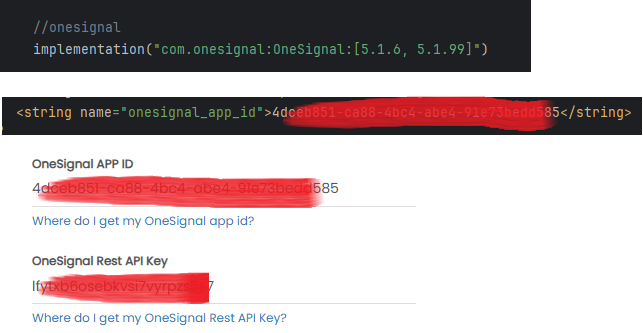
Hi, Your OneSignal Rest API Key is invalid, the number of characters for OneSignal Rest API should be longer and start from os_v2_app_xxxxx, so try recreating your OneSignal API Key. Thanks
Thanks bro, it’s working !!
Hi, You’re welcome  Thanks
I want to write this setting, but what should I write instead of x?
public static final int x = Constant.CATEGORY_GRID_2_COLUMN;
Hi, We don’t understand what you mean, there is no definition of x in the code settings, your intention or purpose for writing that setting is also unclear, please note that our support is within the scope of documentation and app configuration, beyond that or if you want to customize further, it is outside the scope of our support. Thanks
I was referring to the default category settings, which are similar to the settings used to specify the default movie format
public static final int DEFAULT_VIDEO_VIEW_TYPE = Constant.VIDEO_LIST_DEFAULT;
Hi, Can’t see the image, postimg is blocked in our country, use another image hosting. Thanks
Hi, Unfortunately, that’s beyond of our support, but we’ll note it and possibly add a setting directly to the app in a future update. Thanks

videos stopped playing. stucked at loading bar after clicking play button of any videos. this is a serious issue …
Hi, Which video source are you using? YouTube or direct video url? It should be checked further, another possibility is your video url structure is invalid so it fails to be read by the app, for further check, please send screenshots, screen capture video when testing and send sample url you use so we can check it, you can send the details to our email: help.solodroid@gmail.com Thanks
I have sent the mail with all the bugs in latest version. even i sent all details with comparing older version of app. because 5.2.0 version is working perfectly. please check and solve the bugs as soon as possible.
Hi, Ok thanks, we will check and handle this issue immediately to solve the problem as soon as possible. Thanks
have you received the mail, if not received then tell me. I will send it again. because I did not get any response in mail.
Hi, recieved and has been replied, we have noted the information you provided and our team will follow up immediately so that we can release the update as soon as possible, it may take a few days. Thanks
Hi, For a quick fix regarding the issue of videos from youtube sources failing to play, please update the library version for the youtube player to the latest version 12.1.2 in the build.gradle file dependencies (Module: app): https://prnt.sc/oI8twtDOdBxl Thanks
yes solved… Now may I know ui related issue when will be solved. I sent ui related issue too. where status bar color not changing and bottom navigation showing slightly upper from the bottom in latest devices like oneplus 11R.
Hi, Related to that, it’s an issue if the target sdk is 35 or above, edge-to-edge will be automatically active for android devices with android os 15 or above, bottom navigation is also affected, for this case, there is no quick solution, we have to rewrite the code so that the ui becomes compatible, we will release an update on codecanyon when everything is done. Thanks
This version has not been updated to sdk admob 24.4.0 and error when watching videos, can you fix it soon?
Hi, Which video source are you using? YouTube or direct video url? It should be checked further, another possibility is your video url structure is invalid so it fails to be read by the app, for further check, please send screenshots, screen capture video when testing and send sample url you use so we can check it, you can send the details to our email: help.solodroid@gmail.com Thanks
Hi, For a quick fix regarding the issue of videos from youtube sources failing to play, please update the library version for the youtube player to the latest version 12.1.2 in the build.gradle file dependencies (Module: app): https://prnt.sc/oI8twtDOdBxl Thanks
Yes, thank you! But there is another problem ( //Ad Network Sdk, see the documentation for other Ad Network Sdk option implementation ‘com.github.solodroid-dev:admob-ads-sdk:1.+’ ) is in the old version, the new version updated on 09/06/2025 sdk ads 24.4.0, please update the library for me. Thank you!
Hi,
For admob-ads-sdk, you can update the sdk version to 2.+, it uses the latest play services ads sdk 24.4.0com.github.solodroid-dev:admob-ads-sdk:2.+
Thanks
videos not paying in some of the apps. previously videos was playing, suddenly i frame player loading but video not playing. videos listing correctly showing, as we click on play button then start loading and there is no end of loading videos?
why this happening.
Hi, Which video source are you using? YouTube or direct video url? It should be checked further, another possibility is your video url structure is invalid so it fails to be read by the app, for further check, please send screenshots, screen capture video when testing and send sample url you use so we can check it, you can send the details to our email: help.solodroid@gmail.com Thanks
Hi, For a quick fix regarding the issue of videos from youtube sources failing to play, please update the library version for the youtube player to the latest version 12.1.2 in the build.gradle file dependencies (Module: app): https://prnt.sc/oI8twtDOdBxl Thanks
Can you add comments section ?
Hi, unfortunately, it is not possible, or the code must be further customized in a more advanced way because the comment section requires user login, or alternatively, you can check out our other item “Android News App” that already supports comment sections. Thanks
Thanks
Sir
is it possible to add reels in this app
or is it possible to add reels option in next update version ?
Hello, dear developer. I still haven’t received an answer from you. Google Play requires new manifests. How can I make them? Please answer.
Hello dear developer! Today I tried to upload the aab file to Google Play (made according to your latest update), but it refused to upload and wrote to fix the manifests: Please resolve any conflicts in your manifest before uploading. Other developers use the following authority parameters for content providers: com.app.turk.AudienceNetworkContentProvider, com.app.turk.com.squareup.picasso, com.app.turk.firebaseinitprovider, com.app.turk.mobileadsinitprovider.
Please tell me what to do?
Hello,
Can we embed the Instagram, facebook, youtube and other videos in the posts and that play in the app only?
Thanks, DK
Please forgive me for writing here. I wrote to the mail, but there is no answer yet. But I really need it and time is of the essence.
I have a problem. I downloaded version 5.3.0. And the admin panel is not installed on the hosting and also tried on the VDS cloud server. Version 5.1.1 of the admin panel is easily and quickly installed on both hosting and cloud servers and on PHP 7.4 -8.2. Version 5.3.0 gives an error on the hosting:
Fatal error: ....../includes/header.php:11 Stack trace: #0 / ......dashboard.php(1): include_once() #1 {main} thrown in / ......includes/header.php on line 11
On the cloud server there is just a white background and nothing else. Tell me what is the difference between versions 5.3.0 and 5.1.1.? Is it critical not to change the admin panel for the new apk v5.3.0? And how to fix this error?
please guide me applovin add implementation, in Facebook Audience Network i used, , AppLovin MAX code but not showing, where can find the applovin sdk key
It is support vertical video link to utube short, reel and tiktok?
notifications not working in new update 5.3.0
Hi, It’s working, you must also update the admin panel with the latest code. Thanks
yes i have updated, but one signal has also updated and rest API key not working. also while using firebase this error shows Invalid Project Id in the service-account.json.
i have done already json correctly. because it submitted successfully in the onesignal
Hi, It is certain that you made a mistake and did not read the documentation for the latest firebase or onesignal configuration, Invalid Project Id in the service-account.json indicates that you have not configured by replacing the code in service-account.json, so, read the documentation and make sure you have followed the instructions correctly, it also applies to onesignal, onesignal now uses a new API structure, the old Rest API Key can no longer be used, you must create a new Rest API Key in your onesignal dashboard. Thanks
Hi, I have the same issue as the person below regarding the implementation of the multi-SDK.
When I update the settings.gradle file with the solution you proposed, I get an error when trying to build, and the TrackSelectionDialog.java file opens automatically.
In the Build Output section at the bottom, the following error is highlighted:
DefaultTrackSelector.ParametersBuilder builder = parameters.buildUpon();
I would greatly appreciate your help, as I urgently need to update my apps with the multi-SDK.
Hi, library compatibility issue, we will release an update in the next few days regarding this issue. Thanks
Hello Solodroid, what has happened? I can no longer compile when I select:
implementation ‘com.github.solodroid-dev:multi-ads-sdk:2.+’
Hi,
Open settings.gradle and update dependencyResolutionManagement to be like below:
dependencyResolutionManagement {
    repositoriesMode.set(RepositoriesMode.FAIL_ON_PROJECT_REPOS)
    repositories {
        google()
        mavenCentral()
        maven { url 'https://jitpack.io' }
        maven { url 'https://android-sdk.is.com/' }
        maven { url 'https://unity3ddist.jfrog.io/artifactory/unity-mediation-mvn-prod-local/' }
        maven { url 'https://maven.wortise.com/artifactory/public' }
        maven { url 'https://artifact.bytedance.com/repository/pangle' }
        maven { url 'https://cboost.jfrog.io/artifactory/chartboost-ads/' }
        maven { url 'https://maven.ogury.co' }
    }
}
Thanks
When I update the code you sent me, now I get this error, what should I do now?
YourVideosChannel\app\src\main\java\com\app\loomerx\utils\TrackSelectionDialog.java:79: error: incompatible types: Builder cannot be converted to ParametersBuilder DefaultTrackSelector.ParametersBuilder builder = parameters.buildUpon();
I need help please, this has never happened to me before
Can i add any video link from any website? I Don’t want to use youtube url. If i add the video url from other’s video sharing website like dailymotion,vimeo,tiktok ect will the app work to play video? I want to work with copyright video which is not allow in YouTube.
can you add chartboost ads in it
Hi, Chartboost is not supported in this item, maybe it can be done through customization, but there will be additional cost for that, for further discussion, you can contact us via email: help.solodroid@gmail.com Thanks
how to upgrade latest facebook audience network sdk
why are you not responding ?
Hi, Make sure to use simple-ads-sdk in the dependencies build.gradle file, also change the library to the specific version 1.1.0 or the latest release. Thanks
is this correct
implementation ‘com.github.solodroid-dev:simple-ads-sdk:1.+’
Hi, Yes, make sure your Android Studio cache is not enabled, if you want to force using the latest version, use the specific version as we have shown above, change 1.+ to 1.1.0 Thanks
Hi, can i store the file on local server? Accessed from LAN?
Hi, Yes, you can use local web server like xampp, Make sure your mobile device and computer are connected to the same network, you can access it using your computer’s IP address. Thanks
hi, ive already installed the apps on localhost, when i try to upload a new video, there is no error but the video didnt appear in manage video menus, how to solve this ?
Hello, apa kabar? I almost forgot about this question, can you help?
Hi, Possible problem uploading files on your localhost, if you are still using localhost, the best alternative is to use direct url, you can save your video files directly in the htdocs/<folder-name> folder, to access it, make sure your computer and phone are connected to the same network, do not write the localhost url or 10.0.2.2, it will not work on your phone, but use the ip address of your local computer, to find out the ip address, you can open cmd and type the ipconfig command to find out your computer’s ip address. Thanks